2015 MERCEDES-BENZ SL-Class heating
[x] Cancel search: heatingPage 182 of 610

and drive at a speed to suit the prevailing
weather conditions.
You should pay special attention to road con-
ditions when temperatures are around freez-
ing point.
For more information on driving with snow
chains, see (Y page 571).
For more information on driving with summer tires, see (Y page 570).
Observe the notes in the "Winter operation"
section (Y page 570). Driving systems
Cruise control
General notes Cruise control maintains a constant road
speed for you. It brakes automatically in order
to avoid exceeding the set speed. On long and
steep downhill gradients, especially if the
vehicle is laden, you must select a lower gear in good time. By doing so, you will make use of the braking effect of the engine. This relievesthe load on the brake system and prevents
the brakes from overheating and wearing too
quickly.
Use cruise control only if road and traffic con- ditions make it appropriate to maintain a
steady speed for a prolonged period. You can store any road speed above 20 mph
(30 km/h).
Important safety notes If you fail to adapt your driving style, cruise
control can neither reduce the risk of an acci-
dent nor override the laws of physics. Cruise
control cannot take into account the road,
traffic and weather conditions. Cruise control
is only an aid. You are responsible for the dis-
tance to the vehicle in front, for vehicle speed, for braking in good time and for staying in
lane. Do not use cruise control:
R in road and traffic conditions which do not
allow you to maintain a constant speed e.g.
in heavy traffic or on winding roads
R on slippery road surfaces. Braking or accel-
erating could cause the drive wheels to lose
traction and the vehicle could then skid
R when there is poor visibility, e.g. due to fog,
heavy rain or snow
If there is a change of drivers, advise the new
driver of the speed stored.
Cruise control lever Cruise control lever
0043
To store the current speed or a higher
speed
0044 To store the current speed or call up the
last stored speed
0087 To store the current speed or a lower
speed
0085 To deactivate cruise control
When you activate cruise control, the stored
speed is shown in the status indicator of the
multifunction display:
R USA only: e.g. CRUISE 55 Miles
CRUISE 55 Miles
R Canada only: e.g. 00B290 Km/h 90 Km/h 180
Driving systemsDriving and parking
Page 184 of 610

X
To adjust the set speed in 1 mph incre-
ments (1 km/h increments): briefly
press the cruise control lever up 0043to the
pressure point for a higher speed or
down 0044for a lower speed.
Every time the cruise control lever is
pressed up or down, the last speed stored
is increased or reduced.
X To adjust the set speed in 5 mph incre-
ments (10 km/h increments): briefly
press the cruise control lever up 0043past
the pressure point for a higher speed or
down 0044for a lower speed.
Every time the cruise control lever is
pressed up or down, the last speed stored
is increased or reduced.
i Cruise control is not deactivated if you
depress the accelerator pedal. For exam-
ple, if you accelerate briefly to overtake,
cruise control adjusts the vehicle's speed
to the last speed stored after you have fin- ished overtaking.
Deactivating cruise control Cruise control lever
There are several ways to deactivate cruise
control:
X Briefly press the cruise control lever for-
wards 0043.
or X Brake. Cruise control is automatically deactivated if:
R you engage the electric parking brake
R you are driving at less than 20 mph
(30 km/h)
R ESP ®
intervenes or you deactivate ESP ®
R you shift the transmission to position N
while driving
If cruise control is deactivated, you will hear a
warning tone. You will see the Cruise Con‐
Cruise Con‐
trol Off trol Off message in the multifunction dis-
play for approximately five seconds.
i When you switch off the engine, the last
speed stored is cleared. DISTRONIC PLUS
General notes DISTRONIC PLUS regulates the speed and
automatically helps you maintain the dis-
tance to the vehicle detected in front. DIS-
TRONIC PLUS brakes automatically so that
the set speed is not exceeded.
On long and steep downhill gradients, espe-
cially if the vehicle is laden, you must select a lower gear in good time. By doing so, you will make use of the braking effect of the engine.
This relieves the load on the brake system and prevents the brakes from overheating and
wearing too quickly.
If a slower-moving vehicle is detected in front,
DISTRONIC PLUS brakes your vehicle. It
maintains the preset distance to the vehicle in front.
If DISTRONIC PLUS detects that there is a risk of a collision, you will be warned visually and
acoustically. DISTRONIC PLUS cannot pre-
vent a collision without your intervention. An
intermittent warning tone will then sound and
the distance warning lamp will light up in the instrument cluster. Brake immediately in
order to increase the distance to the vehicle
in front or take evasive action provided it is
safe to do so. 182
Driving systemsDriving an
d parking
Page 295 of 610

Example of operation
In the instructions, operating sequences are
described as follows:
X Press the 002Abutton.
Radio mode is activated.
X Select Radio
Radio by sliding 00520064and turning
00790052007A the COMAND controller and press 0098
to confirm.
X Confirm Station List
Station List by pressing0098.
The station list appears.
Buttons on the COMAND controller Overview
0043
Back button (Y page 293)
0044 Clear button (Y page 293)
0087 Seat function button (Y page 314)
0085 Favorites button (Y page 309)
i If your vehicle does not have the seat
function button, it will have two Favorites
buttons.
i For AMG vehicles: the COMAND control-
ler is configured with the 0043and 0044but-
tons.
Back button
You can use the 003Dbutton to exit a menu or
to call up the basic display of the current
operating mode. X
To exit the menu: briefly press the003D
back button.
COMAND changes to the next higher menu level in the current operating mode.
X To call up the basic display: press and
hold the 003Dback button.
COMAND changes to the basic display of
the current operating mode.
Clear button X To delete individual characters: briefly
press the 0084clear button.
X To delete an entire entry: press and hold
the 0084 clear button.
Seat function button
You can use the 0050button to call up the
following seat functions:
R Multicontour seat (with 4-way lumbar sup-
port)
R Active multicontour seat (dynamic seat and
massage function)
R Balance (seat heating distribution)
More information on the seat functions
(Y page 314).
Favorites button
You can assign predefined functions to
the 0080 favorites button and call them up by
pressing the button (Y page 309). At a glance
293COMAND Z
Page 318 of 610

X
Select the seat (Y page 314).
X Select Seat Sides
Seat Sides by turning00790052007Athe
COMAND controller and press 0098to con-
firm.
A scale appears.
X Turn 00790052007A or slide 009700520064the COMAND con-
troller and press 0098to confirm.
X To exit the menu: press the003Dback
button.
Balance
The availability of this function depends on
the vehicle model series. The Balance function controls the distribution
of heat on the seat backrest and cushion.
The Balance function influences the currently set heating level of the seat heating; see the
separate vehicle Operator's Manual.
X Select the seat (Y page 314).
X Select Balance
Balance by turning 00790052007Athe
COMAND controller and press 0098to con-
firm.
A scale appears and shows the current set-
ting. Positive values indicate the heat out-
put for the seat backrest, negative values
indicate the heat output for the seat cush-
ion. The intensity is indicated by an orange
bar in the stylized seat above the scale. The values stand for:
R 0
0 - backrest and seat cushion are heated
equally to the maximum level
R 1 1to 3
3- the heat output to the seat cush-
ion is reduced in one-third increments
R -1
-1 to-3
-3 - the heat output to the backrest
is reduced in one-third increments
X Turn 00790052007A or slide 009500520096the COMAND con-
troller and press 0098to confirm.
X To exit the menu: press the003Dback
button.
Massage function
The availability of this function depends on
the type of seat and the vehicle model series. Example display (M-Class or GL-Class)
X Select the seat (Y page 314).
X Select Massage Massage by turning 00790052007Athe
COMAND controller and press 0098to con-
firm.
A list appears.
You can select different types of massage
function:
R 0: Off 0: Off
R 1: Slow and Gentle
1: Slow and Gentle
R 2: Slow and Vigorous
2: Slow and Vigorous
R 3: Fast and Gentle
3: Fast and Gentle
R 4: Fast and Vigorous
4: Fast and Vigorous 316
Vehicle functionsCOMAND
Page 380 of 610

Problem
Possible causes/consequences and
0050
0050Solutions The
Navigation
Navigation
Unavailable
Unavailable message
appears. COMAND has an integrated hard drive on which the digital map is
stored.
To protect the integrated hard drive against damage, COMAND
deactivates it at very high and low temperatures. The navigation
system will then be temporarily unavailable.
X Let the vehicle and COMAND cool down.
X To hide the message: switch COMAND off and then on again. If an area of the hard disk has a malfunction, COMAND can no
longer access the map data in this area. This may occur when
calculating a route, for example.
X To hide the message: switch COMAND off and then on again.
The navigation system will be operational again until it has to
access the faulty area of the hard drive once more. The message
will then reappear.
X Consult an authorized Mercedes-Benz Center. Problem
Possible causes/consequences and
0050 0050Solutions You see a message
informing you that the
DVD containing the dig-
ital map is incompatible
with the system soft-
ware. The DVD containing the digital map cannot be used for the update.
X To confirm the message: press0098the COMAND controller.
X Eject the DVD.
X Have the system database checked at an authorized Mercedes-
Benz Center. Problem
Possible causes/consequences and
0050 0050Solutions The map software
update has failed. The DVD is dirty.
X Clean the DVD.
X Restart the update. The DVD is scratched.
X Consult an authorized Mercedes-Benz Center. There is overheating due to excessive temperatures in the vehicle
interior.
X Wait until the vehicle interior has cooled down.
X Restart the update. COMAND's integrated hard disk is defective.
X Consult an authorized Mercedes-Benz Center. 378
NavigationCOMAND
Page 520 of 610
X
Fold down sun visor 0043.
X Pull sun visor 0043out of retainer 0044.
X Swing sun visor 0043to the side.
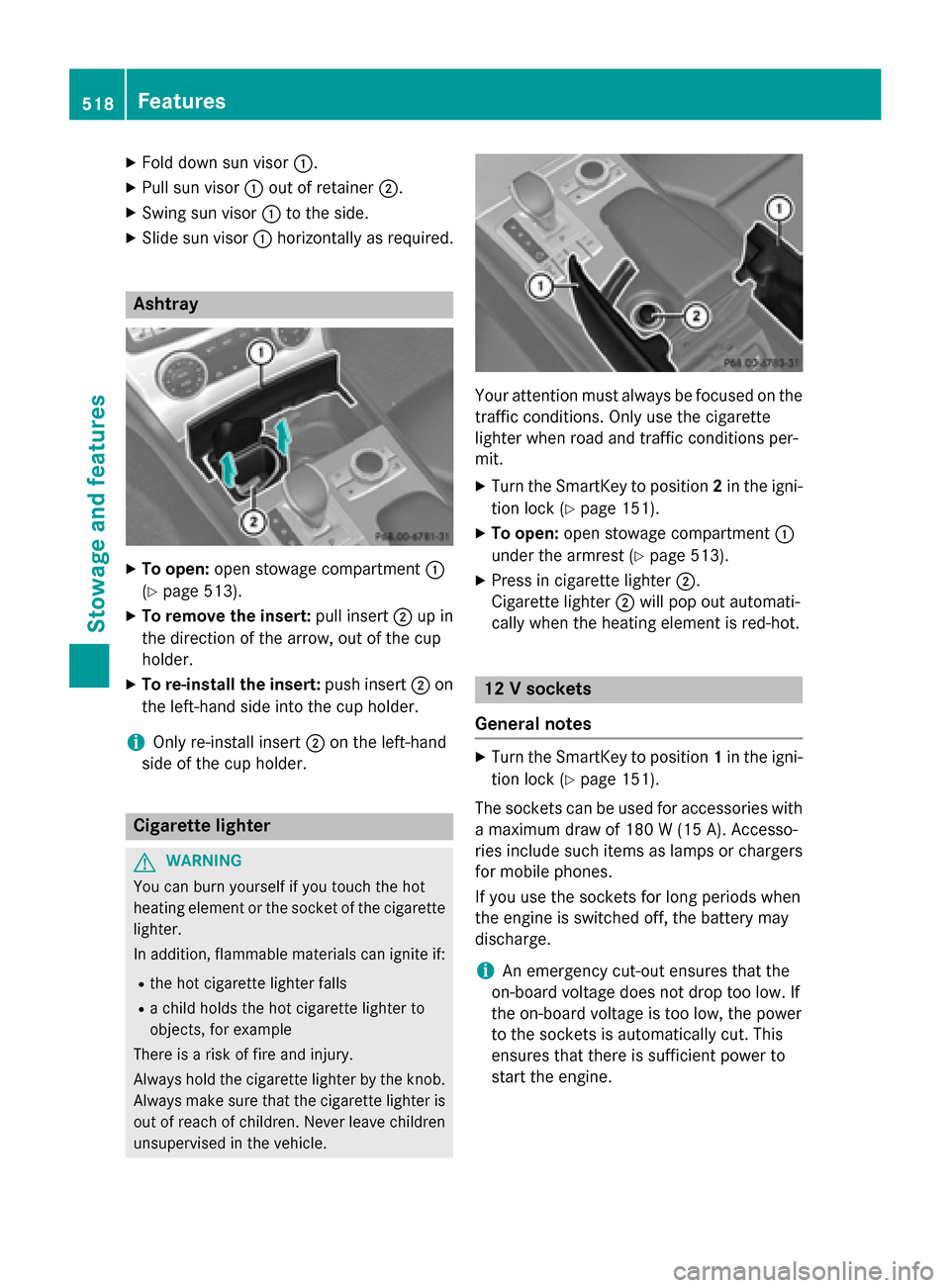
X Slide sun visor 0043horizontally as required. Ashtray
X
To open: open stowage compartment 0043
(Y page 513).
X To remove the insert: pull insert0044up in
the direction of the arrow, out of the cup
holder.
X To re-install the insert: push insert0044on
the left-hand side into the cup holder.
i Only re-install insert
0044on the left-hand
side of the cup holder. Cigarette lighter
G
WARNING
You can burn yourself if you touch the hot
heating element or the socket of the cigarette lighter.
In addition, flammable materials can ignite if:
R the hot cigarette lighter falls
R a child holds the hot cigarette lighter to
objects, for example
There is a risk of fire and injury.
Always hold the cigarette lighter by the knob.
Always make sure that the cigarette lighter is
out of reach of children. Never leave children unsupervised in the vehicle. Your attention must always be focused on the
traffic conditions. Only use the cigarette
lighter when road and traffic conditions per-
mit.
X Turn the SmartKey to position 2in the igni-
tion lock (Y page 151).
X To open: open stowage compartment 0043
under the armrest (Y page 513).
X Press in cigarette lighter 0044.
Cigarette lighter 0044will pop out automati-
cally when the heating element is red-hot. 12 V sockets
General notes X
Turn the SmartKey to position 1in the igni-
tion lock (Y page 151).
The sockets can be used for accessories with a maximum draw of 180 W(15 A). Accesso-
ries include such items as lamps or chargers
for mobile phones.
If you use the sockets for long periods when
the engine is switched off, the battery may
discharge.
i An emergency cut-out ensures that the
on-board voltage does not drop too low. If
the on-board voltage is too low, the power
to the sockets is automatically cut. This
ensures that there is sufficient power to
start the engine. 518
FeaturesStowage and fea
tures
Page 548 of 610

Genuine leather seat covers
! To retain the natural appearance of the
leather, observe the following cleaning
instructions:
R Clean genuine leather covers carefully
with a damp cloth and then wipe the cov-
ers down with a dry cloth.
R Make sure that the leather does not
become soaked. It may otherwise
become rough and cracked.
R Only use leather care agents that have
been tested and approved by Mercedes-
Benz. You can obtain these from a quali- fied specialist workshop.
Leather is a natural product.
It exhibits natural surface characteristics, for
example:
R differences in the texture
R marks caused by growth and injury
R slight nuances of color
These are characteristics of leather and not
material defects.
Seat covers of other materials
! Observe the following when cleaning:
R Clean artificial leather covers with a cloth
moistened with a solution containing 1%
detergent (e.g. dish washing liquid).
R Clean cloth covers with a microfiber
cloth moistened with a solution contain-
ing 1% detergent (e.g. dish washing liq-
uid). Rub carefully and always wipe entire
seat sections to avoid leaving visible
lines. Leave the seat to dry afterwards.
Cleaning results depend on the type of
dirt and how long it has been there.
R Clean Alcantara® covers with a damp
cloth. Make sure that you wipe entire
seat sections to avoid leaving visible
lines. Cleaning the seat belts G
WARNING
Seat belts can become severely weakened if
bleached or dyed. This could cause the seat
belts to tear or fail, for instance, in the event of an accident. This poses an increased risk of
injury or fatal injury.
Never bleach or dye the seat belts.
! Do not clean the seat belts using chemical
cleaning agents. Do not dry the seat belts
by heating at temperatures above 176 ‡
(80 †) or in direct sunlight.
X Use clean, lukewarm water and soap solu-
tion.
Cleaning the headliner and carpets X
Headliner: if it is very dirty, use a soft brush
or dry shampoo.
X Carpets: use the carpet and textile clean-
ing agents recommended and approved by
Mercedes-Benz. 546
CareMaintenance and care
Page 604 of 610

MB 229.51). They have not necessarily been
approved by Mercedes-Benz. Fuel
Important safety notes G
WARNING
Fuel is highly flammable. If you handle fuel
incorrectly, there is a risk of fire and explo-
sion.
You must avoid fire, open flames, creating
sparks and smoking. Switch off the engine
and, if applicable, the auxiliary heating before refueling. G
WARNING
Fuel is poisonous and hazardous to health.
There is a risk of injury.
You must make sure that fuel does not come into contact with your skin, eyes or clothing
and that it is not swallowed. Do not inhale fuel
vapors. Keep fuel away from children.
If you or others come into contact with fuel,
observe the following:
R Wash away fuel from skin immediately
using soap and water.
R If fuel comes into contact with your eyes,
immediately rinse them thoroughly with
clean water. Seek medical assistance with-
out delay.
R If fuel is swallowed, seek medical assis-
tance without delay. Do not induce vomit-
ing.
R Immediately change out of clothing which
has come into contact with fuel.
Tank capacity Model Total capa-
city All models
19.8 US gal
(75.0 l) Model Of which
reserve AMG vehicles
Approx.
3.7 US gal (14.0 l) All ot
her models Approx.
2.4 US gal (9.0 l) Gasoline
Fuel grade
!
Do not use diesel to refuel vehicles with a
gasoline engine. Do not switch on the igni- tion if you accidentally refuel with the
wrong fuel. Otherwise, the fuel will enter
the fuel system. Even small amounts of the
wrong fuel could result in damage to the
fuel system and the engine. Notify a quali-
fied specialist workshop and have the fuel
tank and fuel lines drained completely.
! Only refuel using unleaded premium
grade gasoline with at least 91 AKI/
95 RON.
! Only use the fuel recommended. Operat-
ing the vehicle with other fuels can lead to
engine failure.
! Do not use the following:
R E85 (gasoline with 85% ethanol)
R E100 (100% ethanol)
R M15 (gasoline with 15% methanol)
R M30 (gasoline with 30% methanol)
R M85 (gasoline with 85% methanol)
R M100 (100% methanol)
R Gasoline with metalliferous additives
R Diesel
Do not mix such fuels with the fuel recom-
mended for your vehicle. Do not use addi-
tives. This can otherwise lead to engine
damage. This does not include cleaning
additives for the removal and prevention of residue build-up. gasoline may only be
mixed with cleaning additives recommen- 602
Service products and filling capacitiesTechnical data