2015 MERCEDES-BENZ S-Class change wheel
[x] Cancel search: change wheelPage 276 of 502

G
WARNING
Active Lane Keeping Assist cannot always
clearly detect lane markings.
In such cases, Active Lane Keeping Assist
can:
R give an unnecessary warning and then
make a course-correcting brake application
to the vehicle
R not give a warning or intervene
There is a risk of an accident.
Always pay particular attention to the traffic
situation and keep within the lane, especially
if Active Lane Keeping Assist alerts you. Ter-
minate the intervention in a non-critical driv-
ing situation.
The system may be impaired or may not func-
tion if:
R there is poor visibility, e.g. due to insuffi-
cient illumination of the road, or due to
snow, rain, fog or spray
R there is glare, e.g. from oncoming traffic,
the sun or reflections (e.g. when the road
surface is wet)
R the windshield is dirty, fogged up, damaged
or covered, for instance by a sticker, in the
vicinity of the camera
R the radar sensors in the front or rear bump-
ers or the radiator trim are dirty, e.g.
obscured by snow
R there are no, several or unclear lane mark-
ings for a lane, e.g. in areas with road con-
struction work
R the lane markings are worn away, dark or
covered up, e.g. by dirt or snow
R the distance to the vehicle in front is too
small and the lane markings thus cannot be
detected
R the lane markings change quickly, e.g.
lanes branch off, cross one another or
merge
R the road is narrow and winding
R there are strong shadows cast on the road If no vehicle is detected in the adjacent lane
and broken lane markings are detected, no
lane-correcting brake application is made.
Warning vibration in the steering wheel
A warning may be given if a front wheel
passes over a lane marking. It will warn you by
means of intermittent vibration in the steer-
ing wheel for up to 1.5 seconds.
Lane-correcting brake application
If you leave your lane, under certain circum-
stances the vehicle will brake briefly on one
side. This is meant to assist you in bringing
the vehicle back to the original lane. G
WARNING
A lane-correcting brake application cannot
always bring the vehicle back into the original lane. There is a risk of an accident.
Always steer, brake or accelerate yourself,
especially if Active Lane Keeping Assist warns
you or makes a lane-correcting brake appli-
cation. If a lane-correcting brake application occurs,
display :appears in the multifunction dis-
play. The brake application also slightly
reduces vehicle speed.
This function is available in the range between
40 mph and 120 mph (60 km/h and
200 km/h).
A lane-correcting brake application can be
made after driving over a lane marking rec-
ognized as being solid or broken. Before this,
a warning must be given by means of inter-
mittent vibration in the steering wheel. In 274
Driving systemsDriving and parking
Page 288 of 502

X
Press program selector button :to
change the drive program.
The selected drive program appears in the
multifunction display.
The program selector button allows you to
choose between different driving character-
istics. E
Economy R
Comfortable, economi-
cal driving
R Electric operation mode
is used as often as pos-
sible
R The ECO start/stop
function is available S
Sport R
Sporty driving style with
boost mode
R The internal combus-
tion engine is always
switched on E+
Economy
Plus R
Comfortable, economi-
cal driving
R Electric operation mode
is used as often as pos-
sible
R The ECO start/stop
function is available
R Double pulses in the
haptic accelerator
pedal, as an indication
to release the accelera-
tor pedal (Y page 286)
R After the accelerator
pedal has been
released, the coasting
characteristics of the
vehicle are adapted to
the traffic conditions. For further information on the automatic drive
program, see (Y page 202). Manual drive program M
In addition to automatic drive programs
Eand
S, you can switch to manual drive program M
using the steering wheel paddle shifters.
In manual drive program M, you can briefly
change gear yourself by using the steering
wheel paddle shifters. The transmission must be in position D. In manual drive program M
the internal combustion engine is always
switched on.
Activating when driving with the electric
motor:
X Pull the left or right steering wheel paddle
shifter (Y page 201).
The combustion engine is switched on.
Manual drive program Mis temporarily acti-
vated. The selected gear and Mappear in
the multifunction display.
Activating when driving with the combustion
engine:
X Pull the left or right steering wheel paddle
shifter (Y page 201).
Manual drive program Mis temporarily acti-
vated. The selected gear and Mappear in
the multifunction display.
The ECO start/stop function is not available
in manual drive program M.
Haptic accelerator pedal General notes
The haptic accelerator pedal helps you to
reduce the fuel consumption and emissions
of your vehicle.
There are two different functions available for this purpose:
R an additional point of resistance in E-MODE
operating mode (Y page 280)
R a double impulse in E+operating mode
(Y page 285) 286
PLUG-IN HYBRID operationDriving and parking
Page 297 of 502

!
A display message is shown if the coolant
temperature is too high.
If the coolant temperature is above 257 ‡
(125 †) do not drive any further. The
engine will otherwise be damaged.
The coolant temperature is displayed in the
lower section of the tachometer (Y page 35).
Hybrid and PLUG-IN HYBRID vehicles: the
multifunction display shows the coolant tem-
perature in the Coolant
Coolant submenu
(Y page 307).
Under normal operating conditions and with
the specified coolant level, the coolant tem-
perature may rise to 255 ‡ (124 †). Outside temperature display
You should pay special attention to road con-
ditions when temperatures are around freez-
ing point.
Bear in mind that the outside temperature
display indicates the temperature measured
and does not record the road temperature.
The outside temperature display is in the mul- tifunction display (Y page 296).
Changes in the outside temperature are dis-
played after a short delay. Operating the on-board computer
:
Multifunction display
; Right control panel
= Left control panel
X To activate the on-board computer: turn
the SmartKey to position 1in the ignition
lock.
You can control the multifunction display and
the settings in the on-board computer using
the buttons on the multifunction steering
wheel.
Left control panel ò R
Calls up the main menu 9
: Press briefly:
R Scrolls in lists
R Selects a menu or function
R In the Radio Radio/Media Mediamenu:
opens the track or station list
and selects an audio track or
video scene
R In the Telephone Telephone menu:
switches to the phone book and
selects a name or a telephone
number Displays and operation
295On-board computer and displays Z
Page 305 of 502
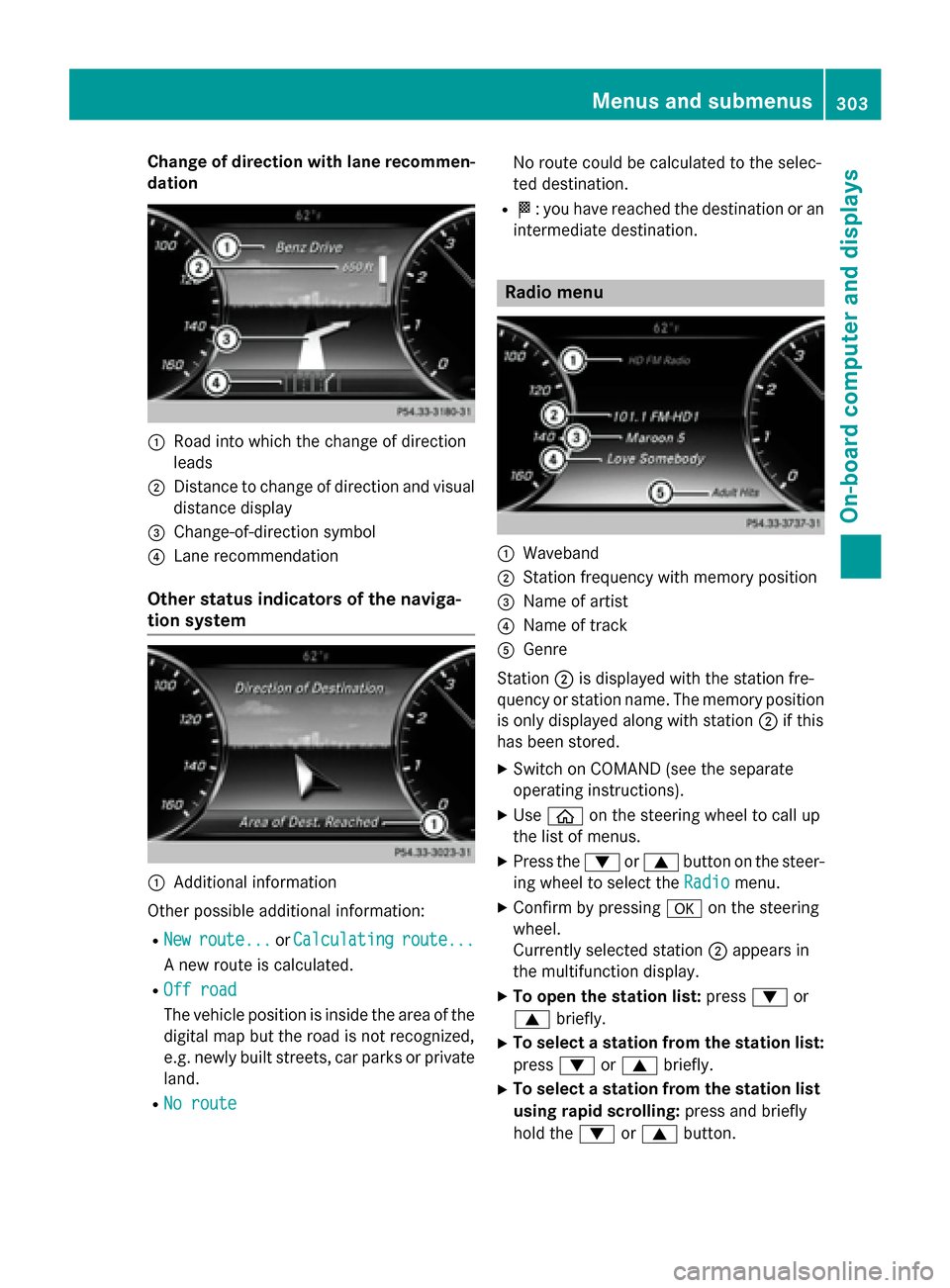
Change of direction with lane recommen-
dation :
Road into which the change of direction
leads
; Distance to change of direction and visual
distance display
= Change-of-direction symbol
? Lane recommendation
Other status indicators of the naviga-
tion system :
Additional information
Other possible additional information:
R New
New route...
route... orCalculating Calculating route...
route...
A new route is calculated.
R Off road
Off road
The vehicle position is inside the area of the
digital map but the road is not recognized,
e.g. newly built streets, car parks or private
land.
R No route No route No route could be calculated to the selec-
ted destination.
R O: you have reached the destination or an
intermediate destination. Radio menu
:
Waveband
; Station frequency with memory position
= Name of artist
? Name of track
A Genre
Station ;is displayed with the station fre-
quency or station name. The memory position
is only displayed along with station ;if this
has been stored.
X Switch on COMAND (see the separate
operating instructions).
X Use ò on the steering wheel to call up
the list of menus.
X Press the :or9 button on the steer-
ing wheel to select the Radio
Radio menu.
X Confirm by pressing aon the steering
wheel.
Currently selected station ;appears in
the multifunction display.
X To open the station list: press:or
9 briefly.
X To select a station from the station list:
press :or9 briefly.
X To select a station from the station list
using rapid scrolling: press and briefly
hold the :or9 button. Menus and submenus
303On-board computer and displays Z
Page 306 of 502

X
To select a waveband or station mem-
ory: press abriefly.
X Use : or9 to select the waveband
or station memory.
X Press ato confirm the selection.
i Storing the station in COMAND; see the
separate operating instructions.
i SIRIUS XM satellite radio functions like a
normal radio.
You can find further information on radio
mode in the "Satellite radio" section of the
separate COMAND operating instructions. Media menu
Changing the media source You can change the media source and play-
back mode (audio, video or TV) at any time in
the Media
Media menu.
X Switch on COMAND (see the separate
operating instructions).
X Use ò on the steering wheel to call up
the list of menus.
X Press the :or9 button on the steer-
ing wheel to select the Media
Media menu.
X Confirm by pressing aon the steering
wheel.
X To open/close the media sources list:
press abriefly.
The list shows the following media sources,
for example: R
Disc (CD/DVD)
R Memory card (SD/SDHC)
R MEDIA REGISTER
R USB storage device
R Bluetooth ®
audio device
Observe the additional information on media
support and on media mode in the separate
COMAND operating instructions.
Operating an audio player or audio
media :
Media source, e.g. name of current CD
; Current title
= Name of artist
? Name of album
A Folder name
Audio data from various audio devices or
media can be played, depending on the equip-
ment installed in the vehicle.
X Switch on COMAND (see the separate
operating instructions).
X Use ò on the steering wheel to call up
the list of menus.
X Press the :or9 button on the steer-
ing wheel to select the Media Mediamenu.
X Confirm by pressing aon the steering
wheel.
X To select audio player or data carrier:
press abriefly, to open the list of media
sources.
X Use : or9 to select the correspond-
ing audio player or audio media.
X Press ato confirm the selection. 304
Menus and submenusOn-board computer and displays
Page 312 of 502
X
Press ato confirm.
The current selection is displayed.
X To activate/deactivate: press thea
button again.
When Active Blind Spot Assist is activated, gray radar waves propagating backwards
appear next to the vehicle in the Assis‐
Assis‐
tance Info Display tance Info Display menu in the multi-
function display.
For further information about Active Blind
Spot Assist, see (Y page 270).
Setting ATTENTION ASSIST X Use ò on the steering wheel to call up
the list of menus.
X Press the :or9 button on the steer-
ing wheel to select the Settings Settingsmenu.
X Confirm by pressing aon the steering
wheel.
X Use : or9 to select the DriveAs‐
DriveAs‐
sist
sist submenu.
X Press ato confirm.
X Press the :or9 button to select
Attention Assist
Attention Assist.
X Press ato confirm.
X Press the :or9 button to set Off
Off,
Standard
Standard orSensitive
Sensitive .
X Press the abutton to confirm the selec-
tion.
When ATTENTION ASSIST is deactivated, the é symbol appears in the Assistance
Assistance
Graphic
Graphic menu in the multifunction display
when the ignition is on.
For further information about ATTENTION
ASSIST, see (Y page 264).
Activating/deactivating Active Lane
Keeping Assist X Use ò on the steering wheel to call up
the list of menus.
X Press the :or9 button on the steer-
ing wheel to select the Settings Settingsmenu.
X Confirm by pressing aon the steering
wheel. X
Use : or9 to select the DriveAs‐
DriveAs‐
sist
sist submenu.
X Press ato confirm.
X Press the :or9 button to select
Lane Keeping Assist
Lane Keeping Assist.
X Press ato confirm.
The current selection Standard
StandardorAdap‐
Adap‐
tive
tive is displayed.
X To change the setting: pressaagain.
For further information about Active Lane
Keeping Assist, see (Y page 273).
Hybrid submenu (plug-in hybrid vehi-
cles) Setting the maximum charge current
Before charging the high-voltage battery,
check the maximum permissible charge cur-
rent for the relevant power socket.
If there are no charge current settings on the charging cable, set the maximum charge cur-
rent.
The maximum charge current values in the
on-board computer may deviate from the
charging cable values.
X Use ò on the steering wheel to call up
the list of menus.
X Press the :or9 button on the steer-
ing wheel to select the Settings
Settings menu.
X Confirm by pressing aon the steering
wheel.
X Use : or9 to select the Hybrid Hybridsub-
menu.
X Press ato confirm.
X Press :or9 to select the Maximum
Maximum
Charge Current
Charge Current function.
You will see the selected setting.
X Press the abutton to save the setting.
Setting the departure time
With the Departure Time Departure Time function you can
set the time by which pre-entry climate con-
trol is to be complete and the high voltage
battery fully charged. 310
Menus and submenusOn-board computer and displays
Page 315 of 502
X
Use ò on the steering wheel to call up
the list of menus.
X Press the :or9 button on the steer-
ing wheel to select the Settings
Settingsmenu.
X Confirm by pressing aon the steering
wheel.
X Press the :or9 button to select the
Instrument Cluster
Instrument Cluster submenu.
X Press ato confirm.
X Press the :or9 button to select the
Display Unit Speed-/Odometer
Display Unit Speed-/Odometer func-
tion.
You will see the selected setting: km
km or
miles miles.
X Press the abutton to save the setting.
The selected unit of measurement for dis-
tance applies to:
R Speedometer
R Digital speedometer in the Trip
Trip menu
R Additional speedometer in the status area
on the multi-function display
The unit in the additional speedometer is
displayed inversely to the selected dis-
tance unit.
R Odometer and the trip odometer
R Trip computer
R Current consumption and the range
R Navigation instructions in the Navi
Navi menu
R Cruise Control
R SPEEDTRONIC
R DISTRONIC PLUS
R ASSYST PLUS service interval display
Selecting the permanent display function
All vehicles except PLUG-IN HYBRID vehi-
cles: with the Permanent Display
Permanent Display function
you can switch on the outside temperature in the status bar of the multifunction display.
PLUG-IN HYBRID vehicles: with thePerma‐ Perma‐
nent
nent Display
Display function you can switch on the
following displays in the status bar of the mul-
tifunction display. R
outside temperature
R coolant temperature (PLUG‑IN HYBRID
vehicles)
R the total electric range (PLUG-IN HYBRID
vehicles)
X Use ò on the steering wheel to call up
the list of menus.
X Press the :or9 button on the steer-
ing wheel to select the Settings
Settings menu.
X Confirm by pressing aon the steering
wheel.
X Press the :or9 button to select the
Instrument Cluster Instrument Cluster submenu.
X Press ato confirm.
X Press :or9 to select the Perma‐
Perma‐
nent Display
nent Display function.
X Press ato confirm.
All vehicles except PLUG-IN HYBRID
vehicles: the current setting for Outside Outside
Temperature
Temperature is shown.
Only PLUG-IN HYBRID vehicles: the cur-
rent selection of Outside Temperature
Outside Temperature,
Coolant Temperature
Coolant Temperature orElectric
Electric
Range
Range is displayed.
X Only PLUG-IN HYBRID vehicles: select
the desired option with :or9.
X To change the setting: pressa.
Switching the additional speedometer
on/off
Use the Additional Speedometer Additional Speedometer function
to choose whether the status area in the mul- tifunction display shows the speed digitally.
X Use ò on the steering wheel to call up
the list of menus.
X Press the :or9 button on the steer-
ing wheel to select the Settings Settingsmenu.
X Confirm by pressing aon the steering
wheel.
X Press the :or9 button to select the
Instrument Cluster
Instrument Cluster submenu.
X Press ato confirm. Menus and submenus
313On-board computer and displays Z
Page 350 of 502

Tires
Display messages
Possible causes/consequences and
M
MSolutions Check Tire Pres‐
Check Tire Pres‐
sure Soon sure Soon Canada only:
The tire pressure loss warning system has detected a significant
loss in pressure.
A warning tone also sounds.
Possible causes:
R you have changed the positions of the wheels and tires or instal-
led new wheels and tires.
R the tire pressure in one or more tires is not correct.
G WARNING
With tire pressures which are too low, there is a risk of the fol-
lowing hazards:
R they may burst, especially as the load and vehicle speed
increase.
R they may wear excessively and/or unevenly, which may greatly
impair tire traction.
R the driving characteristics, as well as steering and braking, may
be greatly impaired.
There is a risk of an accident.
X Stop the vehicle without making any sudden steering or braking
maneuvers. Pay attention to the traffic conditions as you do so.
X Secure the vehicle against rolling away (Y page 220).
X Check the tires and, if necessary, follow the instructions for a
flat tire (Y page 423).
X Check the tire pressures and, if necessary, correct the tire pres-
sure.
X Restart the tire pressure loss warning system when the tire
pressure is correct (Y page 452).Check Tire Pres‐ Check Tire Pres‐
sure Then Restart sure Then Restart
Run Flat Indicator Run Flat Indicator Canada only:
The tire pressure loss warning system generated a display mes-
sage and has not been restarted since.
X Set the correct tire pressure in all four tires.
X Restart the tire pressure loss warning system (Y page 452).Run Run
Flat
Flat Indicator
Indicator
Inoperative
Inoperative Canada only:
The tire pressure loss warning system is faulty.
X Visit a qualified specialist workshop. 348
Display
messagesOn-board computer and displays