2015 MERCEDES-BENZ S-Class Distribution
[x] Cancel search: DistributionPage 147 of 502
G
WARNING
Children could become trapped if they acti-
vate the memory function, particularly when
unattended. There is a risk of injury.
When leaving the vehicle, always take the
SmartKey with you and lock the vehicle. Never leave children unsupervised in the vehicle. General notes
The settings for the rear seat and the front-
passenger seat can be stored using the rear-
compartment memory function.
R If the indicator lamp in the vbutton is
not lit, store the rear seat settings.
R If the indicator lamp in the vbutton
lights up, store the front-passenger seat
and rear seat settings. Both the front-
passenger and rear seat are taken into
account with this setting. Depending on the equipment in the vehicle, two or three
memory positions can be stored for the
front-passenger and rear seats. Storing settings
General notes With the memory function in the rear, you can
store up to three different settings, e.g. for
three different people.
The following settings are stored as a single
memory preset:
R position of the seat, backrest and head
restraint
R multicontour seat: the seat cushions of the
backrest as well as the contour of the back- rest in the lumbar and shoulder regions
R seat heating: distribution of the heated sec-
tions of the seat cushion and backrest if the
indicator lamp in the vbutton is not lit. The following settings are stored to a memory
position, if the indicator lamp in the v
button lights up:
R position of the footrest for the front-
passenger seat, if available
R position of the screen, if available
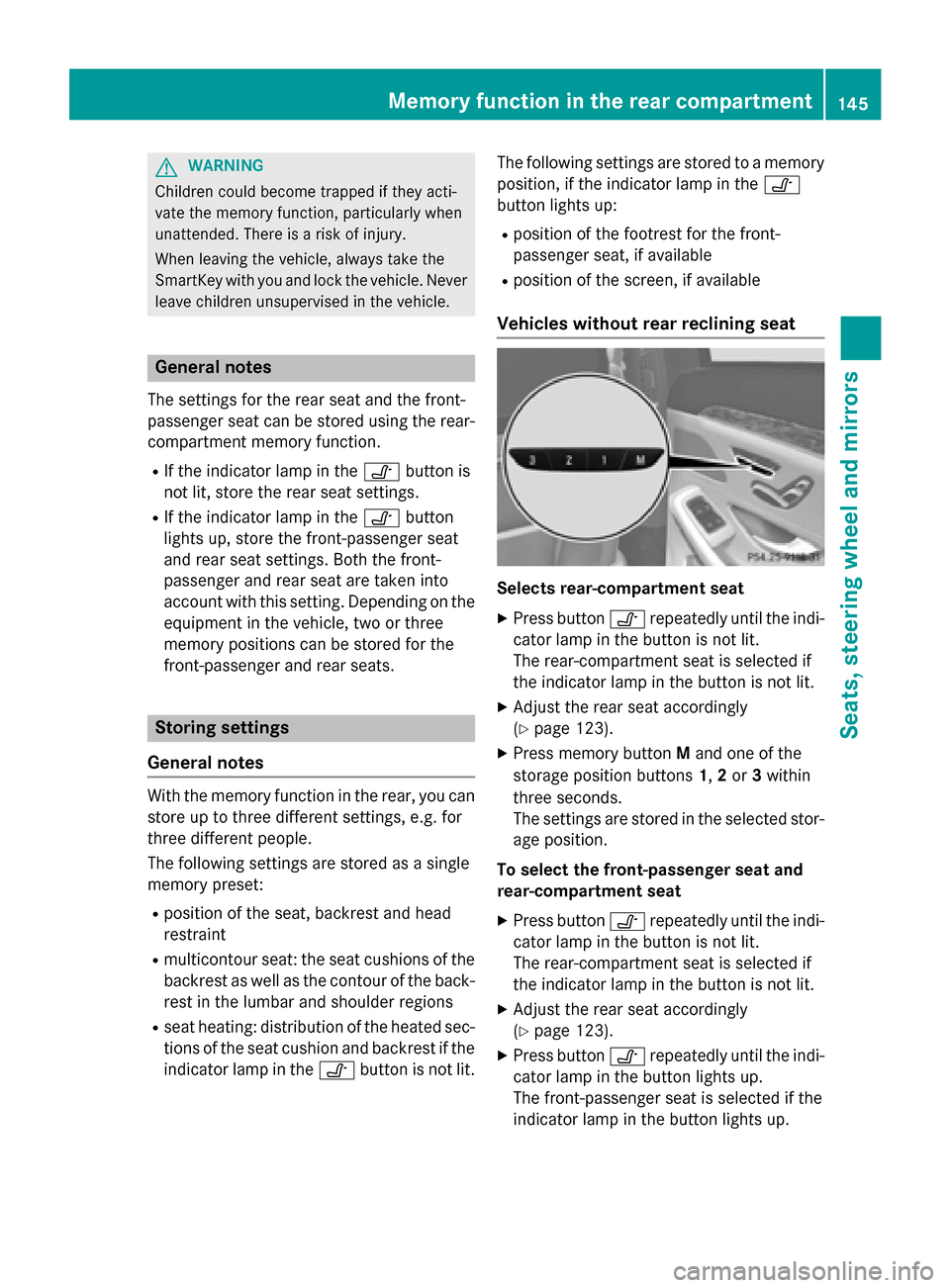
Vehicles without rear reclining seat Selects rear-compartment seat
X Press button vrepeatedly until the indi-
cator lamp in the button is not lit.
The rear-compartment seat is selected if
the indicator lamp in the button is not lit.
X Adjust the rear seat accordingly
(Y page 123).
X Press memory button Mand one of the
storage position buttons 1,2or 3within
three seconds.
The settings are stored in the selected stor- age position.
To select the front-passenger seat and
rear-compartment seat
X Press button vrepeatedly until the indi-
cator lamp in the button is not lit.
The rear-compartment seat is selected if
the indicator lamp in the button is not lit.
X Adjust the rear seat accordingly
(Y page 123).
X Press button vrepeatedly until the indi-
cator lamp in the button lights up.
The front-passenger seat is selected if the
indicator lamp in the button lights up. Memory function in the rear compartment
145Seats, steering wheel and mirrors Z
Page 167 of 502
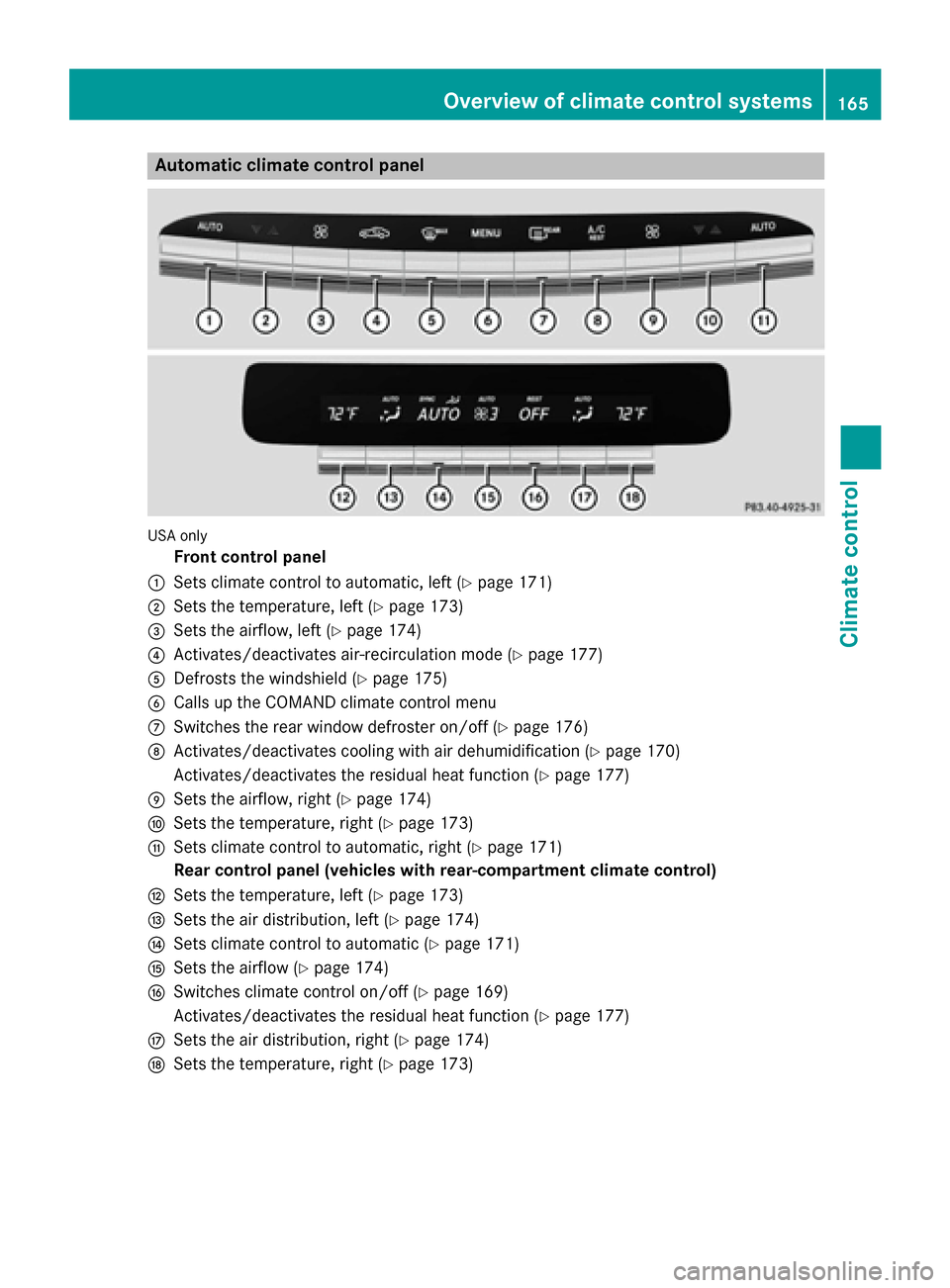
Automatic climate control panel
USA only
Front control panel
: Sets climate control to automatic, left (Y page 171)
; Sets the temperature, left (Y page 173)
= Sets the airflow, left (Y page 174)
? Activates/deactivates air-recirculation mode (Y page 177)
A Defrosts the windshield (Y page 175)
B Calls up the COMAND climate control menu
C Switches the rear window defroster on/off (Y page 176)
D Activates/deactivates cooling with air dehumidification (Y page 170)
Activates/deactivates the residual heat function (Y page 177)
E Sets the airflow, right (Y page 174)
F Sets the temperature, right (Y page 173)
G Sets climate control to automatic, right (Y page 171)
Rear control panel (vehicles with rear-compartment climate control)
H Sets the temperature, left (Y page 173)
I Sets the air distribution, left (Y page 174)
J Sets climate control to automatic (Y page 171)
K Sets the airflow (Y page 174)
L Switches climate control on/off (Y page 169)
Activates/deactivates the residual heat function (Y page 177)
M Sets the air distribution, right (Y page 174)
N Sets the temperature, right (Y page 173) Overview of climate control systems
165Climate control
Page 168 of 502
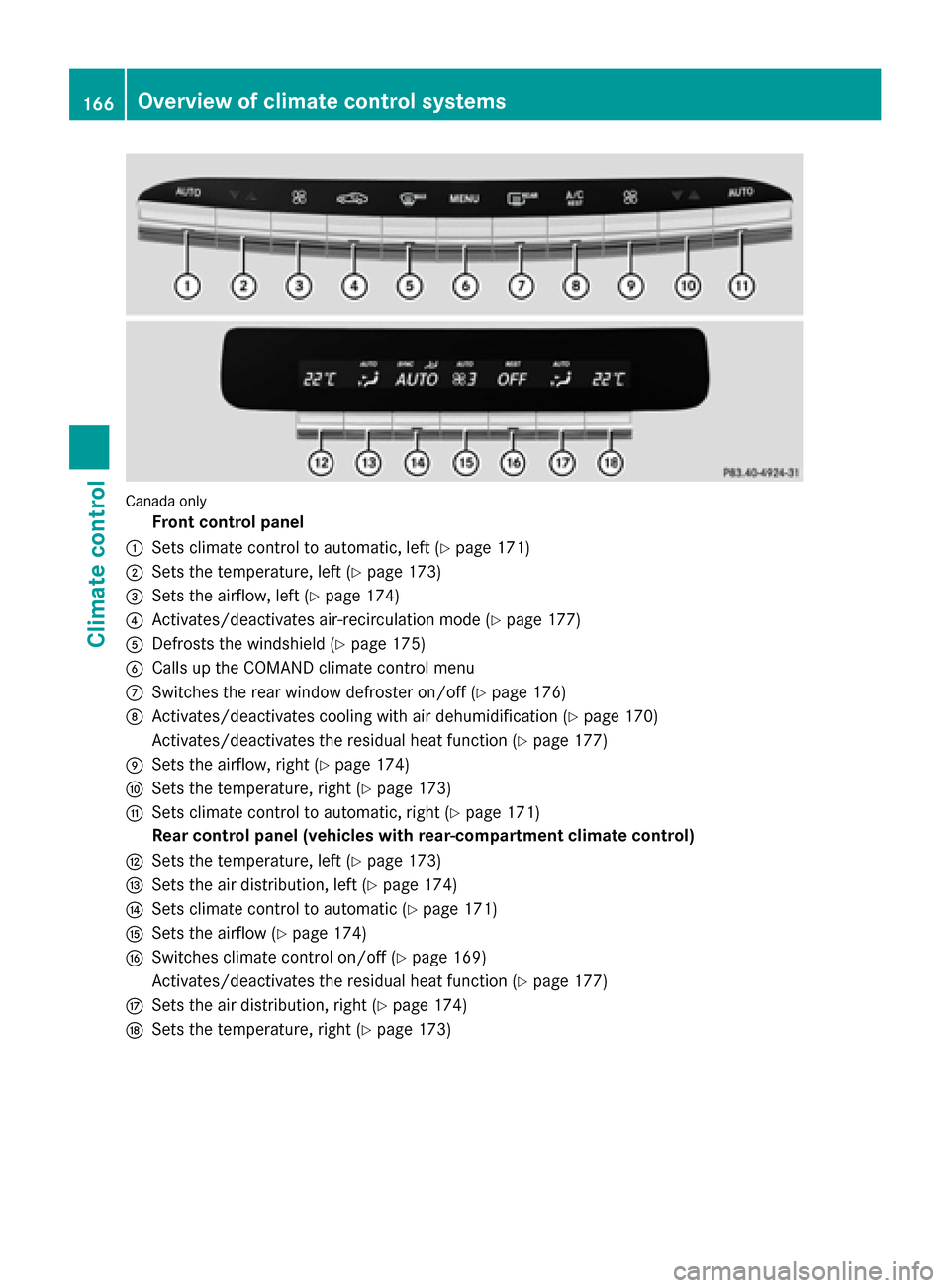
Canada only
Front control panel
: Sets climate control to automatic, left (Y page 171)
; Sets the temperature, left (Y page 173)
= Sets the airflow, left (Y page 174)
? Activates/deactivates air-recirculation mode (Y page 177)
A Defrosts the windshield (Y page 175)
B Calls up the COMAND climate control menu
C Switches the rear window defroster on/off (Y page 176)
D Activates/deactivates cooling with air dehumidification (Y page 170)
Activates/deactivates the residual heat function (Y page 177)
E Sets the airflow, right (Y page 174)
F Sets the temperature, right (Y page 173)
G Sets climate control to automatic, right (Y page 171)
Rear control panel (vehicles with rear-compartment climate control)
H Sets the temperature, left (Y page 173)
I Sets the air distribution, left (Y page 174)
J Sets climate control to automatic (Y page 171)
K Sets the airflow (Y page 174)
L Switches climate control on/off (Y page 169)
Activates/deactivates the residual heat function (Y page 177)
M Sets the air distribution, right (Y page 174)
N Sets the temperature, right (Y page 173)166
Overview of climate control systemsClimate control
Page 169 of 502
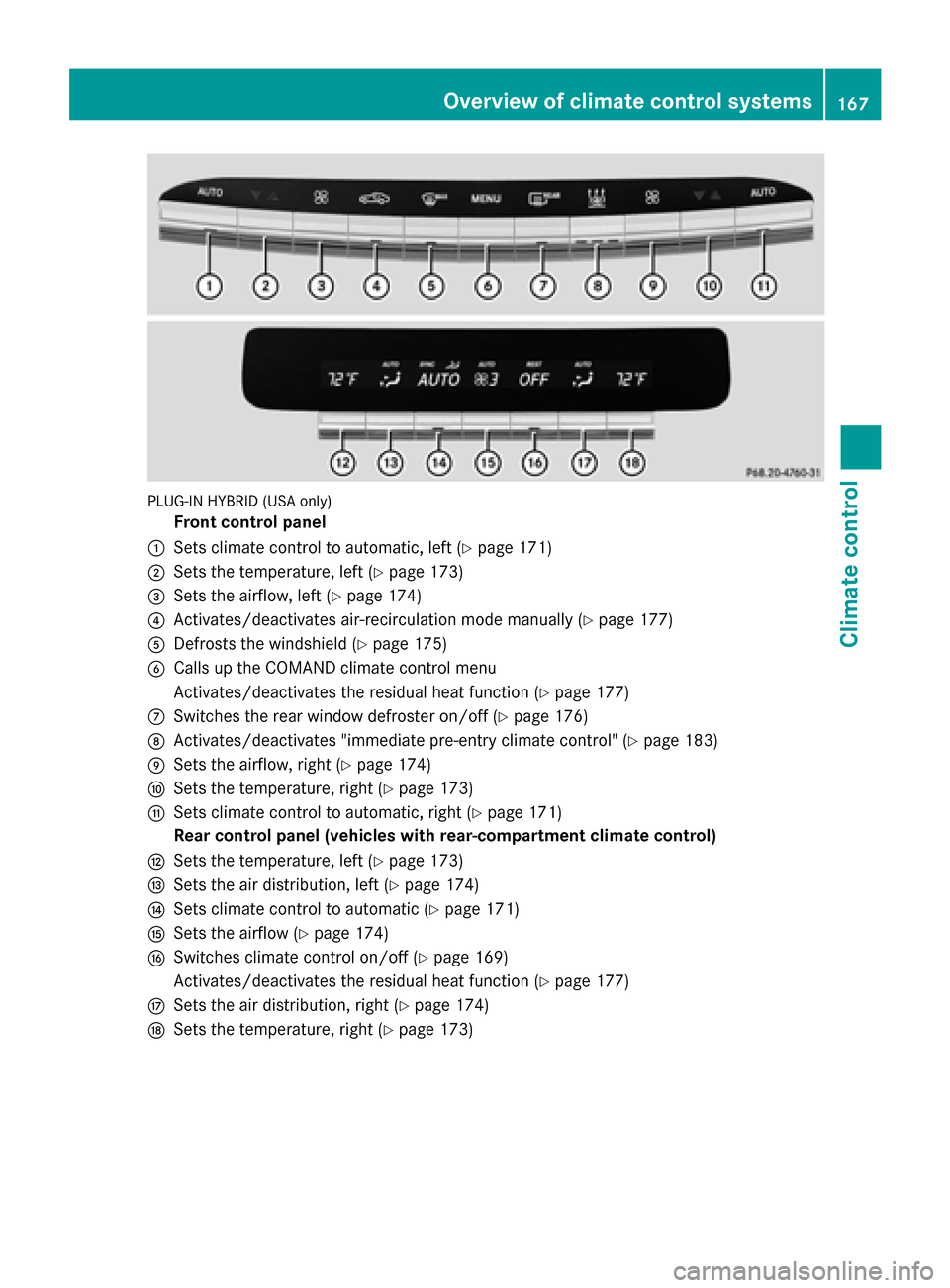
PLUG-IN HYBRID (USA only)
Front control panel
: Sets climate control to automatic, left (Y page 171)
; Sets the temperature, left (Y page 173)
= Sets the airflow, left (Y page 174)
? Activates/deactivates air-recirculation mode manually (Y page 177)
A Defrosts the windshield (Y page 175)
B Calls up the COMAND climate control menu
Activates/deactivates the residual heat function (Y page 177)
C Switches the rear window defroster on/off (Y page 176)
D Activates/deactivates "immediate pre-entry climate control" (Y page 183)
E Sets the airflow, right (Y page 174)
F Sets the temperature, right (Y page 173)
G Sets climate control to automatic, right (Y page 171)
Rear control panel (vehicles with rear-compartment climate control)
H Sets the temperature, left (Y page 173)
I Sets the air distribution, left (Y page 174)
J Sets climate control to automatic (Y page 171)
K Sets the airflow (Y page 174)
L Switches climate control on/off (Y page 169)
Activates/deactivates the residual heat function (Y page 177)
M Sets the air distribution, right (Y page 174)
N Sets the temperature, right (Y page 173) Overview of climate control systems
167Climate control
Page 170 of 502
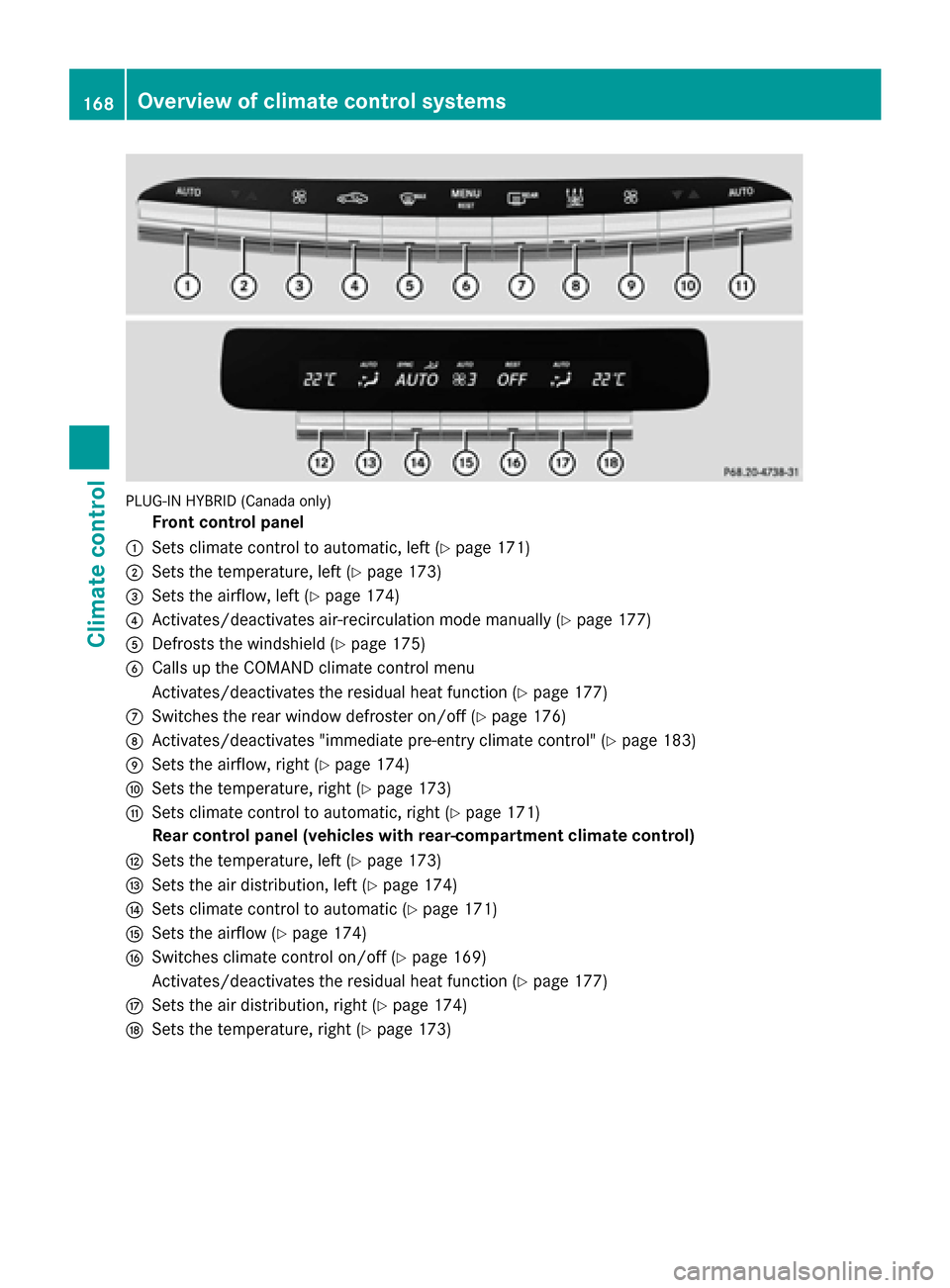
PLUG-IN HYBRID (Canada only)
Front control panel
: Sets climate control to automatic, left (Y page 171)
; Sets the temperature, left (Y page 173)
= Sets the airflow, left (Y page 174)
? Activates/deactivates air-recirculation mode manually (Y page 177)
A Defrosts the windshield (Y page 175)
B Calls up the COMAND climate control menu
Activates/deactivates the residual heat function (Y page 177)
C Switches the rear window defroster on/off (Y page 176)
D Activates/deactivates "immediate pre-entry climate control" (Y page 183)
E Sets the airflow, right (Y page 174)
F Sets the temperature, right (Y page 173)
G Sets climate control to automatic, right (Y page 171)
Rear control panel (vehicles with rear-compartment climate control)
H Sets the temperature, left (Y page 173)
I Sets the air distribution, left (Y page 174)
J Sets climate control to automatic (Y page 171)
K Sets the airflow (Y page 174)
L Switches climate control on/off (Y page 169)
Activates/deactivates the residual heat function (Y page 177)
M Sets the air distribution, right (Y page 174)
N Sets the temperature, right (Y page 173)168
Overview of climate control systemsClimate control
Page 173 of 502

Problems with the "Cooling with air dehumidification" function
Problem
Possible causes/consequences and
M
MSolutions The indicator lamp in
the
Á button
flashes three times or
remains off. Cooling
with air dehumidifica-
tion can also no longer
be switched on using
COMAND (see the sep-
arate operating instruc- tions). Cooling with air dehumidification has been deactivated due to a
malfunction.
X Visit a qualified specialist workshop. Setting climate control to automatic
General notes In automatic mode, the set temperature is
maintained automatically at a constant level. The system automatically regulates the tem-
perature of the dispensed air, the airflow and
the air distribution.
The automatic mode functions optimally
when the "Cooling with air dehumidification"
function is activated. If necessary, cooling
with air dehumidification can be deactivated.
If you deactivate the "Cooling with air-dehu-
midification" function, the air inside the vehi-
cle will not be cooled. The air inside the vehi- cle will also not be dehumidified. The win-
dows can fog up more quickly. Therefore,
deactivate the cooling with air-dehumidifica-
tion function only briefly. Controlling front climate control auto-
matically using the front control panel X
Turn the SmartKey to position 2in the igni-
tion lock (Y page 189).
X Set the desired temperature using the
w rocker switch on the front control
unit.
or
X Set the desired temperature using
COMAND (see the separate operating
instructions).
X To activate: press rocker switch Ãup
or down.
The indicator lamp in the Ãrocker
switch lights up.
X To switch to manual operation: press the
K rocker switch up or down.
or
X Set the airflow using COMAND (see the
separate operating instructions).
or
X Set the air distribution using COMAND (see
the separate operating instructions).
The indicator lamp in the Ãrocker
switch goes out.
In automatic mode, if you adjust the airflow or air distribution manually, the indicator lamp
on the Ãrocker switch goes out. The func-
tion which has not been changed manually, Operating the climate control systems
171Climate control
Page 174 of 502
however, continues to be controlled automat-
ically. When the manually set function
switches back to automatic mode, the indi-
cator lamp on the Ãrocker switch lights
up again.
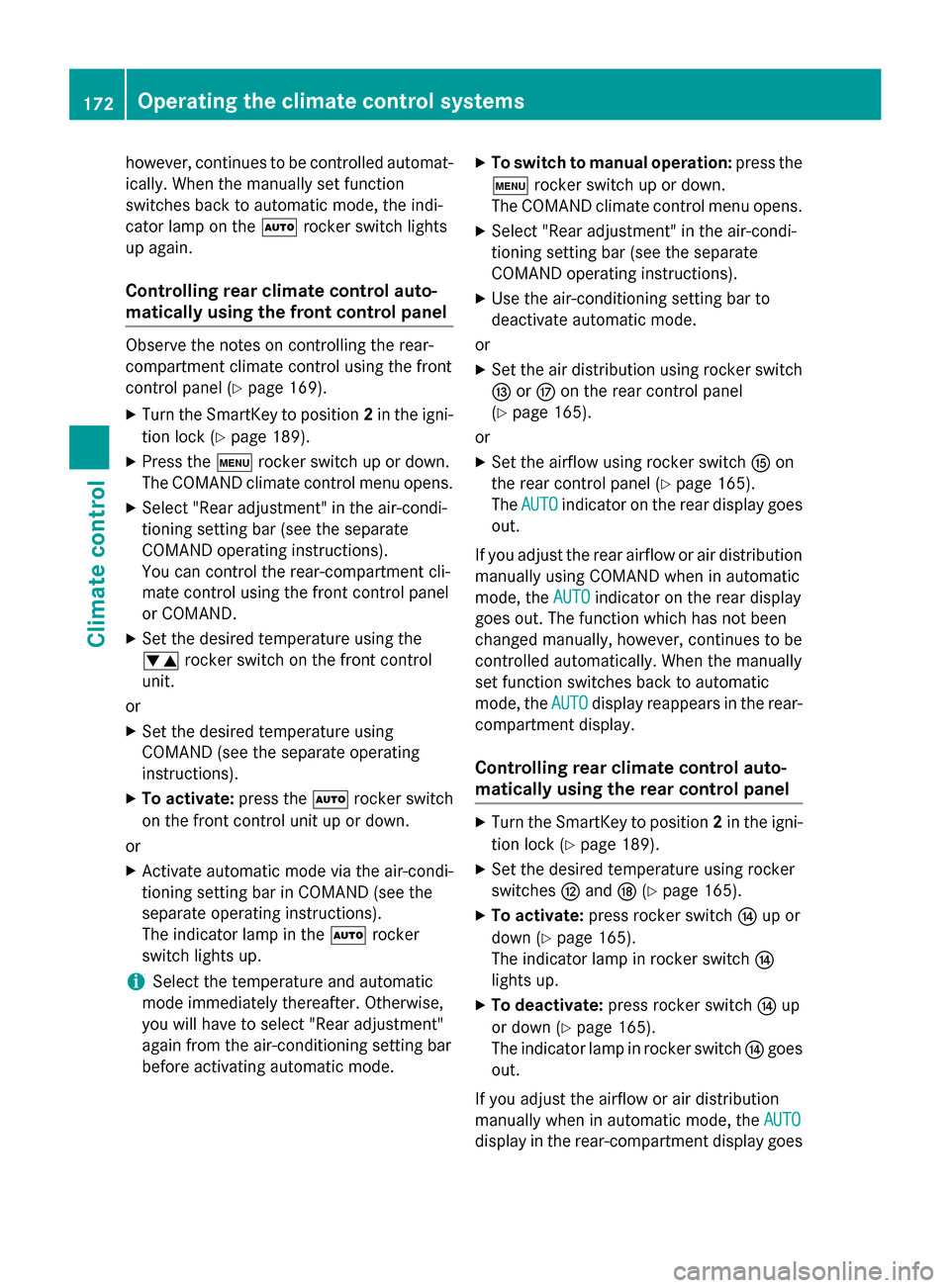
Controlling rear climate control auto-
matically using the front control panel Observe the notes on controlling the rear-
compartment climate control using the front
control panel (Y page 169).
X Turn the SmartKey to position 2in the igni-
tion lock (Y page 189).
X Press the trocker switch up or down.
The COMAND climate control menu opens.
X Select "Rear adjustment" in the air-condi-
tioning setting bar (see the separate
COMAND operating instructions).
You can control the rear-compartment cli-
mate control using the front control panel
or COMAND.
X Set the desired temperature using the
w rocker switch on the front control
unit.
or
X Set the desired temperature using
COMAND (see the separate operating
instructions).
X To activate: press theÃrocker switch
on the front control unit up or down.
or X Activate automatic mode via the air-condi-
tioning setting bar in COMAND (see the
separate operating instructions).
The indicator lamp in the Ãrocker
switch lights up.
i Select the temperature and automatic
mode immediately thereafter. Otherwise,
you will have to select "Rear adjustment"
again from the air-conditioning setting bar
before activating automatic mode. X
To switch to manual operation: press the
t rocker switch up or down.
The COMAND climate control menu opens.
X Select "Rear adjustment" in the air-condi-
tioning setting bar (see the separate
COMAND operating instructions).
X Use the air-conditioning setting bar to
deactivate automatic mode.
or X Set the air distribution using rocker switch
I orM on the rear control panel
(Y page 165).
or X Set the airflow using rocker switch Kon
the rear control panel (Y page 165).
The AUTO
AUTO indicator on the rear display goes
out.
If you adjust the rear airflow or air distribution
manually using COMAND when in automatic
mode, the AUTO AUTOindicator on the rear display
goes out. The function which has not been
changed manually, however, continues to be
controlled automatically. When the manually
set function switches back to automatic
mode, the AUTO AUTOdisplay reappears in the rear-
compartment display.
Controlling rear climate control auto-
matically using the rear control panel X
Turn the SmartKey to position 2in the igni-
tion lock (Y page 189).
X Set the desired temperature using rocker
switches Hand N(Ypage 165).
X To activate: press rocker switch Jup or
down (Y page 165).
The indicator lamp in rocker switch J
lights up.
X To deactivate: press rocker switch Jup
or down (Y page 165).
The indicator lamp in rocker switch Jgoes
out.
If you adjust the airflow or air distribution
manually when in automatic mode, the AUTO AUTO
display in the rear-compartment display goes 172
Operating the climate control systemsClimate control
Page 176 of 502
X
Turn the SmartKey to position 2in the igni-
tion lock (Y page 189).
X Press the trocker switch up or down.
The COMAND climate control menu opens.
X Select "Rear adjustment" in the air-condi-
tioning setting bar (see the separate
COMAND operating instructions).
You can control the rear-compartment cli-
mate control using the front control panel
or COMAND.
X To increase/reduce: press thew
rocker switch on the front control panel up
or down.
or
X Set the temperature using COMAND (see
the separate operating instructions).
Only change the temperature setting in
small increments. Start at 72 ‡ (22 †).
Setting the temperature in the rear
compartment using the rear control
panel X
Turn the SmartKey to position 2in the igni-
tion lock (Y page 189).
X To increase/reduce: press rocker
switch HorN up or down (Y page 165).
Only change the temperature setting in
small increments. Start at 72 ‡ (22 †).
Setting the footwell temperature The footwell temperature for the driver and
front passenger can be set separately using
COMAND (see the separate operating
instructions). Setting the air distribution
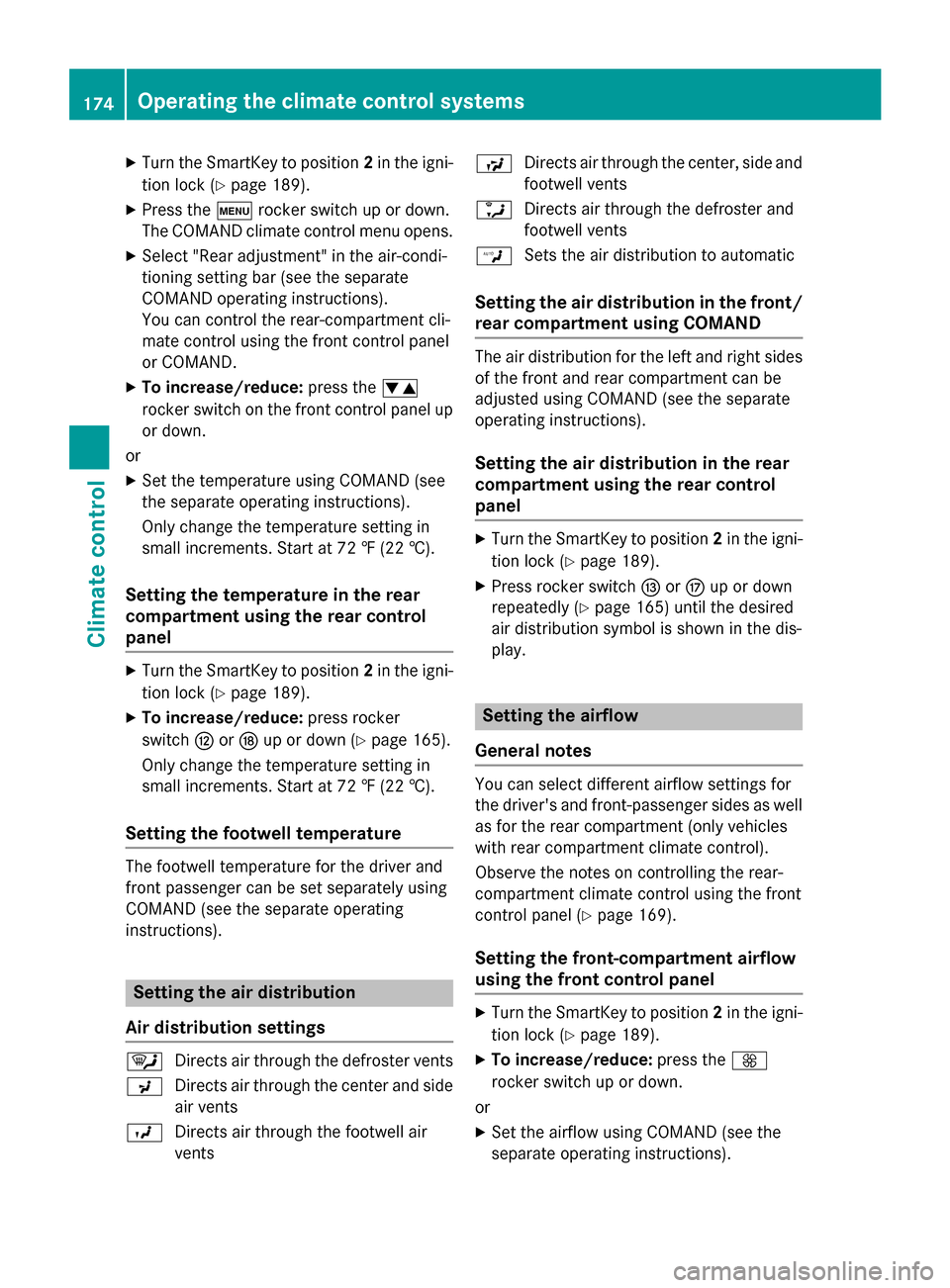
Air distribution settings ¯
Directs air through the defroster vents
P Directs air through the center and side
air vents
O Directs air through the footwell air
vents S
Directs air through the center, side and
footwell vents
a Directs air through the defroster and
footwell vents
W Sets the air distribution to automatic
Setting the air distribution in the front/
rear compartment using COMAND The air distribution for the left and right sides
of the front and rear compartment can be
adjusted using COMAND (see the separate
operating instructions).
Setting the air distribution in the rear
compartment using the rear control
panel X
Turn the SmartKey to position 2in the igni-
tion lock (Y page 189).
X Press rocker switch IorM up or down
repeatedly (Y page 165) until the desired
air distribution symbol is shown in the dis-
play. Setting the airflow
General notes You can select different airflow settings for
the driver's and front-passenger sides as well as for the rear compartment (only vehicles
with rear compartment climate control).
Observe the notes on controlling the rear-
compartment climate control using the front
control panel (Y page 169).
Setting the front-compartment airflow
using the front control panel X
Turn the SmartKey to position 2in the igni-
tion lock (Y page 189).
X To increase/reduce: press theK
rocker switch up or down.
or
X Set the airflow using COMAND (see the
separate operating instructions). 174
Operating the climate control systemsClimate control