2015 MERCEDES-BENZ S-Class Display
[x] Cancel search: DisplayPage 269 of 502
Pedestrian and animal recognition
General notes
Pedestrian or animal recognition may be
impaired or inoperative if:
R pedestrians or animals are partially or
entirely obscured by other objects, e.g.
parked vehicles
R the silhouette of the pedestrian or of the
animal in the Night View Assist Plus display
is incomplete or interrupted, e.g. by pow-
erful light reflections
R pedestrians or animals do not contrast with
the surroundings
R the camera system no longer recognizes
pedestrians as persons due to special
clothing or other objects
R pedestrians are not in an upright position,
e.g. sitting, squatting or lying
R animals are not recognized by the system,
e.g. because of their size or shape
The pedestrian and animal recognition is
deactivated at temperatures above 90 ‡ (32 †). The spotlight function and automatic
delayed switch-off are then no longer active.
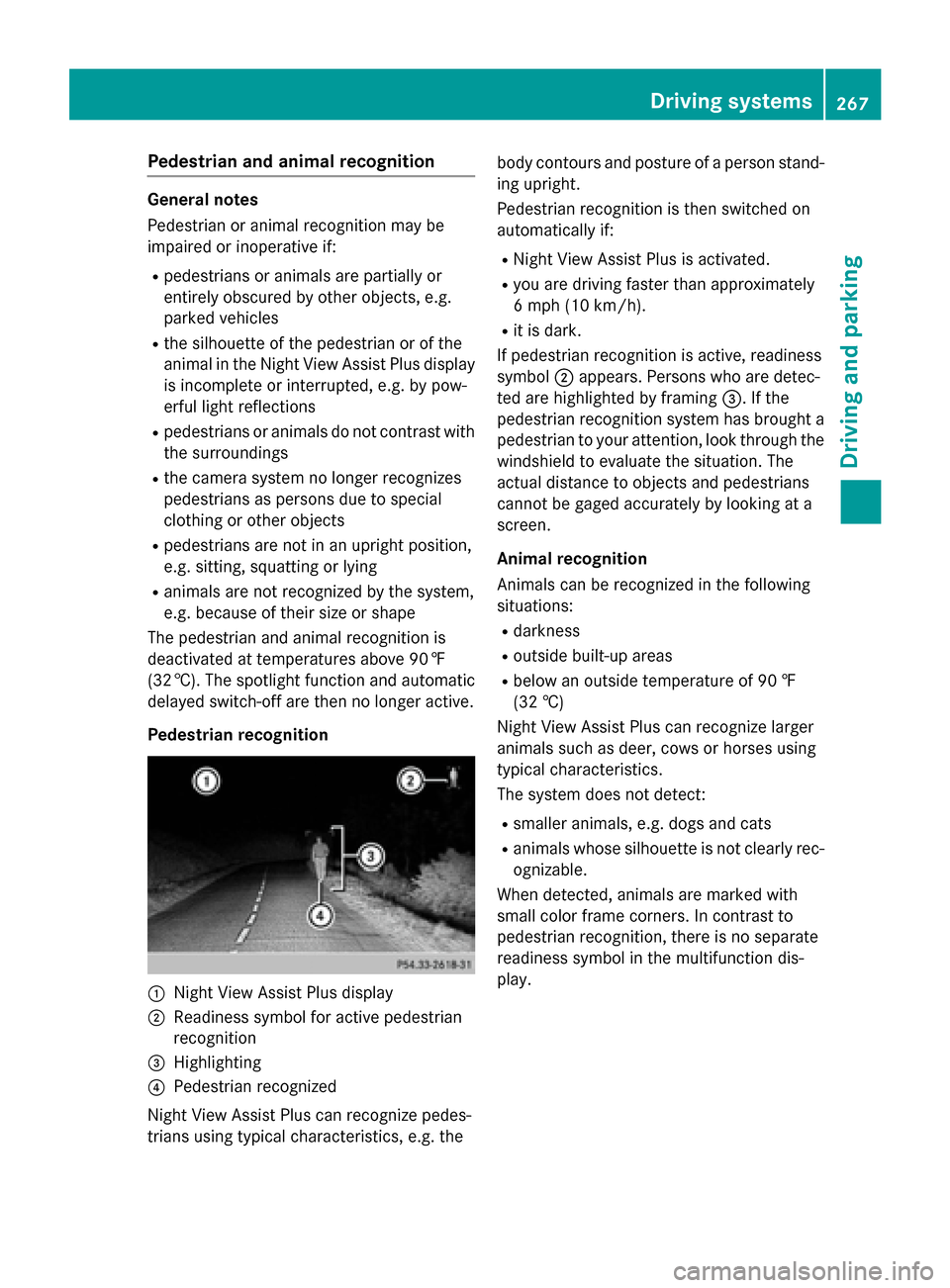
Pedestrian recognition :
Night View Assist Plus display
; Readiness symbol for active pedestrian
recognition
= Highlighting
? Pedestrian recognized
Night View Assist Plus can recognize pedes-
trians using typical characteristics, e.g. the body contours and posture of a person stand-
ing upright.
Pedestrian recognition is then switched on
automatically if:
R Night View Assist Plus is activated.
R you are driving faster than approximately
6 mph (10 km/h).
R it is dark.
If pedestrian recognition is active, readiness
symbol ;appears. Persons who are detec-
ted are highlighted by framing =. If the
pedestrian recognition system has brought a pedestrian to your attention, look through the
windshield to evaluate the situation. The
actual distance to objects and pedestrians
cannot be gaged accurately by looking at a
screen.
Animal recognition
Animals can be recognized in the following
situations:
R darkness
R outside built-up areas
R below an outside temperature of 90 ‡
(32 †)
Night View Assist Plus can recognize larger
animals such as deer, cows or horses using
typical characteristics.
The system does not detect:
R smaller animals, e.g. dogs and cats
R animals whose silhouette is not clearly rec-
ognizable.
When detected, animals are marked with
small color frame corners. In contrast to
pedestrian recognition, there is no separate
readiness symbol in the multifunction dis-
play. Driving systems
267Driving and parking Z
Page 270 of 502

Switching Night View Assist on/off
Activation conditions
You can only activate Night View Assist Plus if
all of the following conditions are met:
R the ignition is switched on (Y page 189) or
the engine has been started.
R the light switch is in the ÃorL posi-
tion.
R reverse gear has not been engaged.
Activating Night View Assist Plus X
Press button :.
The Night View Assist Plus display appears in the multifunction display.
i The infrared headlamps only switch on in
the dark from speeds of approximately
6 mph (10 km/h). This means that you do
not have the full visual range while the vehi- cle is stationary and cannot check whether
Night View Assist Plus is working. The infra- red headlamps are deactivated at speeds
below 3 mph (5 km/h). The Night View
image continues to be displayed until you
deactivate it by pressing button :.
Automatic activation
You can select the Night View Assist
Night View Assist
Automatic Automatic Activation
Activation option via the Night
View Assist menu. The pedestrian and animal search function remains active even when the
Night View image is not displayed. In the dark,
in unlit surroundings and at speeds of more
than 60 km/h, the Night View image is auto-
matically displayed in the multifunction dis- play as soon as pedestrians or animals are
detected.
X In the assistance menu, select automatic
delayed switch-off of Night View Assist Plus
(Y page 308).
Deactivating Night View Assist Plus
X Press button :.
The Night View Assist Plus display disap-
pears from the multifunction display. Night View Assist is deactivated.
Spotlight function General notes
Under certain conditions, the spotlight func-
tion uses the headlamps to flash at detected
pedestrians.
The spotlight function is only active if:
R pedestrian recognition is active
R the road surface is not lit
R the driving speed is at least 40 mph
(60 km/h)
R the "Adaptive Highbeam Assist PLUS" func-
tion is activated (Y page 154)
The spotlight function is not active or is active
only to a limited extent if:
R you are driving in city traffic
R there are pedestrians located in the area of
an oncoming vehicle or a vehicle in front
Activating the spotlight function
The pedestrian detection with spotlight func- tion is running the background. If the prereq-uisites are met, the spotlight function uses
the headlamps to flash four short pulses at a
pedestrian detected on or near to the road
surface.
X In the light menu, select the spotlight func-
tion of Night View Assist (Y page 312).
The spotlight function does not flash at ani-
mals. 268
Driving systemsDriving an
d parking
Page 271 of 502
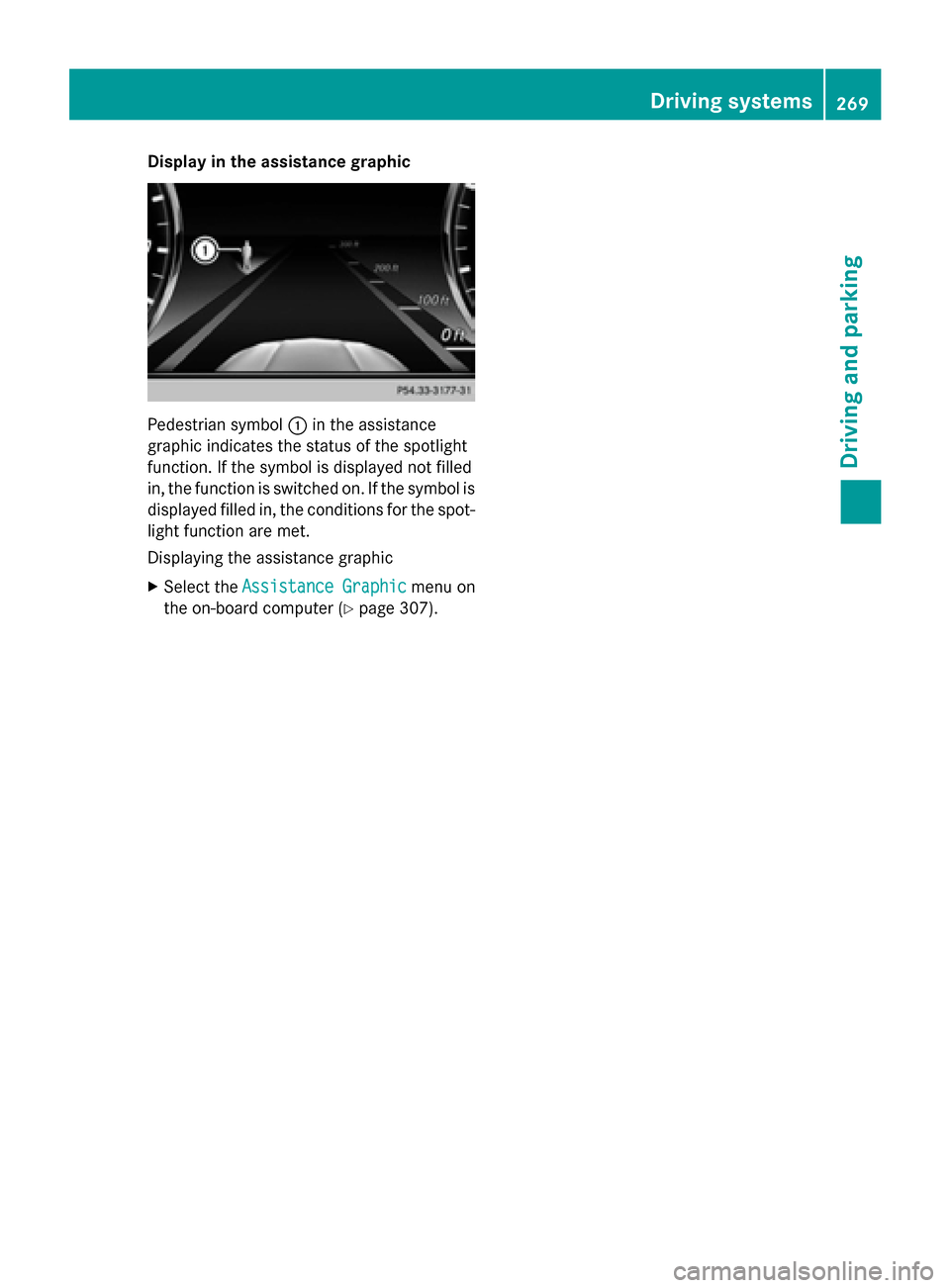
Display in the assistance graphic
Pedestrian symbol
:in the assistance
graphic indicates the status of the spotlight
function. If the symbol is displayed not filled
in, the function is switched on. If the symbol is displayed filled in, the conditions for the spot-
light function are met.
Displaying the assistance graphic
X Select the Assistance Graphic
Assistance Graphic menu on
the on-board computer (Y page 307). Driving syste
ms
269Driving an d parking Z
Page 272 of 502

Problems with Night View Assist
Problem
Possible causes/consequences and
M
MSolutions The picture quality of
Night View Assist Plus
has deteriorated. The windshield is fogged up on the inside.
X Fold down camera cover (Y page 417).
X Defrost the windshield (Y page 176). The windshield is iced up.
X De-ice the windshield (Y page 175). The windshield wipers are smearing the windshield.
X Replace the wiper blades (Y page 158). The windshield is smeared after the vehicle has been cleaned in a
car wash.
X Clean the windshield (Y page 415). There is windshield chip damage in the camera's field of vision.
X Replace the windshield. The pedestrian and ani-
mal recognition is not
available. The infrared camera in the radiator grill is dirty.
X Use a soft cloth and water to clean the infrared camera. Driving Assistance PLUS package
General notes The Active Driving Assistance PLUS package
consists of DISTRONIC PLUS (Y page 231),
Active Blind Spot Assist (Y page 270) and
Active Lane Keeping Assist (Y page 273).
Active Blind Spot Assist General notes
Active Blind Spot Assist uses a radar sensor
system, pointed toward the rear of the vehi-
cle, to monitor the area to the sides of the
vehicle which the driver is unable to see. A
warning display in the exterior mirrors draws
your attention to vehicles detected in the
monitored area. If you then switch on the cor- responding turn signal to change lanes, you
will also receive a visual and audible collision
warning. If a risk of lateral collision is detec- ted, corrective braking may help you avoid a
collision. Before a course-correcting brake
application, Active Blind Spot Assist evalu-
ates the space in the direction of travel and at
the sides of the vehicle. For this, Active Blind
Spot Assist uses radar sensors which are
pointed in the direction of travel.
Active Blind Spot Assist supports you from a
speed of approximately 20 mph (30 km/h).
Important safety notes
Active Blind Spot Assist is only an aid and is
not a substitute for attentive driving. G
WARNING
Active Blind Spot Assist does not react to:
R vehicles overtaken too closely on the side,
placing them in the blind spot area
R vehicles which approach with a large speed
differential and overtake your vehicle 270
Driving systemsDriving and parking
Page 274 of 502

Due to the nature of the system:
R warnings may be issued in error when driv-
ing close to crash barriers or similar solid
lane borders.
R warnings may be interrupted when driving
alongside particularly long vehicles, e.g.
trucks, for a prolonged time.
Warning display :
Warning display
Active Blind Spot Assist is not operational at
speeds below approximately 20 mph
(30 km/h). Vehicles in the monitoring range
are then not indicated.
If a vehicle is detected within the blind spot
monitoring range at speeds above 20 mph
(30 km/h), warning lamp :on the corre-
sponding side lights up red. This warning is
always emitted when a vehicle enters the
blind spot monitoring range from behind or
from the side. When you overtake a vehicle,
the warning only occurs if the difference in
speed is less than 7 mph (12 km/h).
If you select the reverse gear, Active Blind
Spot Assist is not operational.
The brightness of the warning lamps is auto-
matically adapted to the brightness of the
surroundings. When Active Blind Spot Assist is activated,
gray radar waves propagating backwards
appear next to the vehicle in the assistance
display in the multifunction display. Above a
speed of 20 mph (30 km/h), the color of the
radar waves in the assistance display
changes to green ;. Active Blind Spot Assist
is then ready for use.
Visual and acoustic collision warning
If you switch on the turn signals to change
lanes and a vehicle is detected in the side
monitoring range, you receive a visual and
acoustic collision warning. You will then hear a double warning tone and red warning
lamp :flashes. If the turn signal remains on,
detected vehicles are indicated by the flash-
ing of red warning lamp :. There are no fur-
ther warning tones.
Course-correcting brake application
If Active Blind Spot Assist detects a risk of a
lateral collision in the monitoring range, a
course-correcting brake application is carried
out. This is meant to assist you in avoiding a
collision. G
WARNING
A course-correcting brake application cannot always prevent a collision. There is a risk of an
accident.
Always steer, brake or accelerate yourself,
especially if Active Blind Spot Assist warns
you or makes a course-correcting brake appli-
cation. Always maintain a safe distance at the sides. 272
Driving systemsDriving an
d parking
Page 275 of 502

If a course-correcting brake application
occurs, red warning lamp :flashes in the
exterior mirror and a dual warning tone
sounds. In addition, display ;underlining
the danger of a side collision appears in the
multifunction display.
In very rare cases, the system may make an
inappropriate brake application. A course-
correcting brake application may be interrup-
ted at any time if you steer slightly in the
opposite direction or accelerate.
The course-correcting brake application is
available in the speed range between 20 mph (30 km/h) and 120 mph (200 km/h).
Either no braking application, or a course-
correcting brake application adapted to the
driving situation occurs if:
R there are vehicles or obstacles, e.g. crash
barriers, located on both sides of your vehi-
cle.
R a vehicle approaches you too closely at the
side.
R you have adopted a sporty driving style with
high cornering speeds.
R you clearly brake or accelerate.
R a driving safety system intervenes, e.g.
ESP ®
or PRE-SAFE ®
Brake.
R ESP ®
is switched off.
R a loss of tire pressure or a defective tire is
detected.
Switching on Active Blind Spot Assist X Make sure that Active Blind Spot Assist is
activated in the on-board computer
(Y page 309).
X Turn the SmartKey to position 2in the igni-
tion lock.
Warning lamps :in the exterior mirrors
light up red for approximately 1.5 seconds. Gray radar waves propagating backwards
appear next to the vehicle in the assistance
display in the multifunction display. Active Lane Keeping Assist General notes
Active Lane Keeping Assist monitors the area
in front of your vehicle by means of camera
system :at the top of the windshield. Vari-
ous different areas to the front, rear and side of your vehicle are also monitored with the aid
of the radar sensor system. Active Lane Keep-
ing Assist detects lane markings on the road
and can warn you before you leave your lane
unintentionally. If you do not react to the
warning, a lane-correcting application of the
brakes can bring the vehicle back into the
original lane.
If you select km kmin the Display Unit
Display Unit
Speed-/Odometer:
Speed-/Odometer: function on the on-board
computer (Y page 312), Active Lane Keeping
Assist is activated starting at a speed of
60 km/h. If the miles milesdisplay unit is selected,
the assistance range begins at 40 mph.
Important safety notes
If you fail to adapt your driving style, Active
Lane Keeping Assist can neither reduce the
risk of accident nor override the laws of phys- ics. Active Lane Keeping Assist cannot take
account of road and weather conditions. It
may not recognize traffic situations. Active
Lane Keeping Assist is only an aid. You are
responsible for the distance to the vehicle in
front, for vehicle speed, for braking in good
time and for staying in your lane.
Active Lane Keeping Assist cannot continu-
ously keep your vehicle in its lane. Driving systems
273Driving and parking Z
Page 276 of 502

G
WARNING
Active Lane Keeping Assist cannot always
clearly detect lane markings.
In such cases, Active Lane Keeping Assist
can:
R give an unnecessary warning and then
make a course-correcting brake application
to the vehicle
R not give a warning or intervene
There is a risk of an accident.
Always pay particular attention to the traffic
situation and keep within the lane, especially
if Active Lane Keeping Assist alerts you. Ter-
minate the intervention in a non-critical driv-
ing situation.
The system may be impaired or may not func-
tion if:
R there is poor visibility, e.g. due to insuffi-
cient illumination of the road, or due to
snow, rain, fog or spray
R there is glare, e.g. from oncoming traffic,
the sun or reflections (e.g. when the road
surface is wet)
R the windshield is dirty, fogged up, damaged
or covered, for instance by a sticker, in the
vicinity of the camera
R the radar sensors in the front or rear bump-
ers or the radiator trim are dirty, e.g.
obscured by snow
R there are no, several or unclear lane mark-
ings for a lane, e.g. in areas with road con-
struction work
R the lane markings are worn away, dark or
covered up, e.g. by dirt or snow
R the distance to the vehicle in front is too
small and the lane markings thus cannot be
detected
R the lane markings change quickly, e.g.
lanes branch off, cross one another or
merge
R the road is narrow and winding
R there are strong shadows cast on the road If no vehicle is detected in the adjacent lane
and broken lane markings are detected, no
lane-correcting brake application is made.
Warning vibration in the steering wheel
A warning may be given if a front wheel
passes over a lane marking. It will warn you by
means of intermittent vibration in the steer-
ing wheel for up to 1.5 seconds.
Lane-correcting brake application
If you leave your lane, under certain circum-
stances the vehicle will brake briefly on one
side. This is meant to assist you in bringing
the vehicle back to the original lane. G
WARNING
A lane-correcting brake application cannot
always bring the vehicle back into the original lane. There is a risk of an accident.
Always steer, brake or accelerate yourself,
especially if Active Lane Keeping Assist warns
you or makes a lane-correcting brake appli-
cation. If a lane-correcting brake application occurs,
display :appears in the multifunction dis-
play. The brake application also slightly
reduces vehicle speed.
This function is available in the range between
40 mph and 120 mph (60 km/h and
200 km/h).
A lane-correcting brake application can be
made after driving over a lane marking rec-
ognized as being solid or broken. Before this,
a warning must be given by means of inter-
mittent vibration in the steering wheel. In 274
Driving systemsDriving and parking
Page 277 of 502

addition, a lane with lane markings on both
sides must be recognized.
In the case of a broken lane marking being
detected, a lane-correcting brake application can only be made if a vehicle has been detec-
ted in the adjacent lane. Oncoming vehicles,
overtaking vehicles and vehicles in adjacent
lanes can be detected.
i A further lane-correcting brake applica-
tion can only occur after your vehicle has
returned to the original lane.
No lane-correcting brake application occurs
if:
R you clearly and actively steer, brake or
accelerate.
R you cut the corner on a sharp bend.
R you have switched on the turn signal.
R a driving safety system intervenes, e.g.
ESP ®
, PRE-SAFE ®
Brake or Active Blind
Spot Assist.
R you have adopted a sporty driving style with
high cornering speeds or high rates of
acceleration.
R ESP ®
is switched off.
R the transmission is not in position D.
R a loss of tire pressure or a defective tire has
been detected and displayed.
R an obstacle in the lane in which you are
driving has been detected.
Active Lane Keeping Assist may not detect
other road users or traffic situations. An inap- propriate brake application may be interrup-
ted at any time if you:
R steer slightly in the opposite direction
R switch on the turn signal
R clearly brake or accelerate
A lane-correcting brake application is inter-
rupted automatically if:
R a driving safety system intervenes, e.g.
ESP ®
, PRE-SAFE ®
Brake or Active Blind
Spot Assist.
R lane markings can no longer be recognized. Switching on Active Lane Keeping Assist
X
Press button ;.
Indicator lamp :lights up. The Lane Lane
Keeping Assist On
Keeping Assist On message appears in
the multifunction display. If all conditions
have been satisfied, a warning or steering
intervention may be made.
If you drive at speeds above 40 mph
(60 km/h) and lane markings are detected, the lines in the assistance graphics display(Y page 307) are shown in green. Active
Lane Keeping Assist is ready for use.
X To switch off: press button;.
Indicator lamp :goes out. The Active
Lane Keeping Assist is deactivated. The
Lane Keeping Assist Off Lane Keeping Assist Off message
appears in the multifunction display.
Selecting Standard or Adaptive setting X In the DriveAssist
DriveAssist menu on the on-board
computer, select the Active Lane Keep‐
Active Lane Keep‐
ing Assist
ing Assist function (Ypage 310).
X Select Standard
Standard orAdaptive
Adaptive.
When Standard
Standard is selected, no warning
vibration occurs if:
R you switch on the turn signals. In this
event, the warnings are suppressed for a
certain period of time.
R a driving safety system intervenes, such
as ABS, BAS or ESP ®
.
When Adaptive
Adaptive is selected, no warning
vibration occurs if: Driving systems
275Driving and parking Z