2015 MERCEDES-BENZ S-Class radio settings
[x] Cancel search: radio settingsPage 204 of 298

Deleting highlighted stations
X In radio mode: slide 00520064the controller.
X To select Options
Options in the radio menu bar:
turn and press the controller.
X Select Edit List
Edit List.
X To select the required preset entry: turn the
controller.
X Slide 00520096the controller.
X To select the Delete Highlighted Sta‐
Delete Highlighted Sta‐
tion/Channel
tion/Channel option in the additional
menu: turn and press the controller.
X If you really wish to delete the highlighted
station, select Yes Yes: turn and press the con-
troller. Otherwise, select No
No: turn and press
the controller. Calling up sound settings
X In radio mode: slide 00520064the controller.
X To select Sound
Sound in the radio menu bar: turn
and press the controller.
The sound menu appears (Y page 250).Radio text
This function is available in HD and FM/AM
radio mode.
Radio text is additional data, metadata or
similar that, in addition to displaying the artist and track, also includes information on the
current program.
X To switch on radio text view: in radio mode,
slide 00520064the controller.
The Radio menu bar is shown. X
To select Info Info: turn and press the control-
ler.
With an active Info
Infobutton, a larger view of
the radio station set will be shown together
with radio text information in place of the list
of stations. The frequency is visible in the
context display.
X To switch on radio text plus: in radio mode,
slide 00520064the controller.
The Radio menu bar is shown.
X Select Info
Info.
The display switches back to the radio sta-
tion overview with radio text plus informa-
tion. Satellite radio
General notes
The satellite radio mode requires satellite
radio equipment and registration with a sat-
ellite radio provider.
Note that the categories and channels shown in the illustrations depend on the program
content offered by the provider. The illustra-
tions and descriptions in these operating
instructions may therefore differ from the
channels and categories offered by the pro-
vider.
SatRadio mode may be temporarily unavaila-
ble or interrupted for a variety of reasons.
These include environmental or topographi-
cal conditions as well as other factors beyond
the control of Mercedes-Benz USA, LLC. This means operation may not be possible in cer-
tain areas.
These include:
R tunnels
R parking garages
R locations inside or next to buildings
R locations in the vicinity of other structures
SIRIUS XM Satellite Radio offers more than
140 digital-quality radio channels providing
100% commercial-free music, sports, news
and entertainment. 202
Satellite
radioRadio
Page 209 of 298

X
To select Options
Optionsin the radio menu bar:
turn and press the controller.
X To select Tag
Tag this
this Track
Track : turn and press
the controller.
A message about saving this music track on
the Apple ®
device appears. Displaying information
X
To select Info Infoin the radio menu bar: turn
and press the controller.
Information on the currently received pro-
gram is displayed.
If available, you will see:
R the channel logo
R the channel abbreviation
R the artist of the track that is currently being
played
R the current track
X To return to the radio display: select
Info Info: slide 00520064and press the controller. Displaying service information
The provider's customer service center is
available by phone at any time to answer any
general questions or questions on the ver-
sions available.
X To select Options
Options in the menu bar: slide
00520064 and press the controller.
X To select Service
Service: turn and press the con-
troller.
The provider's details appear. X
To return to the main display: press the
0038 button. Channel list updates
During reception of a new channel list, the
Updating Channels... Updating Channels... message is shown.
The station last selected is switched to mute until the update has been completed. Sat
Radio mode is not available during this proc-
ess.
Once the update has been completed, the Sat Radio basic menu appears. The station previ-
ously selected will be played if it is still avail-
able. Sound settings
Information on sound settings (Y page 250). Satellite radio
207Radio
Page 252 of 298

Your COMAND equipment
These operating instructions describe all
standard and optional equipment available
for your COMAND system at the time of pur-
chase. Country-specific differences are pos-
sible. Please note that your COMAND system may not be equipped with all the features
described. This also applies to safety-relevant
systems and functions. Therefore, the equip-
ment on your COMAND system may differ
from that in the descriptions and illustrations. Should you have any questions concerning
equipment and operation, please consult an
authorized Mercedes-Benz Center. Sound settings
Calling up the sound menu
You can make various sound settings for the
different audio and video sources. It is possi- ble to set more bass for radio mode than for
audio CD mode, for example. The respective
sound menu can be called up from the menu
of the desired mode.
The example describes where to call up the
sound menu in CD mode. X
Insert an audio CD (Y page 212).
The CD display appears.
X To display the menu bars: slide 00520064the
controller.
X To select Sound
Sound in the menu bar: turn and
press the controller.
The menu appears with the last setting
accessed, e.g. Balance/Fader Balance/Fader. Sound menu overview Function Options
Equalizer Sets: treble, mid-
range and base
Balance/fader Moves the sound
focus: right/left and
front/rear Changing loud-
speaker source Outputs a seat-
based media source
on the entire sound
system
Setting treble, mid-range and bass
X
To display the menu bars: slide 00520064the
controller in media mode.
X To select Sound
Sound in the menu bar: turn and
press the controller.
The menu with the last accessed setting
appears.
X Turn the controller until Equalizer Equalizeris
brought to the front.
X To activate rotary menus for treble, mid-
range and base: slide 00520064the controller.
X To switch between the rotary menus: slide
00950052 the controller.
X To make the desired Equalizer
Equalizer settings:
turn the controller.
Rotary menus show the set values. 250
Sound set
tingsSound
Page 254 of 298

Burmester
®
surround sound system General notes
The Burmester ®
surround sound system has
a total output of 590 watts and is equipped
with 13 loudspeakers.
The Burmester ®
surround sound system is
available for all functions in the radio and
media modes. Calling up the sound menu
You can make various sound settings for the
different audio and video sources. It is possi-
ble to set more bass for radio mode than for
audio CD mode, for example. The respective
sound menu is called up from the menu of the desired mode.
The example shows the sound menu control
panel in CD mode. X
Insert an audio CD (Y page 212).
The CD display appears.
X To display the menu bars: slide 00520064the
controller.
X To select Sound
Sound in the menu bar: turn and
press the controller.
The menu appears with the last setting
accessed, e.g. Balance/Fader Balance/Fader. Overview of Burmester
®
surround sound sys-
tem Function Options
Equalizer Sets: treble, mid-
range and base
Balance/fader Moves the sound
focus: right/left and
front/rear Changing loud-
speaker source Outputs a seat-
based media source
on the entire sound
system
Surround Optimizes sound
playback for all
seats
Setting treble, mid-range and bass
X
To display the menu bars: slide 00520064the
controller in media mode.
X To select Sound
Sound in the menu bar: turn and
press the controller.
The menu with the last accessed setting
appears.
X Turn the controller until Equalizer Equalizeris in the
center.
X Slide 00520064the controller.
The rotary menus for treble, mid-range and
bass are activated.
X To switch between the rotary menus: slide
009500520096 the controller. 252
Burmester ®
surround sound systemSound
Page 255 of 298
X
To make the desired Equalizer
Equalizersettings:
turn the controller.
The rotary menus show the set values.
X To return to the menu: slide 00970052the con-
troller.
X To return to the basic menu: press the 0038
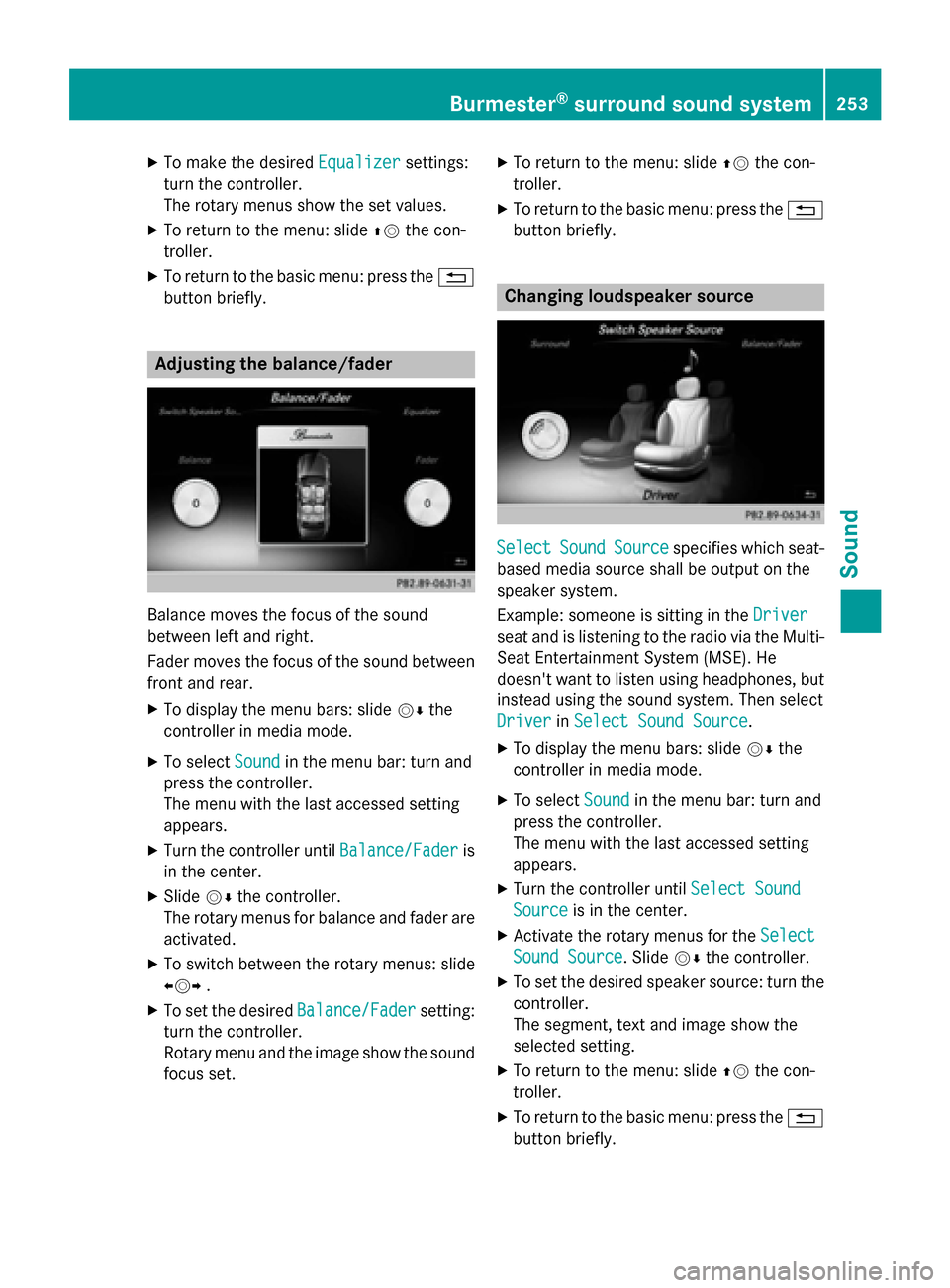
button briefly. Adjusting the balance/fader
Balance moves the focus of the sound
between left and right.
Fader moves the focus of the sound between
front and rear.
X To display the menu bars: slide 00520064the
controller in media mode.
X To select Sound
Sound in the menu bar: turn and
press the controller.
The menu with the last accessed setting
appears.
X Turn the controller until Balance/Fader
Balance/Fader is
in the center.
X Slide 00520064the controller.
The rotary menus for balance and fader are
activated.
X To switch between the rotary menus: slide
009500520096 .
X To set the desired Balance/Fader Balance/Fadersetting:
turn the controller.
Rotary menu and the image show the sound focus set. X
To return to the menu: slide 00970052the con-
troller.
X To return to the basic menu: press the 0038
button briefly. Changing loudspeaker source
Select Select
Sound
SoundSource
Source specifies which seat-
based media source shall be output on the
speaker system.
Example: someone is sitting in the Driver Driver
seat and is listening to the radio via the Multi- Seat Entertainment System (MSE). He
doesn't want to listen using headphones, but
instead using the sound system. Then select
Driver Driver inSelect Sound Source
Select Sound Source.
X To display the menu bars: slide 00520064the
controller in media mode.
X To select Sound
Soundin the menu bar: turn and
press the controller.
The menu with the last accessed setting
appears.
X Turn the controller until Select Sound
Select Sound
Source Source is in the center.
X Activate the rotary menus for the Select
Select
Sound Source
Sound Source. Slide 00520064the controller.
X To set the desired speaker source: turn the
controller.
The segment, text and image show the
selected setting.
X To return to the menu: slide 00970052the con-
troller.
X To return to the basic menu: press the 0038
button briefly. Burmester
®
surround sound system 253Sound
Page 256 of 298

Setting surround sound
The
Surround
Surround setting optimizes the sound
playback for the selected seat position.
X To display the menu bars: slide 00520064the
controller in media mode.
X To select Sound
Soundin the menu bar: turn and
press the controller.
The menu with the last accessed setting
appears.
X Turn the controller until Surround Surroundis in the
center.
X Slide 00520064the controller.
The left-hand rotary menu to switch sur-
round sound on and off is activated.
X To activate Surround
Surround: turn the controller
until On Onis active.
X To adjust the surround sound for Front
Front,
Rear
Rear orAll Seats
All Seats: slide 00520096the control-
ler.
The right-hand rotary menu is activated.
X To set the desired Surround
Surround focus: turn the
controller.
The menu symbol, text and image show the
selected setting.
X To return to the menu: slide 00970052the con-
troller.
X To return to the basic menu: press the 0038
button briefly. Burmester
®
high-end 3D surround
sound system General notes
The Burmester ®
high-end 3D surround sound
system has a total output of 1540 watts and is equipped with 24 loudspeakers.
The Burmester ®
high-end 3D surround sound
system is available for all functions in the
radio and media modes. Calling up the sound menu
You can make various sound settings for the
different audio and video sources. It is possi-
ble to set more bass for radio mode than for
audio CD mode, for example. You can call up the respective sound menu from the menu of
the desired mode.
The example describes where to call up the
sound menu in CD mode. X
Insert an audio CD (Y page 212).
The CD display appears.
X To display the menu bars: slide 00520064the
controller.
X To select Sound Soundin the menu bar: turn and
press the controller.
A menu appears with the last setting
accessed, e.g. Sound Profile Sound Profile.254
Burmester ®
high-end 3D surround sound systemSound
Page 261 of 298

Your COMAND equipment
................260
Rear Seat Entertainment System
overview ............................................ 260
System settings ................................ 268
Vehicle settings ................................ 270
Navigation mode ............................... 271
Online and Internet functions ..........271
Radio mode ........................................ 272
Media mode ....................................... 272
Audio/video mode ............................273
Video DVD mode ............................... 276
AUX mode .......................................... 280 259Rea
r Seat Entertainment System
Page 271 of 298

X
Select Language
Language using the00630064 but-
tons and press the 008Bbutton to confirm.
The list of languages appears. A 0036dot
indicates the current setting.
X Select the language using the 00630064
buttons and press the 008Bbutton to confirm.
The system activates the corresponding
language. Switching the display design
X Select Vehicle
Vehicle using the
006300640059 buttons on the
remote control and press the 008Bbutton to
confirm.
X Select System Settings
System Settings using the0064
00590065 buttons on the remote control
and press the 008Bbutton to confirm.
You see the System Settings
System Settings menu on
the selected rear screen.
X Select Display
Display using the 00630064 but-
tons on the remote control and press the
008B button to confirm.
X Select Day Mode
Day Mode, Night Mode
Night Mode orAuto‐
Auto‐
matic
matic using the 00630064 buttons and
press the 008Bbutton to confirm.
The dot indicates the current setting. Design Explanation
Day Mode
Day Mode The display is set per-
manently to day
design.
Night Mode Night Mode The display is set per-
manently to night
design.
Automatic Automatic The display design
changes depending on
the vehicle instrument
cluster illumination.
Setting the brightness
X Select Vehicle Vehicle using the
006300640059 buttons on the remote control and press the
008Bbutton to
confirm.
X Select System Settings
System Settings using the0064
00590065 buttons on the remote control
and press the 008Bbutton to confirm.
You see the System Settings
System Settings menu on
the selected rear screen.
X Select Display
Display using the 00630064 but-
tons on the remote control and press the
008B button to confirm.
X Select Brightness
Brightness using the00630064
buttons and press the 008Bbutton to confirm.
A scale appears.
X Adjust the brightness using the 00630064
buttons and press the 008Bbutton to confirm.
The brightness bar moves up or down. The picture becomes lighter or darker in
accordance with the scale. Showing/hiding the picture
X Select Vehicle Vehicle using the
006300640059 buttons on the
remote control and press the 008Bbutton to
confirm.
X Press button 0064on the remote control.
A menu appears.
X Select Display Off
Display Off using the
006300640059 buttons and press
the 008Bbutton to confirm.
X To display the picture: press the008Bbut-
ton. Adjusting sound settings
You can select the sound settings in the radio, audio CD/audio DVD/MP3, video DVD and
AUX modes.
X Select a medium (e.g. audio CD mode)
(Y page 274).
X To show the menu: press the 0064button
on the remote control. System settings
269Rear Seat Entertainment System Z