2015 MERCEDES-BENZ M-Class ROD
[x] Cancel search: RODPage 164 of 466

ECO start/stop function (all vehicles
except the ML 250 BlueTEC 4MATIC)
Introduction This section describes the ECO start/stop
function for all vehicles except the ML 250
BlueTEC 4MATIC. Information about the ECO
start/stop function on the ML 250 BlueTEC
4MATIC (Y page 164).
The ECO start/stop function switches the
engine off automatically if the vehicle is stop- ped under certain conditions.
The engine starts automatically when the
driver wants to pull away again. The ECO
start/stop function thereby helps you to
reduce the fuel consumption and emissions
of your vehicle.
Important safety notes G
WARNING
If the engine is switched off automatically and you exit the vehicle, the engine is restarted
automatically. The vehicle may begin moving. There is a risk of accident and injury.
If you wish to exit the vehicle, always turn off
the ignition and secure the vehicle against
rolling away.
General notes 0043
ECO start/stop display
If the 00A7 symbol is shown in green in the
multifunction display, the ECO start/stop
function switches the engine off automati-
cally if the vehicle stops moving.
Every time you switch on the engine using the SmartKey or the Start/Stop button, the ECO
start/stop function is activated. If the ECO start/stop function has been man-
ually deactivated (Y page 163) or a malfunc-
tion has caused the system to be deactivated, the 00A7 symbol is not displayed.
AMG vehicles: the ECO start/stop function
is only available in drive program C.
For further information on automatic engine
switch-off (Y page 162) and automatic
engine start (Y page 163).
Automatic engine switch-off If the vehicle is braked to a standstill in
Dor N,
the ECO start/stop function switches off the engine automatically.
The ECO start/stop function is operational
and the 00A7symbol is displayed in green in
the multifunction display, if:
R the indicator lamp in the ECO button is lit
green.
R no off-road program has been selected.
R the outside temperature is within the range
that is suitable for the system.
R the engine is at normal operating temper-
ature.
R the set temperature for the vehicle interior
has been reached.
R the battery is sufficiently charged.
R the system detects that the windshield is
not fogged up when the air-conditioning
system is switched on.
R the hood is closed.
R the driver's door is closed and the driver's
seat belt is fastened.
If conditions for automatic engine switch-off
have not been fulfilled, the 00A7symbol will
be shown in yellow.
i All of the vehicle's systems remain active
when the engine has been stopped auto-
matically.
i The HOLD function can be activated if the
engine has been switched off automati-
cally. It is then not necessary to continue
applying the brakes during the automatic 162
DrivingDriving and parking
Page 166 of 466

AMG vehicles
X
To switch off: in drive program C, press
ECO button 0043.
or X Switch to drive program Sor M
(Y page 172).
Indicator lamp 0044and the 00A7ECO sym-
bol in the multifunction display go out.
X To activate: press ECO button 0043.
Indicator lamp 0044lights up. If drive pro-
gram Sor Mis active, the automatic trans-
mission switches to drive program C.
If all conditions for automatic engine
switch-off (Y page 162) are fulfilled, the
00A7 symbol is shown in green in the mul-
tifunction display.
If the conditions for automatic engine
switch-off are not all fulfilled (Y page 162),
the 00A7 symbol is lit yellow. If this is the
case, the ECO start/stop function is not
available.
i If indicator lamp
0044is off, the ECO start/
stop function has been deactivated man-
ually or as the result of a malfunction. The
engine will then not be switched off auto-
matically when the vehicle stops. ECO start/stop function (ML 250
BlueTEC 4MATIC)
Introduction The ECO start/stop function switches the
engine off automatically if the vehicle is stop-
ped under certain conditions.
The engine starts automatically when the
driver wants to pull away again. The ECO
start/stop function thereby helps you to
reduce the fuel consumption and emissions
of your vehicle.
Important safety notes G
WARNING
If the engine is switched off automatically and you exit the vehicle, the engine is restarted
automatically. The vehicle may begin moving. There is a risk of accident and injury.
If you wish to exit the vehicle, always turn off
the ignition and secure the vehicle against
rolling away.
General notes 0043
ECO start/stop display
If the engine has been switched off automat-
ically by the ECO start/stop function, the
00A7 symbol is shown in the multifunction
display.
Every time you switch on the engine using the SmartKey or the Start/Stop button, the ECO
start/stop function is activated.
For further information on automatic engine
switch-off (Y page 165) and automatic
engine start (Y page 165).164
DrivingDriving and pa
rking
Page 254 of 466
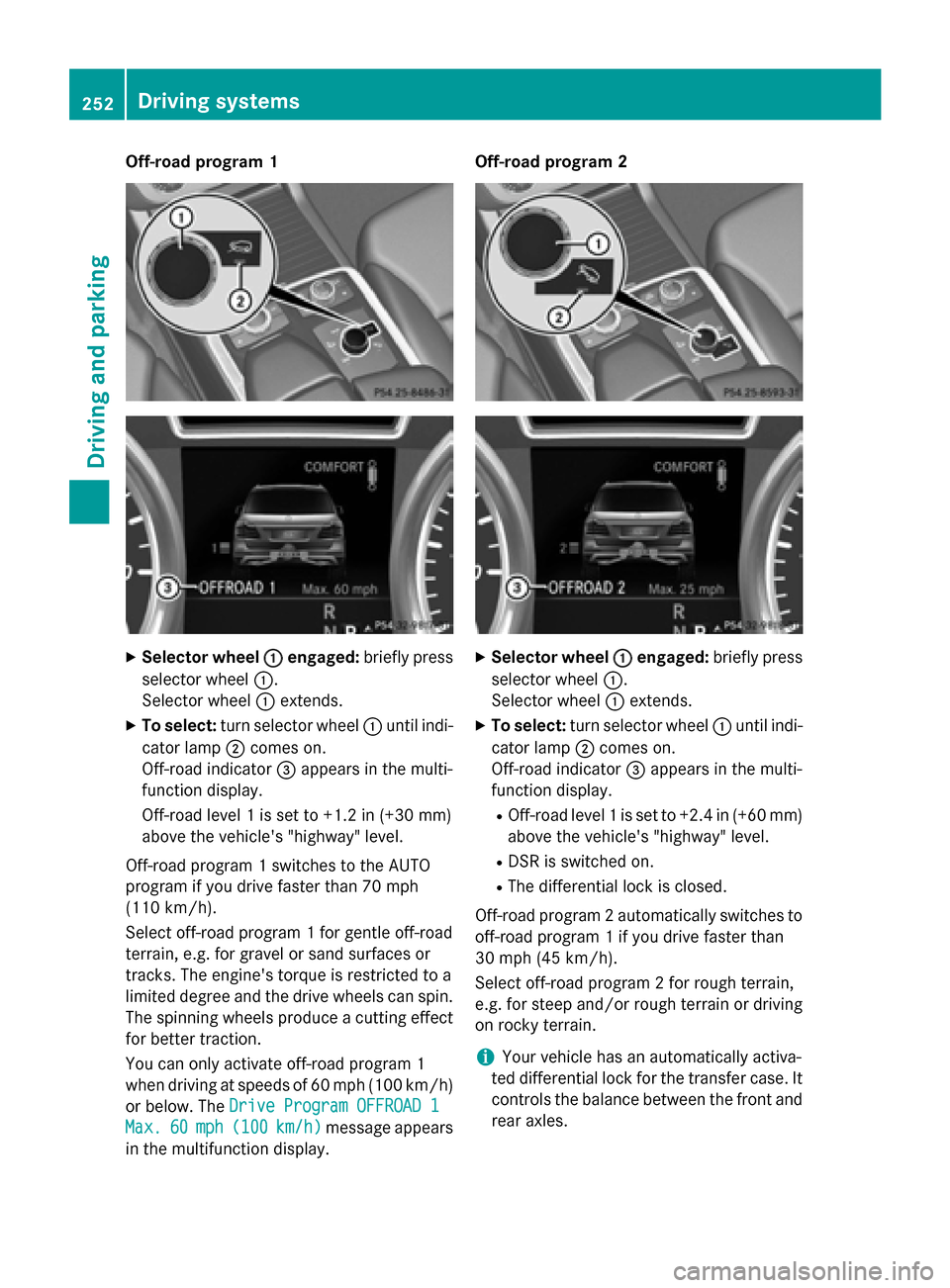
Off-road program 1
X
Selector wheel 0043
0043engaged: briefly press
selector wheel 0043.
Selector wheel 0043extends.
X To select: turn selector wheel 0043until indi-
cator lamp 0044comes on.
Off-road indicator 0087appears in the multi-
function display.
Off-road level 1 is set to +1.2 in (+30 mm)
above the vehicle's "highway" level.
Off-road program 1 switches to the AUTO
program if you drive faster than 70 mph
(110 km/h).
Select off-road program 1 for gentle off-road
terrain, e.g. for gravel or sand surfaces or
tracks. The engine's torque is restricted to a
limited degree and the drive wheels can spin.
The spinning wheels produce a cutting effect
for better traction.
You can only activate off-road program 1
when driving at speeds of 60 mph (100 km/h)
or below. The Drive Program OFFROAD 1
Drive Program OFFROAD 1
Max. Max. 60
60mph (
mph (100 100km/h)
km/h) message appears
in the multifunction display. Off-road program 2
X
Selector wheel 0043
0043engaged: briefly press
selector wheel 0043.
Selector wheel 0043extends.
X To select: turn selector wheel 0043until indi-
cator lamp 0044comes on.
Off-road indicator 0087appears in the multi-
function display.
R Off-road level 1 is set to +2.4 in (+60 mm)
above the vehicle's "highway" level.
R DSR is switched on.
R The differential lock is closed.
Off-road program 2 automatically switches to off-road program 1 if you drive faster than
30 mph (45 km/h).
Select off-road program 2 for rough terrain,
e.g. for steep and/or rough terrain or drivingon rocky terrain.
i Your vehicle has an automatically activa-
ted differential lock for the transfer case. It controls the balance between the front and
rear axles. 252
Driving systemsDriving and parking
Page 268 of 466

Useful information
i This Operator's Manual describes all
models and all standard and optional equip- ment of your vehicle available at the time of
publication of the Operator's Manual.
Country-specific differences are possible.
Please note that your vehicle may not be
equipped with all features described. This
also applies to safety-related systems and
functions.
i Read the information on qualified special-
ist workshops (Y page 29). Important safety notes
G
WARNING
If you operate information systems and com-
munication equipment integrated in the vehi- cle while driving, you will be distracted from
traffic conditions. You could also lose control of the vehicle. There is a risk of an accident.
Only operate the equipment when the traffic
situation permits. If you are not sure that this
is possible, park the vehicle paying attention
to traffic conditions and operate the equip-
ment when the vehicle is stationary. G
WARNING
If the instrument cluster has failed or mal-
functioned, you may not recognize function
restrictions in systems relevant to safety. The operating safety of your vehicle may be
impaired. There is a risk of an accident.
Drive on carefully. Have the vehicle checked
at a qualified specialist workshop immedi-
ately.
You must observe the legal requirements for
the country in which you are currently driving when operating the on-board computer.
The on-board computer only shows messages
or warnings from certain systems in the mul- tifunction display. You should therefore make
sure your vehicle is operating safely at all times. Otherwise, a vehicle that is not oper-
ating safely may cause an accident.
For an overview, see the instrument panel
illustration (Y
page 35). Displays and operation
Instrument cluster lighting
The lighting in the instrument cluster, in the
displays and the controls in the vehicle inte-
rior can be adjusted using the brightness con-
trol knob.
The brightness control knob is located on the bottom left of the instrument cluster
(Y page 35).
X Turn the brightness control knob clockwise
or counter-clockwise.
If the light switch is set to 0058,0060or
0058, the brightness is dependent upon
the brightness of the ambient light.
i The light sensor in the instrument cluster
automatically controls the brightness of
the multifunction display.
In daylight, the displays in the instrument
cluster are not illuminated. Coolant temperature display
G
WARNING
Opening the hood when the engine is over-
heated or when there is a fire in the engine
compartment could expose you to hot gases
or other service products. There is a risk of
injury.
Let an overheated engine cool down before
opening the hood. If there is a fire in the
engine compartment, keep the hood closed
and contact the fire department.
! A display message is shown if the coolant
temperature is too high.
If the coolant temperature is over 248 ‡
(120 †), do not continue driving. The
engine will otherwise be damaged. 266
Displays and operationOn-board computer and displays
Page 275 of 466

Operating an audio player or audio
media Audio data from various audio devices or
media can be played, depending on the equip- ment installed in the vehicle.
X Switch on COMAND Online and select
audio CD or MP3 mode, see the separate
operating instructions.
X Press the 0059or0065 button on the steer-
ing wheel to select the Audio
Audio menu.
X To select the next/previous track:
briefly press the 0063or0064 button.
X To select a track from the track list
(rapid scrolling): press and hold the 0063
or 0064 button until the desired track has
been reached 0043.
If you press and hold 0063or0064, the
rapid scrolling speed is increased. Not all
audio drives or data carriers support this
function.
If track information is stored on the audio
device or medium, the multifunction display
will show the number and title of the track.
The current track does not appear in audio
AUX mode (Aux iliary audio mode: external
audio source connected).
Video DVD operation Example: CD/DVD changer display X
Switch on COMAND and select video DVD;
see the separate operating instructions.
X Press the 0059or0065 button on the steer-
ing wheel to select the Audio
Audio menu.
X To select the next/previous scene:
briefly press the 0063or0064 button.
X To select a scene from the scene list
(rapid scrolling): press and hold the 0063
or 0064 button until desired scene 0043has
been reached. Telephone menu
Introduction G
WARNING
If you operate information systems and com-
munication equipment integrated in the vehi- cle while driving, you will be distracted from
traffic conditions. You could also lose control of the vehicle. There is a risk of an accident.
Only operate the equipment when the traffic
situation permits. If you are not sure that this
is possible, park the vehicle paying attention
to traffic conditions and operate the equip-
ment when the vehicle is stationary.
When telephoning, you must observe the
legal requirements for the country in which
you are currently driving.
X Switch on the mobile phone (see the sep-
arate operating instructions).
X Switch on COMAND (see the separate
operating instructions).
X Establish a Bluetooth ®
connection to
COMAND; see the separate operating
instructions.
X Press the 0059or0065 button on the steer-
ing wheel to select the Tel Telmenu. Menus and submenus
273On-board computer and displays Z
Page 277 of 466
Assistance menu
Introduction In the
DriveAssist
DriveAssist menu, you have the fol-
lowing options:
R Displaying the assistance graphic
(Y page 275)
R Activating/deactivating the distance warn-
ing function (Y page 275)
R Activating/deactivating PRE-SAFE ®
Brake
(Y page 276)
R Activating/deactivating ATTENTION
ASSIST (Y page 276)
R Activating/deactivating Blind Spot Assist
or Active Blind Spot Assist (Y page 276)
R Activating/deactivating Lane Keeping
Assist or Active Lane Keeping Assist
(Y page 276)
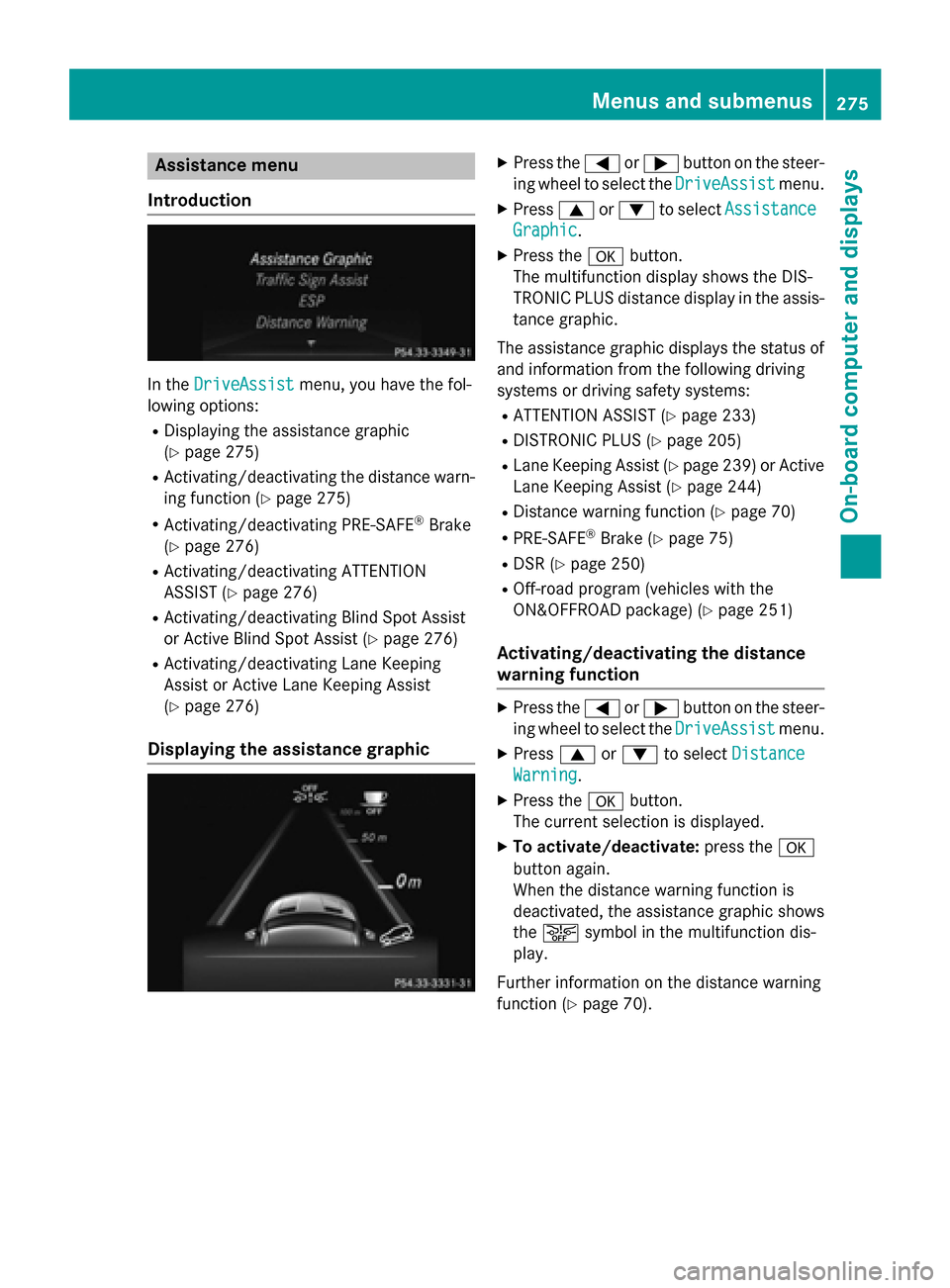
Displaying the assistance graphic X
Press the 0059or0065 button on the steer-
ing wheel to select the DriveAssist DriveAssistmenu.
X Press 0063or0064 to select Assistance Assistance
Graphic
Graphic.
X Press the 0076button.
The multifunction display shows the DIS-
TRONIC PLUS distance display in the assis- tance graphic.
The assistance graphic displays the status of and information from the following driving
systems or driving safety systems:
R ATTENTION ASSIST (Y page 233)
R DISTRONIC PLUS (Y page 205)
R Lane Keeping Assist (Y page 239) or Active
Lane Keeping Assist (Y page 244)
R Distance warning function (Y page 70)
R PRE-SAFE ®
Brake (Y page 75)
R DSR (Y page 250)
R Off-road program (vehicles with the
ON&OFFROAD package) (Y page 251)
Activating/deactivating the distance
warning function X
Press the 0059or0065 button on the steer-
ing wheel to select the DriveAssist DriveAssistmenu.
X Press 0063or0064 to select Distance
Distance
Warning
Warning.
X Press the 0076button.
The current selection is displayed.
X To activate/deactivate: press the0076
button again.
When the distance warning function is
deactivated, the assistance graphic shows
the 00D4 symbol in the multifunction dis-
play.
Further information on the distance warning
function (Y page 70). Menus and sub
menus
275On-board computer and displays Z
Page 279 of 466

R
Checking the tire pressure electronically
(Y page 408)
R Calling up the service due date
(Y page 371) Settings menu
Introduction In the
Sett. Sett. menu, you have the following
options:
R Changing the instrument cluster settings
(Y page 277)
R Changing the light settings (Y page 277)
R Changing the vehicle settings
(Y page 279)
R Changing the convenience settings
(Y page 279)
R Restoring the factory settings
(Y page 281)
Instrument cluster submenu Selecting the unit of measurement for dis-
tance
The Display Unit Speed-/Odometer: Display Unit Speed-/Odometer:
function allows you to choose whether cer-
tain displays appear in kilometers or miles in the multifunction display.
X Press the 0059or0065 button on the steer-
ing wheel to select the Settings Settingsmenu.
X Press the 0064or0063 button to select the
Instrument Cluster Instrument Cluster submenu.
X Press 0076to confirm. X
Press the 0064or0063 button to select the
Display Unit Speed-/Odometer Display Unit Speed-/Odometer func-
tion.
You will see the selected setting: km kmor
miles
miles.
X Press the 0076button to save the setting.
The selected unit of measurement for dis-
tance applies to: R Digital speedometer in the Trip
Trip menu
R Odometer and the trip odometer
R Trip computer
R Current consumption and the range
R Navigation messages in the Navi Navimenu
R Cruise control
R DISTRONIC PLUS
R ASSYST PLUS service interval display
Selecting the permanent display function
You can determine whether the multifunction
display permanently shows your speed or the outside temperature.
X Press the 0059or0065 button on the steer-
ing wheel to select the Sett Settmenu.
X Press the 0064or0063 button to select the
Instrument Cluster
Instrument Cluster submenu.
X Press 0076to confirm.
X Press the 0064or0063 button to select the
Permanent Display:
Permanent Display: function.
You will see the selected setting Outside
Outside
Temperature
Temperature orSpeedometer [mph]
Speedometer [mph]/
Speedometer [km/h]
Speedometer [km/h] .
X Press the 0076button to save the setting.
i The speed is highlighted in km/h or in
mph conversely to your speedometer.
Light submenu Setting the daytime running lamps
i This function is not available in Canada.
X Press the 0059or0065 button on the steer-
ing wheel to select the Sett.
Sett.menu.
X Press the 0064or0063 button to select the
Light
Light submenu. Menus and submenus
277On-board computer and displays Z
Page 286 of 466
Display messages
Introduction
General notes Display messages appear in the multifunction display.
Display messages with graphic displays may be shown in simplified form in the Operator's
Manual and may differ from the messages shown in the multifunction display.
Please respond in accordance with the display messages and follow the additional notes in this Operator's Manual.
Certain display messages are accompanied by an audible warning tone or a continuous tone.
When you stop and park the vehicle, please observe the notes on:
R HOLD function (Y page 210)
R Parking (Y page 182)
Hiding display messages X
Press the 0076or0038 button on the steering wheel to hide the display message.
The display message is cleared.
The multifunction display shows high-priority display messages in red. Some high-priority dis- play messages cannot be hidden.
The multifunction display shows these messages continuously until the causes for the mes-
sages have been remedied.
Message memory The on-board computer saves certain display messages in the
message memory. You can call
up the display messages:
X Press the 0059or0065 button on the steering wheel to select the Serv. Serv.menu.
If there are display messages, the multifunction display shows 2 Messages
2 Messages, for example.
X Press the 0063or0064 button to select the entry, e.g. 2 Messages
2 Messages.
X Press 0076to confirm.
X Press the 0063or0064 button to scroll through the display messages.
When the ignition is switched off, all display messages are deleted, apart from some high-
priority display messages. Once the causes of the high-priority display messages have been
rectified, the corresponding display messages are also deleted. 284
Display
messagesOn-board computer and displays