2015 MERCEDES-BENZ M-Class Central
[x] Cancel search: CentralPage 89 of 466

Unlocking and opening doors from
the inside
You can open a door from inside the vehicle
even if it has been locked. You can only open
the rear doors from inside the vehicle if they
are not secured by the child-proof locks
(Y page 66).
If the vehicle has been locked with the Smart-
Key or with KEYLESS-GO, opening a door from the inside will trigger the anti-theft alarm sys-
tem. Switch off the alarm (Y page 77).X
Front door: pull door handle 0044.
If the door is locked, locking knob 0043pops
up. The door is unlocked and can be
opened.
X Rear door: pull up locking knob 0043on the
relevant rear door.
The rear door is unlocked and can be
opened. Centrally locking and unlocking the
vehicle from the inside
You can centrally lock or unlock the vehicle
from the inside. The buttons are located on
both front doors. 0043
To unlock
0044 To lock
X To unlock: press button 0043.
X To lock: press button 0044.
If the front-passenger door is closed, the
vehicle locks.
Meanwhile, the fuel filler flap will not be
locked or unlocked.
You cannot unlock the vehicle centrally from
the inside if the vehicle has been locked with the SmartKey or KEYLESS-GO.
You can open a front door from inside the
vehicle even if it has been locked.
If the vehicle has been locked using the lock-
ing button for the central locking, or has been
locked automatically, and a door is opened
from the inside:
R the vehicle will be fully unlocked if it had
previously been fully unlocked
R only the door which has been opened form
the inside is unlocked if only the driver's
door had been previously unlocked Doors
87Opening and closing Z
Page 160 of 466

X
Check the starter battery and recharge if
necessary (Y page 389).
or
X Jump-start the vehicle (Y page 391).
i The SmartKey can be turned in the igni-
tion lock even if it is not the correct Smart- Key for the vehicle. The ignition is not
switched on. The engine cannot be started.
KEYLESS-GO General notes
Vehicles with KEYLESS-GO are equipped with
a SmartKey featuring an integrated KEYLESS- GO function and a detachable Start/Stop but-
ton.
The Start/Stop button must be inserted in the ignition lock and the SmartKey must be in the
vehicle.
When you insert the Start/Stop button into
the ignition lock, the system needs approx-
imately two seconds recognition time. You
can then use the Start/Stop button.
Pressing the Start/Stop button several times
in succession corresponds to the different
key positions in the ignition lock. This is only
the case if you are not depressing the brake
pedal.
If you depress the brake pedal and press the
Start/Stop button, the engine starts immedi-
ately.
A check which periodically establishes a radio
connection between the vehicle and the
SmartKey determines whether a valid Smart- Key is in the vehicle. This occurs, for example,
when starting the engine.
To start the vehicle without actively using the SmartKey:
R the Start/Stop button must be inserted in
the ignition lock.
R the SmartKey must be in the vehicle.
R the vehicle must not be locked with the
SmartKey or KEYLESS-GO (Y page 81).Do not keep the SmartKey:
R with electronic devices, e.g. a mobile
phone or another SmartKey
R with metallic objects, e.g. coins or metal
foil
R inside metallic objects, e.g. a metal case
This can impair the functionality of the KEY-
LESS-GO key.
Do not keep the KEYLESS-GO key in the tem-
perature-controlled cup holder (Y page 346).
Otherwise, the KEYLESS-GO key will not be
recognized.
If you lock the vehicle with the SmartKey's
remote control or with KEYLESS-GO, after a
short time:
R you will not be able to switch on the ignition
with the Start/Stop button.
R you will not be able to start the engine with
the Start/Stop button until the vehicle is
unlocked again.
If you lock the vehicle centrally using the but-
ton on the front door (Y page 87), you can
continue to start the engine with the Start/
Stop button.
i The engine can be turned off while the
vehicle is in motion by pressing and holding the Start/Stop button for approximately
three seconds. This function operates inde-
pendently of the ECO start/stop automatic
engine switch-off function.
Key positions with KEYLESS-GO 0043
Start/Stop button
0044 Ignition lock 158
DrivingDriving and pa
rking
Page 163 of 466
The red
0049(USA only) or 0024(Canada
only) indicator lamp in the instrument clus-
ter goes out.
i It is only possible to shift the transmission
from position Pto the desired position if
you depress the brake pedal. Only then is
the parking lock released. If the brake
pedal is not depressed, the DIRECT SELECT
lever can still be moved but the parking lock remains engaged.
i The vehicle locks centrally once you have
pulled away. The locking knobs in the doors
drop down.
You can open the doors from the inside at
any time.
You can also deactivate the automatic lock-
ing feature (Y page 279).
i Upshifts take place at higher engine
speeds after a cold start. This helps the
catalytic converter to reach its operating
temperature more quickly.
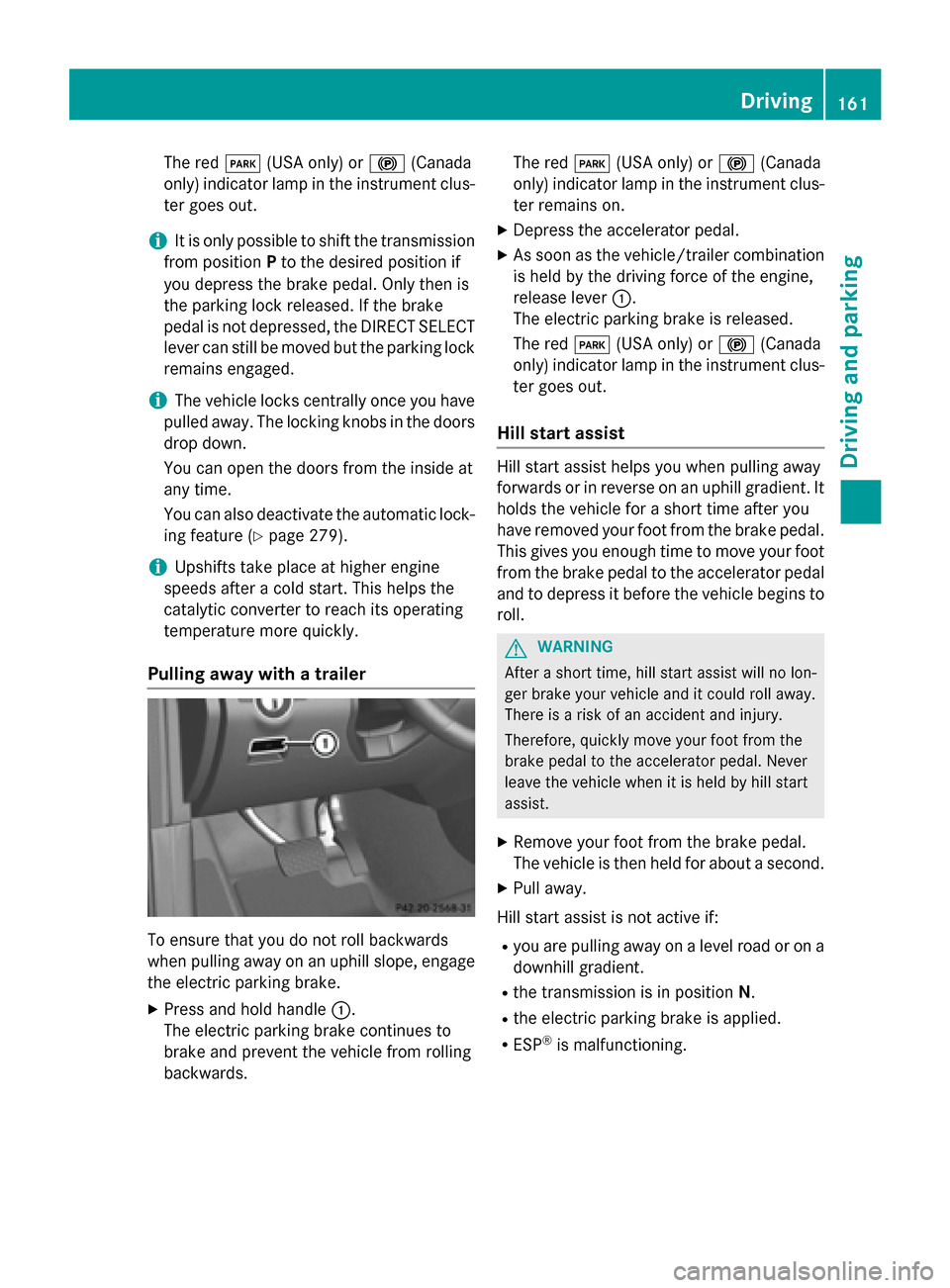
Pulling away with a trailer To ensure that you do not roll backwards
when pulling away on an uphill slope, engage
the electric parking brake.
X Press and hold handle 0043.
The electric parking brake continues to
brake and prevent the vehicle from rolling
backwards. The red
0049(USA only) or 0024(Canada
only) indicator lamp in the instrument clus- ter remains on.
X Depress the accelerator pedal.
X As soon as the vehicle/trailer combination
is held by the driving force of the engine,
release lever 0043.
The electric parking brake is released.
The red 0049(USA only) or 0024(Canada
only) indicator lamp in the instrument clus-
ter goes out.
Hill start assist Hill start assist helps you when pulling away
forwards or in reverse on an uphill gradient. It
holds the vehicle for a short time after you
have removed your foot from the brake pedal. This gives you enough time to move your foot
from the brake pedal to the accelerator pedal and to depress it before the vehicle begins to
roll. G
WARNING
After a short time, hill start assist will no lon-
ger brake your vehicle and it could roll away.
There is a risk of an accident and injury.
Therefore, quickly move your foot from the
brake pedal to the accelerator pedal. Never
leave the vehicle when it is held by hill start
assist.
X Remove your foot from the brake pedal.
The vehicle is then held for about a second.
X Pull away.
Hill start assist is not active if: R you are pulling away on a level road or on a
downhill gradient.
R the transmission is in position N.
R the electric parking brake is applied.
R ESP ®
is malfunctioning. Driving
161Driving and parking Z
Page 230 of 466
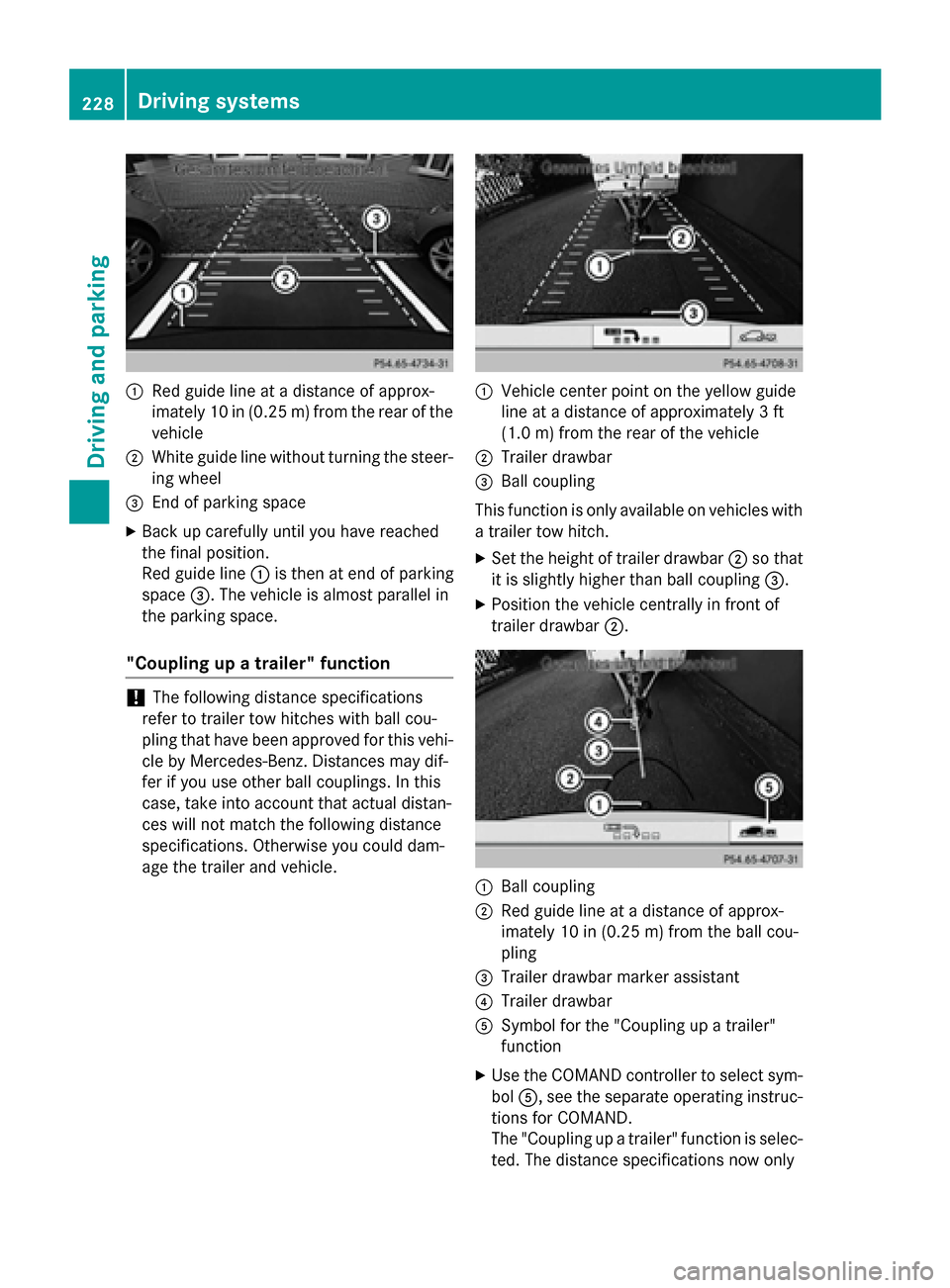
0043
Red guide line at a distance of approx-
imately 10 in (0.25 m) from the rear of the
vehicle
0044 White guide line without turning the steer-
ing wheel
0087 End of parking space
X Back up carefully until you have reached
the final position.
Red guide line 0043is then at end of parking
space 0087. The vehicle is almost parallel in
the parking space.
"Coupling up a trailer" function !
The following distance specifications
refer to trailer tow hitches with ball cou-
pling that have been approved for this vehi-
cle by Mercedes-Benz. Distances may dif-
fer if you use other ball couplings. In this
case, take into account that actual distan-
ces will not match the following distance
specifications. Otherwise you could dam-
age the trailer and vehicle. 0043
Vehicle center point on the yellow guide
line at a distance of approximately 3 ft
(1.0 m) from the rear of the vehicle
0044 Trailer drawbar
0087 Ball coupling
This function is only available on vehicles with
a trailer tow hitch.
X Set the height of trailer drawbar 0044so that
it is slightly higher than ball coupling 0087.
X Position the vehicle centrally in front of
trailer drawbar 0044. 0043
Ball coupling
0044 Red guide line at a distance of approx-
imately 10 in (0.25m)from the ball cou-
pling
0087 Trailer drawbar marker assistant
0085 Trailer drawbar
0083 Symbol for the "Coupling up a trailer"
function
X Use the COMAND controller to select sym-
bol 0083, see the separate operating instruc-
tions for COMAND.
The "Coupling up a trailer" function is selec- ted. The distance specifications now only 228
Driving systemsDriving and parking
Page 281 of 466

R
Parking lamps
R Daytime running lamps
R Side marker lamps
R Surround lighting in the exterior mirrors
Activating/deactivating the interior light-
ing delayed switch-off
If you activate the Interior Lighting
Interior Lighting
Delay Delay function, the interior lighting remains
on for 20 seconds after you remove the
SmartKey from the ignition lock.
X Press the 0059or0065 button on the steer-
ing wheel to select the Sett
Sett menu.
X Press the 0064or0063 button to select the
Light Light submenu.
X Press 0076to confirm.
X Press the 0064or0063 button to select the
Interior Lighting Delay
Interior Lighting Delay function.
If the Interior
Interior Lighting
LightingDelay
Delayfunction
has been switched on, the vehicle interior is
displayed in orange in the multifunction
display.
X Press the 0076button to save the setting.
Vehicle submenu Activating/deactivating the automatic
door locking mechanism
If you activate the Automatic Door Lock Automatic Door Lock
function, the vehicle is centrally locked above
a speed of approximately 9 mph (15 km/h).
X Press the 0059or0065 button on the steer-
ing wheel to select the Sett
Settmenu.
X Press the 0064or0063 button to select the
Vehicle
Vehicle submenu.
X Press 0076to confirm.
X Press the 0064or0063 button to select the
Automatic Door Lock
Automatic Door Lock function.
When the Automatic
Automatic Door
DoorLock
Lockfunction
is activated, the vehicle doors are displayed
in orange in the multifunction display.
X Press the 0076button to save the setting.
For further information on the automatic lock- ing feature, see (Y page 88). Activating/deactivating the acoustic
locking verification signal
If you switch on the
Acoustic AcousticLock
Lockfunction,
an acoustic signal sounds when you lock the
vehicle.
X Press the 0059or0065 button on the steer-
ing wheel to select the Sett.
Sett. menu.
X Press 0064or0063 to select the Vehicle Vehicle
submenu.
X Press 0076to confirm.
X Press the 0064or0063 button to select the
Acoustic Lock
Acoustic Lock function.
If the Acoustic
Acoustic Lock
Lockfunction is activated,
the 0037 symbol in the multifunction dis-
play lights up orange.
X Press the 0076button to save the setting.
Activating/deactivating the radar sensor
system
X Press the 0059or0065 button on the steer-
ing wheel to select the Sett.
Sett. menu.
X Press 0064or0063 to select the Vehicle Vehicle
submenu.
X Press 0076to confirm.
X Press the 0063or0064 button to select
Radar Sensor (See Oper. Manual):
Radar Sensor (See Oper. Manual):.
You will see the selected setting: Enabled
Enabled
or Disabled Disabled.
X Press the 0076button to save the setting.
The following systems are switched off when the radar sensor system is deactivated:
R DISTRONIC PLUS (Y page 198)
R BAS PLUS (Y page 69)
R PRE-SAFE ®
Brake (Y page 75)
R Blind Spot Assist (Y page 237)
R Active Blind Spot Assist (Y page 241)
Convenience submenu Activating/deactivating the EASY-
ENTRY/EXIT feature
G
WARNING
When the EASY-ENTRY/EXIT feature adjusts
the steering wheel, you and other vehicle Menus and submenus
279On-board computer and displays
Z
Page 319 of 466

Display messages
Possible causes/consequences and
0050
0050Solutions Wiper malfunction‐
Wiper malfunction‐
ing ing The windshield wipers are malfunctioning.
X Visit a qualified specialist workshop. Hazard warning
Hazard warning
lamps malfunction‐ lamps malfunction‐
ing ing The hazard warning lamps are faulty.
X Visit a qualified specialist workshop. SmartKey
Display messages
Possible causes/consequences and
0050
0050Solutions 00AF
Key Does Not Key Does Not
Belong to Vehicle Belong to Vehicle You have put the wrong SmartKey in the ignition lock.
X Use the correct SmartKey. 00AF
Take Take
Your
YourKey
Keyfrom
from
Ignition
Ignition The SmartKey is in the ignition lock.
X Remove the SmartKey. 00AF
Obtain a New Key Obtain a New Key The SmartKey needs to be replaced.
X Visit a qualified specialist workshop. 00AF
Replace Replace
Key
KeyBattery
Battery The batteries of the KEYLESS-GO key are discharged.
X Change the batteries (Y page 83).00AF
Don't Forget Your Don't Forget Your
Key Key This display message is displayed for a maximum of 60 seconds
and is simply a reminder.
You have opened the driver's door with the engine switched off.
The KEYLESS-GO key is not in the ignition lock.
X Remember to take the KEYLESS-GO key with you when you
leave the vehicle. 00AF
Key Not Detected Key Not Detected
(red display message) The KEYLESS-GO key is not in the vehicle.
A warning tone also sounds.
If the engine is switched off, you can no longer lock the vehicle
centrally or start the engine.
X Pull over and stop the vehicle safely as soon as possible, paying
attention to road and traffic conditions.
X Secure the vehicle against rolling away (Y page 182).
X Locate the KEYLESS-GO key. Display
messages
317On-board computer and displays Z
Page 444 of 466
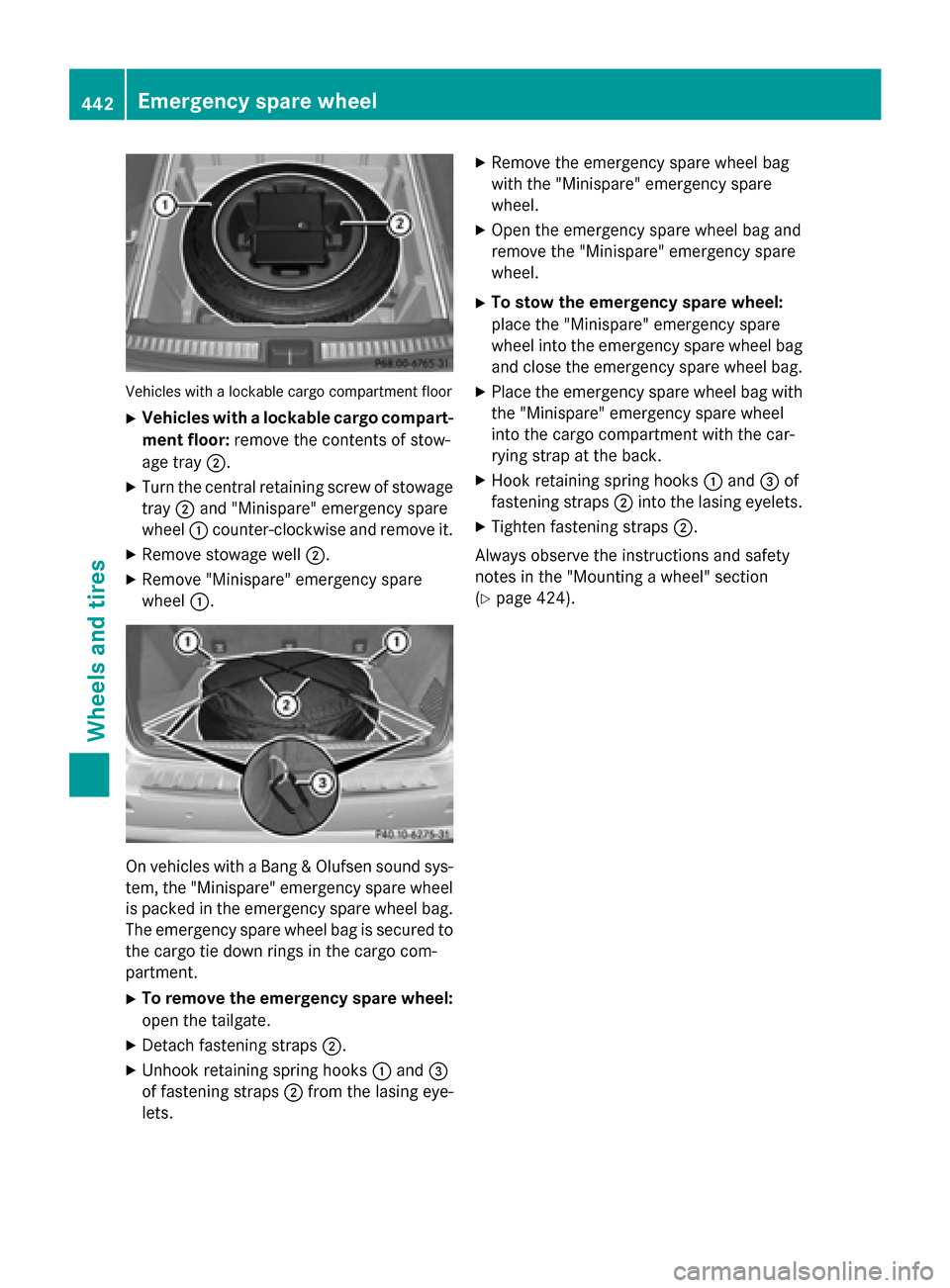
Vehicles with a lockable cargo compartment floor
X Vehicles with a lockable cargo compart-
ment floor: remove the contents of stow-
age tray 0044.
X Turn the central retaining screw of stowage
tray 0044and "Minispare" emergency spare
wheel 0043counter-clockwise and remove it.
X Remove stowage well 0044.
X Remove "Minispare" emergency spare
wheel 0043. On vehicles with a Bang & Olufsen sound sys-
tem, the "Minispare" emergency spare wheel
is packed in the emergency spare wheel bag. The emergency spare wheel bag is secured tothe cargo tie down rings in the cargo com-
partment.
X To remove the emergency spare wheel:
open the tailgate.
X Detach fastening straps 0044.
X Unhook retaining spring hooks 0043and 0087
of fastening straps 0044from the lasing eye-
lets. X
Remove the emergency spare wheel bag
with the "Minispare" emergency spare
wheel.
X Open the emergency spare wheel bag and
remove the "Minispare" emergency spare
wheel.
X To stow the emergency spare wheel:
place the "Minispare" emergency spare
wheel into the emergency spare wheel bag
and close the emergency spare wheel bag.
X Place the emergency spare wheel bag with
the "Minispare" emergency spare wheel
into the cargo compartment with the car-
rying strap at the back.
X Hook retaining spring hooks 0043and 0087of
fastening straps 0044into the lasing eyelets.
X Tighten fastening straps 0044.
Always observe the instructions and safety
notes in the "Mounting a wheel" section
(Y page 424). 442
Emergency spare wheelWheels and tires