2015 MERCEDES-BENZ GLK-CLASS SUV start stop button
[x] Cancel search: start stop buttonPage 7 of 386

Resetting the service interval dis-
play ................................................ 305
Service message ............................ 304
Special service requirements ......... 305
ATA (Anti-Theft Alarm system)
Activating/deactivating ................... 75
Function ........................................... 75
Switching off the alarm .................... 75
ATTENTION ASSIST
Activating/deactivating ................. 229
Display message ............................ 250
Function/notes ............................. 202
Audio menu (on-board com-
puter) .................................................. 2 26
Audio system
see separate operating instructions
Authorized Mercedes-Benz Center
see Qualified specialist workshop
Authorized workshop
see Qualified specialist workshop
AUTO lights
Display message ............................ 246
see Lights
Automatic car wash (care) ............... 306
Automatic engine start (ECO start/
stop function) .................................... 153
Automatic engine switch-off (ECO
start/stop function) .......................... 153
Automatic headlamp mode .............. 116
Automatic transmission
Accelerator pedal position ............. 159
Automatic drive program ............... 160
Changing gear ............................... 159
DIRECT SELECT lever ..................... 156
Display message ............................ 257
Driving tips .................................... 159
Emergency running mode .............. 162
Engaging drive position .................. 158
Engaging neutral ............................ 157
Engaging park position automati-
cally .............................................. . 157
Engaging reverse gear ................... 157
Engaging the park position ............ 157
Kickdown ....................................... 159
Manual drive program .................... 160
Overview ........................................ 156
Problem (malfunction) ................... 162 Program selector button ................ 159
Pulling away ................................... 152
Starting the engine ........................ 151
Steering wheel paddle shifters ...... 160
Trailer towing ................................. 159
Transmission position display ........ 157
Transmission positions .................. 158
Automatic transmission emer-
gency mode ....................................... 162
B
Backup lamp
Changing bulbs .............................. 125
Display message ............................ 245
Bag hook ............................................ 278
Ball coupling
Installing ........................................ 21 4
Removing ....................................... 217
Storing ........................................... 2 17
BAS (Brake Assist System) ................. 69
BAS PLUS (Brake Assist System
PLUS) ................................................... . 69
Battery (SmartKey)
Checking .......................................... 81
Important safety notes .................... 81
Replacing ......................................... 8 1
Battery (vehicle)
Charging ........................................ 321
Display message ............................ 248
Important safety notes .................. 319
Jump starting ................................. 323
Belt
see Seat belts
Belt force limiter
Activation ......................................... 60
Function ........................................... 60
Blind Spot Assist
Activating/deactivating ................. 229
Display message ............................ 252
Notes/function .............................. 203
Trailer towing ................................. 205
see Active Blind Spot Assist
BlueTEC (DEF) .................................... 376
BlueTEC ®
Adding DEF .................................... 165
Brake Assist
see BAS (Brake Assist System)
Index5
Page 14 of 386

Display message ............................ 258
Locking ............................................79
Start/Stop button .......................... 149
Starting the engine ........................ 151
Unlocking ......................................... 79
Kickdown
Driving tips .................................... 159
Knee bag .............................................. 47
L
Lamps
see Warning and indicator lamps
Lane Keeping Assist
Activating/deactivating ................. 230
Display message ............................ 251
Function/information .................... 205
Lane Tracking package ..................... 203
LATCH-type (ISOFIX) child seat
anchors ................................................ 64
License plate lamp (display mes-
sage) ................................................... 245
Light function, active
Display message ............................ 246
Light sensor (display message) ....... 246
Lights
Activating/deactivating the inte-
rior lighting delayed switch-off ....... 232
Active light function ....................... 119
Automatic headlamp mode ............ 116
Cornering light function ................. 120
Display message ............................ 243
Fog lamps ...................................... 117
Hazard warning lamps ................... 119
High beam flasher .......................... 119
High-beam headlamps ................... 118
Light switch ................................... 116
Low-beam headlamps .................... 117
Parking lamps ................................ 118
Rear fog lamp ................................ 118
Setting the brightness of the dis-
play/switch (on-board computer) .. 231
Standing lamps .............................. 118
Switching the daytime running
lamps on/off (on-board com-
puter) ............................................. 231
Switching the daytime running
lamps on/off (switch) .................... 116 Switching the exterior lighting
delayed switch-off on/off (on-
board computer) ............................ 231
Switching the surround lighting
on/off (on-board computer) .......... 231
Turn signals ................................... 118
see Interior lighting
see Replacing bulbs
Loading guidelines ............................ 274
Locking
see Central locking
Locking (doors)
Automatic ........................................ 86
Emergency locking ........................... 86
From inside (central locking but-
ton) ............................................... ... 85
Locking centrally
see Central locking
Locking verification signal (on-
board computer) ............................... 232
Low-beam headlamps
Changing bulbs .............................. 124
Display message ............................ 243
Switching on/off ........................... 117
Lumbar support
Adjusting ....................................... 104
Adjusting the 4-way lumbar sup-
port ............................................... . 104
Luxury head restraints ..................... 103
M
M+S tires ............................................ 335
Malfunction message
see Display messages
Matte finish (cleaning instruc-
tions) .................................................. 3 08
mbrace
Call priority .................................... 291
Display message ............................ 238
Downloading destinations
(COMAND) ..................................... 291
Downloading routes ....................... 294
Emergency call .............................. 288
General notes ................................ 287
Geo fencing ................................... 294
Locating a stolen vehicle ............... 293
MB info call button ........................ 290
12Index
Page 19 of 386

Selecting the unit of measure-
ment .............................................. 230
see Instrument cluster
SRS (Supplemental Restraint Sys-
tem)
Display message ............................ 239
Introduction ..................................... 43
Warning lamp ................................. 266
Warning lamp (function) ................... 43
Standing lamps
Changing bulbs .............................. 124
Display message ............................ 245
Switching on/off ........................... 118
Start/stop function
see ECO start/stop function
Starting (engine) ................................ 151
Steering (display message) .............. 258
Steering wheel
Adjusting (electrically) ................... 107
Adjusting (manually) ...................... 106
Button overview ............................... 35
Buttons (on-board computer) ......... 221
Cleaning ......................................... 31 1
Important safety notes .................. 106
Paddle shifters ............................... 160
Steering wheel heating .................. 107
Storing settings (memory func-
tion) .............................................. . 112
Steering wheel heating
Problem (malfunction) ................... 108
Switching on/off ........................... 107
Steering wheel paddle shifters ........ 160
Stowage areas ................................... 275
Stowage compartments
Armrest (under) ............................. 275
Cup holders ................................... 282
Glove box ....................................... 275
Important safety information ......... 275
Rear ............................................... 276
Stowage net ................................... 276
Stowage net ....................................... 276
Summer tires ..................................... 334
Sun visor ............................................ 283
Surround lighting (on-board com-
puter) .................................................. 2 31
SUV
(Sport Utility Vehicle) ....................... 25 Switching air-recirculation mode
on/off
................................................. 14 3
T
Tachometer ........................................ 220
Tail lamps
Display message ............................ 244
Tailgate
Display message ............................ 257
Emergency unlocking ....................... 91
Important safety notes .................... 87
Limiting the opening angle ............... 90
Opening dimensions ...................... 380
Opening/closing (automatically
from inside) ...................................... 90
Opening/closing (automatically
from outside) ................................... 88
Opening/closing (from outside) ....... 88
Tank
see Fuel tank
Tank content
Fuel gauge ....................................... 33
Technical data
Capacities ...................................... 373
Emergency spare wheel ................. 369
Information .................................... 372
Tires/wheels ................................. 360
Trailer loads ................................... 381
Vehicle data ................................... 380
TELEAID
Call priority .................................... 291
Downloading destinations
(COMAND) ..................................... 291
Downloading routes ....................... 294
Emergency call .............................. 288
General notes ................................ 287
Geo fencing ................................... 294
Locating a stolen vehicle ............... 293
MB info call button ........................ 290
Remote vehicle locking .................. 292
Roadside Assistance button .......... 289
Search & Send ............................... 292
Self-test ......................................... 28 8
Speed alert .................................... 294
System .......................................... 288
Triggering the vehicle alarm ........... 295
Vehicle Health Check .................... 293
Index17
Page 34 of 386
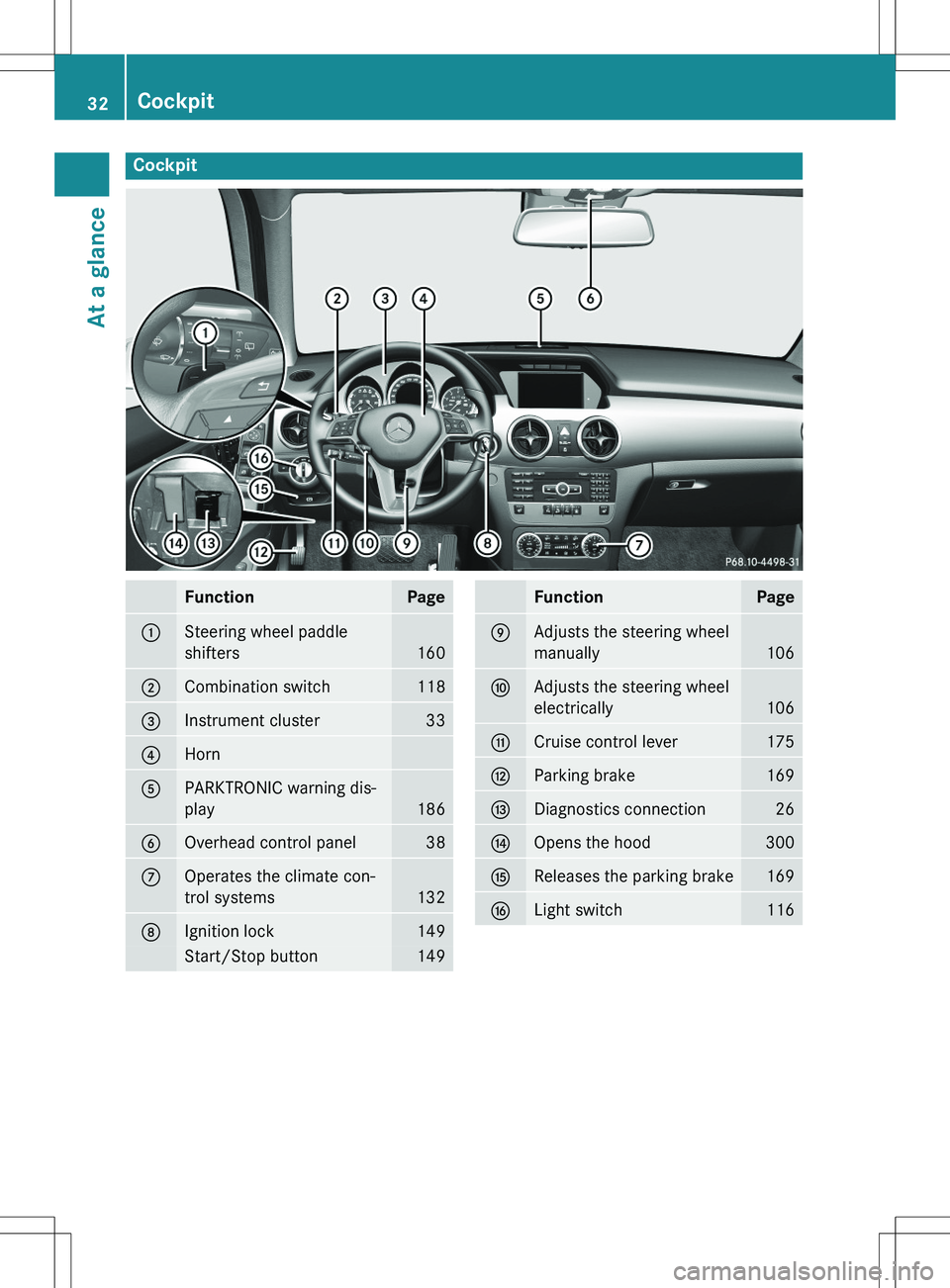
Cockpit
FunctionPage
:Steering wheel paddle
shifters
160
;Combination switch118
=Instrument cluster33
?Horn
APARKTRONIC warning dis-
play
186
BOverhead control panel38
COperates the climate con-
trol systems
132
DIgnition lock149
Start/Stop button149
FunctionPage
EAdjusts the steering wheel
manually
106
FAdjusts the steering wheel
electrically
106
GCruise control lever175
HParking brake169
IDiagnostics connection26
JOpens the hood300
KReleases the parking brake169
LLight switch116
32Cockpit
At a glance
Page 54 of 386
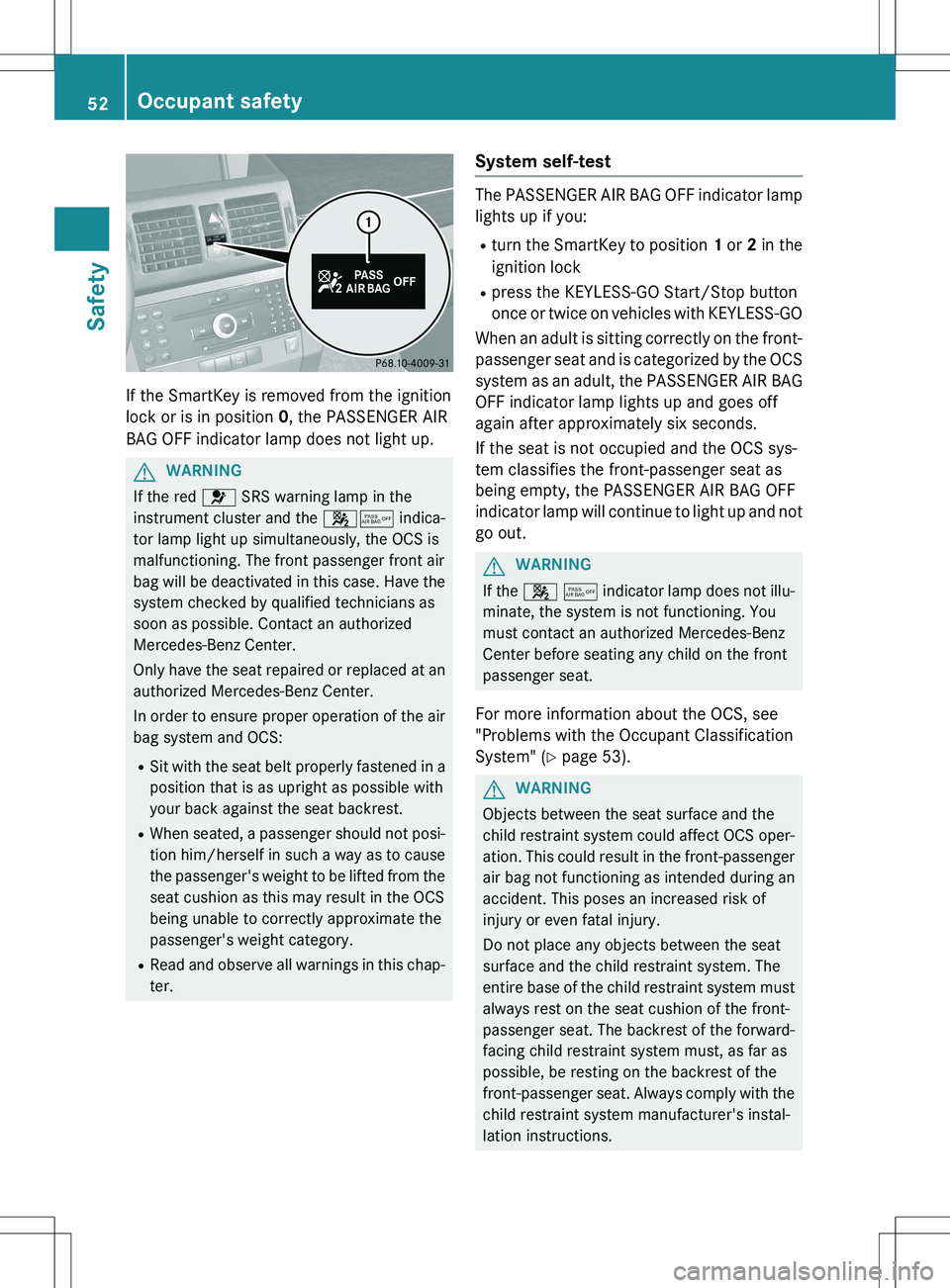
If the SmartKey is removed from the ignition
lock or is in position 0, the PASSENGER AIR
BAG OFF indicator lamp does not light up.
GWARNING
If the red 6 SRS warning lamp in the
instrument cluster and the 45 indica-
tor lamp light up simultaneously, the OCS is
malfunctioning. The front passenger front air
bag will be deactivated in this case. Have the system checked by qualified technicians as
soon as possible. Contact an authorized
Mercedes-Benz Center.
Only have the seat repaired or replaced at an
authorized Mercedes-Benz Center.
In order to ensure proper operation of the air
bag system and OCS:
R Sit with the seat belt properly fastened in a
position that is as upright as possible with
your back against the seat backrest.
R When seated, a passenger should not posi-
tion him/herself in such a way as to cause
the passenger's weight to be lifted from the seat cushion as this may result in the OCS
being unable to correctly approximate the
passenger's weight category.
R Read and observe all warnings in this chap-
ter.
System self-test
The PASSENGER AIR BAG OFF indicator lamp
lights up if you:
R turn the SmartKey to position 1 or 2 in the
ignition lock
R press the KEYLESS-GO Start/Stop button
once or twice on vehicles with KEYLESS-GO
When an adult is sitting correctly on the front-
passenger seat and is categorized by the OCS system as an adult, the PASSENGER AIR BAG
OFF indicator lamp lights up and goes off
again after approximately six seconds.
If the seat is not occupied and the OCS sys-
tem classifies the front-passenger seat as
being empty, the PASSENGER AIR BAG OFF
indicator lamp will continue to light up and not go out.
GWARNING
If the 4 5 indicator lamp does not illu-
minate, the system is not functioning. You
must contact an authorized Mercedes-Benz
Center before seating any child on the front
passenger seat.
For more information about the OCS, see
"Problems with the Occupant Classification
System" ( Y page 53).
GWARNING
Objects between the seat surface and the
child restraint system could affect OCS oper-
ation. This could result in the front-passengerair bag not functioning as intended during an
accident. This poses an increased risk of
injury or even fatal injury.
Do not place any objects between the seat
surface and the child restraint system. The
entire base of the child restraint system must
always rest on the seat cushion of the front-
passenger seat. The backrest of the forward-
facing child restraint system must, as far as
possible, be resting on the backrest of the
front-passenger seat. Always comply with the child restraint system manufacturer's instal-
lation instructions.
52Occupant safety
Safety
Page 77 of 386
When leaving the vehicle, always take the
SmartKey with you and lock the vehicle. The
engine can be started by anyone with a valid
SmartKey that is left inside the vehicle.
iThe immobilizer is always deactivated
when you start the engine.
In the event that the engine cannot be star-
ted (yet the vehicle's battery is charged),
the system is not operational. Contact an
authorized Mercedes-Benz Center or call
1-800-FOR-MERCedes (in the USA) or
1-800-387-0100 (in Canada).
ATA (anti-theft alarm system)
A visual and audible alarm is triggered if the
alarm system is armed and you open: R a door
R the vehicle with the mechanical key
R the tailgate
R the hood
The alarm is not switched off, even if you
close the open door that triggered it, for
example.
iIf the alarm continues for more than
30 seconds, the mbrace emergency call
system automatically notifies the Cus-
tomer Assistance Center. This is done
either by text message or data connection. The emergency call system sends the mes-sage or data provided that:
R you have subscribed to the mbrace ser-
vice.
R the mbrace service has been activated
properly.
R the necessary mobile phone network is
available.
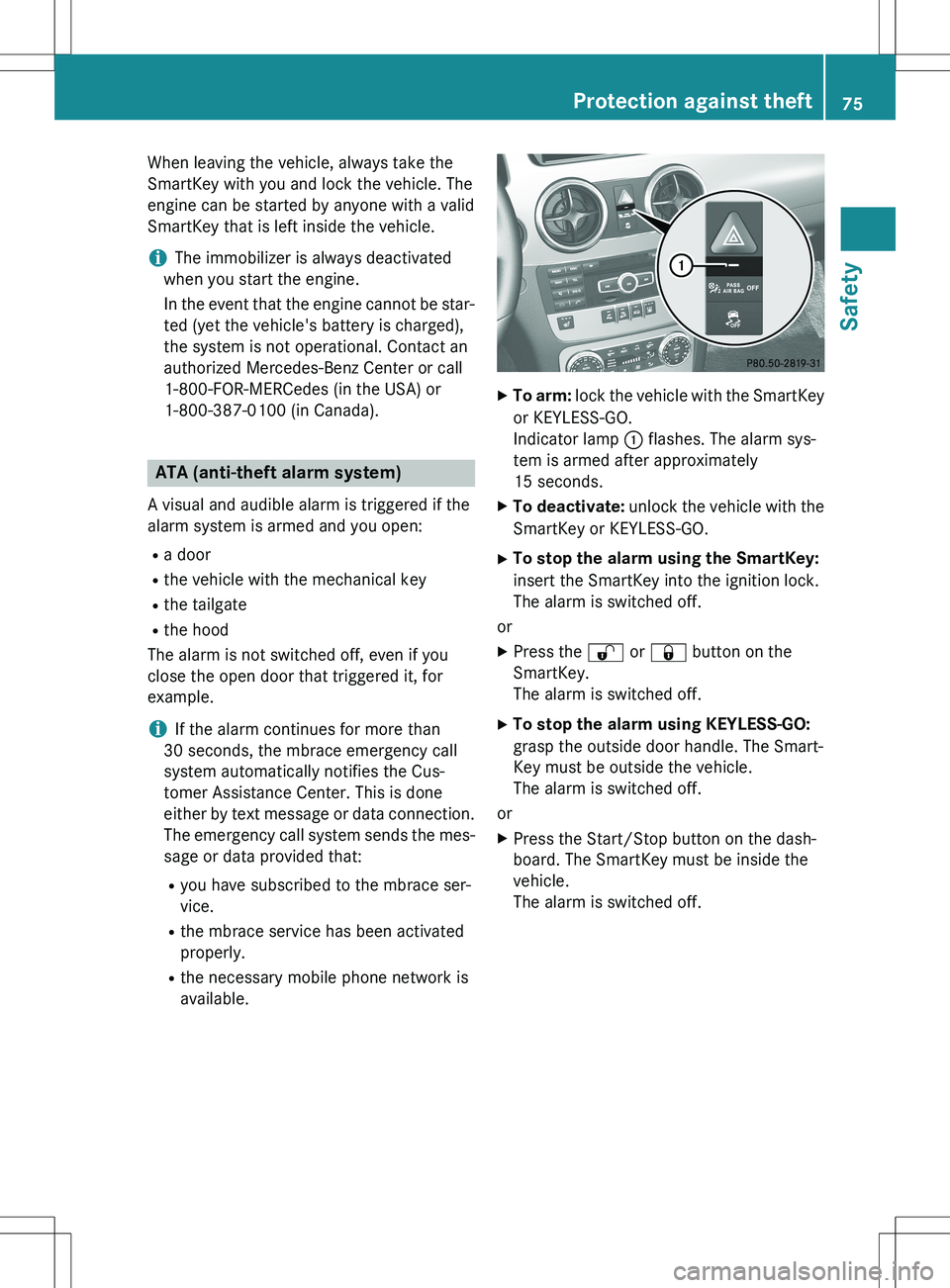
XTo arm: lock the vehicle with the SmartKey
or KEYLESS-GO.
Indicator lamp : flashes. The alarm sys-
tem is armed after approximately
15 seconds.
X To deactivate: unlock the vehicle with the
SmartKey or KEYLESS-GO.
X To stop the alarm using the SmartKey:
insert the SmartKey into the ignition lock.
The alarm is switched off.
or X Press the % or & button on the
SmartKey.
The alarm is switched off.
X To stop the alarm using KEYLESS-GO:
grasp the outside door handle. The Smart-
Key must be outside the vehicle.
The alarm is switched off.
or X Press the Start/Stop button on the dash-
board. The SmartKey must be inside the
vehicle.
The alarm is switched off.
Protection against theft75
Safety
Z
Page 82 of 386

XTo deactivate: press the & button on
the SmartKey twice in rapid succession.
The battery check lamp of the SmartKey
( Y page 81) lights up twice briefly and
KEYLESS-GO is deactivated.
X To activate: press any button on the
SmartKey or insert the SmartKey into the
ignition lock.
KEYLESS-GO and all of its associated fea-
tures are available again.
Changing the settings of the locking
system
You can change the settings of the locking
system. This means that only the driver's door
and the fuel filler flap are unlocked when the
vehicle is unlocked. This is useful if you fre-
quently travel on your own.
X To change the setting: press and hold
down the % and & buttons simulta-
neously for approximately six seconds until
the battery check lamp ( Y page 81)
flashes twice.
iIf the setting of the locking system is
changed within the signal range of the vehi- cle, pressing the & or % button:
R locks or
R unlocks the vehicle
The SmartKey now functions as follows:
X To unlock the driver's door: press the
% button once.
X To unlock centrally: press the % but-
ton twice.
X To lock centrally: press the & button.
The KEYLESS-GO function is changed as fol-
lows:
X To unlock the driver's door: touch the
inner surface of the door handle on the
driver's door.
X To unlock centrally: touch the inner sur-
face of the door handle on the front-
passenger door or the rear door. X
To lock centrally: touch the outer sensor
surface on one of the door handles
( Y page 79).
X To restore the factory settings: press
and hold down the % and & buttons
simultaneously for approximately six sec-
onds until the battery check lamp flashes
twice.
Mechanical key
General notes
If the vehicle can no longer be locked or
unlocked with the SmartKey or the KEYLESS- GO key, use the mechanical key.
If you use the mechanical key to unlock and
open the driver's door, the anti-theft alarm
system will be triggered ( Y page 75).
X To end the alarm: insert the SmartKey into
the ignition lock.
iWith KEYLESS-GO: remove the Start/
Stop button from the ignition lock before-
hand.
If you unlock the vehicle using the mechanical key, the fuel filler flap will not be unlocked
automatically.
Removing the mechanical key
X Push release catch : in the direction of
the arrow and at the same time remove
mechanical key ; from the SmartKey.
80SmartKey
Opening and closing
Page 110 of 386
Problems with the steering wheel heating
ProblemPossible causes/consequences and M Solutions
The steering wheel
heating has switched
off prematurely or can-
not be switched on.The on-board voltage is too low because too many elect rical con-
sumers are switched on.
X Switch off electrical consumers that you do not need, such as
the rear window defroster or interior lighting.
Once the battery is sufficiently charged, the steering wheel
heating will switch back on automatically.
EASY-ENTRY/EXIT feature
Important safety notes
GWARNING
When the EASY-ENTRY/EXIT feature adjusts
the steering wheel, you and other vehicle
occupants – particularly children – could
become trapped. There is a risk of injury.
While the EASY-ENTRY/EXIT feature is mak-
ing adjustments, make sure that no one has
any body parts in the sweep of the steering
wheel.
If somebody becomes trapped: R press one of the memory function position
buttons, or
R move the switch for steering wheel adjust-
ment in the opposite direction to that in
which the steering wheel is moving.
The adjustment process is stopped.
GWARNING
If you drive off while the EASY-ENTRY/EXIT
feature is making adjustments, you could lose
control of the vehicle. There is a risk of an
accident.
Always wait until the adjustment process is
complete before driving off.
The EASY-ENTRY/EXIT feature makes getting in and out of your vehicle easier.
You can activate and deactivate the EASY-
ENTRY/EXIT feature in the on-board com-
puter ( Y page 233).
Position of the steering wheel when the
EASY-ENTRY/EXIT feature is active
The steering wheel swings upwards when
you:
R remove the SmartKey from the ignition lock
R open the driver's door with KEYLESS-GO in
position 1
R open the driver's door and the SmartKey is
in position 0 or 1 in the ignition lock
( Y page 149)
iThe steering wheel only moves upwards if
it has not already reached the upper stop.
Position of the steering wheel for driv-
ing
The steering wheel is moved to the last selec-
ted position when:
R the driver's door is closed
R you insert the SmartKey into the ignition
lock
or
R you press the Start/Stop button once on
vehicles with KEYLESS-GO
When you close the driver's door with the
ignition switched on, the steering wheel is
also automatically moved to the previously
set position.
The last position of the steering wheel is
stored when you switch off the ignition or
when you store the setting with the memory
function ( Y page 112).
108Steering wheel
Seats, steering wheel and mirrors