2015 MERCEDES-BENZ GLE COUPE snow chains
[x] Cancel search: snow chainsPage 12 of 393
Snow chains .................................. 351
Symmetrical dipped beam ............. 115
Towing a trailer .............................. 227
Travelling uphill .............................. 177
Tyre ruts ........................................ 177
Wet road surface ........................... 173
DSR (Downhill Speed Regulation)
Display message ............................ 273
Function/note s............................. 193
DVD video
Operating (on-board computer) ..... 241
DYNAMIC SELECT controller
Automatic transmission ................. 153 E
EASY-ENTRY feature Activating/deactivating ................. 248
Function/note s............................. 110
EASY-EXIT feature
Crash-responsive ........................... 111
Function/note s............................. 110
Switching on/of f........................... 248
EBD (electronic brake force distri-
bution)
Display message ............................ 256
Function/note s................................ 72
ECO display
Function/note s............................. 171
On-board computer ....................... 238
ECO start/stop function
Automatic engine start .................. 150
Automatic engine switch-off .......... 150
Deactivating/activating ................. 151
General information ....................... 150
Important safety notes .................. 150
Introduction ................................... 149
Electromagnetic compatibility
Declaration of conformity ................ 24
Emergency
Automatic measures after an acci-
dent ................................................. 52
Emergency key
Unlocking the driver's door .............. 86
Emergency key element
Function/note s................................ 80
General notes .................................. 80
Inserting .......................................... 81 Locking vehicle ................................ 87
Removing ......................................... 81
Emergency release
Driver's door .................................... 86
Emergency spare wheel
General notes ................................ 367
Important safety notes .................. 367
Inflating the collapsible spare
wheel ............................................. 369
Removing ....................................... 368
Storage location ............................ 368
Stowing .......................................... 368
Technical data ............................... 371
Emergency unlocking
Tailgate ............................................ 92
Vehicle ............................................. 86
Engine
Display message ............................ 269
ECO start/stop function ................ 149
Engine number ............................... 374
Jump-starting ................................. 341
Running irregularly ......................... 152
Starting (important safety notes )... 148
Starting problems .......................... 152
Starting the engine with the key .... 148
Starting with KEYLESS GO ............. 148
Stopping ........................................ 168
Tow-starting (vehicle) ..................... 346
Warning lamp (engine diagnos-
tics) ............................................... 294
Engine electronics
Notes ............................................. 372
Problem (fault) ............................... 152
Engine oil
Additives ........................................ 379
Checking the oil level ..................... 320
Checking the oil level using the
dipstick .......................................... 320
Display message ............................ 270
Filling capacity ............................... 379
Notes about oil grade s................... 378
Notes on oil level/consumption .... 320
Temperature (on-board computer,
Mercedes-AMG vehicles) ............... 250
Topping up ..................................... 320
Viscosity ........................................ 379
Environmental protection
Returning an end-of-life vehicle ....... 22 Index
9
Page 20 of 393
Setting the airflow
............................1 33
Settings
Factory (on-board computer) ......... 249
On-board computer ....................... 245
SETUP (on-board computer) ............. 250
Side lamps
Switching on/off ........................... 116
Side marker lamp Display mes-
sage .................................................... 267
Side windows
Convenience closing ........................ 94
Convenience opening ..................... .93
Important safety notes .................... 92
Opening/closing .............................. 93
Overview .......................................... 92
Problem (malfunction) .....................96
Resetting ........................................ .95
Reversing feature ............................ .92
Sidebag ................................................ 44
Sliding sunroof
see Panorama sliding sunroof
Snow chains
Information .................................... 351
Socket
Luggage compartment ...................3 10
Sockets
Centre console .............................. 309
General notes ................................ 309
Rear compartment ......................... 310
Specialist workshop ............................ 25
Spectacles compartment ................. 301
Speed, controlling
see Cruise control
Speedometer
Digital ............................................ 239
In the Instrument cluster ................. 29
Segments ...................................... 235
Selecting a display unit .................. 246
SPEEDTRONIC
Activating variable ......................... 181
Deactivating variable ..................... 182
Display message ............................ 277
Function/notes ............................ .180
Important safety notes .................. 181
LIM indicator lamp ......................... 181
Permanent ..................................... 182
Selecting ........................................ 181 Storing the current spee
d.............. 181
Variabl e......................................... 181
Start/Stop button
Removing ....................................... 147
Start/stop function
see ECO start/stop function
Starting (engine) ................................ 148
STEER CONTROL .................................. 74
Steering
Display message ............................ 284
Steering Assist and Stop&Go Pilot
(DISTRONIC PLUS)
Activating/deactivating ................. 244
Display message ............................ 277
Steering assistant STEER CON-
TROL
see STEER CONTROL
Steering wheel
Adjusting (electrically) ................... 109
Adjusting (manually) ...................... 108
Button overview ............................... 32
Buttons (on-board computer) ......... 236
Cleaning ......................................... 329
Important safety notes .................. 108
Steering wheel heating .................. 109
Storing settings (memory func-
tion) ............................................... 114
Steering wheel gearshift paddles .... 158
Steering wheel heating
Problem (malfunction) ................... 110
Switching on/of f........................... 109
Stopwatch (RACETIMER) ................... 250
Stowage areas ................................... 299
Stowage compartments
Armrest (under) ............................. 300
Centre console .............................. 301
Centre console (rear) ..................... 301
Cup holde r..................................... 306
Glove compartment ....................... 300
Important safety information ......... 299
Spectacles compartment ............... 301
Stowage net ....................................... 301
Stowage space
Stowage net ................................... 301
Summer tyres .................................... 350
Sun visor ............................................ 308 Index
17
Page 24 of 393
Windows
Cleaning ......................................... 326
see Side windows
Windscreen
Demisting ...................................... 134
Windscreen washer fluid
see Windscreen washer system
Windscreen washer system
Important safety notes .................. 381
Topping up .................................... .322
Windscreen wipers
Problem (malfunction) ................... 125
Replacing the wiper blades ............ 122
Switching on/off ........................... 121
Winter driving
General notes ................................ 350
Winter operation
Overview ........................................ 350
Radiator cover ............................... 319
Slippery road surfaces ................... 174
Snow chains .................................. 351
Winter tyres
Limiting the speed (on-board com-
puter) ............................................. 247
M+S tyres ...................................... 350
Wiper blades
Cleaning ......................................... 327
Important safety notes .................. 122
Replacing ....................................... 122
Replacing (windscreen) .................. 122
Wooden trim (cleaning instruc-
tions) ................................................. .329 Z
ZONE function Switching on/off ........................... 134 Index
21
Page 67 of 393
Pets in the vehicle
G
WARNING
If you leave animals unsupervised or unse-
cured in the vehicle, they may push a button
or a switch, for example.
They could:
R activate vehicle equipment and become
trapped, for example
R switch vehicle systems on or off, thus
endangering other road users
In the event of an accident, sudden braking or
abrupt changes of direction, unsecured ani-
mals could be flung around the vehicle, injur-
ing the vehicle occupants. There is a risk of an accident and injury.
Never leave animals unattended in the vehi-
cle. Always secure animals correctly during a
journey, e.g. in an animal transport box. Driving safety systems
Driving safety systems overview
In this section, you will find information about
the following driving safety systems:
R ABS (Anti-lock BrakingSystem)
(Y page 64)
R BAS ( Brake Assist System) (Y page 65)
R BAS PLUS with Cross-Traffic Assist ( Brake
Assist System PLUS with Cross-Traffic Assist)
(Y page 65)
R COLLISION PREVENTION ASSIST PLUS
(Y page 67)
R Adaptive brake lights (Y page 69)
R ESP ®
(Electronic StabilityProgram)
(Y page 70)
R EBD ( electronic brake force distribution)
(Y page 72)
R ADAPTIVE BRAKE (Y page 72)
R PRE-SAFE ®
Brake (Y page 72)
R STEER CONTROL (Y page 74) Important safety notes
If you fail to adapt your driving style or if you are
inattentive, the driving safety systems can nei-
ther reduce the risk of an accident nor override the laws of physics. Driving safety systems are
merely aids designed to assist driving. You are
responsible for maintaining the distance to the
vehicle in front, for vehicle speed, for braking in
good time, and for staying in lane. Always adapt your driving style to suit the prevailing road and
weather conditions and maintain a safe distance from the vehicle in front. Drive carefully.
The driving safety systems described only work
as effectively as possible when there is ade-
quate contact between the tyres and the road
surface. Pay particular attention to the informa- tion regarding tyres, recommended minimum
tyre tread depths etc. in the "Wheels and tyres" section (Y page 348).
In wintry driving conditions, always use winter
tyres (M+S tyres) and, if necessary, snow
chains. Only in this way will the driving safety
systems described in this section work as effec-
tively as possible. ABS (Anti-lock Braking System)
General notes ABS regulates brake pressure in such a way that
the wheels do not lock when you brake. This
allows you to continue steering the vehicle when braking.
The ! ABS warning lamp in the instrument
cluster lights up when the ignition is switched
on. It goes out when the engine is running.
ABS works from a speed of about 8 km/h,
regardless of road-surface conditions. ABS
works on slippery surfaces, even when you only brake gently.
Important safety notes i
Observe the "Important safety notes" sec-
tion (Y page 64). G
WARNING
If ABS is faulty, the wheels could lock when
braking. The steerability and braking charac-
teristics may be severely impaired. Addition-
ally, further driving safety systems are deac- 64
Driving safety systemsSafety
Page 74 of 393
G
WARNING
If you deactivate ESP ®
, ESP ®
no longer sta-
bilises the vehicle. There is an increased risk
of skidding and an accident.
Only deactivate ESP ®
in the situations descri-
bed in the following.
It may be best to deactivate ESP ®
in the follow-
ing situations:
R when using snow chains
R in deep snow
R on sand or gravel
i Activate ESP ®
as soon as the situations
described above no longer apply. ESP ®
will
otherwise not be able to stabilise the vehicle
if the vehicle starts to skid or a wheel starts to
spin.
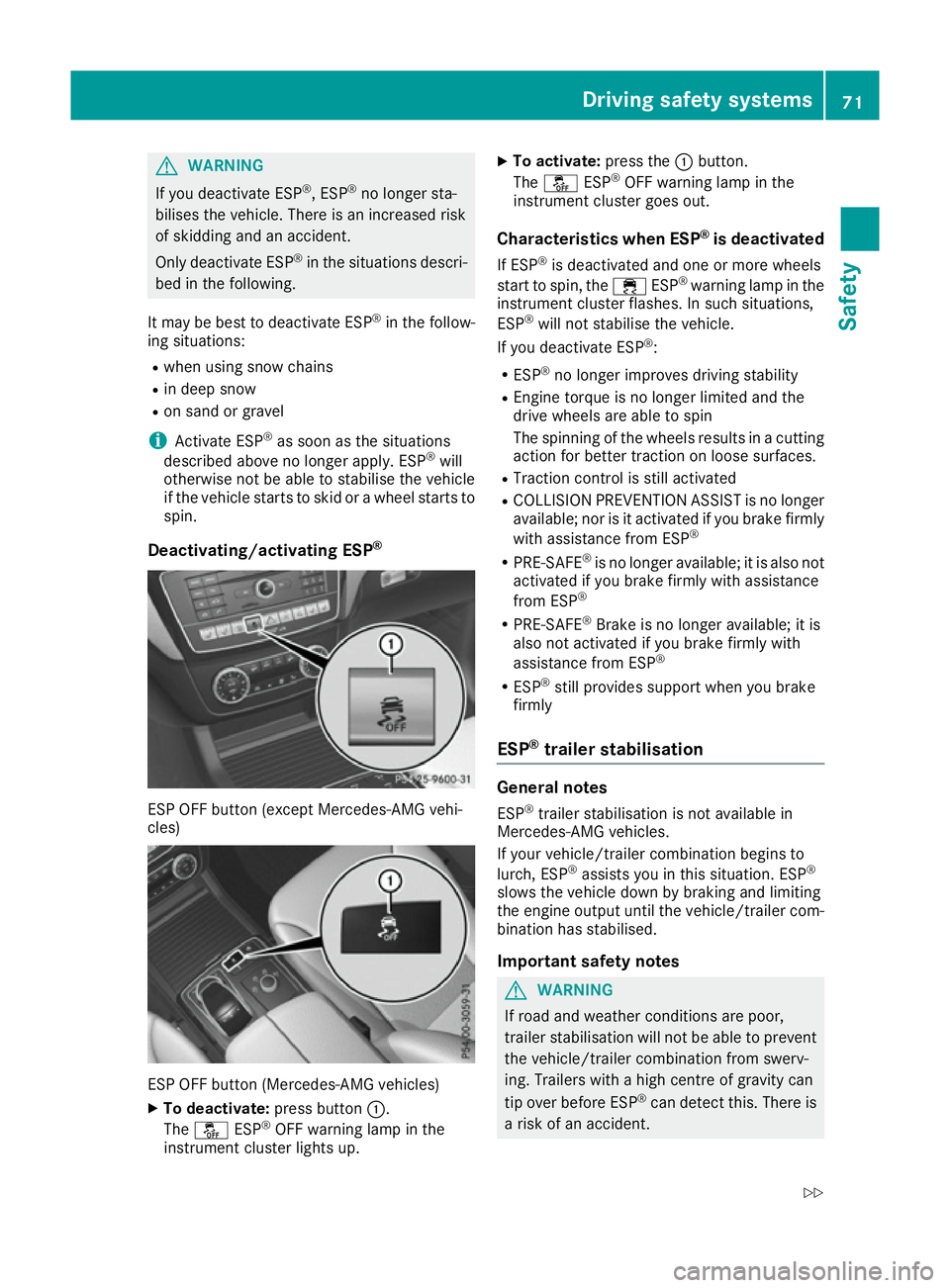
Deactivating/activating ESP ®ESP OFF button (except Mercedes-AMG vehi-
cles)
ESP OFF button (Mercedes-AMG vehicles)
X To deactivate: press button:.
The å ESP®
OFF warning lamp in the
instrument cluster lights up. X
To activate: press the:button.
The å ESP®
OFF warning lamp in the
instrument cluster goes out.
Characteristics when ESP ®
is deactivated
If ESP ®
is deactivated and one or more wheels
start to spin, the ÷ESP®
warning lamp in the
instrument cluster flashes. In such situations,
ESP ®
will not stabilise the vehicle.
If you deactivate ESP ®
:
R ESP ®
no longer improves driving stability
R Engine torque is no longer limited and the
drive wheels are able to spin
The spinning of the wheels results in a cutting
action for better traction on loose surfaces.
R Traction control is still activated
R COLLISION PREVENTION ASSIST is no longer
available; nor is it activated if you brake firmly
with assistance from ESP ®
R PRE-SAFE ®
is no longer available; it is also not
activated if you brake firmly with assistance
from ESP ®
R PRE-SAFE ®
Brake is no longer available; it is
also not activated if you brake firmly with
assistance from ESP ®
R ESP ®
still provides support when you brake
firmly
ESP ®
trailer stabilisation General notes
ESP ®
trailer stabilisation is not available in
Mercedes-AMG vehicles.
If your vehicle/trailer combination begins to
lurch, ESP ®
assists you in this situation. ESP ®
slows the vehicle down by braking and limiting
the engine output until the vehicle/trailer com-
bination has stabilised.
Important safety notes G
WARNING
If road and weather conditions are poor,
trailer stabilisation will not be able to prevent the vehicle/trailer combination from swerv-
ing. Trailers with a high centre of gravity can
tip over before ESP ®
can detect this. There is
a risk of an accident. Driving safety systems
71Safety
Z
Page 177 of 393
Driving on flooded roads
!
Bear in mind that vehicles travelling in front
or in the opposite direction create waves. This may cause the maximum permissible water
depth to be exceeded.
These notes must be observed under all cir-
cumstances. You could otherwise damage
the engine, the electronics or the transmis-
sion.
If you must drive on stretches of road on which
water has collected, please bear in mind that:
R in the case of standing water, the water level
must be no higher than the lower edge of the vehicle body
R you should drive no faster than walking pace
Off-road fording !
Under no circumstances should you accel-
erate before entering the water. The bow
wave could cause water to enter and damage the engine and neighbouring assemblies.
! Do not open any of the vehicle's doors while
fording. Otherwise, water could get into the
vehicle interior and damage the vehicle's
electronics and interior equipment.
R Establish how deep the water is and the char-
acteristics of the body of water before ford-
ing.
R Select the highest possible vehicle level.
R Shift to a lower gear using the left-hand steer-
ing wheel gearshift paddle.
R Avoid high engine speeds.
R Enter and exit the water at a flat place and at
a steady walking pace.
R Drive slowly and at a constant speed through
the water.
R Ensure that a bow wave does not form as you
drive.
R Do not stop and do not switch off the engine.
Water offers a high degree of resistance, the
ground is slippery and, in some cases, unsta-
ble. Therefore, it is difficult and dangerous to pull away in the water.
R Clean any mud from the tyre tread after ford-
ing.
R Apply the brakes to dry them after fording.
Always observe the fording depth values
(Y page 383). Winter driving
G
WARNING
If you shift down on a slippery road surface in an attempt to increase the engine's braking
effect, the drive wheels could lose their grip.
This increases the risk of skidding and having
an accident.
Do not shift down for additional engine brak-
ing on a slippery road surface. G
DANGER
If the exhaust pipe is blocked or adequate
ventilation is not possible, poisonous gases
such as carbon monoxide (CO) may enter the vehicle. This is the case, e.g. if the vehicle
becomes trapped in snow. There is a risk of
fatal injury.
If you leave the engine or the auxiliary heating
running, make sure the exhaust pipe and area
around the vehicle are clear of snow. To
ensure an adequate supply of fresh air, open a window on the side of the vehicle that is not
facing into the wind.
! Take care not to damage the sealing strip
and the moulding on the side of the rear win- dow when scraping ice off the rear window.
Have your vehicle winterproofed at a qualified
specialist workshop at the onset of winter.
You should drive particularly carefully on slip-
pery road surfaces. Avoid sudden acceleration,
steering and braking manoeuvres. Do not use
cruise control or DISTRONIC PLUS.
If the vehicle threatens to skid or cannot be
stopped when moving at low speed:
X Shift the transmission to position N.
X Try to bring the vehicle under control by using
corrective steering.
When driving in snow with or without snow
chains, select driving program Slippery
(Y page 153).
The outside temperature indicator is not
designed to serve as an ice-warning device and
is therefore unsuitable for that purpose.
Changes in the outside temperature are dis-
played after a short delay. 174
Driving tipsDriving and pa
rking
Page 178 of 393
Indicated temperatures just above the freezing
point do not guarantee that the road surface is
free of ice. The road may still be icy, especially in wooded areas or on bridges. You should pay
special attention to road conditions when tem-
peratures are around freezing point.
Further information on driving with snow chains
(Y page 351).
Further information on driving with summer
tyres (Y page 350).
Observe the notes in the "Winter operation" sec-
tion (Y page 350). Off-road driving
Important safety notes G
WARNING
If you drive on a steep incline at an angle or
turn on a steep incline, the vehicle could slip
sideways, tip and overturn. There is a risk of
an accident.
When driving on an incline, drive into the line of fall (upwards or downwards in a straight
line) and do not turn. G
WARNING
Flammable material such as leaves, grass or
twigs may ignite if they come into contact with hot parts of the exhaust system. There is a risk of fire.
When driving off road or on unpaved roads,
check the vehicle's underside regularly. In
particular, remove parts of plants or other
flammable materials which have become
trapped. In the case of damage, contact a
qualified specialist workshop. G
WARNING
If the vehicle level is high, the vehicle centre of gravity is raised. This could cause the vehicleto tip over more easily on uphill or downhill
gradients. There is a risk of an accident.
Select the lowest possible vehicle level. !
There is a risk of damage to the vehicle if:
R the vehicle becomes stuck, e.g. on a high
kerb or an unpaved road
R you drive too fast over an obstacle, e.g. a
kerb or a pothole in the road
R a heavy object strikes the underbody or
parts of the chassis
In situations like this, the body, the under-
body, chassis parts, wheels or tyres could be
damaged without the damage being visible.
Components damaged in this way can unex-
pectedly fail or, in the case of an accident, no longer withstand the strain they are designed
for.
If the underbody panelling is damaged, com-
bustible materials such as leaves, grass or
twigs can gather between the underbody and
the underbody panelling. If these materials
come in contact with hot parts of the exhaust
system, they can catch fire.
In such situations, have the vehicle checked
and repaired immediately at a qualified spe-
cialist workshop. If, upon continuing your
journey, you notice that driving safety is
impaired, pull over and stop the vehicle imme- diately, paying attention to road and traffic
conditions. In such cases, consult a qualified
specialist workshop.
When driving off-road, substances such as sand,
mud and water or water mixed with oil may get
into the brakes. This may lead to a reduction in
braking performance or total brake failure as a
result of increased wear. The braking charac-
teristics will vary depending on the substances
that get into the brakes. Clean the brakes after
driving off-road. If you notice grinding noises or a reduction in braking performance, have the
brake system checked at a qualified specialist
workshop immediately. Adapt your driving style
to the altered braking characteristics.
Driving off-road increases the possibility of dam- age to the vehicle, which may cause assemblies
or systems to fail. Adapt your driving style to the conditions of the terrain. Drive carefully. Have
vehicle damage rectified immediately at a quali-
fied specialist workshop.
Do not shift into transmission position Nwhen
driving off-road. You could lose control of the
vehicle if you attempt to brake the vehicle using
the service brake. If the gradient is too steep for your vehicle, back up in reverse gear. Driving tips
175Driving and parking Z
Page 196 of 393
On steep uphill or downhill inclines or if there is
a malfunction, the transmission may also be
automatically shifted into position P.4MATIC
4MATIC ensures that all four wheels are perma-
nently driven. Together with ESP ®
and 4ETS, it
improves the traction of your vehicle whenever
a drive wheel spins due to insufficient grip.
If you fail to adapt your driving style, 4MATIC can
neither reduce the risk of an accident nor over-
ride the laws of physics. 4MATIC cannot take
account of road, weather and traffic conditions. 4MATIC is only an aid. You are responsible for
the distance to the vehicle in front, for vehicle
speed, for braking in good time and for staying in
lane.
! Never tow the vehicle with one axle raised.
This may damage the transfer case. Damage
of this sort is not covered by the Mercedes-
Benz implied warranty. All wheels must
remain either on the ground or be fully raised.
Observe the instructions for towing the vehi-
cle with all wheels in full contact with the
ground.
! A function or performance test should only
be carried out on a twin-axle dynamometer.
Before you operate the vehicle on such a
dynamometer, please consult a qualified
workshop. You could otherwise damage the
drive train or the brake system.
i In wintry driving conditions, the maximum
effect of 4MATIC can only be achieved if you
use winter tyres (M+S tyres), with snow
chains if necessary. DSR (Downhill Speed Regulation)
General notes DSR is an aid to assist you when driving down-
hill. It keeps the speed of travel at the speed
selected on the on-board computer. The steeper
the downhill gradient, the greater the DSR brak-
ing effect on the vehicle. When driving on flat
stretches of road or on an uphill gradient, the
DSR braking effect is minimal or non-existent.
DSR controls the vehicle’s speed when it is acti- vated and the transmission is in position D,Ror
N. By accelerating or braking, you can always drive at a higher or a lower speed than that set
on the on-board computer.
Important safety notes G
WARNING
If the speed driven and the set speed deviate and you activate DSR on a slippery road sur-
face, the wheels may lose traction. This
increases the risk of skidding and having an
accident.
Before switching DSR on, please take into
consideration the road surface and the differ-
ence between driving speed and the set
speed.
If you fail to adapt your driving style, DSR can
neither reduce the risk of accident nor override the laws of physics. DSR cannot take account ofroad, weather and traffic conditions. DSR is only
an aid. You are responsible for the distance to
the vehicle in front, for vehicle speed, for brak-
ing in good time and for staying in lane.
You are always responsible for keeping control
of the vehicle and for assessing whether the
downhill gradient can be managed. DSR may not
always be able to keep to the set speed, depend-
ing on road surface and tyre conditions. Select a set speed suitable for the prevailing conditions
and when necessary, apply the brakes manually.
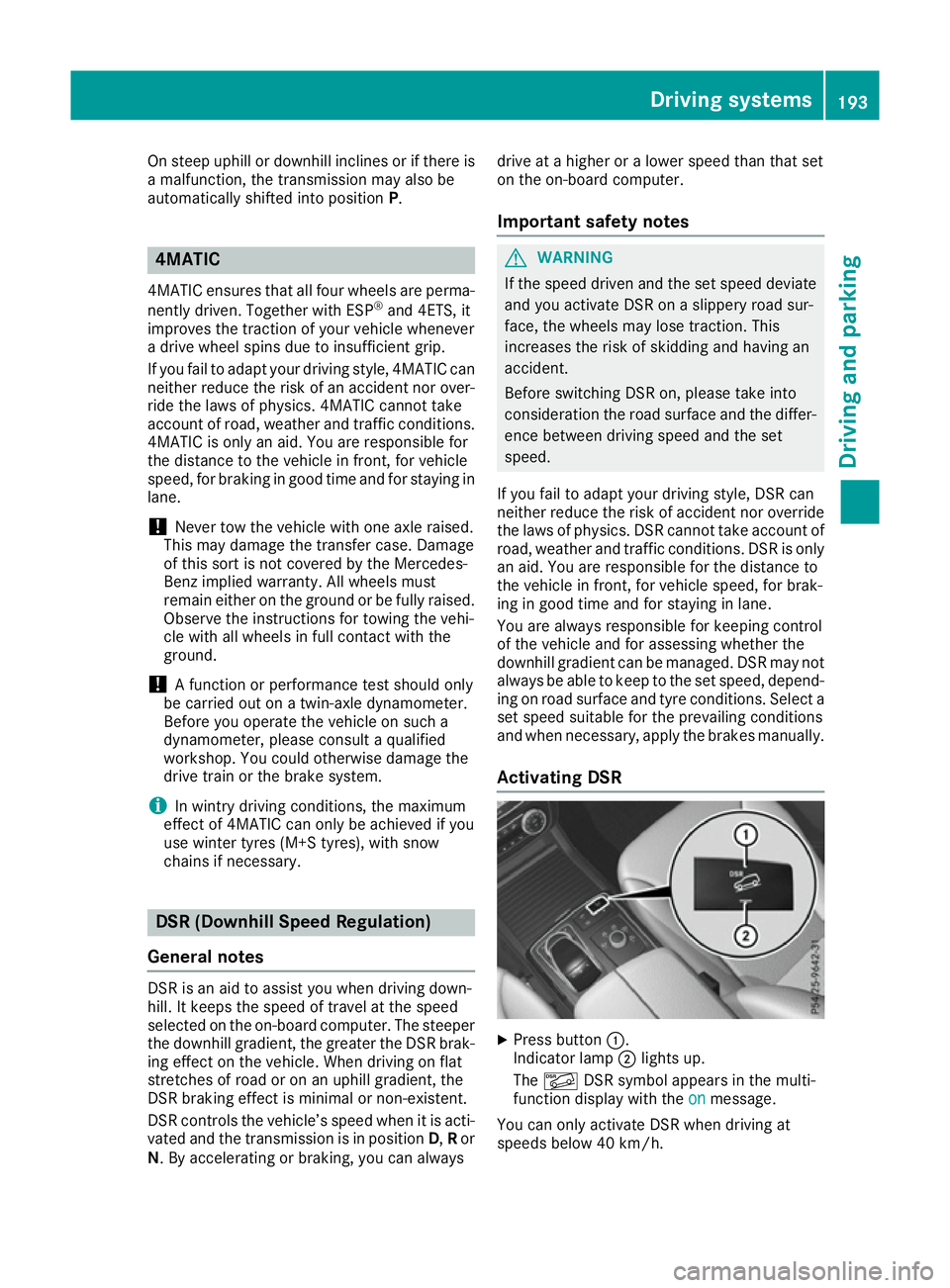
Activating DSR X
Press button :.
Indicator lamp ;lights up.
The à DSR symbol appears in the multi-
function display with the on onmessage.
You can only activate DSR when driving at
speeds below 40 km/h. Driving systems
193Driving and parking Z