2015 MERCEDES-BENZ GLE COUPE radiator
[x] Cancel search: radiatorPage 14 of 393
Problem (malfunction) ...................1
64
Fuses
Allocation chart ............................ .346
Before changing ............................ .346
Dashboard fuse box ....................... 346
Fuse box in the engine compart-
ment .............................................. 347
Fuse box under rear bench sea t.... 347
Important safety notes .................. 346 G
Garage door opener Clearing the memory ..................... 313
Frequencies ................................... 314
General notes ................................ 311
Important safety notes .................. 312
Opening/closing the garage doo r..3 13
Programming (button in the rear-
view mirror) ................................... 312
Synchronising the rolling code ....... 313
Gear indicator (on-board com-
puter, Mercedes-AMG vehicles) ....... 250
Gearshift paddles
see Steering wheel gearshift paddles
Gearshift program
SETUP (on-board computer) .......... 250
Genuine Mercedes-Benz parts ........... 22
Glove compartment .......................... 300H
Hazard warning lamps ......................117
Head restraints
Adjusting ....................................... 103
Adjusting (electrically) ................... 104
Adjusting (rear) .............................. 104
Fitting/removing (rear) .................. 105
Luxury ............................................ 104
Headlamps
Misting up ...................................... 120
see Automatic headlamp mode
Heating
see Climate control
High-pressure cleaners .................... 325
Hill start assist .................................. 149
HOLD function
Deactivating ................................... 192 Display message ............................ 274
Function/notes ............................
.191
Horn ...................................................... 27 I
Ignition lock see Key positions
Immobiliser .......................................... 75
Indicator and warning lamp
Restraint system ............................ 294
Indicator and warning lamps
Coolant .......................................... 295
DISTRONIC PLUS ........................... 297
Engine diagnostics ......................... 294
Indicator lamps
Display message ............................ 266
see Warning and indicator lamps
Insect protection on the radiator .... 319
Instrument cluster
Overview .......................................... 29
Warning and indicator lamps ........... 31
Instrument cluster lighting .............. 235
Intelligent Light System
Activating/deactivating ................. 246
Display message ............................ 267
Overview ........................................ 117
Setting the dipped-beam head-
lamps for driving on the right/left .. 246
Interior lighting
Automatic control system .............. 121
Emergency lighting ........................ 121
Manual control ............................... 121
Overview ........................................ 120
Reading lamp ................................. 120
Interior motion sensor
Deactivating ..................................... 77
Function .......................................... .76
Priming ............................................ 76
Switching off .................................... 76
ISOFIX child seat securing system ....54 J
Jack Storage location ............................3 32
Using ............................................. 358
Jump starting (engine) ......................341 Index
11
Page 18 of 393
Problem (fault) ...............................2
02
Sensor range ................................. 199
Trailer towing ................................. 199
Warning displa y............................. 200
PASSENGER AIR BAG
Display message ............................ 264
Indicator lamps ................................ 38
Problems (malfunctions) ................ 264
Pets in the vehicle ............................... 64
Plastic trim (cleaning instruc-
tions) .................................................. 329
Power closing ...................................... 86
Power windows
see Side windows
PRE-SAFE ®
(anticipatory occupant
protection)
Operation ......................................... 51
PRE-SAFE ®
(preventive occupant
safety system)
Display message ............................ 260
PRE-SAFE ®
Brake
Activating/deactivating ................. 244
Display message ............................ 260
Function/note s................................ 72
Important safety notes .................... 73
Warning lamp ................................. 297
PRE-SAFE ®
PLUS (anticipatory
occupant protection PLUS)
Display message ............................ 261
Operation ......................................... 51
Protection against theft
ATA (Anti-Theft Alarm system) ......... 75
Immobiliser ...................................... 75
Interior motion sensor ..................... 76
Tow-away protection ........................ 75
Protection of the environment
General notes .................................. 22
Pulling away
General notes ................................ 149
Trailer ............................................ 149
Pulling away (automatic transmis-
sion) .................................................... 149 Q
QR code Mercedes-Benz Guide App ................. 1
Rescue card ..................................... 25 Qualified specialist workshop
........... 25 R
RACETIMER (on-board computer) .... 250
Radiator cover ................................... 319
Radio
Selecting a station ......................... 241
see separate operating instructions
Radio-based vehicle components
Declaration of conformity ................ 24
Reading lamp ..................................... 120
Rear bench seat
Folding the bench seat forwards/
back ............................................... 303
Rear compartment
Setting the air vents ...................... 143
Setting the temperature ................ 132
Rear foglamp
Display message ............................ 267
Switching on/of f........................... 116
Rear seat
Adjusting ....................................... 105
Rear shelf ........................................... 304
Rear window heating
Problem (fault) ............................... 136
Switching on/of f........................... 135
Rear-compartment seat belt sta-
tus indicator ........................................ 42
Rear-view mirror
Anti-dazzle mode (automatic) ........ 112
Dipping (manual) ........................... 111
Refuelling
Fuel gauge ....................................... 29
Important safety notes .................. 161
Notes for Mercedes ‑AMG vehi-
cles ................................................ 376
Refuelling process ......................... 162
see Fuel
Remote control
Auxiliary heating/ventilation .......... 139
Changing the batteries (auxiliary
heating) ......................................... 141
Garage door opener ....................... 311
Programming (garage door
opener) .......................................... 312
Replacing bulbs
General notes ................................ 121 Index
15
Page 24 of 393
Windows
Cleaning ......................................... 326
see Side windows
Windscreen
Demisting ...................................... 134
Windscreen washer fluid
see Windscreen washer system
Windscreen washer system
Important safety notes .................. 381
Topping up .................................... .322
Windscreen wipers
Problem (malfunction) ................... 125
Replacing the wiper blades ............ 122
Switching on/off ........................... 121
Winter driving
General notes ................................ 350
Winter operation
Overview ........................................ 350
Radiator cover ............................... 319
Slippery road surfaces ................... 174
Snow chains .................................. 351
Winter tyres
Limiting the speed (on-board com-
puter) ............................................. 247
M+S tyres ...................................... 350
Wiper blades
Cleaning ......................................... 327
Important safety notes .................. 122
Replacing ....................................... 122
Replacing (windscreen) .................. 122
Wooden trim (cleaning instruc-
tions) ................................................. .329 Z
ZONE function Switching on/off ........................... 134 Index
21
Page 156 of 393
Problem
Possible causes/consequences and
M
MSolutions The coolant temperature
display is showing more
than 120 †. The coolant warning lamp may also
be on and a warning tone
may sound. The coolant level is too low. The coolant is too hot and the engine is no
longer being cooled sufficiently.
X Stop as soon as possible and allow the engine and the coolant to
cool down.
X Check the coolant level (Y page 321). Observe the warning notes
as you do so and top up the coolant if necessary. If the coolant level is correct, the radiator fan may be faulty. The cool-
ant is too hot and the engine is no longer being cooled sufficiently.
X If the coolant temperature is below 120 †, you can continue driving
to the nearest qualified specialist workshop.
X Avoid heavy loads on the engine as you do so, e.g. driving in moun-
tainous terrain and stop-start traffic. DYNAMIC SELECT controller
Use the DYNAMIC SELECT controller to change the drive program. Depending on the drive pro-
gram selected, the following vehicle character-
istics will change:
R the drive (engine and transmission manage-
ment)
R the transmission
R the suspension
R the steering
R the availability of the ECO start/stop function
If the ignition is switched off for less than four
hours, the previously selected drive program is
activated when the engine is next started. If the
ignition is switched off for more than four hours,
the Comfort drive program is activated when
the engine is next started. X
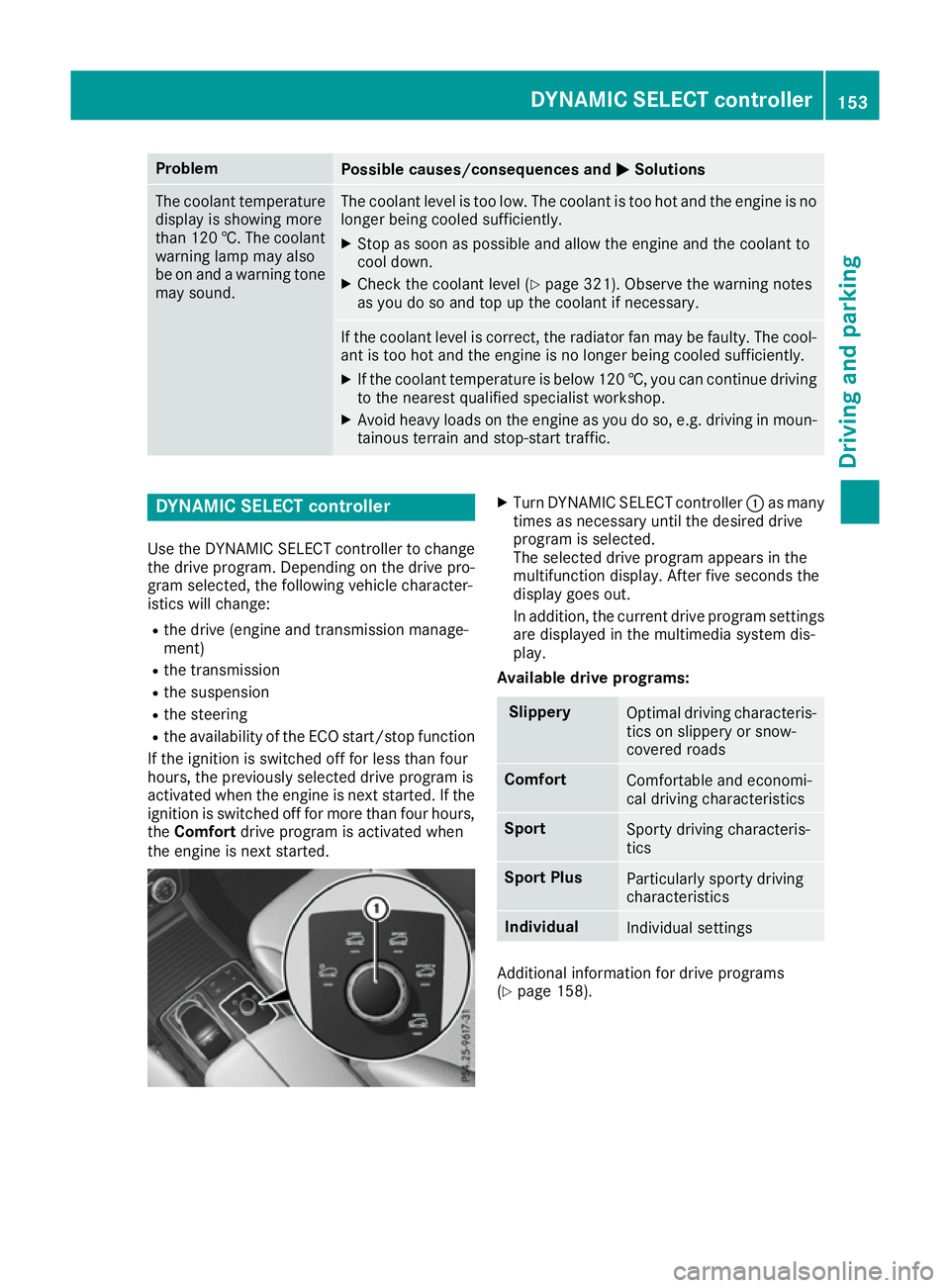
Turn DYNAMIC SELECT controller :as many
times as necessary until the desired drive
program is selected.
The selected drive program appears in the
multifunction display. After five seconds the
display goes out.
In addition, the current drive program settings
are displayed in the multimedia system dis-
play.
Available drive programs: Slippery
Optimal driving characteris-
tics on slippery or snow-
covered roads Comfort
Comfortable and economi-
cal driving characteristics
Sport
Sporty driving characteris-
tics
Sport Plus
Particularly sporty driving
characteristics
Individual
Individual settings
Additional information for drive programs
(Y
page 158). DYNAMIC SELECT controller
153Driving and parking Z
Page 225 of 393
As a result, Active Blind Spot Assist may nei-
ther give warnings nor intervene in such sit-
uations. There is a risk of an accident.
Always pay careful attention to the traffic sit- uation and maintain a safe distance at the sideof the vehicle.
Radar sensors The Active Blind Spot Assist radar sensors are
integrated into the front and rear bumpers and
behind a cover in the radiator trim. Make sure
that the bumpers and the cover in the radiator
trim are free of dirt, ice or slush. The sensors
must not be covered, for example by cycle racks or overhanging loads. Following an accident or
in the event of damage to the bumpers, have the
function of the radar sensors checked at a quali-
fied specialist workshop. Active Blind Spot
Assist may otherwise no longer function prop-
erly.
Monitoring range G
WARNING
Active Blind Spot Assist does not detect all
traffic situations and road users. There is a
risk of an accident.
Always make sure that there is sufficient dis-
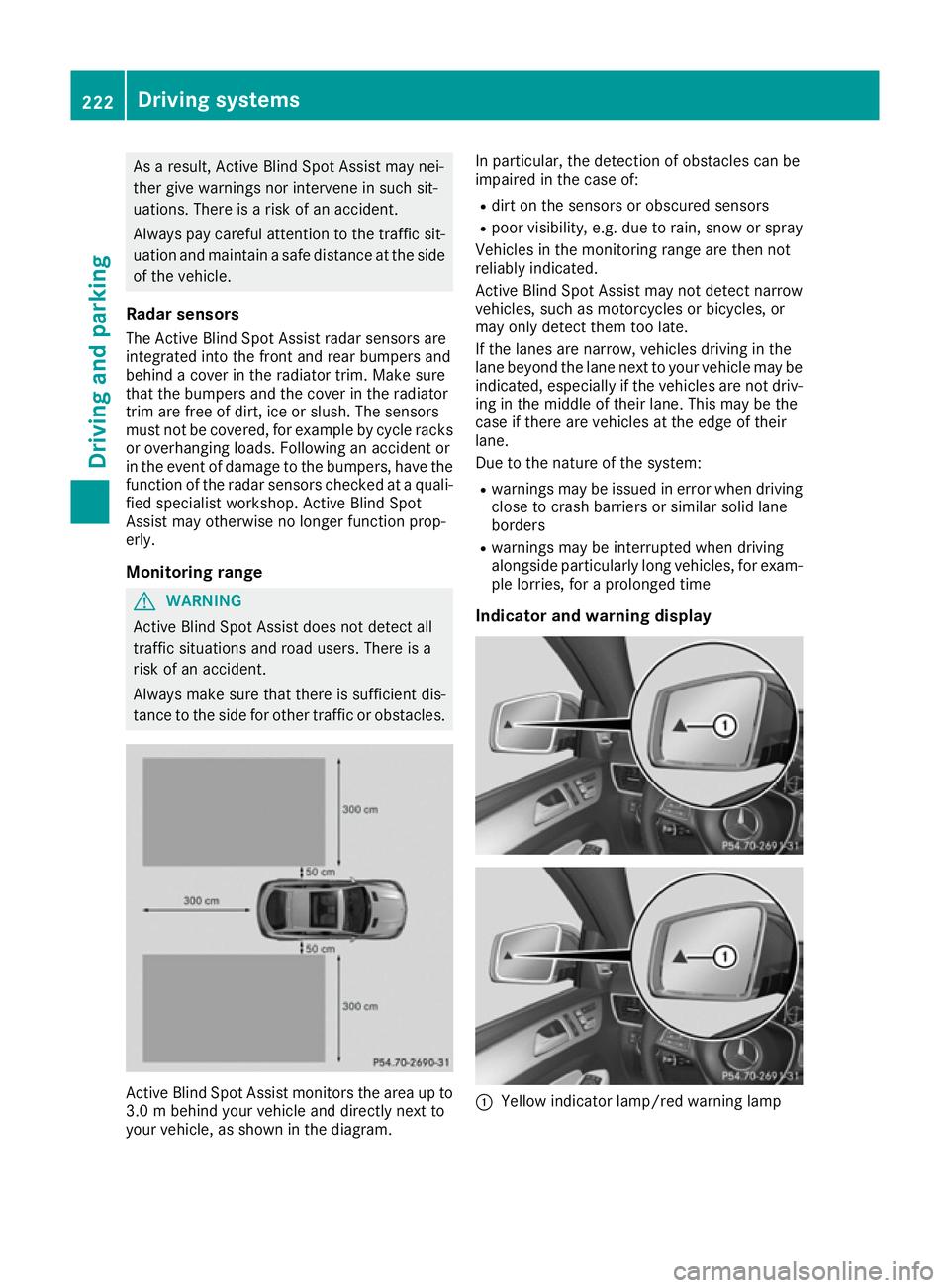
tance to the side for other traffic or obstacles. Active Blind Spot Assist monitors the area up to
3.0 m behi nd your vehicle and directly next to
your vehicle, as shown in the diagram. In particular, the detection of obstacles can be
impaired in the case of:
R dirt on the sensors or obscured sensors
R poor visibility, e.g. due to rain, snow or spray
Vehicles in the monitoring range are then not
reliably indicated.
Active Blind Spot Assist may not detect narrow
vehicles, such as motorcycles or bicycles, or
may only detect them too late.
If the lanes are narrow, vehicles driving in the
lane beyond the lane next to your vehicle may be indicated, especially if the vehicles are not driv-
ing in the middle of their lane. This may be the
case if there are vehicles at the edge of their
lane.
Due to the nature of the system:
R warnings may be issued in error when driving
close to crash barriers or similar solid lane
borders
R warnings may be interrupted when driving
alongside particularly long vehicles, for exam-
ple lorries, for a prolonged time
Indicator and warning display :
Yellow indicator lamp/red warning lamp 222
Driving systemsDriving an
d parking
Page 264 of 393
Display messages
Possible causes/consequences and
M
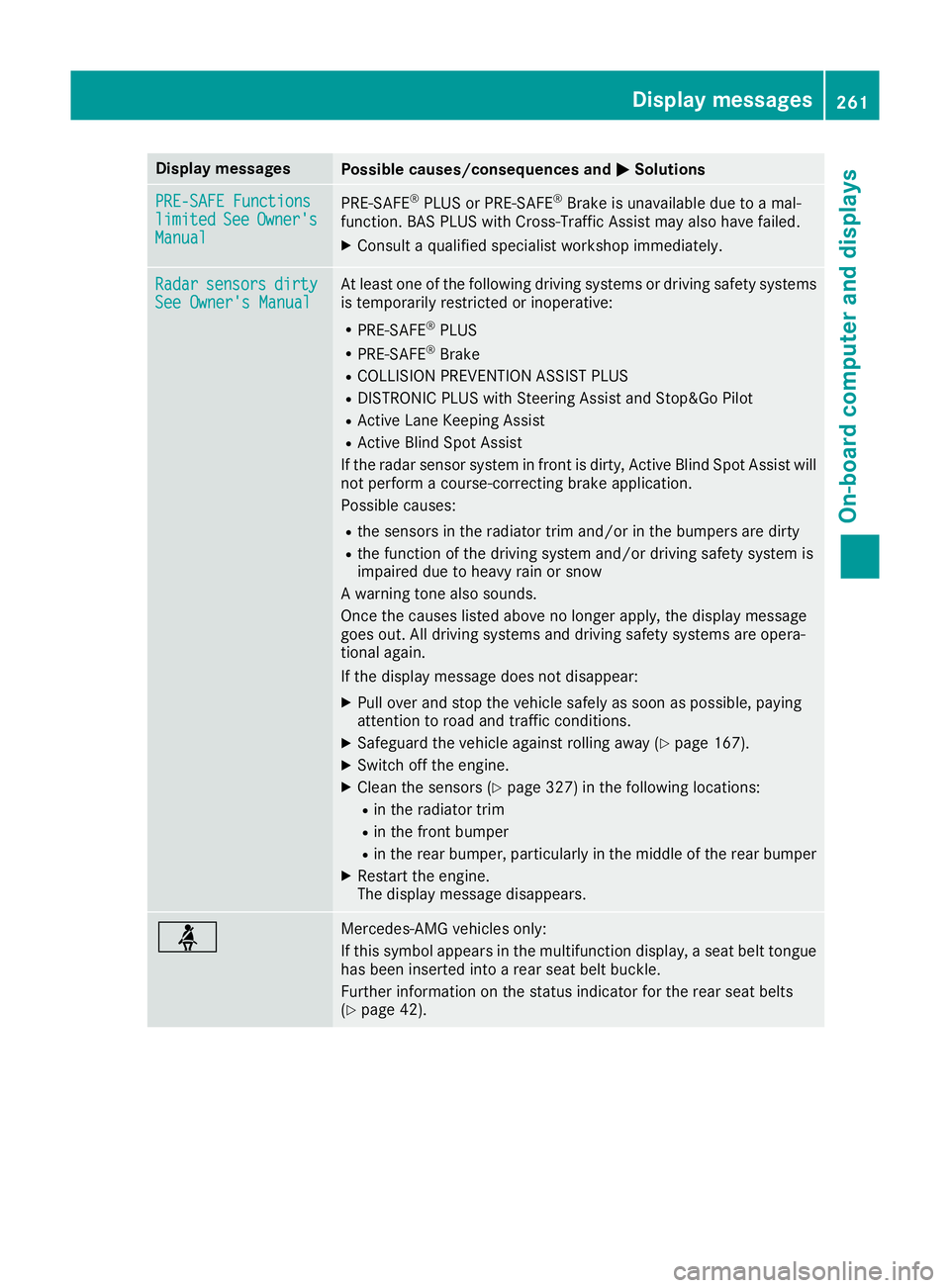
MSolutions PRE-SAFE Functions
PRE-SAFE Functions
limited limited
See
SeeOwner's
Owner's
Manual
Manual PRE
‑SAFE ®
PLUS or PRE‑ SAFE®
Brake is unavailable due to a mal-
function. BAS PLUS with Cross-Traffic Assist may also have failed.
X Consult a qualified specialist workshop immediately. Radar
Radar
sensors
sensors dirty
dirty
See Owner's Manual
See Owner's Manual At least one of the following driving systems or driving safety systems
is temporarily restricted or inoperative:
R PRE-SAFE ®
PLUS
R PRE-SAFE ®
Brake
R COLLISION PREVENTION ASSIST PLUS
R DISTRONIC PLUS with Steering Assist and Stop&Go Pilot
R Active Lane Keeping Assist
R Active Blind Spot Assist
If the radar sensor system in front is dirty, Active Blind Spot Assist will not perform a course-correcting brake application.
Possible causes:
R the sensors in the radiator trim and/or in the bumpers are dirty
R the function of the driving system and/or driving safety system is
impaired due to heavy rain or snow
A warning tone also sounds.
Once the causes listed above no longer apply, the display message
goes out. All driving systems and driving safety systems are opera-
tional again.
If the display message does not disappear:
X Pull over and stop the vehicle safely as soon as possible, paying
attention to road and traffic conditions.
X Safeguard the vehicle against rolling away (Y page 167).
X Switch off the engine.
X Clean the sensors (Y page 327) in the following locations:
R in the radiator trim
R in the front bumper
R in the rear bumper, particularly in the middle of the rear bumper
X Restart the engine.
The display message disappears. ü Mercedes-AMG vehicles only:
If this symbol appears in the multifunction display, a seat belt tongue
has been inserted into a rear seat belt buckle.
Further information on the status indicator for the rear seat belts
(Y page 42). Display
messages
261On-board computer and displays Z
Page 272 of 393
Engine
Display messages
Possible causes/consequences and
M
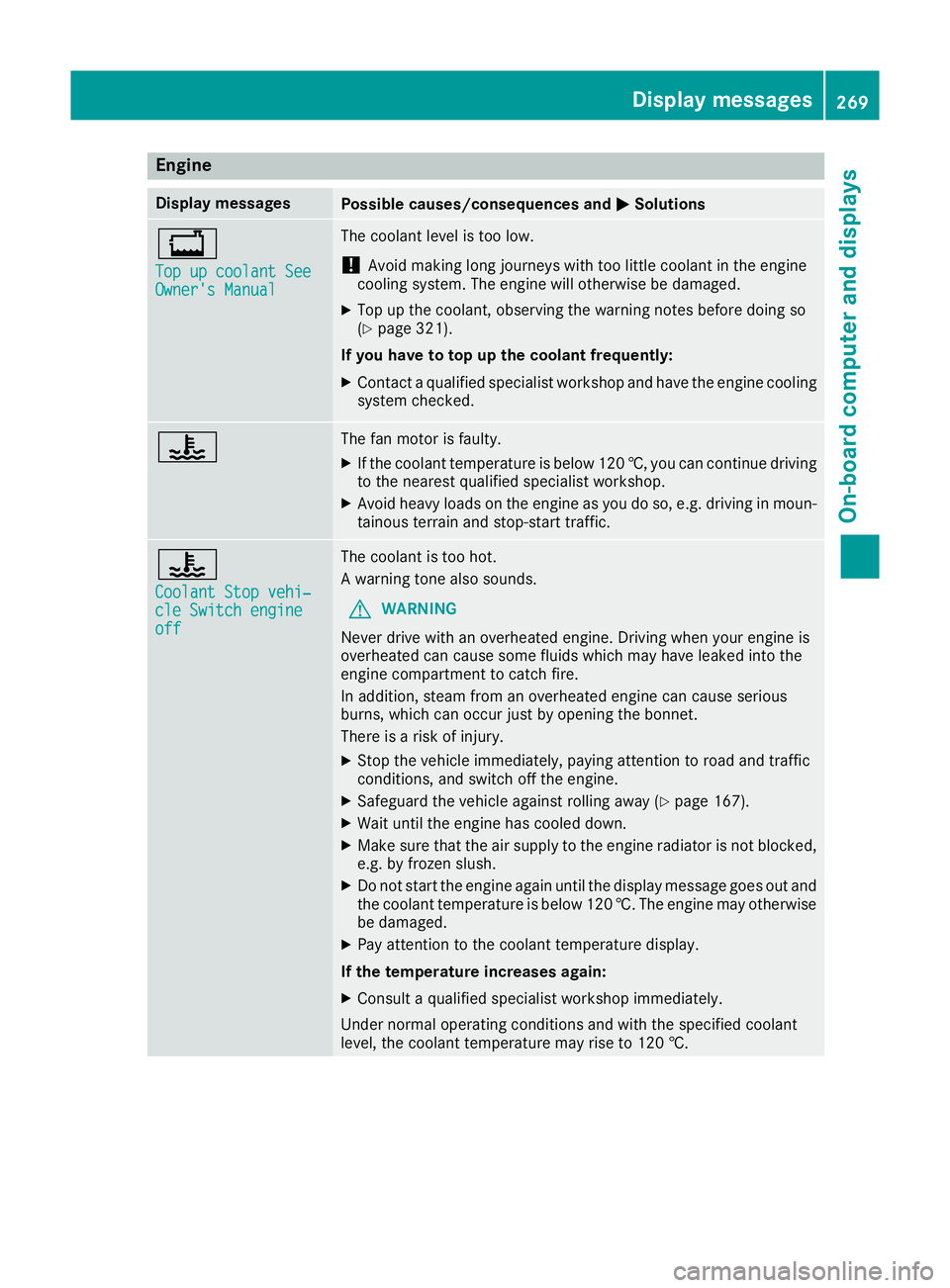
MSolutions +
Top up coolant See Top up coolant See
Owner's Manual Owner's Manual The coolant level is too low.
! Avoid making long journeys with too little coolant in the engine
cooling system. The engine will otherwise be damaged.
X Top up the coolant, observing the warning notes before doing so
(Y page 321).
If you have to top up the coolant frequently: X Contact a qualified specialist workshop and have the engine cooling
system checked. ? The fan motor is faulty.
X If the coolant temperature is below 120 †, you can continue driving
to the nearest qualified specialist workshop.
X Avoid heavy loads on the engine as you do so, e.g. driving in moun-
tainous terrain and stop-start traffic. ?
Coolant Stop vehi‐ Coolant Stop vehi‐
cle Switch engine cle Switch engine
off off The coolant is too hot.
A warning tone also sounds.
G WARNING
Never drive with an overheated engine. Driving when your engine is
overheated can cause some fluids which may have leaked into the
engine compartment to catch fire.
In addition, steam from an overheated engine can cause serious
burns, which can occur just by opening the bonnet.
There is a risk of injury.
X Stop the vehicle immediately, paying attention to road and traffic
conditions, and switch off the engine.
X Safeguard the vehicle against rolling away (Y page 167).
X Wait until the engine has cooled down.
X Make sure that the air supply to the engine radiator is not blocked,
e.g. by frozen slush.
X Do not start the engine again until the display message goes out and
the coolant temperature is below 120 †. The engine may otherwisebe damaged.
X Pay attention to the coolant temperature display.
If the temperature increases again:
X Consult a qualified specialist workshop immediately.
Under normal operating conditions and with the specified coolant
level, the coolant temperature may rise to 120 †. Display messages
269On-board computer and displays Z
Page 299 of 393
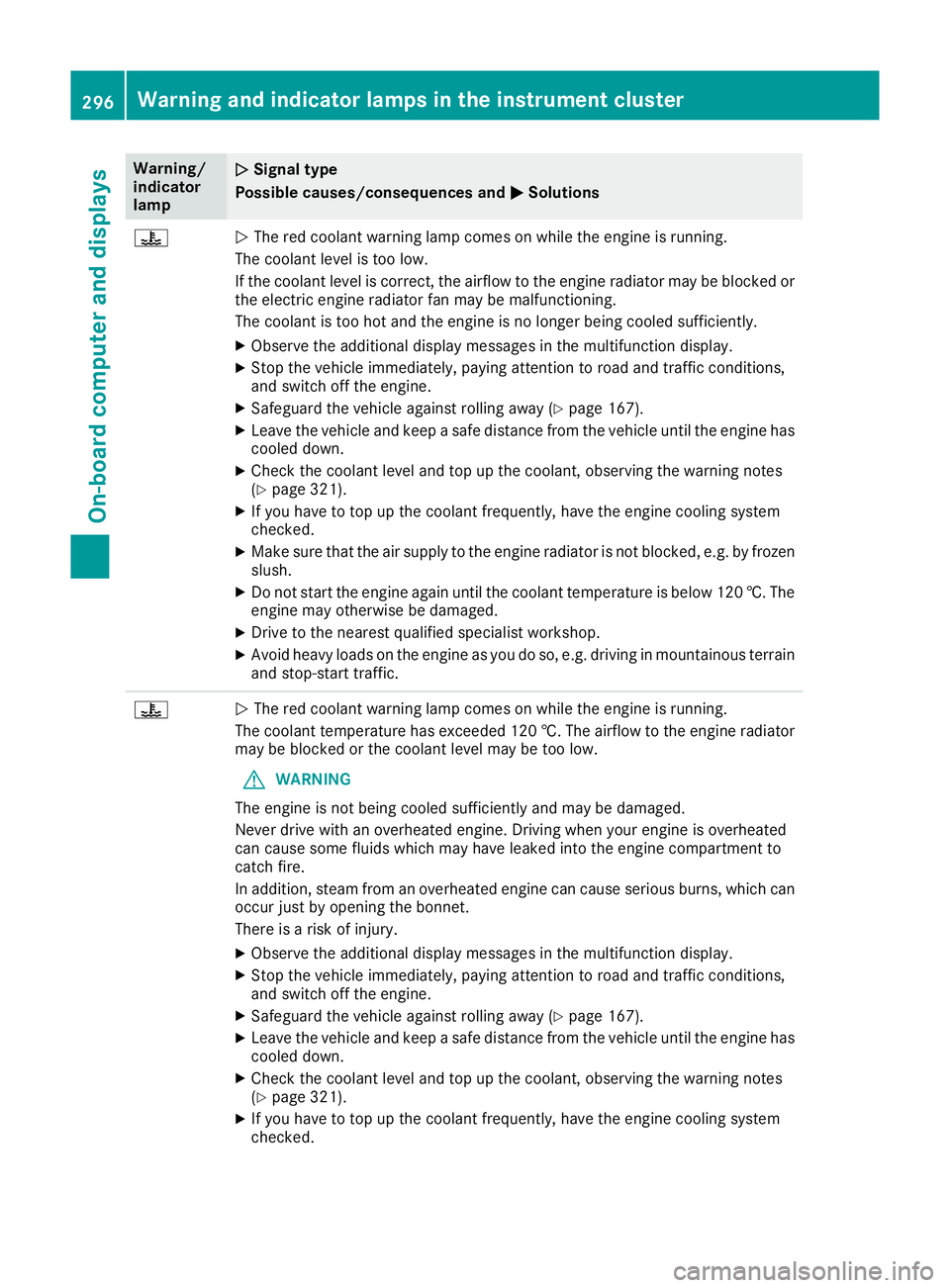
Warning/
indicator
lamp
N N
Signal type
Possible causes/consequences and M
M Solutions ?
N
The red coolant warning lamp comes on while the engine is running.
The coolant level is too low.
If the coolant level is correct, the airflow to the engine radiator may be blocked or the electric engine radiator fan may be malfunctioning.
The coolant is too hot and the engine is no longer being cooled sufficiently.
X Observe the additional display messages in the multifunction display.
X Stop the vehicle immediately, paying attention to road and traffic conditions,
and switch off the engine.
X Safeguard the vehicle against rolling away (Y page 167).
X Leave the vehicle and keep a safe distance from the vehicle until the engine has
cooled down.
X Check the coolant level and top up the coolant, observing the warning notes
(Y page 321).
X If you have to top up the coolant frequently, have the engine cooling system
checked.
X Make sure that the air supply to the engine radiator is not blocked, e.g. by frozen
slush.
X Do not start the engine again until the coolant temperature is below 120 †. The
engine may otherwise be damaged.
X Drive to the nearest qualified specialist workshop.
X Avoid heavy loads on the engine as you do so, e.g. driving in mountainous terrain
and stop-start traffic. ?
N
The red coolant warning lamp comes on while the engine is running.
The coolant temperature has exceeded 120 †. The airflow to the engine radiator may be blocked or the coolant level may be too low.
G WARNING
The engine is not being cooled sufficiently and may be damaged.
Never drive with an overheated engine. Driving when your engine is overheated
can cause some fluids which may have leaked into the engine compartment to
catch fire.
In addition, steam from an overheated engine can cause serious burns, which can
occur just by opening the bonnet.
There is a risk of injury.
X Observe the additional display messages in the multifunction display.
X Stop the vehicle immediately, paying attention to road and traffic conditions,
and switch off the engine.
X Safeguard the vehicle against rolling away (Y page 167).
X Leave the vehicle and keep a safe distance from the vehicle until the engine has
cooled down.
X Check the coolant level and top up the coolant, observing the warning notes
(Y page 321).
X If you have to top up the coolant frequently, have the engine cooling system
checked. 296
Warning and indicator lamps in the instrument clusterOn-board computer and displays