2015 MERCEDES-BENZ GL-Class Malfunction
[x] Cancel search: MalfunctionPage 311 of 462
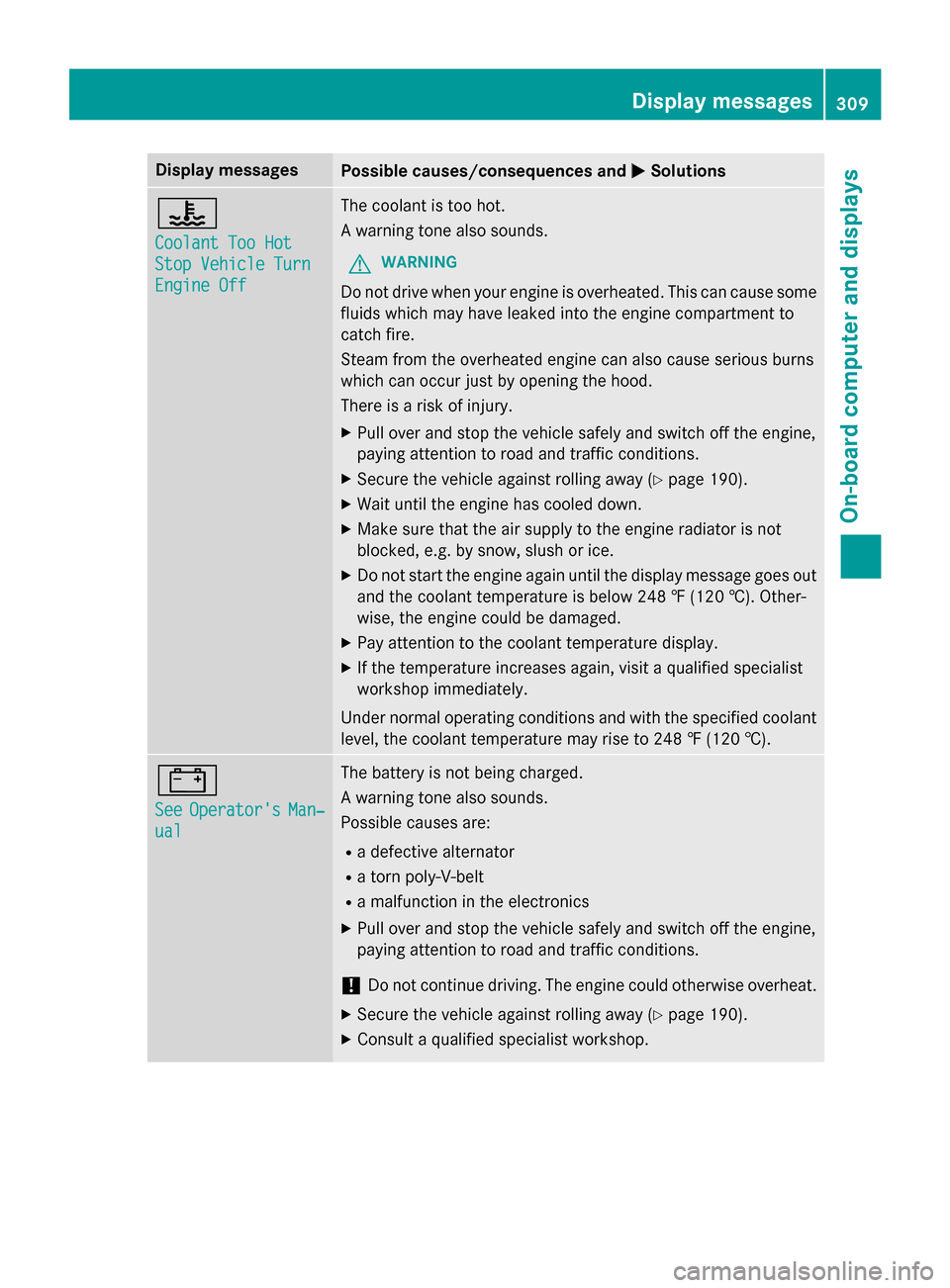
Display messages
Possible causes/consequences and
0050
0050Solutions 00AC
Coolant Too Hot Coolant Too Hot
Stop Vehicle Turn Stop Vehicle Turn
Engine Off Engine Off The coolant is too hot.
A warning tone also sounds.
G WARNING
Do not drive when your engine is overheated. This can cause some
fluids which may have leaked into the engine compartment to
catch fire.
Steam from the overheated engine can also cause serious burns
which can occur just by opening the hood.
There is a risk of injury.
X Pull over and stop the vehicle safely and switch off the engine,
paying attention to road and traffic conditions.
X Secure the vehicle against rolling away (Y page 190).
X Wait until the engine has cooled down.
X Make sure that the air supply to the engine radiator is not
blocked, e.g. by snow, slush or ice.
X Do not start the engine again until the display message goes out
and the coolant temperature is below 248 ‡ (120 †). Other-
wise, the engine could be damaged.
X Pay attention to the coolant temperature display.
X If the temperature increases again, visit a qualified specialist
workshop immediately.
Under normal operating conditions and with the specified coolant
level, the coolant temperature may rise to 248 ‡ (120 †). 003D
See See
Operator's
Operator's Man‐
Man‐
ual
ual The battery is not being charged.
A warning tone also sounds.
Possible causes are:
R a defective alternator
R a torn poly-V-belt
R a malfunction in the electronics
X Pull over and stop the vehicle safely and switch off the engine,
paying attention to road and traffic conditions.
! Do not continue driving. The engine could otherwise overheat.
X Secure the vehicle against rolling away (Y page 190).
X Consult a qualified specialist workshop. Display
messages
309On-board computer and displays Z
Page 314 of 462

Driving systems
Display messages
Possible causes/consequences and
0050
0050Solutions 00AD
Attention Assist: Attention Assist:
Take a Break! Take a Break! Based on certain criteria, ATTENTION ASSIST has detected fatigue
or a lack of concentration on the part of the driver. A warning tone also sounds.
X If necessary, take a break.
During long journeys, take regular breaks in good time so you get enough rest. 00AD
Attention Assist Attention Assist
Inoperative Inoperative ATTENTION ASSIST is inoperative.
X Visit a qualified specialist workshop. 00C4
Drive More Slowly Drive More Slowly You cannot change the vehicle level. Possible causes are:
R you are driving too fast for the selected vehicle level.
R you are towing a trailer.
R the trailer-coupling socket is being used, e.g. for a bicycle rack.
X Drive more slowly and then select the desired vehicle level
again.
R Vehicles with the ON&OFFROAD package (Y page 214)
R Vehicles with the AIRMATIC package (Y page 221)
X Observe the notes on towing a trailer (Y page 265).00C4
Compressor Compressor
Is
IsCool‐
Cool‐
ing
ing You have selected a higher vehicle level. The compressor first
needs to cool down because of frequent level changes.
X Drive in a manner appropriate for the current vehicle level.
X Make sure that there is sufficient ground clearance.
X Allow the compressor to cool down.
When the compressor has cooled down, the display message
disappears. The vehicle then continues rising to the selected
level. 00C4
ABC Malfunction ABC Malfunction AIRMATIC is malfunctioning.
X
Drive as appropriate for the current vehicle level, but do not
exceed 50 mph (80 km/h).
X Make sure that there is sufficient ground clearance.
X Have the vehicle checked at a qualified specialist workshop. 312
Display
messagesOn-board computer and displays
Page 315 of 462

Display messages
Possible causes/consequences and
0050
0050Solutions 00C4
Max. Speed 12 mph Max. Speed 12 mph You are exceeding the speed permissible for the selected off-road
level.
In addition, the vehicle level display appears between the vehicle
icon and the display message, and a warning tone sounds.
G WARNING
The vehicle could tip and rollover.
There is a risk of an accident. X Adjust your driving style to the altered handling characteristics.
X Only make slight steering movements and avoid fast steering
movements.
X Do not exceed 12 mph (20 km/h)until the vehicle has reached
off-road level 2. ACTIVE CURVE SYS‐ ACTIVE CURVE SYS‐
TEM malfunctioning TEM malfunctioning The Active Curve System is faulty. The vehicle's handling charac-
teristics may be affected.
X Do not drive at speeds above 50 mph (80 km/h).
X Have the vehicle checked at a qualified specialist workshop. ACTIVE CURVE SYS‐ ACTIVE CURVE SYS‐
TEM Malfunction TEM Malfunction
See See
Operator's
Operator's Man‐
Man‐
ual
ual The Active Curve System is faulty. The vehicle's handling charac-
teristics are severely impaired. A warning tone also sounds.
G WARNING
There is a risk of an accident. X Drive on carefully.
X Adjust your driving style to the altered handling characteristics.
X Avoid sudden acceleration in tight bends and fast steering
movements.
X Do not drive at speeds above 50 mph (80 km/h).
X Visit a qualified specialist workshop immediately. 00C4
Raising Raising
Max.
Max.Speed
Speed
12 mph
12 mph The vehicle is being adjusted to off-road level 3. The display mes-
sage informs you of the maximum speed permissible for off-road
level 3.
X Do not drive at speeds above 12 mph (20 km/h). 0093
Lowering Lowering
Max.
Max.
Speed 12 mph
Speed 12 mph The vehicle is being lowered from off-road level 3 to off-road level
2. The display message informs you of the maximum speed per-
missible for off-road level 3.
X Do not exceed 12 mph (20 km/h) until the vehicle has reached
off-road level 2. Display messages
313On-board computer and displays Z
Page 316 of 462

Display messages
Possible causes/consequences and
0050
0050Solutions 003B
Different. Lock Different. Lock
Sys. Malfunction Sys. Malfunction The differential lock is faulty.
X Do not drive at speeds above 50 mph (80 km/h).
X Have the vehicle checked at a qualified specialist workshop. 003B
Different. Different.
Locking
Locking
Sys. Cooling Down
Sys. Cooling Down
Please Wait Please Wait The differential lock is too hot and has been disengaged.
X Drive on carefully.
X Allow the differential lock to cool down.
The differential lock re-engages as soon as it has cooled down. LOW RANGE Stop LOW RANGE Stop
Apply Apply
Parking
Parking Brake
Brake A gearshift process has been canceled. LOW RANGE is in the neu-
tral position. There is no connection between the engine and the
drive wheels.
X Pull over and stop the vehicle safely as soon as possible, paying
attention to road and traffic conditions.
X Apply the electric parking brake. Do not continue driving under
any circumstances.
X Repeat the gearshift process. LOW RANGE Malfunc‐
LOW RANGE Malfunc‐
tion To Park, tion To Park,
Apply Apply
Parking
Parking Brake
Brake LOW RANGE is malfunctioning.
X Do not drive at speeds above 50 mph (80 km/h).
X When parking, secure the vehicle against rolling away
(Y page 190).
X Have the vehicle checked at a qualified specialist workshop. LOW RANGE Max. LOW RANGE Max.
Speed 25 mph Speed 25 mph You have exceeded the maximum speed for the gearshift process.
X Drive more slowly.
The gear change is made. LOW RANGE Max. LOW RANGE Max.
Speed 40 mph Speed 40 mph You have exceeded the maximum speed for the gearshift process.
X Drive more slowly.
The gear change is made. LOW LOW
RANGE
RANGE Shift
Shiftto
to
Position N Briefly
Position N Briefly You have reduced the vehicle speed, but the automatic transmis-
sion is not in position N.
X Briefly shift the automatic transmission to position N.LOW
LOW
RANGE
RANGE Shifting
Shifting
Canceled Please
Canceled Please
Reactivate Reactivate The gearshift process has been canceled.
X Repeat the gearshift process. 00C6
Inoperative Inoperative DSR (Downhill Speed Regulation) is deactivated due to a malfunc-
tion.
X Have DSR checked at a qualified specialist workshop. 314
Display
messagesOn-board computer and displays
Page 324 of 462

Display messages
Possible causes/consequences and
0050
0050Solutions Warning Tire Mal‐
Warning Tire Mal‐
function function The tire pressure in one or more tires has dropped suddenly. The
wheel position is shown in the multifunction display.
G WARNING
If you drive with a flat tire, there is a risk of the following hazards: R a flat tire affects the ability to steer or brake the vehicle.
R you could lose control of the vehicle.
R continued driving with a flat tire will cause excessive heat build-
up and possibly a fire.
There is a risk of an accident.
X Stop the vehicle without making any sudden steering or braking
maneuvers. Pay attention to the traffic conditions as you do so.
X Secure the vehicle against rolling away (Y page 190).
X Check the tires and, if necessary, follow the instructions for a
flat tire (Y page 389). Tire Press. Moni‐ Tire Press. Moni‐
tor Currently tor Currently
Unavailable Unavailable Due to a source of radio interference, no signals can be received
from the wheel sensors. The tire pressure monitor is temporarily
malfunctioning.
X Drive on.
The tire pressure monitor restarts automatically as soon as the
problem has been solved. Wheel Sensor Miss‐ Wheel Sensor Miss‐
ing ing There is no signal from the tire pressure sensor of one or several
wheels. The pressure of the affected tire is not displayed in the
multifunction display.
X Have the faulty tire pressure sensor replaced at a qualified spe-
cialist workshop. Tire Pressure Mon‐ Tire Pressure Mon‐
itor Inoperative itor Inoperative
No Wheel Sensors No Wheel Sensors The wheels mounted do not have a suitable tire pressure sensor.
The tire pressure monitor is deactivated.
X Mount wheels with suitable tire pressure sensors.
The tire pressure monitor is activated automatically after driving
for a few minutes. Tire Press. Moni‐ Tire Press. Moni‐
tor Inoperative tor Inoperative The tire pressure monitor is faulty.
X Visit a qualified specialist workshop. 322
Display
messagesOn-board computer and displays
Page 325 of 462

Vehicle
Display messages
Possible causes/consequences and
0050
0050Solutions Shift to 'P' or
Shift to 'P' or
'N' 'N'
to
toStart
Start Engine
Engine You have attempted to start the engine with the transmission in
position
Ror D.
X Shift the transmission to position Por N. Auxiliary Battery Auxiliary Battery
Malfunction Malfunction The auxiliary battery for the automatic transmission is no longer
being charged.
X Visit a qualified specialist workshop at the next opportunity.
X Until then, set the automatic transmission to position Pbefore
you switch off the engine.
X Before leaving the vehicle, apply the electric parking brake.
X Secure the vehicle against rolling away (Y page 190).Apply Brake to
Apply Brake to
Shift from 'P' Shift from 'P' You have attempted to move the transmission selector lever to
position
D,Ror Nwithout depressing the brake pedal.
X Depress the brake pedal. Transmission Not Transmission Not
in P Risk of Vehi‐ in P Risk of Vehi‐
cle Rolling Away cle Rolling Away The driver's door is open and the transmission is in position
R,N or
D.
A warning tone also sounds. X Shift the transmission to position P.
X Secure the vehicle against rolling away (Y page 190).Service Required
Service Required
Do Do
Not
Not Shift
Shift Gears
Gears
Visit Dealer
Visit Dealer You cannot change the transmission position due to a malfunction.
A warning tone also sounds.
If transmission position Dis selected:
X Drive to a qualified specialist workshop without shifting the
transmission from position D.
If transmission position R,Nor Pis selected:
X Notify a qualified specialist workshop or breakdown service. Only Shift to 'P' Only Shift to 'P'
when Vehicle is when Vehicle is
Stationary Stationary The vehicle is moving.
X
Stop the vehicle safely as soon as possible, paying attention to
road and traffic conditions.
X Shift the transmission to position P. Display messages
323On-board computer and displays Z
Page 327 of 462

Display messages
Possible causes/consequences and
0050
0050Solutions 00CC
Power Power
Steering
Steering Mal‐
Mal‐
function See Oper‐
function See Oper‐
ator's Manual ator's Manual The power steering is malfunctioning.
A warning tone also sounds.
G WARNING
You will need to use more force to steer.
There is a risk of an accident. X Check whether you are able to apply the extra force required.
X If you are able to steer safely: carefully drive on to a qualified
specialist workshop.
X If you are unable to steer safely: do not drive on. Contact the
nearest qualified specialist workshop. No Service No Service Your vehicle is outside the network provider's transmitter/
receiver range.
X Wait until the mobile phone operational readiness symbol
appears in the multifunction display. 00B2
Check Washer Fluid Check Washer Fluid The washer fluid level in the washer fluid reservoir has dropped
below the minimum.
X Add washer fluid (Y page 376). Wiper malfunction‐ Wiper malfunction‐
ing ing The windshield wipers are malfunctioning.
X Visit a qualified specialist workshop. Hazard warning
Hazard warning
lamps malfunction‐ lamps malfunction‐
ing ing The hazard warning lamps are faulty.
X Visit a qualified specialist workshop. SmartKey
Display messages
Possible causes/consequences and
0050
0050Solutions 00AF
Key Does Not Key Does Not
Belong to Vehicle Belong to Vehicle You have put the wrong SmartKey in the ignition lock.
X Use the correct SmartKey. 00AF
Take Take
Your
YourKey
Keyfrom
from
Ignition
Ignition The SmartKey is in the ignition lock.
X Remove the SmartKey. 00AF
Obtain a New Key Obtain a New Key The SmartKey needs to be replaced.
X Visit a qualified specialist workshop. Display
messages
325On-board computer and displays Z
Page 328 of 462

Display messages
Possible causes/consequences and
0050
0050Solutions 00AF
Replace Replace
Key
KeyBattery
Battery The batteries of the KEYLESS-GO key are discharged.
X Change the batteries (Y page 85).00AF
Don't Forget Your Don't Forget Your
Key Key This display message is displayed for a maximum of 60 seconds
and is simply a reminder.
You have opened the driver's door with the engine switched off.
The KEYLESS-GO key is not in the ignition lock.
X Remember to take the KEYLESS-GO key with you when you
leave the vehicle. 00AF
Key Not Detected Key Not Detected
(red display message) The KEYLESS-GO key is not in the vehicle.
A warning tone also sounds.
If the engine is switched off, you can no longer lock the vehicle
centrally or start the engine.
X Pull over and stop the vehicle safely as soon as possible, paying
attention to road and traffic conditions.
X Secure the vehicle against rolling away (Y page 190).
X Locate the KEYLESS-GO key. The KEYLESS-GO key is not detected while the engine is running
because there is interference from a strong source of radio waves.
A warning tone also sounds.
X Pull over and stop the vehicle safely as soon as possible, paying
attention to road and traffic conditions.
X Secure the vehicle against rolling away (Y page 190).
X Operate the vehicle with the SmartKey in the ignition lock. 00AF
Key Not Detected Key Not Detected
(white display mes-
sage) The KEYLESS-GO key cannot be detected at present.
X Change the location of the SmartKey with the KEYLESS-GO
functions in the vehicle.
If the KEYLESS-GO key is still not detected:
X Operate the vehicle with the SmartKey in the ignition lock. 00AF
Remove Remove
'Start'
'Start' But‐
But‐
ton and Insert Key
ton and Insert Key KEYLESS-GO is temporarily malfunctioning or is defective. A warn-
ing tone also sounds.
X Insert the SmartKey into the ignition lock and turn it to the
desired position.
X Visit a qualified specialist workshop. 326
Display
messagesOn-board computer and displays