Page 181 of 274
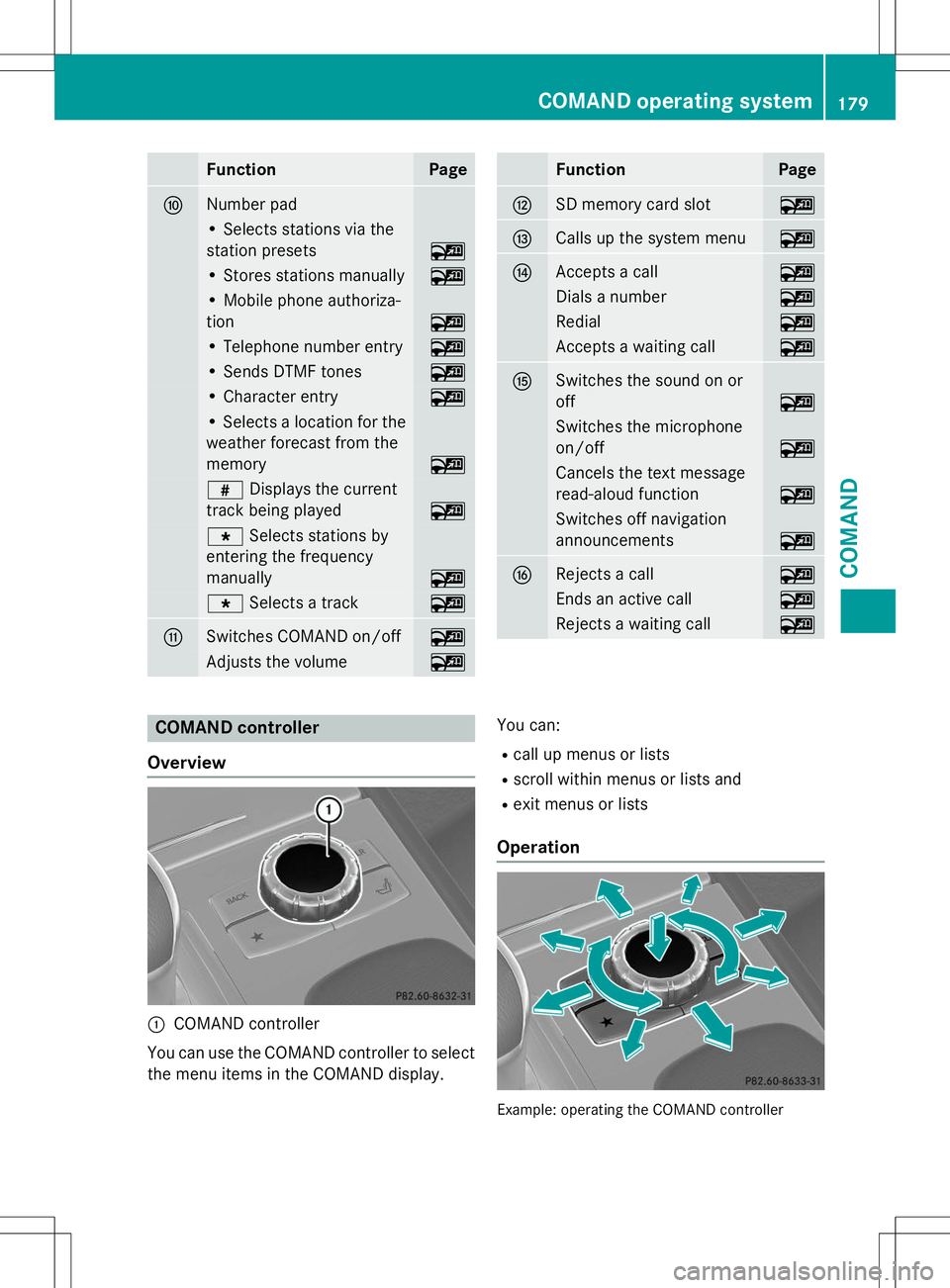
FunctionPage
FNumber pad
• Selects stations via the
station presets
~
• Stores stations manually~
• Mobile phone authoriza-
tion
~
• Telephone number entry~
• Sends DTMF tones~
• Character entry~
• Selects a location for the
weather forecast from the
memory
~
z Displays the current
track being played
~
g Selects stations by
entering the frequency
manually
~
g Selects a track~
GSwitches COMAND on/off~
Adjusts the volume~
FunctionPage
HSD memory card slot~
ICalls up the system menu~
JAccepts a call~
Dials a number~
Redial~
Accepts a waiting call~
KSwitches the sound on or off
~
Switches the microphone
on/off
~
Cancels the text message
read-aloud function
~
Switches off navigation
announcements
~
LRejects a call~
Ends an active call~
Rejects a waiting call~
COMAND controller
Overview
:COMAND controller
You can use the COMAND controller to select
the menu items in the COMAND display. You can:
R call up menus or lists
R scroll within menus or lists and
R exit menus or lists
Operation
Example: operating the COMAND controller
COMAND operating system179
COMAND
Z
Page 190 of 274

COMAND controller and pressWto con-
firm.
The carousel view appears.
X Bring the
Internet Radiopanel to the
front by turning cVdthe COMAND con-
troller and press Wto confirm.
The Internet radio menu appears.
Searching for stations
X SelectSearchin the Internet radio menu.
A list with search criteria appears.
X Select criterion and press Wto confirm.
iFor example as a search criterion, you can
set an Internet radio station that is located
close to your navigation destination.
Connecting to a station
X Search for a station ( Ypage 188).
X Select ;(play) in the Internet radio
menu and press Wto confirm.
The call is placed.
If the data stream is interrupted, an automatic attempt is made to re-establish the connec-
tion.
Manually re-establishing a connection
X Select ;(play) again in the Internet
radio menu and press Wto confirm.
Ending data transfer: X Select É(stop) in the Internet radio
menu and press Wto confirm.
or
X Change to another audio source, for exam-
ple
Disc.
If you change to a main function that is not an
audio source, e.g. navigation, the data con-
nection remains on. You can continue listen-
ing to the set station.
Internet
Display restriction
Internet pages cannot be shown while the
vehicle is in motion.
Calling up a website
Calling up the carousel view
X Select the ®symbol in the main function
bar by turning cVdthe COMAND con-
troller and press Wto confirm.
The carousel view appears.
You can now enter a web address.
Entering a web address
You can enter the web address using either
the character bar or the number keypad.
X Select
wwwby sliding VÆand turning cVd
the COMAND controller and press Wto
confirm.
An input menu appears.
188Online and Internet functions
COMAND
Page 202 of 274

Roadside Assistance button
XOpen the stowage compartment under the
armrest ( Ypage 193).
X Press Roadside Assistance button :for
more than two seconds.
A call to a Mercedes-Benz Roadside Assis-
tance Representative is initiated. Indicator
lamp ;in Roadside Assistance button :
flashes while the call is active. The
Con�Z
necting Callmessage appears in the
multifunction display and COMAND is
muted.
If a connection can be made, the
Call Con�Z
nectedmessage appears in the multifunction
display.
If a mobile phone network is available and
there is sufficient GPS reception, the mbrace
system transmits data to the Response Cen-
ter, for example:
R current location of the vehicle
R vehicle identification number
R vehicle model
R vehicle color
iThe COMAND display shows that an
mbrace call is active. You can change to the navigation menu by pressing the NAVI but-
ton on COMAND during the call. Voice out- put is not available.
A voice connection is established between
the Mercedes-Benz Roadside Assistance
Representative and the vehicle occupants. The Mercedes-Benz Roadside Assistance
Representative either sends a qualified
Mercedes-Benz technician or makes arrange-
ments for your vehicle to be transported to
the nearest authorized Mercedes-Benz Cen-
ter. You may be charged for services such as
repair work and/or towing. Further details
are available in your mbrace manual.
X Describe the type of assistance needed.
iIf the indicator lamp in Roadside Assis-
tance button :is flashing continuously
and no voice connection with the Response center has been established, then the
mbrace system has not been able to initiate
a Roadside Assistance call (e.g. the rele-
vant mobile phone network is not availa-
ble). The
CallFailedmessage appears in
the multifunction display.
X To end a call: press the~button on the
multifunction steering wheel.
or
X Press the corresponding COMAND button
to end a phone call.
iSign and drive services 2
: you are not
charged for services such as jump-starting,
providing a few gallons of fuel for a fuel tank that has been run dry or changing a faulty
tire with the vehicle's own spare wheel.
MB Info call button
2 USA only.
200Features
Stowage and features
Page 203 of 274
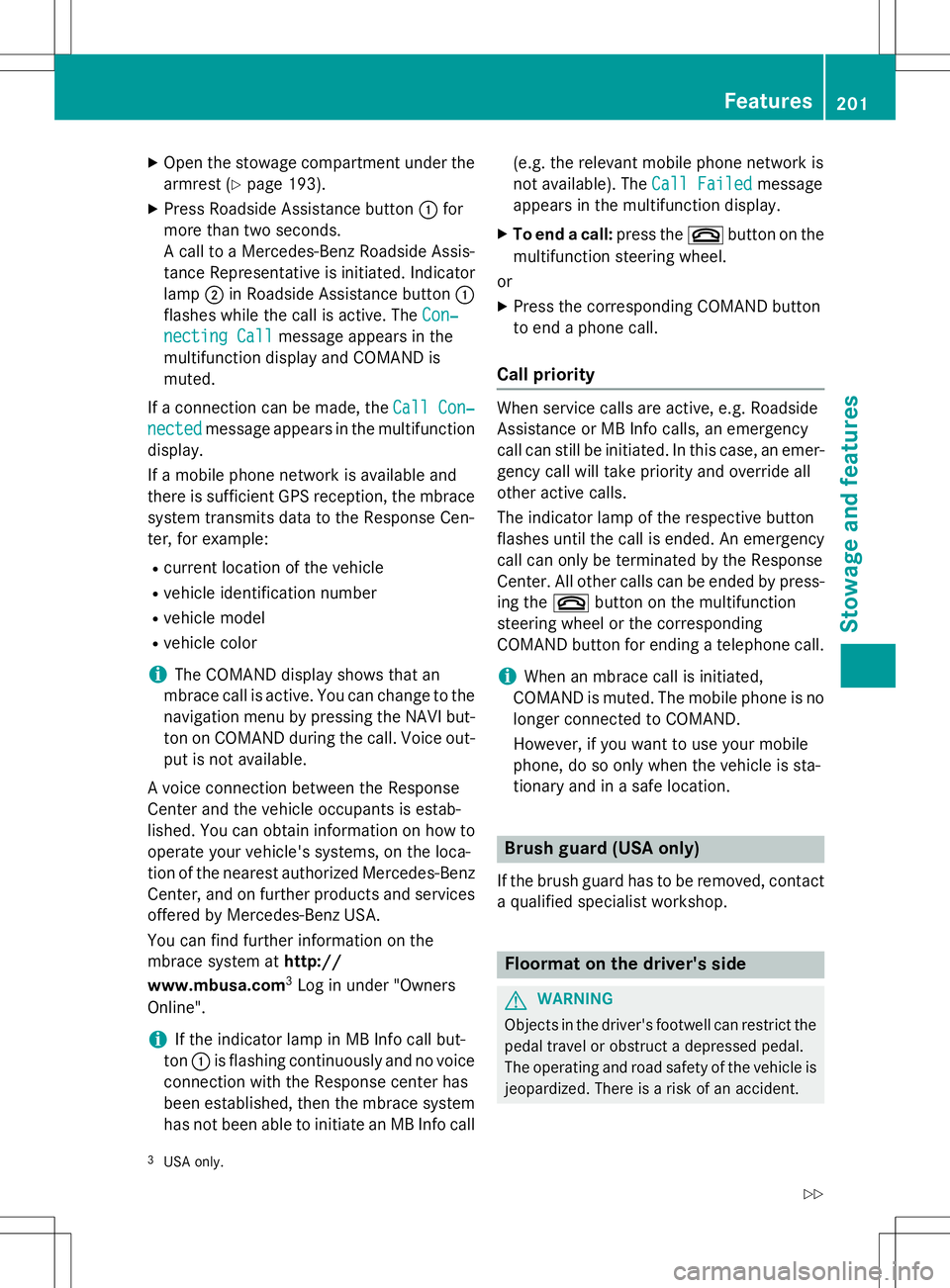
XOpen the stowage compartment under the
armrest ( Ypage 193).
X Press Roadside Assistance button :for
more than two seconds.
A call to a Mercedes-Benz Roadside Assis-
tance Representative is initiated. Indicatorlamp ;in Roadside Assistance button :
flashes while the call is active. The
Con�Z
necting Callmessage appears in the
multifunction display and COMAND is muted.
If a connection can be made, the
Call Con�Z
nectedmessage appears in the multifunction
display.
If a mobile phone network is available and
there is sufficient GPS reception, the mbrace
system transmits data to the Response Cen-
ter, for example:
R current location of the vehicle
R vehicle identification number
R vehicle model
R vehicle color
iThe COMAND display shows that an
mbrace call is active. You can change to the navigation menu by pressing the NAVI but-
ton on COMAND during the call. Voice out- put is not available.
A voice connection between the Response
Center and the vehicle occupants is estab-
lished. You can obtain information on how to operate your vehicle's systems, on the loca-
tion of the nearest authorized Mercedes-BenzCenter, and on further products and services
offered by Mercedes-Benz USA.
You can find further information on the
mbrace system at http://
www.mbusa.com 3
Log in under "Owners
Online".
iIf the indicator lamp in MB Info call but-
ton :is flashing continuously and no voice
connection with the Response center has
been established, then the mbrace system
has not been able to initiate an MB Info call (e.g. the relevant mobile phone network is
not available). The
Call Failedmessage
appears in the multifunction display.
X To end a call: press the~button on the
multifunction steering wheel.
or
X Press the corresponding COMAND button
to end a phone call.
Call priority
When service calls are active, e.g. Roadside
Assistance or MB Info calls, an emergency
call can still be initiated. In this case, an emer-
gency call will take priority and override all
other active calls.
The indicator lamp of the respective button
flashes until the call is ended. An emergency call can only be terminated by the Response
Center. All other calls can be ended by press-
ing the ~button on the multifunction
steering wheel or the corresponding
COMAND button for ending a telephone call.
iWhen an mbrace call is initiated,
COMAND is muted. The mobile phone is no
longer connected to COMAND.
However, if you want to use your mobile
phone, do so only when the vehicle is sta-
tionary and in a safe location.
Brush guard (USA only)
If the brush guard has to be removed, contact a qualified specialist workshop.
Floormat on the driver's side
GWARNING
Objects in the driver's footwell can restrict the pedal travel or obstruct a depressed pedal.
The operating and road safety of the vehicle is
jeopardized. There is a risk of an accident.
3 USA only.
Features201
Stowage and features
Z