2015 MERCEDES-BENZ E-CLASS SALOON plate
[x] Cancel search: platePage 17 of 497
Display message ............................ 328
Doo rcentral locking/unlocking ....... 95
Emergency key element ................... 96
Important safety note s.................... 94
Los s................................................. 99
Modifying the programming ............. 96
Overview .......................................... 94
Positions (ignition lock) ................. 179
Problem (malfunction) ..................... 99
Starting the engine ........................ 182
Ke yp ositions
Key ................................................ 179
KEYLESS GO .................................. 179
KEYLESS-GO
Convenience closing ...................... 112
Deactivation ..................................... 95
Displa ymessage ............................ 328
Locking ............................................ 95
Removing the Start/Sto pbutton ... 181
Start/Sto pbutton .......................... 179
Starting the engine ........................ 182
Unlocking ......................................... 95
Kickdown
Driving tip s.................................... 194
Manua ldrive progra m.................... 199
Kneebag ............................................... 51 L
Lamps see Warning and indicator lamps
Lan eKeeping Assist
Activating/deactivating ................. 288
Displa ymessage ............................ 317
Function/information .................... 259
Lan epackage ..................................... 257
Lap time (RACETIMER) ...................... 296
Lashin geyelets ................................. 351
Licenc eplate lamp (display mes-
sage) ................................................... 309
Light senso r(display message) ....... 310
Lighting
see Lights
Lights
Activating/deactivating the Intel-
ligent Light System ........................ 290
Activating/deactivating the inte-
rio rlighting delaye dswitch-off ....... 292 Active light function ....................... 145
Adaptive Highbeam Assist PLU
S.... 147
Automati cheadlamp mod e............ 143
Cornering light function ................. 146
Dipped-bea mheadlamp s............... 143
Driving abroa d............................... 142
Foglamp s(extende drange) ........... 146
Hazard warning lamps ................... 145
Headlamp flashe r........................... 145
Light switch ................................... 142
Main-bea mheadlamp s................... 144
Motorwa ymode............................. 146
Parking lamps ................................ 144
Rear foglamp ................................. 143
Setting brightness for display/
switche s(on -board computer) ....... 290
Setting the ambient lighting
brightness (on-board computer) .... 291
Setting the ambient lighting col-
ou r(on -board computer) ................ 291
Sid elam ps ..................................... 144
Switching the daytime driving
lights on/of f(on -board com-
puter) ............................................. 290
Switching the exterio rlighting
delaye dswitch-off on/of f(on-
board computer) ............................ 292
Switching the surround lighting
on/of f(on -board computer) .......... 292
Turn signal s................................... 144
see Interior lighting
see Replacing bulbs
LI Mi ndicator lamp
Cruise control ................................ 212
DISTRONIC PLU S........................... 219
Variabl eSPEEDTRONIC ................. 215
Limiting the speed
see SPEEDTRONIC
Loadin gguidelines ............................ 342
Loadin gsillp rotector ........................ 358
Locking
see Central locking
Locking (doors)
Automati c...................................... 102
Emergency locking ........................ 103
From inside (central locking but-
ton) ................................................ 101 14
Index
Page 25 of 497
Trim piece
s(clea ning instruc-
tions) .................................................. 392
Trip computer (on-board com-
puter) .................................................. 280
Trip meter
Calling up ....................................... 280
Resetting (on-boar dcomputer) ...... 281
Turn signals
Changing bulb s(front) ................... 151
Switching on/off ........................... 144
TV
Operating (on-boar dcomputer) ..... 284
see Separate operating instructions
Two-way radio
Frequencie s................................... 470
Installation ..................................... 470
Transmission outpu t(maximum) .... 470
Type identificatio nplate
see Vehicl eide ntificatio nplate
Tyre changin gtoolkit....................... 395
Tyre pressure
Calling up (on-boar dcomputer) ..... 423
Display message ............................ 322
Not reache d(TIRE FIT) .................... 400
Reached (TIREFIT) .......................... 400
Recommended ............................... 420
Tyre pressure loss warning
Genera lnotes ................................ 421
Important safety notes .................. 422
Restarting ...................................... 422
Tyre pressure monitor
Checking the tyr epressure elec-
tronically ........................................ 424
Function/note s............................. 423
Genera lnotes ................................ 423
Important safety notes .................. 423
Radi otypea pproval for the tyre
pressure monitor ........................... 425
Restarting ...................................... 424
Warning lamp ................................. 339
Warning message .......................... 424
Tyres
Changing awheel .......................... 426
Checking ........................................ 417
Directio nofrotation ...................... 426
Displa ymessage ............................ 322
Genera lnotes ................................ 431
Important safety notes .................. 416 Information on driving .................... 416
MOExtended tyre s......................... 418
Replacing ....................................... 426
Service life ..................................... 417
Storing ........................................... 426
Tyre size (data ).............................. 431
Tyre trea d...................................... 417
Wheel and tyre combinations ........ 433
see Fla ttyre U
Unlocking Emergency unlocking ..................... 102
From inside the vehicl e(central
unlocking button) ........................... 101 V
Vanity mirro r(in sun visor) .............. 363
Variable SPEEDTRONIC
see SPEEDTRONIC
Vehicle
Correct us e...................................... 27
Data acquisition ............................... 28
Displa ymessage ............................ 324
Electronics ..................................... 470
Equipment ....................................... 25
Implied warranty .............................. 27
Individua lsettings .......................... 289
Leaving parked up ......................... 207
Locking (i nanemergency) ............. 103
Locking (key) ................................... 95
Lowering ........................................ 430
Pulling away ................................... 182
Raising ........................................... 427
Registration ..................................... 27
Securing from rolling away ............ 427
Tow-starting ................................... 407
Towing away .................................. 407
Transporting .................................. 410
Unlocking (i nanemergency) ......... 102
Unlocking (key) ................................ 95
Vehicl edata. .................................. 481
Vehicl edata ....................................... 481
Vehicl edimensions ........................... 481
Vehicl eemergenc yloc king .............. 103 22
Index
Page 26 of 497
Vehicl
eidentificatio nnumber
see VIN
Vehicl eidentificatio nplate .............. 472
Vehicl elevel
AIRMATI C...................................... 231
Vehicl elevel (display message) ....... 315
Vehicl emaintenance
see ASSYST PLUS
Vehicl etoolkit.................................. 395
Vehicl eweigh ts................................. 481
Video
Operating the DVD ......................... 284
VIN
Sea t............................................... 472
Type plate ...................................... 472 W
Warning and indicator lamps ABS ................................................ 332
Brakes ........................................... 330
Distance warning signa l................. 338
ESP ®
.............................................. 333
ESP ®
OFF ....................................... 334
Fue ltank ........................................ 336
Genera lnotes ................................ 329
LIM (cruis econtrol) ........................ 212
LIM (DISTRONIC PLUS) .................. 219
LIM (variabl eSPEEDTRONIC )......... 215
Overview .......................................... 35
PASSENGER AIR BAG OFF ............... 45
Reserve fue l................................... 336
Sea tbelt. ....................................... 329
Tyre pressure monitor ................... 339
Warning triangle ................................ 394
Washer fluid
Displa ymessage ............................ 328
Wheel and tyre combinations
see Tyres
Wheel bolt tightenin gtorque ........... 430
Wheel chock ...................................... 427
Wheels
Changing awheel .......................... 426
Changing/replacing ....................... 426
Checking ........................................ 417
Cleaning ......................................... 388
Emergency spare whee l................. 465
Fitting anew whee l........................ 430 Fitting
awheel ............................... 426
Genera lnotes ................................ 431
Important safety notes .................. 416
Information on driving .................... 416
Removing awheel .......................... 429
Storing ........................................... 426
Tightening torque ........................... 430
Wheel size/tyre size ...................... 431
Windowbag
Operation ......................................... 52
Windows
Cleaning ......................................... 388
see Sid ewindows
Windscreen
Demisting ...................................... 164
Windscree nwasher fluid
see Windscree nwashe rs ystem
Windscree nwasher system
Important safety notes .................. 480
Topping up ..................................... 383
Windscree nwipers
Problem (malfunction) ................... 154
Rear window wipe r........................ 152
Replacing the wipe rblade s............ 152
Switching on/of f........................... 151
Winter operation
Important safety notes .................. 418
Radiato rcove r............................... 380
Slippery roa dsurfaces ................... 211
Snow chains .................................. 419
Winter tyres
Limiting the speed (on-board com-
puter) ............................................. 292
M+S tyre s...................................... 418
Wipe rblades
Cleaning ......................................... 389
Important safety notes .................. 152
Replacing (o nthe rea rwindow )..... 153
Replacing (windscreen) .................. 152
Wooden trim (cleaning instruc-
tions) .................................................. 392
Workshop
see Qualifie dspecialist workshop Z
ZONE function Switching on/of f........................... 164 Index
23
Page 145 of 497
Useful information
i This Owner's Manual describes all mod-
els, series and optional equipment for your
vehicle that were available at the time of
going to press. National variation sare pos-
sible. Not ethat your vehicle may not be
equipped with all of the function sdescri-
bed. This is also the case for system sand
function srelevan ttosafety.
i Read the information on qualified special-
ist workshops: (Y page 27). Exterior lighting
Genera
lnotes
For reason sofsafety, Mercedes-Benz recom-
mends that you drive with the lights switched
on even during the daytime. Therefore, your
vehicle is equipped with special daytime driv- ing lamps. In some countries, operation of the
headlamps varies due to legal requirements
and self-imposed obligations. Driving abroad
Genera lnotes If your journey takes you to countries where
vehicles are driven on the opposite side of the
road to the country in which the vehicle is
registered, your headlamps must be switched to symmetrical dipped beam as soon as pos-sible after crossing the border (exception:
vehicles with static LED headlamps). This pre-
vent soncoming traffic from being dazzled.
Symmetrical lights do not illuminate as large
an area of the edge of the carriageway.
Vehicles with static LED headlamps It is not necessary to switc
hyour headlamps
to symmetrical dipped beam when drivin gin
countries where vehicles are driven on the
opposite side of the road to the country in
which the vehicle is registered. Legal require- ment
sare fulfilled without switching the
headlamps to symmetrical dipped beam.
Vehicles with Intelligent Light System X
Before crossing the border, set the head-
lamps to symmetrical dipped beam and
after returnin gback to asymmetrical
dipped beam via the "Dipped-beam head-
lamps for drivin gonthe right/left "function
in the on-board computer (Y page 291).
If the headlamps are converted to symmetri-
cal dipped beam, the "motorway mode" and
"extended range foglamps" function sare not
available. Setting the exterior lighting
Setting options Exterior lightin
gcan be set by:
R using the light switch
R using the combination switch
(Y page 144)
R using the on-board computer
(Y page 290)
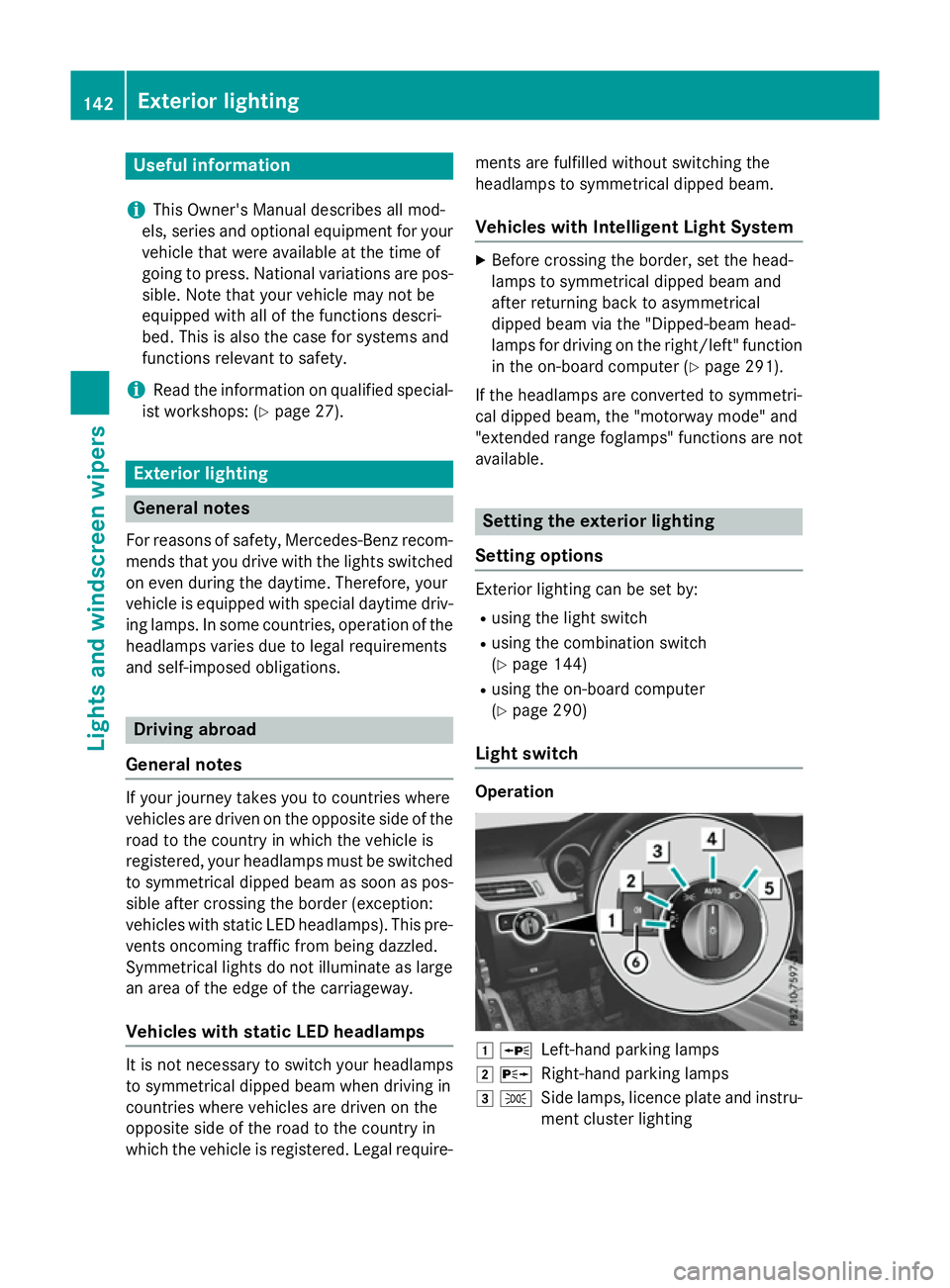
Light switch Operation
1
W
Left-han dparkin glamps
2 X
Right-hand parkin glamps
3 T
Side lamps, licenc eplate and instru-
ment cluster lighting 142
Exterior lightingLights and windscreen wipers
Page 270 of 497

To avoid hazardous situations:
R make sure to check the noseweight before
each journey
R use adrawbar noseweight as close as pos-
sible to the maximum noseweight
R do not exceed the maximum permissible
noseweight
R do not use anoseweight lower than the
minimum noseweight
When reversin gthe vehicle towards the
trailer, make sure there is nobody between
the trailer and the vehicle.
Couple and uncouple the trailer carefully. If
you do not couple the trailer to the towing
vehicle correctly, the trailer could become
detached.
Make sure that the following values are not
exceeded:
R the permissible trailer drawbar noseweight
R the permissible trailer load
R the permissible rear axle load of the towing
vehicle
R the maximum permissible gross vehicle
weight of both the towing vehicle and the
trailer
You will find the applicable permissible val-
ues, which must not be exceeded, in the vehi-
cle documents.
You will find the values approved by the man- ufacturer on the vehicle identification plates
and those for the towing vehicle under "Tech-
nical data" (Y page 484).
When towing atrailer, your vehicle's handling
characteristics will be different in comparison to when driving without atrailer.
The vehicle/trailer combination:
R is heavier
R is restricted in its acceleration and gradi-
ent-climbin gcapability
R has an increased braking distance
R is affected more by stron gcrosswinds
R demands more sensitive steering
R has alarger turnin gcircle This can impair the vehicle's handling char-
acteristics. Adapt your driving style accord-
ingly. Maintain
asafe distance. Drive care-
fully.
When towing atrailer, alway sadjust your
speed to the curren troad and weather con-
ditions. Do not exceed the maximum permis- sible speed for your vehicle/trailer combina-
tion. Notes on towing
atrailer
General notes Trailer towing is not permissible on the fol-
lowing models:
R E2 20 BlueTEC BlueEFFICIENCY Edition
R E1 80
R E63A MG
R E63A MG S-MODEL
R E63A MG 4MATIC
R E63A MG S-MODEL4 MATIC
i When towing
atrailer, set the tyre pres-
sure on the rear axle of the towing vehicle
for am aximum load; see the tyre pressure
table in the fuel filler flap (Y page 420).
Please notet hat when towing atrailer,
PARKTRONIC (Y page 235), Active Parking
Assist (Y page 239) and Blind Spot Assist
(Y page 257) are only available with limita-
tions, or not at all.
i On vehicles without level control, the
height of the ball coupling will alter accord-
ing to the load placed on the vehicle. If nec- essary, use atrailer with aheight-adjusta-
ble drawbar.
You will find fitting dimensions and loads
under "Technical data" (Y page 482).
Driving tips i
Observe the notes on ESP ®
trailer stabi-
lisation (Y page 86). Towing
atrailer
267Driving and parking Z
Page 312 of 497
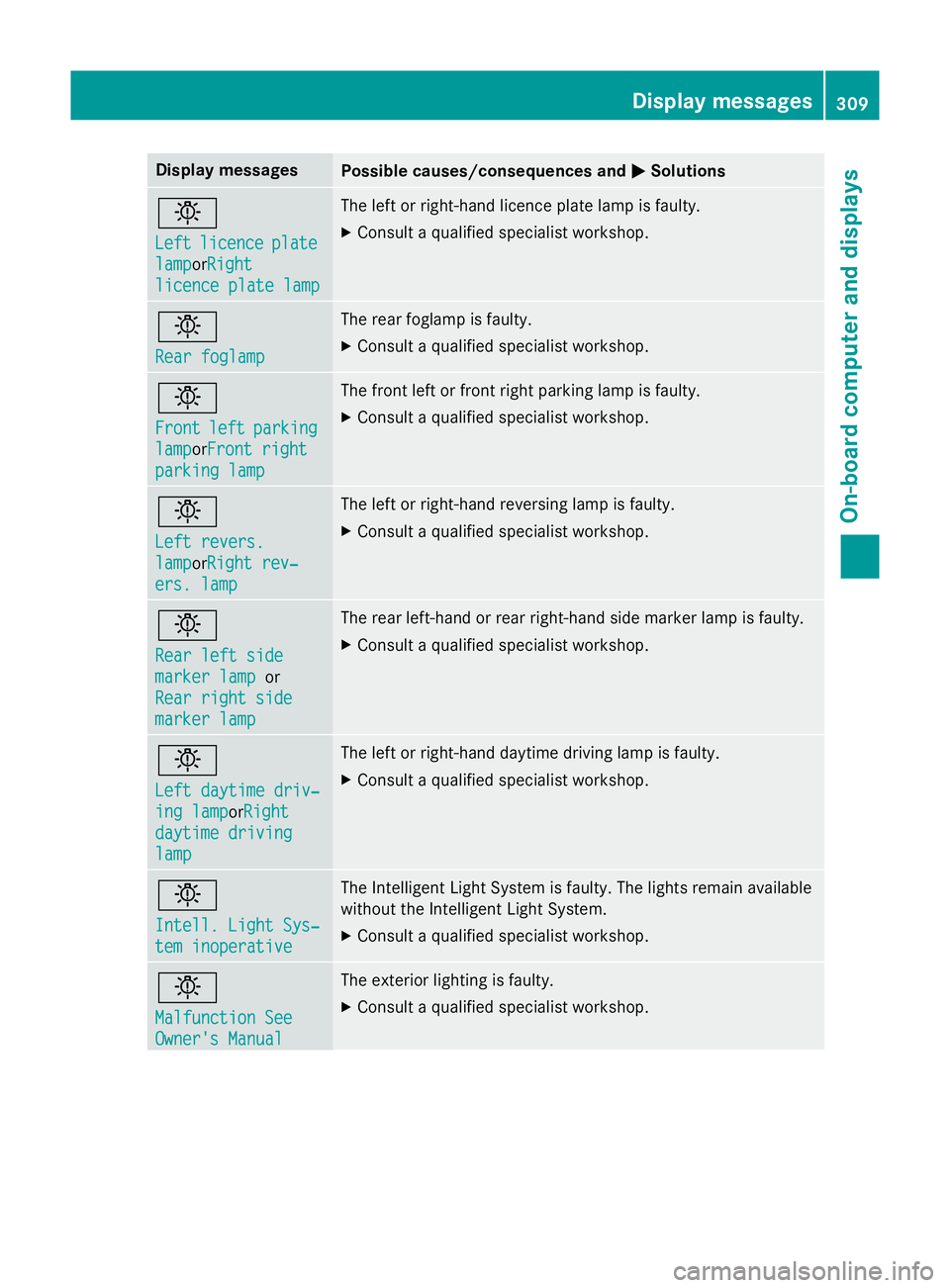
Display messages
Possible causes/consequences and
M
MSolutions b
Left Left
licence
licence plate
plate
lamp
lampor Right
Right
licenc eplate lamp
licenc eplate lamp The lef
torright-hand licence plat elamp is faulty.
X Consult aqualified specialist workshop. b
Rea
rf oglamp
Rea rf oglamp The rear foglam
pisfaulty.
X Consult aqualified specialist workshop. b
Front Front
left
leftparking
parking
lamp
lampor Front right
Front right
parkin glamp
parkin glamp The fron
tleftorf rontright parkin glamp is faulty.
X Consult aqualified specialist workshop. b
Lef
tr evers.
Lef tr evers.
lamp lampor Right rev‐
Right rev‐
ers .l amp
ers .l amp The lef
torright-hand reversin glamp is faulty.
X Consult aqualified specialist workshop. b
Rea
rl efts ide
Rea rl efts ide
marker lamp marker lamp or
Rea rr ight side
Rea rr ight side
marker lamp
marker lamp The rear left-han
dorrear right-hand side marke rlamp is faulty.
X Consult aqualified specialist workshop. b
Lef
td aytim edriv‐
Lef td aytim edriv‐
ing lamp ing lampor Right
Right
daytim edriving
daytim edriving
lamp
lamp The lef
torright-hand daytime drivin glamp is faulty.
X Consult aqualified specialist workshop. b
Intell
.Light Sys‐
Intell .Light Sys‐
tem inoperative tem inoperative The Intelligent Light Syste
misfaulty. The lights remain available
without th eIntel ligent Light System.
X Consult aqualified specialist workshop. b
Malfunction See Malfunction See
Owner'
sManual
Owner' sManual The exterio
rlighting is faulty.
X Consult aqualified specialist workshop. Display
messages
309On-boardcomputer an ddisplays Z
Page 390 of 497
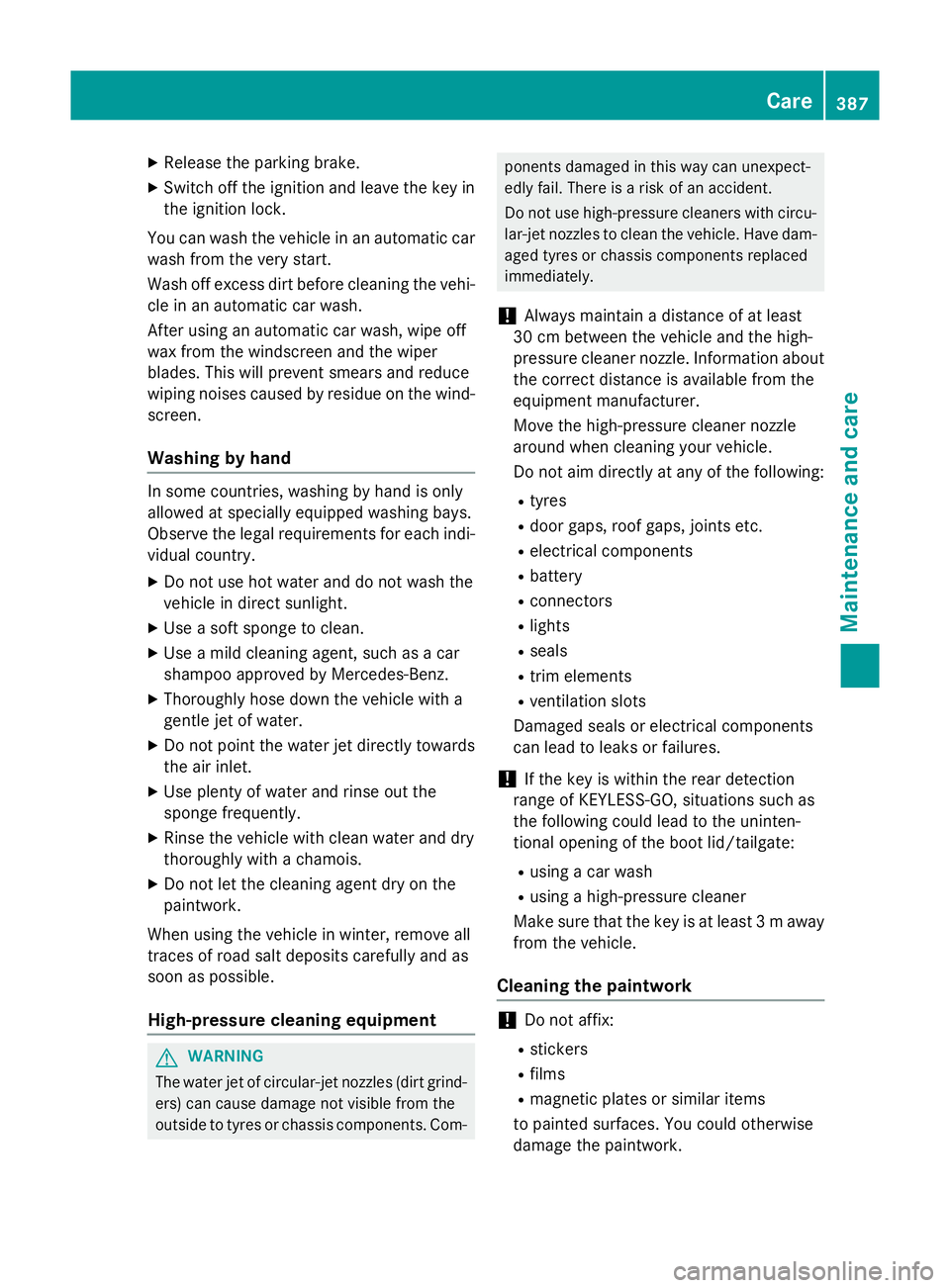
X
Releas ethe parkin gbrake.
X Switc hoff th eignition and leav ethe keyin
th ei gnition lock.
You can wash th evehicl einana utomatic car
wash from th everys tart.
Wash off excess dir tbefore cleaning th evehi-
cle in an automatic car wash.
Afte rusin gana utomatic car wash ,wipe off
wax from th ewindscree nand th ewiper
blades. This will preven tsme ars and reduce
wipin gnoises caused by residue on th ewind-
screen.
Washing by hand In som
ecountries, washin gbyhandiso nly
allowe datspecially equipped washin gbays.
Observ ethe legal requirements for eac hind i-
vidual country.
X Do no tuse hot water and do no twash the
vehicl eindirectsunlight.
X Use asofts pong etoc lean.
X Use amild cleaning agent, suc hasacar
shampoo approve dbyMercedes-Benz.
X Thoroughly hos edown th evehicl ewitha
gentl ejet of water.
X Do no tpoin tthe water je tdirectl ytow ards
th ea ir inlet.
X Use plenty of water and rinse out the
spong efrequently.
X Rinse th evehicl ewithc lean water and dry
thoroughly wit hachamois.
X Do no tlet th ecleaning agen tdry on the
paintwork.
Whe nusingthe vehicl einw inter, remove all
trace sofroads alt deposit scarefully and as
soo nasp ossible.
High-pressure cleaning equipment G
WARNING
The water je tofcircular-je tnozzle s(dir tgrind-
ers )can caus edamage no tvisible from the
outside to tyres or chassi scom ponents. Com- ponents damaged in this way can unexpect-
edly fail
.There is ariskofana ccident.
Do no tuse high-pressur ecleaners wit hcircu-
lar-je tnozzle stoc lean th evehicle. Hav edam-
aged tyres or chassi scom ponent sreplaced
immediately.
! Always maintai
nadistanc eofatl east
30 cm between th evehicl eand th ehigh-
pressur ecleane rnozzle .Inf ormation about
th ec orrect distanc eisavailable from the
equipmen tmanufacturer.
Mov ethe high-pressur ecleane rnozzle
around when cleaning your vehicle.
Do no taim directl yatany of th efollowing:
R tyres
R doo rgaps ,roo fg aps ,joint setc.
R electrical components
R battery
R connectors
R lights
R seals
R trim elements
R ventilation slots
Damaged seals or electrical components
can lead to leak sorfailures.
! If th
ekeyis within th erear detection
range of KEYLESS-GO ,situation ssuchas
th ef ollowin gcould lead to th euninten-
tional openin goftheboo tlid/tailgate:
R usin gac ar wash
R usin gah igh-pressur ecleaner
Mak esuret hatthe keyisatl east3maway
from th evehicle.
Cleaning th epaintwork !
Do no
taffix:
R stickers
R films
R magneti cplates or similar items
to painte dsurfaces. You could otherwise
damag ethe paintwork. Care
387Maintenance and care Z
Page 410 of 497
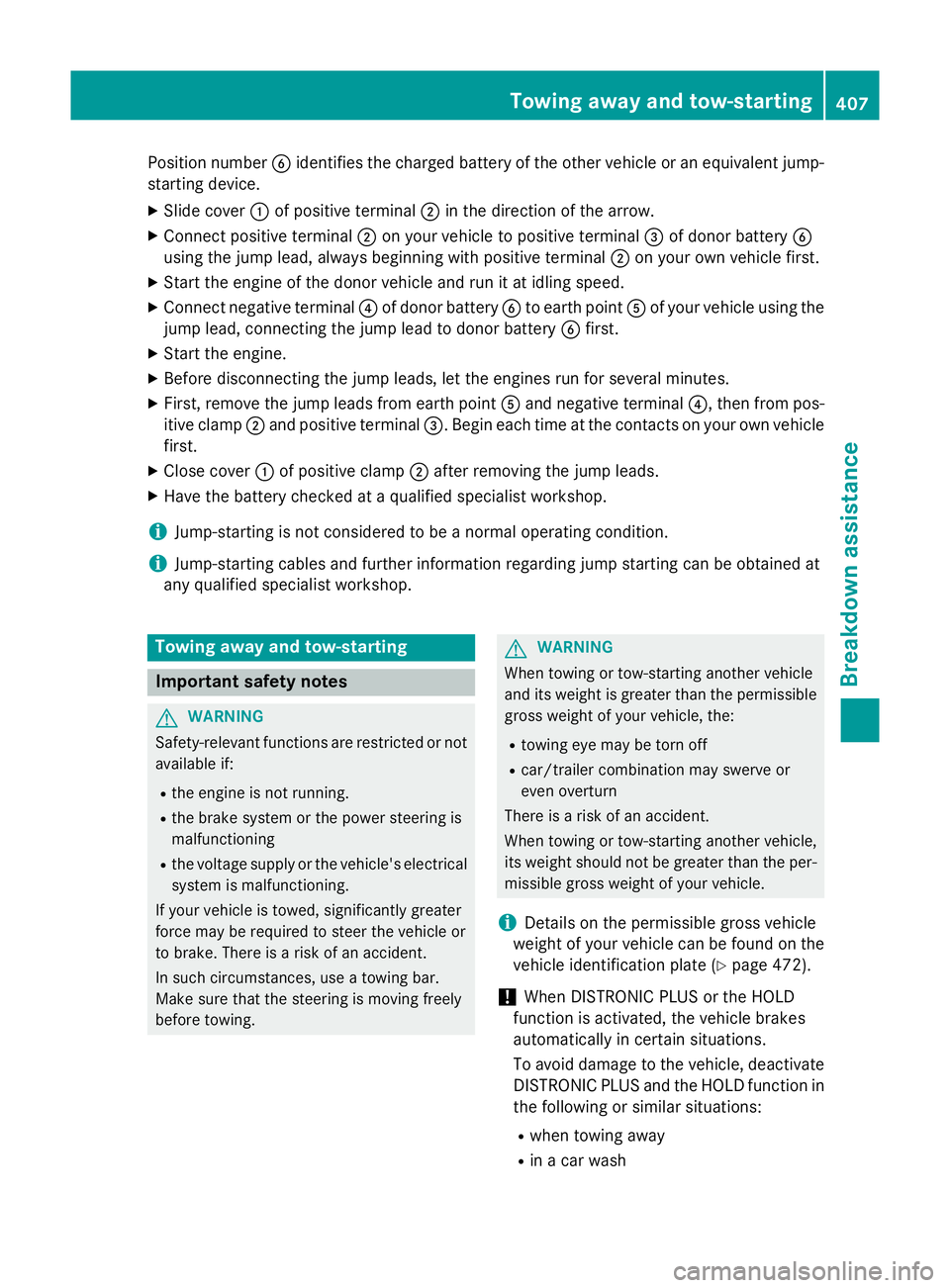
Position number
Bidentifies the charged batter yofthe other vehicle or an equivalent jump-
starting device.
X Slide cover :of positive terminal ;in the direction of the arrow.
X Connec tpositive terminal ;on your vehicle to positive terminal =of donor battery B
using the jump lead, alway sbeginnin gwith positive terminal ;on your own vehicle first.
X Start the engine of the donor vehicle and run it at idling speed.
X Connec tnegative terminal ?of donor battery Bto earth point Aof your vehicle using the
jump lead, connectin gthe jump lead to donor battery Bfirst.
X Start the engine.
X Before disconnectin gthe jump leads, let the engines run for several minutes.
X First ,remove the jump leads from earth point Aand negative terminal ?,then from pos-
itive clamp ;and positive terminal =.Begin each time at the contacts on your own vehicle
first.
X Close cover :of positive clamp ;after removin gthe jump leads.
X Have the batter ychecked at aqualified specialist workshop.
i Jump-starting is not considered to be
anormal operating condition.
i Jump-starting cables and further information regarding jump starting can be obtained at
any qualified specialist workshop. Towing away and tow-starting
Important safety notes
G
WARNING
Safety-relevant functions are restricted or not
availabl eif:
R the engine is not running.
R the brake system or the power steerin gis
malfunctioning
R the voltage supply or the vehicle's electrical
system is malfunctioning.
If your vehicle is towed, significantly greater
force may be required to steer the vehicle or
to brake. There is arisk of an accident.
In such circumstances, use atowing bar.
Make sure that the steerin gismoving freely
before towing. G
WARNING
When towing or tow-starting another vehicle
and its weight is greater than the permissible gross weight of your vehicle, the:
R towing eye may be torn off
R car/trailer combination may swerve or
even overturn
There is arisk of an accident.
When towing or tow-starting another vehicle,
its weight should not be greater than the per- missible gross weight of your vehicle.
i Details on the permissible gross vehicle
weight of your vehicle can be found on the
vehicle identification plate (Y page 472).
! When DISTRONIC PLUS or the HOLD
function is activated, the vehicle brakes
automatically in certain situations.
To avoid damage to the vehicle, deactivate
DISTRONIC PLUS and the HOLD function in the following or similar situations:
R when towing away
R in ac ar wash Towing away and tow-starting
407Breakdown assistance Z