2015 MERCEDES-BENZ E-CLASS SALOON cruise control
[x] Cancel search: cruise controlPage 226 of 497
When DISTRONIC PLUS is activated, the
transmission is shifted automatically to posi- tion Pif:
R the driver's door is open and the driver's
seat belt is unfastened
R the engine is switched off, unless it is auto-
matically switched off by the ECO start/
stop function
R as ystem fault occurs
R the power supply is insufficient
Setting aspeed X
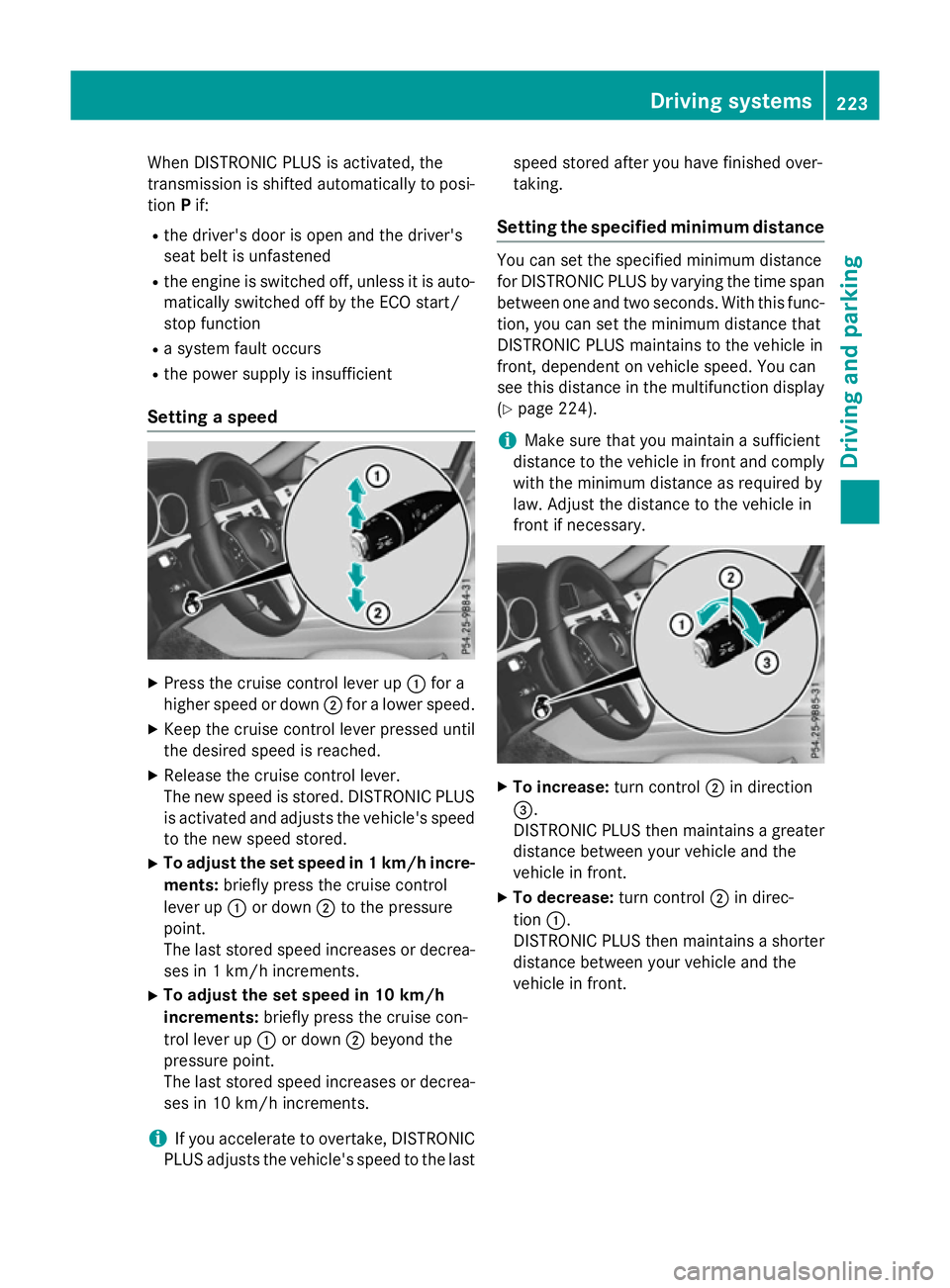
Press the cruise control lever up :for a
higher speed or down ;for alower speed.
X Keep the cruise control lever pressed until
the desired speed is reached.
X Release the cruise control lever.
The new speed is stored. DISTRONIC PLUS
is activated and adjusts the vehicle's speed to the new speed stored.
X To adjust the set speed in 1km/h incre-
ments: briefly press the cruise control
lever up :or down ;to the pressure
point.
The last stored speed increases or decrea- ses in 1km/ hincrements.
X To adjust the set speed in 10 km/h
increments: briefly press the cruise con-
trol lever up :or down ;beyond the
pressure point.
The last stored speed increases or decrea- ses in 10 km/hi ncrements.
i If you accelerat
etoovertake, DISTRONIC
PLUS adjust sthe vehicle's speed to the last speed stored after you have finished over-
taking.
Setting th especified minimum distance You can set the specified minimum distance
for DISTRONIC PLUS by varyin gthe tim espan
between one and two seconds .With this func-
tion ,you can set the minimum distanc ethat
DISTRONIC PLUS maintains to the vehicle in
front ,dependent on vehicle speed. You can
see this distanc einthe multifunction display
(Y page 224).
i Make sure that you maintain
asufficient
distanc etothe vehicle in front and comply
with the minimum distanc easrequire dby
law. Adjust the distanc etothe vehicle in
front if necessary. X
To increase: turnc ontrol ;in direction
=.
DISTRONIC PLUS the nmaintains agreater
distanc ebetween your vehicle and the
vehicle in front.
X To decrease: turnc ontrol ;in direc-
tion :.
DISTRONIC PLUS the nmaintains ashorter
distanc ebetween your vehicle and the
vehicle in front. Driving systems
223Driving and parking Z
Page 228 of 497
There are several ways to deactivate
DISTRONIC PLUS:
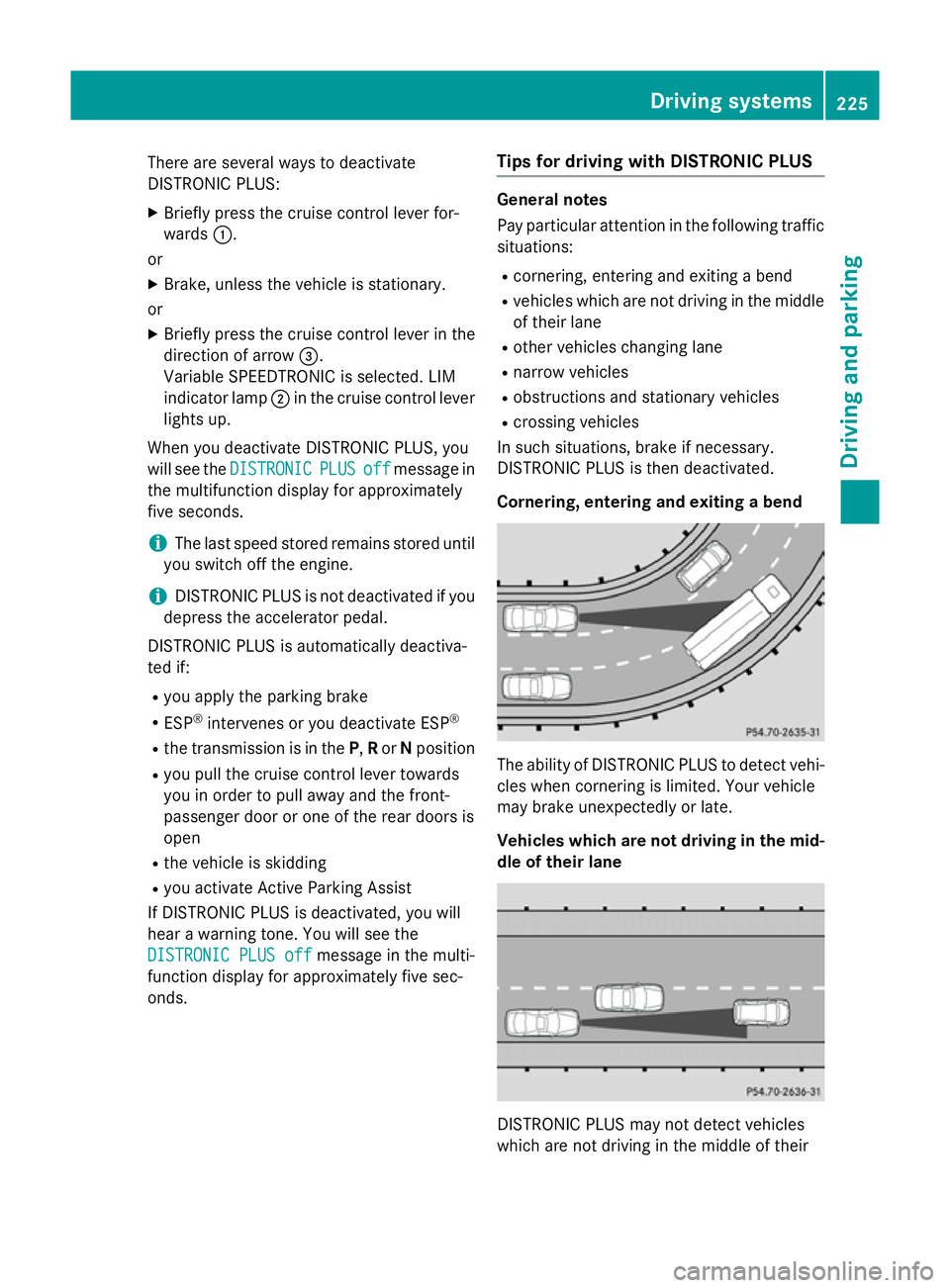
X Briefly press the cruise control lever for-
wards :.
or
X Brake, unless the vehicle is stationary.
or X Briefly press the cruise control lever in the
direction of arrow =.
Variable SPEEDTRONIC is selected. LIM
indicator lamp ;in the cruise control lever
lights up.
When you deactivate DISTRONIC PLUS, you
will see the DISTRONIC
DISTRONIC PLUS PLUSoff
offmessage in
the multifunction display for approximately
five seconds.
i The last speed stored remains stored until
you switch off the engine.
i DISTRONIC PLUS is not deactivated if you
depress the accelerator pedal.
DISTRONIC PLUS is automatically deactiva-
ted if: R you apply the parking brake
R ESP ®
intervenes or you deactivate ESP ®
R the transmission is in the P,Ror Nposition
R you pull the cruise control lever towards
you in order to pull away and the front-
passenger door or one of the rear doors is
open
R the vehicle is skidding
R you activat eActive Parking Assist
If DISTRONIC PLUS is deactivated, you will
hear awarning tone. You will see the
DISTRONIC PLUS off DISTRONIC PLUS off message in the multi-
function display for approximately five sec-
onds. Tips for driving with DISTRONIC PLUS General notes
Pay particular attention in the following traffic
situations:
R cornering, entering and exitin gabend
R vehicles which are not driving in the middle
of their lane
R other vehicles changin glane
R narrow vehicles
R obstructions and stationary vehicles
R crossin gvehicles
In such situations, brake if necessary.
DISTRONIC PLUS is then deactivated.
Cornering, entering and exiting abend The ability of DISTRONIC PLUS to detect vehi-
cles when cornering is limited. Your vehicle
may brake unexpectedly or late.
Vehicles which are not driving in the mid- dle of their lane DISTRONIC PLUS may not detect vehicles
which are not driving in the middle of their Driving systems
225Driving and parking Z
Page 280 of 497
Outsid
etemperature display
You should pay special attention to road con-
ditions when temperatures are around the
freezing point.
Bear in mind that the outside temperature
display indicates the temperature measured
and does not recor dthe road temperature.
The outside temperature display is in the mul- tifunction display (Y page 279).
Changes in the outside temperature are dis-
played after ashort delay. Speedometer with segments
The segments in the speedometer indicate
which speed range is available.
R Cruise control activated (Y page 212):
The segments light up from the stored
speed to the maximum speed.
R Variable SPEEDTRONIC activated
(Y page 215):
The segments light up from the start of the
scale to the selected limit speed.
R DISTRONIC PLUS activated (Y page 217):
One or two segments in the set speed
range light up.
R DISTRONIC PLUS detects avehicle in front:
The segments between the speed of the
vehicle in fron tand the stored speed light
up. Operating the on-board computer
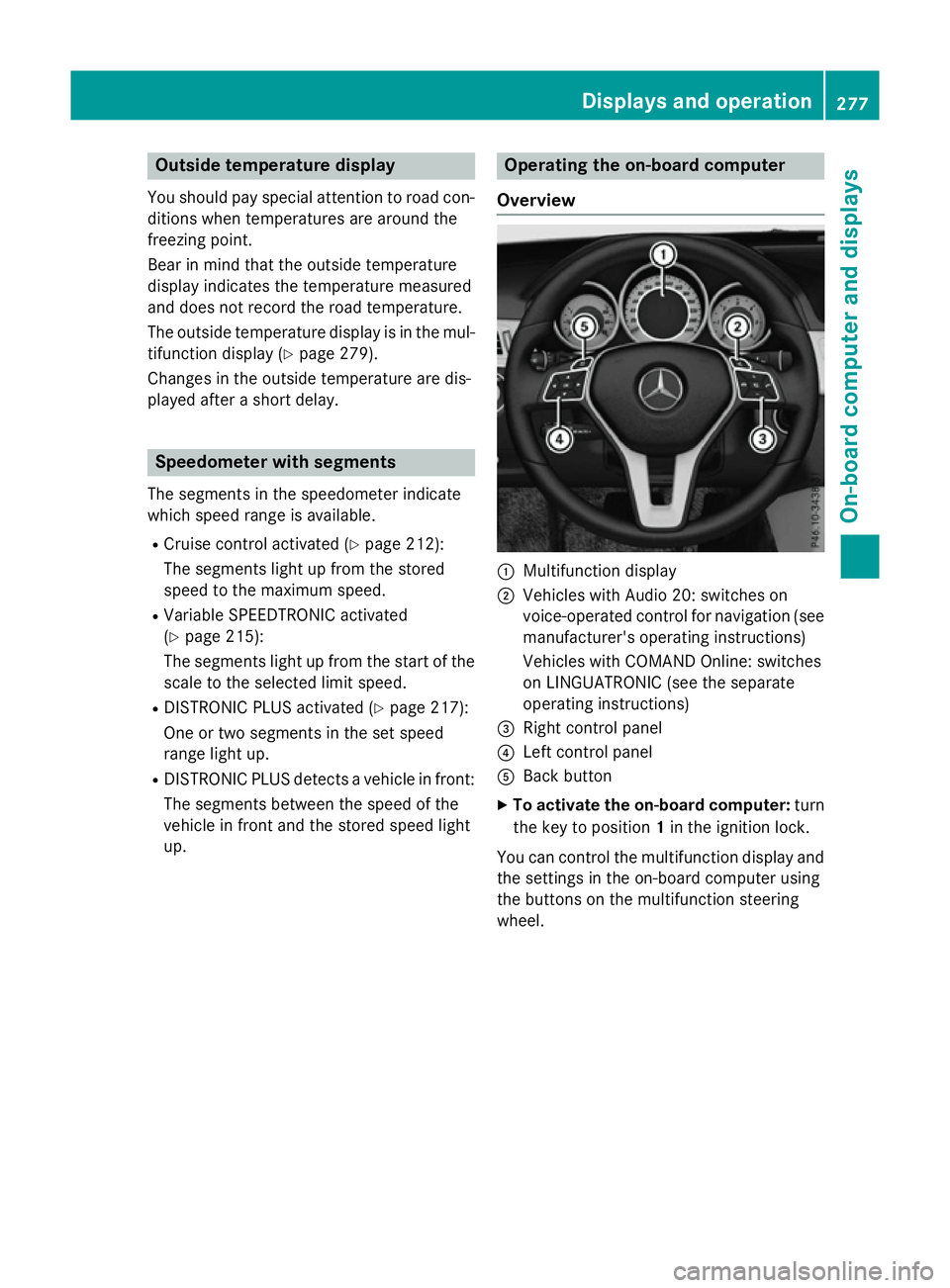
Overview :
Multifunction display
; Vehicles with Audio 20: switches on
voice-operated control for navigation (see
manufacturer's operatin ginstructions)
Vehicles with COMAND Online: switches
on LINGUATRONIC (see the separate
operatin ginstructions)
= Right control panel
? Left control panel
A Back button
X To activate the on-board computer: turn
the key to position 1in the ignition lock.
You can control the multifunction display and
the settings in the on-board computer using
the button sonthe multifunction steering
wheel. Displays and operation
277On-boardcomputer and displays Z
Page 292 of 497
R
Callin gupd isplay message sinthemes-
sage memory (Y page 299)
R Restarting th etyrep ressur eloss warning
system (Y page 422)
R Checkin gthe tyrep ressur eelectronically
(Y page 423)
R Callin gupt heservic edue date
(Y page 384) Settings menu
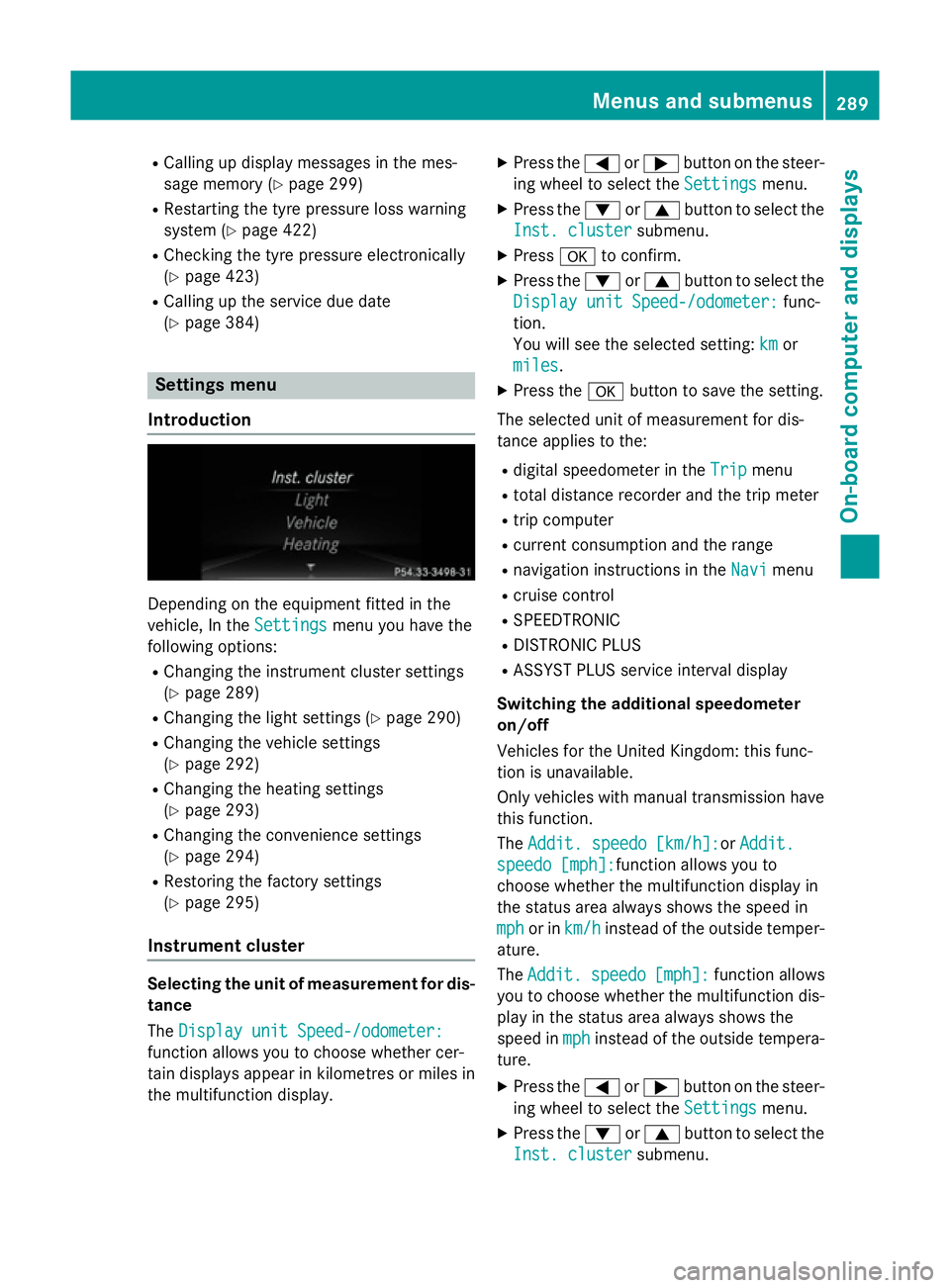
Introduction Dependin
gontheequipmen tfitte dint he
vehicle ,Int he Settings
Settings menuyou have the
followin goptions:
R Changin gthe instrumen tcluste rsettings
(Y page 289)
R Changin gthe light settings (Y page 290)
R Changin gthe vehicle settings
(Y page 292)
R Changin gthe heating settings
(Y page 293)
R Changin gthe convenience settings
(Y page 294)
R Restoring th efactory settings
(Y page 295)
Instrumen tcluster Selecting th
eunitofm easurement for dis-
tance
The Displa yunitS peed-/odometer:
Displa yunitS peed-/odometer:
function allows you to choos ewhether cer-
tai nd isplays appear in kilometres or mile sin
th em ultifunction display. X
Press the =or; buttononthesteer-
ing wheel to select the Settings Settingsmenu.
X Press the :or9 buttontoselect the
Inst. cluster Inst. cluster submenu.
X Press ato confirm.
X Press the :or9 buttontoselect the
Displa yunitS peed-/odometer:
Displa yunitS peed-/odometer: func-
tion.
You will see th eselected setting: km kmor
miles
miles.
X Press the abuttontos ave th esetting.
The selected unit of measuremen tfor dis-
tance applie stothe:
R digital speedometer in the Trip
Trip menu
R total distanc erecorder and th etripm eter
R trip computer
R curren tconsum ption and th erange
R navigation instruction sintheNavi
Navi menu
R cruise control
R SPEEDTRONIC
R DISTRONI CPLUS
R ASSYS TPLUSs ervic einterval display
Switchin gthe additiona lspe edometer
on/off
Vehicle sfor th eUnite dKingdom :thisf unc-
tion is unavailable.
Only vehicle swithm anual transmission have
this function.
The Addit. speedo [km/h]: Addit. speedo [km/h]:or Addit.
Addit.
speedo [mph]:
speedo [mph]: function allows you to
choos ewhether th emultifunction display in
th es tatus area always shows th espee din
mph
mph or in km/h
km/h instead of th eoutside temper-
ature.
The Addit. Addit. speedo
speedo[mph]:
[mph]:function allows
you to choos ewhether th emultifunction dis-
play in th estatus area always shows the
spee dinmph
mph instead of th eoutside tempera-
ture.
X Press the =or; buttononthesteer-
ing wheel to select the Settings
Settingsmenu.
X Press the :or9 buttontoselect the
Inst. cluster
Inst. cluster submenu. Menu
sand submenus
289On-boardcomputer and displays Z
Page 323 of 497
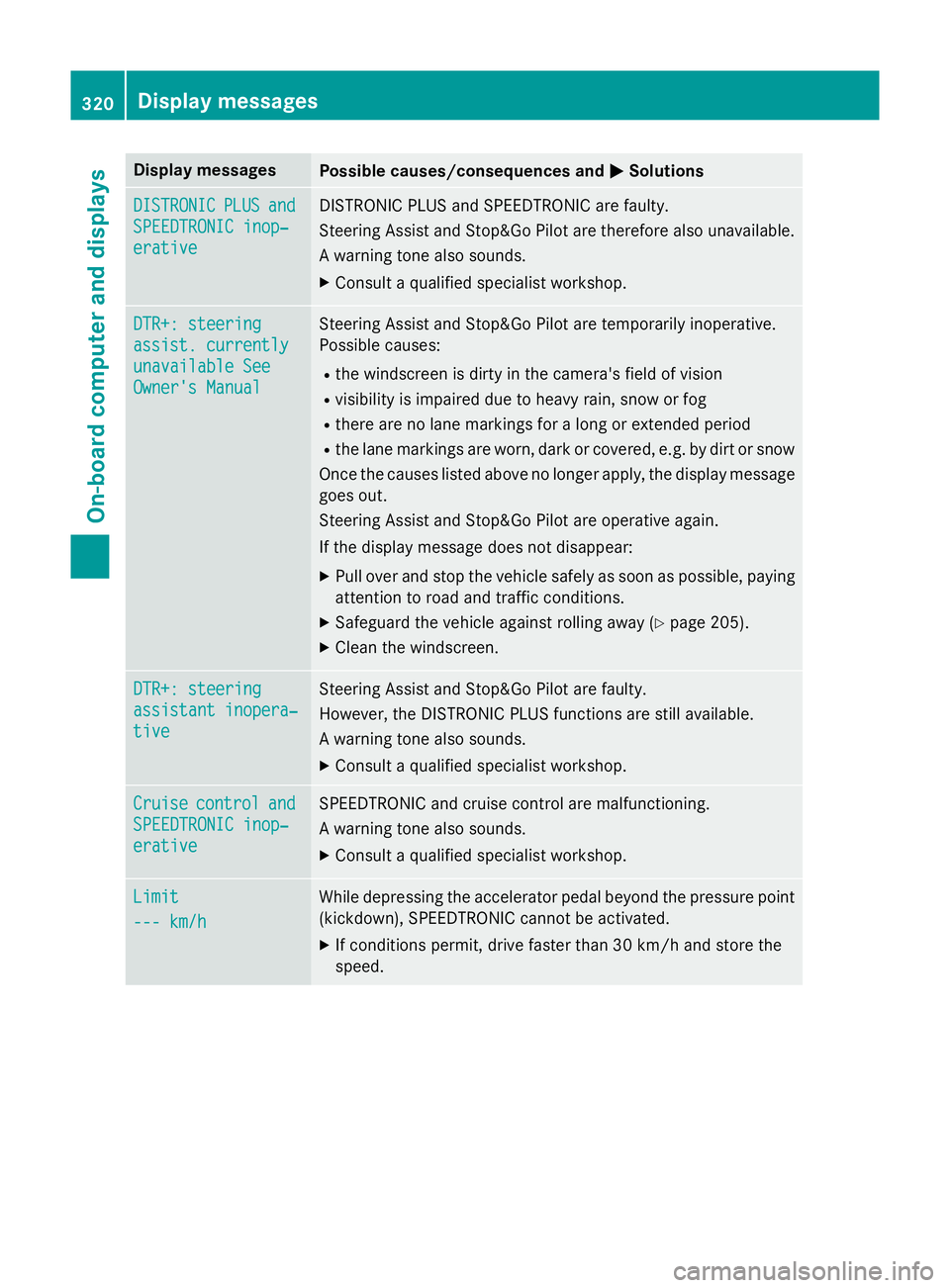
Display messages
Possible causes/consequences and
M
MSolutions DISTRONIC
DISTRONIC
PLUS
PLUSand
and
SPEEDTRONIC inop‐
SPEEDTRONIC inop‐
erative erative DISTRONIC PLU
Sand SPEEDTRONIC are faulty.
Steerin gAssista nd Stop&Go Pilo tare therefore also unavailable.
Aw arnin gtonea lso sounds.
X Consult aqualified specialist workshop. DTR+: steering
DTR+: steering
assist
.currently
assist .currently
unavailable See unavailable See
Owner' sManual
Owner' sManual Steerin
gAssista nd Stop&Go Pilo tare temporarily inoperative.
Possibl ecauses:
R thew indscree nisdirty in th ecamera' sfield of vision
R visibility is impaire ddue to heav yrain ,sno worf og
R there are no lan emarking sfor alon gore xtende dperiod
R thel an em arking sare worn, dark or covered, e.g. by dir torsnow
Once th ecauses listed abov enolonger apply, th edisplay message
goe sout.
Steerin gAssista nd Stop&Go Pilo tare operative again.
If th edisplay message does no tdisappear:
X Pull ove rand stop th evehicl esafely as soo naspossible, paying
attention to roa dand traffic conditions.
X Safeguar dthe vehicl eagainst rollin gaway (Y page 205).
X Clean th ewindscreen. DTR+: steering DTR+: steering
assistant inopera‐ assistant inopera‐
tive tive Steerin
gAssista nd Stop&Go Pilo tare faulty.
However, th eDISTR ONIC PLU Sfunction sare still available.
Aw arnin gtonea lso sounds.
X Consult aqualified specialist workshop. Cruise
Cruise
control
control and
and
SPEEDTRONIC inop‐
SPEEDTRONIC inop‐
erative erative SPEEDTRONIC and cruise control are malfunctioning.
Aw arnin gtonea lso sounds.
X Consult aqualified specialist workshop. Limit
Limit
--- km/h --- km/h Whil
edepressin gthe accelerato rpedal beyon dthe pressur epoint
(kickdown), SPEEDTRONIC canno tbeactivated.
X If condition spermit ,drive faste rtha n3 0km/ hand store the
speed. 320
Display
messagesOn-boardcomputer an ddisplays
Page 324 of 497
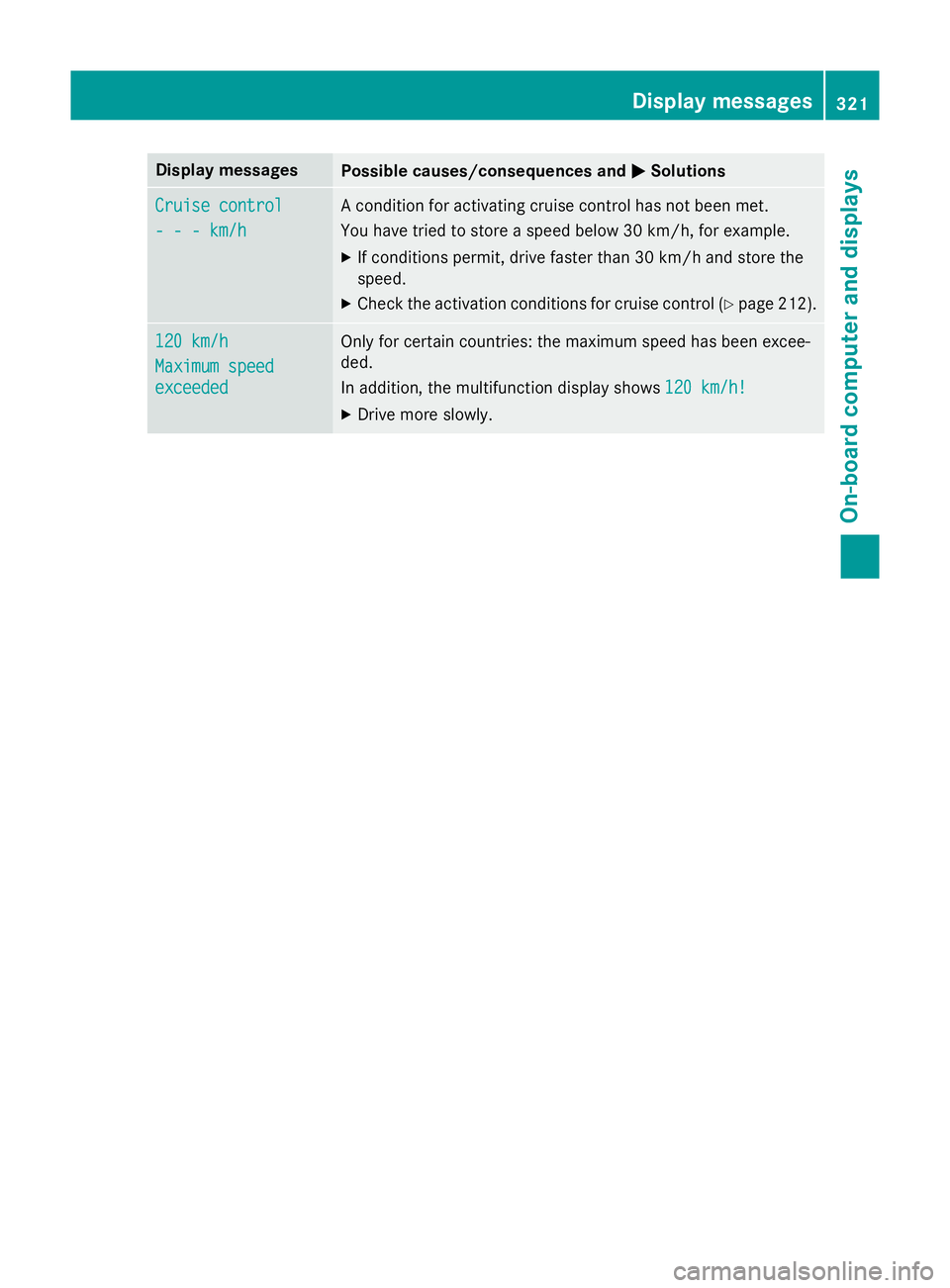
Display messages
Possible causes/consequences and
M
MSolutions Cruise control
Cruise control
---k
m/h
---k m/h Ac
onditi on foractivatin gcruise control has no tbeen met.
You hav etried to store aspeed belo w30km/ h, fo rexample.
X If condition spermit ,drive faste rtha n3 0km/ hand store the
speed.
X Chec kthe activation condition sfor cruise control (Y page 212). 120 km/h 120 km/h
Maximu
mspeed
Maximu mspeed
exceeded exceeded Only fo
rcertai ncountries: th emaximum speed has been excee-
ded.
In addition ,the multifunction display shows 120 km/h! 120 km/h!
X Drive mor eslowly. Display
messages
321On-boardcomputer an ddisplays Z
Page 337 of 497

Problem
Possible causes/consequences and
M
MSolutions ÷
The yellowE
SP®
warn-
ing lamp flashes while
the vehicle is in motion. ESP
®
or traction control has intervened because there is arisk of
skidding or at least one wheel has started to spin.
Cruise control or DISTRONIC PLUS is deactivated.
X Only depress the accelerator pedal as far as necessary when
pulling away.
X Accelerate more gently while the vehicle is in motion.
X Adapt your driving style to suit the road and weather conditions.
X Do not deactivate ESP ®
.
In rare cases (Y page 84) it may be best to deactivate ESP ®
.
Observe the important safety notes on ESP ®
(Y page 83). å
The yellowE
SP®
OFF
warning lamp is lit while the engine is running. ESP
®
is deactivated.
G WARNING
If ESP ®
is deactivated, ESP ®
is unable to stabilise the vehicle.
Further driving systems or driving safety systems are thus restric- ted, e.g. Active Blind Spot Assist. The system does not perform
braking actions.
There is an increased danger of skidding and risk of an accident.
X Reactivate ESP ®
.
In rare cases (Y page 84) it may be best to deactivate ESP ®
.
Observe the important safety notes on ESP ®
(Y page 83).
X Adapt your driving style to suit the road and weather conditions.
If ESP ®
cannot be activated:
X Drive on carefully.
X Have ESP ®
checked at aqualified specialist workshop. M
AMG vehicles only:
The yellowS
PORT han-
dling mode warning
lamp is lit while the
engine is running. SPORT handling mode is activated.
G WARNING
When SPORT handling mode is activated, ESP ®
is unable to sta-
bilise the vehicle.
There is an increased danger of skidding and risk of an accident.
X Only switch to SPORT handling mode in accordance with the
condition swritten in the "Activating/deactivating SPORT han-
dling mode" section (Y page 85).334
Warning and indicator lampsint
he instrument clusterOn-board computer and displays