2015 MERCEDES-BENZ E-CLASS SALOON cruise control
[x] Cancel search: cruise controlPage 216 of 497

Selecting cruise control
X
Check whether LIM indicator lamp :is off.
If it is off, cruise control is already selected. If it is not, press the cruise control lever in
the direction of arrow ;.
LIM indicator lamp :in the cruise control
lever goes out. Cruise control is selected.
Activation conditions To activate cruise control, all of the following
activation condition smust be fulfilled:
R the parking brake must be released.
R you are driving faster than 30 km/h.
R ESP ®
must be switched on, but not inter-
vening.
R the transmission must be in position D.
R the cruise control function must be selec-
ted (Y page 213).
Storing and maintaining the current
speed You can accept the current speed if you are
driving faster than 30 km/h.
X Accelerate the vehicl etothe desired
speed.
X Briefl ypress the cruis econtro llev er up :
or down ;.
X Remov eyourfoo tfromt he accelerator
pedal.
Cruise contro lisactivated .The vehicle
automaticall ymaintains the stored speed.
i Cruise contro
lmaybe unabl etomaintain
the stored spee donuphillgradients. The
stored spee disresumed when the gradient
evens out. Cruise contro lmaintains the
stored spee dondownhil lgradients by
automaticall ybraking the vehicle.
i Vehicles with manua ltransmission:
R always drive at adequate, bu tnot exces-
sive, engine speeds
R change gear in goo dtime.
R if possible, do not change down several
gear satat ime
Storin gthe curren tspeed or callin gup
the las tstored speed G
WARNING
If yo ucallupt he stored speed and it is lower
tha nthe current speed ,the vehicl edeceler-
ates. If yo udonot know the stored speed ,the
vehicl ecould decelerate unexpectedly .There
is ar iskofana ccident.
Pa ya ttentio ntothe roa dand traffi ccondi-
tions befor ecalling up the stored speed .Ifyou
do not know the stored speed ,stor ethe
desired speed again. Dr
ivin gsystems
213Driving an dparking Z
Page 217 of 497
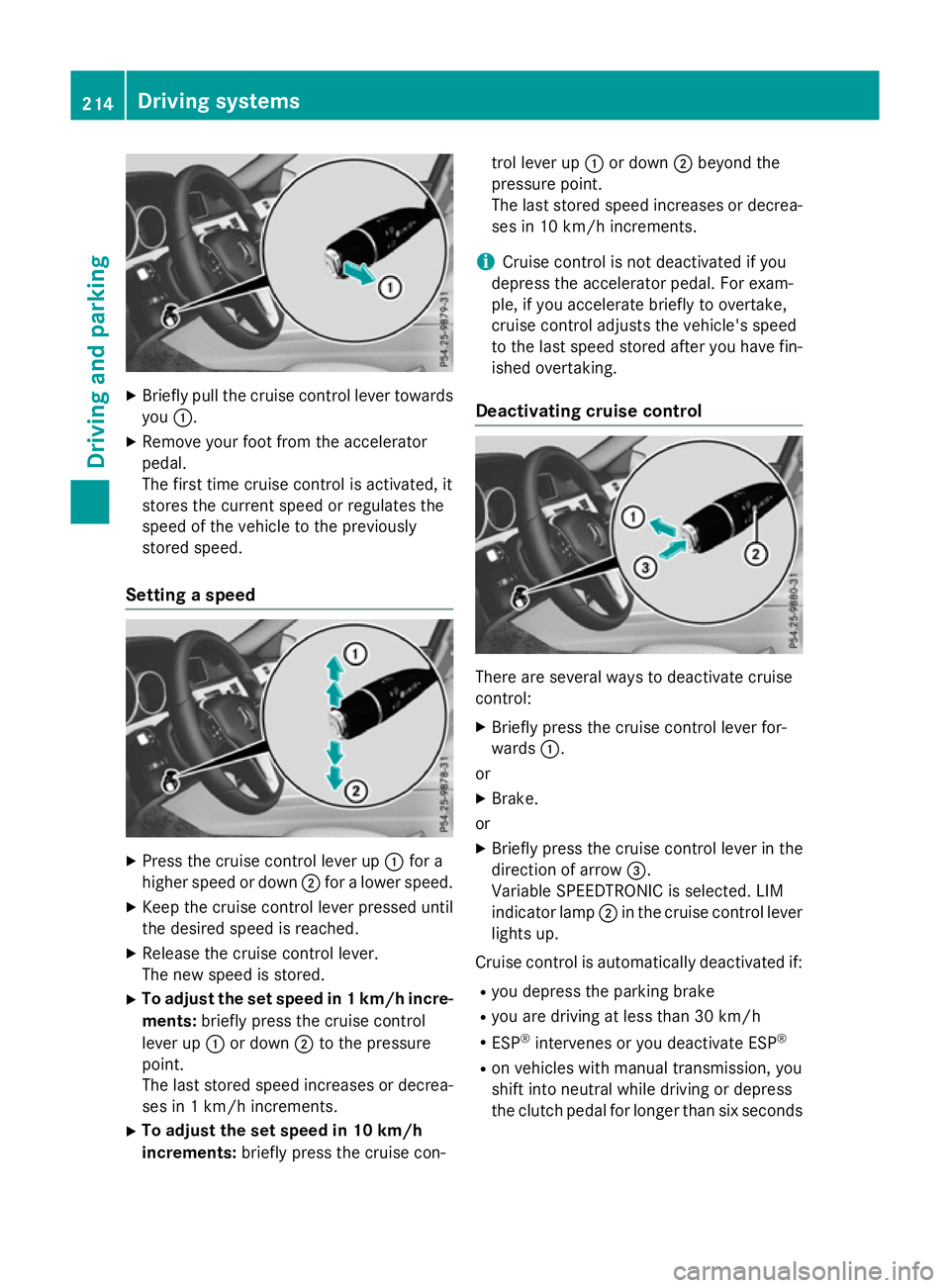
X
Briefly pull the cruise control lever towards
you :.
X Remove your foot from the accelerator
pedal.
The firs ttime cruise control is activated, it
store sthe current speed or regulates the
speed of the vehicle to the previously
store dspeed.
Setting aspeed X
Press the cruise control lever up :for a
higher speed or down ;for alower speed.
X Kee pthe cruise control lever presse duntil
the desire dspeed is reached.
X Releas ethe cruise control lever.
The new speed is stored.
X To adjust the se tspeed in 1km/h incre-
ments: brieflypress the cruise control
lever up :or down ;to the pressure
point.
The last store dspeed increases or decrea-
ses in 1km/h increments.
X To adjust the se tspeed in 10 km/h
increments: brieflypress the cruise con- trol lever up
:or down ;beyond the
pressure point.
The last store dspeed increases or decrea-
ses in 10 km/h increments.
i Cruise control is not deactivated if you
depress the accelerato rpedal .For exam-
ple, if yo uaccelerate briefl ytoovertake,
cruise control adjusts the vehicle's speed
to the last speed store dafteryou have fin-
ished overtaking.
Deactivatin gcruise control There are several ways to deactivate cruise
control:
X Briefly press the cruise control lever for-
wards :.
or
X Brake.
or X Briefly press the cruise control lever in the
direction of arrow =.
Variabl eSPEEDTRONIC is selected .LIM
indicator lamp ;in the cruise control lever
lights up.
Cruise control is automaticall ydeactivated if:
R yo ud epress the parking brake
R yo ua re driving at less than 30 km/h
R ESP ®
intervenes or yo udeactivate ESP ®
R on vehicle swithm anual transmission, you
shift into neutral while driving or depress
the clutch pedal for longer than six seconds 214
Drivin
gsystemsDrivin gand parking
Page 218 of 497
R
on vehicles with manual transmission, you
shift to agear that is too high, and as a
result the engine speed is too low
R on vehicles with automatic transmission,
you shift to position Nwhile driving
If cruise control is deactivated, you will hear a warning tone. You will see the Cruise con‐
Cruise con‐
trol off
trol off message in the multifunction dis-
play for approximately five seconds.
i The last speed stored is cleared when you
switch off the engine. SPEEDTRONIC
Important safety notes SPEEDTRONIC brakes automatically so that
you do not exceed the set speed. Change into
al ower gear in good time on long and steep
downhill gradients. Take particular noteof
this when driving aladen vehicle. By doing so,
you will make use of the braking effect of the engine. This relieves the load on the brake
system and prevent sthe brakes from over-
heating and wearing too quickly. If you need
additional braking, depress the brake pedal
repeatedly rather than continuously.
If you fail to adapt your driving style, SPEED-
TRONIC can neither reduce the risk of an
accident nor override the laws of physics.
SPEEDTRONIC cannot take into account
road, weather or traffic conditions. SPEED-
TRONIC is only an aid. You are responsible for
the distance to the vehicle in front,f or vehicle
speed, for braking in good time, and for stay- ing in lane.
If there is achange of drivers, advise the new
driver of the speed stored.
You can set avariable or permanent limit
speed:
R variable for speed limits, e.g. in built-up
areas
R permanent for long-term speed restric-
tions, e.g. when driving with winter tyres
fitted i
The speed indicated in the speedometer
may differ slightly from the limit speed
stored.
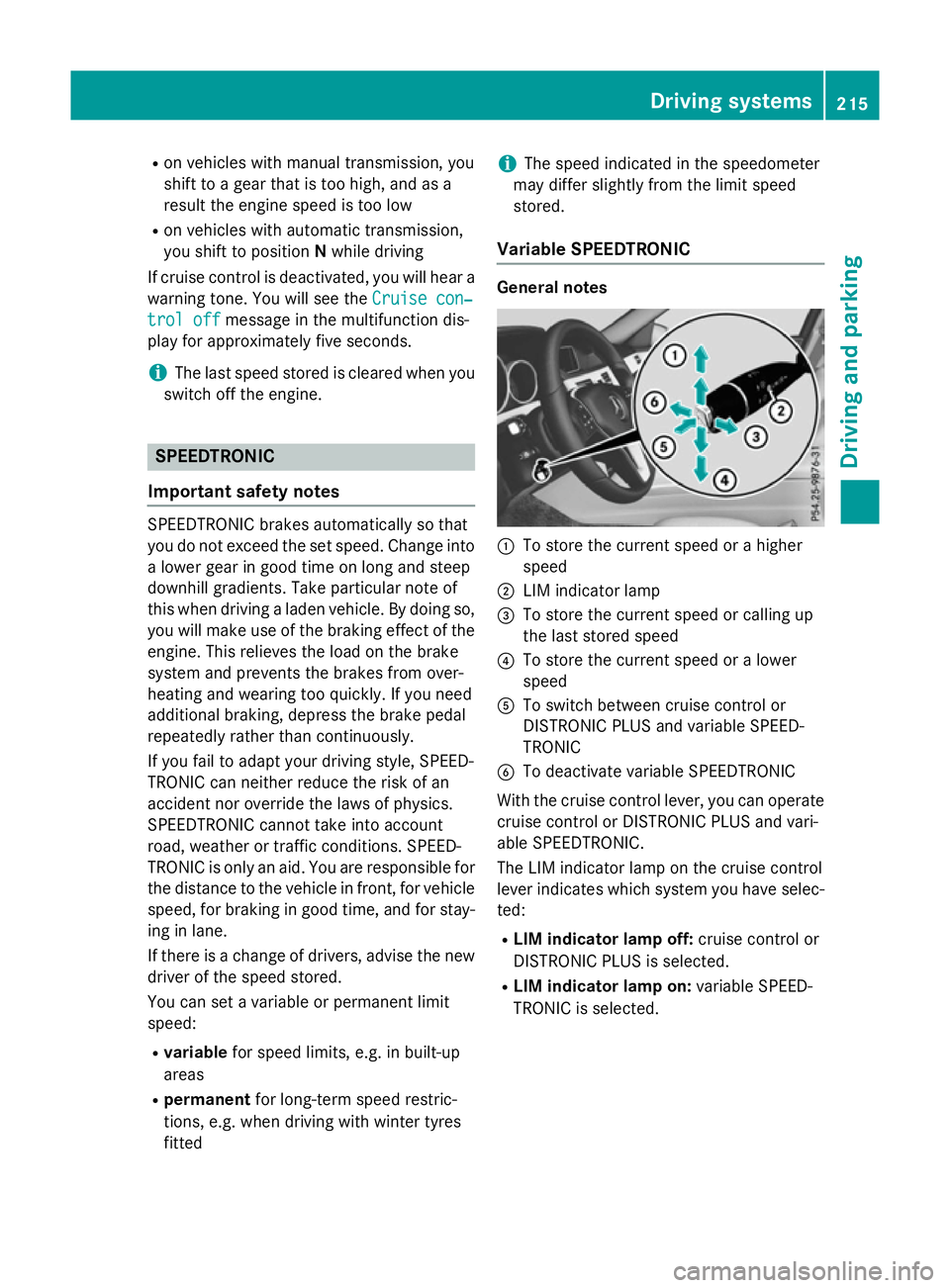
Variable SPEEDTRONIC General notes
:
To store the current speed or ahigher
speed
; LIM indicator lamp
= To store the current speed or calling up
the last stored speed
? To store the current speed or alower
speed
A To switch between cruise control or
DISTRONIC PLUS and variable SPEED-
TRONIC
B To deactivate variable SPEEDTRONIC
With the cruise control lever, you can operate
cruise control or DISTRONIC PLUS and vari-
able SPEEDTRONIC.
The LIM indicator lamp on the cruise control
lever indicates which system you have selec- ted:
R LIM indicator lamp off: cruise control or
DISTRONIC PLUS is selected.
R LIM indicator lamp on: variable SPEED-
TRONIC is selected. Driving systems
215Driving and parking Z
Page 219 of 497

Selecting variable SPEEDTRONIC
If there is
achange of drivers, advise the new
driver of the limit speed stored.
X Check whether LIM indicator lamp :is on.
If it is on, variable SPEEDTRONIC is already
selected.
If it is not, press the cruise control lever in
the direction of arrow ;.
LIM indicator lamp :in the cruise control
lever lights up. Variable SPEEDTRONIC is
selected.
Storing the current speed X
Briefly press the cruise control lever up :
or down ;.
The current speed is stored and shown in
the multifunction display.
The segments in the multifunction display
light up from the start of the scale up to the
stored speed.
You can use the cruise control lever to limit
the speed to any speed above 30 km/hw hile
the engine is running. Storing the current speed or calling up the
last stored speed G
WARNING
If you call up the stored speed and it is lower
than the current speed, the vehicle deceler-
ates. If you do not know the stored speed, the vehicle could decelerate unexpectedly. There
is ar isk of an accident.
Pay attention to the road and traffic condi-
tions before calling up the stored speed. If you do not know the stored speed, store the
desired speed again. X
Briefly pull the cruise control lever towards
you :.
Setting aspeed X
To adjust the set speed in 10 km/h
increments: briefly press the cruise con-
trol lever up :beyond the pressure point
for ahigher speed, or down ;for alower
speed.
or X Keep the cruise control lever pressed
beyond the pressure point until the desired 216
Driving systemsDriving and parking
Page 220 of 497

speed is set. Press the cruise control lever
up : for ahigher speed or down ;for a
lower speed.
X To adjust the set speed in 1km/h incre-
ments: briefly press the cruise control
lever up :to the pressure point for a
higher speed or down ;for alower speed.
or
X Keep the cruise control lever pressed to the
pressure point until the desired speed is
set. Press the cruise control lever up :for
ah igher speed or down ;for alower
speed.
Switching SPEEDTRONIC to passive
If you depress the accelerator pedal beyond
the pressure point (kickdown), SPEED-
TRONIC is switched to passive mode. The fol-
lowing message appears in the multifunction
display: SPEEDTRONIC passive SPEEDTRONIC passive.
You can then exceed the stored speed.
SPEEDTRONIC is activated againify ou:
R drive slower than the stored speed without
kickdown
R set anew speed or
R call up the last speed stored again
The SPEEDTRONIC passive
SPEEDTRONIC passive message in the
multifunction displayd isappears.
Deactivating variable SPEEDTRONIC
It is not possible to deactivate variable
SPEEDTRONIC by braking. There are several waystod
eactivate variable
SPEEDTRONIC:
X Briefly press the cruise control lever for-
wards :.
or X Briefly press the cruise control lever in the
direction of arrow =.
LIM indicator lamp ;in the cruise control
lever goes out. Variable SPEEDTRONIC is
deactivated.
Cruise control or DISTRONIC PLUS is selec-
ted.
i The last speed stored is cleared when you
switch off the engine.
Permanent SPEEDTRONIC You can use the on-board computer to limit
the speed permanently to
avalue between
160 km/h(e.g. for driving on winter tyres) and the maximum speed (Y page 292).
Shortly before the stored speed is reached, it appears in the multifunction display.
Permanent SPEEDTRONIC remains active,
even if variableS PEEDTRONIC is deactivated.
You cannot exceed the stored limit speed,
even if you depress the accelerator pedal
beyond the pressure point (kickdown). DISTRONIC PLUS
General notes DISTRONIC PLUS regulates the speed and
automaticallyh
elps you maintain the dis-
tance to the vehicle detected in front.V ehi-
cles are detected with the aid of the radar
sensor system. DISTRONIC PLUS brakes
automaticallysot hat the set speed is not
exceeded.
Change into alower gear in good time on long
and steep downhill gradients. Take particular note of this when driving aladen vehicle. By
doing so, you will make use of the braking
effect of the engine. This relieves the load on Driving systems
217Driving and parking Z
Page 222 of 497

lose traction and the vehicle could then
skid
R when there is poor visibility, e.g. due to fog,
heavy rain or snow
DISTRONIC PLUS may not detect narrow
vehicles drivin ginfront,e.g. motorcycles, or
vehicles drivin gonadifferentline.
In particular, the detection of obstacles can
be impaired in the case of:
R dirt on the sensors or obscured sensors
R sno worh eavy rain
R interference by other radar sources
R the possibilit yofstron gr adar reflections,
for example, in multi-storey car parks
If DISTRONIC PLUS no longer detect savehi-
cle in front ,itmay unexpectedly accelerat eto
the speed stored.
This speed can:
R be too high for afilter lane or aslip road
R be so high in the right lane that you pass
vehicles drivin gonthe left (left-han ddrive
countries)
R be so high in the left lane that you pass
vehicles drivin gonthe right (right-hand
drive countries)
If there is achange of drivers, advise the new
drive rofthe speed stored.
Cruise control lever :
To store the current speed or ahigher
speed
; To set the specified minimum distance
= LIM indicator lamp ?
To store the current speed or callin gup
the last stored speed
A To store the current speed or alower
speed
B To switc hbetween DISTRONIC PLUS and
variable SPEEDTRONIC
C To deactivat eDISTRONIC PLUS
You can operat eDISTRONIC PLUS and varia-
ble SPEEDTRONIC with the cruise control
lever.
The LIM indicator lamp on the cruise control
lever indicates which system you have selec-
ted:
R LIM indicator lam poff:DISTRONIC PLUS
is selected.
R LIM indicator lam pon:variable SPEED-
TRONIC is selected.
Selecting DISTRONIC PLUS X
Check whether LIM indicator lamp :is off.
If it is off ,DISTRONIC PLUS is already selec-
ted.
If it is not ,press the cruise control lever in
the direction of arrow ;.
LIM indicator lamp :in the cruise control
lever goes out. DISTRONIC PLUS is selec-
ted. Driving systems
219Driving and parking Z
Page 223 of 497
Activating DISTRONIC PLUS
Activation conditions
To activat
eDISTR ONICPLUS, th efollowing
condition smustbef ulfilled:
R thee nginem ustber unning. It may tak eup
to two minute sofdriving before
DISTRONI CPLUSisr eadyfor use.
R thep arking brak emustber eleased.
R ESP ®
mus tbes witched on ,but no tinter-
vening.
R Active Parking Assis tmustn otbe activa-
ted.
R thet ransmission mus tbeinpositionD.
R thed river' sdoor mus tbeclosed when you
shif tfrom Pto Dor your seat belt mus tbe
fastened.
R thef ront-pa ssenger door and th erear
door smustbec losed.
R thev ehicl emustn otbe skidding.
R theD ISTR ONICPLUSfunction mus tbe
selected wit hthe cruise control lever
(Y page 219).
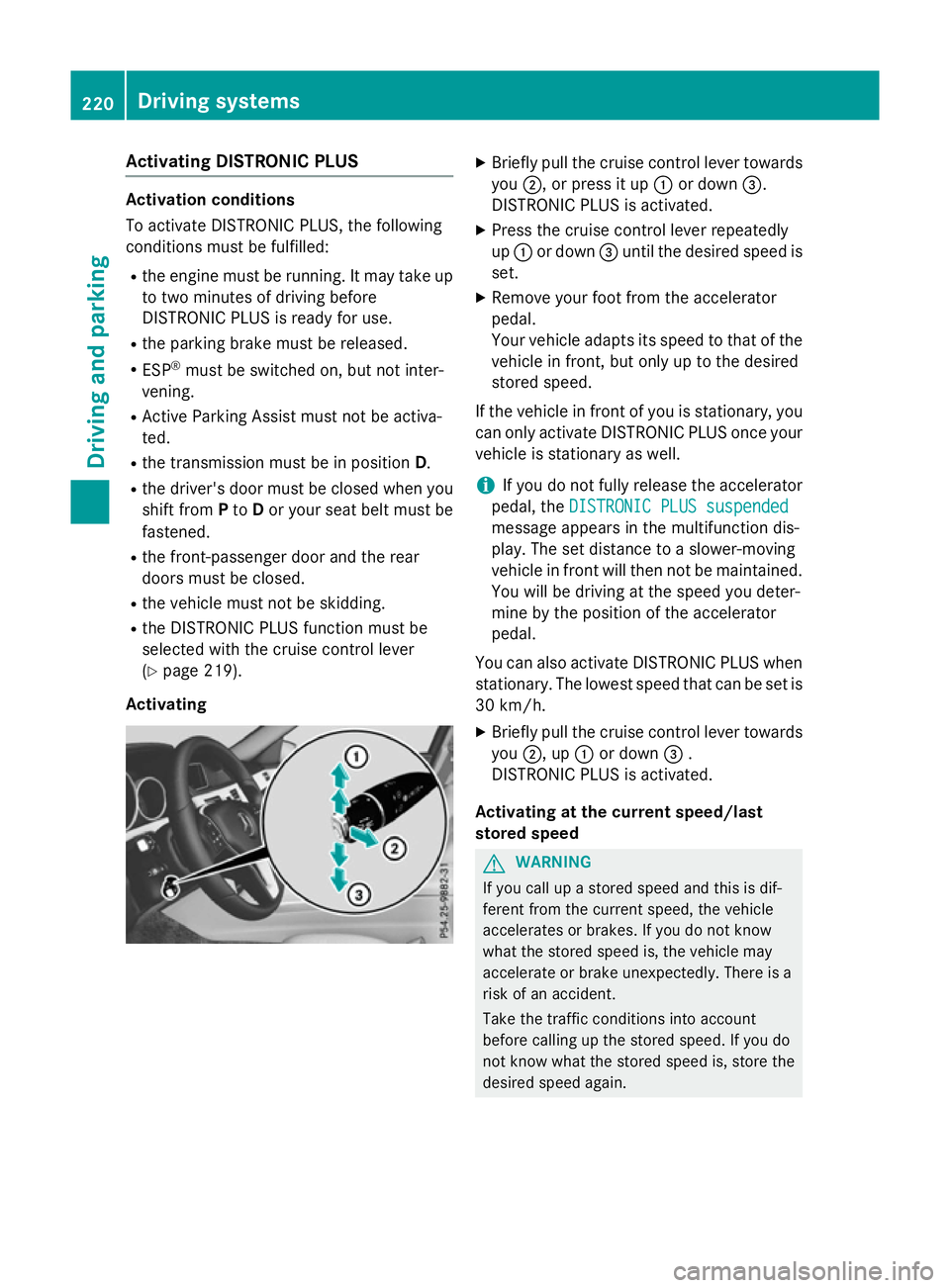
Activating X
Briefly pull th ecruise control lever towards
you ;,orp ress it up :or down =.
DISTRONI CPLUSisa ctivated.
X Press th ecruise control lever repeatedly
up : or down =until th edesired spee dis
set.
X Remove your foo tfromt heaccelerator
pedal.
Your vehicl eadapt sits spee dtot hatoft he
vehicl einfront,but only up to th edesired
store dspeed.
If th evehicl einf rontof you is stationary, you
can only activat eDISTR ONICPLUSo ncey our
vehicl eisstationary as well.
i If you do no
tfully release th eaccelerator
pedal ,the DISTRONIC PLU Ssuspended
DISTRONIC PLU Ssuspended
message appear sinthemultifunction dis-
play. The set distanc etoaslower-moving
vehicl einfrontwill then no tbemaintained.
You will be driving at th espee dyou deter-
min ebyt heposition of th eaccelerator
pedal.
You can also activat eDISTR ONICPLUSw hen
stationary. The lowes tspee dtha tcan be set is
30 km/h.
X Briefly pull th ecruise control lever towards
you ;,up:or down =.
DISTRONI CPLUSisa ctivated.
Activating at th ecurren tspeed/last
store dspeed G
WARNING
If you call up astoreds pee dand this is dif-
feren tfromt hecurren tspeed, th evehicle
accelerate sorbrakes. If you do no tknow
what th estoreds pee dis, th evehicl emay
accelerate or brak eunexpectedly. There is a
ris kofana ccident.
Tak ethe traffic condition sintoa ccount
before calling up th estoreds peed. If you do
no tk noww hat th estoreds pee dis, store the
desired spee dagain. 220
Driving systemsDriving and pa
rking
Page 224 of 497
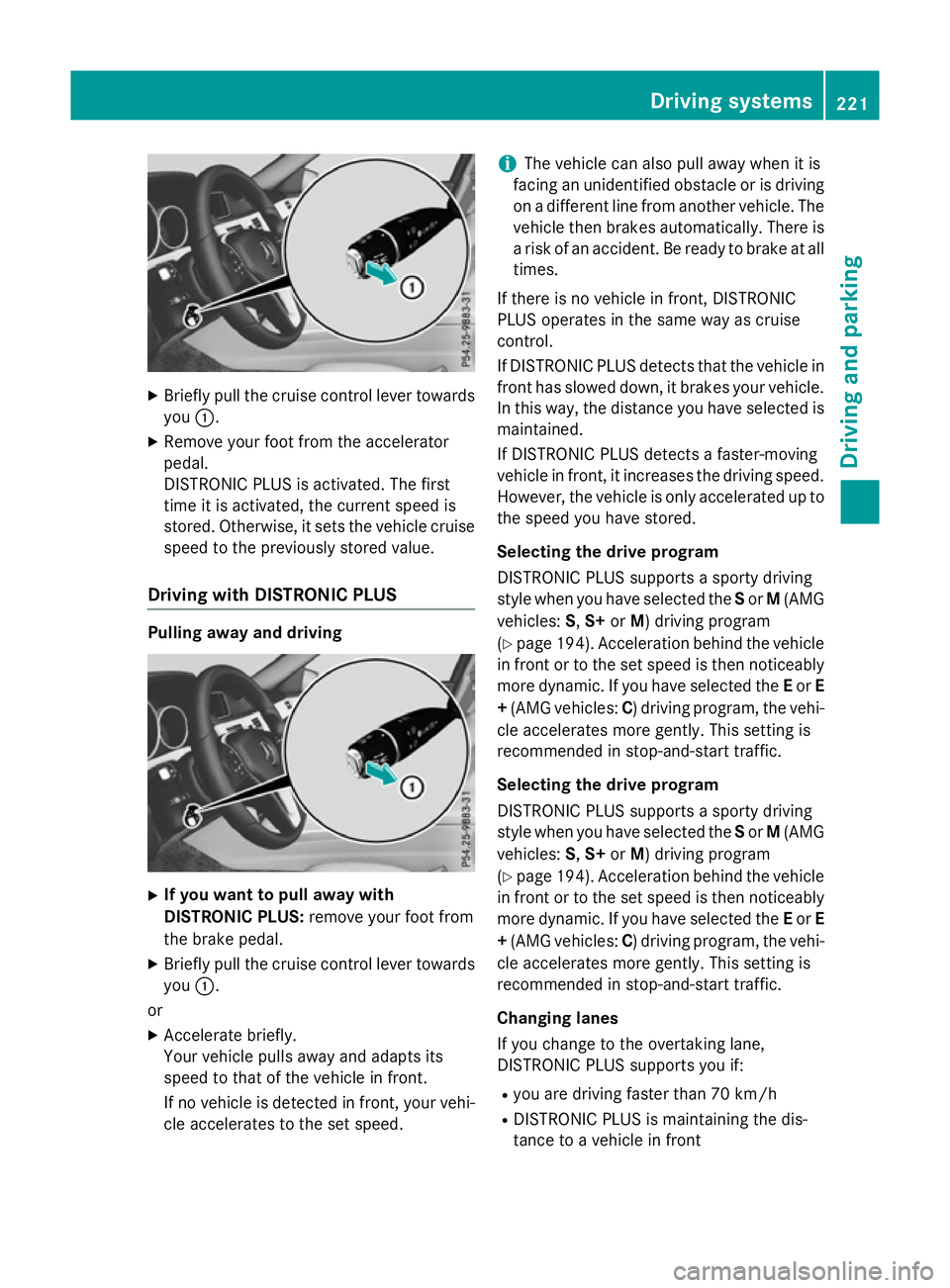
X
Briefly pull the cruise control lever towards
you :.
X Remove your foot from the accelerator
pedal.
DISTRONIC PLUS is activated. The first
time it is activated, the current speed is
stored. Otherwise, it sets the vehicle cruise speed to the previously store dvalue.
Drivin gwithD ISTRONI CPLUS Pulling away and driving
X
If you wan ttopull away with
DISTRONI CPLUS: remove your foot from
the brake pedal.
X Briefly pull the cruise control lever towards
you :.
or
X Accelerate briefly.
You rvehicle pull sawaya nd adapts its
speed to that of the vehicle in front.
If no vehicle is detected in front, your vehi-
cle accelerate stothe set speed. i
The vehicle can also pull away whe
nitis
facing an unidentifie dobstacl eorisd riving
on adifferent line from another vehicle .The
vehicle then brakes automatically. There is
ar iskofana ccident. Be ready to brake at all
times.
If there is no vehicle in front, DISTRONIC
PLUS operate sinthe same wa yascruise
control.
If DISTRONIC PLUS detects that the vehicle in front ha sslowe ddown, it brakes your vehicle.
In this way, the distance yo uhaves elected is
maintained.
If DISTRONIC PLUS detects afaster-moving
vehicle in front, it increases the driving speed.
However, the vehicle is only accelerate dupto
the speed yo uhaves tored.
Selecting the drive program
DISTRONIC PLUS supports asporty driving
styl ewheny ou have selected the Sor M(AMG
vehicles: S,S+ orM)d riving program
(Y page 194). Acceleration behind the vehicle
in front or to the set speed is then noticeably
more dynamic. If yo uhaves elected the Eor E
+ (AMG vehicles: C)driving program, the vehi-
cle accelerate smore gently. Thi ssetting is
recommende dinstop-and-start traffic.
Selecting the drive program
DISTRONIC PLUS supports asporty driving
styl ewheny ou have selected the Sor M(AMG
vehicles: S,S+ orM)d riving program
(Y page 194). Acceleration behind the vehicle
in front or to the set speed is then noticeably
more dynamic. If yo uhaves elected the Eor E
+ (AMG vehicles: C)driving program, the vehi-
cle accelerate smore gently. Thi ssetting is
recommende dinstop-and-start traffic.
Changing lanes
If yo uchange to the overtaking lane,
DISTRONIC PLUS supports yo uif:
R yo ua re driving faster than 70 km/h
R DISTRONIC PLUS is maintaining the dis-
tance to avehicle in front Drivin
gsystems
221Drivingand parking Z