2015 MERCEDES-BENZ E-CLASS SALOON climate control
[x] Cancel search: climate controlPage 170 of 497
immediately to open/close the side window
in the door. The side window stops. To con-
tinue closing the side window, pull on the
W switch.
X Convenience closing feature: press and
hold the gbutton until the side win-
dows and the sliding sunroof or the pano-
rama sliding sunroof are closed.
The indicator lamp above the gbutton
light sup. Air-recirculation mode is activa-
ted.
If part softhe body are in the closin garea
during convenienc eclosing, proceed as fol-
lows:
X Press the Wbutton to sto pthe side win-
dows.
The side windows stop.
X To the nopen the side windows ,press the
W button again.
X Press the 3button to sto pthe sliding
sunroof or panorama sliding sunroof.
The sliding sunroof or panorama sliding
sunroof stops.
X To the nopen the sliding sunroof or pano-
rama sliding sunroof, pull back on the 3
button.
i Notes on the automatic reversin gfeature
for:
R the side windows (Y page 110)
R the sliding sunroof (Y page 115)
R the panorama sliding sunroof
(Y page 115)
X Convenience opening feature: press and
hold the gbutton until the side win-
dows and the sliding sunroof or panorama
sliding sunroof have opened. The side win-
dows and the sliding sunroof or panorama
sliding sunroof move back to their original
position.
The indicator lamp above the gbutton
goes out. Air-recirculation mode is deacti-
vated. i
If you open the side windows
,the sliding
sunroof or the panorama sliding sunroof
manually after closing the mwith the con-
venienc eclosing feature, the ywill remain in
this position when opened using the con-
venienc eopening feature. Activating/deactivating th
eresidual
heat function
General notes The residual heat function is only available
with THERMOTRONI
Cautomatic climat econ-
trol.
It is possible to make use of the residual heat
of the engin etocontinue heatin gthe vehicle
for approximately 30 minutes after the engine
has been switched off .The heatin gtime
depends on the set interior temperature.
Activating/deactivating X
Turn the key to position 0in the ignition
lock or remove it (Y page 179).
X To activate: press theÌbutton.
The indicator lamp above the Ìbutton
light sup.
i If the residual heat function is activated,
the windows may mist up on the inside.
i The blower will run at
alow speed regard-
less of the airflow setting.
i If you activate the residual heat function
at high temperatures, only the ventilation
will be activated. The blower runs at
medium speed.
X To deactivate: press theÌbutton.
The indicator lamp above the Ìbutton
goes out.
Residual heat is deactivate dautomatically:
R after approximately 30 minutes
R when the ignition is switched on
R if the battery voltage drops
R when the auxiliary heatin gisswitched on Operating thec
limate control system
167Climate control Z
Page 172 of 497
Switching the auxiliary heating or aux-
iliary ventilation on or off using the
centre console The colours of the indicator lamps on the but-
ton have the following meanings:
Blue Auxiliary ventilation switched on
Red Auxiliary heating switched on
Yellow Departure time preselected (Ypage 293) X
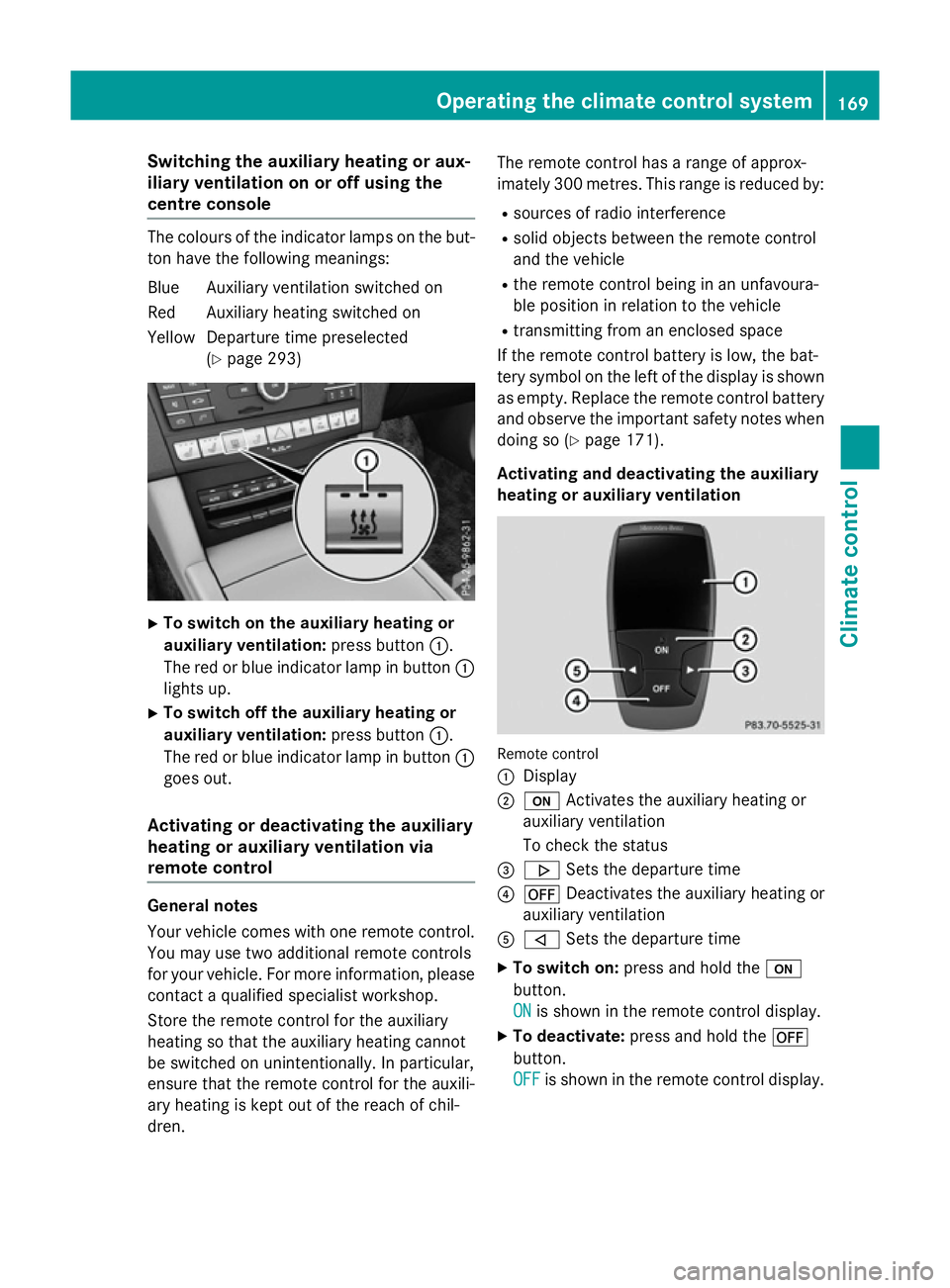
To switch on the auxiliary heating or
auxiliary ventilation: press button:.
The red or blue indicator lamp in button :
lights up.
X To switch off the auxiliary heating or
auxiliary ventilation: press button:.
The red or blue indicator lamp in button :
goes out.
Activating or deactivating the auxiliary
heating or auxiliary ventilation via
remote control General notes
Your vehicle comes with one remote control.
You may use two additional remote controls
for your vehicle. For more information ,please
contact aqualified specialist workshop.
Storet he remote control for the auxiliary
heating so that the auxiliary heating cannot
be switched on unintentionally. In particular,
ensure that the remote control for the auxili-
ary heating is kept out of the reach of chil-
dren. The remote control has
arange of approx-
imately 300 metres. This range is reduced by:
R sources of radio interference
R solid objectsb etween the remote control
and the vehicle
R the remote control being in an unfavoura-
ble position in relation to the vehicle
R transmittingf rom an enclosed space
If the remote control battery is low, the bat-
tery symbol on the left of the display is shown as empty. Replace the remote control battery
and observe the important safety notes when doing so (Y page 171).
Activating and deactivating the auxiliary
heating or auxiliary ventilation Remote control
:
Display
; u Activates the auxiliary heating or
auxiliary ventilation
To check the status
= . Sets the departure time
? ^ Deactivates the auxiliary heating or
auxiliary ventilation
A , Sets the departure time
X To switch on: press and hold the u
button.
ON ON is shown in the remote control display.
X To deactivate: press and hold the ^
button.
OFF OFF is shown in the remote control display. Operating the climate control system
169Climatecontrol Z
Page 173 of 497

Checking th
estatus of theauxiliary heat-
ing or auxiliary ventilation
X Briefly pres sthe u button.
The followin gmessages may appear in the
display: Display Meaning
The auxiliar
yheating or
auxiliar yventilatio nis
deactivated. The auxiliar
yventilation
is switched on .The num-
ber in th edisplay shows
th er emainin gtime( in
minutes )for th eauxiliary
ventilation. The auxiliar
yheating is
switched on .The number
in th edisplay show sthe
remainin gtime( in
minutes )for th eauxiliary
heating. Ad
epartur etimeh as
been activated. The
departur etimea ppears
in th edisplay. Ad
epartur etimeh as
been activated. The aux-
iliary ventilatio niscur-
rently activated. The
number in th edisplay
show sthe remaining
tim e(in minutes )for the
auxiliar yventilation. If
th ev ehicle is no tstarted
after this time, th erun-
nin gtimeisi ncreased by
fiv em inutes. Ad
epartur etimeh as
been activated. The aux-
iliary heating is currently
activated. The number in
th ed isplay show sthe
remainin gtime( in
minutes )for th eauxiliary
heating .Ifthevehicle is
no tstarted after this
time, th erunnin gtimeis
increased by five
minutes. If th
eengine has no tyet reached operating
temperatur ewhen it is started, th eauxiliary
heating runnin gtimeisi ncreased. The auxili-
ary heating continues to run until th eoperat-
ing temperatur eisreached. If this is th ecase,
the y symbo lappear sintheremot econ-
trol display and th erunnin gtimeisz ero
minutes.
Settin gthe departure time
Mak esure that th etimes et in th evehicle is
correc tbefore settin gthe departur etim e(see
th es eparate operatin ginstructions). Other-
wise, th eauxiliar yheating may switch on at
th ew rongtimea nd at an unsuitable location.
When settin gthe departur etime, also
observ ethe important safety notes
(Y page 168). 170
Operating th
eclimate control systemClimate control
Page 174 of 497
X
Briefly press the ubutton.
X Press the ,or. button repeatedly
unti lthe time to be changed appears in the
display.
X Press the uand^ buttons simulta-
neously.
The Îsymbo linthe remote control dis-
play flashes.
X Press the ,or. button to set the
desire ddeparture time.
i The longer yo
upress the ,or.
button, the faster the time changes.
X Press the uand^ button simulta-
neously.
The new departure time is stored.
Activating the se tdeparture time
X Briefly press the ubutton.
X Press the ,or. button repeatedly
unti lthe desire ddeparture time appears in
the display.
X Press the ubutton.
The Ísymbol, the departure time and,
depending on the selected departure time, the letter A, BorCappea rinthe display.
Deactivatin gthe se tdeparture time
X Briefly press the ubutton.
The statu softhe auxiliary heating is shown
in the display.
X Press the .button.
The firs tdeparture time store dappears in
the display.
X Press the ^button.
OFF
OFF is shown in the remote control display.
Replacing the remote control battery Important safety notes
G
WARNING
Batterie scontai ntoxic and corrosiv esubstan-
ces. If batterie sare swallowed, it can result in
severe health problems. There is ariskoff atal
injury. Kee
pbatterie soutof the reach of children. If
ab attery is swallowed, see kmedica lattention
immediately. H
Environmental note Batterie
scontai npollutants.
It is illega ltodispose of them
with the household rubbish.
The ym ustb ec ollected sep-
arately and disposed of in an environmentally responsible
recycling system. Dispose of batterie
sinan
environmentally responsible
manner. Take discharged
batterie stoaqualified spe-
cialist worksho portoacol-
lection point for used batter-
ies.
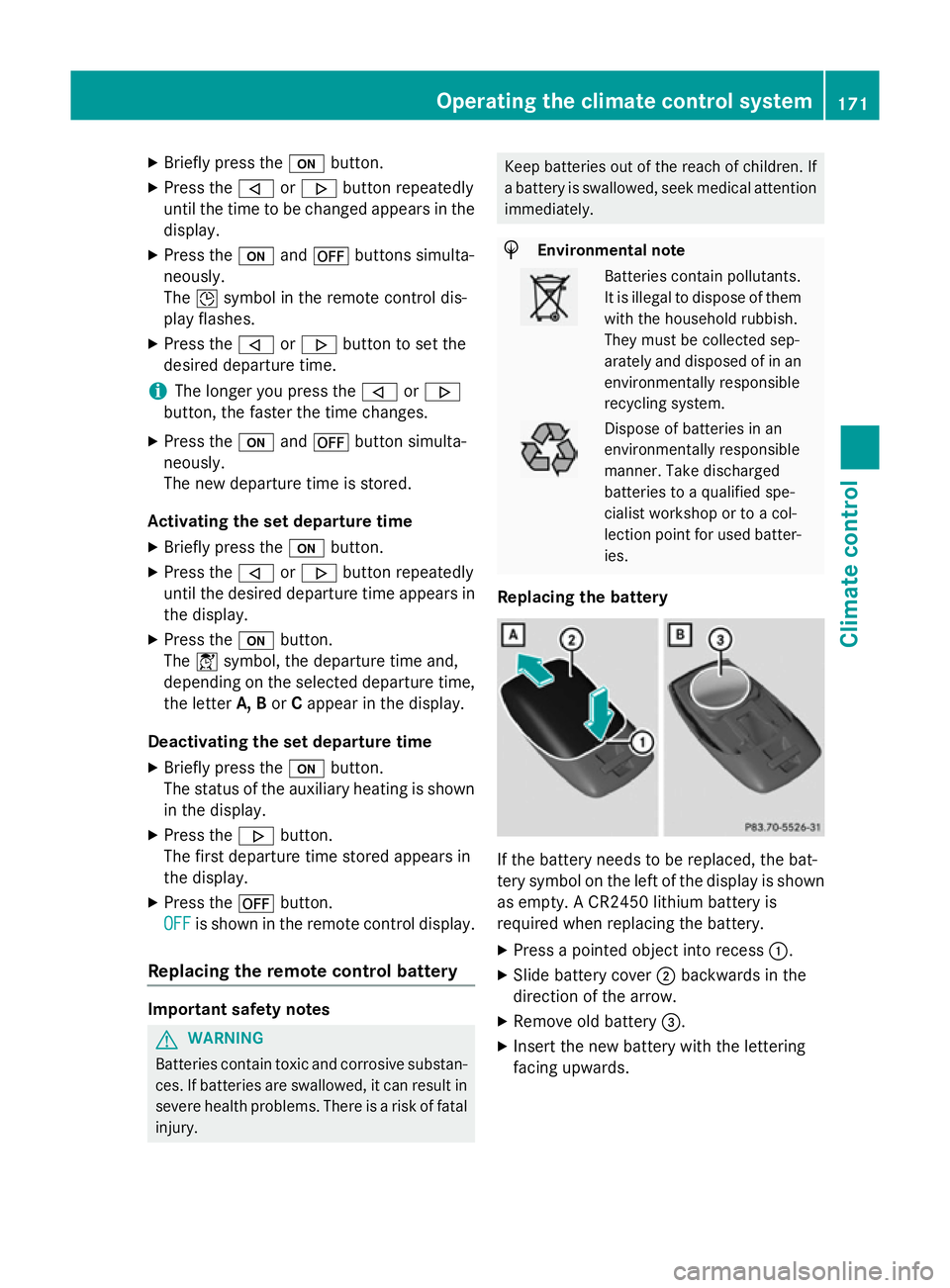
Replacing the battery If the battery need
stobereplaced, the bat-
tery symbo lonthe left of the display is shown
as empty. ACR2450 lithiu mbattery is
required whe nreplacing the battery.
X Press apointed object into recess :.
X Slide battery cover ;backwards in the
direction of the arrow.
X Remove old battery =.
X Inser tthe new battery with the lettering
facing upwards. Operating the climate control system
171Climate control Z
Page 175 of 497
X
Slide battery cover ;in the opposite direc-
tion to the arrow on the remote control until it engages.
X Use the remote control to check the vehi-
cle's auxiliary heating functions. 172
Operating the climate control systemClimate control
Page 176 of 497
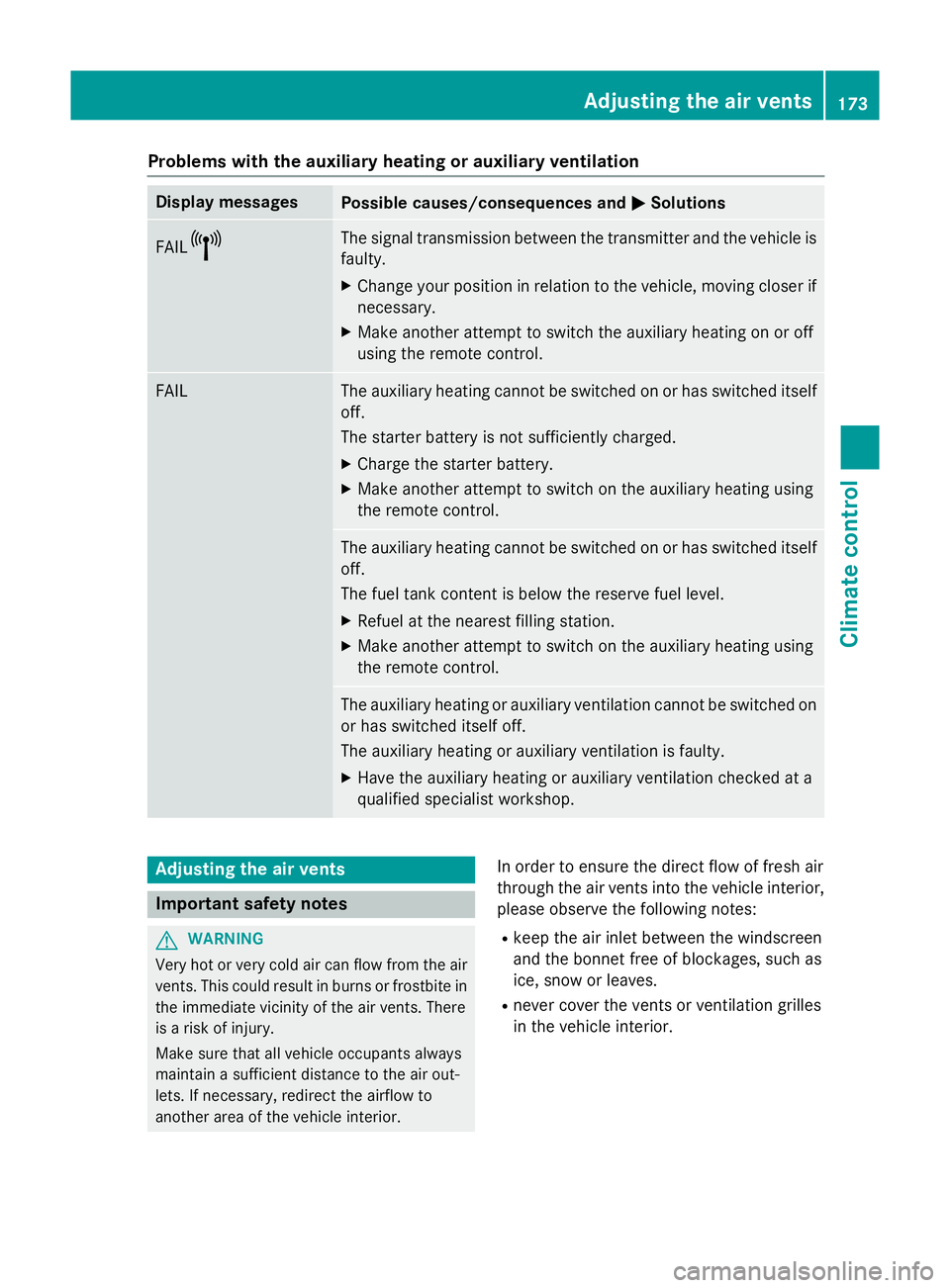
Problems with the auxiliary heating or auxiliary ventilation
Display messages
Possible causes/consequences and
M
MSolutions FAIL¨ The signal transmission between the transmitter and the vehicle is
faulty.
X Change your position in relation to the vehicle, moving closer if
necessary.
X Make another attempt to switch the auxiliary heating on or off
using the remote control. FAIL The auxiliary heating cannot be switched on or has switched itself
off.
The starter battery is not sufficiently charged.
X Charge the starter battery.
X Make another attempt to switch on the auxiliary heating using
the remote control. The auxiliary heating cannot be switched on or has switched itself
off.
The fuel tank content is below the reserve fuel level.
X Refuel at the nearest filling station.
X Make another attempt to switch on the auxiliary heating using
the remote control. The auxiliary heating or auxiliary ventilation cannot be switched on
or has switched itself off.
The auxiliary heating or auxiliary ventilation is faulty.
X Have the auxiliary heating or auxiliary ventilation checked at a
qualified specialist workshop. Adjusting the air vents
Important safety notes
G
WARNING
Very hot or very cold air can flow from the air vents. This could result in burns or frostbit ein
the immediate vicinity of the air vents. There
is ar isk of injury.
Make sure that all vehicle occupants always
maintain asufficient distance to the air out-
lets. If necessary, redirect the airflow to
another area of the vehicle interior. In order to ensure the direct flow of fresh air
through the air ventsi
nto the vehicle interior,
please observe the following notes:
R keep the air inlet between the windscreen
and the bonnet free of blockages, such as
ice, snow or leaves.
R never cover the ventsorv entilation grilles
in the vehicle interior. Adjusting the air vents
173Climatecontrol Z
Page 178 of 497
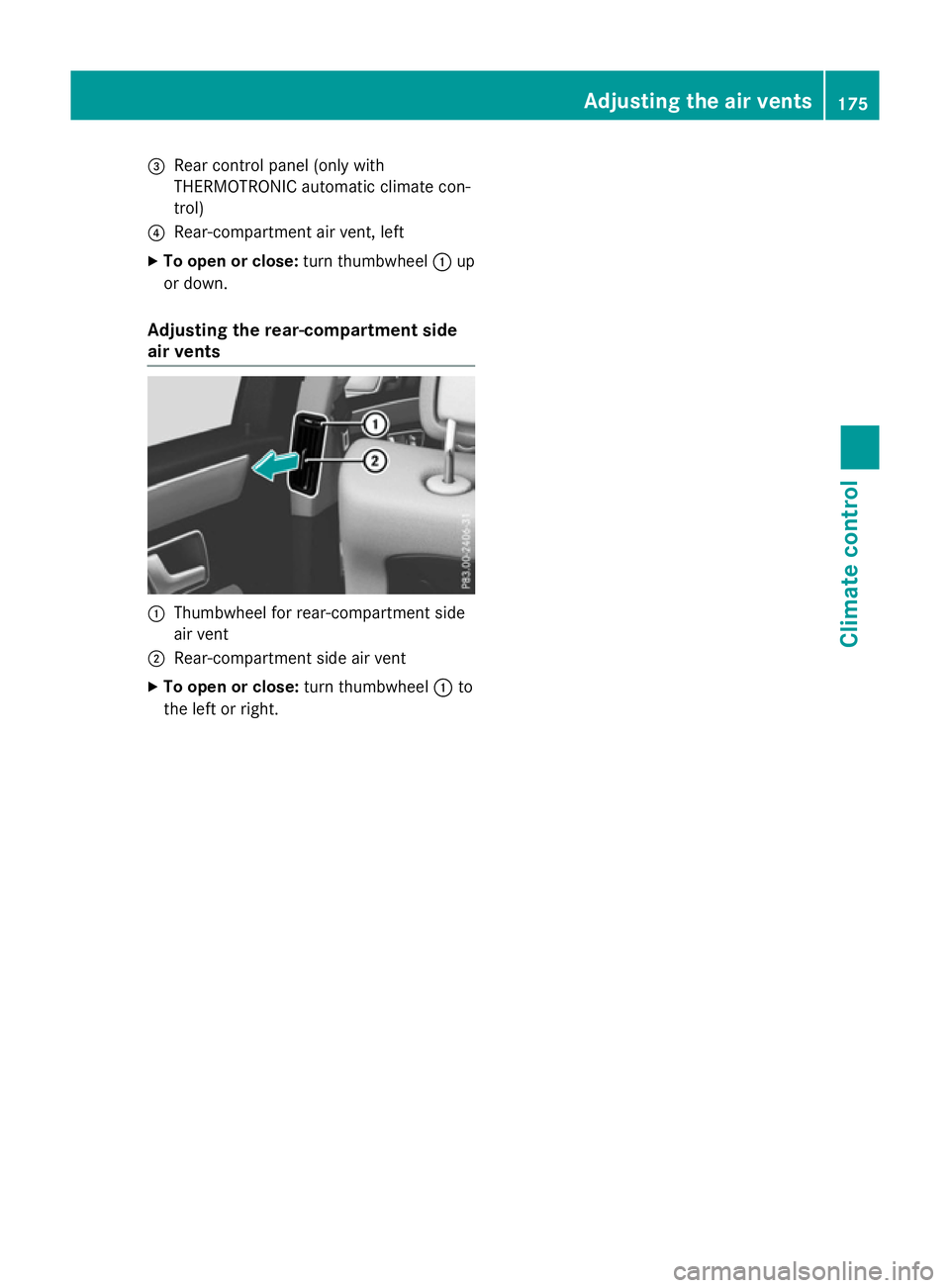
=
Rear control panel (only with
THERMOTRONI Cautomatic climat econ-
trol)
? Rear-compartmen tair vent, left
X To ope norclose:turnthumbwheel :up
or down.
Adjusting th erear-c ompartment side
air vents :
Thumbwheel for rear-compartmen tside
air vent
; Rear-compartmen tside air vent
X To ope norclose:turnthumbwheel :to
th el eftorr ight. Adjusting th
eair vents
175Climatecont rol Z
Page 476 of 497
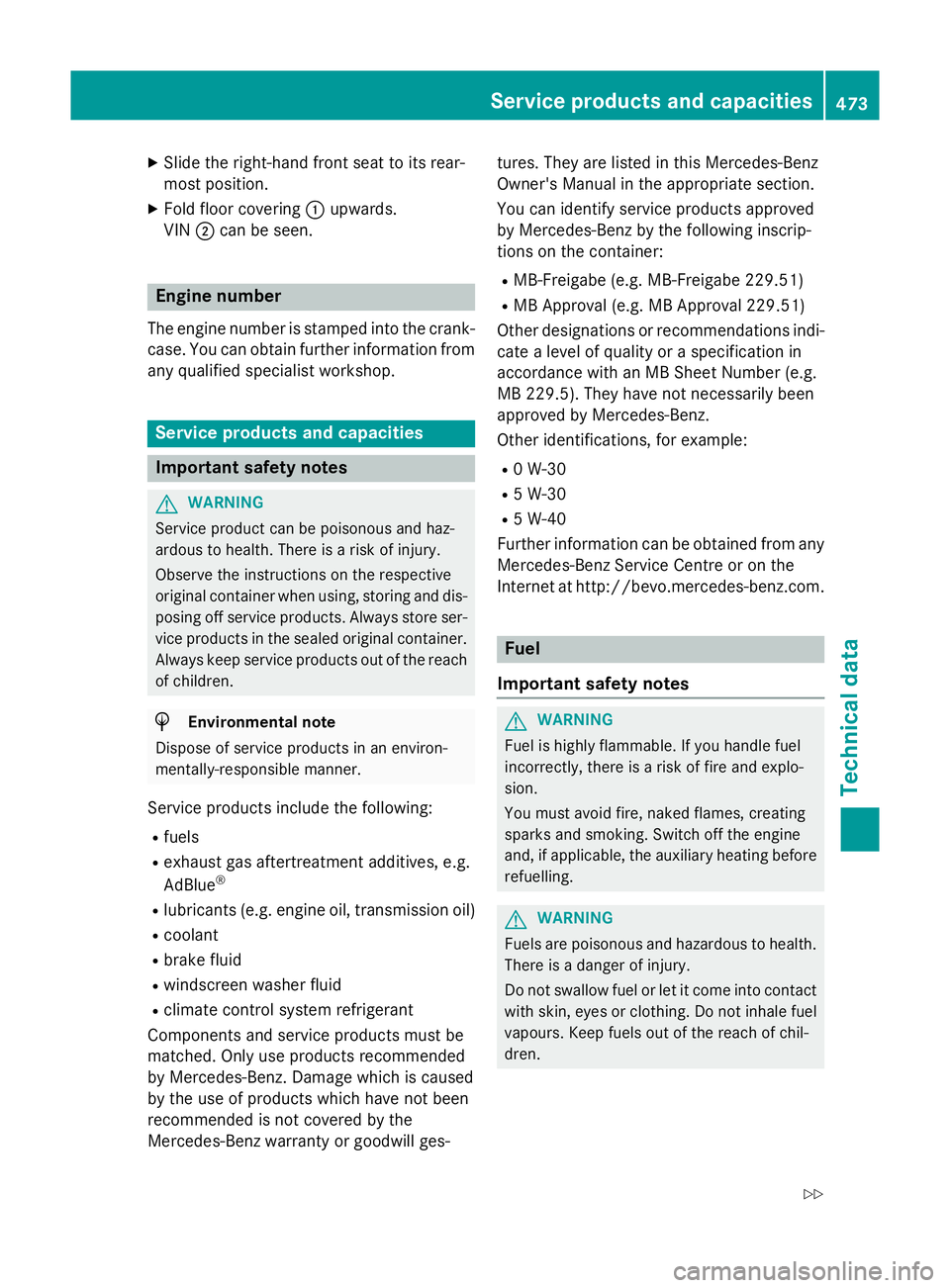
X
Slide the right-hand front sea ttoits rear-
mos tposition.
X Fol dfloor covering :upwards.
VIN ;can be seen. Engine number
The engine number is stampe dinto the crank-
case. Yo ucan obtain further information from
any qualified specialist workshop. Servic
eproducts and capacities Important safety notes
G
WARNING
Service product can be poisonous and haz-
ardou stohealth. There is ariskofi njury.
Observe the instructions on the respective
original containe rwhenu sing ,storing and dis-
posing off service products. Alway sstore ser-
vice products in the seale doriginal container.
Alway skeep service products ou tofthe reach
of children. H
Environmental note
Dispose of service products in an environ-
mentally-responsible manner.
Service products includ ethe following:
R fuels
R exhaus tgas aftertreatment additives, e.g.
AdBlue ®
R lubricants (e.g. engine oil, transmissio noil)
R coolant
R brake fluid
R windscreen washe rfluid
R climate control system refrigerant
Components and service products mus tbe
matched .Only us eproducts recommended
by Mercedes-Benz. Damage which is caused
by the us eofproducts which have not been
recommended is not covered by the
Mercedes-Benz warranty or goodwil lges- tures. The
yare listed in this Mercedes-Benz
Owner's Manua linthe appropriate section.
Yo uc an identif yservice products approved
by Mercedes-Benz by the following inscrip-
tions on the container:
R MB-Freigab e(e.g. MB-Freigab e229.51)
R MB Approva l(e.g. MB Approva l229.51)
Othe rdesignations or recommendations indi-
cate alevel of quality or aspecification in
accordance with an MB Shee tNum ber(e.g.
MB 229.5) .The yh aven ot necessaril ybeen
approved by Mercedes-Benz.
Othe ride ntifications ,for example:
R 0W -30
R 5W -30
R 5W -40
Further information can be obtaine dfrom any
Mercedes-Benz Service Centre or on the
Interne tath ttp://bevo.mercedes-benz.com. Fuel
Important safety notes G
WARNING
Fue lish ighl yf lammable. If yo uhandlef uel
incorrectly, ther eisariskoff irea nd explo-
sion.
Yo um usta void fire, nake dflames ,creating
sparks and smoking. Switch off the engine
and ,ifa pplicable, the auxiliary heating before
refuelling. G
WARNING
Fuels are poisonous and hazardou stohealth.
There is adanger of injury.
Do not swallo wfuelorl etit come into contact
with skin, eyes or clothing .Donot inhale fuel
vapours. Kee pfuels ou tofthe reach of chil-
dren. Servic
eproducts and capacities
473Technical data
Z