2015 MERCEDES-BENZ E-CLASS CABRIOLET light
[x] Cancel search: lightPage 16 of 349

Adaptive Highbeam Assist PLUS .... 117
Automatic headlamp mode ............ 114
Cornering light function ................. 117
Dipped-beam headlamps ............... 115
Driving abroad ............................... 114
Foglamps (extended range) ........... 117
Hazard warning lamps ..................
.116
Headlamp flasher ........................... 116
Light switch ................................... 114
Main-beam headlamps ................... 116
Motorway mode ............................ .117
Parking lamps ................................ 115
Rear foglamp ................................. 115
Setting brightness for display/
switches (on-board computer) ....... 223
Side lamps ..................................... 115
Switching the daytime driving
lights on/off (on-board com-
puter) ............................................. 224
Switching the exterior lighting
delayed switch-off on/off (on-
board computer) ............................ 225
Switching the surround lighting
on/off (on-board computer) .......... 225
Turn signals ................................... 116
see Interior lighting
see Replacing bulbs
LIM indicator lamp
Cruise control ................................ 163
DISTRONIC PLUS ........................... 169
Variable SPEEDTRONIC ................. 166
Limiting the speed
see SPEEDTRONIC
LINGUATRONIC
see Separate operating instructions
Loading guidelines ............................ 272
Locking
see Central locking
Locking (doors)
Automatic ........................................ 82
Emergency locking ........................... 82
From inside (central locking but-
ton) ................................................. .81
Locking centrally
see Central locking
Locking verification signal (on-
board computer) .............................. .226 Luggage cover
see Boot separator
Lumbar support
Adjusting the 4-way lumbar sup-
port ................................................ 104 M
M+S tyres .......................................... .323
Main-beam headlamps
Adaptive Highbeam Assist PLUS .... 117
Changing bulbs .............................. 120
Display message ............................ 236
Switching on/off ........................... 116
Maintenance
see ASSYST PLUS
Manual transmission
Engaging reverse gear ................... 146
Gear leve r...................................... 146
Pulling away ................................... 141
Shift recommendation ................... 147
Starting the engine ........................ 141
Matt finish (cleaning instructions) .. 297
Media Interface
USB port in the armrest of the
centre console ............................... 274
see Separate operating instructions
Memory card (audio) ......................... 218
Memory function ............................... 112
Mercedes-Benz Contact
Display message ............................ 232
Mercedes-Benz emergency call
system
Switch in the overhead control
panel .............................................. 281
Mercedes-Benz Intelligent Drive
360°camera .................................. 192
Active Blind Spot Assist ................. 203
Active Lane Keeping Assist ............ 206
Active Parking Assist ..................... 183
ATTENTION ASSIST ........................ 196
Blind Spot Assist ............................ 200
Cruise control ................................ 163
DISTRONIC PLUS ........................... 168
DISTRONIC PLUS with Steering
Assist and Stop&Go Pilot ............... 176
General notes ................................ 162
Lane Keeping Assist ...................... 202 Index
13
Page 17 of 349

PARKTRONIC ................................. 179
PRE-SAFE ®
(anticipatory occu-
pant protection) ...............................47
PRE-SAFE ®
PLUS (anticipatory
occupant protection PLUS) .............. 48
Reversing camera .......................... 188
SPEEDTRONIC ...............................1 65
Traffic Sign Assist .......................... 197
Mercedes-Benz Service Centre
see Qualified specialist workshop
Message memory (on-board com-
puter) ................................................. .229
Messages
see Display messages
Mirrors
see Exterior mirrors
see Rear-view mirror
see Vanity mirror (in sun visor)
Mobile phone
Connecting (Bluetooth ®
inter-
face) .............................................. 266
Connecting another mobile
phone ............................................ 267
Connecting the telephone module
with Bluetooth ®
(SAP profile) ......... 269
Frequencies ................................... 335
Installation ..................................... 335
Menu (on-board computer) ............ 219
Notes/placing in the bracket ......... 281
Transmission output (maximum) .... 335
Mobile telephone
Pre-installed bracket ..................... .282
Modifying the programming (key) ..... 76
MOExtended tyres .............................306
Motorway mode ................................ 117
MP3
Operating ....................................... 218
See also Digital Owner's Manual ... 263
Multicontour seat
Adjusting (on the seat) .................. 104
Multifunction display
Function/notes ............................ .215
Permanent display ......................... 223
Multifunction steering wheel
Operating the on-board computer .. 214
Overview .......................................... 32 Multimedia system
see Separate operating instructions
Music files
See also Digital Owner's Manual ... 263 N
Navigation Menu (on-board computer) ............ 217
See also Digital Owner's Manual ... 263
NECK-PRO head restraints
Important safety notes .................... 47
Operation ......................................... 47
Resetting triggered .......................... 47
Notes on running in a new vehicle .. 138 O
Occupant safety Airbags ............................................ 42
Automatic measures after an acci-
dent ................................................. 49
Children in the vehicle ..................... 49
Important safety notes .................... 37
PASSENGER AIRBAG indicator
lamp ................................................. 38
Pets in the vehicle ........................... 61
PRE-SAFE ®
(anticipatory occu-
pant protection) ............................... 47
PRE-SAFE ®
PLUS (anticipatory
occupant protection PLUS) .............. 48
Restraint system introduction .......... 37
Restraint system warning lamp ....... .38
Odometer ...........................................2 15
Oil
see Engine oil
On-board computer
Assistance menu ........................... 220
Audio menu ................................... 218
Convenience submenu .................. 227
Display messages .......................... 229
Displaying a service message ....... .294
DISTRONIC PLUS ........................... 173
Factory setting submenu .............. .228
Heating submenu ........................... 226
Important safety notes .................. 213
Instrument cluster submenu .......... 223
Light submenu ............................... 223 14
Index
Page 21 of 349
Skibag
................................................ 275
SMS
See also Digital Owner's Manual ... 263
Snow chains ...................................... 324
Sockets
General notes ................................ 280
Rear compartment .........................2 81
Soft top
AIRCAP ............................................ 95
Cleaning ......................................... 298
Closing manually in an emer-
gency ............................................... 90
Display message ............................ 252
Draught stop ................................... .94
Fitting/removing the AIRCAP
draught stop .................................... 96
Important safety notes .................... 88
Opening/closing (with key) .............. 90
Opening/closing (with soft-top
switch) ............................................. 89
Problem (malfunction) ..................... 98
Re-locking ........................................ 94
Soft-top switch .................................... 89
Sound
Switching on/off ........................... 264
Specialist workshop ............................ 27
Speed, controlling
see Cruise control
Speedometer
Activating/deactivating the addi-
tional speedometer ........................ 223
Digital ............................................ 216
In the Instrument cluster ................ .31
Segments ...................................... 213
Selecting a display uni t.................. 223
SPEEDTRONIC
Deactivating variable ..................... 167
Display message ............................ 244
Function/note s............................. 165
Important safety notes .................. 165
LIM indicator lamp ......................... 166
Permanent ..................................... 168
Selecting ........................................ 166
Storing the current speed .............. 166
Variabl e......................................... 166
Start/stop function
see ECO start/stop function Starting (engine)
................................ 140
STEER CONTROL .................................. 71
Steering
Display message ............................ 251
Steering Assist and Stop&Go Pilot
(DISTRONIC PLUS)
Activating/deactivating ................. 222
Display message ............................ 245
Steering assistant STEER CON-
TROL
see STEER CONTROL
Steering wheel
Adjusting (electrically) ................... 107
Adjusting (manually) ...................... 107
Button overview ............................... 32
Buttons (on-board computer) ......... 214
Cleaning ......................................... 302
Gearshift paddle s........................... 151
Important safety notes .................. 106
Steering wheel heating .................. 107
Storing settings (memory func-
tion) ............................................... 112
Steering wheel gearshift paddles .... 151
Steering wheel heating
Problem (malfunction) ................... 109
Switching on/of f........................... 107
Stowage areas ................................... 272
Stowage compartments
Armrest (under) ............................. 274
Centre console .............................. 273
Cup holde r..................................... 277
Glove compartment ....................... 273
Important safety information ......... 272
Under driver's seat/front-
passenger sea t.............................. 274
Stowage net ....................................... 274
Stowage space
Stowage net ................................... 274
Stowage well beneath the boot
floor .................................................... 277
Summer tyres .................................... 323
Sun visor ............................................ 279
Surround lighting (on-board com-
puter) .................................................. 225
Switching on media mode
Via the device list .......................... 270 18
Index
Page 23 of 349
Trailer
Folding the ball coupling in/out ..... 210
Trailer coupling
see Towing a trailer
Trailer towing
7-pin connector ............................. 212
Blind Spot Assist ............................ 202
Cleaning the trailer tow hitch ......... 301
Coupling up a traile r...................... 211
Decoupling a trailer ....................... 211
Driving tips .................................... 209
Folding in the ball coupling ............ 211
Folding out the ball coupling .......... 210
Important safety notes .................. 208
Lights display message .................. 236
Mounting dimensions .................... 343
Parktronic ...................................... 181
Power supply ................................. 211
Trailer load s................................... 344
Transmission
see Automatic transmission
see Manual transmission
Transmission position display ......... 147
Transmission position display
(DIRECT SELECT lever) ...................... 147
Transporting the vehicle .................. 317
Trim pieces (cleaning instruc-
tions) .................................................. 302
Trip computer (on-board com-
puter) .................................................. 216
Trip meter
Calling up ....................................... 215
Resetting (on-board computer) ...... 216
Turn signals
Switching on/of f........................... 116
TV
Operating (on-board computer) ..... 219
see Separate operating instructions
Two-way radio
Frequencies ................................... 335
Installation ..................................... 335
Transmission output (maximum) .... 335
Type identification plate
see Vehicle identification plate
Tyre changing tool kit ....................... 305
Tyre inflation compressor
see TIREFIT kit Tyre pressure
Calling up (on-board computer) ..... 326
Display message ............................ 246
Not reached (TIREFIT) .................... 309
Reached (TIREFIT) .......................... 309
Recommended ............................... 324
Tyre pressure loss warning
General notes ................................ 325
Important safety notes .................. 326
Restarting ...................................... 326
Tyre pressure monitor
Checking the tyre pressure elec-
tronically ........................................ 327
Function/note s............................. 326
General notes ................................ 326
Important safety notes .................. 327
Restarting ...................................... 328
Warning lamp ................................. 262
Warning message .......................... 328
Tyres
Changing a whee l.......................... 328
Checking ........................................ 321
Direction of rotation ...................... 329
Display message ............................ 246
Important safety notes .................. 321
Information on driving .................... 321
MOExtended tyre s......................... 323
Replacing ....................................... 329
Service life ..................................... 322
Storing ........................................... 329
Tyre size (data ).............................. 333
Tyre tread ...................................... 322
Wheel and tyre combinations ........ 333
see Flat tyre U
Unlocking Emergency unlocking ....................... 82
From inside the vehicle (central
unlocking button) ............................. 81
USB devices
Connecting to the Media Inter-
face ............................................... 271 V
Vanity mirror (in sun visor) .............. 27920
Index
Page 31 of 349

ment, lateral acceleration, accelerator pedal
position
R malfunctions and defects in important system
components, e.g. lights, brakes
R vehicle reactions and operating conditions in
special driving situations, e.g. airbag deploy-
ment, intervention of stability control sys-
tems
R ambient conditions, e.g. outside temperature
This data is of an exclusively technical nature
and can be used to:
R assist in detecting and rectifying faults and
defects
R analyse vehicle functions, e.g. after an acci-
dent
R optimise vehicle functions
The data cannot be used to trace the vehicle's
movements.
When your vehicle is serviced, technical infor-
mation can be read from the event data memory and fault data memory.
Services include, for example:
R repair services
R service processes
R warranty events
R quality assurance
The vehicle is read out by employees of the ser- vice network (including the manufacturer) using
special diagnostic testers. You can obtain more
information there, if required.
After a fault has been rectified, the information
is deleted from the fault memory or is continu-
ally overwritten.
When operating the vehicle, situations are con-
ceivable in which this technical data, in connec- tion with other information (if necessary, after
consultation with an authorised expert), could
be traced to a person.
Examples include:
R accident reports
R damage to the vehicle
R witness statements
Further additional functions that have been con- tractually agreed upon with the customer allow
certain vehicle data to be conveyed by the vehi-
cle as well. The additional functions include, for example, vehicle location in case of an emer-
gency. Copyright information
General notes
Information on licences for free and open-
source software used in your vehicle and its
electronic components is available on the fol-
lowing website:
http://www.mercedes-benz.com/opensource 28
Copyright informationIntroduction
Page 32 of 349
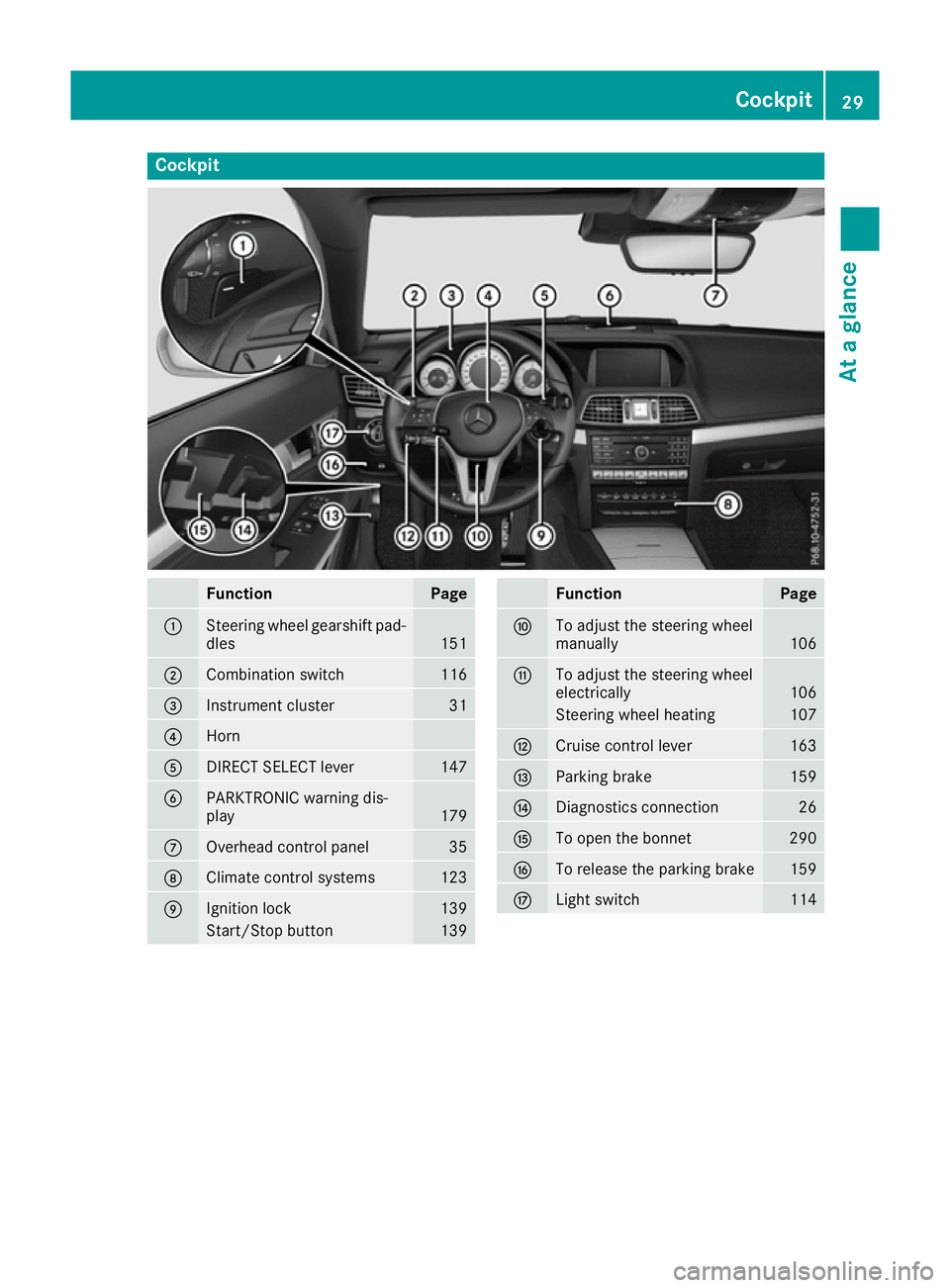
Cockpit
Function Page
:
Steering wheel gearshift pad-
dles 151
;
Combination switch 116
=
Instrument cluster 31
?
Horn
A
DIRECT SELECT lever 147
B
PARKTRONIC warning dis-
play
179
C
Overhead control panel 35
D
Climate control systems 123
E
Ignition lock 139
Start/Stop button 139 Function Page
F
To adjust the steering wheel
manually
106
G
To adjust the steering wheel
electrically
106
Steering wheel heating 107
H
Cruise control lever 163
I
Parking brake 159
J
Diagnostics connection 26
K
To open the bonnet 290
L
To release the parking brake 159
M
Light switch 114Cockpit
29At a glance
Page 33 of 349
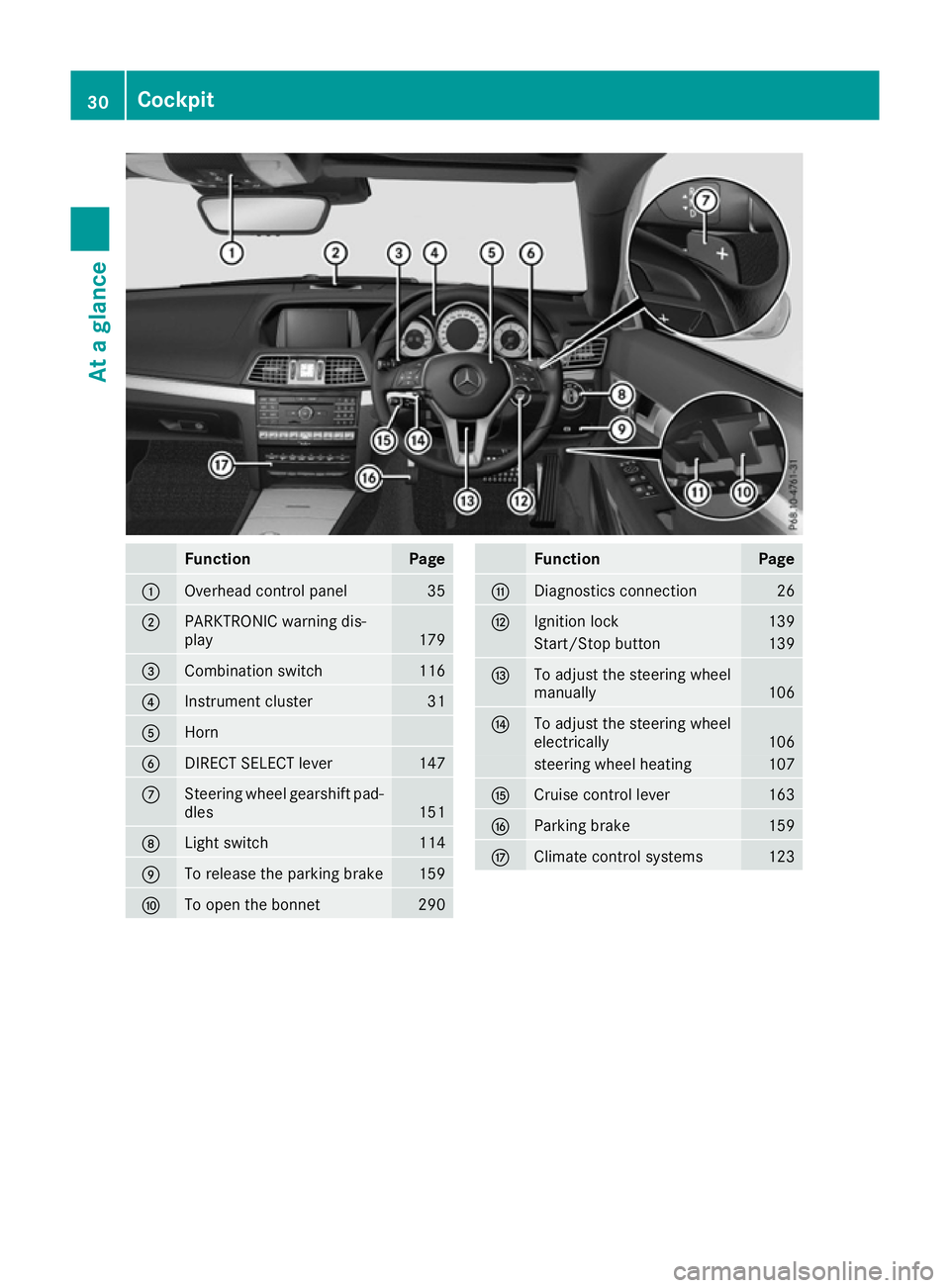
Function Page
:
Overhead control panel 35
;
PARKTRONIC warning dis-
play
179
=
Combination switch 116
?
Instrument cluster 31
A
Horn
B
DIRECT SELECT lever 147
C
Steering wheel gearshift pad-
dles 151
D
Light switch 114
E
To release the parking brake 159
F
To open the bonnet 290 Function Page
G
Diagnostics connection 26
H
Ignition lock 139
Start/Stop button 139
I
To adjust the steering wheel
manually
106
J
To adjust the steering wheel
electrically
106
steering wheel heating 107
K
Cruise control lever 163
L
Parking brake 159
M
Climate control systems 12330
CockpitAt a glance
Page 34 of 349

Instrument cluster
i
Instrument cluster with speedometer
(km/h) Function Page
:
Fuel gauge (left)
Coolant temperature (right) 213
Warning and indicator lamps:
÷
ESP® 256
·
Distance warning 261
å
ESP®
OFF 256
#
Turn signal, left 116
?
Coolant 259
K
Main-beam headlamps 116
L
Dipped-beam head-
lamps 115
T
Side lamps 115
R
Rear foglamp 115
8
Reserve fuel 259
Fuel filler flap location indi-
cator: the fuel filler cap is on
the right-hand side. Function Page
;
Speedometer with segments 213
=
Multifunction display 215
?
Rev counter 213
Warning and indicator lamps:
J
Brakes (red) 255
!
Turn signal, right 116
J
Only for certain vehi-
cles: brakes (yellow) 255
!
ABS 256
6
Restraint system 38
;
Engine diagnostics 259
h
Tyre pressure monitor 262
ü
Seat belts 254
%
Diesel engine: preglow 141
Information on displaying the outside tempera-
ture in the multifunction display can be found
under "Outside temperature display"
(Y
page 213).
The lighting in the instrument cluster, in the dis- plays and the controls in the vehicle interior can
be adjusted via the on-board computer
(Y page 223). Instrument cluster
31At a glance