2015 MERCEDES-BENZ CLA-Class radio
[x] Cancel search: radioPage 2 of 362

Publication details
Internet
Further information about Mercedes-Benz
vehicles and about Daimler AG can be found
on the following websites:
http://www.mbusa.com (USA only)
http://www.mercedes-benz.ca (Canada
only) Editorial office
© Daimler AG: not to be reprinted, translated
or otherwise reproduced, in whole or in part,
without written permission from Daimler AG. Vehicle manufacturer
Daimler AG
Mercedesstraße 137
70327 Stuttgart
Germany
Symbols
Registered trademarks:
R Bluetooth ®
is a registered trademark of
Bluetooth SIG Inc.
R DTS is a registered trademark of DTS, Inc.
R Dolby and MLP are registered trademarks
of DOLBY Laboratories.
R BabySmart™, ESP ®
and PRE-SAFE ®
are
registered trademarks of Daimler AG.
R HomeLink ®
is a registered trademark of
Johnson Controls.
R iPod ®
and iTunes ®
are registered trade-
marks of Apple Inc.
R Logic7 ®
is a registered trademark of Har-
man International Industries.
R Microsoft ®
and Windows media ®
are reg-
istered trademarks of Microsoft Corpora-
tion.
R SIRIUS is a registered trademark of Sirius
XM Radio Inc.
R HD Radio is a registered trademark of iBiq-
uity Digital Corporation.
R Gracenote ®
is a registered trademark of
Gracenote, Inc.
R ZAGATSurvey ®
and related brands are reg-
istered trademarks of ZagatSurvey, LLC.
In this Operator's Manual you will find the fol-
lowing symbols: G
WARNING
Warning notes make you aware of dangers
which could pose a threat to your health or
life, or to the health and life of others. H
Environmental note
Environmental notes provide you with infor-
mation on environmentally aware actions or
disposal.
! Notes on material damage alert you to
dangers that could lead to damage to your
vehicle.
i Practical tips or further information that
could be helpful to you. X
This symbol indicates an instruction
that must be followed.
X Several of these symbols in succes-
sion indicate an instruction with sev-
eral steps.
(Y
page) This symbol tells you where you can
find more information about a topic.
YY This symbol indicates a warning or an
instruction that is continued on the
next page.
Dis‐ Dis‐
play play This text indicates a message in the
multifunction/COMAND/Audio dis-
play.
Parts of the software in the vehicle are pro-
tected by copyright ©
2005
The FreeType Project
http://www.freetype.org. All rights
reserved.
As at 09.05.2014
Page 16 of 362

Program selector button
.................. 153
Protection against theft
ATA (Anti-Theft Alarm system) ......... 71
Immobilizer ...................................... 71
Protection of the environment
General notes ..................................20
Pulling away
Automatic transmission ................. 144
Hill start assist ...............................1 45Q
QR code Mercedes-Benz Guide App ................. 1
Rescue card ..................................... 26
Qualified specialist workshop ........... 24R
RACE START Important safety notes .................. 180
RACE START (AMG vehicles) ............. 180
RACETIMER (on-board computer) .... 214
Radio
Selecting a station ......................... 207
see separate operating instructions
Radio-wave reception/transmis-
sion in the vehicle
Declaration of conformity ................ 24
Rain closing feature (panorama
roof with power tilt/sliding panel) .... 92
Reading lamp ..................................... 115
Rear compartment
Setting the air vents ..................... .137
Rear fog lamp
Changing bulbs .............................. 119
Display message ............................ 231
Switching on/off ........................... 111
Rear lamps
see Lights
Rear seats
Folding the backrest forwards/
back ............................................... 266
Rear view camera
Cleaning instructions ..................... 296
Displays in the Audio displa y......... 189
Displays in the COMAND display ... 189
Function/note s............................. 189 Switching on/of
f........................... 189
Rear window defroster
Problem (malfunction) ................... 135
Switching on/of f........................... 134
Rear-view mirror
Anti-glare (manual) ........................ 103
Dipping (automatic) ....................... 104
Recuperation display ........................ 204
Refrigerant (air-conditioning sys-
tem)
Important safety notes .................. 358
Refueling
Fuel gauge ....................................... 31
Important safety notes .................. 158
Notes for AMG vehicles ................. 355
Refueling process .......................... 159
see Fuel
Remote control
Garage door opener ....................... 279
Programming (garage door
opener) .......................................... 280
Replacing bulbs
Important safety notes .................. 116
Overview of bulb types .................. 117
Removing/replacing the cover
(front wheel arch) .......................... 118
Reporting safety defects .................... 25
Rescue card ......................................... 26
Reserve (fuel tank)
see Fuel
Reserve fuel
Display message ............................ 234
Warning lamp ................................. 256
see Fuel
Residual heat (climate control) ........ 135
Restraint system
Display message ............................ 225
Introduction ..................................... 40
Warning lamp ................................. 255
Warning lamp (function) ................... 41
Reverse gear (selector lever) ........... 151
Reversing feature
Panorama sliding sunroof ................ 91
Roller sunblind ................................. 92
Side windows ................................... 86
Roadside Assistance (breakdown) .... 2214
Index
Page 19 of 362

Transmission oil (on-board com-
puter, AMG vehicles) ..................... 214
Through-loading feature ...................265
Timing (RACETIMER) ......................... 214
Tire pressure
Calling up (on-board computer) ..... 326
Checking manually ........................ 325
Display message ............................ 239
Important safety notes .................. 326
Maximum ....................................... 324
Not reached (TIREFIT) .................... 304
Notes ............................................. 323
Reached (TIREFIT) .......................... 304
Recommended ............................... 322
Tire pressure loss warning system
General notes ................................ 325
Important safety notes .................. 325
Restarting ...................................... 326
Tire pressure monitor
Checking the tire pressure elec-
tronically ........................................ 328
Function/notes ............................ .326
General notes ................................ 326
Important safety notes .................. 326
Radio type approval for the tire
pressure monitor ........................... 329
Restarting ...................................... 328
Warning lamp ................................. 259
Warning message .......................... 328
TIREFIT kit .......................................... 302
Tires
Aspect ratio (definition) ................. 340
Average weight of the vehicle
occupants (definition) .................... 339
Bar (definition) ............................... 338
Changing a wheel .......................... 341
Characteristics .............................. 338
Checking ........................................ 319
Curb weight (definition) ................. 340
Definition of terms ......................... 338
Direction of rotatio n...................... 341
Display message ............................ 239
Distribution of the vehicle occu-
pants (definition) ............................ 341
DOT (Department of Transporta-
tion) (definition) ............................. 339
DOT, Tire Identification Number
(TIN) ............................................... 338 GAWR (Gross Axle Weight Rating)
(definition) ..................................... 339
General notes ................................ 345
GVW (Gross Vehicle Weight) (def-
inition) ........................................... 339
GVWR (Gross Vehicle Weight Rat- ing) (definition) .............................. 339
Important safety notes .................. 318
Increased vehicle weight due to
optional equipment (definition) ...... 339
Information on driving .................... 318
Kilopascal (kPa) (definition) ........... 339
Labeling (overview) ........................ 335
Load bearing index (definition) ...... 340
Load index ..................................... 337
Load index (definition) ................... 339
M+S tires ....................................... 320
Maximum load on a tire (defini-
tion) ............................................... 340
Maximum loaded vehicle weight
(definition) ..................................... 339
Maximum permissible tire pres-
sure (definition) ............................. 340
Maximum tire load ......................... 337
Maximum tire load (definition) ....... 340
MOExtended tire s.......................... 320
Optional equipment weight (defi-
nition) ............................................ 340
PSI (pounds per square inch) (def-
inition) ........................................... 340
Replacing ....................................... 341
Service life ..................................... 320
Sidewall (definition) ....................... 340
Speed rating (definition) ................ 339
Storing ........................................... 341
Structure and characteristics
(definition) ..................................... 338
Summer tires ................................. 320
Temperature .................................. 334
TIN (Tire Identification Number)
(definition) ..................................... 340
Tire bead (definition) ...................... 340
Tire pressure (definition) ................ 340
Tire pressures (recommended )...... 339
Tire size (data )............................... 345
Tire size designation, load-bearing
capacity, speed rating .................... 335
Tire tread ....................................... 319 Index
17
Page 26 of 362

In situations like this, the body, the under-
carriage, chassis parts, wheels or tires
could be damaged without the damage
being visible. Components damaged in this way can unexpectedly fail or, in the case of
an accident, no longer withstand the strain
they are designed to.
If the underbody paneling is damaged,
combustible materials such as leaves,
grass or twigs can gather between the
underbody and the underbody paneling. If
these materials come in contact with hot
parts of the exhaust system, they can catch fire.
In such situations, have the vehicle
checked and repaired immediately at a
qualified specialist workshop. If on con-
tinuing your journey you notice that driving
safety is impaired, pull over and stop the
vehicle immediately, paying attention to
road and traffic conditions. In such cases,
consult a qualified specialist workshop. Declarations of conformity
Vehicle components which receive
and/or transmit radio waves USA:
"The wireless devices of this vehicle
comply with Part 15 of the FCC Rules. Oper-
ation is subject to the following two condi-
tions: 1) These devices may not cause harm-
ful interference, and 2) These devices must
accept any interference received, including
interference that may cause undesired oper-
ation. Changes or modifications not expressly approved by the party responsible for com-
pliance could void the user’s authority to
operate the equipment."
Canada: "The wireless devices of this vehicle
comply with Industry Canada license-exempt RSS standard(s). Operation is subject to the
following two conditions: (1) These devices
may not cause interference, and (2) These
devices must accept any interference, includ-
ing interference that may cause undesired
operation of the device." Diagnostics connection
The diagnostics connection is only intended
for the connection of diagnostic equipment at
a qualified specialist workshop. G
WARNING
If you connect equipment to the diagnostics
connection in the vehicle, it may affect the
operation of the vehicle systems. As a result, the operating safety of the vehicle could be
affected. There is a risk of an accident.
Do not connect any equipment to a diagnos-
tics connection in the vehicle. G
WARNING
Objects in the driver's footwell can restrict the pedal travel or obstruct a depressed pedal.
The operating and road safety of the vehicle is
jeopardized. There is a risk of an accident.
Make sure that all objects in the vehicle are
stowed correctly, and that they cannot enter
the driver's footwell. Install the floormats
securely and as specified in order to ensure
sufficient clearance for the pedals. Do not use loose floormats and do not place floormats on
top of one another.
! If the engine is switched off and equip-
ment on the diagnostics connection is
used, the starter battery may discharge.
Connecting equipment to the diagnostics
connection can lead to emissions monitoring information being reset, for example. This
may lead to the vehicle failing to meet the
requirements of the next emissions test dur-
ing the main inspection. Qualified specialist workshop
An authorized Mercedes-Benz Center is a
qualified specialist workshop. It has the nec-
essary specialist knowledge, tools and quali-
fications to correctly carry out the work
required on your vehicle. This is especially the case for work relevant to safety. 24
Introduction
Page 77 of 362

X
To lock centrally: press button:.
The SmartKey centrally locks/unlocks: R the doors
R the trunk lid
R the fuel filler flap
The turn signals flash once when unlocking
and three times when locking.
i You can also set an audible signal to con-
firm that the vehicle has been locked. The
audible signal can be activated and deacti-
vated using the on-board computer
(Y page 213).
X To open the trunk lid automatically:
press and hold button ;until the trunk lid
opens (Y page 84). KEYLESS-GO
General notes Bear in mind that the engine can be started by
any of the vehicle occupants if there is a
SmartKey in the vehicle.
Locking/unlocking centrally You can start, lock or unlock the vehicle using
KEYLESS-GO. To do this, you only need carry
the SmartKey with you. You can combine the
functions of KEYLESS-GO with those of a con- ventional SmartKey. Unlock the vehicle by
using KEYLESS-GO, for instance, and lock it
using the &button on the SmartKey.
The driver's door and the door at which the
handle is used, must both be closed. The
SmartKey must be outside the vehicle. When
locking or unlocking with KEYLESS-GO, the
distance between the SmartKey and the cor-
responding door handle must not be greater
than 3 ft (1 m). A check which periodically establishes a radio
connection between the vehicle and the
SmartKey determines whether a valid Smart- Key is in the vehicle. This occurs, for example:
R when starting the engine
R whilst driving
R when the external door handles are
touched
R during convenience closing X
To unlock the vehicle: touch the inner
surface of the door handle.
X To lock the vehicle: touch sensor sur-
face :or;.
Make sure that you do not touch the inner
surface of the door handle.
X Convenience closing feature: touch
recessed sensor surface ;for an exten-
ded period.
Further information on the convenience
closing feature (Y page 88). X
To unlock the trunk lid: pull the handle on
the trunk lid. SmartKey
75Opening and closing Z
Page 81 of 362

Problems with the SmartKey
Problem
Possible causes/consequences and
M
MSolutions You cannot lock or
unlock the vehicle
using the SmartKey. The SmartKey battery is discharged or nearly discharged.
X Vehicles without KEYLESS-GO or KEYLESS-GO start func-
tion: try again to lock/unlock the vehicle using the remote con-
trol function of the SmartKey. Point the tip of the SmartKey at
the driver's door handle from close range and press the %or
& button.
If this does not work: X Check the SmartKey battery (Y page 77) and replace it if nec-
essary (Y page 78).
X Unlock (Y page 83) or lock (Y page 83) the vehicle using the
mechanical key. There is interference from a powerful source of radio waves.
X Vehicles without KEYLESS-GO or KEYLESS-GO start func-
tion: try again to lock/unlock the vehicle using the remote con-
trol function of the SmartKey. Point the tip of the SmartKey at
the driver's door handle from close range and press the %/
& button.
If this does not work: X Unlock (Y page 83) or lock (Y page 83) the vehicle using the
mechanical key. The SmartKey is faulty.
X Unlock (Y page 83) or lock (Y page 83) the vehicle using the
mechanical key.
X Have the SmartKey checked at a qualified specialist workshop. You can no longer lock
or unlock the vehicle
using KEYLESS-GO. The SmartKey battery is discharged or nearly discharged.
X Check the SmartKey battery (Y page 77) and replace it if nec-
essary (Y page 78).
If this does not work:
X Unlock (Y page 83) or lock (Y page 83) the vehicle using the
mechanical key. There is interference from a powerful source of radio waves.
X Unlock (Y page 83) or lock (Y page 83) the vehicle using the
mechanical key. SmartKey
79Opening and closing Z
Page 82 of 362
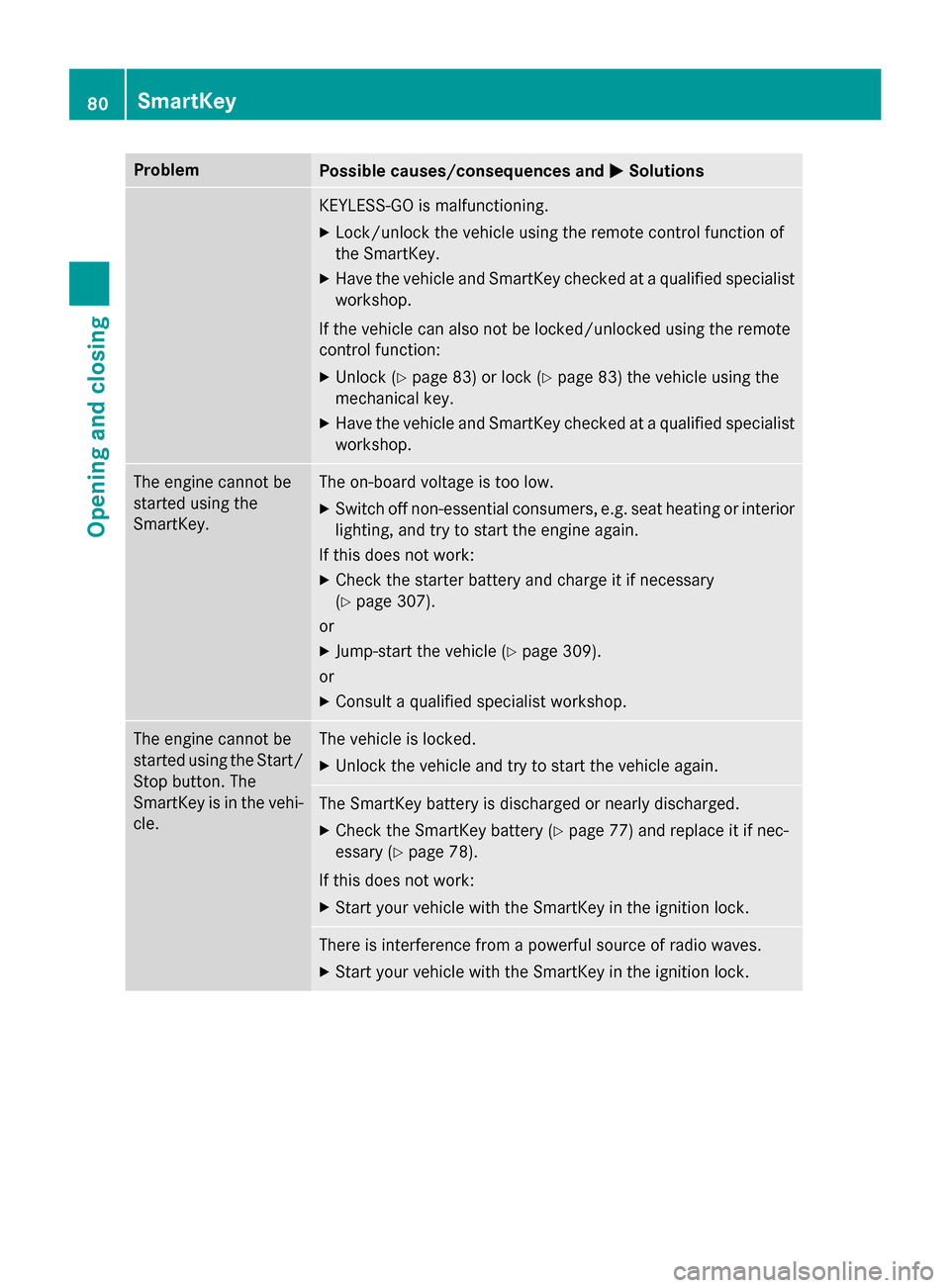
Problem
Possible causes/consequences and
M
MSolutions KEYLESS-GO is malfunctioning.
X Lock/unlock the vehicle using the remote control function of
the SmartKey.
X Have the vehicle and SmartKey checked at a qualified specialist
workshop.
If the vehicle can also not be locked/unlocked using the remote
control function:
X Unlock (Y page 83) or lock (Y page 83) the vehicle using the
mechanical key.
X Have the vehicle and SmartKey checked at a qualified specialist
workshop. The engine cannot be
started using the
SmartKey. The on-board voltage is too low.
X Switch off non-essential consumers, e.g. seat heating or interior
lighting, and try to start the engine again.
If this does not work:
X Check the starter battery and charge it if necessary
(Y page 307).
or
X Jump-start the vehicle (Y page 309).
or
X Consult a qualified specialist workshop. The engine cannot be
started using the Start/
Stop button. The
SmartKey is in the vehi-
cle. The vehicle is locked.
X Unlock the vehicle and try to start the vehicle again. The SmartKey battery is discharged or nearly discharged.
X Check the SmartKey battery (Y page 77) and replace it if nec-
essary (Y page 78).
If this does not work:
X Start your vehicle with the SmartKey in the ignition lock. There is interference from a powerful source of radio waves.
X Start your vehicle with the SmartKey in the ignition lock. 80
SmartKeyOpening and closing
Page 143 of 362

G
WARNING
Unsuitable footwear can hinder correct usage of the pedals, e.g.:
R shoes with thick soles
R shoes with high heels
R slippers
There is a risk of an accident.
Wear suitable footwear to ensure correct
usage of the pedals. G
WARNING
If you switch off the ignition while driving,
safety-relevant functions are only available
with limitations, or not at all. This could affect, for example, the power steering and the brake
boosting effect. You will require considerably
more effort to steer and brake. There is a risk of an accident.
Do not switch off the ignition while driving. G
WARNING
If the parking brake has not been fully
released when driving, the parking brake can:
R overheat and cause a fire
R lose its hold function.
There is a risk of fire and an accident. Release
the parking brake fully before driving off.
! Do not warm up the engine with the vehi-
cle stationary. Drive off immediately. Avoid high engine speeds and driving at full throt-
tle until the engine has reached its operat-
ing temperature.
Only shift the automatic transmission to
the desired drive position when the vehicle is stationary.
Where possible, avoid spinning the drive
wheels when pulling away on slippery
roads. You could otherwise damage the
drive train.
! AMG vehicles:
avoid full-load operation
and engine speeds greater than 5000 rpm
when the engine is cold. This helps to pro- tect the engine and avoids uncomfortable
driving. Key positions
SmartKey g
To remove the SmartKey
(shift the transmission to position P)
1 Power supply for some consumers, such
as the windshield wipers
2 Ignition (power supply for all consumers)
and drive position
3 To start the engine
i The SmartKey can be turned in the igni-
tion lock even if it is not the correct Smart- Key for the vehicle. The ignition is not
switched on. The engine cannot be started.
Start/Stop button General notes
Vehicles with KEYLESS-GO are equipped with
SmartKeys featuring the integrated KEYLESS-
GO function and a detachable Start/Stop but-
ton.
A check which periodically establishes a radio connection between the vehicle and the
SmartKey determines whether a valid Smart-Key is in the vehicle. This occurs, for example,
when starting the engine.
When you insert the Start/Stop button into
the ignition lock, the system needs approx-
imately two seconds recognition time. You
can then use the Start/Stop button. Driving
141Driving and parking Z