2015 MERCEDES-BENZ CLA-Class change wheel
[x] Cancel search: change wheelPage 8 of 362

C
California Important notice for retail cus-
tomers and lessees .......................... 22
Calling up a malfunction
see Display messages
Care
Car wash ........................................ 292
Carpets .......................................... 298
Display .......................................... .296
Exhaust pipe .................................. 296
Exterior lights ................................ 295
Gear or selector lever .................... 297
Interior .......................................... .296
Matte finish ................................... 294
Notes ............................................. 291
Paint .............................................. 293
Plastic trim ................................... .297
Power washer ................................ 293
Rear view camera .......................... 296
Roof lining ...................................... 298
Seat belt ........................................ 298
Seat cover ..................................... 297
Sensors ......................................... 295
Steering wheel ............................... 297
Trim pieces ................................... .297
Washing by hand ........................... 292
Wheels .......................................... .294
Windows ........................................ 294
Wiper blades .................................. 295
Wooden trim .................................. 297
Cargo compartment enlargement ... 265
Cargo tie down rings ......................... 266
CD player/CD changer (on-board
computer) .......................................... 207
Center console
Lower section .................................. 35
Upper section .................................. 34
Central locking
Automatic locking (on-board com-puter) ............................................. 212
Locking/unlocking (SmartKey) ....... .74
Changing bulbs
Brake lamps .................................. .119
Cornering light function ................. 119
High-beam headlamps ................... 118
Low-beam headlamps .................... 118 Rear fog lamp ................................ 119
Turn signals (front) ......................... 119
Turn signals (rear) .......................... 119
Child
Restraint system .............................. 57
Child seat
Forward-facing restraint system ...... 61
LATCH-type (ISOFIX) child seat
anchors ............................................ 58
On the front-passenger seat ............ 60
Rearward-facing restraint system .... 61
Top Tether ....................................... 59
Child-proof locks
Important safety notes .................... 61
Rear doors ....................................... 62
Children
Special seat belt retractor .............. .57
Cigarette lighter ................................ 270
Cleaning
Mirror turn signal .......................... .295
Climate control
Air-conditioning system ................. 125
Automatic climate control (dual-
zone) .............................................. 127
Controlling automatically .............. .131
Cooling with air dehumidification .. 129
Defrosting the windows ................. 134
Defrosting the windshield .............. 133
General notes ................................ 124
Indicator lamp ................................ 131
Information about using auto-
matic climate control ..................... 128
Maximum cooling .......................... 133
Notes on using the air-condition-
ing system ..................................... 126
Overview of systems ..................... .124
Problem with the rear window
defroster ........................................ 135
Problems with cooling with air
dehumidification ............................ 131
Refrigerant ..................................... 358
Refrigerant filling capacity ............. 359
Setting the air distribution ............. 132
Setting the air vents ..................... .136
Setting the airflow ......................... 132
Setting the temperature ................ 131
Switching air-recirculation mode
on/off ............................................ 135 6
Index
Page 26 of 362

In situations like this, the body, the under-
carriage, chassis parts, wheels or tires
could be damaged without the damage
being visible. Components damaged in this way can unexpectedly fail or, in the case of
an accident, no longer withstand the strain
they are designed to.
If the underbody paneling is damaged,
combustible materials such as leaves,
grass or twigs can gather between the
underbody and the underbody paneling. If
these materials come in contact with hot
parts of the exhaust system, they can catch fire.
In such situations, have the vehicle
checked and repaired immediately at a
qualified specialist workshop. If on con-
tinuing your journey you notice that driving
safety is impaired, pull over and stop the
vehicle immediately, paying attention to
road and traffic conditions. In such cases,
consult a qualified specialist workshop. Declarations of conformity
Vehicle components which receive
and/or transmit radio waves USA:
"The wireless devices of this vehicle
comply with Part 15 of the FCC Rules. Oper-
ation is subject to the following two condi-
tions: 1) These devices may not cause harm-
ful interference, and 2) These devices must
accept any interference received, including
interference that may cause undesired oper-
ation. Changes or modifications not expressly approved by the party responsible for com-
pliance could void the user’s authority to
operate the equipment."
Canada: "The wireless devices of this vehicle
comply with Industry Canada license-exempt RSS standard(s). Operation is subject to the
following two conditions: (1) These devices
may not cause interference, and (2) These
devices must accept any interference, includ-
ing interference that may cause undesired
operation of the device." Diagnostics connection
The diagnostics connection is only intended
for the connection of diagnostic equipment at
a qualified specialist workshop. G
WARNING
If you connect equipment to the diagnostics
connection in the vehicle, it may affect the
operation of the vehicle systems. As a result, the operating safety of the vehicle could be
affected. There is a risk of an accident.
Do not connect any equipment to a diagnos-
tics connection in the vehicle. G
WARNING
Objects in the driver's footwell can restrict the pedal travel or obstruct a depressed pedal.
The operating and road safety of the vehicle is
jeopardized. There is a risk of an accident.
Make sure that all objects in the vehicle are
stowed correctly, and that they cannot enter
the driver's footwell. Install the floormats
securely and as specified in order to ensure
sufficient clearance for the pedals. Do not use loose floormats and do not place floormats on
top of one another.
! If the engine is switched off and equip-
ment on the diagnostics connection is
used, the starter battery may discharge.
Connecting equipment to the diagnostics
connection can lead to emissions monitoring information being reset, for example. This
may lead to the vehicle failing to meet the
requirements of the next emissions test dur-
ing the main inspection. Qualified specialist workshop
An authorized Mercedes-Benz Center is a
qualified specialist workshop. It has the nec-
essary specialist knowledge, tools and quali-
fications to correctly carry out the work
required on your vehicle. This is especially the case for work relevant to safety. 24
Introduction
Page 104 of 362

Problems with the seat heating
Problem
Possible causes/consequences and
M
MSolutions The seat heating has
switched off prema-
turely or cannot be
switched on. The on-board voltage is too low because too many electrical con-
sumers are switched on.
X Switch off electrical consumers that you do not need, such as
the rear window defroster or interior lighting.
Once the battery is sufficiently charged, the seat heating will
switch back on automatically. Steering wheel
Important safety notes
G
WARNING
You could lose control of your vehicle if you do the following while driving:
R adjust the driver's seat, head restraint,
steering wheel or mirrors
R fasten the seat belt
There is a risk of an accident.
Adjust the driver's seat, head restraint, steer-
ing wheel and mirror and fasten your seat belt before starting the engine. G
WARNING
Children could injure themselves if they
adjust the steering wheel. There is a risk of
injury.
When leaving the vehicle, always take the
SmartKey with you and lock the vehicle. Never leave children unsupervised in the vehicle. Adjusting the steering wheel
G
WARNING
If the steering wheel is unlocked while the
vehicle is in motion, it could change position
unexpectedly. This could cause you to lose
control of the vehicle. There is a risk of an
accident. Before starting off, make sure the steering
wheel is locked. Never unlock the steering
wheel while the vehicle is in motion. :
Release lever
; To adjust the steering wheel height
= To adjust the steering wheel position
(fore-and-aft adjustment)
X Push release lever :down completely.
The steering column is unlocked.
X Adjust the steering wheel to the desired
position.
X Push release lever :up completely.
The steering column is locked.
X Check if the steering column is locked.
When doing so, try to push the steering
wheel up or down or try to move it in the
fore-and-aft direction. 102
Steering wheelSeats, steering wheel and mirrors
Page 107 of 362

R
If electrolyte comes into contact with your
skin or hair or is swallowed, seek medical
attention immediately.
R Immediately change out of clothing which
has come into contact with electrolyte.
R If an allergic reaction occurs, seek medical
attention immediately.
The "Automatic anti-glare mirrors" function is
only available if the vehicle is equipped with
the "Mirrors package".
The rear-view mirror and the exterior mirror
on the driver's side automatically go into anti- glare mode if:
R the ignition is switched on and
R incident light from headlamps strikes the
sensor in the rear-view mirror
The mirrors do not go into anti-glare mode if
reverse gear is engaged or the interior lighting is switched on. Parking position for the exterior mir-
ror on the front-passenger side
General notes The "Parking position of the exterior mirror on
the front-passenger side" function is only
available if the vehicle is equipped with the
"Mirrors package".
Setting and storing the parking position Using reverse gear
You can position the front-passenger side
exterior mirror in such a way that you can see the rear wheel on that side as soon as you
engage reverse gear. You can store this posi-
tion. :
Button for the driver's side exterior mirror
; Button for the front-passenger side exte-
rior mirror
= Adjustment button
? Memory button M
X Make sure that the vehicle is stationary.
X Turn the SmartKey to position 2in the igni-
tion lock (Y page 141).
X Press button ;for the exterior mirror on
the front-passenger side.
X Engage reverse gear.
The exterior mirror on the front-passenger
side moves to the preset parking position.
X Use adjustment button =to adjust the
exterior mirror. You should see the rear
wheel and the curb in the exterior mirror.
The parking position is stored.
i If you shift the transmission to another
position, the exterior mirror on the front-
passenger side returns to the driving posi-
tion.
Using the memory button
You can position the front-passenger side
exterior mirror in such a way that you can see
the rear wheel on that side as soon as you
engage reverse gear. This setting can be
stored using memory button M?.
X Make sure that the vehicle is stationary.
X Turn the SmartKey to position 2in the igni-
tion lock (Y page 141).
X Press button ;for the exterior mirror on
the front-passenger side. Mirrors
105Seats, steering wheel and mirrors Z
Page 120 of 362
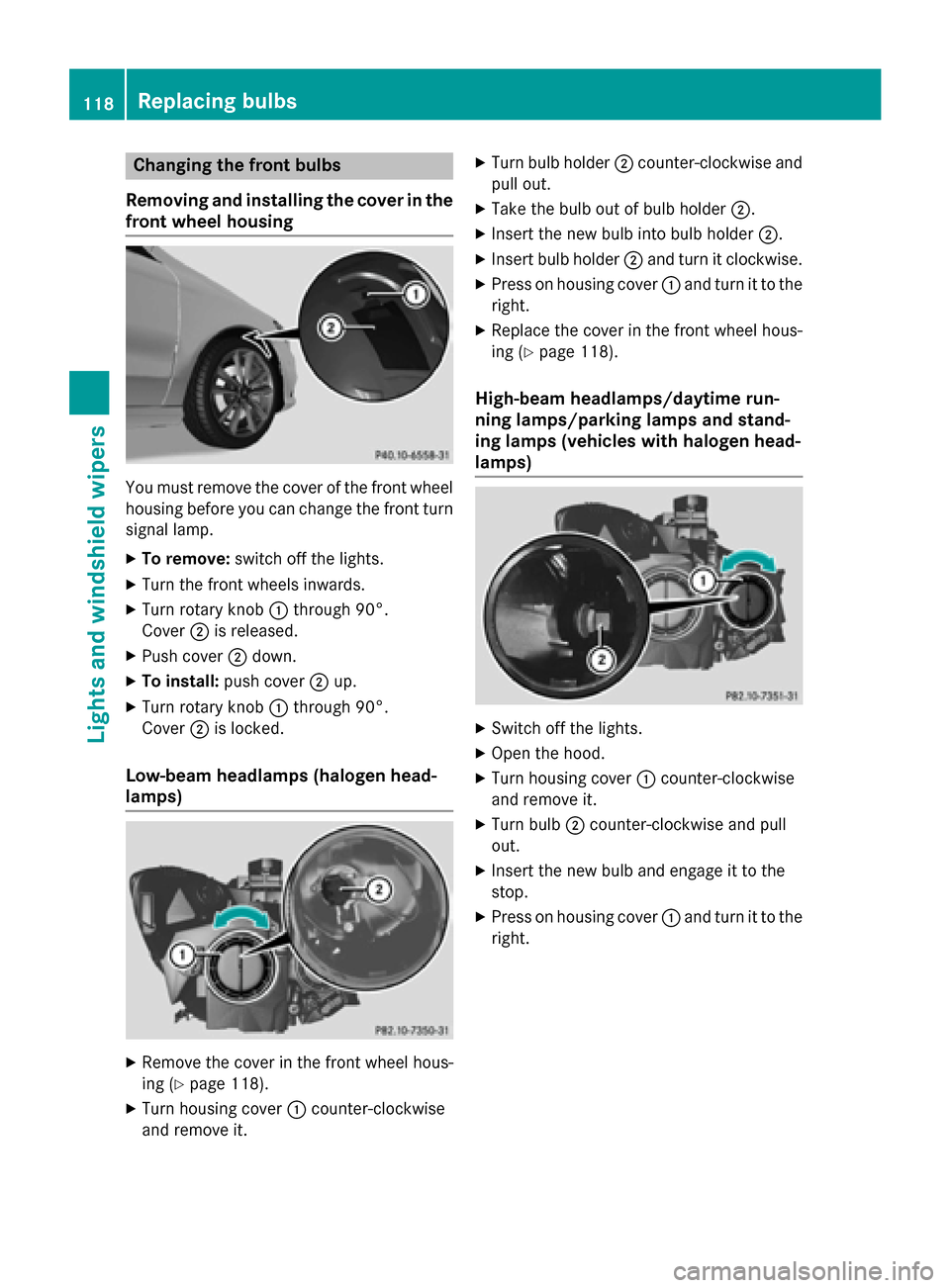
Changing the front bulbs
Removing and installing the cover in the
front wheel housing You must remove the cover of the front wheel
housing before you can change the front turn signal lamp.
X To remove: switch off the lights.
X Turn the front wheels inwards.
X Turn rotary knob :through 90°.
Cover ;is released.
X Push cover ;down.
X To install: push cover ;up.
X Turn rotary knob :through 90°.
Cover ;is locked.
Low-beam headlamps (halogen head-
lamps) X
Remove the cover in the front wheel hous-
ing (Y page 118).
X Turn housing cover :counter-clockwise
and remove it. X
Turn bulb holder ;counter-clockwise and
pull out.
X Take the bulb out of bulb holder ;.
X Insert the new bulb into bulb holder ;.
X Insert bulb holder ;and turn it clockwise.
X Press on housing cover :and turn it to the
right.
X Replace the cover in the front wheel hous-
ing (Y page 118).
High-beam headlamps/daytime run-
ning lamps/parking lamps and stand-
ing lamps (vehicles with halogen head-
lamps) X
Switch off the lights.
X Open the hood.
X Turn housing cover :counter-clockwise
and remove it.
X Turn bulb ;counter-clockwise and pull
out.
X Insert the new bulb and engage it to the
stop.
X Press on housing cover :and turn it to the
right. 118
Replacing bulbsLights and windshield wipers
Page 133 of 362
Problems with the "Cooling with air dehumidification" function
Problem
Possible causes/consequences and
M
MSolutions The indicator lamp in
the
¿ button
flashes three times or
remains off. The "Cool-
ing with air dehumidifi-
cation" function cannot
be switched on. Cooling with air dehumidification has been deactivated due to a
malfunction.
X Visit a qualified specialist workshop. Setting climate control to automatic
General notes The automatic function is only available in
conjunction with dual-zone automatic climate
control.
In automatic mode, the set temperature is
maintained automatically at a constant level. The system automatically regulates the tem-
perature of the dispensed air, the airflow and
the air distribution.
The automatic mode functions optimally
when the "Cooling with air dehumidification"
function is activated. If necessary, cooling
with air dehumidification can be deactivated.
If you deactivate the "Cooling with air-dehu-
midification" function, the air inside the vehi-
cle will not be cooled. The air inside the vehi- cle will also not be dehumidified. The win-
dows can fog up more quickly. Therefore, only deactivate the "Cooling with air-dehumidifi-
cation" function briefly.
Setting climate control to automatic X
Turn the SmartKey to position 2in the igni-
tion lock (Y page 141).
X Set the desired temperature.
X To activate: press theÃbutton.
The indicator lamp in the Ãbutton lights
up. Automatic air distribution and airflow
are activated. X
To switch to manual mode: press the
É orË button.
or X Press the KorI button.
The indicator lamp in the Ãbutton goes
out. Automatic air distribution and airflow
are deactivated. Setting the temperature
Air-conditioning system You can set the temperature for the entire
vehicle. The set temperature is automatically
maintained at a constant level.
X Turn the SmartKey to position 2in the igni-
tion lock (Y page 141).
X To increase/reduce: turn control:
clockwise or counter-clockwise
(Y page 125). Only change the temperature
setting in small increments. Start at 72 ‡
(22 †).
Dual-zone automatic climate control Different temperatures can be set for the
driver's and front-passenger sides. The set
temperature is automatically maintained at a
constant level.
X Turn the SmartKey to position 2in the igni-
tion lock (Y page 141).
X To increase/reduce: turn thumbwheel:
or E to the left or right (Y page 127). Only Operating the climate control systems
131Climate control
Page 154 of 362

Transmission positions
B Park position
This prevents the vehicle from roll- ing away when stopped.
Do not shift the transmission into
position P(Y page 149) unless the
vehicle is stationary. The parking
lock should not be used as a brake when parking. Always apply the
electronic parking brake in addi-
tion to the parking lock in order to
secure the vehicle.
If the vehicle electronics are mal-
functioning, the transmission may
be locked in position P. Have the
vehicle electronics checked imme-
diately at a qualified specialist
workshop.
Park position Pis automatically
engaged if:
R you switch off the engine using
the SmartKey and remove the
SmartKey
R you switch off the engine using
the SmartKey or using the Start/
Stop button and open the driv-
er's door or front-passenger
door
R the driver's door is opened when
the vehicle is stationary or driv-
ing at very low speed and the
transmission is in position Dor R C Reverse gear
Only shift the transmission to R
when the vehicle is stationary. A Neutral
Do not shift the transmission to
N
while driving. Otherwise, the auto-
matic transmission could be dam-
aged.
No power is transmitted from the
engine to the drive wheels.
Releasing the brakes will allow you
to move the vehicle freely, e.g. to
push it or tow it.
If ESP ®
is deactivated or faulty:
shift the transmission to position N
if the vehicle is in danger of skid-
ding, e.g. on icy roads.
If you switch the engine off with the transmission in position Ror D, the
automatic transmission shifts to N
automatically.
! Rolling in neutral
Ncan damage
the drive train. 7 Drive
The automatic transmission
changes gear automatically. All
forward gears are available.
Driving tips
Changing gear The automatic transmission shifts to the indi-
vidual gears automatically when it is in trans-
mission position D. This automatic gear shift-
ing behavior is determined by:
R the selected drive program (Y page 153)
R the position of the accelerator pedal
(Y page 152)
R the road speed
Accelerator pedal position Your style of driving influences how the auto-
matic transmission shifts gear:
R little throttle: early upshifts
R more throttle: late upshifts 152
Automatic transmissionDriving an
d parking
Page 156 of 362

X
AMG vehicles: press program selector
button :.
The selected drive program appears in the
multifunction display.
When the engine is started, the automatic
transmission always switches to automatic
drive program E(drive program Cin AMG
vehicles).
All vehicles (except AMG vehicles) E
Economy Comfortable, economical
driving
S
Sport Sporty driving style
M
Manual Manual gear shifting
AMG vehicles
C
Controlled
Efficiency Comfortable, economical
driving
S
Sport Sporty driving style
M
Manual Manual gear shifting
For further information on the automatic drive
program, see (Y page 154). Steering wheel paddle shifters
:
Left steering wheel paddle shifter (shifts
down)
; Right steering wheel paddle shifter (shifts
up)
In drive program M, you can change gear
yourself using the steering wheel paddle shift-
ers.
If you pull the left or right steering wheel pad- dle shifter when in automatic drive program E
(drive program Con AMG vehicles) or S, the
automatic transmission shifts into drive pro-
gram Mfor a limited time. Depending on
which paddle shifter is pulled, the automatic
transmission immediately shifts into the next
gear down or up.
AMG vehicles: you can activate drive pro-
gram MRACE START (Y page 180) using the
steering wheel paddle shifters.
You can only change gear with the steering
wheel paddle shifters when the transmission
is in position D.
For further information on the manual drive
program, see (Y page 155). Automatic drive program
Drive program E(drive program Con MAG
vehicles) is characterized by the following:
R comfort-oriented engine settings.
R optimal fuel consumption resulting from
the automatic transmission shifting up
sooner. 154
Automatic transmissionDriving and pa
rking