2015 MERCEDES-BENZ B-CLASS SPORTS tire pressure
[x] Cancel search: tire pressurePage 18 of 346
Switching on/off........................... 106
Start/Stop button
Removing ....................................... 136
Starting the engine ........................ 138
Start/stop function
see ECO start/stop function
Starting (engine) ................................ 137
Status overview (on-board com- puter) .................................................. 201
STEER CONTROL .................................. 66
Steering (display message) .............. 233
Steering assistant STEER CON- TROL
see STEER CONTROL
Steering wheel
Adjusting (manually) ........................ 97
Button overview ............................... 31
Buttons (on-board computer) ......... 193
Cleaning ......................................... 280
Important safety notes .................... 97
Paddle shifters ............................... 147
Steering wheel paddle shifters ........ 147
Stowage compartments
Armrest (front) ............................... 250
Armrest (under) ............................. 250
Center console .............................. 249
Center console (rear) ..................... 250
Cup holders ................................... 259
Eyeglasses compartment ............... 249
Glove box ....................................... 249
Important safety information ......... 249
Map pockets .................................. 251
Stowage net ................................... 251
Under driver's seat/front-
passenger sea t.............................. 250
Stowage net ....................................... 251
Summer tires ..................................... 304
Sun visor ............................................ 261
Switching air-recirculation mode
on/off ................................................. 130
T
Tachometer ........................................ 193
Tail lamps
Display message ............................ 220
see Lights Tailgate
Display message ............................ 232
Emergency unlocking ....................... 80
Important safety notes .................... 79
Opening dimensions ...................... 341
Opening/closing (from outside) ....... 80
Tank content
Fuel gauge ....................................... 29
Technical data
Capacities ...................................... 335
Emergency spare wheel ................. 331
Information .................................... 334
Tires/wheels ................................. 326
Vehicle data ................................... 341
Telephone
Accepting a call (multifunction
steering wheel) .............................. 200
Display message ............................ 233
Introduction ................................... 200
Menu (on-board computer) ............ 200
Number from the phone book ........ 200
Redialing ........................................ 201
Rejecting/ending a call ................. 200
Temperature
Coolant .......................................... 192
Outside temperature ...................... 193
Setting (climate control )................ 126
Through-loading feature ................... 252
Tire pressure
Checking manually ........................ 309
Display message ............................ 229
Maximum ....................................... 308
Not reached (TIREFIT) .................... 288Note s............................................. 307
Reached (TIREFIT) .......................... 288
Recommended ............................... 305
Tire pressure loss warning system
General notes ................................ 309
Important safety notes .................. 309
Restarting ...................................... 309
TIREFIT kit .......................................... 286
Tires
Aspect ratio (definition) ................. 321
Average weight of the vehicle
occupants (definition) .................... 320
Bar (definition) ............................... 319
Changing a whee l.......................... 322
Characteristics .............................. 319
16Index
Page 19 of 346
Checking ........................................ 303
Curb weight (definition)................. 321
Definition of terms ......................... 319
Direction of rotation ...................... 322
Display message ............................ 229
Distribution of the vehicle occu-
pants (definition) ............................ 322
DOT (Department of Transporta-
tion) (definition) ............................. 320
DOT, Tire Identification Number
(TIN) ............................................... 319
GAWR (Gross Axle Weight Rating)
(definition) ..................................... 320
General notes ................................ 326
GVW (Gross Vehicle Weight) (def-
inition) ........................................... 320
GVWR (Gross Vehicle Weight Rat-
ing) (definition) .............................. 320
Important safety notes .................. 302
Increased vehicle weight due to
optional equipment (definition) ...... 320
Information on driving .................... 302
Kilopascal (kPa) (definition) ........... 320
Labeling (overview) ........................ 316
Load bearing index (definition) ...... 321
Load index ..................................... 318
Load index (definition) ................... 320
M+S tire s....................................... 304
Maximum load on a tire (defini-
tion) ............................................... 321
Maximum loaded vehicle weight
(definition) ..................................... 320
Maximum permissible tire pres-
sure (definition) ............................. 321
Maximum tire load ......................... 318
Maximum tire load (definition) ....... 321
MOExtended tire s.......................... 304
Optional equipment weight (defi-
nition) ............................................ 321
PSI (pounds per square inch) (def-
inition) ........................................... 321
Replacing ....................................... 322
Service life ..................................... 304
Sidewall (definition) ....................... 321
Speed rating (definition) ................ 320
Storing ........................................... 322
Structure and characteristics
(definition) ..................................... 319 Summer tire
s................................. 304
Temperature .................................. 315
TIN (Tire Identification Number)
(definition) ..................................... 321
Tire bead (definition) ...................... 321
Tire pressure (definition) ................ 321
Tire pressures (recommended) ...... 320
Tire size (data) ............................... 326
Tire size designation, load-bearing capacity, speed rating .................... 316
Tire tread ....................................... 303
Tire tread (definition) ..................... 321
Total load limit (definition) ............. 322
Traction ......................................... 315
Traction (definition) ....................... 321
Tread wear ..................................... 315
Uniform Tire Quality Grading
Standards ...................................... 314
Uniform Tire Quality Grading
Standards (definition) .................... 320
Wear indicator (definition) ............. 321
Wheel and tire combination ........... 328
Wheel rim (definition) .................... 320
see Flat tire
Top Tether ............................................ 57
Tow-starting
Emergency engine starting ............ 298
Important safety notes .................. 295
Installing the towing eye ................ 296
Removing the towing eye ............... 297
Towing a trailer
ESP ®
(Electronic Stability Pro-
gram) ............................................... 66
Towing away
Important safety guidelines ........... 295
Installing the towing eye ................ 296
Notes for 4MATIC vehicles ............ 298
Removing the towing eye ............... 297
Transporting the vehicl e................ 298
With both axles on the ground ....... 297
With front axle raised ..................... 297
Towing eye ......................................... 284
Transmission
see Automatic transmission
Transmission position display
(DIRECT SELECT lever) ...................... 143
Transporting the vehicle .................. 298
Index17
Page 22 of 346
Protection of the environment
General notes
HEnvironmental note
Daimler's declared policy is one of compre-
hensive environmental protection.
The objectives are for the natural resources
that form the basis of our existence on this
planet to be used sparingly and in a manner
that takes the requirements of both nature
and humanity into account.
You too can help to protect the environment
by operating your vehicle in an environmen-
tally responsible manner.
Fuel consumption and the rate of engine,
transmission, brake and tire wear are affected by these factors:
R operating conditions of your vehicle
R your personal driving style
You can influence both factors. You should
bear the following in mind:
Operating conditions:
R avoid short trips as these increase fuel con-
sumption.
R always make sure that the tire pressures
are correct.
R do not carry any unnecessary weight.
R remove roof racks once you no longer need
them.
R a regularly serviced vehicle will contribute
to environmental protection. You should
therefore adhere to the service intervals.
R always have service work carried out at a
qualified specialist workshop.
Personal driving style:
R do not depress the accelerator pedal when
starting the engine.
R do not warm up the engine when the vehicle
is stationary.
R drive carefully and maintain a safe distance
from the vehicle in front.
R avoid frequent, sudden acceleration andbraking.
R change gear in good time and use each gear
only up to Ôof its maximum engine speed.
R switch off the engine in stationary traffic.
R keep an eye on the vehicle's fuel consump-
tion.
Environmental concerns and recom-
mendations
Wherever the operating instructions require
you to dispose of materials, first try to regen-
erate or re-use them. Observe the relevant
environmental rules and regulations when
disposing of materials. In this way you will
help to protect the environment.
Genuine Mercedes-Benz parts
HEnvironmental note
Daimler AG also supplies reconditioned major
assemblies and parts which are of the same
quality as new parts. They are covered by the same Limited Warranty entitlements as newparts.
!Air bags and Emergency Tensioning Devi-
ces, as well as control units and sensors for these restraint systems, may be installed in
the following areas of your vehicle:
R doors
R door pillars
R door sills
R seats
R cockpit
R instrument cluster
R center console
Do not install accessories such as audio
systems in these areas. Do not carry out
repairs or welding. You could impair the
operating efficiency of the restraint sys-tems.
Have aftermarket accessories installed at a qualified specialist workshop.
20Introduction
Page 153 of 346
!Overfilling the fuel tank could damage the
fuel system.
!Take care not to spill any fuel on painted
surfaces. You could otherwise damage the
paintwork.
!Use a filter when refueling from a fuel can.
Otherwise, the fuel lines and/or injection
system could be blocked by particles from
the fuel can.
Do not get into the vehicle again during the
refueling process. Otherwise, electrostatic
charge could build up again.
If you overfill the fuel tank, fuel could spray
out when the fuel pump nozzle is removed.
For further information on fuel and fuel quality ( Y page 335).
Refueling
General information
The fuel filler flap is unlocked or locked auto- matically when you unlock or lock the vehicle
with the key.
The position of the fuel filler cap is displayed æ in the instrument cluster. The arrow on
the filling pump indicates the side of the vehi-
cle.
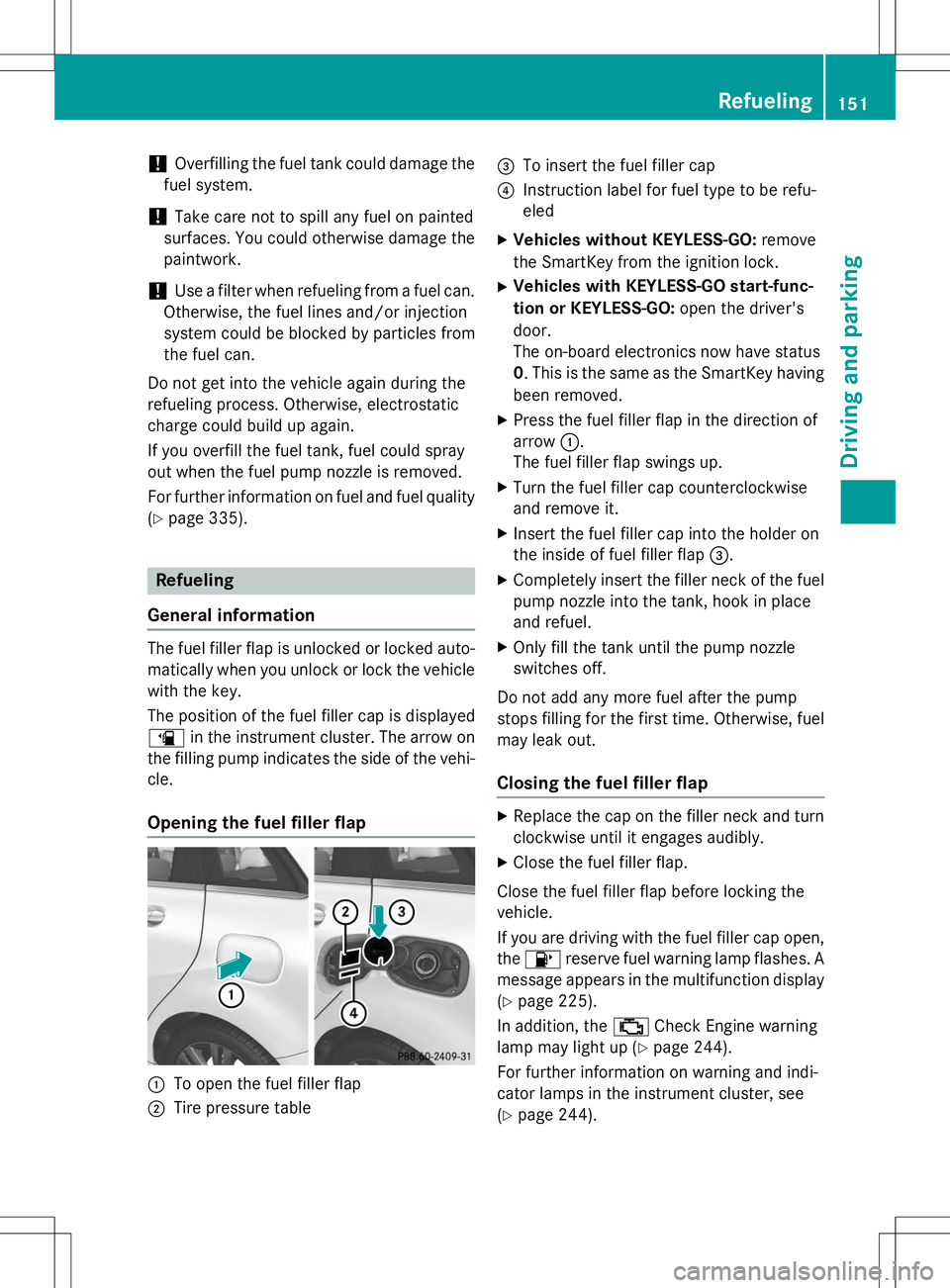
Opening the fuel filler flap
:To open the fuel filler flap
;Tire pressure table
=To insert the fuel filler cap
?Instruction label for fuel type to be refu- eled
X Vehicles without KEYLESS-GO: remove
the SmartKey from the ignition lock.
X Vehicles with KEYLESS-GO start-func-
tion or KEYLESS-GO: open the driver's
door.
The on-board electronics now have status0 . This is the same as the SmartKey having
been removed.
X Press the fuel filler flap in the direction ofarrow :.
The fuel filler flap swings up.
X Turn the fuel filler cap counterclockwise
and remove it.
X Insert the fuel filler cap into the holder on
the inside of fuel filler flap =.
X Completely insert the filler neck of the fuel
pump nozzle into the tank, hook in place
and refuel.
X Only fill the tank until the pump nozzle
switches off.
Do not add any more fuel after the pump
stops filling for the first time. Otherwise, fuel
may leak out.
Closing the fuel filler flap
X Replace the cap on the filler neck and turn
clockwise until it engages audibly.
X Close the fuel filler flap.
Close the fuel filler flap before locking the vehicle.
If you are driving with the fuel filler cap open, the 8 reserve fuel warning lamp flashes. A
message appears in the multifunction display
( Y page 225).
In addition, the ;Check Engine warning
lamp may light up ( Ypage 244).
For further information on warning and indi-
cator lamps in the instrument cluster, see( Y page 244).
Refueling151
Driving and parking
Z
Page 158 of 346
Drive sensibly – save fuel
Observe the following tips to save fuel:R The tires should always be inflated to the
recommended tire pressure.
R Remove unnecessary loads.
R Remove roof racks when they are not nee-ded.
R Warm up the engine at low engine speeds.
R Avoid frequent acceleration or braking.
R Have all maintenance work carried out as
indicated by the service intervals in the
Maintenance Booklet or by the service
interval display.
Fuel consumption also increases when driv-
ing in cold weather, in stop-start traffic and in
hilly terrain.
Drinking and driving
GWARNING
Drinking and driving and/or taking drugs and driving are very dangerous combinations.
Even a small amount of alcohol or drugs can
affect your reflexes, perceptions and judg-
ment.
The possibility of a serious or even fatal acci-
dent is greatly increased when you drink or
take drugs and drive.
Do not drink or take drugs and drive or allow
anyone to drive who has been drinking or tak-
ing drugs.
Emission control
GWARNING
Combustion engines emit poisonous exhaust
gases such as carbon monoxide. Inhaling
these exhaust gases leads to poisoning. There is a risk of fatal injury. Therefore never leave
the engine running in enclosed spaces with-
out sufficient ventilation.
Certain engine systems are designed to keep
the level of poisonous components in exhaust
fumes within legal limits. These systems only work at peak efficiency if
they are serviced exactly in accordance with
the manufacturer's specifications. For this
reason, only have work on the engine carried
out by qualified and authorized Mercedes-
Benz technicians.
The engine settings must not be changed
under any circumstances. Furthermore, all
specific service work must be carried out at
regular intervals and in accordance with the
Mercedes-Benz service requirements. Details
can be found in the Maintenance Booklet.
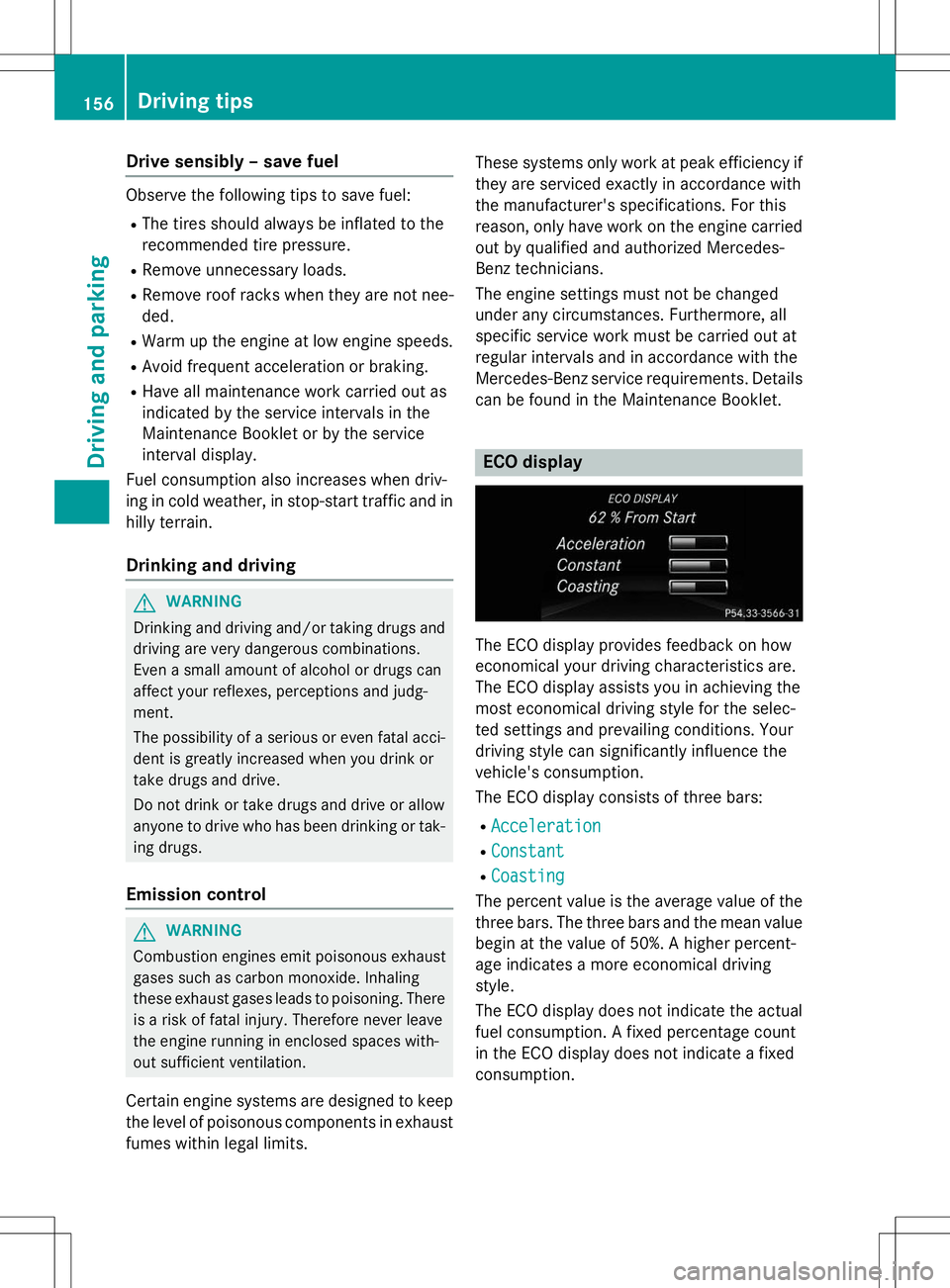
ECO display
The ECO display provides feedback on how
economical your driving characteristics are.
The ECO display assists you in achieving the
most economical driving style for the selec-
ted settings and prevailing conditions. Your
driving style can significantly influence the
vehicle's consumption.
The ECO display consists of three bars: R
Acceleration
RConstant
RCoasting
The percent value is the average value of the three bars. The three bars and the mean value
begin at the value of 50%. A higher percent-
age indicates a more economical driving
style.
The ECO display does not indicate the actual fuel consumption. A fixed percentage count
in the ECO display does not indicate a fixed
consumption.
156Driving tips
Driving and pa rking
Page 159 of 346
Apart from driving style, consumption is
dependent on many factors such as, e.g.: Rload
R tire pressure
R cold start
R choice of route
R electrical consumers switched on
These factors are not included in the ECO dis-
play.
The evaluation of your driving style is carried
out using the following three categories:
R
Acceleration(evaluation of all accelera-
tion processes):
- The bar fills up: moderate acceleration,
especially at higher speeds
- The bar empties: sporty acceleration
R
Constant(assessment of driving behavior
at all times)
- The bar fills up: constant speed and
avoidance of unnecessary acceleration
and deceleration
- The bar empties: fluctuations in speed
R
Coasting(assessment of all deceleration
processes) - The bar fills up: anticipatory driving,
keeping your distance and early release
of the accelerator. The vehicle can coast
without use of the brakes.
- The bar empties: frequent braking
An economical driving style specially requires
driving at moderate engine speeds.
To achieve a higher value in the categories
AccelerationandConstant:
R observe the gearshift recommendations.
R drive in drive program E.
On long journeys at a constant speed, e.g. on
the highway, only the bar for
Constantwill
change.
The ECO display summarizes the driving char- acteristics from the start of the journey to its completion. For this reason, the bars change
dynamically at the beginning of the journey.
On longer journeys, there are fewer changes. For more dynamic changes, carry out a man-
ual reset.
For further information on the ECO display,
see ( Ypage 196).
Braking
Important safety notes
GWARNING
If you shift down on a slippery road surface in an attempt to increase the engine's braking
effect, the drive wheels could lose their grip.
There is an increased danger of skidding and
accidents.
Do not shift down for additional engine brak-
ing on a slippery road surface.
Downhill gradients
!On long and steep gradients, you must
reduce the load on the brakes by shifting to
a lower gear in good time. This allows you to
take advantage of the engine's braking
effect. For this, you need to have selected
manual drive program M. This helps you to
avoid overheating the brakes and wearing
them out excessively.
When you take advantage of the engine's
braking effect, a drive wheel may not turn
for some time, e.g. on a slippery road sur-
face. This could cause damage to the drive train. This type of damage is not covered bythe Mercedes-Benz warranty.
Briefly depressing the accelerator pedal on
downhill gradients while the manual drive
program Mis temporarily activated: the auto-
matic transmission may switch to the last
active automatic drive program Eor S. The
automatic transmission may shift to a higher
gear. This can reduce the engine's braking
effect.
Driving tips157
Driving an d parking
Z
Page 178 of 346
Parking tips:R On narrow roads, drive as close to the park-
ing space as possible.
R Parking spaces that are littered or over-
grown might be identified or measured
incorrectly.
R Parking spaces that are partially occupied
by trailer drawbars might not be identified
as such or be measured incorrectly.
R Snowfall or heavy rain may lead to a parking
space being measured inaccurately.
R Pay attention to the PARKTRONIC(Y page 173) warning messages during the
parking procedure.
R You can intervene in the steering procedure
to correct it at any time. Active Parking
Assist will then be canceled.
R When transporting a load which protrudes
from your vehicle, you should not use
Active Parking Assist.
R Never use Active Parking Assist when snow
chains are installed.
R Make sure that the tire pressures are
always correct. This has a direct influence
on the parking characteristics of the vehi-cle.
Use Active Parking Assist for parking spaces:
R that are parallel or at right-angles to the
direction of travel
R that are on straight roads, not bends
R that are on the same level as the road, e.g.
not on the pavement
Detecting parking spaces
Objects located above the height range of
Active Parking Assist will not be detected
when the parking space is measured. These
are not taken into account when the parking
procedure is calculated, e.g. overhanging
loads, tail sections or loading ramps of goodsvehicles.
GWARNING
If there are objects above the detection range: R Active Park Assist may steer too early
R the vehicle may not stop in front of these
objects.
You may cause a collision as a result. There is
a risk of an accident.
If there are objects above the detection range,
stop and deactivate Active Parking Assist.
For further information on the detection
range ( Ypage 173).
Active Parking Assist does not assist you
parking in spaces at right angles to the direc-
tion of travel if: R two parking spaces are located directly
next to one another
R the parking space is directly next to a low
obstacle such as a low curb
R you park forwards
Active Parking Assist does not assist you
parking in spaces that are parallel or at right
angles to the direction of travel if:
R the parking space is on a curb
R the system reads the parking space as
being blocked, for example by foliage or
grass paving blocks
R the area is too small for the vehicle to
maneuver into
R the parking space is bordered by an obsta-
cle, e.g. a tree, a post or a trailer
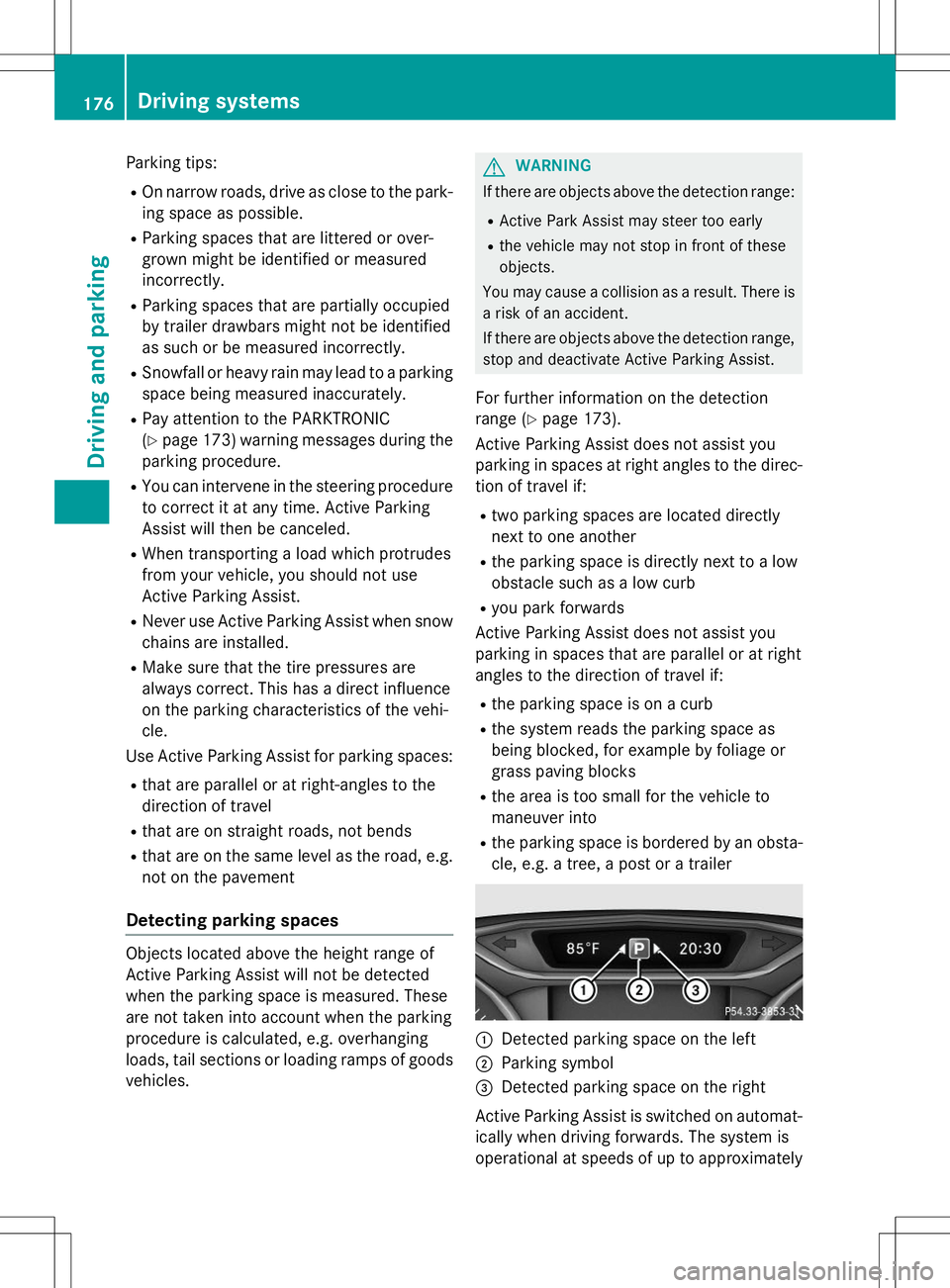
:Detected parking space on the left
;Parking symbol
=Detected parking space on the right
Active Parking Assist is switched on automat-
ically when driving forwards. The system is
operational at speeds of up to approximately
176Driving systems
Driving and parking
Page 206 of 346
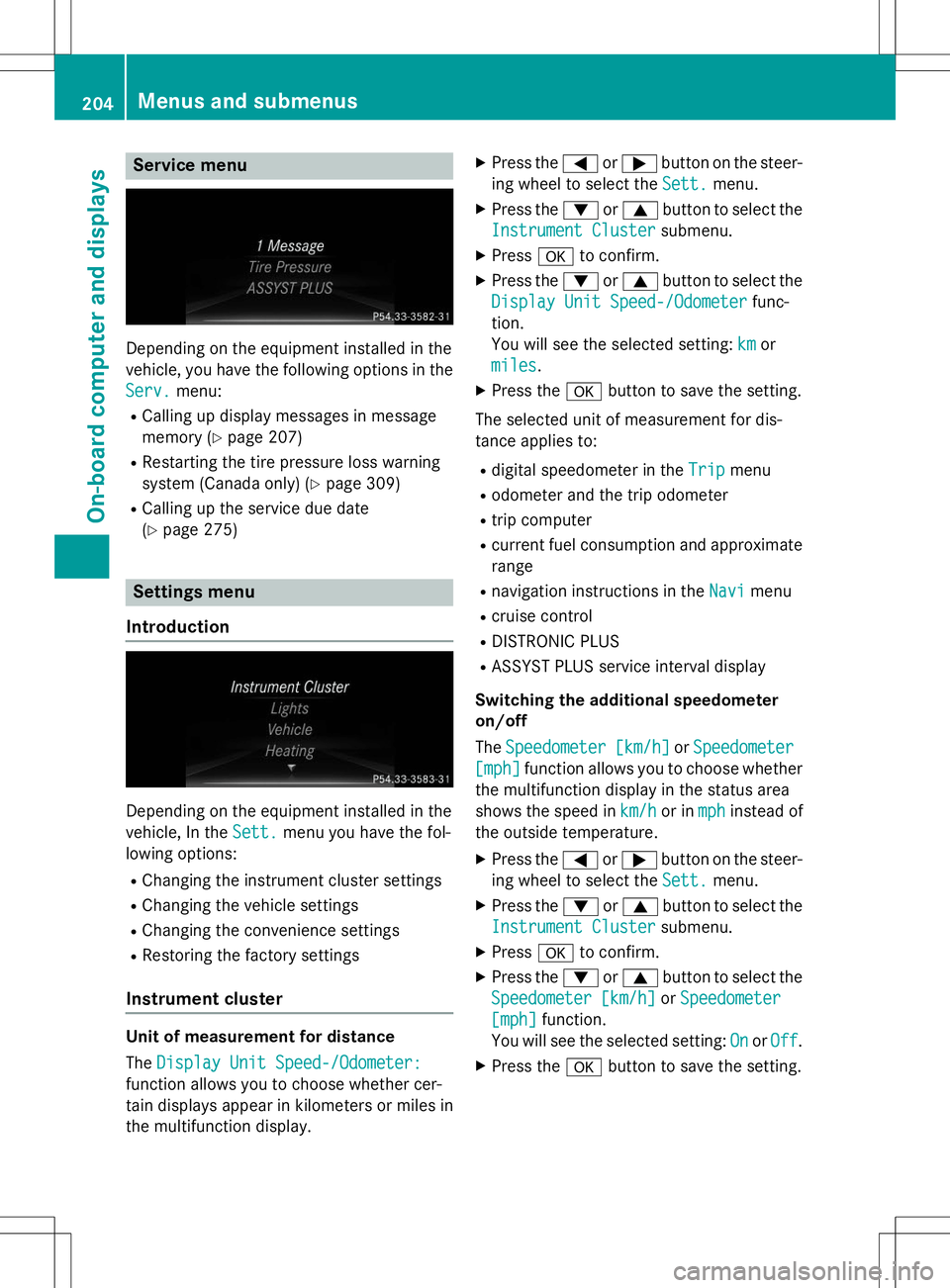
Service menu
Depending on the equipment installed in the
vehicle, you have the following options in the
Serv.menu:
R Calling up display messages in message
memory ( Ypage 207)
R Restarting the tire pressure loss warning
system (Canada only) ( Ypage 309)
R Calling up the service due date(Y page 275)
Settings menu
Introduction
Depending on the equipment installed in the
vehicle, In the
Sett.menu you have the fol-
lowing options:
R Changing the instrument cluster settings
R Changing the vehicle settings
R Changing the convenience settings
R Restoring the factory settings
Instrument cluster
Unit of measurement for distance The
Display Unit Speed-/Odometer:
function allows you to choose whether cer-
tain displays appear in kilometers or miles in
the multifunction display. X
Press the =or; button on the steer-
ing wheel to select the
Sett.menu.
X Press the :or9 button to select the
Instrument Clustersubmenu.
X Press ato confirm.
X Press the :or9 button to select the
Display Unit Speed-/Odometerfunc-
tion.
You will see the selected setting:
kmor
miles.
X Press the abutton to save the setting.
The selected unit of measurement for dis-
tance applies to: R digital speedometer in the
Tripmenu
R odometer and the trip odometer
R trip computer
R current fuel consumption and approximate
range
R navigation instructions in the
Navimenu
R cruise control
R DISTRONIC PLUS
R ASSYST PLUS service interval display
Switching the additional speedometer on/off The
Speedometer [km/h]orSpeedometer
[mph]function allows you to choose whether
the multifunction display in the status area
shows the speed in
km/hor inmphinstead of
the outside temperature.
X Press the =or; button on the steer-
ing wheel to select the
Sett.menu.
X Press the :or9 button to select the
Instrument Clustersubmenu.
X Press ato confirm.
X Press the :or9 button to select the
Speedometer [km/h]orSpeedometer
[mph]function.
You will see the selected setting:
OnorOff.
X Press the abutton to save the setting.
204Menus and submenus
On-board computer and displays