2015 MERCEDES-BENZ B-CLASS SPORTS brakes
[x] Cancel search: brakesPage 7 of 346
AUTO lightsDisplay message ............................ 222
see Lights
Automatic car wash (care) ...............276
Automatic engine start (ECO start/
stop function) ................................... .139
Automatic engine switch-off (ECO
start/stop function) .......................... 139
Automatic headlamp mode .............. 104
Automatic transmission
Accelerator pedal position ............. 146
Automatic drive program .............. .147
Changing gear ............................... 146
DIRECT SELECT lever ..................... 142
Drive program displa y.................... 143
Driving tips .................................... 146
Emergency running mode .............. 150
Engaging drive position .................. 145
Engaging neutral ............................ 144
Engaging park position automati-
cally ............................................... 143
Engaging reverse gear ................... 144
Engaging the park position ............ 143
Holding the vehicle stationary on
uphill gradients .............................. 146
Kickdown ....................................... 146
Manual drive progra m.................... 148
Overview ........................................ 142
Problem (malfunction) ................... 150
Program selector button ................ 147
Pulling away ................................... 138
Starting the engine ........................ 137
Steering wheel paddle shifters ...... 147
Transmission position display ........ 143
Transmission positions .................. 145
Automatic transmission emer-
gency mode ....................................... 150
B
Backup lamp
Changing bulb s.............................. 112
Display message ............................ 221
Bag hook ............................................ 255
BAS (Brake Assist System) ................. 61
Battery (SmartKey)
Checking .......................................... 73
Important safety notes .................... 73 Replacing ......................................... 74
Battery (vehicle)
Charging ........................................ 291
Display message ............................ 223
Important safety notes .................. 289
Jump starting ................................. 293
Blind Spot Assist
Activating/deactivating (on-
board computer) ............................ 203
Display message ............................ 226
Notes/function .............................. 185
Brake fluid
Display message ............................ 214
Notes ............................................. 338
Brake force distribution
see EBD (electronic brake force
distribution)
Brake lamps
Display message ............................ 220
Brakes
ABS .................................................. 61
Adaptive Brake Assist ...................... 63
BAS .................................................. 61
Brake fluid (notes) ......................... 338
Display message ............................ 208
EBD .................................................. 66
Hill start assist ............................... 138
HOLD function ............................... 170
Important safety notes .................. 157
Maintenance .................................. 158
Parking brake ................................ 153
Riding tips ...................................... 157
Warning lamp ................................. 237
Breakdown
see Flat tire
Brightness control (instrument
cluster lighting) ................................... 29
Buttons on the steering wheel ......... 193C
Calling up a malfunction
see Display messages
Care
Car wash ........................................ 276
Carpets .......................................... 282
Display ........................................... 280
Exhaust pipe .................................. 280
Index5
Page 10 of 346
Driving tips .................................... 169
Function/notes............................. 163
Important safety notes .................. 163
Setting the specified minimum
distance ......................................... 167
Doors
Automatic locking (on-board com-
puter) ............................................. 205
Automatic locking (switch) ............... 78
Central locking/unlocking
(SmartKey) ....................................... 70
Control panel ................................... 34
Display message ............................ 232
Emergency locking ........................... 79
Emergency unlocking ....................... 78
Important safety notes .................... 77
Opening (from inside) ...................... 77
Drinking and driving ......................... 156
Drive program
Automatic ...................................... 147
Display (DIRECT SELECT lever) ...... 143
Manual ........................................... 148
Driver's door
see Doors
Driving abroad
Mercedes-Benz Service ................. 275
Driving on flooded roads .................. 160
Driving safety systems
ABS (Anti-lock Braking System) ....... 61
ADAPTIVE BRAK E............................. 66
Adaptive Brake Assist ...................... 63
BAS (Brake Assist System) .............. 61
COLLISION PREVENTION ASSIST
PLUS ................................................ 62
Distance warning function ............... 62
EBD (electronic brake force distri- bution) ............................................. 66 ESP ®
(Electronic Stability Pro-
gram) ............................................... 64
ETS/4ETS (Electronic Traction
System) ........................................... 64
Important safety information ........... 60
Overview .......................................... 60
STEER CONTROL ............................. 66
Driving systems
Active Parking Assist ..................... 175
ATTENTION ASSIST ........................ 183
Blind Spot Assist ............................ 185 Cruise control ................................ 161
Display message ............................ 225
DISTRONIC PLUS ........................... 163
HOLD function ............................... 170
Lane Keeping Assist ...................... 187
Lane Tracking package .................. 185
PARKTRONIC ................................. 172
Rear view camera .......................... 180
Driving tips
Automatic transmission ................. 146
Brakes ........................................... 157
Break-in perio d.............................. 134
Checking brake lining thickness .... 159
DISTRONIC PLUS ........................... 169
Downhill gradient ........................... 157
Drinking and driving ....................... 156
Driving in winter ............................. 160
Driving on flooded roads ................ 160
Driving on wet roads ...................... 160
Exhaust check ............................... 156
Fuel ................................................ 156
General .......................................... 155
Hydroplaning ................................. 160
Icy road surfaces ........................... 160
Limited braking efficiency on sal-
ted roads ....................................... 158
Snow chains .................................. 305
The first 1000 miles (1500 km) ..... 134
Wet road surface ........................... 158
DVD video
Operating (on-board computer) ..... 200
E
EASY-VARIO-PLUS system Cargo compartment enlargement .. 252
EBD (electronic brake force distri-
bution)
Display message ............................ 210
Function/note s................................ 66
ECO display
Function/note s............................. 156
On-board compute r....................... 196
ECO start/stop function
Automatic engine start .................. 139
Automatic engine switch-off .......... 139
Deactivating/activating ................. 140
General information ....................... 139
8Index
Page 20 of 346
Trim pieces (cleaning instruc-
tions).................................................. 281
Trip computer (on-board com-
puter) .................................................. 196
Trip odometer
Calling up ....................................... 196
Resetting (on-board computer) ...... 197
Trunk load (maximum) ...................... 341
Turn signals
Changing bulbs (front) ................... 112
Display message ............................ 219
Switching on/off ........................... 106
Type identification plate
see Vehicle identification plate
U
UnlockingEmergency unlocking ....................... 78
From inside the vehicle (central
unlocking button) ............................. 78
V
Vanity mirror (in the sun visor) ........ 261
Vehicle
Correct use ...................................... 24
Data acquisition ............................... 25
Display message ............................ 230
Equipment ....................................... 21
Individual settings .......................... 204
Limited Warranty ............................. 25
Loading .......................................... 310
Locking (in an emergency) ............... 79
Locking (SmartKey) .......................... 70
Lowering ........................................ 325
Maintenance .................................... 21
Parking for a long period ................ 155
Pulling away ................................... 138
Raising ........................................... 323
Reporting problems ......................... 24
Securing from rolling away ............ 323
Transporting .................................. 298
Unlocking (in an emergency) ........... 78
Unlocking (SmartKey) ...................... 70
Vehicle data ................................... 341
Vehicle data
Roof load (maximum) ..................... 341 Trunk load (maximum) ................... 341
Vehicle dimensions ........................... 341
Vehicle emergency locking ................ 79
Vehicle identification number
see VIN
Vehicle identification plate .............. 334
Vehicle tool kit .................................. 284
Ventilation
Setting the vents ........................... 131
Video
Operating the DVD ........................ .200
VIN ...................................................... 334
W
Warning and indicator lamps
ABS ................................................ 238
Brakes .......................................... .237
Check Engine ................................. 244
Coolant .......................................... 244
Distance warning ........................... 246 ESP ®
.............................................. 240
ESP ®
OFF ....................................... 241
LIM (DISTRONIC PLUS) .................. 164
Overview .......................................... 30
PASSENGER AIR BAG ..................... .39
Reserve fuel .................................. .244
Restraint system ............................ 243
Seat belt ........................................ 235
Warranty .............................................. 21
Washer fluid
Display message ............................ 233
Wheel and tire combination
see Tires
Wheel bolt tightening torque ........... 325
Wheel chock ...................................... 323
Wheels
Changing a wheel .......................... 322
Checking ........................................ 303
Cleaning ......................................... 278
Emergency spare wheel ................. 329
General notes ................................ 326
Important safety notes .................. 302
Information on driving .................... 302
Interchanging/changing ................ 322
Mounting a new wheel ................... 325
Removing a wheel .......................... 325
Storing .......................................... .322
18Index
Page 32 of 346
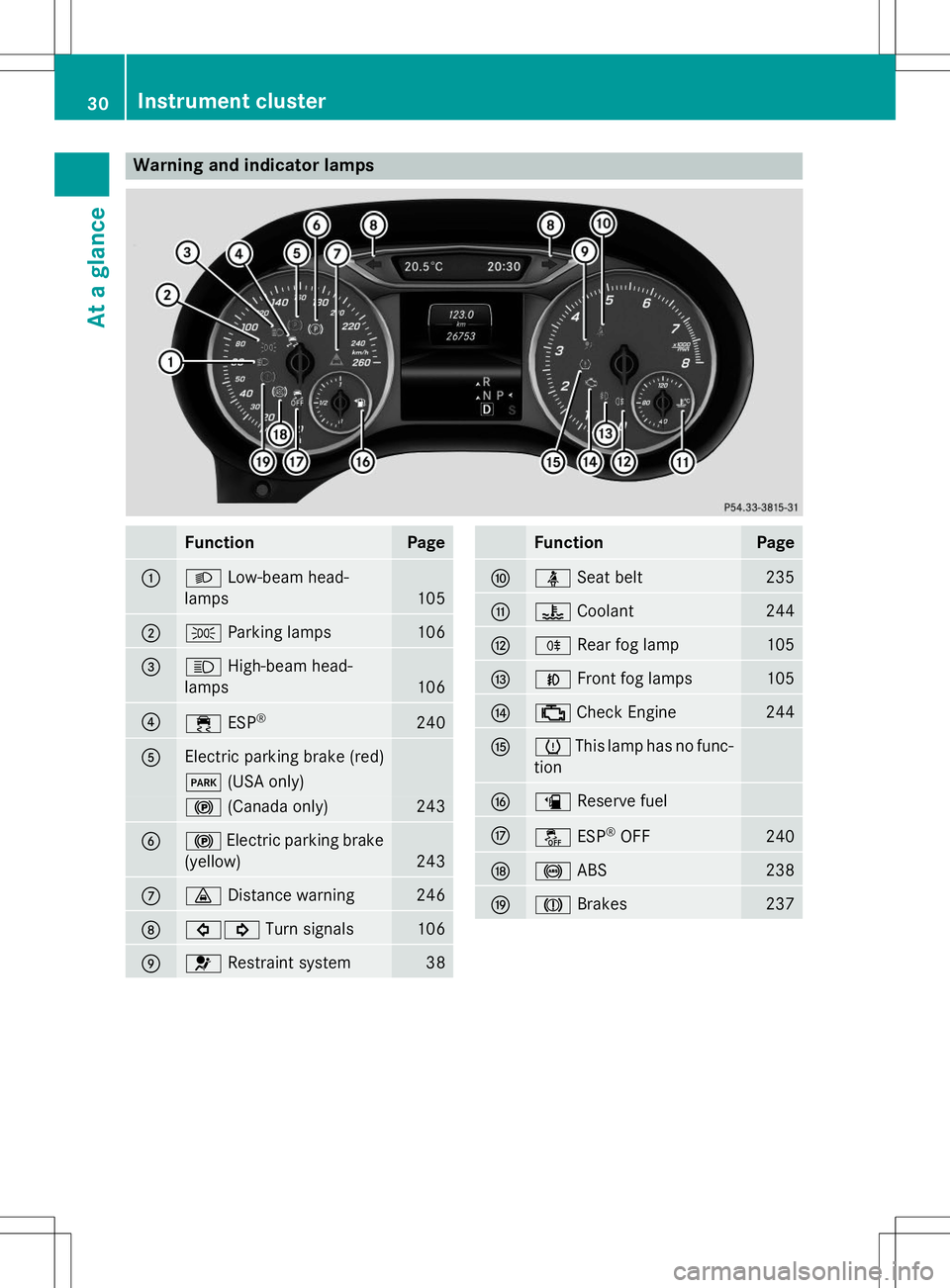
Warning and indicator lamps
FunctionPage
:LLow-beam head-
lamps
105
;T Parking lamps106
=KHigh-beam head-
lamps
106
?÷ ESP®240
AElectric parking brake (red)
F
(USA only)
!(Canada only)243
B!Electric parking brake
(yellow)
243
C· Distance warning246
D#! Turn signals106
E6Restraint system38
FunctionPage
FüSeat belt235
G?Coolant244
HRRear fog lamp105
INFront fog lamps105
J;Check Engine244
KhThis lamp has no func-
tion
Læ Reserve fuel
MåESP®
OFF240
N! ABS238
OJBrakes237
30Instrument cluster
At a glance
Page 63 of 346
chains. Only in this way will the driving safety
systems described in this section work as
effectively as possible.
ABS (Anti-lock Braking System)
General information
ABS regulates brake pressure in such a way
that the wheels do not lock when you brake.
This allows you to continue steering the vehi- cle when braking. The ! ABS warning lamp in the instrument
cluster lights up when the ignition is switched
on. It goes out when the engine is running.
Important safety notes
iObserve the "Important safety notes" sec-
tion ( Ypage 60).
GWARNING
If ABS is faulty, the wheels could lock when
braking. The steerability and braking charac-
teristics may be severely impaired. Addition-
ally, further driving safety systems are deac-
tivated. There is an increased danger of skid-
ding and accidents.
Drive on carefully. Have ABS checked imme-
diately at a qualified specialist workshop.
When ABS is malfunctioning, other systems,
including driving safety systems, will also
become inoperative. Observe the information on the ABS warning lamp ( Ypage 238) and
display messages which may be shown in the
instrument cluster ( Ypage 208).
ABS works from a speed of about 5 mph
(8 km/h), regardless of road-surface condi-
tions. ABS works on slippery surfaces, even
when you only brake gently.
Braking
X If ABS intervenes: continue to depress the
brake pedal vigorously until the braking sit-
uation is over.
X To make a full brake application:
depress the brake pedal with full force.
If ABS intervenes when braking, you will feel a
pulsing in the brake pedal.
The pulsating brake pedal can be an indica-
tion of hazardous road conditions, and func-
tions as a reminder to take extra care while
driving.
BAS (Brake Assist System)
General information
BAS operates in emergency braking situa-
tions. If you depress the brake pedal quickly,
BAS automatically boosts the braking force,
thus shortening the stopping distance.
Important safety notes
iObserve the "Important safety notes" sec-
tion ( Ypage 60).
GWARNING
If BAS is malfunctioning, the braking distance
in an emergency braking situation is
increased. There is a risk of an accident.
In an emergency braking situation, depress
the brake pedal with full force. ABS prevents
the wheels from locking.
Braking
X
Keep the brake pedal firmly depressed until
the emergency braking situation is over.
ABS prevents the wheels from locking.
The brakes will function as usual once you
release the brake pedal. BAS is deactivated.
Driving safety systems61
Safety
Z
Page 66 of 346
Rto crossing traffic
R when cornering
As a result, the Adaptive Brake Assist may not intervene in all critical conditions. There is a
risk of an accident.
Always pay careful attention to the traffic sit- uation and be ready to brake.
Due to the nature of the system, particularly
complicated but non-critical driving condi-
tions may also cause Brake Assist to inter-
vene.
If adaptive Brake Assist is not available due to a malfunction in the radar sensor system, thebrake system remains available with full
brake boosting effect and BAS.
With the help of adaptive Brake Assist, the
distance warning signal can detect obstacles
that are in the path of your vehicle for an
extended period of time.
If adaptive Brake Assist detects a risk of col-
lision with the vehicle in front, it calculates
the braking force necessary to avoid a colli-
sion. If you apply the brakes forcefully, adap-
tive Brake Assist will automatically increase
the braking force to a level suitable for the
traffic conditions.
X Keep the brake pedal depressed until the
emergency braking situation is over.
ABS prevents the wheels from locking.
The brakes will work normally again if:
R you release the brake pedal.
R there is no longer any danger of a collision.
R no obstacle is detected in front of your
vehicle.
Adaptive Brake Assist is then deactivated.
If adaptive Brake Assist demands particularly
high braking force, preventative passenger
protection measures (PRE-SAFE ®
) are activa-
ted simultaneously.
Up to a speed of approximately 155 mph
(250 km/h), adaptive Brake Assist is capable
of reacting to moving objects that have
already been detected as such at least once
over the period of observation. Up to a speed of approximately 44 mph
(70 km/h), adaptive Brake Assist reacts to
stationary obstacles.
ESP®(Electronic Stability Program)
General notes
iObserve the "Important safety notes" sec-
tion ( Ypage 60).
ESP ®
monitors driving stability and traction,
i.e. power transmission between the tires and
the road surface.
If ESP ®
detects that the vehicle is deviating
from the direction desired by the driver, one
or more wheels are braked to stabilize the
vehicle. The engine output is also modified to keep the vehicle on the desired course within
physical limits. ESP ®
assists the driver when
pulling away on wet or slippery roads. ESP ®
can also stabilize the vehicle during braking.
ETS/4ETS (Electronic Traction System)
iObserve the "Important safety notes" sec-
tion ( Ypage 60).
ETS traction control is part of ESP ®
. On vehi-
cles with 4MATIC, 4ETS is part of ESP ®
.
Traction control brakes the drive wheels indi-
vidually if they spin. This enables you to pull
away and accelerate on slippery surfaces, for
example if the road surface is slippery on one
side. In addition, more drive torque is trans-
ferred to the wheel or wheels with traction.
Traction control remains active, even if you
deactivate ESP ®
.
Important safety notes
iObserve the "Important safety notes" sec-
tion ( Ypage 60).
GWARNING
If ESP ®
is malfunctioning, ESP ®
is unable to
stabilize the vehicle. Additionally, further driv-
64Driving safety systems
Safety
Page 141 of 346
ECO start/stop function
Introduction
The ECO start/stop function switches the
engine off automatically if the vehicle is stop- ped under certain conditions.
The engine starts automatically when the
driver wants to pull away again. The ECO
start/stop function thereby helps you to
reduce the fuel consumption and emissions
of your vehicle.
Important safety notes
GWARNING
If the engine is switched off automatically andyou exit the vehicle, the engine is restarted
automatically. The vehicle may begin moving. There is a risk of accident and injury.
If you wish to exit the vehicle, always turn off
the ignition and secure the vehicle against
rolling away.
General notes
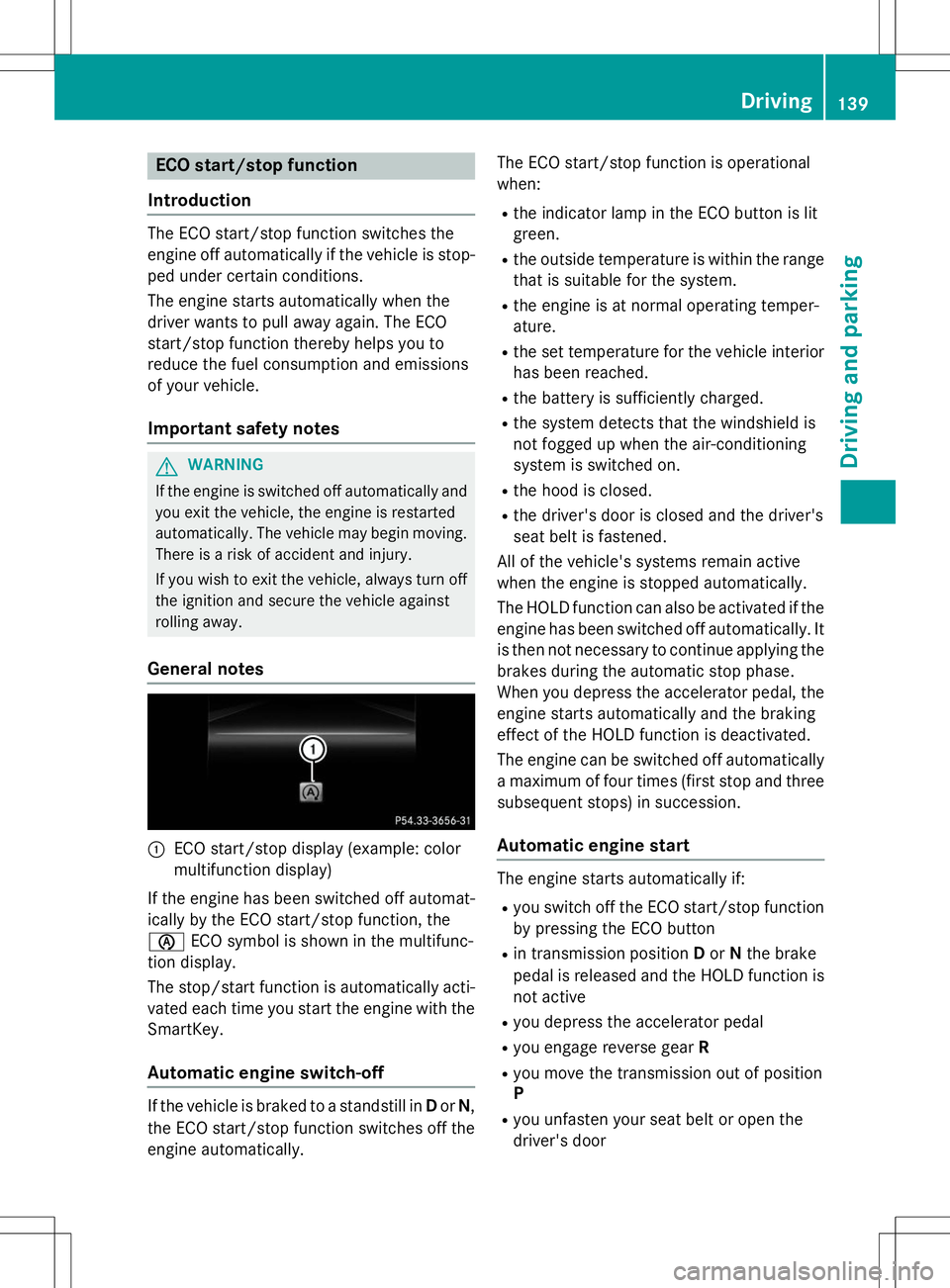
:ECO start/stop display (example: color
multifunction display)
If the engine has been switched off automat-
ically by the ECO start/stop function, theè ECO symbol is shown in the multifunc-
tion display.
The stop/start function is automatically acti-
vated each time you start the engine with the SmartKey.
Automatic engine switch-off
If the vehicle is braked to a standstill in Dor N,
the ECO start/stop function switches off the engine automatically. The ECO start/stop function is operational
when:
R the indicator lamp in the ECO button is lit
green.
R the outside temperature is within the range
that is suitable for the system.
R the engine is at normal operating temper-
ature.
R the set temperature for the vehicle interior
has been reached.
R the battery is sufficiently charged.
R the system detects that the windshield is
not fogged up when the air-conditioning
system is switched on.
R the hood is closed.
R the driver's door is closed and the driver's
seat belt is fastened.
All of the vehicle's systems remain active
when the engine is stopped automatically.
The HOLD function can also be activated if the engine has been switched off automatically. It is then not necessary to continue applying the brakes during the automatic stop phase.
When you depress the accelerator pedal, the
engine starts automatically and the braking
effect of the HOLD function is deactivated.
The engine can be switched off automatically
a maximum of four times (first stop and three subsequent stops) in succession.
Automatic engine start
The engine starts automatically if:
R you switch off the ECO start/stop function
by pressing the ECO button
R in transmission position Dor Nthe brake
pedal is released and the HOLD function is not active
R you depress the accelerator pedal
R you engage reverse gear R
R you move the transmission out of position P
R you unfasten your seat belt or open the
driver's door
Driving139
Driving and parking
Z
Page 148 of 346
ANeutral
Do not shift the transmission toN
while driving. Otherwise, the auto-
matic transmission could be dam-
aged.
No power is transmitted from the
engine to the drive wheels.
Releasing the brakes will allow you
to move the vehicle freely, e.g. to
push it or tow it.
If ESP ®
is deactivated or faulty:
shift the transmission to position N
if the vehicle is in danger of skid-
ding, e.g. on icy roads.
If you switch the engine off with the transmission in position Ror D, the
automatic transmission shifts to N
automatically.
!Rolling in neutral Ncan damage
the drive train.
7Drive
The automatic transmission
changes gear automatically. All
forward gears are available.
Driving tips
Changing gear
The automatic transmission shifts to the indi- vidual gears automatically when it is in trans-
mission position D. This automatic gear shift-
ing behavior is determined by:
R the selected drive program ( Ypage 147)
R the position of the accelerator pedal (Y page 146)
R the road speed
Accelerator pedal position
Your style of driving influences how the auto-
matic transmission shifts gear:
R little throttle: early upshifts
R more throttle: late upshifts
Holding the vehicle stationary on uphill
gradients
GWARNING
If the clutch overheats, the electronic man-
agement system is automatically deactivated. This interrupts the power transmission. The
vehicle may, for example, roll backwards on
gradients. There is a risk of an accident.
Never hold the vehicle stationary on uphill
gradients by depressing the accelerator.
The clutch may overheat if you hold the vehi- cle stationary on uphill gradients by depress- ing the accelerator pedal. If the clutch over-
heats, a warning tone sounds.
The
Stop Vehicle Shift to P Leave
EngineRunningdisplay message appears in
the multifunction display. You will only be
able to continue your journey once the clutch
has cooled down and the display message in
the multifunction display has disappeared.
Never hold the vehicle stationary on uphill
gradients by depressing the accelerator.
Instead, only ever hold the vehicle stationary
on uphill gradients by:
R depressing the brake pedal
R activating the HOLD function
R engaging the electric parking brake
Kickdown
Use kickdown for maximum acceleration.
X Depress the accelerator pedal beyond the
pressure point.
The automatic transmission shifts to a
lower gear depending on the engine speed.
X Ease off the accelerator pedal once the
desired speed is reached.
The automatic transmission shifts back up.
For further information on kickdown in man-
ual drive program M(Y page 148).
146Automatic transmission
Driving an d parking