2015 LINCOLN MKZ easy entry
[x] Cancel search: easy entryPage 82 of 516

The steering column sets a stopping position
just short of the end of the column position
to prevent damage to the steering column.
A new stopping position sets if the steering
column encounters an object when tilting or
telescoping.
To reset the steering column to its normal
stopping position:
1. Press the steering column control again
after encountering the new stopping
position.
2. Continue pressing the control until it reaches the end of the column position.
A new stopping position is set. The next time
you tilt or telescope the steering column, it
will stop just short of the end of the column
position.
Memory Feature
You can save and recall the steering column
position with the memory function. See
Memory Function (page 142).
Note: Pressing the adjustment control during
memory recall cancels the operation. The
column responds to the adjustment control. Easy Entry and Exit Feature
When you switch the ignition off, the steering
column will move to the full up position to
allow extra room to exit your vehicle. The
column will return to the previous setting
when you switch the ignition on. You can
enable or disable this feature in the
information display.
See Information
Displays (page 107).
AUDIO CONTROL
(If Equipped)
You can operate the following functions with
the control: Volume up
A
Volume down
B
Seek up or next
C
Seek down or previous
D
MuteE
Seek, Next or Previous
Press the seek button to:
• tune the radio to the next or previous
stored preset
• play the next or the previous track.
79
MKZ (), enUSA Steering WheelE145979
Page 113 of 516
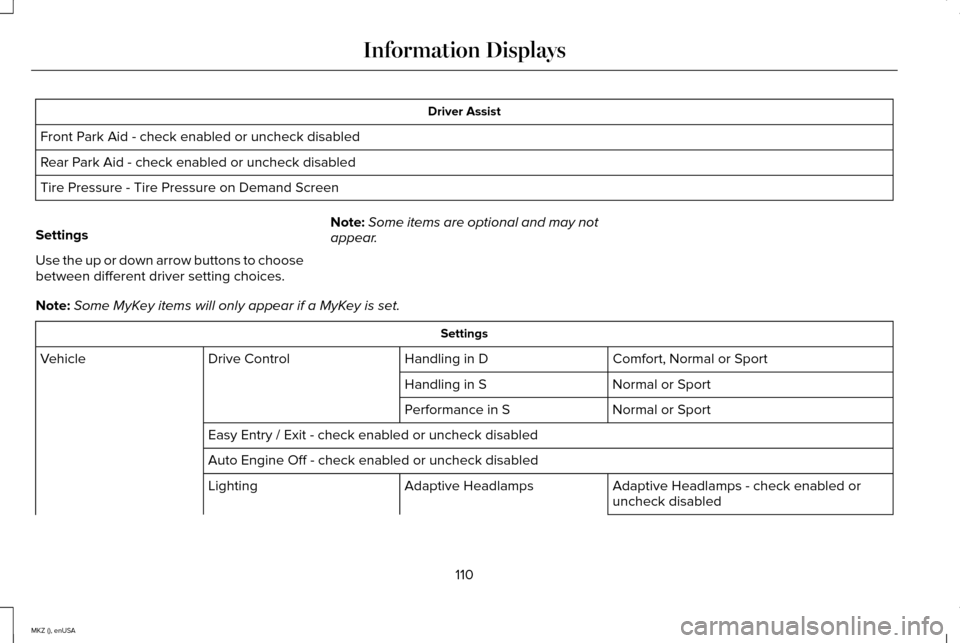
Driver Assist
Front Park Aid - check enabled or uncheck disabled
Rear Park Aid - check enabled or uncheck disabled
Tire Pressure - Tire Pressure on Demand Screen
Settings
Use the up or down arrow buttons to choose
between different driver setting choices. Note:
Some items are optional and may not
appear.
Note: Some MyKey items will only appear if a MyKey is set. Settings
Comfort, Normal or Sport
Handling in D
Drive Control
Vehicle
Normal or Sport
Handling in S
Normal or Sport
Performance in S
Easy Entry / Exit - check enabled or uncheck disabled
Auto Engine Off - check enabled or uncheck disabled Adaptive Headlamps - check enabled or
uncheck disabled
Adaptive Headlamps
Lighting
110
MKZ (), enUSA Information Displays
Page 146 of 516

Recalling a PreSet Position
Press and release the preset button
associated with your desired driving position.
The seat, mirrors and steering column will
move to the position stored for that preset.
Note:
A pre-set memory position can only
be recalled when the ignition is off, or when
the transmission is in park (P) or neutral (N)
if the ignition is on.
You can also recall a preset memory position
by:
• Pressing the unlock button on your
intelligent access key fob if it is linked to
a preset position.
• Unlocking the intelligent driver door
handle if a linked key fob is present.
• Entering a personal entry code on the
Securicode keypad. See Locks (page
65).
Note: Using a linked key fob to recall your
memory position when the ignition is off will
move the seat to the Easy Entry position.
Note: Pressing any seat or mirror adjustment
control (or any memory button) during a
memory recall cancels the operation. Seat recall movement will also stop if you
drive your vehicle.
Linking a PreSet Position to your
Remote Control or Intelligent Access
Key Fob
Your vehicle can save the preset memory
positions for up to three remote controls or
intelligent access (IA) keys.
1. With the ignition on, move the memory
positions to the desired positions.
2. Press and hold the desired preset button
for about five seconds. A tone will sound
after about two seconds. Continue
holding until a second tone is heard.
3. Within three seconds, press the lock button on the remote control you are
linking.
To unlink a remote control, follow the same
procedure – except in step 3, press the
unlock button on the remote control.
Note: If more than one linked remote control
or IA key is in range, the memory function
will move to the settings of the first key
stored. Easy Entry and Exit Feature
If you enable the easy entry and exit feature,
it automatically moves the driver seat
position rearward up to two inches (five
centimeters) when you switch the ignition
off.
The driver seat will return to the previous
position when you switch the ignition on.
You can enable or disable this feature in the
information display.
See Information
Displays (page 107).
REAR SEATS
Note: Your vehicle may have split seatbacks
that you must fold individually.
Note: Make sure the center safety belt is
unbuckled before folding the seatback.
To lower the seat back(s) from inside the
vehicle, do the following:
143
MKZ (), enUSA Seats
Page 510 of 516

Locking and Unlocking.................................65
Activating Intelligent Access ............................66
Autolock Feature...................................................67
Auto Relock............................................................67
Battery Saver.........................................................68
Illuminated Entry...................................................68
Illuminated Exit......................................................68
Luggage Compartment.......................................68
Power Decklid (If Equipped)..............................69
Power Door Locks................................................65
Remote Control.....................................................65
Smart Unlocks .......................................................67
Locks..................................................................65
Lug Nuts See: Changing a Road Wheel.........................343
M
Maintenance..................................................278 General Information...........................................278
Media Hub
......................................................373
Memory Function..........................................142
Easy Entry and Exit Feature..............................143
Linking a PreSet Position to your Remote
Control or Intelligent Access Key Fob.......143
Saving a PreSet Position...................................142
Message Center See: Information Displays.................................107 Mirrors
See: Heated Windows and Mirrors.................135
See: Windows and Mirrors.................................93
Mobile Communications Equipment...........13
Moonroof..........................................................98 Bounce-Back..........................................................99
Opening and Closing the Moonroof................98
Retractable Panoramic Roof..............................99
Venting the Moonroof.........................................99
Motorcraft Parts............................................354
MyKey Troubleshooting
................................63
MyKey™..............................................................59 Principle of Operation.........................................59
MyLincoln Touch ™
.........................................374
General Information...........................................374
N
Navigation......................................................444 cityseekr...............................................................446
Map Mode............................................................449
Navigation Map Updates.................................452
Navigation Voice Commands..........................452
Point of Interest (POI) Categories...................446
Quick-touch Buttons...........................................451
Setting a Destination.........................................445
Setting Your Navigation Preferences............447 Normal Scheduled Maintenance.............482
Intelligent Oil-Life Monitor®.............................
482
Maintenance Intervals.......................................484
O
Oil Check See: Engine Oil Check......................................284
Opening and Closing the Hood
...............279
Ordering Additional Owner's Literature.....................................................258
Obtaining a French Owner’ s Manual............258
Overhead Console
.......................................155
P
Parking Aid
......................................................192
Front Sensing System........................................193
Rear Sensing System.........................................193
Parking Aids
....................................................192
Passive Anti-Theft System............................75 SecuriLock..............................................................75
PATS See: Passive Anti-Theft System........................75
Perchlorate........................................................12
Personal Safety System ™
..............................42
How Does the Personal Safety System
Work?...................................................................42
507
MKZ (), enUSA Index