2015 LINCOLN MKZ wheel
[x] Cancel search: wheelPage 217 of 516
Intensity: This setting affects the intensity of
the steering wheel vibration used for the alert
and alert + aid modes. This setting does not
affect the aid mode.
• Low
• Medium
• High
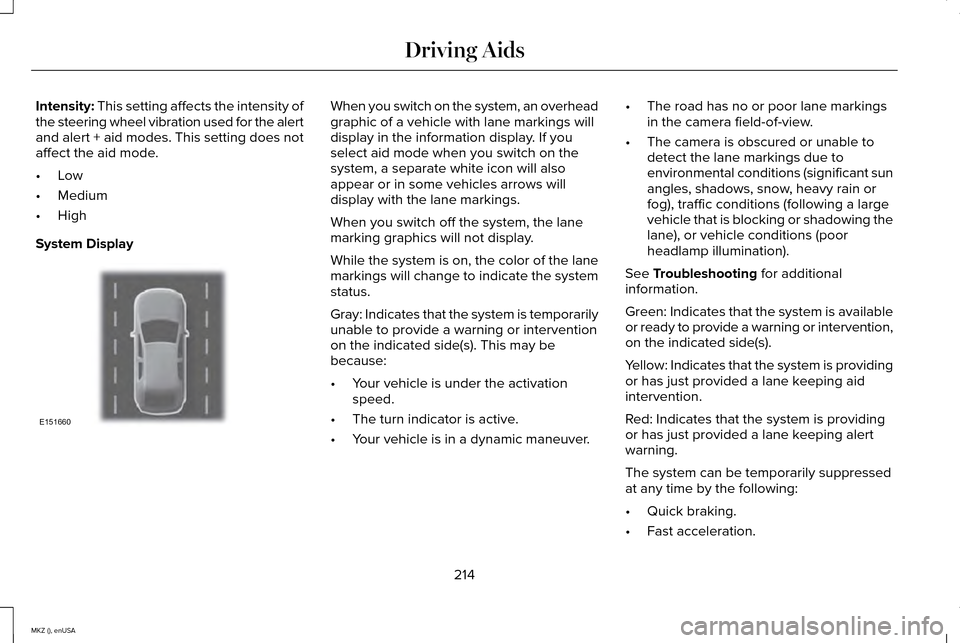
System Display When you switch on the system, an overhead
graphic of a vehicle with lane markings will
display in the information display. If you
select aid mode when you switch on the
system, a separate white icon will also
appear or in some vehicles arrows will
display with the lane markings.
When you switch off the system, the lane
marking graphics will not display.
While the system is on, the color of the lane
markings will change to indicate the system
status.
Gray: Indicates that the system is temporarily
unable to provide a warning or intervention
on the indicated side(s). This may be
because:
•
Your vehicle is under the activation
speed.
• The turn indicator is active.
• Your vehicle is in a dynamic maneuver. •
The road has no or poor lane markings
in the camera field-of-view.
• The camera is obscured or unable to
detect the lane markings due to
environmental conditions (significant sun
angles, shadows, snow, heavy rain or
fog), traffic conditions (following a large
vehicle that is blocking or shadowing the
lane), or vehicle conditions (poor
headlamp illumination).
See
Troubleshooting for additional
information.
Green: Indicates that the system is available
or ready to provide a warning or intervention,
on the indicated side(s).
Yellow: Indicates that the system is providing
or has just provided a lane keeping aid
intervention.
Red: Indicates that the system is providing
or has just provided a lane keeping alert
warning.
The system can be temporarily suppressed
at any time by the following:
• Quick braking.
• Fast acceleration.
214
MKZ (), enUSA Driving AidsE151660
Page 228 of 516

Action
Cause
Clean the grille surface in front of the radar or remove the objectcausing the obstruction
The surface of the radar in the grille is dirty or obstructed in some
way
Wait a short time. It may take several minutes for the radar to detectthat it is no longer obstructed
The surface of the radar in the grille is clean but the message remains
in the display
The collision warning system is temporarily disabled. Collision warningshould automatically reactivate a short time after the weather condi- tions improve
Heavy rain, spray, snow, or fog is interfering with the radar signals
The collision warning system is temporarily disabled. Collision warningshould automatically reactivate a short time after the weather condi- tions improve
Swirling water, or snow or ice on the surface of the road may interfere
with the radar signals
System Limitations WARNING
The collision warning system
’s brake
support can only help reduce the
speed at which a collision occurs if the driver
applies the vehicle ’s brakes. The brake pedal
must be pressed just like any typical braking
situation. Due to the nature of radar technology, there
may be certain instances where vehicles do
not provide a collision warning. These
include:
•
Stationary vehicles or vehicles moving
below 6 mph (10 km/h).
• Pedestrians or objects in the roadway.
• Oncoming vehicles in the same lane.
• Severe weather conditions (see blocked
sensor section). •
Debris build-up on the grille near the
headlamps (see blocked sensor section).
• Small distance to vehicle ahead.
• Steering wheel and pedal movements
are large (very active driving style).
•
225
MKZ (), enUSA Driving Aids
Page 237 of 516

GCW (Gross Combined Weight) - is the
Gross Vehicle Weight plus the weight of
the fully loaded trailer.
GCWR (Gross Combined Weight
Rating) - is the maximum allowable
weight of the vehicle and the loaded
trailer, including all cargo and
passengers, that the vehicle can handle
without risking damage. (Important: The
towing vehicle ’s braking system is rated
for operation at Gross Vehicle Weight
Rating, not at Gross Combined Weight
Rating.) Separate functional brakes
should be used for safe control of towed
vehicles and for trailers where the Gross Combined Weight of the towing vehicle
plus the trailer exceed the Gross Vehicle
Weight Rating of the towing vehicle. The
Gross Combined Weight must never
exceed the Gross Combined Weight
Rating.
Maximum Loaded Trailer Weight -
is
the highest possible weight of a fully
loaded trailer the vehicle can tow. It
assumes a vehicle with mandatory
options, driver and front passenger
weight (150 pounds [68 kilograms] each),
no cargo weight (internal or external)
and a tongue load of 10–15% (conventional trailer) or king pin weight
of 15–25% (fifth wheel trailer). Consult
an authorized dealer (or the RV and
Trailer Towing Guide available at an
authorized dealer) for more detailed
information.
Tongue Load or Fifth Wheel King Pin
Weight - refers to the amount of the
weight that a trailer pushes down on a
trailer hitch.
Examples:
For a 5000 pound (2268
kilogram) conventional trailer, multiply
5000 by 0.10 and 0.15 to obtain a proper
tongue load range of 500 to 750 pounds
(227 to 340 kilograms). For an 11500
pound (5216 kilogram) fifth wheel trailer,
multiply by 0.15 and 0.25 to obtain a
proper king pin load range of 1725 to
2875 pounds (782 to 1304 kilograms).
234
MKZ (), enUSA Load CarryingE143819GCW
GVW
Page 243 of 516

Before Towing a Trailer
Practice turning, stopping and backing up to
get the feel of your vehicle-trailer
combination before starting on a trip. When
turning, make wider turns so the trailer
wheels clear curbs and other obstacles.
When Towing a Trailer
•
Do not drive faster than 70 mph (113
km/h) during the first 500 miles (800
kilometers).
• Do not make full-throttle starts.
• Check your hitch, electrical connections
and trailer wheel lug nuts thoroughly after
you have traveled 50 miles (80
kilometers).
• When stopped in congested or heavy
traffic during hot weather, place the
gearshift in position P to aid engine and
transmission cooling and to help A/C
performance.
• Turn off the speed control with heavy
loads or in hilly terrain. The speed control
may turn off automatically when you are
towing on long, steep grades. •
Shift to a lower gear when driving down
a long or steep hill. Do not apply the
brakes continuously, as they may
overheat and become less effective.
• If your transmission is equipped with a
Grade Assist or Tow/Haul feature, use
this feature when towing. This provides
engine braking and helps eliminate
excessive transmission shifting for
optimum fuel economy and transmission
cooling.
• Allow more distance for stopping with a
trailer attached. Anticipate stops and
brake gradually.
• Avoid parking on a grade. However, if
you must park on a grade:
1. Turn the steering wheel to point your vehicle tires away from traffic flow.
2. Set your vehicle parking brake.
3. Place the automatic transmission in position
P.
4. Place wheel chocks in front and back of the trailer wheels. (Chocks not included
with vehicle.) Launching or Retrieving a Boat or
Personal Watercraft (PWC)
Note:
Disconnect the wiring to the trailer
before
backing the trailer into the water.
Note: Reconnect the wiring to the trailer
after
removing the trailer from the water.
When backing down a ramp during boat
launching or retrieval:
• Do not allow the static water level to rise
above the bottom edge of the rear
bumper.
• Do not allow waves to break higher than
6 inches (15 centimeters) above the
bottom edge of the rear bumper.
Exceeding these limits may allow water to
enter vehicle components:
• Causing internal damage to the
components.
• Affecting driveability, emissions, and
reliability.
240
MKZ (), enUSA Towing
Page 244 of 516

Any time the rear axle submerges in water,
replace the rear axle lubricant. Water may
contaminate the rear axle lubricant, which is
not a normal maintenance inspection item
unless there is a possibility of a leak or other
axle repair is required.
TRANSPORTING THE VEHICLE If you need to have your vehicle towed,
contact a professional towing service or, if
you are a member of a roadside assistance
program, your roadside assistance service
provider.
We recommend the use of a wheel lift and
dollies or flatbed equipment to tow your
vehicle. Do not tow with a slingbelt. Ford
Motor Company has not approved a slingbelt
towing procedure. Vehicle damage may
occur if towed incorrectly, or by any other
means.
Ford Motor Company produces a towing
manual for all authorized tow truck operators.
Have your tow truck operator refer to this
manual for proper hook-up and towing
procedures for your vehicle.
It is acceptable to have your front-wheel
drive vehicle towed from the front if using
proper wheel lift equipment to raise the front
wheels off the ground. When towing in this
manner, the rear wheels can remain on the
ground.
241
MKZ (), enUSA TowingE143886
Page 245 of 516

Front-wheel drive vehicles must have the
front wheels placed on a tow dolly when
towing your vehicle from the rear using
wheel lift equipment. This prevents damage
to the transmission.
Towing an all-wheel drive vehicle requires
that all wheels be off the ground, such as
using a wheel lift and dollies or flatbed
equipment. This prevents damage to the
transmission, all-wheel drive system and
vehicle.
TOWING THE VEHICLE ON FOUR
WHEELS
Emergency Towing
You can flat-tow (all wheels on the ground,
regardless of the powertrain/transmission
configuration) your disabled vehicle (without
access to wheel dollies, car-hauling trailer,
or flatbed transport vehicle) under the
following conditions:
•
Your vehicle is facing forward so you tow
it in a forward direction.
• You place the transmission in position N.
If you cannot place the transmission in
position
N, you may need to override it.
See Transmission (page 171).
• Maximum speed is 35 mph (56 km/h).
• Maximum distance is 50 miles (80
kilometers).
Recreational Towing
Note: Put your climate control system in
recirculated air mode to prevent exhaust
fumes from entering the vehicle.
See
Climate Control (page 132). Follow these guidelines if you have a need
for recreational (RV) towing. An example of
recreational towing would be towing your
vehicle behind a motorhome. These
guidelines are to make sure you do not
damage the transmission during towing.
Vehicles Equipped with a 2.0L Engine
Front-wheel drive (FWD) vehicles
CANNOT
be flat-towed (all wheels on the ground) as
vehicle or transmission damage may occur.
You must place the front wheels on a
two-wheel tow dolly. If you are using a tow
dolly, follow the instructions specified by the
equipment provider.
All-wheel drive (AWD) vehicles CANNOT be
flat-towed (all wheels on the ground), as
vehicle or transmission damage may occur.
It is recommended to tow your vehicle with
all four (4) wheels off the ground such as
when using a car-hauling trailer. Otherwise,
you cannot tow your vehicle.
242
MKZ (), enUSA Towing
Page 246 of 516

Vehicles Equipped with a 3.7L Engine
You can tow your vehicle with all four wheels
on the ground using the Neutral Tow feature,
or with all four wheels off the ground using
a vehicle transport trailer. If you are using a
vehicle transport trailer, follow the instruction
specified by the equipment provider.
If you tow your vehicle with all four wheels
on the ground:
•
Tow only in the forward direction.
• Release the parking brake.
Neutral Tow
Enter Neutral Tow mode by doing the
following:
1. Put the ignition in accessory mode by pressing the engine START button
without pressing the brake pedal.
2. Select Neutral Tow under the Vehicle
Settings menu in the information display.
See
(page 107).
3. Press and hold the OK button to start the
neutral tow process. 4. Press the brake pedal and select
N on
the push-button transmission.
5. Turn the ignition off by pressing the engine START button without pressing
the brake pedal.
If the process is completes successfully:
• the
N on the push-button transmission
blinks slowly
• Neutral Tow Engaged turn ignition off
for towing
appears in the information
display.
Note: If the parking brake is applied, Neutral
Tow remove park brake for towing appears
in the information display.
Note: Do not exceed 65 mph (105 km/h).
Note: Start the engine and allow it to run for
five minutes at the beginning of each day
and every six hours (or fewer). Shut the
engine off and verify that
Neutral tow
engaged appears in the display before
continuing to tow.
Exit Neutral Tow mode, make sure the
ignition is on (engine can be on or off ), press
the brake pedal and select
P on the
push-button transmission. If the process is completed successfully,
Neutral Tow disengaged
appears in the
information display and both the instrument
cluster and push-button transmission display
P
.
243
MKZ (), enUSA Towing
Page 247 of 516

BREAKING-IN
You need to break in new tires for
approximately 300 miles (480 kilometers).
During this time, your vehicle may exhibit
some unusual driving characteristics.
Avoid driving too fast during the first 1000
miles (1600 kilometers). Vary your speed
frequently and change up through the gears
early. Do not labor the engine.
Do not tow during the first 1000 miles (1600
kilometers).
ECONOMICAL DRIVING
Fuel economy is affected by several things
such as how you drive, the conditions you
drive under and how you maintain your
vehicle.
There are some things to keep in mind that
may improve your fuel economy:
•
Accelerate and slow down in a smooth,
moderate fashion.
• Drive at steady speeds. •
Anticipate stops; slowing down may
eliminate the need to stop.
• Combine errands and minimize
stop-and-go driving.
•When running errands, go to the
furthest destination first and then
work your way back home.
• Close the windows for high-speed
driving.
• Drive at reasonable speeds. (Traveling
at 65 mph/105 kph uses about 15% less
fuel than traveling at 75 mph/121 kph).
• Keep the tires properly inflated and use
only the recommended size.
• Use the recommended engine oil.
• Perform all regularly scheduled
maintenance.
There are also some things you may want to
avoid doing because they reduce your fuel
economy:
• Avoid sudden or hard accelerations.
• Avoid revving the engine before turning
off the car.
• Avoid long idle periods. •
Do not warm up your vehicle on cold
mornings.
• Reduce the use of air conditioning and
heat.
• Avoid using speed control in hilly terrain.
• Do not rest your foot on the brake pedal
while driving.
• Avoid carrying unnecessary weight
(approximately 1 mpg [0.4 kilometers/liter]
is lost for every 400 lbs [180 kilograms]
of weight carried).
• Avoid adding particular accessories to
your vehicle (e.g. bug deflectors,
rollbars/light bars, running boards, ski
racks).
• Avoid driving with the wheels out of
alignment.
DRIVING THROUGH WATER WARNING
Do not drive through flowing or deep
water as you may lose control of your
vehicle. 244
MKZ (), enUSA Driving Hints