Page 121 of 500

Settings
Vehicle
Drive ControlHandling in D Sport / Normal / Comfort
Handling in S Sport / Normal
Auto Engine Off — check enabled / uncheck disabled
DTE Calculation Normal / Towing
Easy Entry/Exit — check enabled / uncheck disabled
Lighting Adaptive Head
LampsTraffic Set Up Right Hand / Left
Hand Traffic
Auto Highbeam — check enabled (default) / uncheck
disabled
Autolamp Delay Off or number of seconds
Locks Autolock — check enabled (default) / uncheck disabled
Autounlock — check enabled (default) / uncheck
disabled
Remote Unlocking All doors / Driver’s door
Oil Life Reset Remaining Life XXX %
Power Liftgate Enable / Disable
Remote Start Climate Control
(using this
feature allows you
to select different
climate control
modes when the
vehicle is started
using the remote
start feature)Auto / Last Settings
Seats and wheel
or Seats onlyAuto / Off
Duration 5 / 10 /15 minutes
System — check enabled (default) / uncheck disabled
Windows Remote Open / Close
WipersCourtesy Wipe — check enabled (default) / uncheck
disabled
Rain Sensing — check enabled (default) / uncheck
disabled
120Information Displays
2015 MKT(mkt)
Owners Guide gf, 1st Printing, October 2014
USA(fus)
Page 135 of 500
REAR PASSENGER CLIMATE CONTROL (IF EQUIPPED)
Depending on your vehicle equipment, you may not have all the features
shown below.
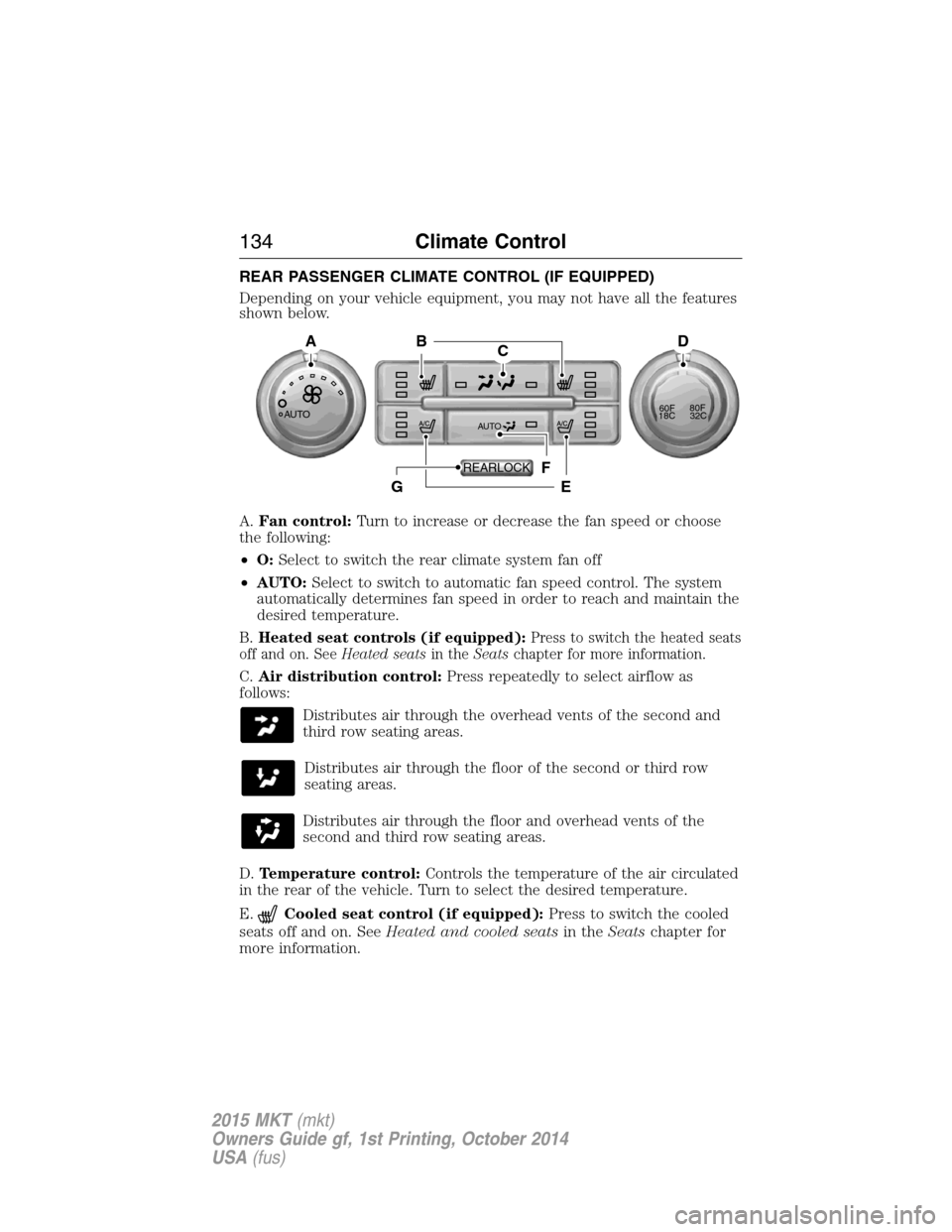
A.Fan control:Turn to increase or decrease the fan speed or choose
the following:
•O:Select to switch the rear climate system fan off
•AUTO:Select to switch to automatic fan speed control. The system
automatically determines fan speed in order to reach and maintain the
desired temperature.
B.Heated seat controls (if equipped):
Press to switch the heated seats
off and on. SeeHeated seatsin theSeatschapter for more information.
C.Air distribution control:Press repeatedly to select airflow as
follows:
Distributes air through the overhead vents of the second and
third row seating areas.
Distributes air through the floor of the second or third row
seating areas.
Distributes air through the floor and overhead vents of the
second and third row seating areas.
D.Temperature control:Controls the temperature of the air circulated
in the rear of the vehicle. Turn to select the desired temperature.
E.
Cooled seat control (if equipped):Press to switch the cooled
seats off and on. SeeHeated and cooled seatsin theSeatschapter for
more information.
AUTO
CB
F
EG
AD
AUTO60F80F
18C32C
REARLOCK
134Climate Control
2015 MKT(mkt)
Owners Guide gf, 1st Printing, October 2014
USA(fus)
Page 136 of 500

F.AUTO:Press to activate automatic control of the airflow direction in
the rear of the vehicle. The system automatically determines the airflow
distribution in order to reach and maintain the desired temperature.
G.REAR LOCK:Illuminates when the rear climate system is being
controlled by the front controls. The rear climate controls do not work
when this is illuminated.
GENERAL OPERATING TIPS
•To reduce fog build-up on the windshield during humid weather,
select defrost. Temperature and fan speed can also be increased to
improve clearing.
•To reduce humidity build-up inside the vehicle, do not drive with the
system off or with recirculated air engaged.
•Do not put objects under the front seats that will interfere with the
airflow to the back seats.
•Remove any snow, ice or leaves from the air intake area at the base
of the windshield.
•To improve the air conditioning cool down, drive with the windows
slightly open for 2-3 minutes after start-up or until the vehicle has
been aired out.
•A small amount of air may be felt from the floor vent regardless of
the air distribution setting that is selected.
During extreme high ambient temperatures when idling stationary for
extended periods of time in gear, it is recommended to run the air
conditioning in the MAX A/C mode, adjust the blower fan speed to the
lowest setting and put the vehicle’s transmission into positionPto
continue to receive cool air from your air conditioning system.
For maximum cooling performance in AUTO, pressMAX A/C.
For maximum cooling performance in manual override control (using the
MyLincoln Touch climate controls):
1. Choose panel, A/C, and recirculation controls.
2. Set the temperature to LO.
3. Set the fan to the highest blower setting.
To aid in side window defogging and demisting in cold or humid weather:
1. Select defrost or floor/defrost (on the MyLincoln Touch climate
controls). To maximize performance select defrost.
2. SelectA/C.
3. Adjust the temperature control to maintain comfort.
4. Set the fan speed to the highest setting.
Climate Control135
2015 MKT(mkt)
Owners Guide gf, 1st Printing, October 2014
USA(fus)
Page 138 of 500

For more information regarding the interval at which you should replace
the cabin air filter, see theScheduled Maintenancechapter.
For additional cabin air filter information, or to replace the filter, see an
authorized dealer.
REMOTE START (IF EQUIPPED)
The remote start feature allows you to pre-condition the interior of your
vehicle. The climate control system works to achieve comfort according
to your previous settings.
Note:You cannot adjust the system during remote start operation.
Turn the ignition on to return the system to its previous settings. You
can now make adjustments normally, but you need to turn certain
vehicle-dependent features back on, such as:
•Heated seats.
•Cooled seats.
•Heated steering wheel.
•Heated mirrors.
•Heated rear window.
You can adjust the default remote start settings using the information
display controls. See theInformation Displayschapter.
Automatic Settings
In hot weather, the system is set to 72°F (22°C). The cooled seats are
set to high (if available, and selected to AUTO in the information
display).
In moderate weather, the system either heats or cools (based on
previous settings). The rear defroster, heated mirrors and heated seats
do not automatically turn on.
In cold weather, the system is set to 72°F (22°C). The heated seats are
set to high (if available, and selected to AUTO in the information
display). The rear defroster and heated mirrors automatically turn on.
Climate Control137
2015 MKT(mkt)
Owners Guide gf, 1st Printing, October 2014
USA(fus)
Page 139 of 500
SITTING IN THE CORRECT POSITION
WARNING:Sitting improperly out of position or with the seat
back reclined too far can take off weight from the seat cushion
and affect the decision of the passenger sensing system, resulting in
serious injury or death in a crash. Always sit upright against your seat
back, with your feet on the floor.
WARNING:Do not recline the seat back as this can cause the
occupant to slide under the seat’s safety belt, resulting in severe
personal injury in the event of a crash.
WARNING:Do not place objects higher than the seat backs to
reduce the risk of injury in a crash or during heavy braking or
when stopping suddenly.
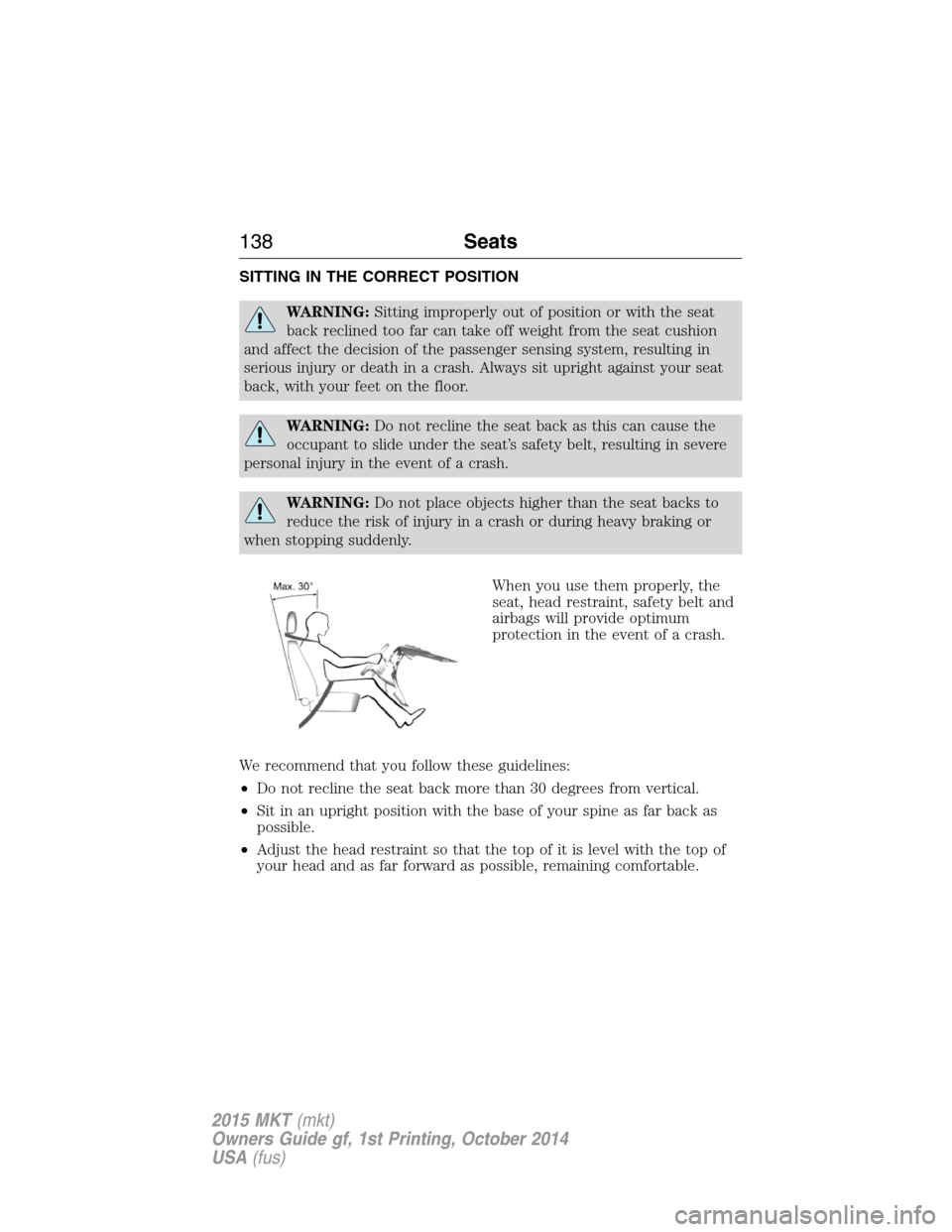
When you use them properly, the
seat, head restraint, safety belt and
airbags will provide optimum
protection in the event of a crash.
We recommend that you follow these guidelines:
•Do not recline the seat back more than 30 degrees from vertical.
•Sit in an upright position with the base of your spine as far back as
possible.
•Adjust the head restraint so that the top of it is level with the top of
your head and as far forward as possible, remaining comfortable.
138Seats
2015 MKT(mkt)
Owners Guide gf, 1st Printing, October 2014
USA(fus)
Page 140 of 500
•Keep sufficient distance between yourself and the steering wheel. We
recommend a minimum of 10 inches (25 centimeters) between your
breastbone and the airbag cover.
•Hold the steering wheel with your arms slightly bent.
•Bend your legs slightly so that you can press the pedals fully.
•Position the shoulder strap of the safety belt over the center of your
shoulder and position the lap strap tightly across your hips.
Make sure that your driving position is comfortable and that you can
maintain full control of your vehicle.
HEAD RESTRAINTS
WARNING:To minimize the risk of neck injury in the event of a
crash, the driver and passenger occupants should not sit in or
operate the vehicle, until the head restraint is placed in its proper
position. The driver should never adjust the head restraint while the
vehicle is in motion.
WARNING:The adjustable head restraint is a safety device.
Whenever possible it should be installed and properly adjusted
when the seat is occupied. An improperly adjusted head restraint may
provide reduced protection to an occupant during certain rear impacts.
WARNING:Install the head restraint properly to minimize the
risk of neck injury in the event of a crash.
Seats139
2015 MKT(mkt)
Owners Guide gf, 1st Printing, October 2014
USA(fus)
Page 141 of 500
Note:Before adjusting any head restraint, adjust the seatback to an
upright driving or riding position. Properly adjust the head restraint so
that the top of the head restraint is even with the top of your head and
positioned as close as possible to the back of your head. For occupants
of extremely tall stature, adjust the head restraint to its full up position.
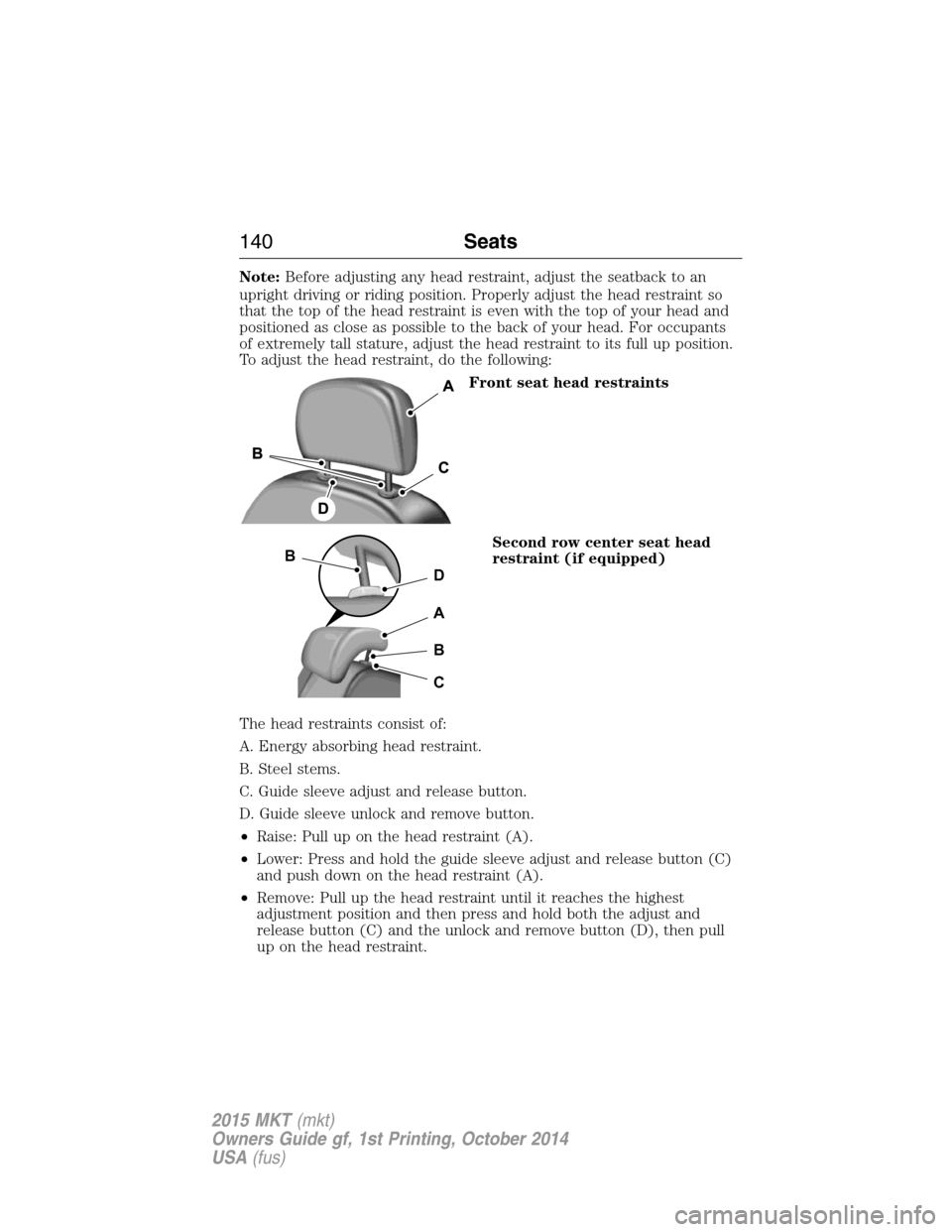
To adjust the head restraint, do the following:
Front seat head restraints
Second row center seat head
restraint (if equipped)
The head restraints consist of:
A. Energy absorbing head restraint.
B. Steel stems.
C. Guide sleeve adjust and release button.
D. Guide sleeve unlock and remove button.
•Raise: Pull up on the head restraint (A).
•Lower: Press and hold the guide sleeve adjust and release button (C)
and push down on the head restraint (A).
•Remove: Pull up the head restraint until it reaches the highest
adjustment position and then press and hold both the adjust and
release button (C) and the unlock and remove button (D), then pull
up on the head restraint.
D
B
A
B
C
140Seats
2015 MKT(mkt)
Owners Guide gf, 1st Printing, October 2014
USA(fus)
Page 142 of 500

•Reinstall: Align the steel stems into the guide sleeves and push the
head restraint down until it locks.
Second row outboard seat head
restraints
The outboard head restraints are
non-adjustable, but they can be
removed.
The non-adjustable head restraints
consists of:
A. Energy absorbing head restraint.
B. Steel stems.
C. Guide sleeve unlock and remove buttons.
To reinstall the non-adjustable head restraint, do the following:
•Remove: Pull up the head restraint until it reaches the highest
adjustment position. Then press and hold the guide sleeve unlock and
remove buttons, and pull up on the head restraint.
•Reinstall: Align the steel stems into the guide sleeves and push the
head restraint down until it locks.
Third row head restraints (if
equipped)
The head restraints consist of:
A. Energy absorbing head restraint.
B. Steel stems.
C. Fold strap.
Fold: Pull the fold strap (C). Pull the head restraint back up to reset.
Note:Press the stow or fold button on the power folding seats to
automatically fold the head restraint.
AB
C
Seats141
2015 MKT(mkt)
Owners Guide gf, 1st Printing, October 2014
USA(fus)