2015 LINCOLN MKT climate settings
[x] Cancel search: climate settingsPage 382 of 500
Using the Touch-sensitive Controls on Your System
To turn a feature on and off, just touch the graphic with your finger. To
get the best performance from the touch-sensitive controls, keep in
mind:
•Do not press hard on the controls. They are sensitive to light touch.
•Use your bare finger to touch the center of a touch-control graphic.
Touching off-center of the graphic may affect operation of a nearby
control.
•Make sure your hands are clean and dry.
•Keep metal and other conductive material away from the surface of
the touchscreen as this may cause electronic interference (for
example, inadvertently turning on a feature other than the one you
meant to turn on).
Depending on your vehicle and option package, you may also have these
controls on your bezel:
•Power:Switch the media or climate features off and on.
•VOLand fan slider bars: Slide your finger over the rear slider area to
control the volume of playing media or the climate system fan.
•Climate:Control the temperature and settings of the climate control
system.
•SeekandTune:Use as you normally would in media modes.
•Eject: Eject a CD from the entertainment system.
•SOURCE:Touch the word repeatedly to see all available media
modes.
•SOUND:Touch the word to access the Sound menu where you can
adjust settings such as: Bass, Treble, Midrange, Balance and Fade,
THX Deep note Demo, DSP (Digital Signal Processing), Occupancy
Mode and Speed Compensated Volume. (Your vehicle may not have
all of these sound options.)
•Hazard flasher: Switch the hazard flashers off and on.
Cleaning the Touchscreen Display
Use a clean, soft cloth such as one used for cleaning glasses. If dirt or
fingerprints are still visible, apply a small amount of alcohol to the cloth.
Do not pour or spray alcohol onto the display. Do not use detergent or
any type of solvent to clean the display.
MyLincoln Touch™381
2015 MKT(mkt)
Owners Guide gf, 1st Printing, October 2014
USA(fus)
Page 389 of 500

•If you use the steering wheel control, press the voice icon. After the
tone, speak your command clearly.
Voice command list
“Audio list of commands”
“Bluetooth audio list of commands”
“Browse list of commands”
“CD list of commands”
“Climate control list of commands”
“List of commands”
“Navigation list of commands”
*
“Phone list of commands”
“Radio list of commands”
“SD card list of commands”
“Sirius satellite list of commands”
**
“Travel link list of commands”*
“USB list of commands”
“Voice instructions list of commands”
“Voice settings list of commands”
“Help”
*This command is only available when your vehicle is equipped with the
navigation system, and the navigation system SD card is in the card slot.
**This command is only available when you have an active Sirius satellite
radio subscription.
Voice Settings
Voice settings allow you to customize the level of system interaction,
help and feedback. The system defaults to standard interaction that uses
candidate lists and confirmation prompts as these provide the highest
level of guidance and feedback.
Interaction Mode:Novice mode provides detailed interaction and
guidance while the advanced mode has less audible interaction and more
tone prompts.
Confirmation Prompts:The system uses these short questions to
confirm your voice request. If turned off, the system simply makes a best
guess as to what you requested. The system may still occasionally ask
you to confirm settings.
388MyLincoln Touch™
2015 MKT(mkt)
Owners Guide gf, 1st Printing, October 2014
USA(fus)
Page 435 of 500

Camera Settings
This menu allows you to access settings for your rear view camera.
Press the Settings icon >Vehicle>Camera Settings,then select from
the following settings:
•Enhanced Park Aids
•Rear Camera Delay
Enable Valet Mode
Valet mode allows you to lock the system. No information is accessible
until the system is unlocked with the correct PIN.
1. Press the Settings icon >Vehicle>Enable Valet Mode.
2. Enter a four-digit pin twice, as prompted.
After you press Continue, the system locks until you enter the PIN again.
Note:If the system locks, and you need to reset the PIN, enter 3681 and
the system unlocks.
Settings
Access and adjust system settings, voice features, as well as phone,
navigation and wireless settings.
System
Press the Settings icon >Settings>System,then select from
the following:
System
LanguageSelect to have the touchscreen display in
English, Spanish or French.
DistanceSelect to display units in kilometers or miles.
TemperatureSelect to display units in Celsius or
Fahrenheit.
System Prompt
VolumeAdjust the volume of voice prompts from the
system.
Touch Screen Button
BeepSelect to have the system beep to confirm
choices made through the touchscreen.
Touch Panel Button
BeepSelect to have the system beep to confirm
button choices made through the climate or
audio system.
434MyLincoln Touch™
2015 MKT(mkt)
Owners Guide gf, 1st Printing, October 2014
USA(fus)
Page 444 of 500
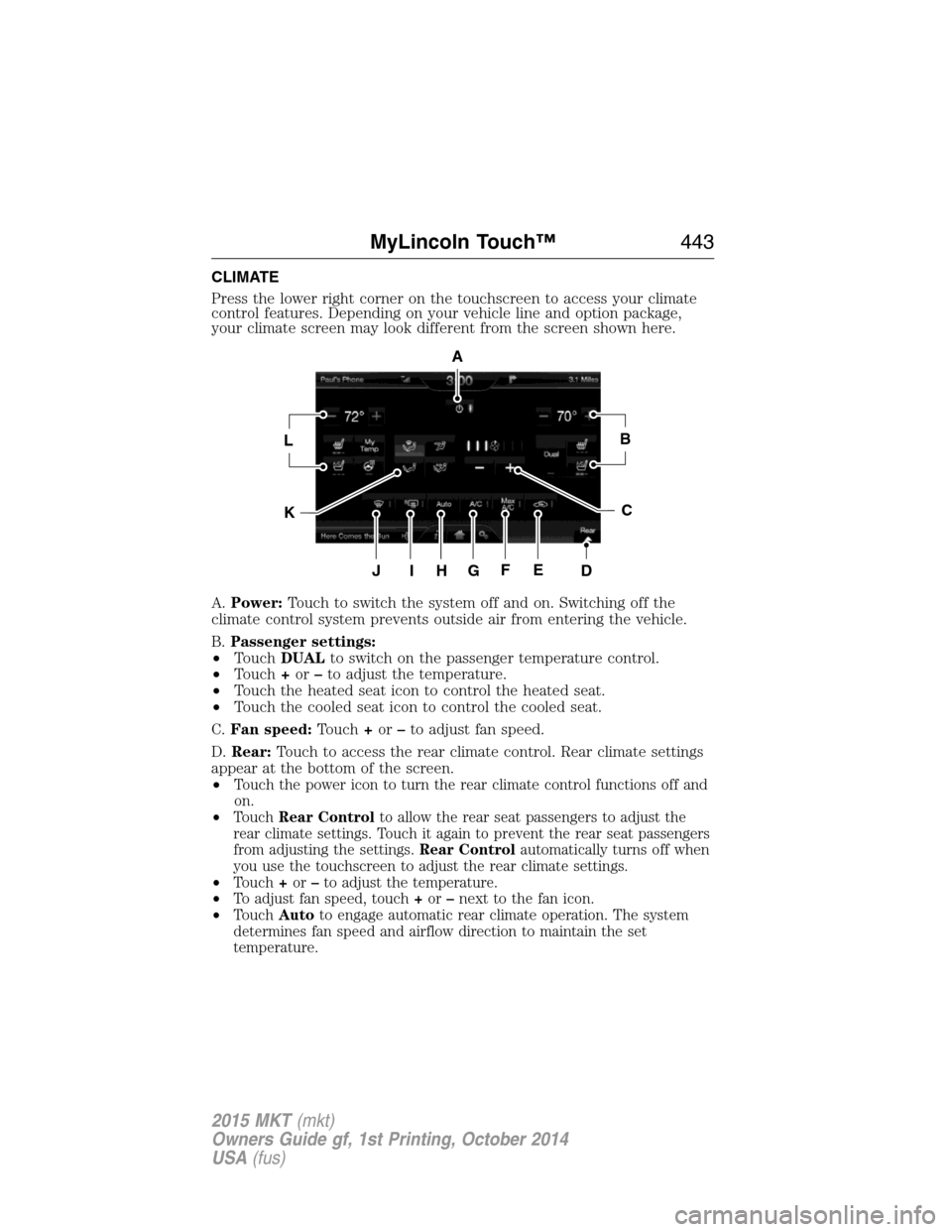
CLIMATE
Press the lower right corner on the touchscreen to access your climate
control features. Depending on your vehicle line and option package,
your climate screen may look different from the screen shown here.
A.Power:Touch to switch the system off and on. Switching off the
climate control system prevents outside air from entering the vehicle.
B.Passenger settings:
•TouchDUALto switch on the passenger temperature control.
•Touch+or–to adjust the temperature.
•Touch the heated seat icon to control the heated seat.
•Touch the cooled seat icon to control the cooled seat.
C.Fan speed:Touch+or–to adjust fan speed.
D.Rear:Touch to access the rear climate control. Rear climate settings
appear at the bottom of the screen.
•
Touch the power icon to turn the rear climate control functions off and
on.
•TouchRear Controlto allow the rear seat passengers to adjust the
rear climate settings. Touch it again to prevent the rear seat passengers
from adjusting the settings.Rear Controlautomatically turns off when
you use the touchscreen to adjust the rear climate settings.
•Touch+or–to adjust the temperature.
•To adjust fan speed, touch+or–next to the fan icon.
•TouchAutoto engage automatic rear climate operation. The system
determines fan speed and airflow direction to maintain the set
temperature.
A
LB
KC
JIHGFED
MyLincoln Touch™443
2015 MKT(mkt)
Owners Guide gf, 1st Printing, October 2014
USA(fus)
Page 445 of 500
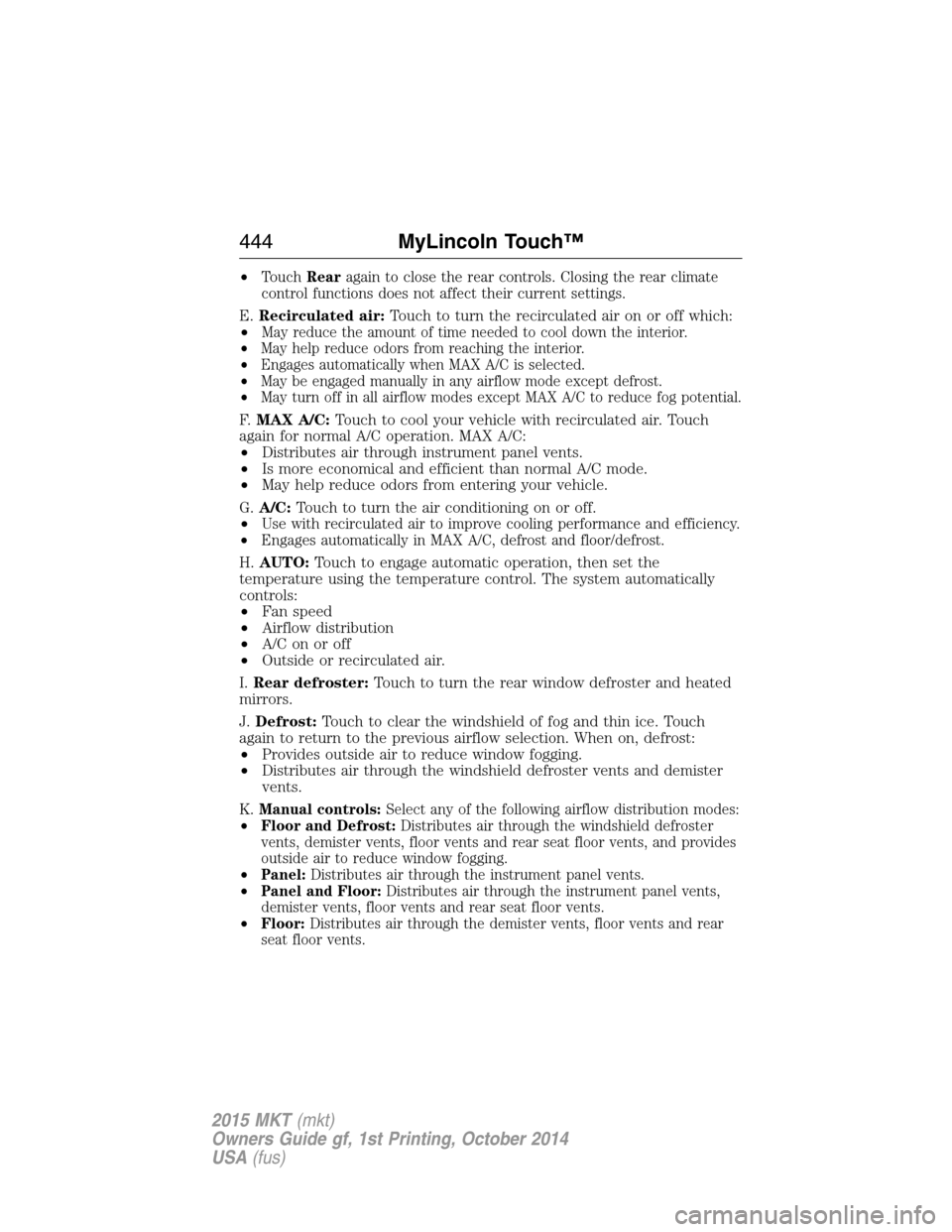
•TouchRearagain to close the rear controls. Closing the rear climate
control functions does not affect their current settings.
E.Recirculated air:Touch to turn the recirculated air on or off which:
•
May reduce the amount of time needed to cool down the interior.
•May help reduce odors from reaching the interior.
•Engages automatically when MAX A/C is selected.
•May be engaged manually in any airflow mode except defrost.
•May turn off in all airflow modes except MAX A/C to reduce fog potential.
F.MAX A/C:Touch to cool your vehicle with recirculated air. Touch
again for normal A/C operation. MAX A/C:
•Distributes air through instrument panel vents.
•Is more economical and efficient than normal A/C mode.
•May help reduce odors from entering your vehicle.
G.A/C:Touch to turn the air conditioning on or off.
•
Use with recirculated air to improve cooling performance and efficiency.
•Engages automatically in MAX A/C, defrost and floor/defrost.
H.AUTO:Touch to engage automatic operation, then set the
temperature using the temperature control. The system automatically
controls:
•Fan speed
•Airflow distribution
•A/Conoroff
•Outside or recirculated air.
I.Rear defroster:Touch to turn the rear window defroster and heated
mirrors.
J.Defrost:Touch to clear the windshield of fog and thin ice. Touch
again to return to the previous airflow selection. When on, defrost:
•Provides outside air to reduce window fogging.
•Distributes air through the windshield defroster vents and demister
vents.
K.
Manual controls:Select any of the following airflow distribution modes:
•Floor and Defrost:Distributes air through the windshield defroster
vents, demister vents, floor vents and rear seat floor vents, and provides
outside air to reduce window fogging.
•Panel:Distributes air through the instrument panel vents.
•Panel and Floor:Distributes air through the instrument panel vents,
demister vents, floor vents and rear seat floor vents.
•Floor:Distributes air through the demister vents, floor vents and rear
seat floor vents.
444MyLincoln Touch™
2015 MKT(mkt)
Owners Guide gf, 1st Printing, October 2014
USA(fus)
Page 446 of 500

L.Driver settings:Depending on your vehicle and option package, you
may have the following features:
•Touch+or–to adjust the temperature.
•If your vehicle is equipped with heated seats, touch the heated seat
icon to control the heated seat. See theSeatschapter.
•If your vehicle is equipped with cooled seats, touch the cooled seat
icon to control the cooled seat. See theSeatschapter.
•Touch and holdMyTempto select a temperature you would like your
vehicle to remember and maintain for you.
•If your vehicle is equipped with a heated steering wheel, touch the
heated steering wheel icon to warm the steering wheel.
Note:If your vehicle is equipped with a wood-trimmed steering wheel, it
does not heat between the 10 o’clock and 2 o’clock positions.
Climate Control Voice Commands
The following voice commands are available at the main menu
level of a voice session. For example, press the voice button
and after the prompt, “Say a command”; say any of the
following commands:
Climate control voice commands
“Climate automatic”
“Climate my temperature”
“Climate off”
“Climate on”
“Climate temperature <15.5–29.5> degrees”
“Climate temperature <60–85> degrees”
“Help”
There are additional climate control commands but in order to access
them, you have to say “Climate” first, then when the system is ready to
listen, you may say any of the following commands:
Additional climate control voice commands
“Automatic” “Panel on”
“A/C off” “Rear defrost off”
“A/C on” “Rear defrost on”
“Defrost off” “Recirc off”
“Defrost on” “Recirc on”
“Dual off” “Temperature”
*
MyLincoln Touch™445
2015 MKT(mkt)
Owners Guide gf, 1st Printing, October 2014
USA(fus)
Page 495 of 500

Cargo net ...................................243
CD ..............................................375
CD player ..........................373, 403
CD voice commands .................404
Cell phone use ............................15
Changing a tire .........................350
Child safety restraints ..........24, 27
Child safety seats
automatic locking mode
(retractor) .................................41
LATCH .......................................24
Child safety seats -
booster seats ...............................32
Cleaning the touchscreen ........381
Cleaning your vehicle ...............317
engine compartment ..............319
instrument panel ....................321
interior .....................................321
plastic parts ............................318
washing ....................................317
waxing .....................................319
wheels ......................................323
wiper blades ............................320
Climate voice commands .........445
Clock ..................................375, 431
Collision Warning System .........236
Console ......................................168
overhead ..................................170
rear ..........................................168
Coolant ......................................296
checking and adding ..............296
refill capacities ........................361
specifications ..........................361
Cooler ........................................169
Cross Traffic Alert ....................231
Cruise control ...........................215Cupholder(s) .............................151
Customer Assistance ................265
Ford Extended Service
Plan ..........................................370
Getting roadside assistance ...265
Getting the service you
need .........................................271
Ordering additional owner’s
literature .................................277
Utilizing the
Mediation/Arbitration
Program ...................................275
D
Defrost .......................................132
rear window ............................136
Dipstick
automatic transmission
fluid ..................................301–302
engine oil .................................295
Display settings .........................432
Drivebelt ....................................360
Driver alert ................................225
Driving under special
conditions ..................191, 193, 196
sand .........................................194
snow and ice ...........................197
through water .................195, 263
Dual automatic temperature
control (DATC) .........................132
E
Electronic message center .......116
Electronic stability control ......203
Emergencies, roadside
jump-starting ..........................268
running out of fuel .................179
494Index
2015 MKT(mkt)
Owners Guide gf, 1st Printing, October 2014
USA(fus)
Page 498 of 500

P
Pairing other phones ................413
Pairing your phone ...................412
Pairing your phone for the
first time ....................................412
Parental MyKey programming ...69
Park Assist ................................206
Parking brake ............................200
Parts
(see Motorcraft® parts) ..........365
Passenger Occupant
Classification Sensor ...................54
Phone settings ..................416, 439
Phone voice commands ............417
POI categories ...........................448
Point of Interest (POI) .............448
Power distribution box
(see Fuses) ...............................280
Power door locks ........................73
Power liftgate ..............................77
Power mirrors ...........................104
Powerpoint ................................165
Power steering ..........................241
fluid, checking and adding ....306
fluid, refill capacity ................361
fluid, specifications .................361
Power Windows .........................102
Privacy information ..................384
Push button start system .........171
Q
Quick touch buttons .................455R
Radio ..........................................375
AM/FM .....................................392
Single CD ................................375
Radio reception .........................373
Radio voice commands .............397
Rear heated/cooled seats .........146
Rear seat controls
(if equipped) .............................376
Rear view camera
display ................................210, 434
Rear window defroster .............132
Receiving a text message .........416
Recommendations for
attaching safety restraints for
children ........................................19
Refrigerator ...............................169
Relays ................................279–280
Remote entry system
illuminated entry ......................76
locking/unlocking doors ...........73
replacing the batteries .............64
Remote start climate
operation ...................................137
Reverse sensing system ...........205
Roadside assistance ..................265
Route preferences ....................450
S
Safety Belt Maintenance ............48
Safety belts
(see Safety restraints) .........39, 43
Safety defects, reporting ..........278
Safety information ....................382
Index497
2015 MKT(mkt)
Owners Guide gf, 1st Printing, October 2014
USA(fus)