Page 516 of 878

5163-4. Using the audio system
●
MP3 file compatibility
• Compatible standards
MP3 (MPEG1 AUDIO LAYERII, III, MPEG2 AUDIO LAYERII, III,
MPEG2.5)
• Compatible sampling frequencies
MPEG1 AUDIO LAYERII, III: 32, 44.1, 48 (kHz)
MPEG2 AUDIO LAYERII, III: 16, 22.05, 24 (kHz)
MPEG2.5: 8, 11.025, 12 (kHz)
• Compatible bit rates (compatible with VBR)
MPEG1 AUDIO LAYERII, III: 32-320 (kbps)
MPEG2 AUDIO LAYERII, III: 32-160 (kbps)
MPEG2.5: 32-160 (kbps)
• Compatible channel modes: stereo, joint stereo, dual channel and monaural●
WMA file compatibility
• Compatible standards
WMA Ver. 9
• Compatible sampling frequencies
HIGH PROFILE 32, 44.1, 48 (kHz)
• Compatible bit rates
HIGH PROFILE 32-320 (kbps, VBR)●
File names
The only files that can be recognized as MP3/WMA and played are those with
the extension .mp3 or .wma.●
ID3 and WMA tags
ID3 tags can be added to MP3 files, making it possible to record the track title,
artist name, etc.
The system is compatible with ID3 Ver. 1.0, 1.1, and Ver. 2.2, 2.3, 2.4 ID3 tags.
(The number of characters is based on ID3 Ver. 1.0 and 1.1.)
WMA tags can be added to WMA files, making it possible to record the track
title and artist name in the same way as with ID3 tags.
Page 517 of 878
5173-4. Using the audio system
3
Interior features ●
MP3 and WMA playback
• When a device containing MP3 or WMA files is connected, all files in the
USB memory device are checked. Once the file check is finished, the first
MP3 or WMA file is played. To make th e file check finish more quickly, we
recommend that you do not include an y files other than MP3 or WMA files
or create any unnecessary folders.
• When the USB device is connected and the audio source is changed to
USB memory mode, the USB device will start playing the first file in the first
folder. If the same device is removed and reinserted (and the contents have
not been changed), the USB device will resume play from the same point in
which it was last used.●
Extensions
If the file extensions .mp3 and .wma are used for files other than MP3 and WMA
files, they will be skipped (not played).●
Playback
• To play MP3 files with steady sound quality, we recommend a fixed bit rate
of at least 128 kbps and a sampling frequency of 44.1 kHz.
• There is a wide variety of freeware and other encoding software for MP3
and WMA files on the market, and depend ing on the status of the encoding
and the file format, poor sound quality or noise at the start of playback may
result. In some cases, playback may not be possible at all.
• Microsoft, Windows, and Windows Media are registered trademarks of
Microsoft Corporation in the U.S.A. and other countries.
CAUTION■
Caution while driving
Do not connect USB memories or operate the controls.
Page 520 of 878

5203-4. Using the audio system
■
About Bluetooth ®
■
Compatible models ●
Bluetooth ®
specifications:
Ver. 1.1, or higher (Recommended: Ver. 1.2 or higher)●
Following profiles:
• A2DP (Advanced Audio Distribution Profil e) Ver. 1.0, or higher (Conformed:
Ve r. 1 . 2 )
• AVRCP (Audio/Video Remote Control Profile) Ver. 1.0 or higher (Con-
formed: Ver. 1.3)
Portable players must correspond to the above specifications in order to be con-
nected to the Bluetooth ®
audio system. However, please note that some functions
may be limited depending on the type of portable player.■
Certification for the Bluetooth ®
audio system
FCC ID: AJDK018
IC ID: 775E-K018
This device complies with Part 15 of FCC Rules and Industry Canada licence-
exempt RSS standard(s). Operation is subject to the following two conditions: (1)
this device may not cause interference, and (2) this device must accept any inter-
ference, including interference that may cause undesired operation of this device.
Le présent appareil est conforme aux la partie 15 des règles de la FCC et CNR
d’Industrie Canada applicables aux appareils radio exempts de licence. L’exploita-
tion est autorisée aux deux conditions suivantes : (1) l’appareil ne doit pas produire
de brouillage, et (2) l’utilisateur de l’appareil doit accepter tout brouillage
radioélectrique subi, même si le brouilla ge est susceptible d’en compromettre le
fonctionnement. Bluetooth is a registered trademark of
Bluetooth SIG. Inc.
Page 555 of 878

5553-4. Using the audio system
3
Interior features Using the hands-free phone system for the first time
Before using the hands-free phone sy stem, it is necessary to register a
mobile phone in the system. The sy stem will enter phone registration
mode automatically when starting th e system with no mobile phone reg-
istered. Follow the procedure below to register (pair) a mobile phone:
Press the off-hook switch or the talk switch.
The introductory guidance and phone name registration instructions are
heard.
Select “Pair Phone” using a voice command or .
Register a phone name by either of the following methods:
a. Select “Record Name” using , and say the name to be
registered.
b. Press the talk switch and say the name to be registered.
A voice guidance instruction to confirm the input is heard.
Select “Confirm” using a voice command or .
A passkey is displayed and heard, an d a voice guidance instruction for
inputting the passkey into the mobile phone is heard.
Input the passkey into the mobile phone.
Refer to the manual that comes with the mobile phone for the operation
of the phone.
Guidance for registration completion is heard.
If the mobile phone has a Bluetooth ®
audio player, the audio player can
be registered at the same time. A voic e guidance instruction to register a
Bluetooth ®
audio player is heard.STEP 1
STEP 2
STEP 3
STEP 4
STEP 5
Page 605 of 878
6053-7. Other interior features
3
Interior features Seat heaters and ventilators
■
Operating condition
The “POWER” switch is in ON mode.■
When not in use
Set the knob at “0”. The indicator light turns off.
CAUTION■
Burns ●
Use caution when seating the following pers ons in a seat with the seat heater on
to avoid the possibility of burns:
• Babies, small children, the elderly, the sick and the physically challenged
• Persons with sensitive skin
• Persons who are fatigued
• Persons who have taken alcohol or drugs that induce sleep (sleeping drugs,
cold remedies, etc.)
●
Do not cover the seat with anything when using the seat heater.
Using the seat heater with a blanket or cushion increases the temperature of the
seat and may lead to overheating.
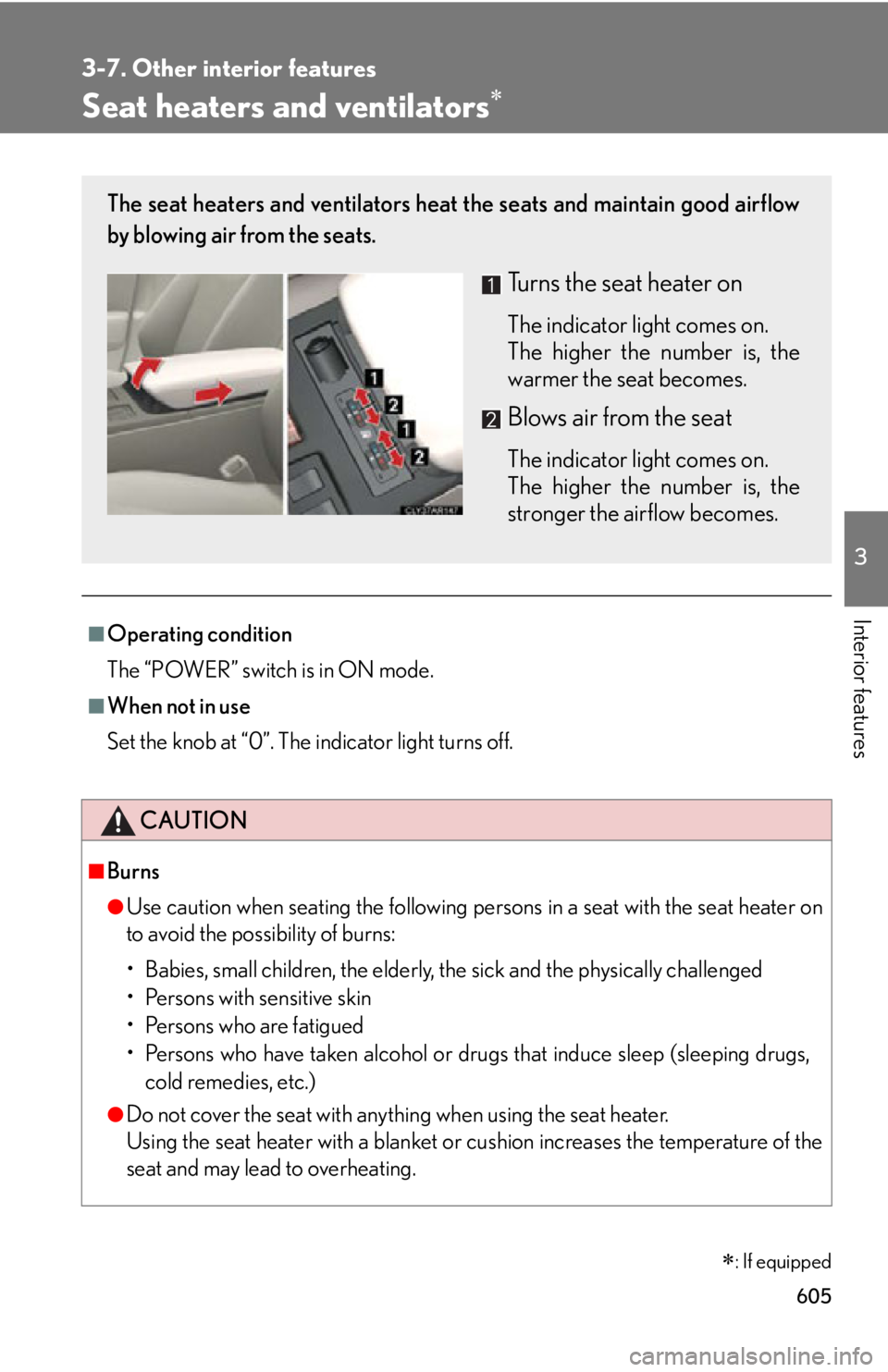
: If equippedThe seat heaters and ventilators heat the seats and maintain good airflow
by blowing air from the seats.
Turns the seat heater on The indicator light comes on.
The higher the number is, the
warmer the seat becomes.
Blows air from the seat The indicator light comes on.
The higher the number is, the
stronger the airflow becomes.
Page 611 of 878
6113-7. Other interior features
3
Interior features CAUTIONObserve the following precautions.
Failure to do so may cause the driver's floor mat to slip, possibly interfering with the
pedals while driving. An unexpectedly high speed may result or it may become diffi-
cult to stop the vehicle, leading to a serious accident. ■
When installing the driver's floor mat ●
Do not use floor mats designed for other models or different model year vehicles,
even if they are Lexus Genuine floor mats.●
Only use floor mats designed for the driver's seat.●
Always install the floor mat securely using the retaining hooks (clips) provided.●
Do not use two or more floor mats on top of each other.●
Do not place the floor mat bottom-side up or upside-down.■
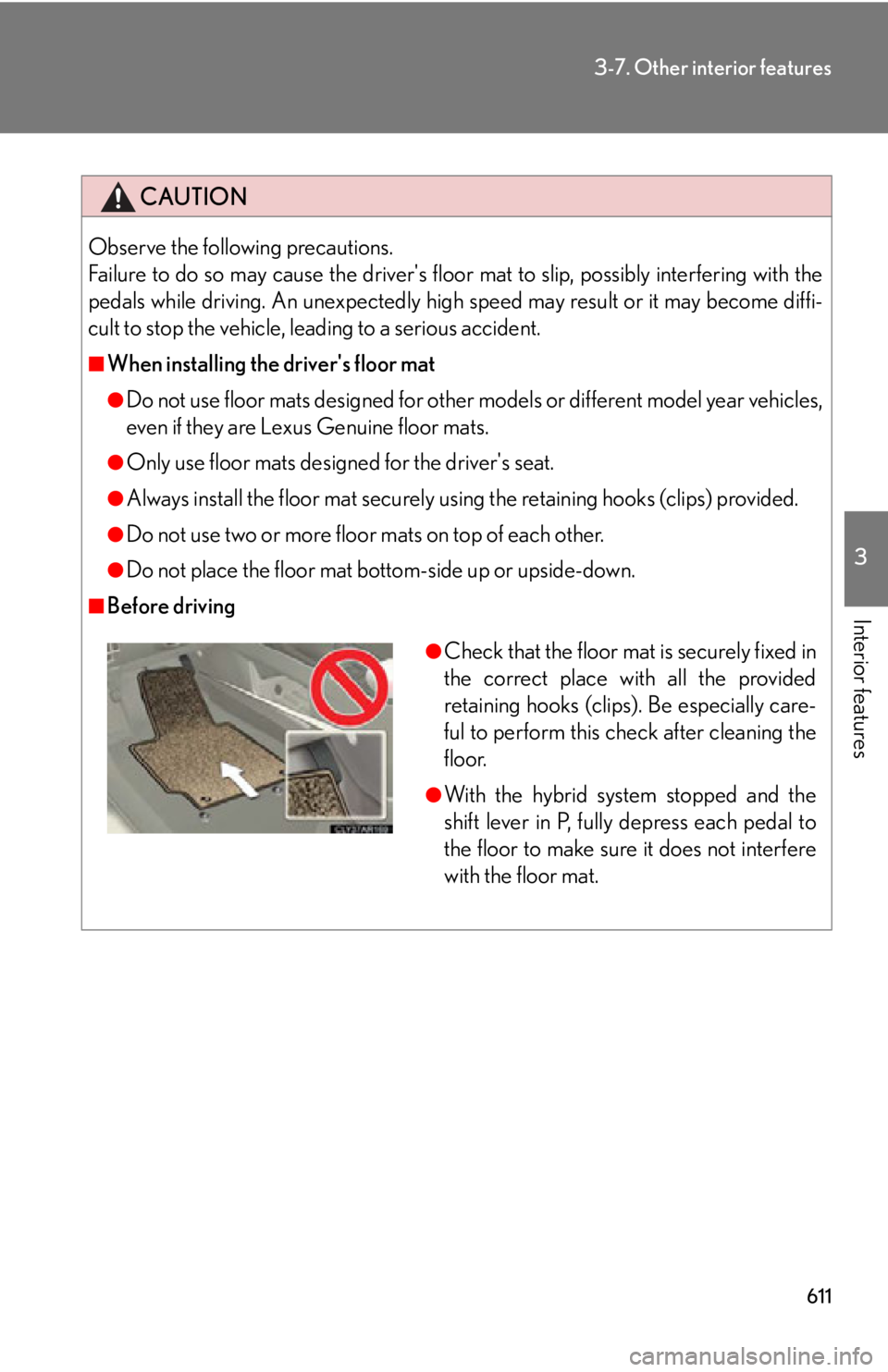
Before driving ●
Check that the floor mat is securely fixed in
the correct place with all the provided
retaining hooks (clips). Be especially care-
ful to perform this check after cleaning the
floor. ●
With the hybrid system stopped and the
shift lever in P, fully depress each pedal to
the floor to make sure it does not interfere
with the floor mat.
Page 628 of 878

6283-7. Other interior features
■
Safety Connect Services Information ●
Phone calls using the vehicles Bluetooth ®
technology will not be possible dur-
ing Safety Connect.●
Safety Connect is available beginning Fall 2009 on select Lexus models. Con-
tact with the Safety Connect response center is dependent upon the telematics
device being in operative condition, ce llular connection availability, and GPS
satellite signal reception, which can limit the ability to reach the response center
or receive emergency service support. Enrollment and Telema tics Subscription
Service Agreement required. A variety of subscription terms is available;
charges vary by subscription term selected.●
Automatic Collision Notification, Emergency Assistance and Stolen Vehicle
Location will function in the United States, including Hawaii and Alaska, and in
Canada, and Enhanced Roadside Assistance will function in the United States
(except Hawaii) and in Canada. No Safety Connect services will function out-
side of the United States in countries other than Canada.●
Safety Connect services ar e not subject to section 255 of the Telecommunica-
tions Act and the device is not TTY compatible.■
Languages
The Safety Connect response center will offer support in multiple languages. The
Safety Connect system will offer voice prompts in English and Spanish. Please indi-
cate your language of choice when enrolling.■
When contacting th e response center
You may be unable to contact the response center if the network is busy.
Page 629 of 878

6293-7. Other interior features
3
Interior features Safety Connect LED light Indicators
● When the “POWER” switch is turn ed to ON mode, the red indicator
light comes on for 2 seconds then turns off. Afterward, the green indi-
cator light comes on, indicating that the service is active.
● The following indicator light patterns indica te specific system usage
conditions:
• Green indicator light on = Active service
• Green indicator light flashing = Safety Connect call in process
• Red indicator light (except at vehicle start-up) = System malfunction
(contact your Lexus dealer)
• No indicator light (off) = Saf ety Connect service not active
Safety Connect services
■ Automatic Collision Notification
In case of either airbag deployment or severe rear-end collision, the
system is designed to automatically call the response center. The
responding agent receives the vehicl e’s location and attempts to speak
with the vehicle occupants to asse ss the level of emergency. If the
occupants are unable to communicate, the agent automatically treats
the call as an emergency, contacts the nearest emergency services
provider to describe the situation, and requests that assistance be sent
to the location.