Page 113 of 878

1131-5. Opening and closing the windows and moon roof
1
Before driving ■
The power windows can be operated when
The “POWER” switch is in ON mode.■
Operating the power windows after turning the hybrid system off
The power windows can be operated for ap proximately 45 seconds even after the
“POWER” switch is turned to ACCESSORY mode or turned off. They cannot,
however, be operated once either front door is opened. ■
Jam protection function
If an object becomes caught between th e window and the window frame, window
travel is stopped and the window is opened slightly. ■
When the power window does not close normally
If the jam protection function is oper ating abnormally and a window cannot be
closed, perform the following operations using the power window switch on the rel-
evant door. ●
After stopping the vehicle, the window can be closed by holding the power win-
dow switch in the one-touch closing position while the “POWER” switch is
turned to ON mode.●
If the window still cannot be closed even by carrying out the operation
explained above, initialize the function by performing the following procedure.
Hold the power window switch in the one-touch closing position. Con-
tinue holding the switch for a further 6 seconds after the window has
closed.
Hold the power window switch in the one-touch opening position. Con-
tinue holding the switch for a further 2 seconds after the window has
opened completely.
Hold the power window switch in the one-touch closing position once
again. Continue holding the switch for a further 2 seconds after the win-
dow has closed.
If you release the switch while the window is moving, start again from the beginning.
If the window continues to close but then re-open slightly even after performing the
above procedure correctly, have the vehicle inspected by your Lexus dealer. STEP 1
STEP 2
STEP 3
Page 115 of 878
11511-5. Opening and closing the windows and moon roof
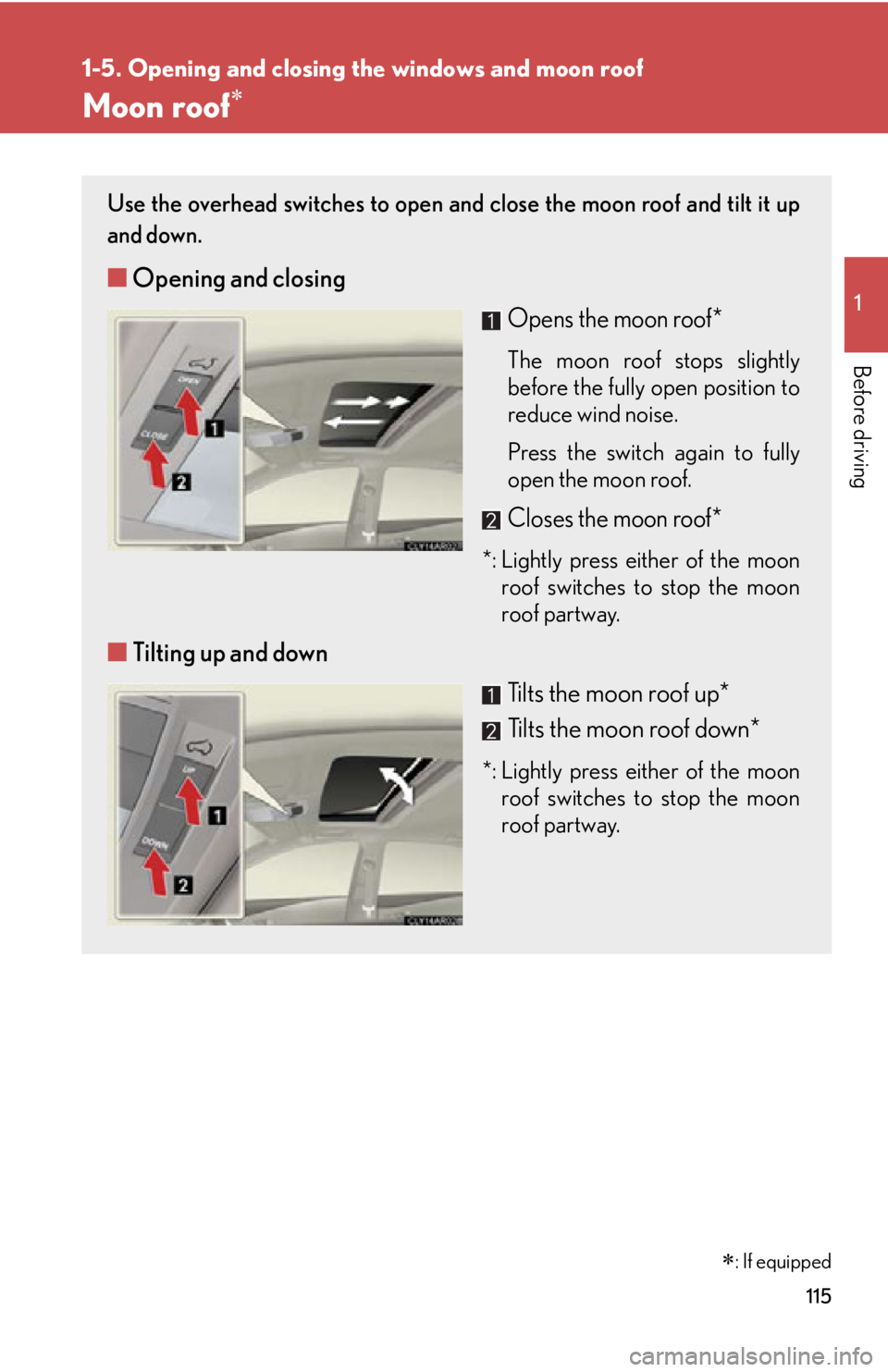
Before driving Moon roof Use the overhead switches to open an d close the moon roof and tilt it up
and down.
■ Opening and closing
Opens the moon roof* The moon roof stops slightly
before the fully open position to
reduce wind noise.
Press the switch again to fully
open the moon roof.
Closes the moon roof**: Lightly press either of the moon
roof switches to stop the moon
roof partway.
■ Tilting up and down
Tilts the moon roof up *
Tilts the moon roof down **: Lightly press either of the moon
roof switches to stop the moon
roof partway.
: If equipped
Page 116 of 878
1161-5. Opening and closing the windows and moon roof
■
The moon roof can be operated when
The “POWER” switch is in ON mode. ■
Operating the moon roof after turning the hybrid system off
The moon roof can be operated for ap proximately 45 seconds even after the
“POWER” switch is turned to ACCESSORY mode or turned off. It cannot, how-
ever, be operated once either front door is opened. ■
Jam protection function
If an object is detected between the moon roof and the frame while the moon roof is
closing or tilting down, travel is stopped and the moon roof opens slightly.■
Sunshade
The sunshade can be opened and closed manually. However, the sunshade will
open automatically when the moon roof is opened. ■
Door lock linked moon roof operation ●
The moon roof can be opened and closed using the mechanical key. ( P. 7 8 1 )●
The moon roof can be opened using the wireless remote control. ( P. 6 9 )
Page 117 of 878

1171-5. Opening and closing the windows and moon roof
1
Before driving ■
When the moon roof does not close normally
Perform the following procedure: ●
If the moon roof closes but then re-opens slightly
Stop the vehicle.
Press and hold the “CLOSE” switch.* 1
The moon roof will close, reopen and pause for approximately 10 sec-
onds.* 2
Then it will close again, tilt up and pause for approximately 1 sec-
ond. Finally, it will tilt down, open and close.
Check to make sure that the moon roof is completely closed and then
release the switch.●
If the moon roof tilts down but then tilts back up
Stop the vehicle.
Press and hold the “UP” switch* 1
until the moon roof moves into the tilt up
position and stops.
Release the “UP” switch once and th en press and hold the “UP” switch
again.* 1
The moon roof will pause for approximately 10 seconds in the tilt up posi-
tion.* 2
Then it will adjust slightly and pause for approximately 1 second.
Finally, it will tilt down, open and close.
Check to make sure that the moon roof is completely closed and then
release the switch.
* 1
: If the switch is released at the incorrect time, the procedure will have
to be performed again from the beginning.
* 2
: If the switch is released after the above mentioned 10 second pause,
automatic operation will be disabled. In that case, press and hold the
“CLOSE” or “UP” switch, and the moon roof will tilt up and pause for
approximately 1 second. Then it will tilt down, open and close. Check
to make sure that the moon roof is completely closed and then release
the switch.
If the moon roof does not fully close even after performing the above procedure
correctly, have the vehicle inspected by your Lexus dealer.
■
Customization
Settings (e.g. linked door lock operation) can be changed.
(Customizable features P. 825)STEP 1
STEP 2
STEP 3
STEP 1
STEP 2
STEP 3
STEP 4
Page 124 of 878

1241-7. Theft deterrent system
Immobilizer system The vehicle's keys have built-in tran sponder chips that prevent the hybrid
system from starting if the key has not been previously registered in the
vehicle's on-board computer.
Never leave the keys inside the vehicle when you leave the vehicle.
This system is designed to help prev ent vehicle theft but does not guaran-
tee absolute security ag ainst all vehicle thefts.
Vehicles with a navigation system or the Lexus Display Audio sys-
tem
The indicator light flashes after
the “POWER” switch has been
turned off to indicate that the
system is operating.
The indicator light stops flashing
after the “POWER” switch has
been turned to ACCESSORY
or ON mode to indicate that the
system has been canceled.
Vehicles without a navigation sy stem or the Lexus Display Audio
system
The indicator light flashes after
the “POWER” switch has been
turned off to indicate that the
system is operating.
The indicator light stops flashing
after the “POWER” switch has
been turned to ACCESSORY
or ON mode to indicate that the
system has been canceled.
Page 126 of 878
1261-7. Theft deterrent system
Alarm The system sounds the alarm and flashe s the lights when forcible entry is
detected.
■ Triggering of the alarm
The alarm is triggered in the follow ing situations when the alarm is
set:
● A locked door is unlocked or open ed in any way other than using
the entry function, wireless r emote control or mechanical key.
(The doors will lock again automatically.)
● The hood is opened.
■ Setting the alarm system
Vehicles with a navigation system or the Lexus Display Audio sys-
tem Close the doors and hood, and
lock all the doors.
The system will be set automati-
cally after 30 seconds.
The indicator light changes from
being on to flashing when the
system is set.
Vehicles without a navigation sy stem or the Lexus Display Audio
system
Close the doors and hood, and
lock all the doors.
The system will be set automati-
cally after 30 seconds.
The indicator light changes from
being on to flashing when the
system is set.
Page 134 of 878
1341-8. Safety information
SRS airbag system components
Knee airbags
Front passenger airbag
Curtain shield airbags
Front side airbags
Front passenger occupant
classification system
(ECU and sensors)
“AIR BAG ON” and “AIR BAG
OFF” indicator lights
Rear side airbags
SRS warning light
Driver airbag Curtain shield and rear side
airbag sensors
Driver's seat belt buckle
switch
Driver's seat position sensor
Airbag sensor assembly
Front airbag sensors
Front passenger’s seat belt
buckle switch
Door sensors
Seat belt pretensioners and
force limiters
Page 135 of 878

1351-8. Safety information
1
Before driving Your vehicle is equipped with AD VANCED AIRBAGS designed based
on the US motor vehicle safety st andards (FMVSS208). The airbag sen-
sor assembly (ECU) controls airbag deployment based on information
obtained from the sensors etc. show n in the system components diagram
above. This information includes cras h severity and occupant informa-
tion. As the airbags deploy, a chemica l reaction in the inflators quickly fills
the airbags with non-toxic gas to he lp restrain the motion of the occu-
pants. ■
If the SRS airbags deploy (inflate) ●
Bruising and slight abrasions may result from contact with a deploying (inflating)
SRS airbag.●
A loud noise and white powder will be emitted.●
Parts of the airbag module (steering wheel hub, airbag cover and inflator) as
well as the seats, parts of the front and rear pillars, and roof side rails, may be hot
for several minutes. The airbag itself may also be hot.●
The windshield may crack.●
For Safety Connect subscriber s, if the SRS airbags deploy or in the event of a
severe rear-end collision, the system is designed to send an emergency call to
the response center, notifying them of the vehicle’s location (without needing to
push the “SOS” button) and an agent will attempt to speak with the occupants
to ascertain the level of emergency and assistance required. If the occupants
are unable to communicate, the agent automatically treats the call as an emer-
gency and helps to dispatch the necessary emergency services. ( P. 6 2 6 )■
SRS airbag deployment conditions (SRS front airbags) ●
The SRS front airbags will deploy in the event of an impact that exceeds the
set threshold level (the level of force corresponding to an approximately 12 -
18 mph [20 - 30 km/h] frontal collision with a fixed wall that does not move or
deform).
However, this threshold velocity will be considerably higher in the following situa-
tions:
• If the vehicle strikes an object, such as a parked vehicle or sign pole, which
can move or deform on impact
• If the vehicle is involved in an underride collision, such as a collision in which
the front of the vehicle “underrides”, or goes under, the bed of a truck