Page 14 of 878
14Pictorial index Instrument panelHeadlight switch
Turn signal lever
Fog light switch P. 217
P. 193
P. 221
Windshield wipers and washer switch
Rear window wiper and washer switch P. 223
P. 229Power back door main
switch P. 77
Tilt and telescopic steering control switch P. 105Power (ignition) switch P. 177
Hood lock release
lever P. 651 Gauges and meters
Multi-information display P. 197
P. 206
Glove box P. 586
Horn P. 196
Parking brake pedal P. 195
Page 15 of 878
15A Without a navigation system or the Lexus Display Audio system
Security indicator P. 124, 126
Audio system
P. 474
Emergency
flasher switch P. 724 ● Display light control
● Outside temperature
display
● Clock
● Air conditioning
display
● Audio display P. 600
P. 598
P. 597
P. 350
P. 474Multi display
Air conditioning
system P. 350
Rear window and outside rear view
mirror defogger switch P. 358
Page 19 of 878
19D Pre-collision braking
off switch
P. 279
: If equipped
* : For vehicles with a navigation system, refe r to the “Navigation System Owner’s Manual”.E Cup holder P. 588
Headlight cleaner switch
P. 231
Power back door switch P. 76
Fuel filler door opener P. 119
Instrument panel light
control buttons P. 198
“ODO/TRIP” button P. 198
Windshield wiper de-icer switch
,
* P. 360BSM main switch
P. 286Tire pressure warning
reset switch P. 672
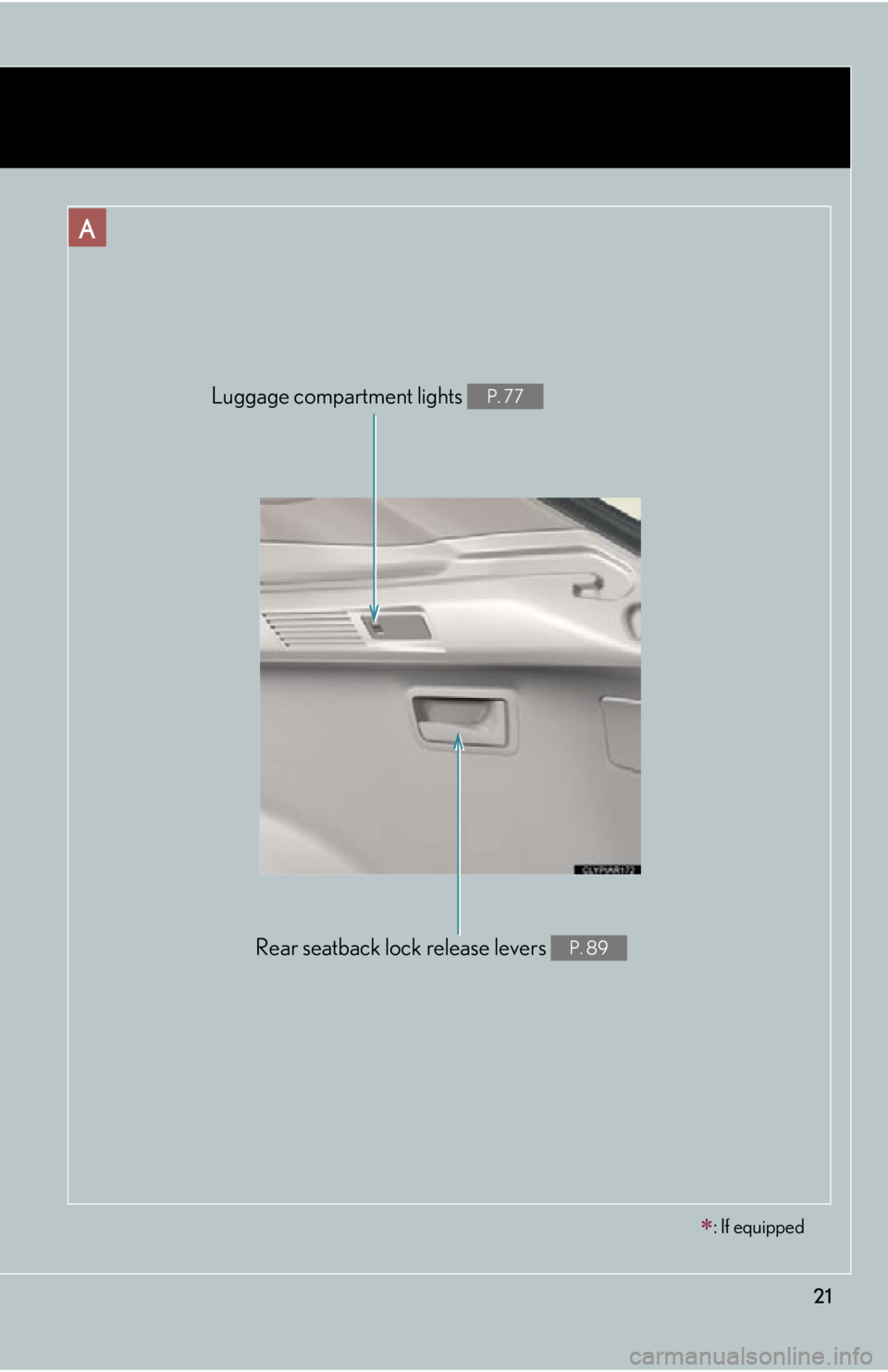
Page 21 of 878
21A
Rear seatback lock release levers P. 89Luggage compartment lights P. 77
: If equipped
Page 36 of 878

361-1. Hybrid system
■
If a warning light comes on or a warning message is displayed, or the 12-volt bat-
tery is disconnected
The hybrid system may not start. In that ca se, try to start the system again. If the
“READY” indicator does not come on, contact your Lexus dealer.■
When refueling, the fuel filler door may take a few moments to open
As part of emission system operation, it ma y take up to 10 seconds for the fuel filler
door to automatically release after the opener switch is pressed. Before refueling is
possible, a message will be shown on the multi-information display. ( P. 119, 755)■
Electromagnetic waves ●
High voltage parts and cables on the hybrid vehicles incorporate electromag-
netic shielding, and theref ore emit approximately the same amount of electro-
magnetic waves as conventional gasoline powered vehicles or home electronic
appliances.●
Your vehicle may cause sound interference in some third party-produced radio
parts.■
Running out of fuel
When the vehicle has run out of fuel and th e hybrid system cannot be started, refuel
the vehicle with at least enough gasoline to make the low fuel level warning light
( P. 733) go off. If there is only a small amount of fuel, the hybrid system may not
be able to start. (The minimum amount of fuel to add to make the low fuel level
warning light go out is about 2.7 gal. [10.1 L, 2.2 Imp. gal.] when the vehicle is on a
level surface. This value may vary when the vehicle is on a slope.)■
Hybrid battery (traction battery)
The hybrid battery (traction battery) has a limited service life. The lifespan of the
hybrid battery (traction battery) can chan ge in accordance with driving style and
driving conditions.
Page 44 of 878
441-1. Hybrid system
These images are examples only, and may vary slightly from actual conditions. When there is no
energy flow Navigation system
Lexus Display Audio system
Hybrid battery
(traction battery)
status Navigation system
Low FullLow Full
Lexus Display Audio system
Low FullNavigation system or Lexus
Display Audio system Multi-information
display
Page 45 of 878
451-1. Hybrid system
1
Before driving Consumption
■ Trip information
Vehicles with a navigation system
Press the “MENU” button on the Remote Touch and select “Info/
Apps”.
Select “Fuel Consumption”. If the “Trip Information” screen does not appear, select “Fuel Consump-
tion” on the “Energy Monitor” screen or “Trip Information” on the “Past
Record” screen.
Reset the trip information data
Average vehicle speed
Elapsed time
Cruising range
Previous fuel consumption per
minute
Current fuel consumption
“Past Record” screen appears
“Energy Monitor” screen
appears
Regenerated energy : One symbol indicates 50
Wh.
The image is example only, and may vary slightly from actual conditions. STEP 1
STEP 2
Page 46 of 878
461-1. Hybrid system
Vehicles with the Lexus Display Audio system
Press the “MENU” button on the Lexus Display Audio controller.
Select “Car” on the “Menu” screen. If the “Trip information” screen does not appear, select “Trip informa-
tion”.
Reset the trip information data
Average vehicle speed
Elapsed time
Cruising range
Previous fuel consumption per
minute
Current fuel consumption
“History” screen appears
“Energy Monitor” screen
appears
Regenerated energy : One symbol indicates 50
Wh.
The image is example only, and may vary slightly from actual conditions. STEP 1
STEP 2