Page 4 of 886

TABLE OF CONTENTS Index
43-1. Lexus Display Audio system
Lexus Display Audio
system ........................................... 328
Display settings ............................. 332
Setup menu..................................... 334
Vehicle information.................... 340
Mobile Assistant ........................... 343
3-2. Using the air conditioning
system and defogger
Automatic air conditioning
system (with the Lexus
Display Audio system) ............ 345
Automatic air conditioning
system (without a navigation
system or the Lexus Display
Audio system)............................ 353
Rear window defogger
switch............................................... 361
Windshield wiper de-icer ......... 363
3-3. Using the Lexus Display
Audio system
Audio system (with the Lexus
Display Audio system) ........... 365
Using the radio ............................. 368
Using the CD player .................. 383 Playing an audio CD and
MP3/WMA discs.................... 384
Listening to an iPod ..................... 394
Listening to a USB memory..... 402
Using the AUX port .................... 412
Listening to Bluetooth ®
audio ................................................ 414
Optimal use of the audio
system ............................................ 428
Using the steering wheel
audio switches ........................... 430
Hands-free system
(for mobile phone) .................... 433
Using the Bluetooth ®
phone .............................................. 441
Setting the hands-free
system ............................................ 459
Bluetooth ®
settings .................... 472
3-4. Using the audio system
Audio system (without a
navigation system or the
Lexus Display Audio
system).......................................... 480
Using the radio ............................. 483
Using the CD player ................... 492
Playing MP3 and WMA
discs ................................................. 501
Operating an iPod ........................ 510
Operating a USB memory...... 520
Bluetooth ®
audio system ........ 530
Using the Bluetooth ®
audio
system ........................................... 5353
Interior features
Page 10 of 886
10Pictorial index Interior SRS driver airbag
P. 119
SRS knee airbags P. 119
Front seats P. 68
SRS front passenger
airbag P. 119
Power outlet
AUX port
USB port
* 1 P. 616
P. 412, 554
P. 394, 402, 510, 520Door pockets
Bottle holders P. 600
P. 600
Rear SRS side airbags P. 119
Power outlet P. 616
Console box P. 604Armrest
Auxiliary box
P. 622
P. 606
Power outlet
P. 616Power window switches P. 98
Rear seats P. 72
Head restraints P. 81
Seat belts P. 83
Front SRS side airbags P. 119
Cup holders P. 601
Rear seat entert ainment system
,
* 2
Page 326 of 886

326 3-3. Using the Lexus Display
Audio system
Audio system (with the
Lexus Display Audio
system).................................... 365
Using the radio....................... 368
Using the CD player ............ 383
Playing an audio CD and
MP3/WMA discs .............. 384
Listening to an iPod................ 394
Listening to a USB
memory ................................. 402
Using the AUX port ............... 412
Listening to Bluetooth ®
audio......................................... 414
Optimal use of the audio
system ..................................... 428
Using the steering wheel
audio switches ..................... 430
Hands-free system
(for mobile phone)............... 433
Using the Bluetooth ®
phone ....................................... 441
Setting the hands-free
system ..................................... 459
Bluetooth ®
settings .............. 472 3-4. Using the audio system
Audio system (without a
navigation system or the
Lexus Display Audio
system) ................................... 480
Using the radio ....................... 483
Using the CD player ............. 492
Playing MP3 and WMA
discs.......................................... 501
Operating an iPod .................. 510
Operating a USB
memory.................................. 520
Bluetooth ®
audio system .... 530
Using the Bluetooth ®
audio system ......................... 535
Operating a Bluetooth ®
enabled portable player ... 540
Setting up a Bluetooth ®
enabled portable player ... 544
Bluetooth ®
audio system
setup ........................................ 551
Optimal use of the audio
system..................................... 552
Using the AUX port .............. 554
Using the steering wheel
audio switches...................... 556
Hands-free system for
mobile phones...................... 560
Page 365 of 886
3653
Interior features 3-3. Using the Lexus Display Audio system
Audio system (with the Lexus Display Audio system) To display the audio control screen, press the “MEDIA” button, “RADIO”
button or the “AUDIO” button on the Lexus Display Audio controller.
Ti t l e Pa g e
Using the radio P. 3 6 8
Using the CD player P. 3 8 3
Playing an audio CD and MP3/WMA discs P. 3 8 4
Listening to an iPod P. 3 9 4
Listening to a USB memory P. 4 0 2
Using the AUX port P. 4 1 2
Listening to Bluetooth ®
audio P. 4 1 4
Optimal use of the audio system P. 4 2 8
Using the steering wheel audio switches P. 4 3 0
Page 402 of 886
4023-3. Using the Lexus Display Audio system
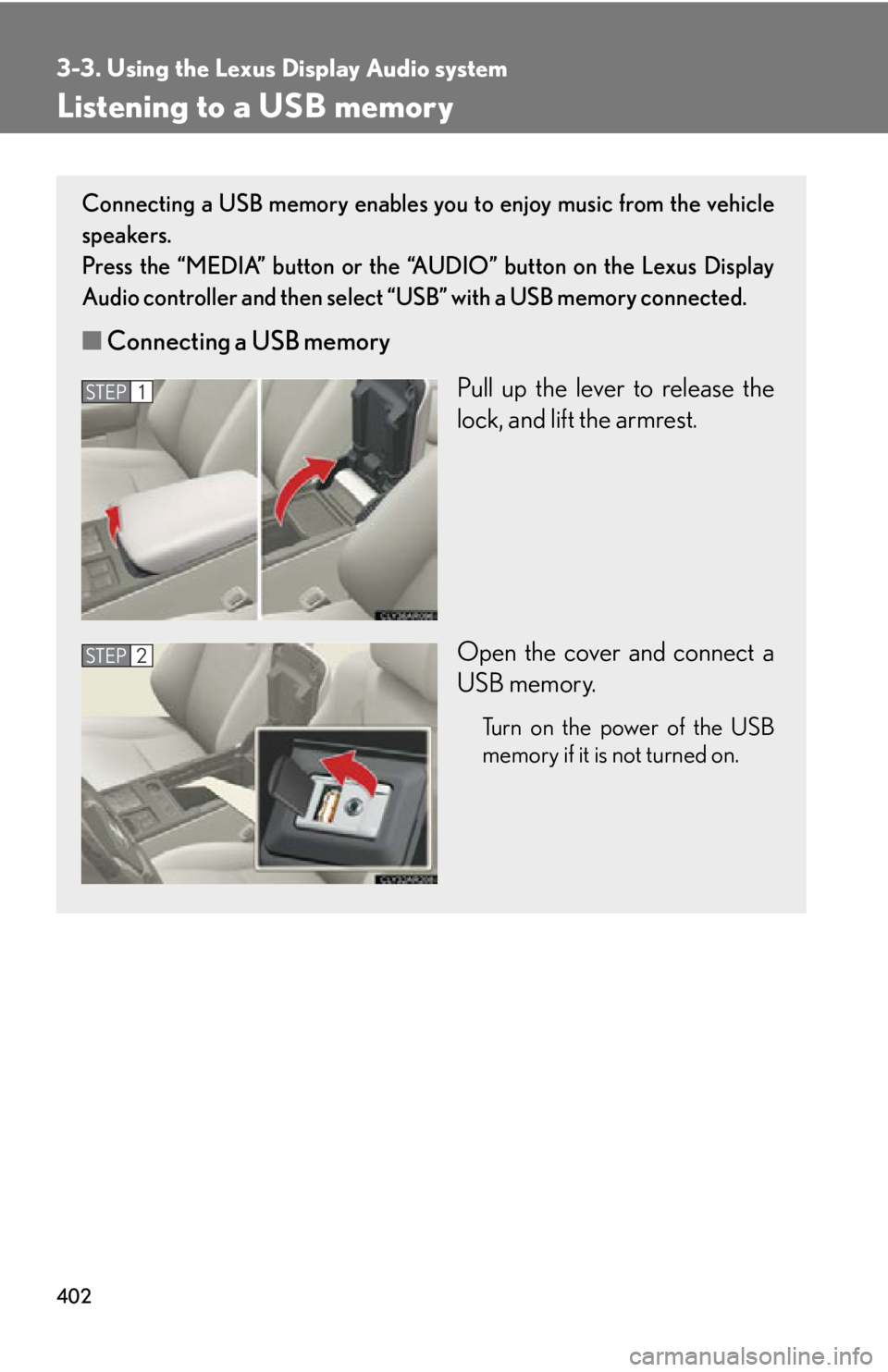
Listening to a USB memory Connecting a USB memory enables you to enjoy music from the vehicle
speakers.
Press the “MEDIA” button or the “AUDIO” button on the Lexus Display
Audio controller and then select “USB” with a USB memory connected.
■ Connecting a USB memory
Pull up the lever to release the
lock, and lift the armrest.
Open the cover and connect a
USB memory. Turn on the power of the USB
memory if it is not turned on.STEP 1
STEP 2
Page 407 of 886
4073-3. Using the Lexus Display Audio system
3
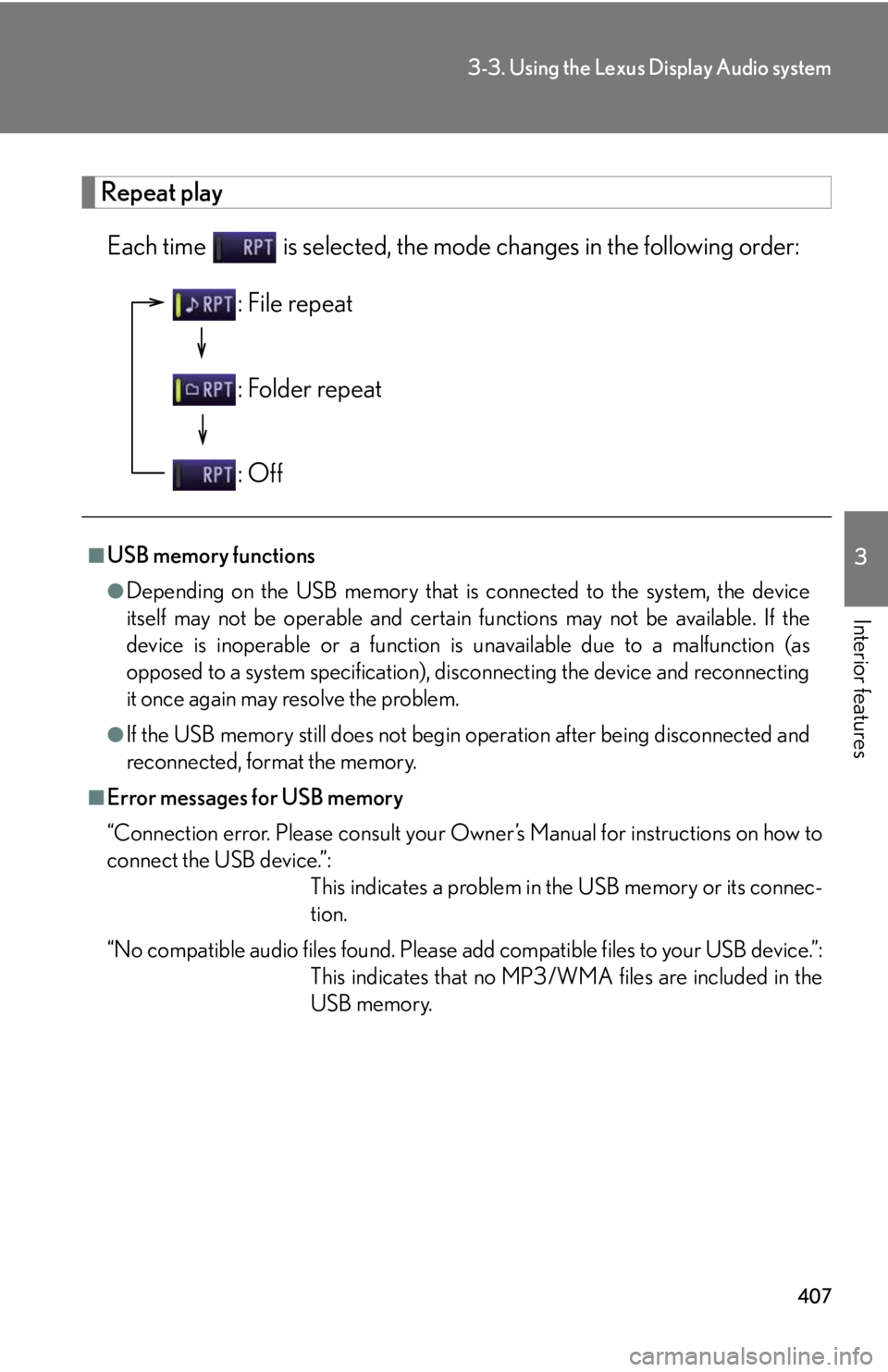
Interior features Repeat play
Each time is selected, the mode changes in the following order:
■
USB memory functions ●
Depending on the USB memory that is connected to the system, the device
itself may not be operable and certain functions may not be available. If the
device is inoperable or a function is unavailable due to a malfunction (as
opposed to a system specification), di sconnecting the device and reconnecting
it once again may resolve the problem.●
If the USB memory still does not begin operation after being disconnected and
reconnected, format the memory.■
Error messages for USB memory
“Connection error. Please consult your Ow ner’s Manual for instructions on how to
connect the USB device.”:
This indicates a problem in the USB memory or its connec-
tion.
“No compatible audio files found. Please add compatible files to your USB device.”:
This indicates that no MP3/WMA files are included in the
USB memory.: File repeat
: Folder repeat
: Off
Page 408 of 886

4083-3. Using the Lexus Display Audio system
■
USB memory ●
Compatible devices
USB memory that can be used for MP3 and WMA playback.●
Compatible device formats
The following device formats can be used:
• USB communication formats: USB2.0 HS (480Mbps)
• File formats: FAT16/32 (Windows)
• Correspondence class: Mass storage class
MP3 and WMA files written in any format other than those listed above may
not play correctly, and their file names and folder names may not be displayed
correctly.
Items related to standards and limitations are as follows:
• Maximum directory hierarchy: 8 levels
• Maximum number of folders in a device: 3000 (including the root)
• Maximum number of files in a device: 9999
• Maximum number of files per folder: 255●
MP3 and WMA files
MP3 (MPEG Audio LAYER 3) is a standard audio compression format.
Files can be compressed to approximately 1 /10 of their original size using MP3
compression.
WMA (Windows Media Audio) is a Microsoft audio compression format. This
format compresses audio data to a size smaller than that of the MP3 format.
There is a limit to the MP3 and WMA file standards that can be used and to the
media/formats on which the files are recorded.
Page 410 of 886
4103-3. Using the Lexus Display Audio system
●
MP3 and WMA playback
• When a device containing MP3 or WMA files is connected, all files in the
USB memory device are checked. Once the file check is finished, the first
MP3 or WMA file is played. To make the file check finish more quickly, we
recommend that you do not include any files other than MP3 or WMA files
or create any unnecessary folders.
• When the USB device is connected and the audio source is changed to USB
memory mode, the USB device will start playing the first file in the first folder.
If the same device is removed and reinserted (and the contents have not been
changed), the USB device will resume play from the same point in which it
was last used.●
Extensions
If the file extensions .mp3 and .wma are used for files other than MP3 and WMA
files, they will be skipped (not played).●
Playback
• To play MP3 files with steady sound qu ality, we recommend a fixed bit rate of
at least 128 kbps and a sampling frequency of 44.1 kHz.
• There is a wide variety of freeware and other encoding software for MP3 and
WMA files on the market, and depending on the status of the encoding and
the file format, poor sound quality or noise at the start of playback may result.
In some cases, playback ma y not be possible at all.
• Microsoft, Windows, and Windows Media are the registered trademarks of
Microsoft Corporation in the U.S.A. and other countries.
CAUTION■
Caution while driving
Do not connect USB memories or operate the controls.