Page 153 of 886

When driving
2
1532-1. Driving procedures
Driving the vehicle.................. 154
Engine (ignition) switch ......... 165
Automatic transmission
(6-speed models) .................. 171
Automatic transmission
(8-speed models) ................. 178
Turn signal lever ....................... 187
Parking brake ........................... 189
Horn ............................................ 190
2-2. Instrument cluster
Gauges and meters ................. 191
Indicators and warning
lights ......................................... 194
Multi-information
display .................................... 200
Head-up display ..................... 206
2-3. Operating the lights and
windshield wipers
Headlight switch....................... 211
Fog light switch ........................ 215
Windshield wipers and
washer ..................................... 217
Rear window wiper and
washer .................................... 224
Headlight cleaner switch..... 226 2-4. Using other driving
systems
Cruise control......................... 227
Dynamic radar cruise
control .................................... 232
Intuitive parking assist .......... 245
Rear view monitor system
(rear view mirror-attached
type) ........................................ 255
Rear view monitor system
(vehicles with the Lexus
Display Audio system) ....... 264
Driving assist systems ........... 269
All-wheel drive lock
switch ....................................... 275
Hill-start assist control .......... 276
Pre-Collision System ............ 278
BSM
(Blind Spot Monitor) .......... 286
2-5. Driving information
Utility vehicle
precautions ........................... 292
Cargo and luggage ............... 296
Vehicle load limits ................... 301
Winter driving tips ................. 302
Trailer towing .......................... 306
Dinghy towing ......................... 323
Page 158 of 886

1582-1. Driving procedures
CAUTION●
Do not shift the shift lever to R while the vehicle is moving forward.
Doing so can damage the transmission and may result in a loss of vehicle control.●
Do not shift the shift lever to D while the vehicle is moving backward.
Doing so can damage the transmission and may result in a loss of vehicle control.●
Moving the shift lever to N while the vehicle is moving will disengage the engine
from the transmission. Engine braking is not available when N is selected.●
During normal driving, do not turn off the engine. Turning the engine off while
driving will not cause loss of steering or braking control, but the power assist to
these systems will be lost. This will make it more difficult to steer and brake, so you
should pull over and stop the vehicle as soon as it is safe to do so.
However, in the event of an emergency, such as if it becomes impossible to stop
the vehicle in the normal way: P. 8 0 4●
Use engine braking (downshift) to maintain a safe speed when driving down a
steep hill.
Using the brakes continuously may cause the brakes to overheat and lose effec-
tiveness. ( P. 171, 178)●
When stopped on an incline, use the brake pedal and parking brake to prevent
the vehicle from rolling backward or forward, causing an accident. ●
Do not adjust the position of the steering wheel, the seat, or the inside or outside
rear view mirrors while driving.
Doing so may result in a loss of vehicle control that can cause accidents, resulting
in death or serious injury.●
Always check that all passengers' arms, heads or other parts of their body are not
outside the vehicle, as this may result in death or serious injury.●
Do not drive in excess of the speed limit. Even if the legal speed limit permits it, do
not drive over 85 mph (140 km/h) unless your vehicle has high-speed capability
tires. Driving over 85 mph (140 km/h) may result in tire failure, loss of control and
possible injury. Be sure to consult a tire dealer to determine whether the tires on
your vehicle are high-speed capability tires or not before driving at such speeds.
Page 194 of 886
1942-2. Instrument cluster
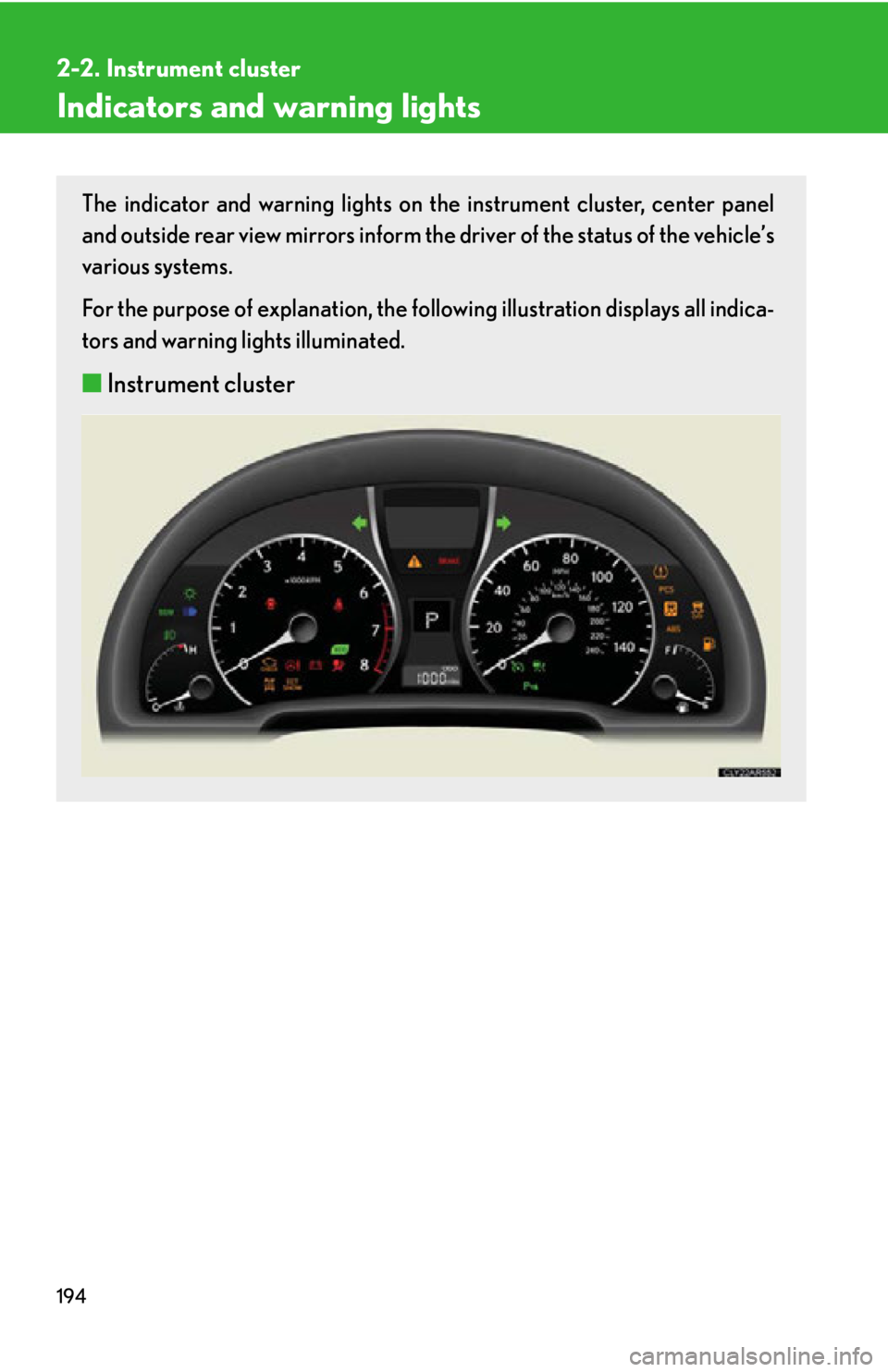
Indicators and warning lights The indicator and warning lights on th e instrument cluster, center panel
and outside rear view mirrors inform the driver of the status of the vehicle’s
various systems.
For the purpose of explanation, the following illustration displays all indica-
tors and warning lights illuminated.
■ Instrument cluster
Page 196 of 886
1962-2. Instrument cluster
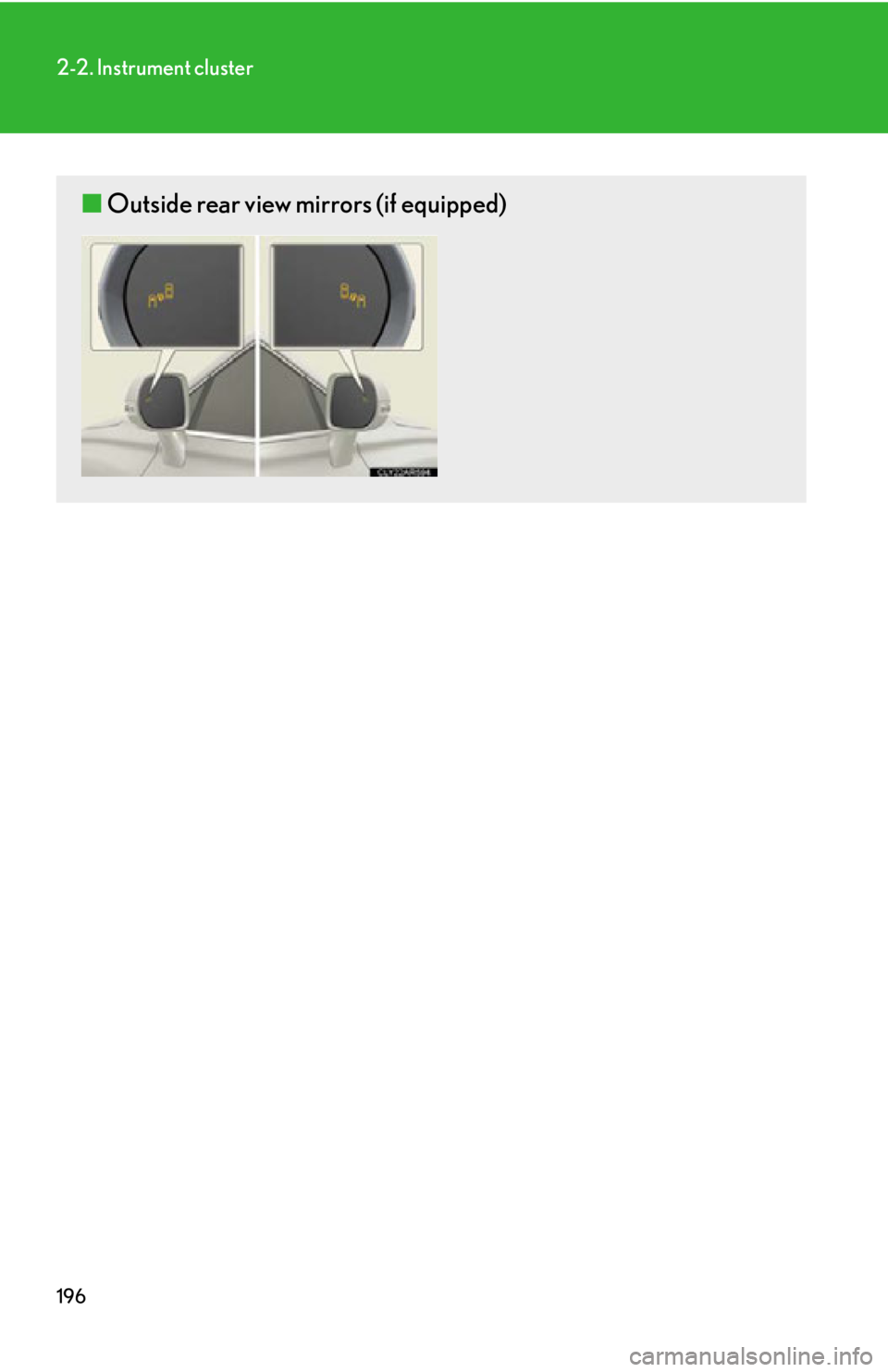
■ Outside rear view mirrors (if equipped)
Page 198 of 886

1982-2. Instrument cluster
* 1
: These lights turn on when the “E NGINE START STOP” switch is turned
to IGNITION ON mode to indicate that a system check is being per-
formed. They will turn off after the en gine is started, or after a few sec-
onds. There may be a malfunction in a system if a light does not come on,
or if the lights do not turn off. Have the vehicle inspected by your Lexus
dealer, for details.
* 2
: The light flashes to indicate that the system is operating.
* 3
: The light comes on when the system is turned off. The light flashes faster
than usual to indicate that the system is operating.
* 4
: In order to confirm operation, the BSM outside rear view mirror indica-
tors illuminate in the following situations:
• When the “ENGINE START STOP” switch is turned to IGNITION
ON mode while the BSM main switch is set to ON.
• When the BSM main switch is set to ON while the “ENGINE START
STOP” switch is in IGNITION ON mode.
If the system is functioning correctly, the BSM outside rear view mirror
indicators will turn off after a few seconds.
If the BSM outside rear view mirror indicators do not illuminate or do not
turn off, there may be a malfunction with the system.
If this occurs, have the vehicle inspected by your Lexus dealer. (AWD models
only)
All-wheel drive lock indi-
cator ( P. 2 7 5 ) “ECT SNOW” indicator
( P. 173, 180) (if equipped)
BSM indicator
( P. 2 8 6 ) (if equipped)
Pre-collision system
warning light ( P. 2 7 8 )(if equipped)
BSM outside rear view
mirror indicators
( P. 2 8 6 )* 1
* 1
* 1, 3
* 4
Page 255 of 886
2552-4. Using other driving systems
2
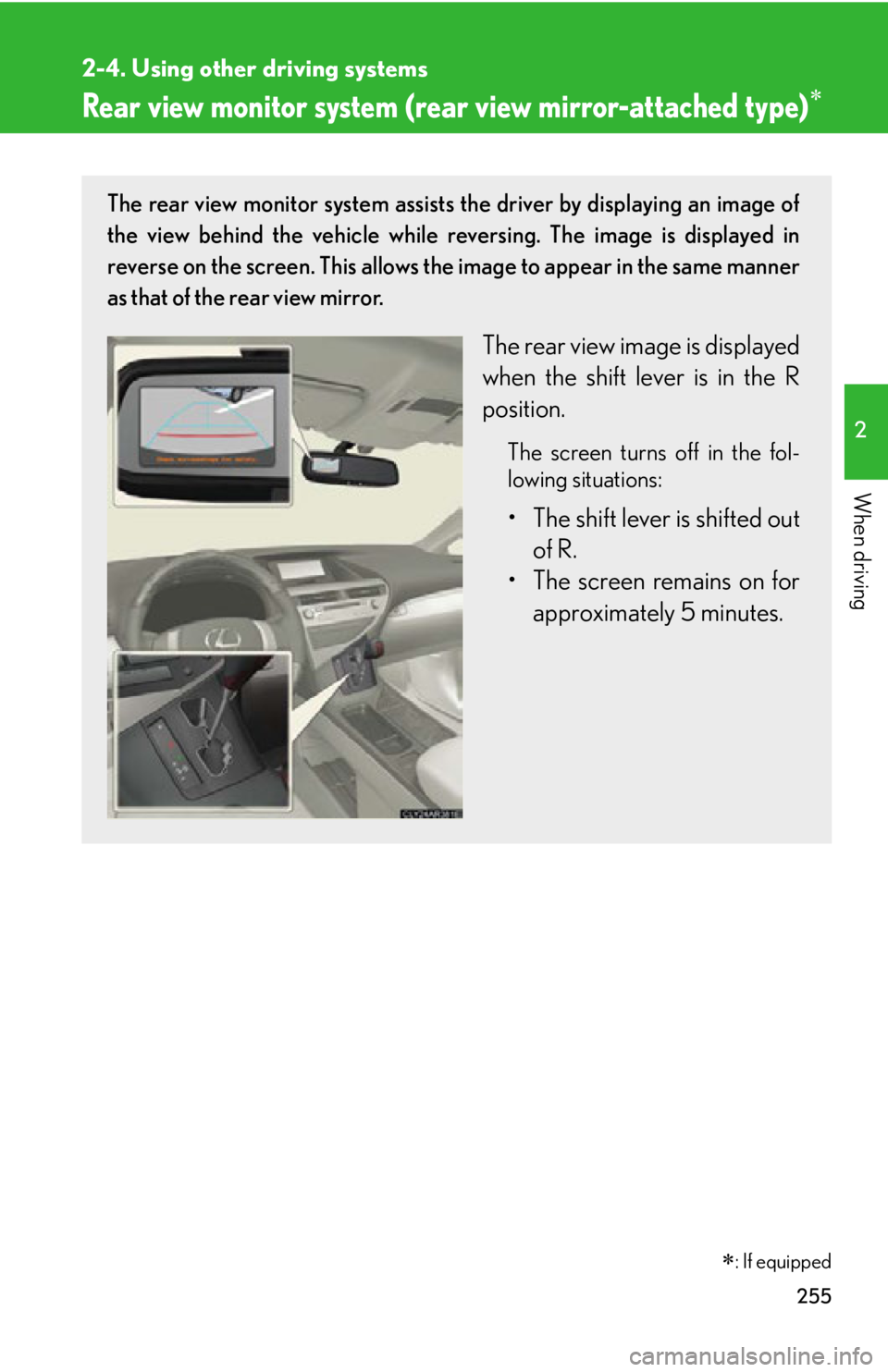
When driving Rear view monitor system (rea r view mirror-attached type) The rear view monitor system assists the driver by displaying an image of
the view behind the vehicle while re versing. The image is displayed in
reverse on the screen. This allows the image to appear in the same manner
as that of the rear view mirror.
The rear view image is displayed
when the shift lever is in the R
position. The screen turns off in the fol-
lowing situations:
• The shift lever is shifted out
of R.
• The screen remains on for
approximately 5 minutes.
: If equipped
Page 257 of 886
2572-4. Using other driving systems
2
When driving ■
Selecting a language (English, French or Spanish)
Press and hold for 6 to 12
seconds.
The screen will turn on and the
indicator will turn green. Press .
Each time
is pressed
and released, the language
changes. A message will flash
in the mirror for 5 seconds
after the button is released,
indicating that the change has
been completed. STEP 1
STEP 2
Page 261 of 886
2612-4. Using other driving systems
2
When driving ■
Rear view monitor system camera
■
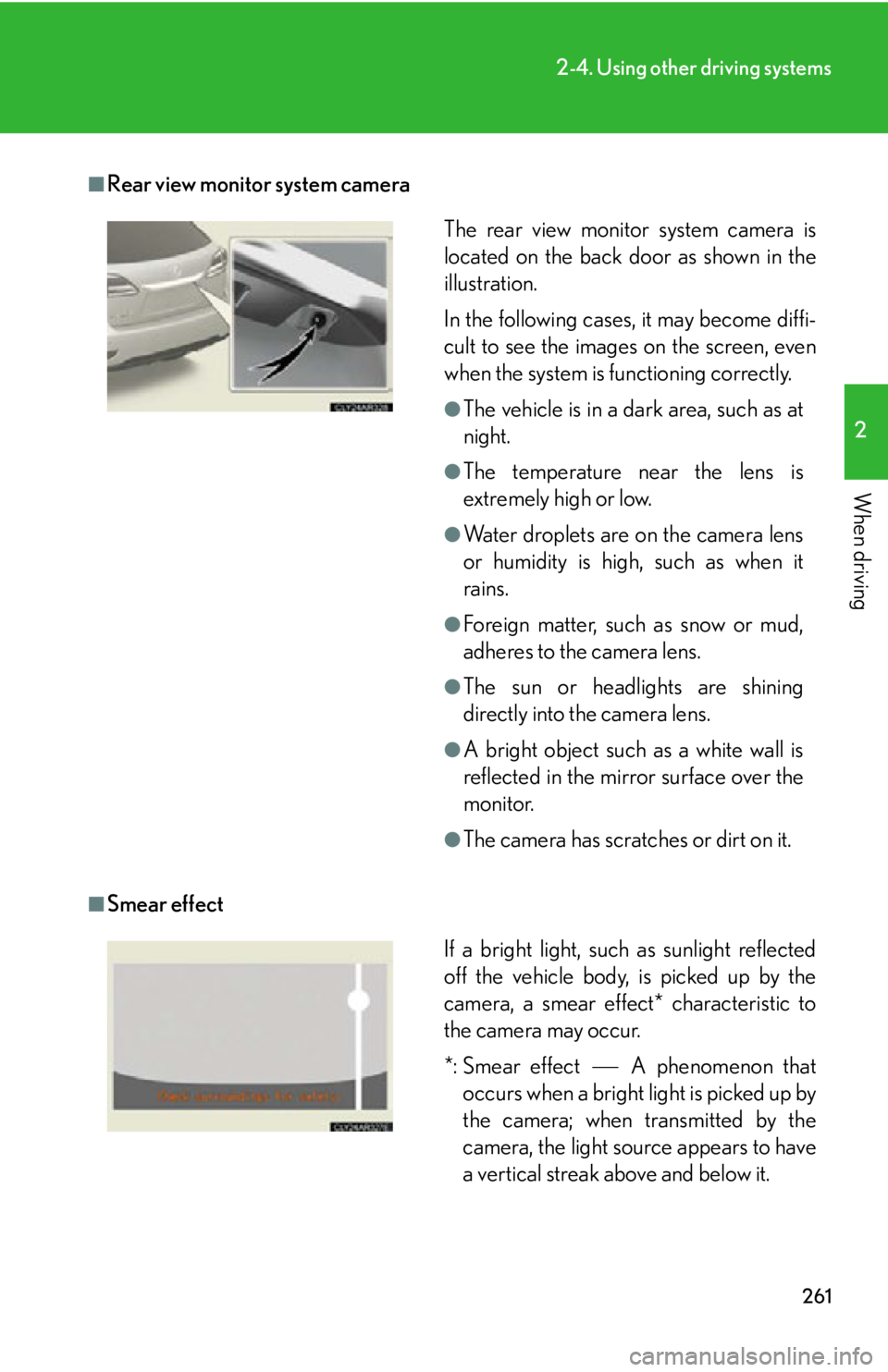
Smear effect The rear view monitor system camera is
located on the back door as shown in the
illustration.
In the following cases, it may become diffi-
cult to see the images on the screen, even
when the system is functioning correctly. ●
The vehicle is in a dark area, such as at
night. ●
The temperature near the lens is
extremely high or low. ●
Water droplets are on the camera lens
or humidity is high, such as when it
rains. ●
Foreign matter, such as snow or mud,
adheres to the camera lens. ●
The sun or headlights are shining
directly into the camera lens. ●
A bright object such as a white wall is
reflected in the mirror surface over the
monitor. ●
The camera has scratches or dirt on it.
If a bright light, such as sunlight reflected
off the vehicle body, is picked up by the
camera, a smear effect* characteristic to
the camera may occur.
*: Smear effect A phenomenon that
occurs when a bright light is picked up by
the camera; when transmitted by the
camera, the light source appears to have
a vertical streak above and below it.