Page 169 of 886

1692-1. Driving procedures
2
When driving CAUTION■
When starting the engine
Always start the engine while sitting in th e driver’s seat. Do not depress the acceler-
ator pedal while starting the engine under any circumstances.
Doing so may cause an accident resu lting in death or serious injury.■
Caution while driving
If the vehicle begins to slide due to engine failure or other circumstances, do not
lock or open the doors until the vehicle reaches a safe and complete stop. Activa-
tion of the steering lock in this circumstance may lead to an accident, resulting in
death or serious injury.■
Stopping the engine in an emergency
If you want to stop the engine in an emergency while driving the vehicle, press and
hold the “ENGINE START STOP” switch for more than 2 seconds, or press it
briefly 3 times or more in succession. ( P. 8 0 4 )
However, do not touch the “ENGINE START STOP” switch while driving except in
an emergency. Turning the engine off while driving will not cause loss of steering or
braking control, but the power assist to these systems will be lost. This will make it
more difficult to steer and brake, so you should pull over and stop the vehicle as
soon as it is safe to do so.
Page 269 of 886
2692-4. Using other driving systems
2
When driving Driving assist systems To help enhance driving safety and performance, the following systems
operate automatically in response to various driving situations. Be aware,
however, that these systems are supplementary and should not be relied
upon too heavily when operating the vehicle.
■ ABS (Anti-lock Brake System) Helps to prevent wheel lock when the brakes are applied suddenly, or if
the brakes are applied while driving on a slippery road surface
■ Brake assist Generates an increased level of braking force after the brake pedal is
depressed, when the system detects a panic stop situation
■ VSC (Vehicle Stability Control) Helps the driver to control skidding when swerving suddenly or turning on
slippery road surfaces
■ TRAC (Traction Control) Helps to maintain drive power and prevent the drive wheels from spinning
when starting the vehicle or accelerating on slippery roads
■ Hill-start assist control P. 2 76
■ EPS (Electric Power Steering) Employs an electric motor to reduce the amount of effort needed to turn
the steering wheel
■ Active Torque Control 4WD system (AWD models) Automatically switches from front-wheel drive to AWD (All-Wheel Drive)
according to driving conditions, help ing to ensure reliable handling and
stability. Examples of conditions wher e the system will switch to AWD are
when cornering, going uphill, starti ng off or accelerating, and when the
road surface is slippery due to snow or rain etc.
Page 320 of 886

3202-5. Driving information
■
Break-in schedule
If your vehicle is new or equipped with any new power train components (such as
an engine, transmission, differential or wheel bearing), Lexus recommends that you
do not tow a trailer until the vehicle has been driven for over 500 miles (800 km).
After the vehicle has been driven for over 500 miles (800 km), you can start tow-
ing. However, for the next 500 miles (800 km), drive the vehicle at a speed of less
than 50 mph (80 km/h) when towing a trailer, and avoid full throttle acceleration.■
Maintenance ●
If you tow a trailer, your vehicle will require more frequent maintenance due to
the additional load. (See “Warranty and Services Guide”, “Owner's Manual
Supplement” or “Scheduled Maintenance”.)●
Retighten the fixing bolts of the towing ball and bracket after approximately
600 miles (1000 km) of trailer towing.■
If trailer sway occurs
One or more factors (crosswinds, passing vehicles, rough roads, etc.) can adversely
affect handling of your vehicle and trailer, causing instability. ●
If trailer swaying occurs:
• Firmly grip the steering wheel. Steer straight ahead.
Do not try to control trailer sway ing by turning the steering wheel.
• Begin releasing the accelerator peda l immediately but very gradually to
reduce speed.
Do not increase speed. Do not apply vehicle brakes.
If you make no extreme correction with the steering or brakes, your vehicle and
trailer should stabilize. ●
After the trailer swaying has stopped:
• Stop in a safe place. Get all occupants out of the vehicle.
• Check the tires of the vehicle and the trailer.
• Check the load in the trailer.
Make sure the load has not shifted.
Make sure the tongue weight is appropriate, if possible.
• Check the load in the vehicle.
Make sure the vehicle is not ov erloaded after occupants get in.
If you cannot find any problems, the speed at which trailer swaying occurred is
beyond the limit of your particular vehicle-trailer combination.
Drive at a lower speed to prevent instability. Remember that swaying of the towing
vehicle-trailer increases as speed increases.
Page 327 of 886

Interior features
3
327Using the hands-free system
(for mobile phones)............. 565
Making a phone call .............. 573
Setting a mobile phone......... 578
Security and system
setup ....................................... 584
Using the phone book.......... 588
3-5. Using the interior lights
Interior lights list ..................... 595
• Interior lights ........................ 596
• Personal lights ...................... 596
3-6. Using the storage
features
List of storage features ......... 598
• Glove box .............................. 599
• Bottle holders/
door pockets ........................ 600
• Cup holders ........................... 601
• Console box .......................... 604
• Coin holder ........................... 606
• Auxiliary boxes .................... 606
• Under tray ............................ 608 3-7. Other interior features
Sun visors ................................. 609
Vanity mirrors .......................... 610
Clock ............................................ 611
Outside temperature
display...................................... 613
Multi-display light control ..... 615
Power outlets ............................ 616
Heated steering wheel .......... 619
Seat heaters and
ventilators ............................. 620
Armrest .................................... 622
Coat hooks .............................. 623
Assist grips ................................ 624
Floor mat .................................. 625
Luggage compartment
features ................................... 627
Garage door opener ............ 632
Compass .................................. 638
Safety Connect ...................... 642
Page 430 of 886
4303-3. Using the Lexus Display Audio system
Using the steering wh eel audio switches
Turning the audio system on
To turn the audio system on, press the “MODE” switch. Some audio features can be controlled using the switches on the steering
wheel.
Press: Turns the power on,
selects audio source
Press and hold: Pause or
mute
Increases/decreases
volume
Radio mode:
Selects radio stations
CD mode:
Selects tracks/files and
folders (MP3/WMA)
iPod mode: Selects songs
USB memory mode:
Selects files and folders
Bluetooth ®
audio mode:
Selects tracks and albums
Page 556 of 886
5563-4. Using the audio system
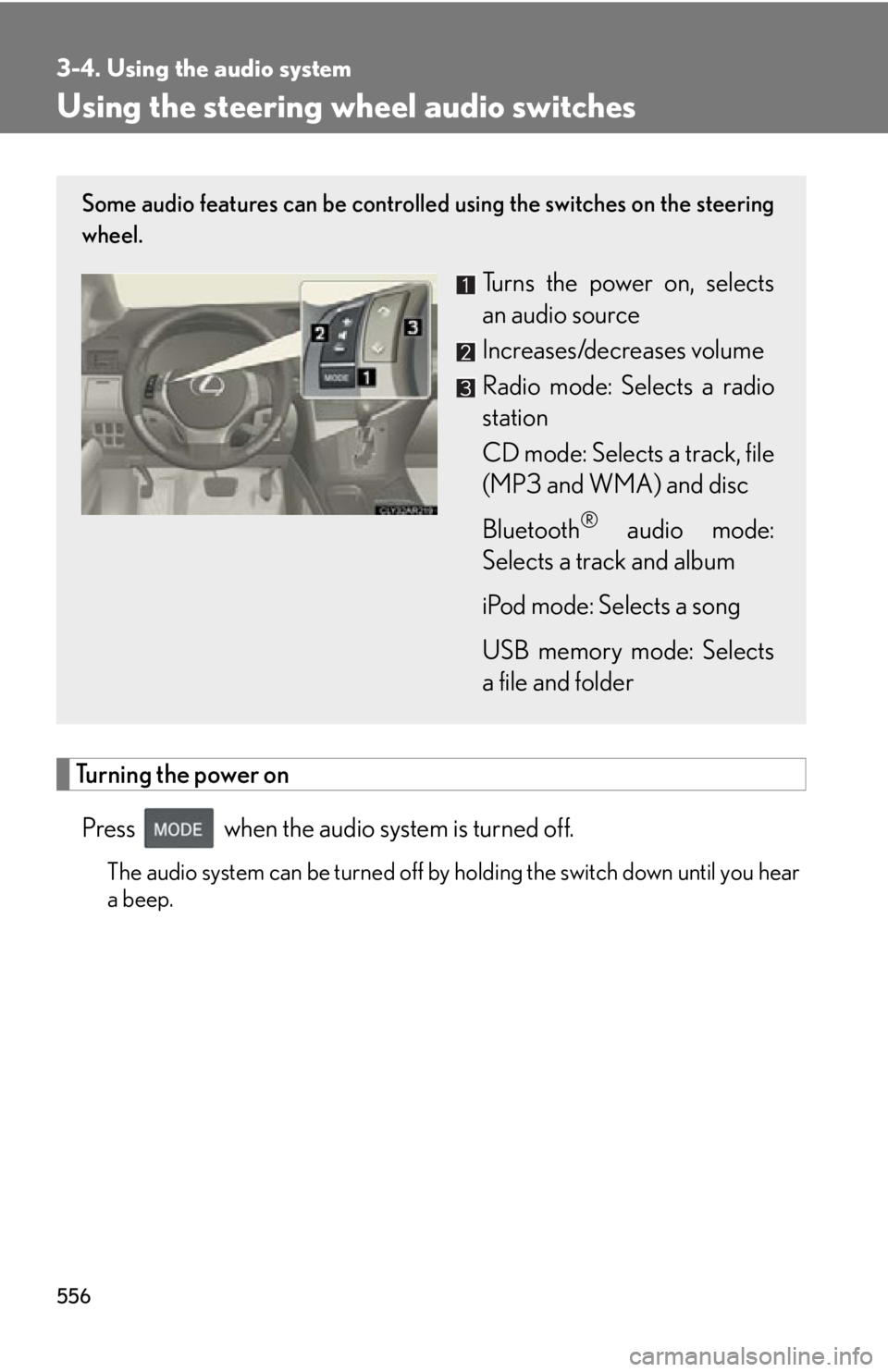
Using the steering wh eel audio switches
Turning the power on
Press when the audio system is turned off. The audio system can be turned off by holding the switch down until you hear
a beep.Some audio features can be controlled using the switches on the steering
wheel.
Turns the power on, selects
an audio source
Increases/decreases volume
Radio mode: Selects a radio
station
CD mode: Selects a track, file
(MP3 and WMA) and disc
Bluetooth ®
audio mode:
Selects a track and album
iPod mode: Selects a song
USB memory mode: Selects
a file and folder
Page 707 of 886
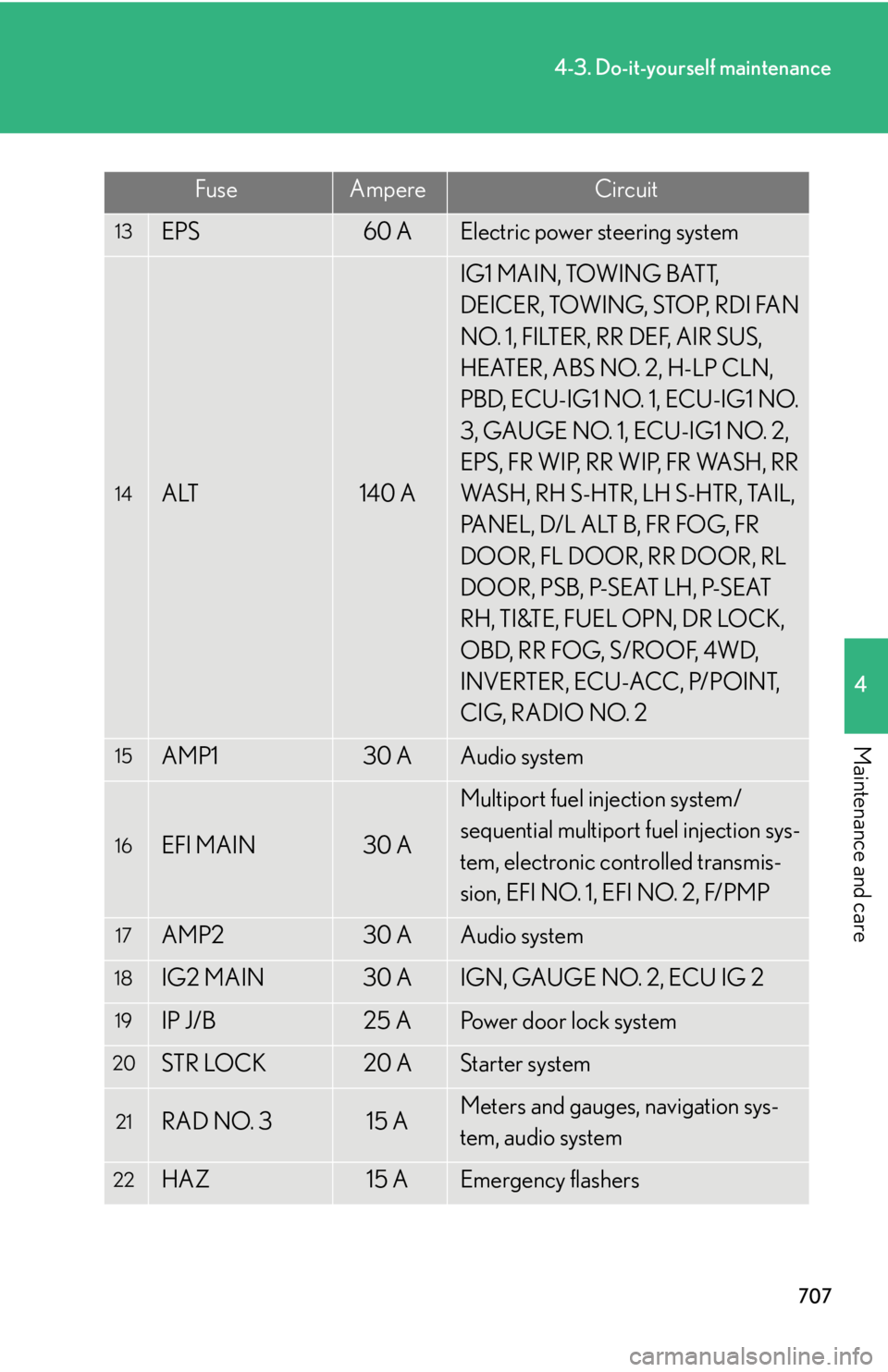
7074-3. Do-it-yourself maintenance
4
Maintenance and care 13
EPS 60 A Electric power steering system
14
ALT 140 A IG1 MAIN, TOWING BATT,
DEICER, TOWING, STOP, RDI FAN
NO. 1, FILTER, RR DEF, AIR SUS,
HEATER, ABS NO. 2, H-LP CLN,
PBD, ECU-IG1 NO. 1, ECU-IG1 NO.
3, GAUGE NO. 1, ECU-IG1 NO. 2,
EPS, FR WIP, RR WIP, FR WASH, RR
WASH, RH S-HTR, LH S-HTR, TAIL,
PANEL, D/L ALT B, FR FOG, FR
DOOR, FL DOOR, RR DOOR, RL
DOOR, PSB, P-SEAT LH, P-SEAT
RH, TI&TE, FUEL OPN, DR LOCK,
O B D, R R F O G, S / R O O F, 4 W D,
INVERTER, ECU-ACC, P/POINT,
CIG, RADIO NO. 215
AMP1 30 A Audio system16
EFI MAIN 30 A Multiport fuel injection system/
sequential multiport fuel injection sys-
tem, electronic controlled transmis-
sion, EFI NO. 1, EFI NO. 2, F/PMP17
AMP2 30 A Audio system18
IG2 MAIN 30 A IGN, GAUGE NO. 2, ECU IG 219
IP J/B 25 A Power door lock system20
STR LOCK 20 A Starter system
21
RAD NO. 3 15 A Meters and gauges, navigation sys-
tem, audio system
22
HAZ 15 A Emergency flashersFuse Ampere Circuit
Page 708 of 886

7084-3. Do-it-yourself maintenance
23
ETCS 10 A Multiport fuel injection system/
sequential multiport fuel injection sys-
tem24
RAD NO. 1 10 A Audio system, navigation system25
AM2 7. 5 A Starter system26
ECU-B NO. 2 7. 5 A Air conditioning system, front passen-
ger occupant classification system,
audio system, vehicle stability control
system, power windows27
MAYDAY/TEL 7. 5 A MAYDAY/TEL28
IMMOBI 7. 5 A IMMOBI29
ALT-S 7. 5 A Charging system30
DRL 7. 5 A Daytime running light system31
IGN 10 A Multiport fuel injection system/
sequential multiport fuel injection sys-
tem32
DOME 10 A Vanity mirror lights, luggage compart-
ment lights, interior lights, personal
lights, door courtesy lights, footwell
lights, scuff lights
33
ECU-B NO. 1 10 A Tilt and telescopic steering, multiplex
communication system, meters and
gauges, driving position memory,
power seats, power back door, head-
up display, starter system, outside rear
view mirror, steering sensor, garage
door openerFuse Ampere Circuit