Page 204 of 886
2042-2. Instrument cluster
■
Electronic features control can be turned on/off when
The “ENGINE START STOP” switch is in IGNITION ON mode.■
Conditions for ending electronic features control
In the following situations, the electronic features control will end: ●
The menu switch is pressed.●
The dynamic radar cruise control is operated (if equipped).●
Intuitive parking assist starts operating (if equipped).●
No action is performed for some time after the electronic features control
screen is displayed.●
A warning message appears after the electronic features control screen is dis-
played.■
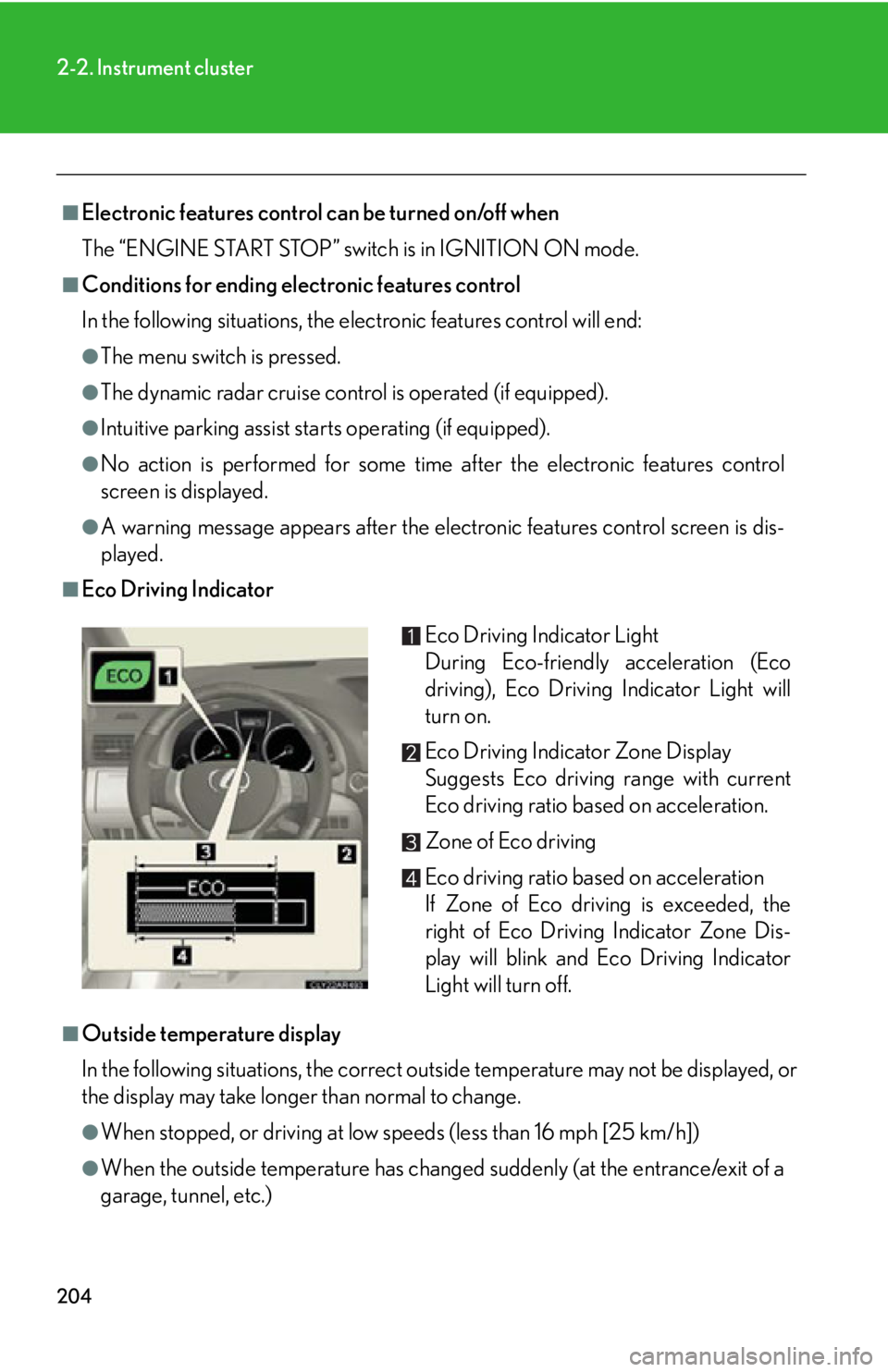
Eco Driving Indicator
■
Outside temperature display
In the following situations, the correct outside temperature may not be displayed, or
the display may take longer than normal to change.
●
When stopped, or driving at low speeds (less than 16 mph [25 km/h])
●
When the outside temperature has changed suddenly (at the entrance/exit of a
garage, tunnel, etc.) Eco Driving Indicator Light
During Eco-friendly acceleration (Eco
driving), Eco Driving Indicator Light will
turn on.
Eco Driving Indicator Zone Display
Suggests Eco driving range with current
Eco driving ratio based on acceleration.
Zone of Eco driving
Eco driving ratio based on acceleration
If Zone of Eco driving is exceeded, the
right of Eco Driving Indicator Zone Dis-
play will blink and Eco Driving Indicator
Light will turn off.
Page 227 of 886
2272
When driving 2-4. Using other driving systems
Cruise control
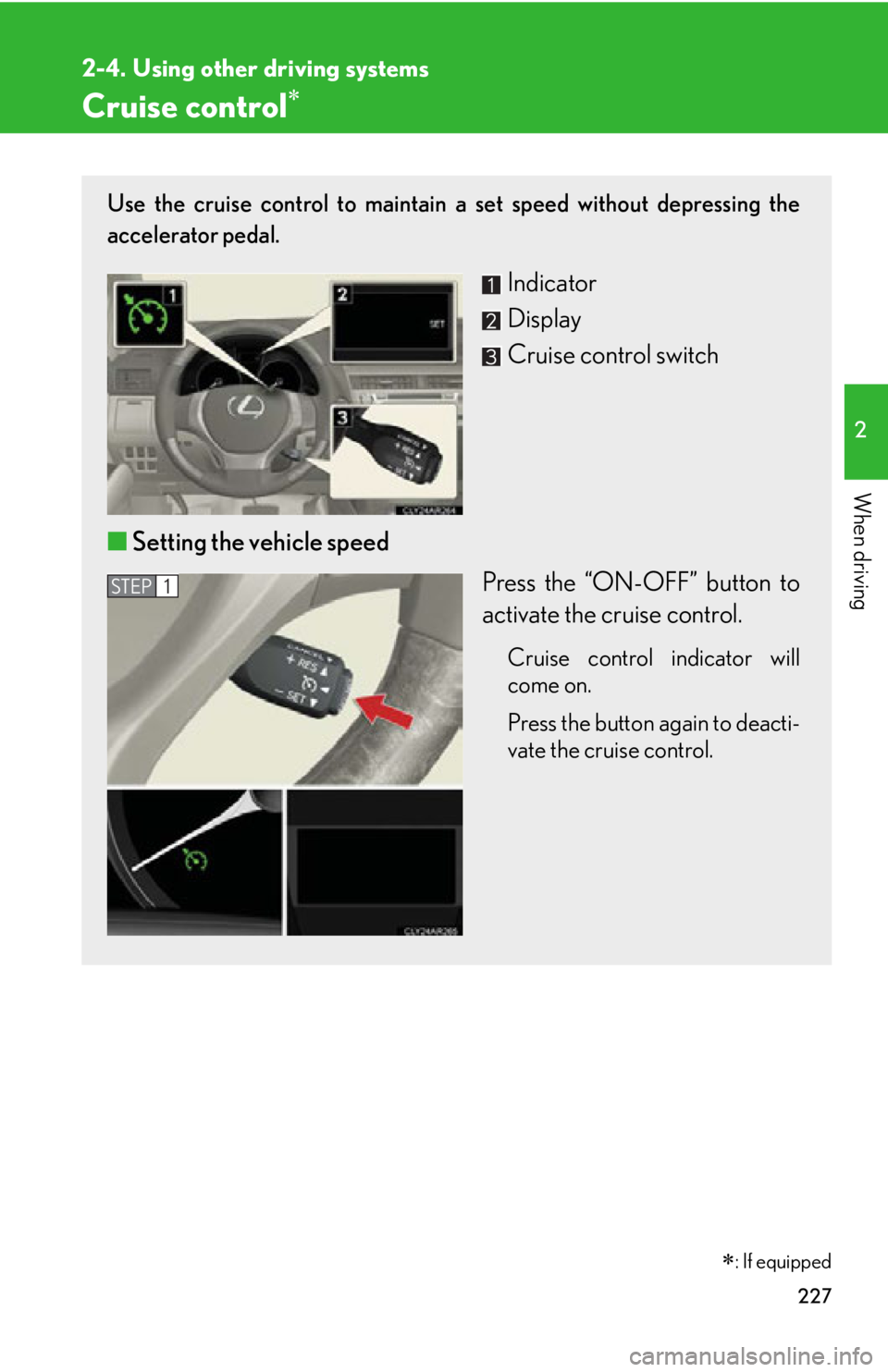
: If equippedUse the cruise control to maintain a set speed without depressing the
accelerator pedal.
Indicator
Display
Cruise control switch
■ Setting the vehicle speed
Press the “ON-OFF” button to
activate the cruise control. Cruise control indicator will
come on.
Press the button again to deacti-
vate the cruise control. STEP 1
Page 230 of 886

2302-4. Using other driving systems
■
Cruise control can be set when ●
The shift lever is in D or range 4 or higher of S has been selected. (vehicles with-
out paddle shift switch)●
The shift lever is in D or range 4 or higher of D has been selected by using the
paddle shift. (vehicles with paddle shift switch)●
Vehicle speed is above 25 mph (40 km/h). ■
Accelerating after setting the vehicle speed ●
The vehicle can be accelerated normally. After acceleration, the set speed
resumes.●
Even without canceling the cruise cont rol, the set speed can be increased by
first accelerating the vehicle to the desired speed and then pushing the lever
down to set the new speed.■
Automatic cruise control cancelation
Cruise control will stop maintaining the ve hicle speed in any of the following situa-
tions. ●
Actual vehicle speed falls more than approximately 10 mph (16 km/h) below the
preset vehicle speed.
At this time, the memorized set speed is not retained.●
Actual vehicle speed is below approximately 25 mph (40 km/h).●
Enhanced VSC is activated. (vehicles with enhanced VSC)●
VSC is activated. (vehicles with VSC)■
If a warning message is shown on the multi-information display
Press the “ON-OFF” button once to deactivate the system, and then press the but-
ton again to reactivate the system.
If the cruise control speed cannot be set or if the cruise control cancels immediately
after being activated, there may be a malfun ction in the cruise control system. Have
the vehicle inspected by your Lexus dealer.
Page 231 of 886
2312-4. Using other driving systems
2
When driving CAUTION■
To avoid operating the cruise control by mistake
Switch the cruise control off using the “ON-OFF” button when not in use.■
Situations unsuitable for cruise control
Do not use cruise control in any of the following situations.
Doing so may result in loss of control and could cause an accident resulting in death
or serious injury. ●
In heavy traffic●
On roads with sharp bends●
On winding roads●
On slippery roads, such as thos e covered with rain, ice or snow●
On steep hills
Vehicle speed may exceed the set speed when driving down a steep hill.●
When your vehicle is towing a trailer or during emergency towing
Page 232 of 886
2322-4. Using other driving systems
Dynamic radar cruise control
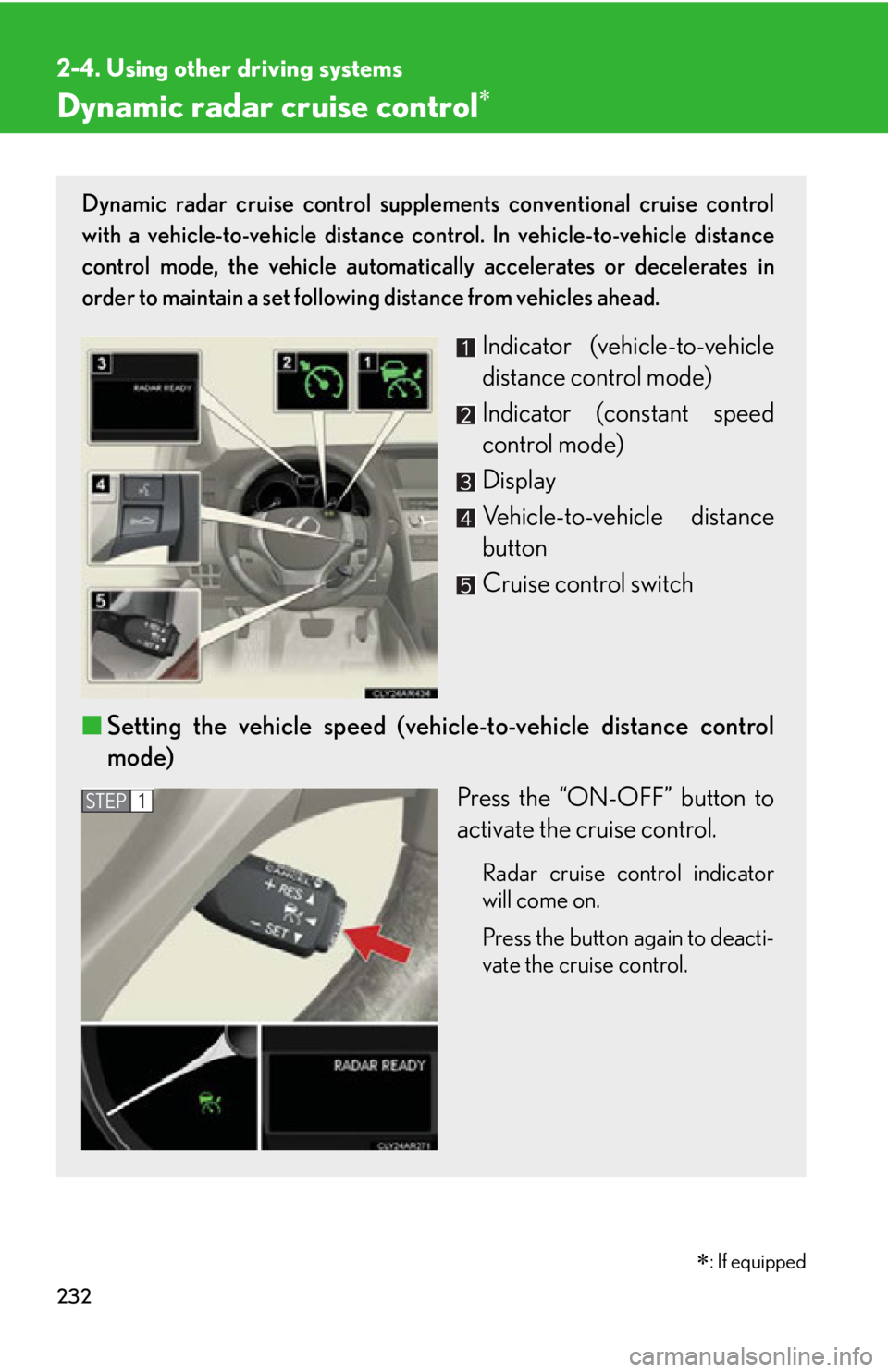
: If equippedDynamic radar cruise control supple ments conventional cruise control
with a vehicle-to-vehicle distance control. In vehicle-to-vehicle distance
control mode, the vehicle automatically accelerates or decelerates in
order to maintain a set following distance from vehicles ahead.
Indicator (vehicle-to-vehicle
distance control mode)
Indicator (constant speed
control mode)
Display
Vehicle-to-vehicle distance
button
Cruise control switch
■ Setting the vehicle speed (vehicle-to-vehicle distance control
mode)
Press the “ON-OFF” button to
activate the cruise control. Radar cruise control indicator
will come on.
Press the button again to deacti-
vate the cruise control. STEP 1
Page 235 of 886
2352-4. Using other driving systems
2
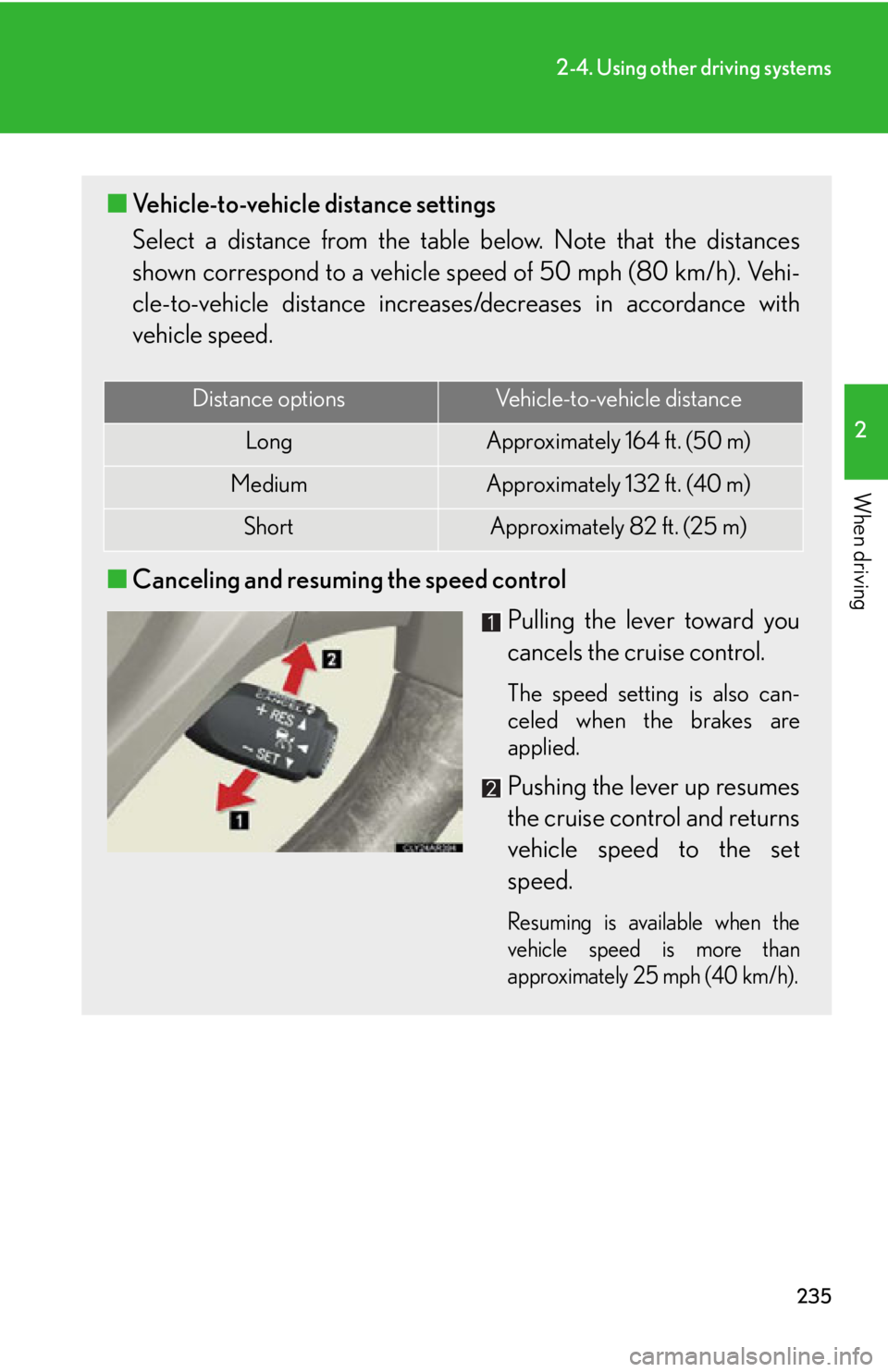
When driving ■ Vehicle-to-vehicle distance settings
Select a distance from the tabl e below. Note that the distances
shown correspond to a vehicle sp eed of 50 mph (80 km/h). Vehi-
cle-to-vehicle distance increases/decreases in accordance with
vehicle speed.
■ Canceling and resuming the speed control
Pulling the lever toward you
cancels the cruise control. The speed setting is also can-
celed when the brakes are
applied.
Pushing the lever up resumes
the cruise control and returns
vehicle speed to the set
speed. Resuming is available when the
vehicle speed is more than
approximately 25 mph (40 km/h).Distance options Vehicle-to-vehicle distance
Long Approximately 164 f t. (50 m)
Medium Approximately 132 ft. (40 m)
Short Approximately 82 ft. (25 m)
Page 237 of 886
2372-4. Using other driving systems
2
When driving Example of follow-up cruising
When following a vehicle driving slower than the set speed The system continues follow-up cruising while adjusting for changes in the
speed of the vehicle ahead in order to maintain the vehicle-to-vehicle dis-
tance set by the driver.
Example of acceleration
When there are no longer any vehicl es ahead driving slower than the
set speed The system accelerates until the set speed is reached. The system then
returns to constant speed cruising.
Approach warning
When your vehicle is too close to a vehicle ahead, and sufficient auto-
matic deceleration via the cruise co ntrol is not possible, the display will
flash and the buzzer will sound to al ert the driver. An example of this
would be if another driver cuts in fron t of you while you are following a
vehicle. Apply the brakes to ensure an appropria te vehicle-to-vehicle dis-
tance.
■ Warnings may not occur when
In the following instances, there is a possibility that the warnings will not
occur:
● When the speed of the vehicle ahead matches or exceeds your
vehicle speed
● When the vehicle ahead is traveling at an extremely slow speed
● Immediately after the cruise control speed was set
● At the instant the accelerator is applied
Page 238 of 886
2382-4. Using other driving systems
Selecting conventional constant speed control mode
Constant speed control mode differs from vehicle-to-vehicle distance
control mode. When constant speed control mode is selected, your vehi-
cle will maintain a set speed regardless of whether or not there are other
vehicles in the lane ahead.
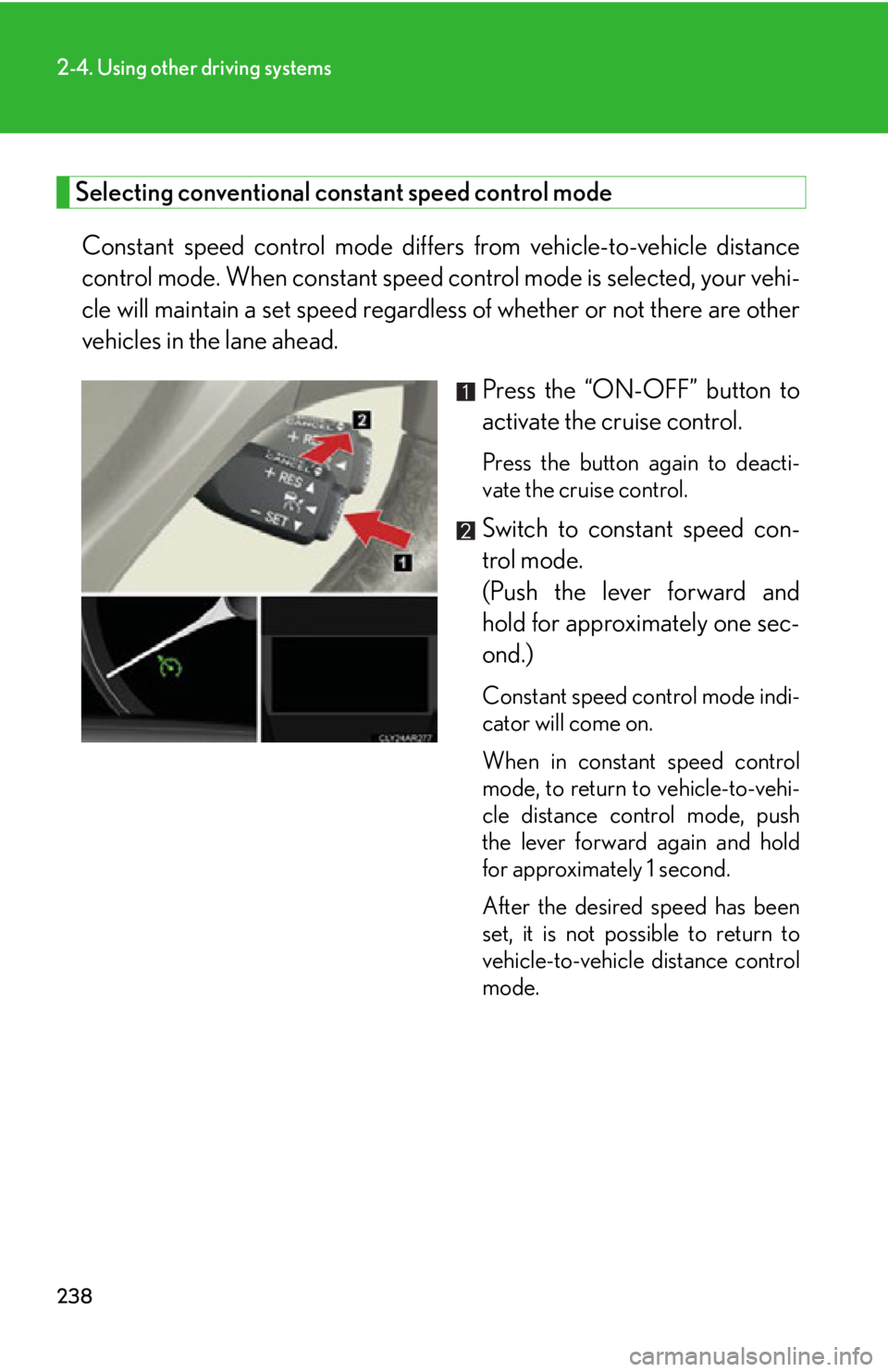
Press the “ON-OFF” button to
activate the cruise control. Press the button again to deacti-
vate the cruise control.
Switch to constant speed con-
trol mode.
(Push the lever forward and
hold for approximately one sec-
ond.) Constant speed control mode indi-
cator will come on.
When in constant speed control
mode, to return to vehicle-to-vehi-
cle distance control mode, push
the lever forward again and hold
for approximately 1 second.
After the desired speed has been
set, it is not possible to return to
vehicle-to-vehicle distance control
mode.