Page 302 of 684

3024-5. Using the driving support systems
RC350/RCF_U (OM24636U)
The areas that vehicles can be detected in are outlined below.
The range of each detection area is: Approximately 1.6 ft. (0.5 m) to 11.5 ft. (3.5 m) from either side of the vehicle
*
*
: The area between the side of the vehicle and 1.6 ft. (0.5 m) from the side of the vehicle cannot be detected.
Approximately 3.3 ft. (1 m) forward of the rear bumper
Approximately 9.8 ft. (3 m) from the rear bumper
Approximately 9.8 ft. (3 m) to 197 ft. (60 m) from the rear bumper
*
*
: The greater the difference in speed between your vehicle and the detected vehicle is, the farther away the vehicle will be detected, causing the outside rear view mirror
indicator to illuminate or flash.
BSM function detection areas
WA R N I N G
■Cautions regarding the use of the function
The driver is solely responsible for safe driving. Always drive safely, taking care to
observe your surroundings.
The BSM function is a supplementary function which alerts the driver that a vehicle is in
a blind spot of the outside rear view mirror s or is approaching rapidly from behind into
a blind spot. Do not overly rely on the BSM fu nction. As the function cannot judge if it is
safe to change lanes, over reliance could lead to an accident resulting in death or seri-
ous injury.
As the system may not function correctly under certain conditions, the driver’s own
visual confirmation of safety is necessary.
1
2
3
4
Page 305 of 684
3054-5. Using the driving support systems
4
Driving
RC350/RCF_U (OM24636U)
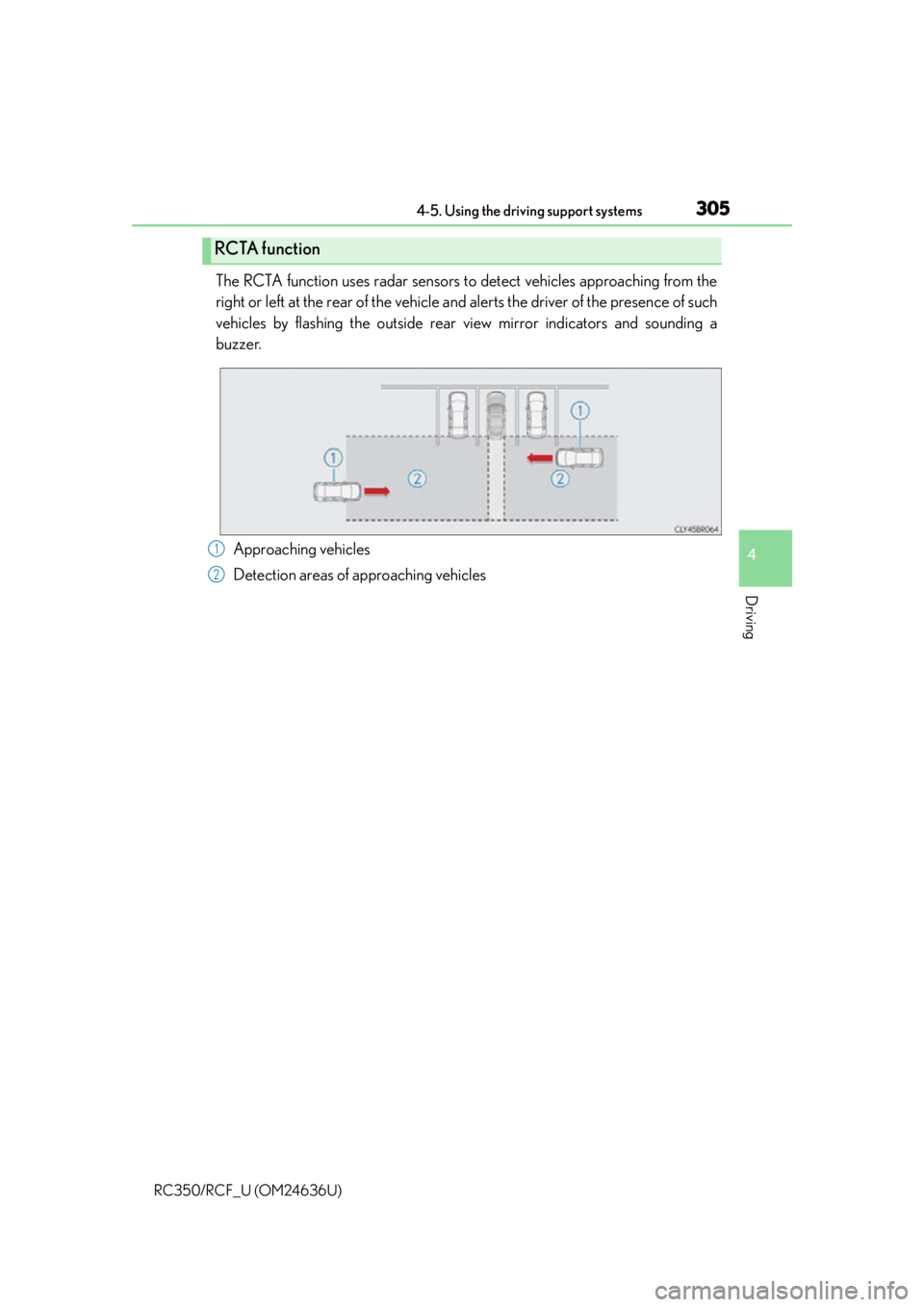
The RCTA function uses radar sensors to detect vehicles approaching from the
right or left at the rear of the vehicle and alerts the driver of the presence of such
vehicles by flashing the outside rear view mirror indicators and sounding a
buzzer.
Approaching vehicles
Detection areas of approaching vehicles
RCTA function
1
2
Page 306 of 684

3064-5. Using the driving support systems
RC350/RCF_U (OM24636U)
■RCTA icon display (if equipped)
When a vehicle approaching from the right or left at the rear of the vehicle is
detected, the following will be displayed on the monitor screen.
DisplayContent
A vehicle is approaching from the left at the rear of the vehicle
A vehicle is approaching from the right at the rear of the vehicle
Vehicles are approaching from both sides of the vehicle
The RCTA function is malfunctioning
( P. 299)
WA R N I N G
■Cautions regarding the use of the function
The driver is solely responsible for safe driving. Always drive safely, taking care to
observe your surroundings.
The RCTA function is only a supplementary fu nction which alerts the driver that a vehi-
cle is approaching from the right or left at the rear of the vehicle. As the RCTA function
may not function correctly under certain conditions, the driver’s own visual confirma-
tion of safety is necessary. Over reliance on this function may lead to an accident
resulting death or serious injury.
Page 307 of 684
3074-5. Using the driving support systems
4
Driving
RC350/RCF_U (OM24636U)
The areas that vehicles can be detected in are outlined below.
The buzzer can alert the driver of faster vehicles approaching from farther away.
Example:
■The RCTA function is operational when
The RCTA function operates when all of the following conditions are met:
●The BSM main switch is on.
●The shift lever is in R.
●The vehicle speed is less than approximately 5 mph (8 km/h).
●The approaching vehicle speed is between approximately 5 mph (8 km/h) and 18 mph
(28 km/h).
RCTA function detection areas
Approaching vehicleSpeedApproximate
alert distance
Fast18 mph (28 km/h)65 ft. (20 m)
Slow5 mph (8 km/h)18 ft. (5.5 m)
1
Page 314 of 684

3144-5. Using the driving support systems
RC350/RCF_U (OM24636U)
■Automatic cancelation of the selected TVD control mode
SLALOM and TRACK mode are canceled when the engine switch is turned off. When
the engine switch is turned to IGNITION ON mode, the TVD system will be in STAN-
DARD mode.
■Automatic disabling of the TVD system
If a malfunction is de tected in the TVD system, a warn ing message will be displayed on
the multi-information display ( P. 548) and the TVD system will be disabled automati-
cally. If the system is disabled, driving force will not be distributed by the TVD but through
normal differential operation.
■To protect the system
The TVD fluid temperature may become excessively high when driving for a long time
under extremely high load conditions. In th is case, a warning message will be displayed
on the multi-information display. ( P. 5 4 9 )
WA R N I N G
■Cautions regarding the use of the system
The driver is solely responsible for safe driv ing. Do not overly rely on the TVD system.
Always drive safely, taking care to observe your surroundings.
Page 419 of 684
4196-1. Using the air conditioning system
6
Interior features
RC350/RCF_U (OM24636U)
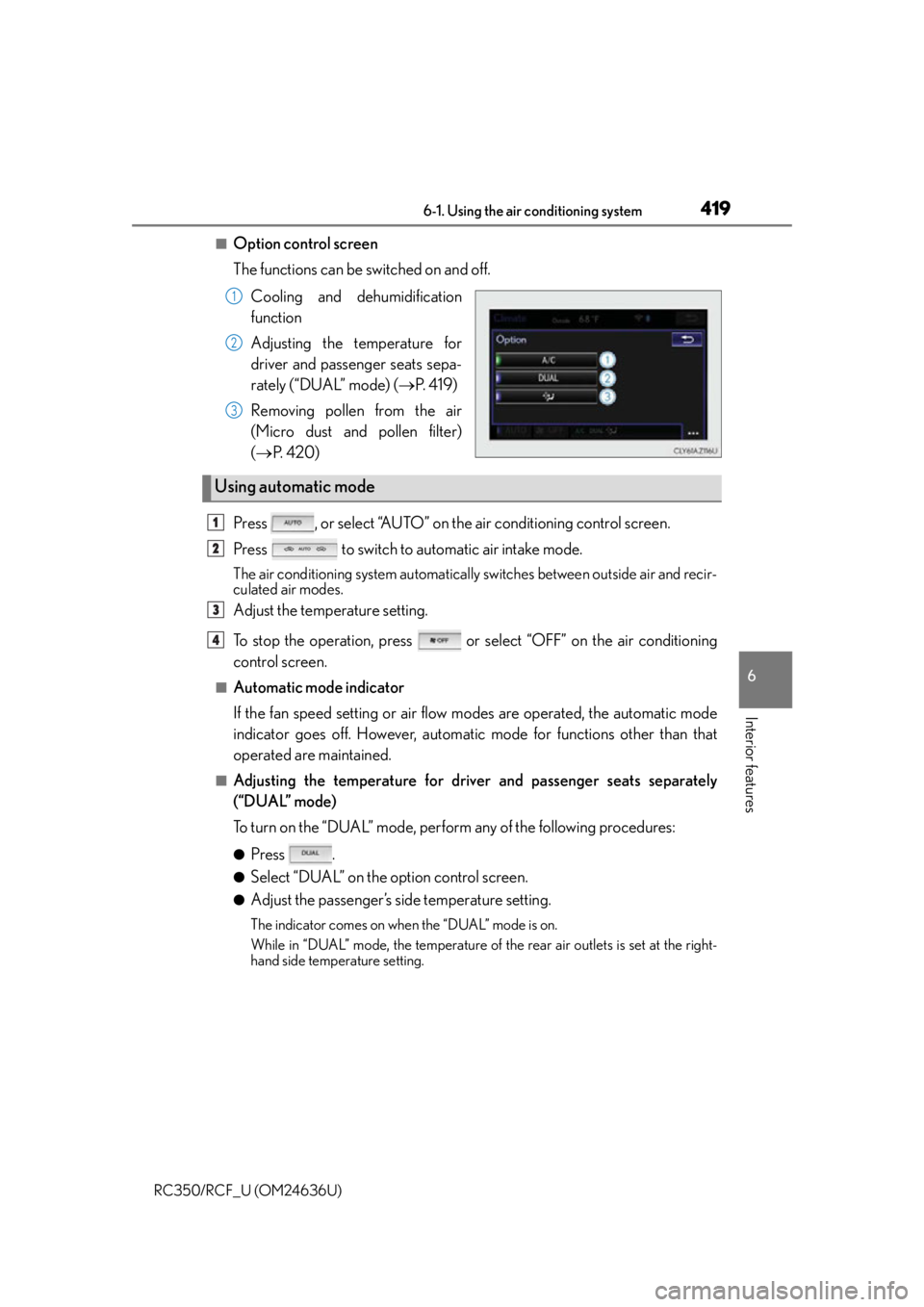
■Option control screen
The functions can be switched on and off.Cooling and dehumidification
function
Adjusting the temperature for
driver and passenger seats sepa-
rately (“DUAL” mode) ( P. 4 1 9 )
Removing pollen from the air
(Micro dust and pollen filter)
( P. 4 2 0 )
Press , or select “AUTO” on the air conditioning control screen.
Press to switch to automatic air intake mode.
The air conditioning system automatically switches between outside air and recir-
culated air modes.
Adjust the temperature setting.
To stop the operation, press or select “OFF” on the air conditioning
control screen.
■Automatic mode indicator
If the fan speed setting or air flow modes are operated, the automatic mode
indicator goes off. However, automati c mode for functions other than that
operated are maintained.
■Adjusting the temperature for driver and passenger seats separately
(“DUAL” mode)
To turn on the “DUAL” mode, perform any of the following procedures:
●Press .
●Select “DUAL” on the option control screen.
●Adjust the passenger’s side temperature setting.
The indicator comes on when the “DUAL” mode is on.
While in “DUAL” mode, the temperature of the rear air outlets is set at the right-
hand side temperature setting.
1
2
3
Using automatic mode
1
2
3
4
Page 426 of 684

4266-1. Using the air conditioning system
RC350/RCF_U (OM24636U)
●The heated steering wheel can be used when the engine switch is in IGNITION ON
mode.
●The heated steering wheel will automati cally turn off after about 30 minutes.
Each time the switch is pressed, the
intensity of the seat heater changes and
the level indicator lights (amber) light
as follows:
Hi (3 segments lit) Mid (2 segments
lit) Lo (1 segment lit) Off
■The seat heaters can be used when
The engine switch is in IGNITION ON mode.
■Seat heater timer control
To enable seat heater timer control, press and hold the driver and front passenger seat
heater switches at the same time when the vehicle is stopped until a buzzer sounds once.
If a seat heater is turned on while seat heater timer control is enabled, the intensity of the
seat heater will automatically change from Hi Mid Lo.
The timing of the change in seat heater intensity differs depending on the temperature
inside the cabin, etc. when the seat heater is operating.
To disable seat heater timer control, press and hold the driver and front passenger seat
heater switches at the same time until a buzzer sounds twice.
Seat heaters
Type A Type B
Page 452 of 684

4526-4. Using the other interior features
RC350/RCF_U (OM24636U)
Subscribers have the following Safety Connect services available:
●Automatic Collision Notification*
Helps drivers receive necessary response from emergency service providers.
( P. 4 5 3 )
*: U.S. Patent No. 7,508,298 B2
●Stolen Vehicle Location
Helps drivers in the event of vehicle theft. ( P. 4 5 4 )
●Emergency Assistance Button (“SOS”)
Connects drivers to resp onse-center support. (P. 4 5 4 )
●Enhanced Roadside Assistance
Provides drivers various on-road assistance. ( P. 4 5 4 )
After you have signed the Telematics Subscription Service Agreement and are
enrolled, you can begin receiving services.
A variety of subscription terms is available for purchase. Contact your Lexus
dealer, call 1-800-25-LEXUS (1-800-255-3987) or push the “SOS” button in
your vehicle for further subscription details.
■Safety Connect Services Information
●Phone calls using the vehicles Bluetooth® technology will not be possible during Safety
Connect.
●Safety Connect is available beginning Fall 2009 on select Lexus models. Contact with
the Safety Connect response center is dependent upon the telematics device being in
operative condition, cellular connection ava ilability, and GPS satellite signal reception,
which can limit the ability to reach the resp onse center or receive emergency service
support. Enrollment and Telematics Subscr iption Service Agreement required. A vari-
ety of subscription terms is available; ch arges vary by subscription term selected.
●Automatic Collision Notification, Emergency Assistance and Stolen Vehicle Location
will function in the United States, including Hawaii and Alaska, and in Canada, and
Enhanced Roadside Assistance will function in the United States (except Hawaii) and in
Canada. No Safety Connect services will function outside of the United States in coun-
tries other than Canada.
●Safety Connect services are not subject to section 255 of the Telecommunications Act
and the device is not TTY compatible.
■Languages
The Safety Connect resp onse center will offer support in multiple languages. The Safety
Connect system will offer voice prompts in English and Spanish. Please indicate your lan-
guage of choice when enrolling.
■When contacting the response center
You may be unable to contact the resp onse center if the network is busy.
Services
Subscription