Page 566 of 684
5668-2. Steps to take in an emergency
RC350/RCF_U (OM24636U)
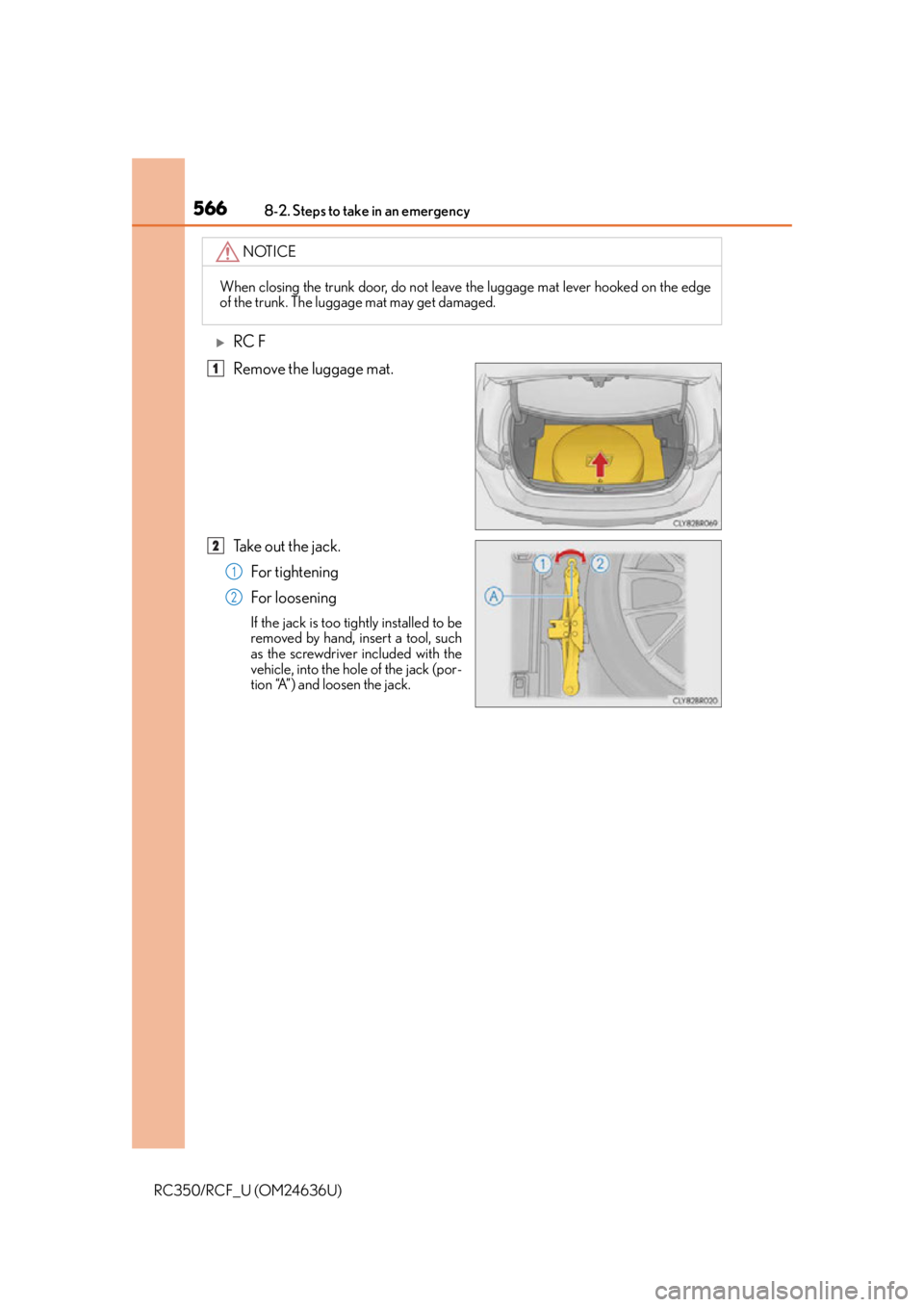
RC F
Remove the luggage mat.
Take out the jack.For tightening
For loosening
If the jack is too tightly installed to be
removed by hand, insert a tool, such
as the screwdriver included with the
vehicle, into the hole of the jack (por-
tion “A”) and loosen the jack.
NOTICE
When closing the trunk door, do not leave the luggage mat lever hooked on the edge
of the trunk. The luggage mat may get damaged.
1
2
1
2
Page 575 of 684
5758-2. Steps to take in an emergency
8
When trouble arises
RC350/RCF_U (OM24636U)
*: Use of the jack (P. 5 6 8 )
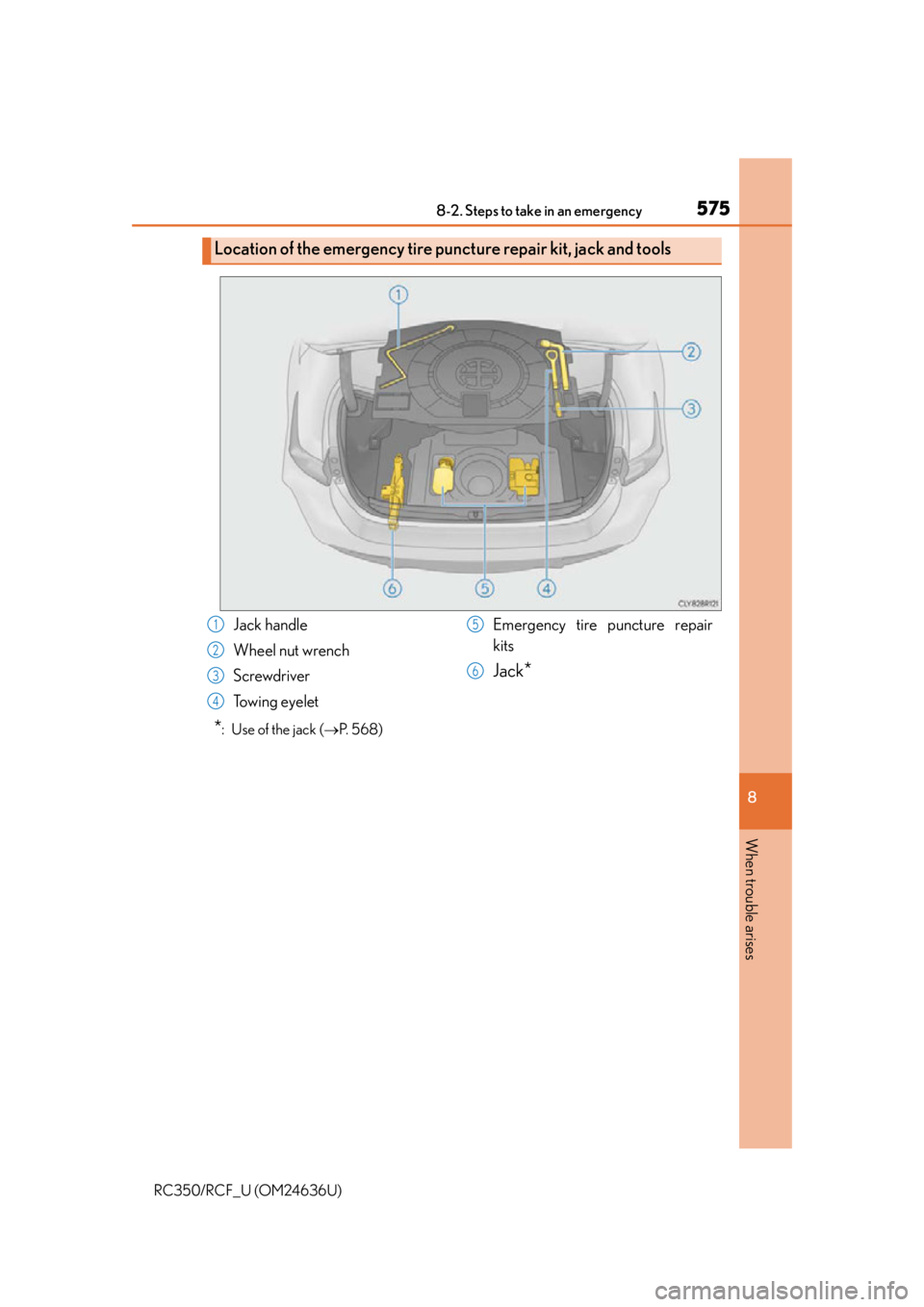
Location of the emergency tire puncture repair kit, jack and tools
Jack handle
Wheel nut wrench
Screwdriver
Towing eyelet Emergency tire puncture repair
kits
Jack*
1
2
3
4
5
6
Page 589 of 684
5898-2. Steps to take in an emergency
8
When trouble arises
RC350/RCF_U (OM24636U)
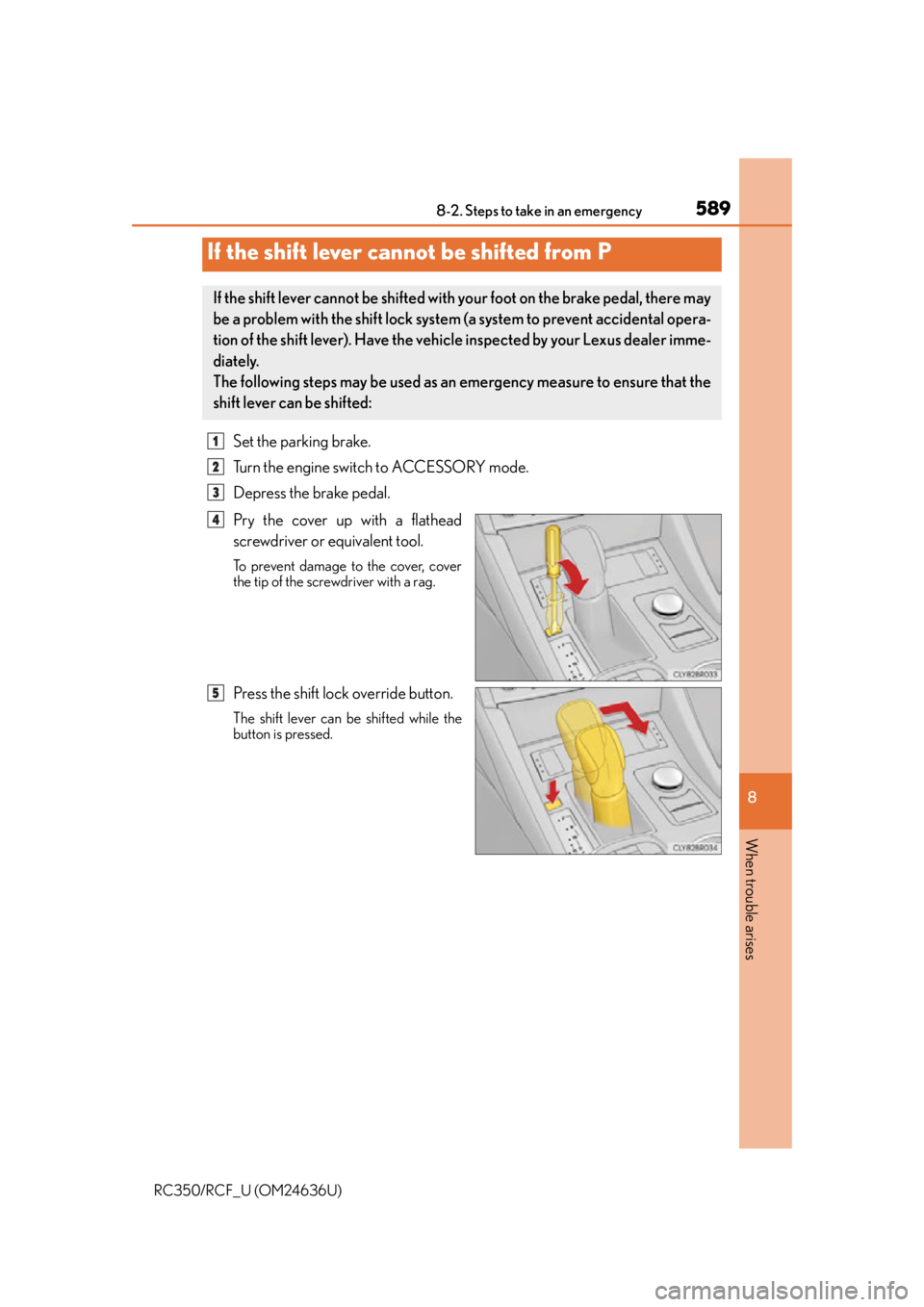
Set the parking brake.
Turn the engine switch to ACCESSORY mode.
Depress the brake pedal.
Pry the cover up with a flathead
screwdriver or equivalent tool.
To prevent damage to the cover, cover
the tip of the screwdriver with a rag.
Press the shift lock override button.
The shift lever can be shifted while the
button is pressed.
If the shift lever cannot be shifted from P
If the shift lever cannot be shifted with your foot on the brake pedal, there may
be a problem with the shift lock system (a system to prevent accidental opera-
tion of the shift lever). Have the vehicl e inspected by your Lexus dealer imme-
diately.
The following steps may be used as an emergency measure to ensure that the
shift lever can be shifted:
1
2
3
4
5
Page 590 of 684
5908-2. Steps to take in an emergency
RC350/RCF_U (OM24636U)
Use the mechanical key (P. 131) in order to perform the following operations:
■Unlocking the door
Insert the mechanical key while
pulling on the driver’s door han-
dle.
Unlocking the door.
Remove the key, return the handle, and then pull the handle again.
If the electronic key does not operate properly
If communication between the electronic key and vehicle is interrupted ( P.
148) or the electronic key cannot be used because the battery is depleted,
the smart access system with push-button start and wireless remote control
cannot be used. In such cases, the doors and trunk can be opened and the
engine can be started by fo llowing the procedure below.
Locking and unlocking the doors and opening the trunk
1
2
3
Page 591 of 684
5918-2. Steps to take in an emergency
8
When trouble arises
RC350/RCF_U (OM24636U)
■Locking the doorMove the inside lock button to the
lock position.
Close the door.
■Opening the trunk
Turn the mechanical key clockwise
to open.
■Key linked functions
*: These settings must be cust omized at your Lexus dealer.
1
2
Locks both side door
Closes the windows and moon roof (if
equipped) (turn and hold)
*
Unlocks the door
Turning the key rearward unlocks the driver’s
door. Turning the key again unlocks the other
door.
Opens the windows and moon roof (if
equipped) (turn and hold)
*
1
22
33
44
Page 639 of 684

6399-2. Customization
9
Vehicle specifications
RC350/RCF_U (OM24636U)
■Door lock (P. 135, 141, 590)
■Smart access system with push-button start and wireless remote control
( P. 135, 141)
FunctionDefault settingCustomized setting
Unlocking using a mechani-
cal key
Driver’s door
unlocked in one
step, both side
doors unlocked in two stepsBoth side doors
unlocked in one step
——O
Automatic door lockShifting the shift
lever to position
other than P
Off
O—OVehicle speed is
approximately 12
mph (20 km/h) or higher
Automatic door unlockShifting the shift
lever to POff
O—ODriver’s door is opened
Locking/unlocking of the
trunk when both side doors
are locked/unlocked
OnOff——O
123
FunctionDefault settingCustomized setting
Operation buzzer volume5OffO—O1 to 7
Operation signal (Emer-
gency flashers)OnOffO—O
Time elapsed before auto-
matic door lock function is
activated if door is not
opened after being
unlocked
60 seconds
Off
O—O30 seconds
120 seconds
Open door warning buzzerOnOff——O
Welcome light illumination
controlOnOff——O
123
Page 640 of 684

6409-2. Customization
RC350/RCF_U (OM24636U)
■Smart access system with push-button start ( P. 135, 141, 146)
■Wireless remote control ( P. 130, 135, 141)
■Driving position memory* ( P. 1 5 7 )
*: If equipped
■Steering wheel ( P. 1 6 4 )
*:If equipped
FunctionDefault settingCustomized setting
Smart access system with
push-button startOnOff——O
Smart door unlockingDriver’s doorBoth side doorsO—O
Number of consecutive
door lock operations2 timesAs many as desired——O
123
FunctionDefault settingCustomized setting
Wireless remote controlOnOff——O
Unlocking operation
Driver’s door
unlocked in one step, both side
doors unlocked in two steps
Both side doors
unlocked in one
stepO—O
Trunk unlocking operationPress and hold (short)
One short press
——O
Push twice
Press and hold (long)
Off
Alarm (panic mode)OnOff——O
123
FunctionDefault settingCustomized setting
Selecting the door linking
driving position memory
with door unlock operation
Driver’s doorBoth side doors——O
123
FunctionDefault settingCustomized setting
Auto tilt away function*OnOff——O
123
Page 661 of 684

661What to do if... (Troubleshooting)
RC350/RCF_U (OM24636U)
●Did you press the engine switch while firmly depressing the brake pedal?
(P. 1 9 3 )
●Is the shift lever in P? ( P. 1 9 6 )
●Is the electronic key anywhere detectable inside the vehicle? ( P. 1 4 6 )
●Is the steering wheel unlocked? ( P. 1 9 6 )
●Is the electronic key battery weak or depleted?
In this case, the engine can be started in a temporary way. (P. 5 9 2 )
●Is the battery discharged? ( P. 5 9 3 )
●Is the engine switch in IGNITION ON mode?
If you cannot release the shift lever by depressing the brake pedal with the
engine switch in IGNITION ON mode. ( P. 5 8 9 )
●It is locked automatically to prevent theft of the vehicle. ( P. 1 9 6 )
●Is the window lock switch pressed?
The power window except for the one at the driver’s seat cannot be operated
if the window lock switch is pressed. ( P. 171)
●The auto power off function will be oper ated if the vehicle is left in ACCES-
SORY or IGNITION ON mode (the engine is not running) for a period of
time. ( P. 1 9 6 )
If you think something is wrong
The engine does not start
The shift lever cannot be shifted from P even if you depress the brake
pedal
The steering wheel cannot be turned after the engine is stopped
The windows do not open or close by operating the power window
switches
The engine switch is turned off automatically