Page 85 of 681

851-2. Hybrid system
1
For safety and security
NX300h_U_OM78007U WA R N I N G ■
Hybrid battery (traction battery) ●
Never resell, hand over or modify the hybrid battery. To prevent accidents, hybrid
batteries that have been removed from a disposed vehicle are collected through
Lexus dealer. Do not dispose of the battery yourself.
Unless the battery is properly collected, th e following may occur, resulting in death
or serious injury:
• The hybrid battery may be illegally dispos ed of or dumped, and it is hazardous to
the environment or someone may touch a high voltage part, resulting in an electric
shock.
• The hybrid battery is intended to be used exclusively with your hybrid vehicle. If
the hybrid battery is used outside of your vehicle or modified in any way, accidents
such as electric shock, heat generation , smoke generation, an explosion and elec-
trolyte leakage may occur.
When reselling or handing over your ve hicle, the possibility of an accident is
extremely high because the person receiving the vehicle may not be aware of these
dangers. ●
If your vehicle is disposed of without the hybrid battery having been removed, there is
a danger of serious electric shock if high voltage parts, cables and their connectors
are touched. In the event that your vehicle must be disposed of, the hybrid battery
must be disposed of by your Lexus dealer or a qualified service sh op. If the hybrid bat-
tery is not disposed of properly, it may caus e electric shock that can result in death or
serious injury.
NOTICE ■
Hybrid battery (traction battery) air intake and discharge vents ●
Do not place objects that will block the air intake vents. The hybrid battery (traction
battery) may have a reduction in hybrid batt ery (traction battery) output as well as be
damaged. ●
Clean the air intake and discharge vents regularly to prevent the hybrid battery (trac-
tion battery) from overheating. ●
Do not get water or foreign materials in either the air intake and discharge vents as
this may cause a short circuit and damage the hybrid battery (traction battery). ●
Do not carry large amounts of water such as water cooler bottles in the vehicle. If
water spills onto the hybrid battery (traction battery), the battery may be damaged.
Have the vehicle inspected by your Lexus dealer.
Page 86 of 681

86 1-3. Theft deterrent system
NX300h_U_OM78007UImmobilizer system The indicator light flashes after the
power switch has been turned off to
indicate that the system is operating.
The indicator light stops flashing after
the power switch has been turned to
ACCESSORY or ON mode to indi-
cate that the system has been canceled. ■
System maintenance
The vehicle has a maintenance-free type immobilizer system. ■
Conditions that may cause the system to malfunction ●
If the grip portion of the key is in contact with a metallic object●
If the key is in close proximity to or touching a key registered to the security system (key
with a built-in transponder chip) of another vehicle ■
Certification for the immobilizer system
For vehicles sold in the U.S.A.
FCC ID: NI4TMIMB-3
This device complies with part 15 of the FC C Rules. Operation is subject to the following
two conditions: (1) This device may not caus e harmful interference, and (2) this device
must accept any interference received, incl uding interference that may cause undesired
operation.
Changes or modifications not expressly approved by the party responsible for compli-
ance could void the user’s authority to operate the equipment.
For vehicles sold in Canada
This device complies with Industry Canada licence-exempt RSS st andard(s). Operation
is subject to the following two conditions: (1) this device may not cause interference, and
(2) this device must accept any interference, including interference that may cause
undesired operation of the device.The vehicle’s keys have built-in transponder chips that prevent the hybrid sys-
tem from starting if a key has not been previously registered in the vehicle’s
on-board computer.
Never leave the keys inside the vehicle when you leave the vehicle.
This system is designed to help prevent vehicle theft but does not guarantee
absolute security against all vehicle thefts.
Page 87 of 681
871-3. Theft deterrent system
1
For safety and security
NX300h_U_OM78007U WA R N I N G ■
Certifications for the immobilizer system
Changes or modifications not expressly approved by the party responsible for compli-
ance could void the user’s authority to operate the equipment.
NOTICE ■
To ensure the system operates correctly
Do not modify or remove the system. If modified or removed, the proper operation of
the system cannot be guaranteed.
Page 89 of 681

891-3. Theft deterrent system
1
For safety and security
NX300h_U_OM78007U ■
System maintenance
The vehicle has a maintenance-free type alarm system. ■
Items to check before locking the vehicle
To prevent unexpected triggering of the alarm and vehicle theft, make sure of the follow-
ing: ●
Nobody is in the vehicle. ●
The windows and moon roof (if equipped) are closed before the alarm is set. ●
No valuables or other personal items are left in the vehicle. ■
Triggering of the alarm
The alarm may be triggered in the following situations:
(Stopping the alarm deactivates the alarm system.)
■
Alarm-operated door lock
The door automatically locks when the following occurs: ●
When a person remaining in the vehicle unlocks the door and the alarm is activated. ●
While the alarm is activated, a person re maining in the vehicle unlocks the door.●
A person inside the vehicle opens a door or
hood, or unlocks the vehicle using an inside
lock button. ●
The 12-volt battery is recharged or replaced
when the vehicle is locked. ( P. 5 9 7 )
NOTICE ■
To ensure the system operates correctly
Do not modify or remove the system. If modified or removed, the proper operation of
the system cannot be guaranteed.
Page 95 of 681

952. Instrument cluster
2
Instrument cluster
NX300h_U_OM78007U * 1
: These lights turn on when the power switch is turned to the ON mode to indicate that
a system check is being performed. They will turn off after the hybrid system is on, or
after a few seconds. There may be a malfunctio n in a system if the lights do not turn on,
or turn off. Have the vehicle inspected by your Lexus dealer.
* 2
: The light flashes to indicate that the system is operating.
* 3
: The light comes on when the system is turned off.
* 4
: When the outside temperature is approximately 37 F (3 C) or lower, the indicator
will flash for approximately 10 seconds, then stay on.* 8
Cruise control “SET”
indicator
( P. 240, 253, 267) (U.S.A.)
Parking brake indicator
( P. 213, 214)
* 8
Cruise control indicator
( P. 240, 253, 267) (Canada)
Parking brake indicator
( P. 213, 214)
* 8
(if equipped)
LDA indicator ( P. 2 7 0 )
* 1
Brake hold standby
indicator ( P. 2 1 6 )
* 8
(if equipped)
Steering control indicator
( P. 2 7 0 )
* 1
Brake hold operated
indicator ( P. 2 1 6 )
(if equipped)
Intuitive parking assist
indicator ( P. 2 7 9 )
* 4, 8
Low outside temperature
indicator ( P. 9 7 )
* 1, 2
Slip indicator light
( P. 3 0 6 ) * 5, 6
(if equipped)
BSM outside rear view
mirror indicators ( P. 3 1 6 )
* 1
VSC OFF indicator
( P. 3 0 7 )
* 7
Security indicator
( P. 86, 88)
* 1, 3
(if equipped)
PCS warning light
( P. 311) * 7
“A I R B A G O N / O F F ”
indicator ( P. 5 3 )
Page 124 of 681

124 3-2. Opening, closing and locking the doors
NX300h_U_OM78007USide doors ◆ Smart access system with push-button start
Carry the electronic key to enable this function.
Grip the driver’s door handle to
unlock the door. Grip any passen-
ger door handle to unlock all the
doors.
* Make sure to touch the sensor on the
back of the handle.
The doors cannot be unlocked for
3 seconds after the doors are locked.
* : The door unlock settings can be
changed. ( P. 1 2 7 , 635)
Touch the lock sensor (the indentation on the surface of the door handle) to
lock all the doors. Check that the door is securely locked.,
◆ Wireless remote control
Locks all the doors Check that the door is securely
locked.
Unlocks all the doors Pressing the button unlocks the
driver’s door. Pressing the button
again within 3 seconds unlocks the
other doors.
Press and hold to open the windows
and moon roof
* 1, 2
* 1
: If equipped
* 2
: This setting must be customized at your Lexus dealer.The vehicle can be locked and unlock ed using the entry function, wireless
remote control or door lock switch.
Locking and unlocking the doors from the outside 1
2
1
2
Page 125 of 681
1253-2. Opening, closing and locking the doors
3
Operation of each component
NX300h_U_OM78007U ■
Operation signals
Doors:
A buzzer sounds and the emergency flashers flash to indicate that the doors have been
locked/unlocked. (Locked: Once; Unlocked: Twice)
Windows:
A buzzer sounds to indicate that all windows are opening. ■
Security feature
If a door is not opened within approximately 60 seconds after the vehicle is unlocked, the
security feature automatically locks the vehicle again. ■
Welcome light illumination control
The side marker, parking, tail and license plat e lights automatically turn on at night when
the doors are unlocked using the entry functi on or wireless remote control if the light
switch is in the “AUTO” position. ■
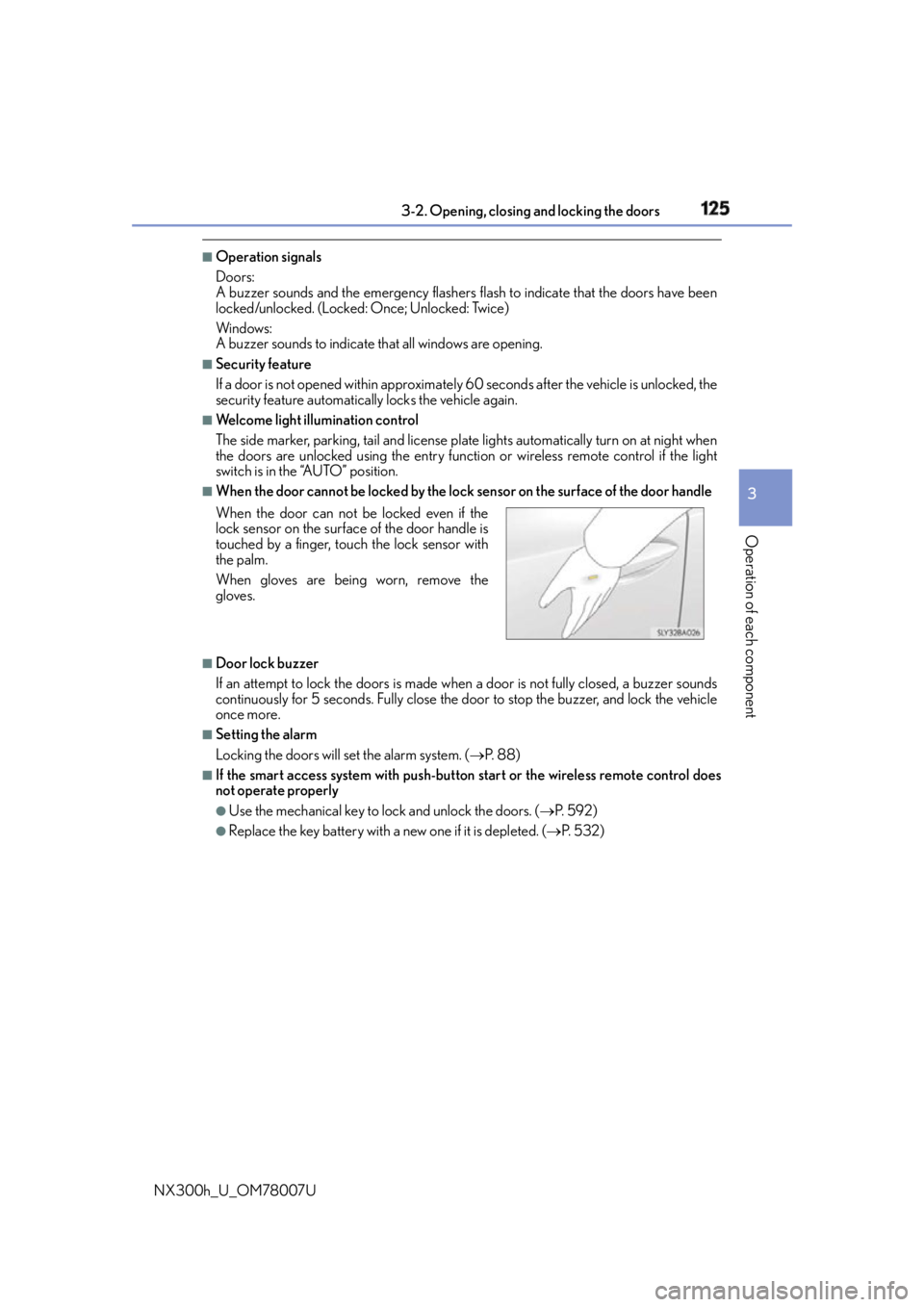
When the door cannot be locked by the lock sensor on the surface of the door handle
■
Door lock buzzer
If an attempt to lock the doors is made when a door is not fully closed, a buzzer sounds
continuously for 5 seconds. Fully close the door to stop the buzzer, and lock the vehicle
once more. ■
Setting the alarm
Locking the doors will set the alarm system. ( P. 88)■
If the smart access system with push-butto n start or the wireless remote control does
not operate properly ●
Use the mechanical key to lock and unlock the doors. ( P. 5 9 2 )●
Replace the key battery with a new one if it is depleted. ( P. 5 3 2 )When the door can not be locked even if the
lock sensor on the surfac e of the door handle is
touched by a finger, touch the lock sensor with
the palm.
When gloves are being worn, remove the
gloves.
Page 129 of 681
1293-2. Opening, closing and locking the doors
3
Operation of each component
NX300h_U_OM78007UBack door ◆ Smart access system with push-button start
Carry the electronic key to enable
this function.
Locks all the doors Check that the door is securely
locked.
Unlocks all the doors The doors cannot be unlocked for 3
seconds after the doors are locked.
◆ Wireless remote control
P. 1 2 4
◆ Door lock switch
P. 1 2 6
Press the switch for 1 second. With the customization feature, it can be
set up so that it can operate even when
the back door is unlocked. ( P. 636)The back door can be locked/unlocked and opened/closed by the following
procedures.
Locking and unlocking the back door 1
2
Opening/closing the back door with the wireless remote control (vehi-
cles with a power back door)

