Page 64 of 960

641-2. Opening, closing and locking the doors
LX570_OM_OM60L96U_(U) CAUTION■
Power back door
Observe the following precautions when operating the power back door.
Failure to do so may caus e death or serious injury.●
Check the safety of the surrounding area to make sure there are no obstacles or
anything that could cause any of your belongings to get caught. ●
If anyone is in the vicinity, make sure they are safe and let them know that the
back door is about to open or close. ●
If the power back door system is turned off with the main switch while the back
door is operating automatically, the automatic operation is stopped. The back
door then has to be operated manually. Take extra care when on an incline, as the
back door may open or close unexpectedly.●
If the operating conditions of the power back door are no longer met, a buzzer
may sound and the back door may stop opening or closing. The back door then
has to be operated manually. Take extra care when on an incline, as the back
door may open or close abruptly.●
On an incline, the back door may sudden ly shut after it opens. Make sure the
back door is fully open and secure. ●
In the following situations, the power ba ck door may detect an abnormality and
automatic operation may be stopped. In th is case, the back door has to be oper-
ated manually. Take extra care when on an incline, as the back door may open or
close abruptly.
• When the back door contacts an obstacle
• When the battery voltage suddenly drops, such as when the “ENGINE
START STOP” switch is turned to the IGNITION ON mode or the engine is
started during automatic operation
Page 65 of 960

651-2. Opening, closing and locking the doors
1
Before driving
LX570_OM_OM60L96U_(U) CAUTION ●
If a bicycle carrier or similar heavy object is attached to the back door, the power
back door may not operate, causing itself to malfunction, or the back door may
suddenly shut again after being opened, causing someone’s hands, head or neck
to be caught and injured. When installi ng an accessory part to the back door,
using a genuine Lexus part is recommended. ●
In cases such as when replacing tires, ma ke sure to turn of f the power back door
main switch. Failure to do so may cause the back door to operate unintentionally
if the power back door switch is accidentally touched, resulting in hands and fin-
gers being caught and injured.■
Jam protection function
Observe the following precautions.
Failure to do so may caus e death or serious injury.●
Never use any part of your body to intentionally activat e the jam protection func-
tion. ●
The jam protection function may not work if something gets caught just before
the back door fully closes. Be careful not to catch fingers or anything else. ●
The jam protection function may not work depending on the shape of the object
that is caught. Be careful not to catch fingers or anything else.
Page 66 of 960

661-2. Opening, closing and locking the doors
LX570_OM_OM60L96U_(U) NOTICE■
Back door damper stays
The back door is equipped with damper stays that hold the back door in place.
Observe the following precautions.
Failure to do so may cause damage to the back door damper stay, resulting in mal-
function.
■
To prevent back door closer malfunction
Do not apply excessive force to the back door while the back door closer is operat-
ing. ■
To prevent damage to the power back door ●
Make sure that there is no ice between the back door and frame that would pre-
vent movement of the back door. Oper ating the power back door when exces-
sive load is present on the back door may cause a malfunction. ●
Do not apply excessive force to the ba ck door while the power back door is
operating. ●
Take care not to damage the sensors (installed on the right and left edges of the
power back door) with a knife or other shar p object. If the sensor is disconnected,
the power back door will not operate in automatic operation. ●
Do not attach any foreign objects, such as
stickers, plastic sheets, or adhesives to the
damper stay rod. ●
Do not touch the damper stay rod with
gloves or other fabric items. ●
Do not attach any accessories other than
genuine Lexus parts to the back door. ●
Do not place your hand on the damper stay
or apply lateral forces to it.Damper stay
Page 69 of 960
691-3. Adjustable components (s eats, mirrors, steering wheel)
1
Before driving
LX570_OM_OM60L96U_(U) Active head restraint
When the occupant’s lower back
presses against the seatback dur-
ing a rear-end collision, the head
restraint moves slightly forward
and upward to help reduce the risk
of whiplash on the seat occupant.■
The auto away function for exiting the driver seat
If the seat is already close to the rearmost position, the auto away function may not
operate when the driver exits the vehicle. ■
Active head restraint
Even small forces applied to the seatback may cause the head restraint to move.
Pushing up a locked head restraint forcibly may make the inner structure of the
head restraint appear. This does not indicate a problem.
During
rear-end
collision
Inner
structure
Page 82 of 960

821-3. Adjustable components (s eats, mirrors, steering wheel)
LX570_OM_OM60L96U_(U) CAUTION■
Seat adjustment
Do not recline the seat mo re than necessary when the vehicle is in motion to
reduce the risk of slid ing under the lap belt.
If the seat is too reclined, during an accide nt the lap belt may slide past the hips and
apply restraint forces directly to the a bdomen or your neck may contact the shoul-
der belt, increasing the risk of death or serious injury.■
When the seatback is folded ●
Do not sit on or place anything on the seatback while driving.●
Be sure to install the seat hook covers on the seat hooks, or you may get burned
when they become hot.■
When returning the seatbacks to their original position
Observe the following precauti ons. Failure to do so may result in death or serious
injury. ●
Be careful not to get your hand s or feet pinched in the seat.●
Make sure the seats are secu rely locked. Failure to do so will prevent the seat
belt from operating properly. ●
Check that the seat belts are not twisted or caught under the seat. ●
Arrange the seat belts in the proper positions for ready use.■
Avoiding damage to seat components
Do not hang or attach anything on the seatback striker.
NOTICE■
Before tumbling, folding up the seats
The seat belts and buckles must be stowed. ■
After returning the third seat
Make sure that the handle on the rear of the seatback has been secured.
Page 83 of 960

8311-3. Adjustable components (seats, mirrors, steering wheel)
Before driving
LX570_OM_OM60L96U_(U) Driving position memory system Your preferred driving position (the po sition of the driver’s seat, steering
wheel and outside rear view mirrors) can be entered into the computer’s
memory and recalled with the touch of a button. It is also possible to set this
function to activate automatica lly when the doors are unlocked.
Three different driving positions can be entered into memory.
■ Entering a position to memory
Turn the “ENGINE START STOP” switch to IGNITION ON
mode.
Adjust the driver’s seat, steering wheel, and outside rear view
mirrors to the desired positions.
While pressing the “SET” but-
ton, or within 3 seconds after
the “SET” button is pressed,
press and hold button “1”, “2” or
“3” until the signal beeps. If the selected button has
already been preset, the previ-
ously recorded position will be
overwritten.
■ Recalling the memorized position
Check that the shift lever is set in “P”.
Turn the “ENGINE START STOP” switch to IGNITION ON
mode.
Press button “1”, “2” or “3” to
recall the desired position.STEP 1
STEP 2
STEP 3
STEP 1
STEP 2
Page 84 of 960
841-3. Adjustable components (s eats, mirrors, steering wheel)
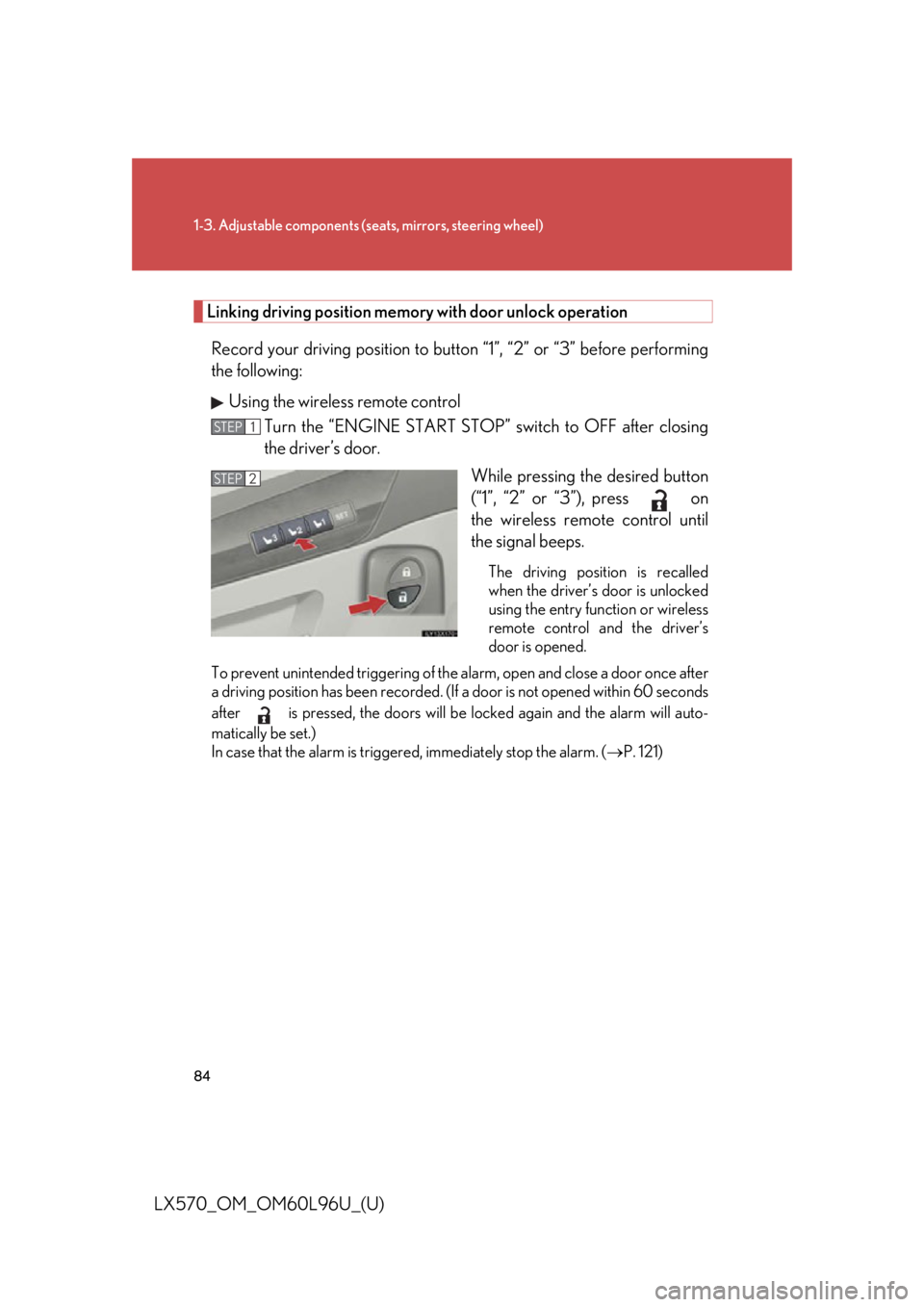
LX570_OM_OM60L96U_(U) Linking driving position memory with door unlock operation
Record your driving position to butto n “1”, “2” or “3” before performing
the following:
Using the wireless remote control
Turn the “ENGINE START STOP ” switch to OFF after closing
the driver’s door.
While pressing the desired button
(“1”, “2” or “3”), press on
the wireless remote control until
the signal beeps. The driving position is recalled
when the driver’s door is unlocked
using the entry function or wireless
remote control and the driver’s
door is opened.
To prevent unintended triggering of the alarm, open and close a door once after
a driving position has been recorded. (If a door is not opened within 60 seconds
after is pressed, the doors will be locked again and the alarm will auto-
matically be set.)
In case that the alarm is triggere d, immediately stop the alarm. ( P. 121)STEP 1
STEP 2
Page 85 of 960

851-3. Adjustable components (s eats, mirrors, steering wheel)
1
Before driving
LX570_OM_OM60L96U_(U) Using the door lock switch
Carry only the key (including the ca rd key) to which you want to link
the driving position. If 2 or more ke ys are in the vehicle, the driving
position cannot be linked properly.
Turn the “ENGINE START STOP ” switch to OFF after closing
the driver’s door.
While pressing the desired button
(“1”, “2” or “3”), press the lock or
unlock side on the door lock
switch (either the driver or passen-
ger side) until the signal beeps. The driving position is recalled
when the driver’s door is unlocked
using the entry function or wireless
remote control and the driver’s
door is opened.STEP 1
STEP 2
■
Canceling the linked door unlock operation
Turn the “ENGINE START STOP” sw itch to OFF after closing the
driver’s door.
Using the wireless remote control: While pressing “SET” button, press
button on the wireless remote control until the signal beeps.
Using the door lock switch: While pre ssing “SET” button, press the lock or
unlock side on the door lock switch until the signal beeps.STEP 1
STEP 2