Page 29 of 960

Before driving
1
29
LX570_OM_OM60L96U_(U) 1-1. Key information
Keys.............................................. 30
1-2. Opening, closing and
locking the doors
Smart access system with
push-button start ................... 35
Wireless remote co ntrol......... 49
Side doors.................................... 52
Back door .................................... 56
1-3. Adjustable components
(seats, mirrors,
steering wheel)
Front seats ................................... 67
Rear seats..................................... 71
Driving position memory
system ....................................... 83
Head restraints .......................... 87
Seat belts ...................................... 91
Steering wheel ......................... 100
Anti-glare inside rear view
mirror ....................................... 102
Outside rear view
mirrors ..................................... 104 1-4. Opening and closing the
windows and moon roof
Power windows ....................... 108
Moon roof .................................... 111
1-5. Refueling
Opening the fuel tank
cap .............................................. 116
1-6. Theft deterrent system
Engine immobilizer
system....................................... 119
Alarm........................................... 121
1-7. Safety information
Correct driving posture ....... 124
SRS airbags .............................. 126
Front passenger occupant
classification system ........... 140
Child restraint systems ......... 146
Installing child restraints........ 151
Page 31 of 960
311-1. Key information
1
Before driving
LX570_OM_OM60L96U_(U) Using the mechanical key
Take out the mechanical key. The mechanical key can only be
inserted in one direction, as the key
only has grooves on one side. If the
key cannot be inserted in a lock
cylinder, turn it over and re-
attempt to insert it.
After using the mechanical key,
store it in the electronic key. Carry
the mechanical key together with
the electronic key. If the electronic
key battery is depleted or the smart
access system with push-button
start does not operate properly,
you will need the mechanical key.
( P. 872)
Page 32 of 960
321-1. Key information
LX570_OM_OM60L96U_(U) ■
Card key ●
The mechanical key that is stored inside the card key should be used only in an
emergency, such as when the key does not operate properly. ●
If it is difficult to take out the mechanic al key, push down the lock release button
using a pen tip etc. If it is difficult to pull it out, use a coin etc.
●
The card key is not waterproof.■
When required to leave the vehicle’s key with a parking attendant
Lock the glove box as circumstances demand. ( P. 691)
Remove the mechanical key for your own use and provide the attendant with the
electronic key only. ●
To store the mechanical key in the card
key, insert it inside while pressing the lock
release button.
●
If the battery cover is not installed and the
battery falls out or if the battery was
removed because the key got wet, reinstall
the battery with the positive terminal facing
the Lexus emblem.
Page 35 of 960
351
Before driving
LX570_OM_OM60L96U_(U) 1-2. Opening, closing and locking the doors
Smart access system with push-button start The following operations can be perf ormed simply by carrying the elec-
tronic key on your person, for example in your pocket.
(The driver should always carry the electronic key.)
Locks and unlocks the doors ( P. 36)
Locks and unlocks the doors ( P. 36)
Starts and stops the engine ( P. 177)
Page 36 of 960
361-2. Opening, closing and locking the doors
LX570_OM_OM60L96U_(U) Unlocking and locking the doors
Side door handle
Grip the driver’s door handle to
unlock the door. Grip the passen-
ger’s door handle to unlock all the
doors.
* Make sure to touch the sensor on
the back of the handle.
The door cannot be unlocked for 3
seconds after the door is locked.
* : The door unlock settings can be
changed. (
P. 41)
Press the lock butto n to lock the
doors. Check that the door is securely
locked.
Pressing and holding the button
closes the windows and moon roof.
(This setting must be customized at
your Lexus dealer.)
Page 37 of 960
371-2. Opening, closing and locking the doors
1
Before driving
LX570_OM_OM60L96U_(U) Back door
Press the unlock button to unlock
the doors. The door cannot be unlocked for 3
seconds after the door is locked.
Lock the back door again when
you leave the vehicle. The back
door will not lock automatically
after it has been opened and then
closed.
Press the lock butto n to lock the
doors. Check that the door is securely
locked.
Page 38 of 960
381-2. Opening, closing and locking the doors
LX570_OM_OM60L96U_(U) Antenna location and effective range
■ Antenna location
Antennas outside cabin
Antennas inside cabin
Antenna outside luggage com-
partment
Page 39 of 960
391-2. Opening, closing and locking the doors
1
Before driving
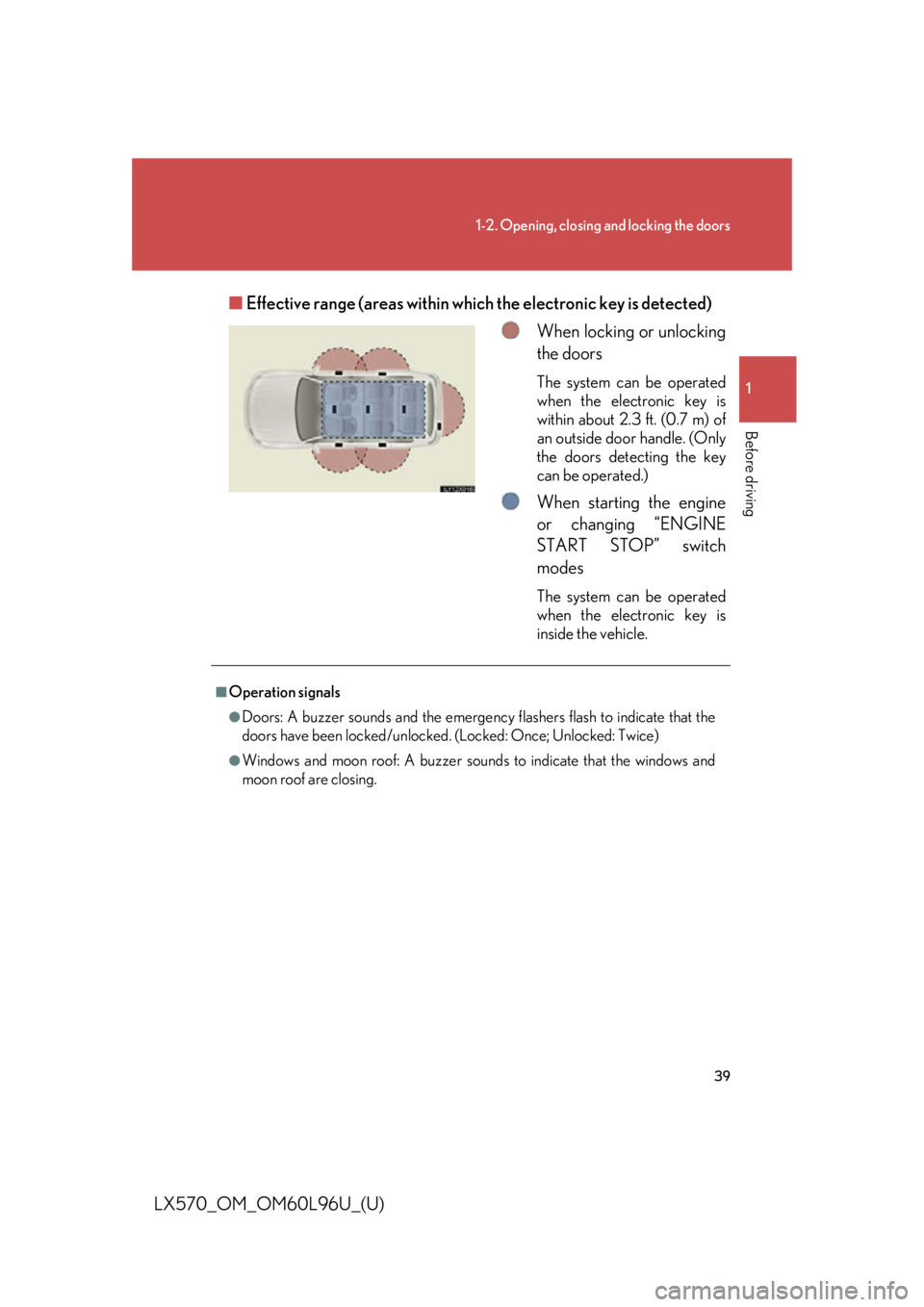
LX570_OM_OM60L96U_(U) ■ Effective range (areas within wh ich the electronic key is detected)
When locking or unlocking
the doors The system can be operated
when the electronic key is
within about 2.3 ft. (0.7 m) of
an outside door handle. (Only
the doors detecting the key
can be operated.)
When starting the engine
or changing “ENGINE
START STOP” switch
modes The system can be operated
when the electronic key is
inside the vehicle.■
Operation signals ●
Doors: A buzzer sounds and the emergenc y flashers flash to indicate that the
doors have been locked/unlocked. (Locked: Once; Unlocked: Twice) ●
Windows and moon roof: A buzzer sounds to indicate that the windows and
moon roof are closing.