Page 539 of 628

5398-2. Steps to take in an emergency
8
When trouble arises
IS300h_EE(OM53D56E)
■Warning messages
The warning message illustrations used are intended as examples, and may differ from
the image that is actually displayed on the multi-information display.
■Warning message in radar cruise mode (if equipped)
In the following situations, the warning messag e may not be displayed even if vehicle-to-
vehicle distance decreases:
●When the speed of the preceding vehicle matches or exceeds your vehicle speed
●When the preceding vehicle is traveling at an extremely slow speed
●Immediately after the cruise control speed was set
●When depressing the accelerator pedal
■The LDA (Lane Departure Alert) lane departure warning function (if equipped)
In the following situations, the warning messag e will not be displayed even if a lane line is
crossed.
●When the vehicle speed deviates from the operating range of the LDA system func-
tions
●When the lane lines cannot be recognized
■Resetting the message indicating maintenance is required
Make sure to reset the oil change system. ( →P. 4 5 8 )
■Warning buzzer
→P. 5 2 5
Page 541 of 628

5418-2. Steps to take in an emergency
8
When trouble arises
IS300h_EE(OM53D56E)
Once3 times
The electronic key was carried out-
side the vehicle and a door other
than the driver’s door was opened
and closed while the power switch
was in a mode other than off.
→Bring the electronic key back
into the vehicle.
The driver’s door was opened and
closed while the electronic key was
not in the vehicle, the shift lever was
in P and the power switch was not
turned off.
→Tu r n t h e p o w e r s w i t c h o f f .
→ Bring the electronic key back
into the vehicle.
9 times
An attempt was made to drive when
the electronic key was not inside the
vehicle.
→Confirm that the electronic key
is inside the vehicle.
Con-
tinuous
An attempt was made to lock the
doors using the smart entry & start
system while the electronic key was
still inside the vehicle.
→Retrieve the electronic key
from the vehicle and lock the
doors again.
OnceCon-
tinuous
An attempt was made to lock either
front door by opening a door and
putting the inside lock button into
the lock position, then closing the
door by pulling on the outside door
handle with the electronic key still
inside the vehicle.
→Retrieve the electronic key
from the vehicle and lock the
doors again.
Interior
buzzerExteriorbuzzerWarning messageDetails/Actions
(Flashes)
(Flashes)
(Flashes)
(Vehicles with the entry function)
(Flashes)
Page 543 of 628

5438-2. Steps to take in an emergency
8
When trouble arises
IS300h_EE(OM53D56E)
Indicates that:
• With the power switch off, thedoors were unlocked and then the
driver’s door was opened and
closed;
• The power switch was turned to ACCESSORY mode without
starting the hybrid system; or
• The shift lever was shifted to P from another position with the
power switch in ON mode.
→ Press the power switch while
depressing the brake pedal.
Once
The power switch has been turned
off with the shift lever in a position
other than P.
→Shift the shift lever to P.
Once
After the power switch has been
turned off with the shift lever in a
position other than P, the shift lever
has been shifted to P.
→Tu r n t h e p o w e r s w i t c h o f f .
Power was turned off due to the
automatic power off function.
→Next time when starting the
hybrid system, increase the
engine speed slightly and main-
tain that level for approximately
5 minutes to recharge the 12-
volt battery.
Con-
tinuous
Indicates that the hybrid system was
stopped in an emergency while driv-
ing
→To restart the hybrid system,
shift the shift lever to N and turn
the power switch to ON mode.
*
Interior
buzzerExteriorbuzzerWarning messageDetails/Actions
(Flashes)
(Flashes)
(Flashes)
Page 561 of 628

5618-2. Steps to take in an emergency
8
When trouble arises
IS300h_EE(OM53D56E)
One of the following may be the cause of the problem:
●One or both of the 12-volt battery terminals may be disconnected.
●The 12-volt battery may be discharged. (→P. 5 6 6 )
Contact any authorized Lexus dealer or repairer, or another duly qualified and
equipped professional if the problem cannot be repaired, or if repair procedures are
unknown.
When the hybrid system does not start, the following steps can be used as an
interim measure to start the hybrid system if the power switch is functioning nor-
mally:
Set the parking brake.
Shift the shift lever to P.
Turn the power switch to ACCESSORY mode.
Press and hold the power switch for about 15 seconds while depressing the
brake pedal firmly.
Even if the hybrid system can be started using the above steps, the system may
be malfunctioning. Have the vehicle inspected by any authorized Lexus dealer or
repairer, or another duly qualified and equipped professional.
The interior lights and he adlights do not turn on, or the horn does not
sound.
Emergency start function
1
2
3
4
Page 562 of 628
5628-2. Steps to take in an emergency
IS300h_EE(OM53D56E)
Set the parking brake.
Turn the power switch to ACCESSORY mode.
Depress the brake pedal.
Pry the cover up with a flathead
screwdriver or equivalent tool.
To prevent damage to the cover, cover
the tip of the screwdriver with a rag.
Press the shift lock override button.
The shift lever can be shifted while the
button is pressed.
If the shift lever cannot be shifted from P
If the shift lever cannot be shifted with your foot on the brake pedal, there may
be a problem with the shift lock system (a system to prevent accidental opera-
tion of the shift lever). Have the vehicle inspected by any authorized Lexus
dealer or repairer, or another duly qua lified and equipped professional imme-
diately.
The following steps may be used as an emergency measure to ensure that the
shift lever can be shifted:
1
2
3
4
5
Page 564 of 628
5648-2. Steps to take in an emergency
IS300h_EE(OM53D56E)
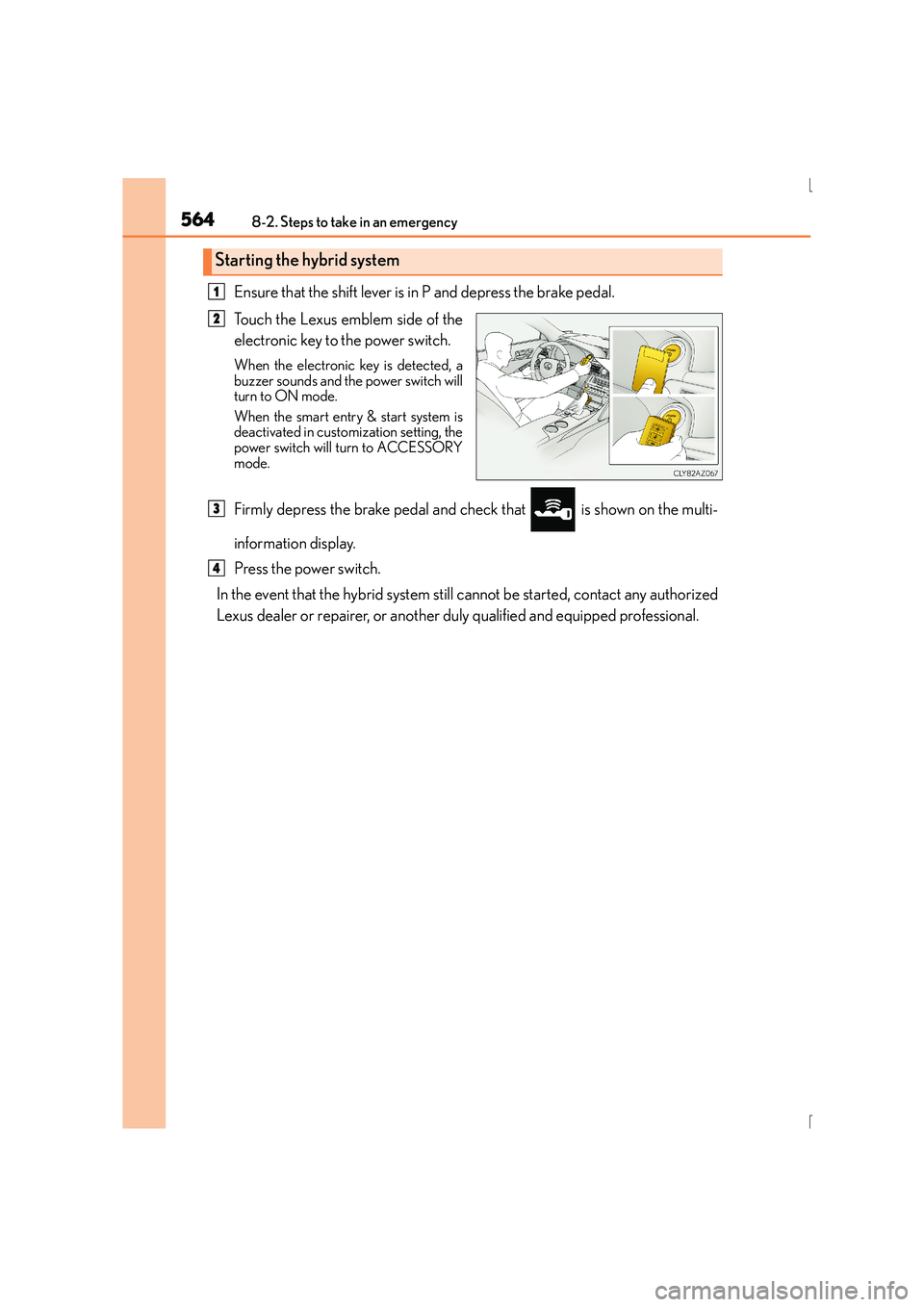
Ensure that the shift lever is in P and depress the brake pedal.
Touch the Lexus emblem side of the
electronic key to the power switch.
When the electronic key is detected, a
buzzer sounds and the power switch will
turn to ON mode.
When the smart entry & start system is
deactivated in customization setting, the
power switch will turn to ACCESSORY
mode.
Firmly depress the brake pedal and check that is shown on the multi-
information display.
Press the power switch.
In the event that the hybrid system still cannot be started, contact any authorized
Lexus dealer or repairer, or another duly qualified and equipped professional.
Starting the hybrid system
1
2
3
4
Page 565 of 628

5658-2. Steps to take in an emergency
8
When trouble arises
IS300h_EE(OM53D56E)
■Stopping the hybrid system
Shift the shift lever to P and press the power switch as you normally do when stopping the
hybrid system.
■Replacing the key battery
As the above procedure is a temporary measure, it is recommended that the electronic
key battery be replaced immediately when the battery is depleted. ( →P. 4 8 8 )
■Alarm (if equipped)
Using the mechanical key to lock the doors will not set the alarm system.
If a door is unlocked using the mechanical key when the alarm system is set, the alarm
may be triggered.
■Changing power switch modes
Release the brake pedal and press the power switch in step above.
The hybrid system does not start and modes will be changed each time the switch is
pressed. ( →P. 2 1 3 )
■When the electronic key does not work properly
●Make sure that the smart entry & start syst em has not been deactivated in the customi-
zation setting. If it is off, turn the function on.
(Customizable features →P. 5 9 1 )
●Check if battery-saving mode is set. If it is set, cancel the function. (→P. 1 5 0 )
CAUTION
■When using the mechanical key and operating the power windows or moon roof
Operate the power window or moon roof after checking to make sure that there is no
possibility of any passenger having any of their body parts caught in the window or
moon roof.
Also, do not allow children to operate the mechanical key. It is possible for children and
other passengers to get caught in the power window or moon roof.
3
Page 568 of 628

5688-2. Steps to take in an emergency
IS300h_EE(OM53D56E)
Maintain the engine speed of the second vehicle and start the hybrid system
of your vehicle by turning the power switch to ON mode.
Make sure the “READY” indicator comes on. If the indicator does not come
on, contact any authorized Lexus dealer or repairer, or another duly qualified
and equipped professional.
Once the hybrid system has started, remove the jumper cables in the exact
reverse order from which they were connected.
Once the hybrid system starts, have the vehicle inspected at any authorized
Lexus dealer or repairer, or another duly qualified and equipped professional as
soon as possible.
■Starting the hybrid system when the 12-volt battery is discharged
The hybrid system cannot be started by push-starting.
■To prevent 12-volt battery discharge
●Turn off the headlights and the audio system while the hybrid system is off.
●Turn off any unnecessary electrical components when the vehicle is running at a low
speed for an extended period, such as in heavy traffic.
■Charging the 12-volt battery
The electricity stored in the 12-volt battery will discharge gradually even when the vehicle
is not in use, due to natural discharge and the draining effects of certain electrical appli-
ances. If the vehicle is left for a long time, the 12-volt battery may discharge, and the
hybrid system may be unable to start. (The 12-volt battery recharges automatically while
the hybrid system is operating.)
■When recharging or replacing the 12-volt battery
●In some cases, it may not be possible to un lock the doors using the smart entry & start
system when the 12-volt battery is discharged. Use the wireless remote control or the
mechanical key to lock or unlock the doors.
●The hybrid system may not start on the first attempt after the 12-volt battery has
recharged but will start normally after the second attempt. This is not a malfunction.
●The power switch mode is memorized by the vehicle. When the 12-volt battery is
reconnected, the system will return to the mo de it was in before the 12-volt battery was
discharged. Before disconnecting the 12-volt battery, turn the power switch off.
If you are unsure what mode the power switch was in before the 12-volt battery dis-
charged, be especially careful when reconnecting the 12-volt battery.
7
8
9