Page 406 of 628
4065-12. Other function
IS300h_EE(OM53D56E)
Go to “USB photo”: → “Info” → “USB1 photo” or “USB2 photo”
→ P. 335
Move the controller to the left to display the menu screen. Change the full screen mode.
Select to set the slide show display
on/off.
Start the slide show at a selected folder.
Change the play speed.
Change the play mode.
Move the controller to the right and select “Browse”.
Select the desired folder, and then select a file to begin using the selected
folder.
USB photo
Connecting a USB memory device enables you to enjoy photo on the Lexus
Display Audio display.
Connecting a USB memory device
Menu screen
1
2
3
4
Selecting a folder
1
2
Page 413 of 628
4136-1. Using the air conditioning system
6
Interior features
IS300h_EE(OM53D56E)
XWith “DUAL” mode
XWithout “DUAL” mode
Air conditioning controls
Page 414 of 628

4146-1. Using the air conditioning system
IS300h_EE(OM53D56E)
■Adjusting the temperature setting
To adjust the temperature setting,
touch and slide your finger up or
down on the sensor.
The temperature setting can also be
adjusted by touching on the sensor.
When the temperature setting is
changed, a buzzer sounds.
■Fan speed setting
Press to increase the fan speed.
Press to decrease the fan speed.
■Change the airflow mode
To change the airflow, press .
The air outlets used are switched each time the button is pressed.
■S-FLOW mode (if equipped)
When there are no passengers in the rear seats, airflow can be directed to the
front seats only to reduce the air conditioning effect on the rear seats.
However, depending on both the temperature inside and outside the vehicle, air-
flow may be directed to the rear seats even though S-FLOW mode is on to main-
tain comfort inside the vehicle.
Press .
The indicator comes on when S-FLOW mode is on.
Press again to resume airflow to the rear seats.
■Other functions
●Switching between outside air and recirculated air modes (→P. 4 1 8 )
●Defogging the windshield ( →P. 4 1 8 )
●Defogging the rear window and outside rear view mirrors ( →P. 4 1 8 )
Page 415 of 628
4156-1. Using the air conditioning system
6
Interior features
IS300h_EE(OM53D56E)
XWith a Lexus Display AudioAdjust the left-hand side temperature setting
Adjust the fan speed setting
Select to set auto mode on/off, fan off, blower customization ( →P. 4 1 9 ) a n d
displaying the option control screen ( →P. 4 1 7 )
Select the air flow mode
Adjust the right-hand side temperature setting
Adjust the temperature setting
Move the Lexus Display Audio controller left/right to select the desired item
( to ).
When , , or is selected:
Move the controller forward/backward or turn it left/right for adjusting.
When or is selected:
Move the controller forward/backward or turn it left/right to select a screen
button, then press the controller.
Air conditioning contro l screen (if equipped)
(With “DUAL” mode) (Without “DUAL” mode)
1
2
3
4
5
6
1
16
21256
34
Page 416 of 628
4166-1. Using the air conditioning system
IS300h_EE(OM53D56E)
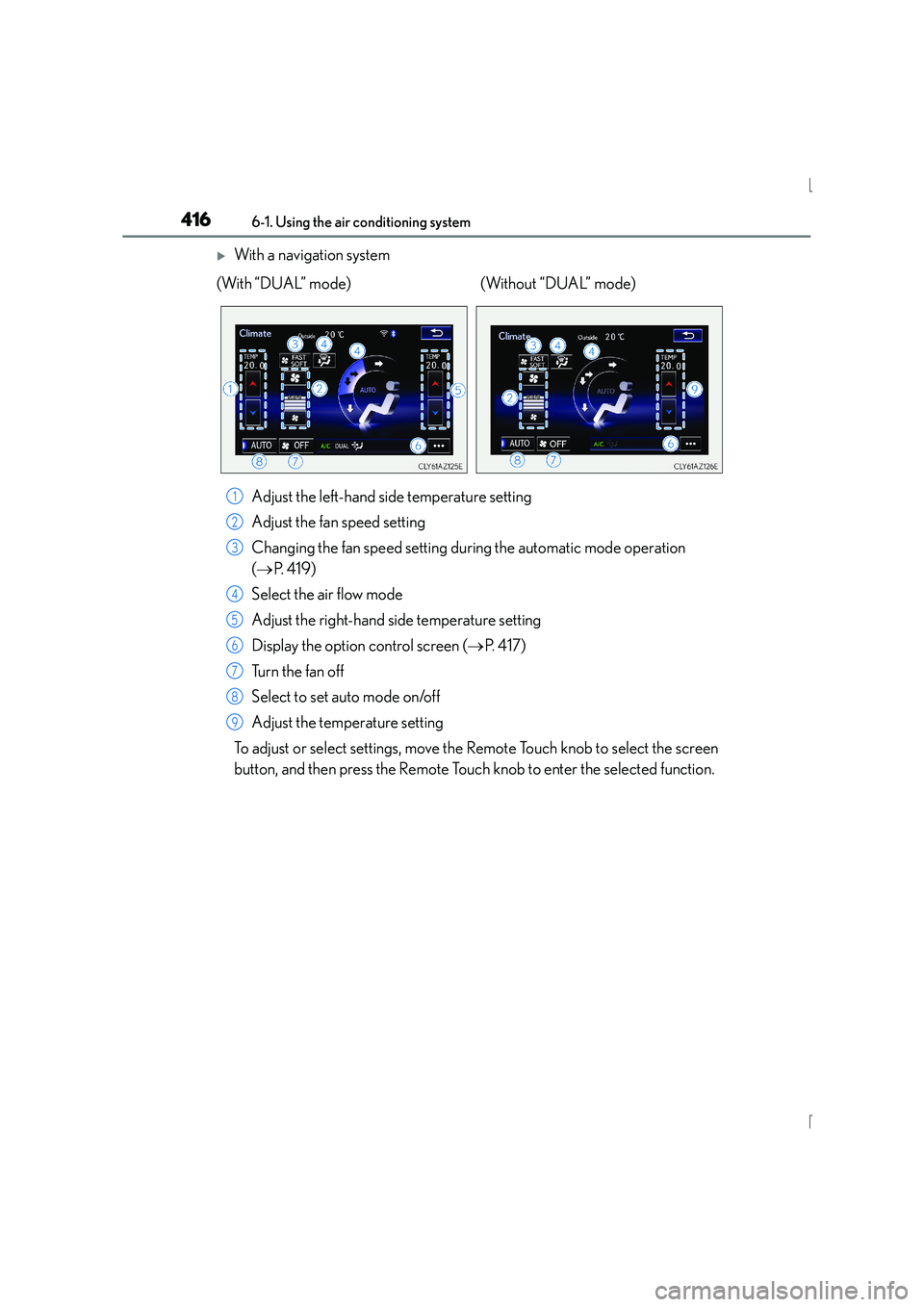
XWith a navigation systemAdjust the left-hand side temperature setting
Adjust the fan speed setting
Changing the fan speed setting during the automatic mode operation
(→ P. 4 1 9 )
Select the air flow mode
Adjust the right-hand side temperature setting
Display the option control screen ( →P. 4 1 7 )
Tu r n t h e f a n o f f
Select to set auto mode on/off
Adjust the temperature setting
To adjust or select settings, move the Remote Touch knob to select the screen
button, and then press the Remote Touch knob to enter the selected function.
(With “DUAL” mode) (Without “DUAL” mode)
1
2
3
4
5
6
7
8
9
Page 417 of 628

4176-1. Using the air conditioning system
6
Interior features
IS300h_EE(OM53D56E)
■Option control screen
The functions can be switched on and off.Cooling and dehumidification
function
Adjusting the temperature for
driver and passenger seats sepa-
rately (“DUAL” mode)
(if equipped) ( →P. 4 1 7 )
Removing pollen from the air
(Pollen removal mode)
( → P. 4 1 8 )
Press , or select “AUTO” on the air conditioning control screen.
Adjust the temperature setting.
To stop the operation, press or select “OFF” on the air conditioning
control screen.
■Automatic mode indicator
If the fan speed setting or air flow modes are operated, the automatic mode
indicator goes off. However, automatic mode for functions other than that
operated is maintained.
■Adjusting the temperature for driv er and passenger seats separately
(“DUAL” mode) (if equipped)
To turn on the “DUAL” mode, perform any of the following procedures:
●Press .
●Select “DUAL” on the option control screen.
●Adjust the passenger’s side temperature setting.
The indicator comes on when the “DUAL” mode is on.
While in “DUAL” mode, the temperature of the rear air outlets is set at the right-
hand side temperature setting.
1
2
3
Using automatic mode
1
2
3
Page 418 of 628

4186-1. Using the air conditioning system
IS300h_EE(OM53D56E)
■Switching between outside air and recirculated air modes
Press to change to recirculated air mode.
Press to change to outside air mode.
The indicator above the selected button comes on.
■Pollen removal mode (if equipped)
Pollen is removed from the air and the air flows to the upper part of the body.
Select
on the option control screen.
When the pollen removal mode is on, is displayed on the air conditioning
control screen.
In order to prevent the windshield from fogging up when the outside air is cold, the
dehumidification function may operate.
The pollens are filtered out even if the pollen removal mode is turned off.
■Defogging the windshield
Defoggers are used to defog the windshield and front side windows.
Press .
Set the outside/recirculated air mode button to outside air mode if the recirculated
air mode is used. (It may switch automatically.)
To defog the windshield and the side windows early, turn the air flow and tempera-
ture up.
To return to the previous mode, press again when the windshield is
defogged.
■Defogging the rear window and outside rear view mirrors
Defoggers are used to defog the rear window, and to remove raindrops, dew
and frost from the outside rear view mirrors.
Press .
The defoggers will automatically turn off after a period of time.
Other functions
Page 419 of 628
4196-1. Using the air conditioning system
6
Interior features
IS300h_EE(OM53D56E)
■Windshield wiper de-icer (if equipped)
This feature is used to prevent ice from building up on the windshield and
wiper blades.
Tu r n s o n /o f f .
The indicator comes on when the
windshield wiper de-icer is on.
The windshield de-icer will automati-
cally turn off after a period of time.
■Blower customization (if equipped)
Fan speed setting during the automatic mode operation can be customized.
To change the fan speed setting mode, select
on the air conditioning
control screen.
Each time is selected, the fan speed setting mode changes as follows.
“MEDIUM” →“SOFT” →“FAST” →“MEDIUM”