2015 Lexus GS350 Media
[x] Cancel search: MediaPage 86 of 615
84
GS350_OM_OM30F69U_(U)
2. Instrument cluster
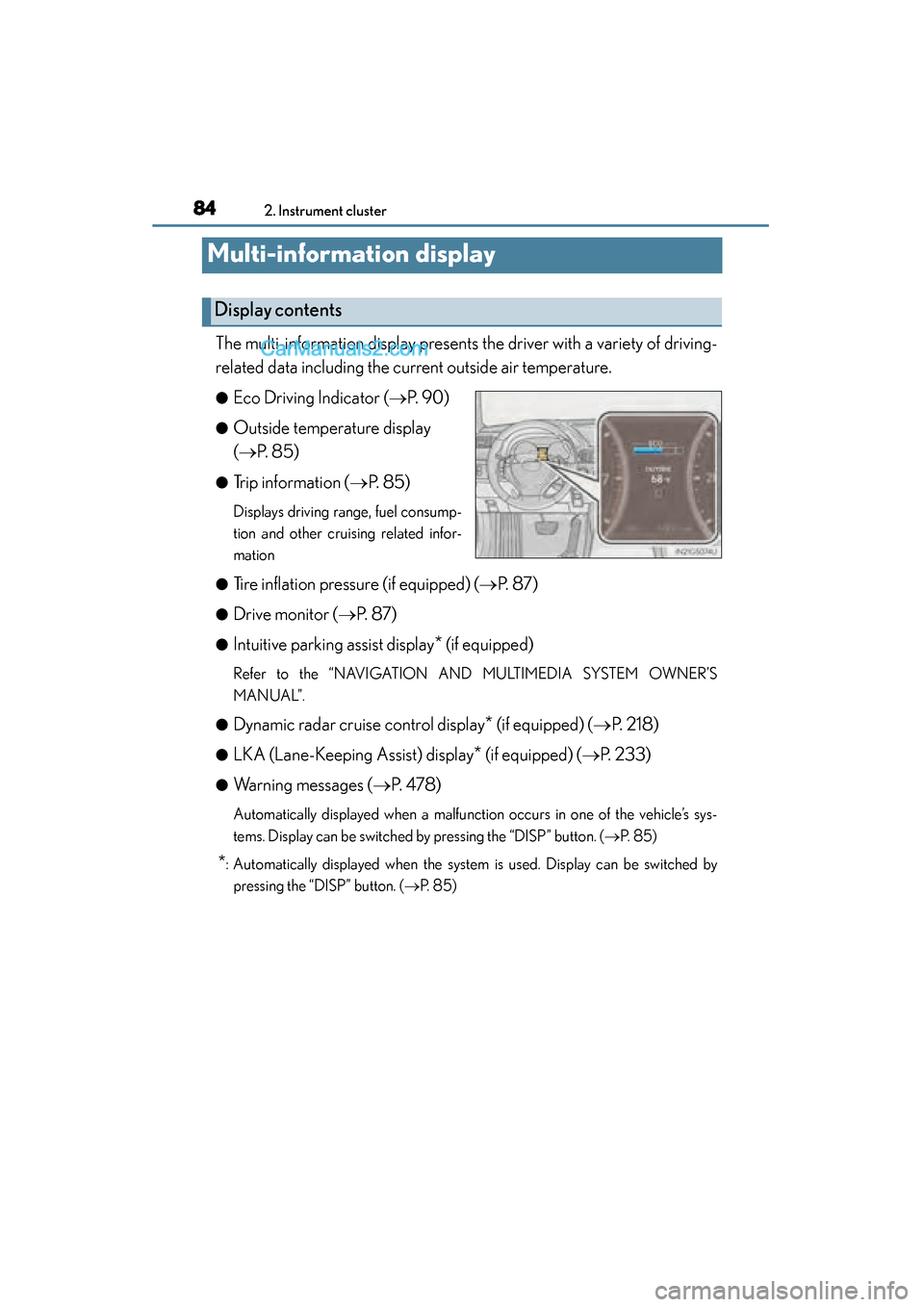
Multi-information display
The multi-information display presents the driver with a variety of driving-
related data including the current outside air temperature.
●Eco Driving Indicator (→P. 9 0 )
●Outside temperature display
(→ P. 8 5 )
●Trip information ( →P. 8 5 )
Displays driving range, fuel consump-
tion and other cruising related infor-
mation
●
Tire inflation pressure (if equipped) ( →P. 8 7 )
●Drive monitor ( →P. 8 7 )
●Intuitive parking assist display* (if equipped)
Refer to the “NAVIGATION AND MULTIMEDIA SYSTEM OWNER’S
MANUAL”.
●
Dynamic radar cruise control display* (if equipped) (→ P. 2 1 8 )
●LKA (Lane-Keeping Assist) display* (if equipped) (→P. 233)
●Warning messages ( →P. 4 7 8 )
Automatically displayed when a malfunction occurs in one of the vehicle’s sys-
tems. Display can be switched by pressing the “DISP” button. (→ P. 8 5 )
*: Automatically displayed when the system is used. Display can be switched by
pressing the “DISP” button. ( →P. 8 5 )
Display contents
GS350_OM_OM30F69U_(U).book Page 84 Monday, January 19, 2015 2:53 PM
Page 108 of 615

106
GS350_OM_OM30F69U_(U)
3-1. Key information
NOTICE
■To prevent key damage
●Do not drop the keys, subject them to strong shocks or bend them.
●Do not expose the keys to high temperatures for long periods of time.
●Do not get the keys wet or wash them in an ultrasonic washer etc.
●Do not attach metallic or magnetic materials to the keys or place the keys close to
such materials.
●Do not disassemble the keys.
●Do not attach a sticker or anything else to the surface of the electronic key.
●Do not place the keys near objects that produce magnetic fields, such as TVs,
audio systems and induction cookers, or medical electrical equipment, such as
low-frequency therapy equipment.
■Carrying the electronic key on your person
Carry the electronic key 3.9 in. (10 cm) or more away from electric appliances that
are turned on. Radio waves emitted from electric appliances within 3.9 in. (10 cm)
of the electronic key may interfere with the key, causing the key to not function
properly.
■In case of a smart access system with push-button start malfunction or other key-
related problems
Take your vehicle with all the electronic keys provided with your vehicle to your
Lexus dealer.
■When an electronic key is lost
If the electronic key remains lost, the risk of vehicle theft increases significantly.
Visit your Lexus dealer immediately with all remaining electronic keys that was
provided with your vehicle.
GS350_OM_OM30F69U_(U).book Page 106 Monday, January 19, 2015 2:53 PM
Page 114 of 615

112
GS350_OM_OM30F69U_(U)
3-2. Opening, closing and locking the doors and trunk
■Switching the door unlock function
It is possible to set which doors the entry function unlocks using the wireless remote
control. Turn the engine switch off.
When the indicator light on the key surface is not on, press and hold ,
or for approximately 5 seconds while pressing and holding .
The setting changes each time an operation is performed, as shown below. (When
changing the setting continuously, release the buttons, wait for at least 5 seconds,
and repeat step .)
To prevent unintended triggering of the alarm, unlock the doors using the wireless
remote control and open and close a door once after the settings have been
changed. (If a door is not opened within 60 seconds after is pressed, the
doors will be locked again and the alarm will automatically be set.)
In case that the alarm is triggered, immediately stop the alarm. ( →P. 7 2 )
1
2
2
Multi-information
displayUnlocking functionBeep
Holding the driver’s door han-
dle unlocks only the driver’s
door.
Exterior: Beeps 3 times
Interior: Pings once
Holding a passenger’s door
handle unlocks all the doors.
Holding a door handle unlocks
all the doors.Exterior: Beeps twice
Interior: Pings once
GS350_OM_OM30F69U_(U).book Page 112 Monday, January 19, 2015 2:53 PM
Page 116 of 615

114
GS350_OM_OM30F69U_(U)
3-2. Opening, closing and locking the doors and trunk
■Conditions affecting operation
The smart access system with push-button start uses weak radio waves. In the follow-
ing situations, the communication between the electronic key and the vehicle may be
affected, preventing the smart access system with push-button start, wireless remote
control and engine immobilizer system from operating properly. (Ways of coping:
→P. 5 2 0 )
●When the electronic key battery is depleted
●Near a TV tower, electric power plant, gas station, radio station, large display, air-
port or other facility that generates strong radio waves or electrical noise
●When carrying a portable radio, cellular phone, cordless phone or other wireless
communication device
●When the electronic key is in contact with, or is covered by the following metallic
objects
• Cards to which aluminum foil is attached
• Cigarette boxes that have aluminum foil inside
• Metallic wallets or bags
•Coins
• Hand warmers made of metal
• Media such as CDs and DVDs
●When other wireless keys (that emit radio waves) are being used nearby
●When carrying the electronic key together with the following devices that emit
radio waves
• Another vehicle’s electronic key or a wireless key that emits radio waves
• Personal computers or personal digital assistants (PDAs)
• Digital audio players
• Portable game systems
●If window tint with a metallic content or metallic objects are attached to the rear
window
GS350_OM_OM30F69U_(U).book Page 114 Monday, January 19, 2015 2:53 PM
Page 169 of 615

GS350_OM_OM30F69U_(U)
1674-1. Before driving
4
Driving
CAUTION
■When the vehicle is parked
●Do not leave glasses, cigarette lighters, spray cans, or soft drink cans in the vehi-
cle when it is in the sun.
Doing so may result in the following:
• Gas may leak from a cigarette lighter or spray can, and may lead to a fire.
• The temperature inside the vehicle may cause the plastic lenses and plasticmaterial of glasses to deform or crack.
• Soft drink cans may fracture, causing the contents to spray over the interior of the vehicle, and may also cause a short circuit in the vehicle’s electrical com-
ponents.
●Do not leave cigarette lighters in the vehicle. If a cigarette lighter is in a place such
as the glove box or on the floor, it may be lit accidentally when luggage is loaded
or the seat is adjusted, causing a fire.
●Do not attach adhesive discs to the windshield or windows. Do not place contain-
ers such as air fresheners on the instrument panel or dashboard. Adhesive discs
or containers may act as lenses, causing a fire in the vehicle.
●Do not leave a door or window open if the curved glass is coated with a metal-
lized film such as a silver-colored one. Reflected sunlight may cause the glass to
act as a lens, causing a fire.
●Always apply the parking brake, shift the sh ift lever to P, stop the engine and lock
the vehicle.
Do not leave the vehicle unattended while the engine is running.
●Do not touch the exhaust pipes while the engine is running or immediately after
turning the engine off.
Doing so may cause burns.
GS350_OM_OM30F69U_(U).book Page 167 Monday, January 19, 2015 2:53 PM
Page 170 of 615

168
GS350_OM_OM30F69U_(U)
4-1. Before driving
CAUTION
■When taking a nap in the vehicle
Always turn the engine off. Otherwise, if you accidentally move the shift lever or
depress the accelerator pedal, this could cause an accident or fire due to engine
overheating. Additionally, if the vehicle is parked in a poorly ventilated area,
exhaust gases may collect and enter the vehicle, leading to death or a serious
health hazard.
■When braking
●When the brakes are wet, drive more cautiously.
Braking distance increases when the brakes are wet, and this may cause one side
of the vehicle to brake differently than the other side. Also, the parking brake may
not securely hold the vehicle.
●If the power brake assist function does not operate, do not follow other vehicles
closely and avoid hills or sharp turns that require braking.
In this case, braking is still possible, but the brake pedal should be depressed
more firmly than usual. Also, the braking distance will increase. Have your brakes
fixed immediately.
●The brake system consists of 2 individual hydraulic systems; if one of the systems
fails, the other will still operate. In this case, the brake pedal should be depressed
more firmly than usual and the braking distance will increase. Have your brakes
fixed immediately.
■If the vehicle becomes stuck (AWD models)
Do not spin the wheels excessively when any of the tires is up in the air, or the vehi-
cle is stuck in sand, mud, etc. This may damage the driveline components or propel
the vehicle forward or backward, causing an accident.
GS350_OM_OM30F69U_(U).book Page 168 Monday, January 19, 2015 2:53 PM
Page 183 of 615

GS350_OM_OM30F69U_(U)
1814-2. Driving procedures
4
Driving
■When the steering lock cannot be released
■Steering lock motor overheating prevention
To prevent the steering lock motor from overheating, the motor may be suspended if
the engine is turned on and off repeatedly in a short period of time. In this case,
refrain from operating the engine. After about 10 seconds, the steering lock motor
will resume functioning.
■When “Check Access System with Elec. Key” will be displayed on the multi-infor-
mation display
The system may be malfunctioning. Have the vehicle inspected by your Lexus dealer
immediately.
■If the electronic key battery is depleted
→P. 4 2 5
■Operation of the engine switch
●When operating the engine switch, one short, firm press is enough. If the switch is
pressed improperly, the engine may not start or the engine switch mode may not
change. It is not necessary to press and hold the switch.
●If attempting to restart the engine immediately after turning the engine switch off,
the engine may not start in some cases. After turning the engine switch off, please
wait a few seconds before restarting the engine.
■If the smart access system with push-button start has been deactivated in a cus-
tomized setting
→P. 5 2 0
“Steering Lock active” will be displayed on
the multi-information display.
Check that the shift lever is set in P. Press the
engine switch while turning the steering
wheel left and right.
GS350_OM_OM30F69U_(U).book Page 181 Monday, January 19, 2015 2:53 PM
Page 185 of 615

GS350_OM_OM30F69U_(U)
1834-2. Driving procedures
4
Driving
NOTICE
■To prevent battery discharge
●Do not leave the engine switch in ACCESSORY or IGNITION ON mode for
long periods of time without the engine running.
●If “POWER ON” is displayed on the multi-information display, the engine switch
is not off. Exit the vehicle after turning the engine switch off.
●Do not stop the engine when the shift lever is in a position other than P. If the
engine is stopped in another shift lever position, the engine switch will not be
turned off but instead be turned to ACCESSORY mode. If the vehicle is left in
ACCESSORY mode, battery discharge may occur.
■When starting the engine
●Do not race a cold engine.
●If the engine becomes difficult to start or stalls frequently, have your vehicle
checked by your Lexus dealer immediately.
■Symptoms indicating a malfunction with the engine switch
If the engine switch seems to be operating somewhat differently than usual, such as
the switch sticking slightly, there may be a malfunction. Contact your Lexus dealer
immediately.
GS350_OM_OM30F69U_(U).book Page 183 Monday, January 19, 2015 2:53 PM