2015 KIA CEED wheel
[x] Cancel search: wheelPage 372 of 1210

Driving your vehicle
26
5
Transaxle ranges
The indicator lights in the instrument
cluster displays the shift lever position
when the ignition switch is in the ONposition.
P (Park)
Always come to a complete stop before
shifting into P (Park). This position locks
the transaxle and prevents the frontwheels from rotating. R (Reverse)
Use this position to drive the vehicle
backward.
N (Neutral)
The wheels and transaxle are not
engaged. The vehicle will roll freely even
on the slightest incline unless the parking
brake or service brakes are applied.D (Drive)
This is the normal forward driving posi-
tion. The transaxle will automatically shift
through a 6-gear sequence, providing the
best fuel economy and power.
For extra power when passing another
vehicle or climbing grades, depress the
accelerator pedal fully (more than 80%)
until the kick down mechanism works
with a clicking noise, at which time the
transaxle will automatically downshift to
the next lower gear.
✽✽
NOTICE
Always come to a complete stop before shifting into D (Drive).
A clicking noise heard from the kick down mechanism by depressing the
accelerator pedal fully is a normal
condition.
CAUTION
Always come to a complete stop
before shifting into or out of R (Reverse); you may damage the
transaxle if you shift into R (Reverse)while the vehicle is in motion, except as explained in “Rocking the vehi-
cle”, in this manual.
WARNING
Shifting into P (Park) while the vehicle is in motion will cause the
drive wheels to lock which will
cause you to lose control of the
vehicle.
Do not use the P (Park) position in place of the parking brake.
Always make sure the shift lever
is latched in the P (Park) position
and set the parking brake fully.
Never leave a child unattended in a vehicle.
CAUTION
The transaxle may be damaged if
you shift into P (Park) while the
vehicle is in motion.
JD eng 5.QXP 3/4/2015 2:51 PM Page 26
Page 376 of 1210

Driving your vehicle
30
5
Good driving practices
Never move the shift lever from P
(Park) or N (Neutral) to any other posi-
tion with the accelerator pedaldepressed.
Never move the shift lever into P (Park) when the vehicle is in motion.
Be sure the vehicle is completely stopped before you attempt to shift into
R (Reverse) or D (Drive).
Never take the vehicle out of gear and coast down a hill. This may be
extremely hazardous. Always leave the
vehicle in gear when moving.
Do not "ride" the brakes. This can cause them to overheat and malfunc-
tion. Instead, when you are driving
down a long hill, slow down and shift to
a lower gear. When you do this, engine
braking will help slow down the vehicle.
Slow down before shifting to a lower gear. Otherwise, the lower gear maynot be engaged.
Always use the parking brake. Do not depend on placing the transaxle in P
(Park) to keep the vehicle from moving. Exercise extreme caution when driving
on a slippery surface. Be especially
careful when braking, accelerating or
shifting gears. On a slippery surface,
an abrupt change in vehicle speed can
cause the drive wheels to lose traction
and the vehicle to go out of control.
Optimum vehicle performance and economy is obtained by smoothly
depressing and releasing the accelera-tor pedal.
WARNING
Always buckle-up! In a collision, an unbelted occupant is signifi-
cantly more likely to be seriously
injured or killed than a properlybelted occupant.
Avoid high speeds when corner- ing or turning.
Do not make quick steering wheel movements, such as sharp
lane changes or fast, sharp turns.
The risk of rollover is greatly increased if you lose control of
your vehicle at highway speeds.
Loss of control often occurs if two or more wheels drop off the
roadway and the driver over-
steers to reenter the roadway.
In the event your vehicle leaves the roadway, do not steer sharply.
Instead, slow down before pulling
back into the travel lanes.
Never exceed posted speed lim- its.
JD eng 5.QXP 3/4/2015 2:51 PM Page 30
Page 388 of 1210

Driving your vehicle
42
5
The ABS continuously senses the speed
of the wheels. If the wheels are going to
lock, the ABS system repeatedly modu-
lates the hydraulic brake pressure to the
wheels.
When you apply your brakes under con-
ditions which may lock the wheels, you
may hear a “tik-tik’’ sound from the
brakes, or feel a corresponding sensation
in the brake pedal. This is normal and it
means your ABS is active.
In order to obtain the maximum benefit
from your ABS in an emergency situa-
tion, do not attempt to modulate your
brake pressure and do not try to pump
your brakes. Press your brake pedal as
hard as possible or as hard as the situa-
tion warrants and allow the ABS to con-
trol the force being delivered to the
brakes.✽✽
NOTICE
A click sound may be heard in the
engine compartment when the vehicle
begins to move after the engine is start-
ed. These conditions are normal and
indicate that the anti-lock brake system
is functioning properly.
Even with the anti-lock brake system, your vehicle still requires sufficient
stopping distance. Always maintain a
safe distance from the vehicle in front
of you.
Always slow down when cornering. The anti-lock brake system cannot pre-
vent accidents resulting from exces-
sive speeds.
On loose or uneven road surfaces, operation of the anti-lock brake system
may result in a longer stopping dis-
tance than for vehicles equipped with a
conventional brake system.
(Continued)
The safety features of an ABS (or
ESC) equipped vehicle should not
be tested by high speed driving or
cornering. This could endanger the
safety of yourself or others.
JD eng 5.QXP 3/4/2015 2:51 PM Page 42
Page 390 of 1210

Driving your vehicle
44
5
Electronic stability control (ESC) (if equipped) The Electronic Stability Control (ESC)
system is designed to stabilize the vehi-
cle during cornering maneuvers. ESC
checks where you are steering and
where the vehicle is actually going. ESC
applies the brakes at individual wheels
and intervenes with engine management
system to stabilize the vehicle. The Electronic stability control (ESC)system is an electronic system designed
to help the driver maintain vehicle control
under adverse conditions. It is not a
substitute for safe driving practices.
Factors including speed, road conditions
and driver steering input can all affect
whether ESC will be effective in
preventing a loss of control. It is still your
responsibility to drive and corner at
reasonable speeds and to leave a
sufficient margin of safety.
When you apply your brakes under con-
ditions which may lock the wheels, you
may hear a “tik-tik’’ sound from the
brakes, or feel a corresponding sensation
in the brake pedal. This is normal and it
means your ESC is active.
✽✽
NOTICE
A click sound may be heard in the
engine compartment when the vehicle
begins to move after the engine is start-
ed. These conditions are normal and
indicate that the Electronic stability
control (ESC) System is functioning
properly.
WARNING
Never drive too fast for the road
conditions or too quickly when cor-
nering. Electronic stability control
(ESC) will not prevent accidents.
Excessive speed in turns, abrupt
maneuvers and hydroplaning onwet surfaces can still result in seri-
ous accidents. Only a safe and
attentive driver can prevent acci-
dents by avoiding maneuvers that
cause the vehicle to lose traction.
Even with ESC installed, always fol-
low all the normal precautions for
driving - including driving at safe
speeds for the conditions.
OJD052009
JD eng 5.QXP 3/4/2015 2:51 PM Page 44
Page 392 of 1210

Driving your vehicle
46
5
Indicator light
When ignition switch is turned to ON, the
indicator light illuminates, then goes off if
the ESC system is operating normally.
The ESC indicator light blinks whenever
ESC is operating or illuminates when
ESC fails to operate. ESC OFF indicator light comes on when
the ESC is turned off with the button.
ESC OFF usage
When driving
ESC should be turned on for daily driv-
ing whenever possible.
To turn ESC off while driving, press the ESC OFF button while driving on a flat
road surface.
✽✽ NOTICE
When operating the vehicle on a dynamometer, ensure that the ESC is
turned off by pressing the ESC OFF
button for more than 3 seconds (ESC
OFF light illuminated). If the ESC is
left on, it may prevent the vehicle
speed from increasing, and result in
false diagnosis.
Turning the ESC off does not affect ABS or brake system operation.
■ESC indicator light
■ ESC OFF indicator light
CAUTION
Driving with varying tire or wheel
sizes may cause the ESC system tomalfunction. When replacing tires,
make sure they are the same size as your original tires.
WARNING
The Electronic Stability Control sys-
tem is only a driving aid; use pre-
cautions for safe driving by slowing
down on curved, snowy, or icy
roads. Drive slowly and don’t
attempt to accelerate whenever the
ESC indicator light is blinking, or
when the road surface is slippery.
WARNING
Never press the ESC OFF button while ESC is operating (ESC indica-
tor light blinks). If ESC is turned off while ESC is
operating, the vehicle may slip out
of control.
JD eng 5.QXP 3/4/2015 2:51 PM Page 46
Page 393 of 1210

547
Driving your vehicle
Vehicle stability management (VSM) (if equipped)
This system provides further enhance-
ments to vehicle stability and steering
responses when a vehicle is driving on a
slippery road or a vehicle detected
changes in coefficient of friction between
right wheels and left wheels when brak-ing.
VSM operation
When the VSM is operating:
ESC (Electronic Stability Control) ( )light will blink.
The steering wheel may be controlled.
When the vehicle stability management
is operating properly, you can feel a slight
pulsation in the vehicle. This is only the
effect of brake control and indicates noth-
ing unusual.
The VSM does not operate when:
Driving on bank road such as gradient or incline
Driving rearward
ESC OFF indicator light ( ) remains on the instrument cluster
EPS (Electronic Power Steering) indi- cator light remains on the instrument cluster
VSM operation off
If you press the ESC OFF button to turn
off the ESC, the VSM will also cancel and
the ESC OFF indicator light ( ) illumi-
nates.
To turn on the VSM, press the button
again. The ESC OFF indicator light goesout.
Malfunction indicator
The VSM can be deactivated even if you
don’t cancel the VSM operation by press-
ing the ESC OFF button. It indicates thata malfunction has been detected some-
where in the EPS (Electronic Power
Steering) system or VSM system. If the
ESC indicator light ( ) or EPS warning
light remains on, we recommend that the
system be checked by an authorized Kia
dealer.
✽✽ NOTICE
The VSM is designed to function above approximately 15 km/h (9 mph)
on curves.
The VSM is designed to function above approximately 30 km/h (18
mph) when a vehicle is braking on a
split-mu road. The split-mu road is
made of surfaces which have different
friction forces.
WARNING
The Vehicle Stability Management system is not a substitute for
safe driving practices but a sup-
plementary function only. It is theresponsibility of the driver to
always check the speed and the
distance to the vehicle ahead.
Always hold the steering wheel
firmly while driving.
Your vehicle is designed to acti- vate according to the driver’s
intention, even with the VSM
installed. Always follow all the
normal precautions for driving at
safe speeds for the conditions –
including driving in inclement
weather and on a slippery road.
Driving with varying tire or wheel sizes may cause the VSM system
to malfunction. When replacing
tires, make sure they are the
same size as your original tires.
JD eng 5.QXP 3/4/2015 2:51 PM Page 47
Page 396 of 1210

Driving your vehicle
50
5
Be cautious when parking on a hill.
Firmly engage the parking brake and
place the shift lever in P (automatic
transaxle) or in first or reverse gear
(manual transaxle). If your vehicle is
facing downhill, turn the front wheels
into the curb to help keep the vehicle
from rolling. If your vehicle is facing
uphill, turn the front wheels away from
the curb to help keep the vehicle from
rolling. If there is no curb or if it is
required by other conditions to keep
the vehicle from rolling, block the
wheels.
Under some conditions your parking brake can freeze in the engaged posi-
tion. This is most likely to happen when
there is an accumulation of snow or ice
around or near the rear brakes or if the
brakes are wet. If there is a risk that the
parking brake may freeze, apply it only
temporarily while you put the shift
lever in P (automatic transaxle) or in
first or reverse gear (manual transaxle)
and block the rear wheels so the vehi-
cle cannot roll. Then release the park-
ing brake. Do not hold the vehicle on the upgrade
with the accelerator pedal. This can
cause the transaxle to overheat.
Always use the brake pedal or parking
brake.
JD eng 5.QXP 3/4/2015 2:51 PM Page 50
Page 398 of 1210
Driving your vehicle
52
5
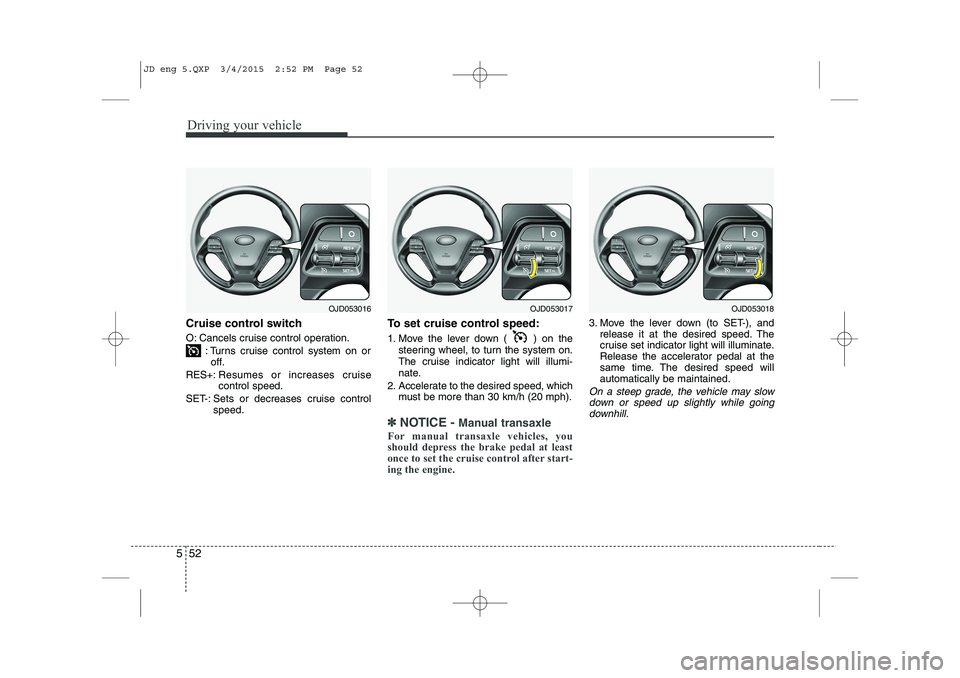
Cruise control switch
O: Cancels cruise control operation.
: Turns cruise control system on oroff.
RES+: Resumes or increases cruise control speed.
SET-: Sets or decreases cruise control speed. To set cruise control speed:
1. Move the lever down ( ) on the
steering wheel, to turn the system on.
The cruise indicator light will illumi-
nate.
2. Accelerate to the desired speed, which must be more than 30 km/h (20 mph).
✽✽ NOTICE - Manual transaxle
For manual transaxle vehicles, you
should depress the brake pedal at least
once to set the cruise control after start-
ing the engine.
3. Move the lever down (to SET-), and release it at the desired speed. The
cruise set indicator light will illuminate.
Release the accelerator pedal at the
same time. The desired speed willautomatically be maintained.
On a steep grade, the vehicle may slow
down or speed up slightly while goingdownhill.
OJD053016OJD053017OJD053018
JD eng 5.QXP 3/4/2015 2:52 PM Page 52