2015 KIA CEED radio
[x] Cancel search: radioPage 698 of 1210

413
Features of your vehicle
Smart key precautions
✽NOTICE
• If, for some reason, you happen to lose your smart key, you will not be able to
start the engine. Tow the vehicle, if
necessary, we recommend that you
contact an authorised Kia dealer.
• A maximum of 2 smart keys can be
registered to a single vehicle. If you
lose a smart key, we recommend that
you contact an authorised Kia dealer.
• The smart key will not work if any of the following occurs:
- The smart key is close to a radiotransmitter such as a radio station or
an airport which can interfere with
normal operation of the smart key.
- The smart key is near a mobile two-
way radio system or a mobile phone.
- Another vehicle’s smart key is being
operated close to your vehicle.
When the smart key does not work
properly, open and close the door with
the mechanical key. If you have a
problem with the smart key, we rec-
ommend that you contact an autho-
rised Kia dealer. (Continued)(Continued)
• If the smart key is in close proximity
to your cell phone or smart phone, the
signal from the smart key could be
blocked by normal operation of your
cell phone or smart phone. This is
especially important when the phone
is active such as making call, receiving
calls, text messaging, and/or
sending/receiving emails. Avoid plac-
ing the smart key and your cell phone
or smart phone in the same pants or
jacket pocket and maintain adequate
distance between the two devices.
Door lock/unlock in an emer-
gency situation
If the smart key does not operate normal-
ly, you can lock or unlock the doors by
using the mechanical key.
1. Press and hold the release button (1)and remove the mechanical key (2).
2. Insert the key into the hole of the out- side door handle. Turn the key toward
the rear of the vehicle to unlock and
toward the front of the vehicle to lock.
3. To reinstall the mechanical key, put the key into the hole and push it until a
click sound is heard.
CAUTION
Keep the smart key away from
water or any liquid. If the keylessentry system is inoperative due to exposure to water or liquids, it will
not be covered by your manufactur-er’s vehicle warranty.
OJD042002
JD RHD 4a(~171).QXP 4/14/2015 6:56 PM Page 13
Page 858 of 1210

4 173
Features of your vehicle
Audio remote control (if equipped)
The steering wheel audio remote control
button is installed to promote safe driving.
VOL (+/ -) (1)
• Push up the lever to increase volume.
Push down the lever to decrease vol-ume.
SEEK ( / ) (2)
The SEEK/PRESET button has different
functions base on the system mode. For
the following functions the button should
be pressed for 0.8 seconds or more.
RADIO mode
It will function as the AUTO SEEK select
button.
CDP mode
It will function as the FF/REW button.
If the SEEK button is pressed for less
than 0.8 second, it will work as follows in
each mode. RADIO mode
It will function as the PRESET STATION
select buttons.
CDP mode
It will function as the TRACK UP/DOWN
button.
Detailed information for audio control
buttons are described in the followingpages in this section.
MUTE (3)
Press the MUTE button to cancel the
sound.
Press the MUTE button again to acti- vate the sound.
MODE (4)
Press the button to select Radio or CD (compact disc).
CAUTION
Do not operate the audio remote
control buttons simultaneously.
OJD042149
■■■■TTTTyyyyppppeeee BBBBOJD042147
■
Type A
JD RHD 4b(172~).QXP 2/17/2015 11:59 AM Page 173
Page 859 of 1210
Features of your vehicle
174
4
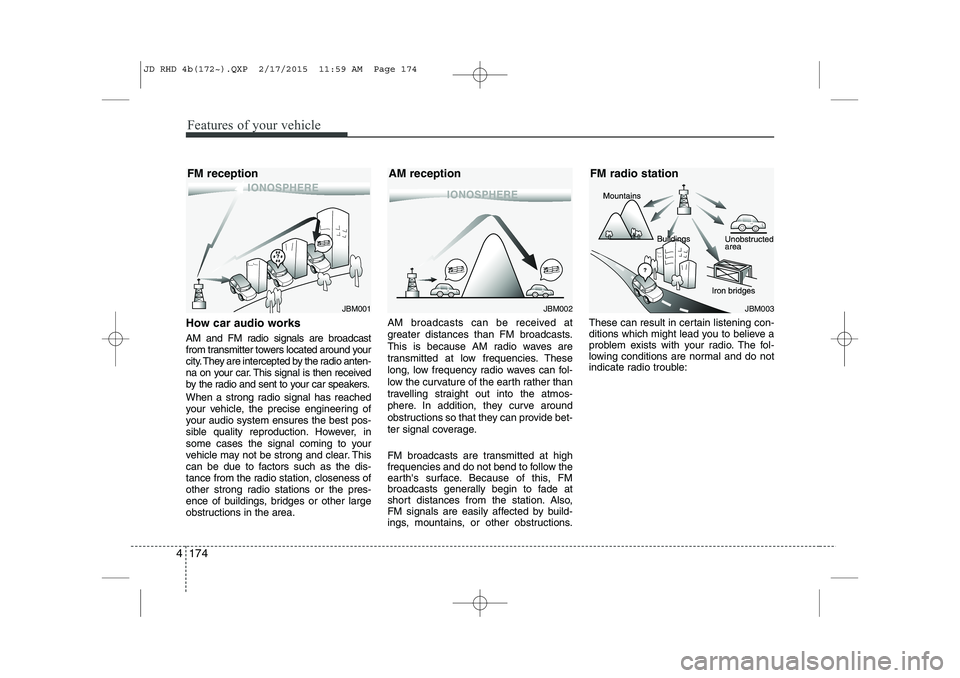
How car audio works
AM and FM radio signals are broadcast
from transmitter towers located around your
city. They are intercepted by the radio anten-
na on your car. This signal is then received
by the radio and sent to your car speakers.
When a strong radio signal has reached
your vehicle, the precise engineering of
your audio system ensures the best pos-
sible quality reproduction. However, in
some cases the signal coming to your
vehicle may not be strong and clear. This
can be due to factors such as the dis-
tance from the radio station, closeness of
other strong radio stations or the pres-
ence of buildings, bridges or other large
obstructions in the area. AM broadcasts can be received at
greater distances than FM broadcasts.
This is because AM radio waves are
transmitted at low frequencies. These
long, low frequency radio waves can fol-
low the curvature of the earth rather than
travelling straight out into the atmos-
phere. In addition, they curve around
obstructions so that they can provide bet-
ter signal coverage.
FM broadcasts are transmitted at high
frequencies and do not bend to follow the
earth's surface. Because of this, FM
broadcasts generally begin to fade at
short distances from the station. Also,
FM signals are easily affected by build-
ings, mountains, or other obstructions.These can result in certain listening con-
ditions which might lead you to believe a
problem exists with your radio. The fol-
lowing conditions are normal and do not
indicate radio trouble:
JBM001JBM002JBM003
FM reception AM reception FM radio station
JD RHD 4b(172~).QXP 2/17/2015 11:59 AM Page 174
Page 860 of 1210

4 175
Features of your vehicle
Fading - As your car moves away fromthe radio station, the signal will weaken
and sound will begin to fade. When this
occurs, we suggest that you selectanother stronger station.
Flutter/Static - Weak FM signals or large obstructions between the trans-
mitter and your radio can disturb the
signal causing static or fluttering nois-
es to occur. Reducing the treble level
may lessen this effect until the distur-
bance clears. Station Swapping - As a FM signal
weakens, another more powerful sig-
nal near the same frequency may
begin to play. This is because your
radio is designed to lock onto the clear-
est signal. If this occurs, select anotherstation with a stronger signal.
Multi-Path Cancellation - Radio signals being received from several directions
can cause distortion or fluttering. This
can be caused by a direct and reflect-
ed signal from the same station, or by
signals from two stations with close
frequencies. If this occurs, selectanother station until the condition haspassed.
Using a mobile phone or a two-wayradio
When a mobile phone is used inside the
vehicle, noise may be produced from the
audio equipment. This does not meanthat something is wrong with the audio
equipment. In such a case, use the
mobile phone at a place as far as possi-
ble from the audio equipment.
JBM004JBM005
CAUTION
When using a communication sys-
tem such a mobile phone or a radio set inside the vehicle, a separateexternal antenna must be fitted.
When a mobile phone or a radio setis used with an internal antenna alone, it may interfere with the vehi-cle's electrical system and adverse-
ly affect safe operation of the vehi- cle.
WARNING
Don't use a mobile phone when you
are driving. You must stop at a safe
place to use a mobile phone.
JD RHD 4b(172~).QXP 2/17/2015 11:59 AM Page 175
Page 864 of 1210

4 179
Features of your vehicle
USING YOUR USB DEVICE
To use an external USB device,make sure the device is not connect-
ed when starting up the vehicle.
Connect the device after starting up.
If you start the engine when the USB device is connected, it may damage
the USB device. (USB flashdrives
are very sensitive to electric shock.)
If the engine is started up or turned off whilst the external USB device is
connected, the external USB device
may not work.
It may not play inauthentic MP3 or WMA files.
1) It can only play MP3 files with the compression rate between
8Kbps~320Kbps.
2) It can only play WMA music files with the compression rate
between 8Kbps~320Kbps.
Take precautions for static electricity when connecting or disconnecting the
external USB device.
An encrypted MP3 PLAYER is not recognizable. Depending on the condition of the
external USB device, the connected
external USB device can be unrec-
ognizable.
When the formatted byte/sector set- ting of External USB device is noteither 512BYTE or 2048BYTE, then
the device will not be recognized.
Use only a USB device formatted to FAT 12/16/32.
USB devices without USB I/F authentica-
tion may not be recognizable.
Make sure the USB connection termi- nal does not come in contact with the
human body or other objects.
If you repeatedly connect or discon- nect the USB device in a short peri-
od of time, it may break the device.
You may hear a strange noise when connecting or disconnecting a USB
device.
If you disconnect the external USB device during playback in USB mode,
the external USB device can be dam-
aged or may malfunction. Therefore,
disconnect the external USB device
when the audio is turned off or in
another mode. (e.g, Radio, CD)
Depending on the type and capacity ofthe external USB device or the type of
the files stored in the device, there is a
difference in the time taken for recogni-
tion of the device.
Do not use the USB device for purposes other than playing music files.
Playing videos through the USB is not supported.
Use of USB accessories such as rechargers or heaters using USB I/F
may lower performance or cause
trouble.
If you use devices such as a USB hub purchased separately, the vehi-
cle’s audio system may not recog-
nize the USB device. In that case,
connect the USB device directly to
the multimedia terminal of the vehi-
cle.
If the USB device is divided by logi- cal drives, only the music files on the
highest-priority drive are recognized
by car audio.
Devices such as MP3 Player/ Mobile phone/Digital camera can be unrec-
ognizable by standard USB I/F can
be unrecognizable.
(Continued)
JD RHD 4b(172~).QXP 2/17/2015 11:59 AM Page 179
Page 867 of 1210
Features of your vehicle
182
4
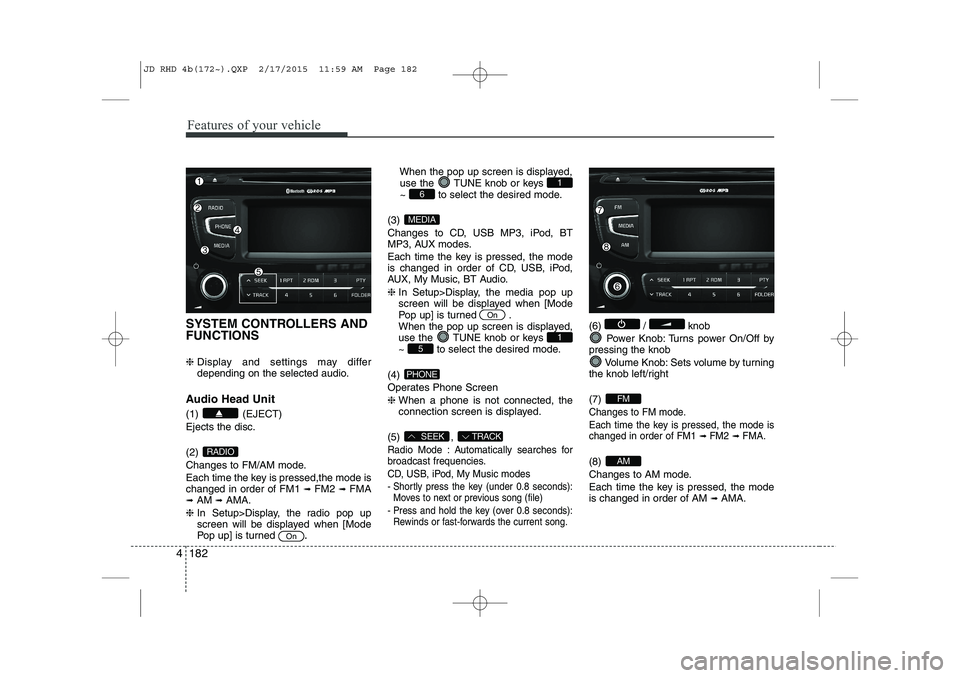
SYSTEM CONTROLLERS AND FUNCTIONS ❈ Display and settings may differ
depending on the selected audio.
Audio Head Unit (1) (EJECT) Ejects the disc. (2)
Changes to FM/AM mode.
Each time the key is pressed,the mode is changed in order of FM1 ➟
FM2 ➟FMA
➟ AM ➟AMA.
❈ In Setup>Display, the radio pop up
screen will be displayed when [Mode
Pop up] is turned .When the pop up screen is displayed,
use the TUNE knob or keys
~ to select the desired mode.
(3)
Changes to CD, USB MP3, iPod, BT
MP3, AUX modes.
Each time the key is pressed, the mode
is changed in order of CD, USB, iPod,
AUX, My Music, BT Audio. ❈ In Setup>Display, the media pop up
screen will be displayed when [Mode
Pop up] is turned .
When the pop up screen is displayed,
use the TUNE knob or keys
~ to select the desired mode.
(4)
Operates Phone Screen❈ When a phone is not connected, the
connection screen is displayed.
(5) ,
Radio Mode : Automatically searches for
broadcast frequencies.
CD, USB, iPod, My Music modes
- Shortly press the key (under 0.8 seconds): Moves to next or previous song (file)
- Press and hold the key (over 0.8 seconds): Rewinds or fast-forwards the current song.
(6) / knob
Power Knob: Turns power On/Off by
pressing the knob
Volume Knob: Sets volume by turning
the knob left/right (7)
Changes to FM mode.
Each time the key is pressed, the mode is changed in order of FM1
➟ FM2➟ FMA.
(8)
Changes to AM mode.
Each time the key is pressed, the mode is changed in order of AM ➟
AMA.AM
FM
TRACKSEEK
PHONE
51
On
MEDIA
61
On
RADIO
JD RHD 4b(172~).QXP 2/17/2015 11:59 AM Page 182
Page 868 of 1210

4 183
Features of your vehicle
(9) ~ (Preset)
Radio Mode: Saves frequencies (chan-
nels) or receives saved frequencies(channels)
CD, USB, iPod, My Music mode
- : Repeat
- : Random
In the Radio, Media, Setup, and Menu
pop up screen, the number menu isselected. (10) ,
MP3, CD, USB mode : Folder Search
FM : RDS Program Type Search (11)
Each time the button is pressed sets screen Off
➟
Screen On ➟Screen Off
❈ Audio operation is maintained and
only the screen will be turned Off.
In the screen Off state, press any key
to turn the screen On again.
(12) Radio Mode
- Press and hold the key (over 0.8 sec- onds): Previews each broadcast for 5 seconds each
CD, USB, iPod mode
- Press and hold the key (over 0.8 sec- onds): Previews each song (file) for 10 seconds each
❈ Press the key (over 0.8
seconds) again to continue listening tothe current song (file).
(13)
Displays menus for the current mode. (14)
Press the key : Moves to the
Display, Sound, Phone(Option), Systemsetting modes
❈
If the Bluetooth®Wireless Technology
feature is supported
(15) TUNE knob
Radio mode : Changes frequency by
turning the knob left/right
CD, USB, iPod mode: Searches songs
(files) by turning the knob left/right ❈ When the desired song is displayed,
press the knob to play the song.
Moves focus in all selection menus and
selects menus
SETUP
SETUP
MEMU
TA/SCAN
TA/SCAN
FOLDERPTY
2 RDM
1 RPT
61
JD RHD 4b(172~).QXP 2/17/2015 11:59 AM Page 183
Page 869 of 1210
![KIA CEED 2015 Owners Manual Features of your vehicle
184
4
DISPLAY SETTINGS
Press the key Select [Display]
through TUNE knob or key
Select menu through TUNE knob
Mode Pop up
[Mode Pop up] Changes selection mode
During](/manual-img/2/57940/w960_57940-868.png "KIA CEED 2015 Owners Manual Features of your vehicle
184
4
DISPLAY SETTINGS
Press the key Select [Display]
through TUNE knob or key
Select menu through TUNE knob
Mode Pop up
[Mode Pop up] Changes selection mode
During")
Features of your vehicle
184
4
DISPLAY SETTINGS
Press the key Select [Display]
through TUNE knob or key
Select menu through TUNE knob
Mode Pop up
[Mode Pop up] Changes selection mode
During On state, press the or
key to display the mode
change pop up screen.
Scroll Text
[Scroll Text] Set /
: Maintains scroll
: Scrolls only one (1) time.
Song Info
When playing an MP3 file, select the
desired display info from ‘Folder/File’ or
‘Album/Artist/Song’. SOUND SETTINGS
Press the key Select [Sound]
through TUNE knob or key
Select menu through TUNE knob
2
RDM
SETUP
Off
On
OffOn
MEDIA
RADIO
On
1 RPT
SETUP
JD RHD 4b(172~).QXP 2/17/2015 11:59 AM Page 184