2015 KIA CEED radio
[x] Cancel search: radioPage 334 of 1210
![KIA CEED 2015 Owners Manual 4 253
Features of your vehicle
SETUP
Starting Mode
Press the key to display the Setup screen.
You can select and control options relat-
ed to [Display], [Sound], [Phone] and[System].Display Setti](/manual-img/2/57940/w960_57940-333.png "KIA CEED 2015 Owners Manual 4 253
Features of your vehicle
SETUP
Starting Mode
Press the key to display the Setup screen.
You can select and control options relat-
ed to [Display], [Sound], [Phone] and[System].Display Setti")
4 253
Features of your vehicle
SETUP
Starting Mode
Press the key to display the Setup screen.
You can select and control options relat-
ed to [Display], [Sound], [Phone] and[System].Display Settings
Adjusting the Brightness
Press the key Select
[Display] Select [Brightness]
Use the , buttons to adjust the
screen brightness or set the Brightness
on Automatic, Day, or Night mode.
Press the button to reset. (
1) Automatic : Adjusts the brightness
automatically
( 2) Day : Always maintains the bright-
ness on high
( 3) Night : Always maintains the bright-
ness on low
Pop-up Mode
Press the key Select
[Display] Select [Pop-up Mode]
This feature is used to display the Pop-up
Mode screen when entering radio and
media modes.
When this feature is turned on, pressing
the or key will display
the Pop-up Mode screen.
✽✽NOTICE
The media Pop-up Mode screen can be
displayed only when two or more media
modes have been connected.
MEDIA RADIO
SETUP
Default
SETUP SETUP
JD eng 4c(~265).QXP 3/4/2015 4:49 PM Page 253
Page 341 of 1210
Features of your vehicle
260
4
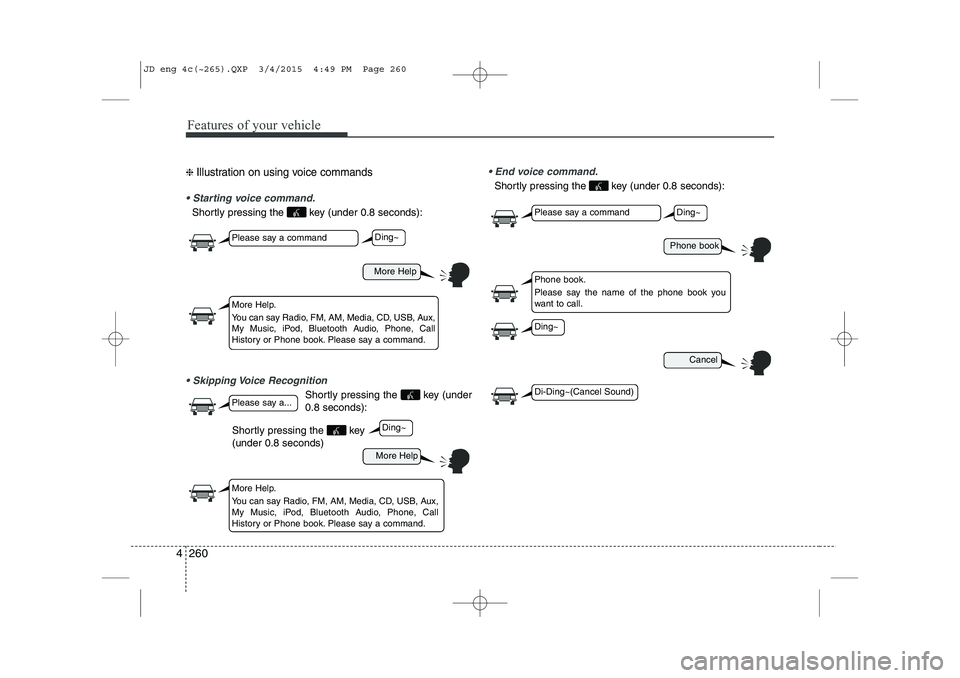
❈ Illustration on using voice commands
Starting voice command.
Shortly pressing the key (under 0.8 seconds):
Skipping Voice Recognition
Shortly pressing the key (under 0.8 seconds):
End voice command.
Shortly pressing the key (under 0.8 seconds):
More Help
Phone book
Cancel
More Help
Please say a command
Please say a command
Please say a...
More Help.
You can say Radio, FM, AM, Media, CD, USB, Aux,
My Music, iPod, Bluetooth Audio, Phone, Call
History or Phone book. Please say a command.
Phone book.
Please say the name of the phone book you
want to call.
More Help.
You can say Radio, FM, AM, Media, CD, USB, Aux,
My Music, iPod, Bluetooth Audio, Phone, Call
History or Phone book. Please say a command.
Ding~
Ding~
Ding~
Di-Ding~(Cancel Sound)
Ding~
Shortly pressing the key (under 0.8 seconds)
JD eng 4c(~265).QXP 3/4/2015 4:49 PM Page 260
Page 342 of 1210

4 261
Features of your vehicle
Command Function
More Help Provides guidance on commands that can be
used anywhere in the system.
Help Provides guidance on commands that can be
used within the current mode.
Call
phone bookEx) Call “John”
Phone Provides guidance on Phone related com- mands. After saying this command, say “Call
History”, “
Phone book”, “Dial Number” to exe-cute corresponding functions.
Call History Displays the Call History screen.
Phone bookDisplays the phone bookscreen. After saying
this command, say the name of a phone booksaved in the phone bookto automatically con-nect the call.
Dial Number Display the Dial number screen. After saying this command, you can say the number what
you want to call.
Redial Connects the most recently called number. Radio
When listening to the radio, displays the next
radio screen. (FM1 ➟FM2 ➟FMA ➟ AM ➟
AMA)
When listening to a different mode, displaysthe most recently played radio screen.
Command Function FM
When currently listening to the FM radio,
maintains the current state.
When listening to a different mode, displaysthe most recently played FM screen.
FM1(FM One) Displays the FM1 screen.
FM2(FM Two) Displays the FM2 screen.
FMA Displays the FMA screen.
AM Displays the AM screen.
AMA Displays the AMA screen.
FM Preset 1~6 Plays the most recently played broadcast
saved in FM Preset 1~6.
AM Preset 1~6 Plays the broadcast saved in AM Preset 1~6.
FM 87.5~107.9 Plays the FM broadcast of the corresponding
frequency.
AM 530~1710 Plays the AM broadcast of the corresponding
frequency.
TA on Enable Traffic Announcement
TA off Disable Traffic Announcement
News on Enable RDS News feature
News off Disable RDS News feature
Voice Command List
Common Commands: These are commands that can be used in all situations. (However, some commands may not be support- ed in special circumstances.)
JD eng 4c(~265).QXP 3/4/2015 4:49 PM Page 261
Page 343 of 1210

Features of your vehicle
262
4
Command Function
Media Moves to the most recently played media
screen.
Play Track 1~30 If a music CD has been inserted, plays the
corresponding track.
CD Plays the music saved in the CD.
Search CD Moves to the CD track or file selection screen.
For audio CDs, move to the screen and say the
track number to play the corresponding track.
Moves to MP3 CD file selection screen. After
manually operate the device to select and
play music.
USB Plays USB music.
Search USB Moves to USB file selection screen. After manually operate the device to select and play
music.
iPod Plays iPod music.
Search iPod Moves to the iPod file selection screen. After,manually operate the device to select and play
music.
My Music Plays the music saved in My Music.
Search My Music Moves to My Music file selection screen. Aftermanually operate the device to select and play
music.
Command Function
AUX (Auxiliary) Plays the connected external device.
Bluetooth Audio Plays the music saved in connected
Bluetooth®Wireless Technologydevice.
Mute Mutes the radio or music volume.
Pardon? Repeats the most recent comment.
Cancel (Exit) Ends voice command.
JD eng 4c(~265).QXP 3/4/2015 4:49 PM Page 262
Page 344 of 1210

4 263
Features of your vehicle
FM/AM radio commands: Commands that can be used whilelistening to FM, AM radio. Audio CD commands: Commands that can be used while
listening to Audio CD.
Command Function
Preset 1~6 Plays the broadcast saved in Preset 1~6.
Auto Store A utomatically selects radio broadcast fre-
quencies with superior reception and saves in
Presets 1~6.
Preset Save 1~6 Saves the current broadcast frequency to
Preset 1~6.
Seek up Plays the next receivable broadcast.
Seek down Plays the previous receivable broadcast.
Next Preset Selects the preset number next to the most recently selected preset. (Example: When cur-
rently listening to preset no. 3, then preset no.
4 will be selected.)
Previous Preset Selects the preset number previous to the most recently selected preset. (Example:
When currently listening to preset no. 3, then
preset no. 2 will be selected.)
Scan Scans receivable frequencies from the current
broadcast and plays for 10 seconds each.
Preset Scan Moves to the next preset from the current
present and plays for 10 seconds each.
AF on Enable Alternative Frequency feature
AF off Disable Alternative Frequency feature
Region Enable Region feature
Command Function
Region off Disable Region feature
Program Type Moves to the RDS Program type selection screen. After, manually operate the device to
select a desired program type.
Random Randomly plays the tracks within the CD.
Random Off Cancels random play to play tracks in sequen-
tial order.
Repeat Repeats the current track.
Repeat Off Cancels repeat play to play tracks in sequen-
tial order.
Next Track Plays the next track.
Previous Track Plays the previous track.
Scan Scans the tracks from the next track for 10
seconds each.
Track 1~30 Plays the desired track number.
Search Track Moves to the track selection screen. After, say
the track name to play the corresponding track.
Information Displays the information screen of the current
track.
JD eng 4c(~265).QXP 3/4/2015 4:49 PM Page 263
Page 453 of 1210

627
What to do in an emergency
Changing a tire with TPMS
If you have a flat tire, the low Tire
Pressure and Position telltales will
come on. We recommend that the
system be checked by an authorized
Kia dealer. Each wheel is equipped with a tire pressure sensor mounted inside the
tire behind the valve stem. You must
use TPMS specific wheels. It is rec-
ommended that you have your tires
serviced by an authorized Kia dealer.If you drive the vehicle for about 10
minutes at speeds above 25 km/h
after replaceing the low pressure tire
with the spare tire, the below willhappen:
The TPMS malfunction indicator
may blink for approximately 1
minute and then remain continuous-
ly illuminated because the TPMSsensor is not mounted on the
sparewheel.CAUTION
The TPMS malfunction indica-
tor may blink for approximate-ly 1 minute and then remaincontinuously illuminated if thevehicle is moving around elec- tric power supply cables orradios transmitter such as atpolice stations, government and public offices, broadcast-ing stations, military installa-tions, airports, or transmitting towers, etc. This can interferewith normal operation of theTire Pressure Monitoring System (TPMS).
The TPMS malfunction indica- tor may blink for approximate-ly 1 minute and then remaincontinuously illuminated if snow chains are used or someseparate electronic devicessuch as notebook computer, mobile charger, remote starteror navigation etc., are used inthe vehicle. This can interfere with normal operation of theTire Pressure MonitoringSystem (TPMS).
CAUTION
We recommend that you use thesealant approved by Kia.
The sealant on the tire pressuresensor and wheel shall be elem-inated when you replace the tire with a new one.
JD eng 6.QXP 3/12/2015 3:05 PM Page 27
Page 591 of 1210

813
Specifications & Consumer information
The refrigerant label is located on the underside of the hood.The radio frequency components of the
vehicle comply with requirements and
other relevant provisions of Directive
1995/5/EC.
Further information including the manu-
facturer's declaration of conformity is
available on Kia web site as follows;
http://www.kia-hotline.com
OJD082001CE0678
■
Example
DECLARATION OF CONFORMITY
REFRIGERANT LABEL
JD eng 8.QXP 3/4/2015 3:13 PM Page 13
Page 693 of 1210
Features of your vehicle
8
4
Transmitter precautions
✽NOTICE
The transmitter will not work if any of
following occur:
• The ignition key is in ignition switch.
• You exceed the operating distance limit (about 10 m [30 feet]).
• The battery in the transmitter is
weak.
• Other vehicles or objects may be
blocking the signal.
• The weather is extremely cold.
• The transmitter is close to a radio
transmitter such as a radio station or
an airport which can interfere with
normal operation of the transmitter.
When the transmitter does not work cor-
rectly, open and close the door with the
ignition key. If you have a problem with
the transmitter, we recommend that you
contact an authorised Kia dealer. (Continued)(Continued)
• If the transmitter is in close proximity
to your cell phone or smart phone, the
signal from the transmitter could be
blocked by normal operation of your
cell phone or smart phone. This is
especially important when the phone
is active such as making call, receiving
calls, text messaging, and/or sending/
receiving emails. Avoid placing the
transmitter and your cell phone or
smart phone in the same pants or
jacket pocket and maintain adequate
distance between the two devices. CAUTION
Changes or modifications not
expressly approved by the partyresponsible for compliance couldvoid the user’s authority to operate the equipment. If the keyless entry
system is inoperative due tochanges or modifications not expressly approved by the party
responsible for compliance, it will
not be covered by your manufactur-er’s vehicle warranty.
CAUTION
• Keep the transmitter away from
water or any liquid. If the keylessentry system is inoperative due to exposure to water or liquids, itwill not be covered by your manu-
facturer vehicle warranty.
• Keep the transmitter away from electromagnetic materials thatblocks electromagnetic waves to
the key surface.
JD RHD 4a(~171).QXP 4/14/2015 6:55 PM Page 8