2015 KIA CEED steering wheel
[x] Cancel search: steering wheelPage 757 of 1210

Features of your vehicle
72
4
Lamp Menu
• Headlamp delay (if equipped)
If the headlamp delay function is checked :
The Headlamp delay and Headlamp
Welcome function will be activated.
• Auto Triple Turn
(One-touch triple turn signal)
If the auto triple turn function is checked :
The lane change signals will blink 3 times
when the turn signal lever is moved
slightly.
• Welcome Light (if equipped)
If the welcome light function is checked :
The welcome light function of puddle
lamp will activate. Settings Menu
• Seat Easy Access (for Driver Position
Memory System equipped vehicle)
(if equipped)
If the seat easy access function is
checked:
The driver's seat will automatically move
forward or rearward for the driver to enter
or exit the vehicle comfortably.
• Welcome Sound
If the welcome sound function is checked :
The Welcome Sound function will be acti-
vated.
• Steering Position (if equipped)
If the steering position function is
checked:
The warning illuminates on the LCD dis-
play when the steering wheel is not
aligned with the ENGINE STRAT/STOP
button in the ON position. • AVG fuel ECO Reset
Auto Reset - The average fuel economy
will reset automatically
when you drive after refu- elling.
Manual Reset - The average fuel econo- my will not reset auto-
matically when you drive
after refuelling. You can
reset the average fuel
economy by pressing
the button for morethan 1 second when the
average fuel economy is
displayed.
• Speed Gauge Scale (if equipped)
- 100% : The size of the numbers on speed gauge is normal state.
- 110% : The size of the numbers on speed gauge will increase.
• Unit
You can choose the displayed unit in the
instrument cluster “km” or “mile”.
• Language
Choose the language you prefer within
the LCD display.
JD RHD 4a(~171).QXP 4/14/2015 6:59 PM Page 72
Page 758 of 1210

473
Features of your vehicle
LCD display information
Sunroof open
If driver removes the ignition key (Smart
key : turns off the engine) and opens the
driver-side door when the sunroof is not
fully closed, warning message will appear
on the LCD display. Also, the warning
chime sounds for approximately 7 sec-
onds.
Illumination intensity
The illumination intensity of the instru-
ment panel is shown when adjusting it
with the illumination control switch.
For more details, refer to “Instrument
panel illumination” in section 4.
Turn on "FUSE SWITCH" (mode switch)
The notice appears to inform the driver to
turn on the fuse switch in the instrument
panel under the steering wheel.
For more details, refer to “Fuses” in sec- tion 7.
OJD042078/OJD042215
■
Normal vision
■SupervisionOJD042079/OJD042214
■
Normal vision
■SupervisionOJD042240/OJD042188
■
Normal vision
■Supervision
JD RHD 4a(~171).QXP 4/14/2015 6:59 PM Page 73
Page 759 of 1210

Features of your vehicle
74
4
Parking assist warning (if equipped)
Displays the area an obstacle is detected
whilst moving forward or rearward.
For more details, refer to “Parking assist
system” in section 4.
Align steering wheel (if equipped)
If you start the engine when the steering
wheel is turned 90 degrees to the left (or
right) after a couple of seconds, “Align
steering wheel” illuminates on the LCD
display for 5 seconds.
Turn the steering wheel to the right (or left)
and make it turned to the left (or right) less
than 30 degrees.
For vehicle’s equipped with smart
key system
Key not in vehicle
If the smart key is not in the vehicle and
if any door is opened or closed with the
engine start/stop button in the ACC, ON,
or START position, the warning illumi-
nates on the LCD display. Also, the chime
sounds for 5 seconds when the smart
key is not in the vehicle and the door isclosed.
Always have the smart key with you.
OJD042163/OJD042196
■
Normal vision
■SupervisionOJD042164/OJD042211
■
Normal vision
■SupervisionOJD042073/OJD042205
■
Normal vision
■Supervision
JD RHD 4a(~171).QXP 4/14/2015 6:59 PM Page 74
Page 762 of 1210

477
Features of your vehicle
Press start button again
If you can not operate the engine
start/stop button when there is a problem
with the engine start/stop button system,
the warning illuminates for 10 seconds
and the chime sounds continuously to
indicate that you could start the engine
by pressing the engine start/stop button
once more. The chime will stop if the engine
start/stop button system works normally
or the theft alarm system is armed.
If the warning illuminates each time you
press the engine start/stop button, we
recommend that the system be checked
by an authorised Kia dealer.Shift to "P" or "N" to start engine
If you try to start the engine with the shift
lever not in the P(Park) or N(Neutral)
position, the warning illuminates for
about 10 seconds on the LCD display.
You can also start the engine with the
shift lever in the N(Neutral) position, but
for your safety start the engine with the
shift lever in the P(Park) position.
Press start button whilst turn steering
(if equipped)
If the steering wheel does not unlock nor-
mally when the engine start/stop button
is pressed, the warning illuminates for 10
seconds on the LCD display. Also, the
warning chime sounds once and the
engine start/stop button light blinks for 10
seconds.
When you are warned, press the engine
start/stop button whilst turning the steer-
ing wheel right and left.
OJD042074/OJD042206
■
Normal vision
■SupervisionOJD042077/OJD042209
■
Normal vision
■SupervisionOJD042067/OJD042199
■
Normal vision
■Supervision
JD RHD 4a(~171).QXP 4/14/2015 7:00 PM Page 77
Page 763 of 1210

Features of your vehicle
78
4
Check steering wheel lock system
(if equipped)
If the steering wheel does not lock nor-
mally when the engine start/stop button
changes to the OFF position, the warning
illuminates for 10 seconds on the LCD
display. Also, the warning chime sounds
for 3 seconds and the engine start/stop
button light blinks for 10 seconds. Check "BRAKE SWITCH" fuse
When the brake switch fuse is discon-
nected, the warning illuminates for 10
seconds on the LCD display.
Replace the fuse with a new one. If that
is not possible you can start the engine
by pressing the engine start/stop button
for 10 seconds in ACC.
Torque reduced due to overheating
(for T-GDI engine)
When the engine coolant temperature
exceeds 115°C, this message will be dis-
played and the torque will be reduced to
protect the engine.
OJD042069/OJD042201
■
Normal vision
■SupervisionOJD042076/OJD042208
■
Normal vision
■SupervisionOJD043509
JD RHD 4a(~171).QXP 4/14/2015 7:00 PM Page 78
Page 785 of 1210
Features of your vehicle
100
4
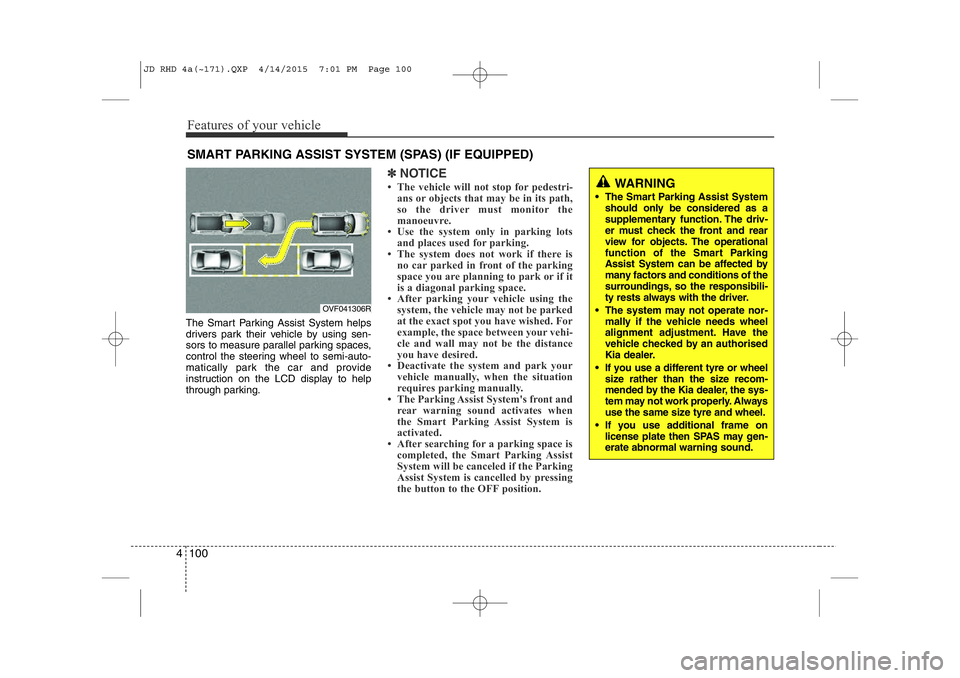
The Smart Parking Assist System helps
drivers park their vehicle by using sen-
sors to measure parallel parking spaces,
control the steering wheel to semi-auto-
matically park the car and provide
instruction on the LCD display to help
through parking.
✽NOTICE
• The vehicle will not stop for pedestri- ans or objects that may be in its path,
so the driver must monitor the
manoeuvre.
• Use the system only in parking lots
and places used for parking.
• The system does not work if there is no car parked in front of the parking
space you are planning to park or if it
is a diagonal parking space.
• After parking your vehicle using the
system, the vehicle may not be parked
at the exact spot you have wished. For
example, the space between your vehi-
cle and wall may not be the distance
you have desired.
• Deactivate the system and park your vehicle manually, when the situation
requires parking manually.
• The Parking Assist System's front and
rear warning sound activates when
the Smart Parking Assist System is
activated.
• After searching for a parking space is completed, the Smart Parking Assist
System will be canceled if the Parking
Assist System is cancelled by pressing
the button to the OFF position.
SMART PARKING ASSIST SYSTEM (SPAS) (IF EQUIPPED)
OVF041306R
WARNING
• The Smart Parking Assist System should only be considered as a
supplementary function. The driv-
er must check the front and rear
view for objects. The operational
function of the Smart Parking
Assist System can be affected by
many factors and conditions of the
surroundings, so the responsibili-
ty rests always with the driver.
• The system may not operate nor- mally if the vehicle needs wheel
alignment adjustment. Have the
vehicle checked by an authorised
Kia dealer.
• If you use a different tyre or wheel size rather than the size recom-
mended by the Kia dealer, the sys-
tem may not work properly. Always
use the same size tyre and wheel.
• If you use additional frame on license plate then SPAS may gen- erate abnormal warning sound.
JD RHD 4a(~171).QXP 4/14/2015 7:01 PM Page 100
Page 789 of 1210

Features of your vehicle
104
4
How the system works
1. Activate the Smart Parking Assist
System
2. Select parking assist mode
3. Search for parking space (slowly move forward.)
4. Search complete (automatic search by sensor.)
5. Steering wheel control (1) Shift according to the instruction on the LCD display.
(2) Drive slowly with the brake pedal applied.
6. Smart Parking Assist System com- plete
7. If necessary, manually adjust position of vehicle.
✽NOTICE
• Before activating the system check if the conditions are possible to use the
system.
• For your safety, always apply the
brake pedal except for when driving.
1. Activate Smart Parking Assist
System
• Press the Smart Parking AssistSystem button (the button indicator will illuminate).
• The Parking Assist System will be acti- vated (the button indicator will illumi-nate).
A warning sound will be heard if an obstacle is detected.
• Press the Smart Parking Assist System button again for more than 2
seconds to turn off the system.
• The Smart Parking Assist System defaults to the OFF position whenever
the ignition switch is turned on.
(Continued)
7. Obstacle in parking space
The system may search for a park-
ing space even though an obstacle
is in the parking space. An accident
may occur if you continue to park
the vehicle with the system.
Do not solely rely on the Smart
Parking Assist System.
OVF041309R
OJD042082R
JD RHD 4a(~171).QXP 4/14/2015 7:01 PM Page 104
Page 791 of 1210

Features of your vehicle
106
4
✽NOTICE
Slowly drive forward maintaining the
distance of approximately 50cm ~
150cm (19.6in.~59.0in.) with the parked
vehicles. If not within the distance, the
system may not be able to search for a
parking space.4. Search complete
Whilst driving forward to search for a
parking space, the above message willappear with a beep sound if the search is
complete. Stop the vehicle and shift to
the R (Reverse) position.
5. Steering wheel control
• The above message will appear if the shift lever is in R (Reverse). The steer- ing wheel will be controlled automati-
cally.
• The system will be cancelled if you firmly hold the steering wheel whilst it
is controlled automatically.
• The system will be cancelled if vehicle speed is over 7km/h(4.3mph).
CAUTION
After searching for a parking space
is completed, continue using thesystem after checking the sur- rounding area.
OVF041310R
50~150 cm50~150 cm
CAUTION
• Always drive slowly with the brake pedal applied.
• If the parking space is to small the system may be cancelled atthe Steering wheel control stage.Do not park your vehicle if thespace is too small.
OJD042221/OJD042218
■
Right side
- parallel mode ■
Left side
-parallel modeOJD042222
WARNING
Do not put your hands between the steering wheel whilst it is being
automatically controlled.
JD RHD 4a(~171).QXP 4/14/2015 7:01 PM Page 106