2015 JEEP GRAND CHEROKEE height
[x] Cancel search: heightPage 356 of 717

Engine Off Options
After pressing the Engine Off Options button on the
touchscreen the following settings will be available.
•Easy Exit Seat — If Equipped
This feature provides automatic driver seat positioning to
enhance driver mobility when entering and exiting the
vehicle. To make your selection, press the “Easy Exit
Seat” button on the touchscreen until a check-mark
appears next to setting, showing that setting has been
selected. Press the back arrow button on the touchscreen
to return to the previous menu.
•Engine Off Power Delay
When this feature is selected, the power window
switches, radio, Uconnect® phone system (if equipped),
DVD video system (if equipped), power sunroof (if
equipped), and power outlets will remain active for up to
10 minutes after the ignition is cycled to OFF. Opening
either front door will cancel this feature. To change the
Engine Off Power Delay status press the press the “+” or
“-” button to choose from “0 seconds,” “45 seconds,” “5
minutes,” or “10 minutes.” Press the back arrow button
on the touchscreen to return to the previous menu.
•Headlight Off Delay
When this feature is selected, the driver can choose to
have the headlights remain on for 0, 30, 60, or 90 seconds
when exiting the vehicle. To change the Headlight Off
Delay status press the “+” or “-” button on the touch-
screen to select your desired time interval. Press the back
arrow button on the touchscreen to return to the previous
menu.
•Auto Entry/Exit Suspension — If Equipped
When this feature is selected, the driver can choose to
automatically lower the vehicle from ride height position
when the vehicle is shifted to park. To change the mode
status press the “Auto Entry/Exit Suspension” button on
354 UNDERSTANDING YOUR INSTRUMENT PANEL
Page 447 of 717

Shifting Into NEUTRAL (N)
WARNING!
You or others could be injured or killed if you leave
the vehicle unattended with the power transfer unit
in the NEUTRAL (N) position without first fully
engaging the parking brake. The NEUTRAL (N)
position disengages both the front and rear drive
shafts from the powertrain and will allow the vehicle
to roll, even if the transmission is in PARK. The
parking brake should always be applied when the
driver is not in the vehicle.
1. Bring the vehicle to a complete stop, with the engine
running.
2. Press and hold the brake pedal.
3. Shift the transmission into NEUTRAL.
4. If vehicle is equipped with Quadra-Lift™ air suspen-
sion, ensure the vehicle is set to Normal Ride Height.
5. Using a ballpoint pen or similar object, push and hold
the recessed transfer case NEUTRAL (N) button (lo-
cated by the selector switch) for four seconds. The
light behind the NEUTRAL (N) symbol will blink,
indicating shift in progress. The light will stop blink-
ing (stay on solid) when the shift to NEUTRAL (N) is
complete. A “NEUTRAL” message will appear in the
Driver Information Display (DID). Refer to “Driver
Information Display (DID)” in “Understanding Your
Instrument Panel” for further information.
5
STARTING AND OPERATING 445
Page 451 of 717
launches, to minimize wheel slippage. If equipped
with air suspension, the default ride height for Snow is
NRH.
•Auto– Fully automatic full time four-wheel drive
operation can be used on and off road. Balances
traction with seamless steering feel to provide im-
proved handling and acceleration over two-wheel
drive vehicles. If equipped with air suspension, the
level will change to NRH.
•Sand– Off road calibration for use on low traction
surfaces such as sand or wet grass. Driveline is maxi-
mized for traction. Some binding may be felt on less
forgiving surfaces. The electronic brake controls are set
to limit traction control management of throttle and
wheel spin. If equipped with air suspension, the
default ride height for Sand is NRH.
•Mud– Off road calibration for use on low traction
surfaces such as mud. Driveline is maximized for
traction. Some binding may be felt on less forgiving
surfaces. The electronic brake controls are set to limit
traction control management of throttle and wheel
spin. If equipped with air suspension, the level will
change to Off Road 1.
•Rock– Off road calibration only available in 4WD Low
range. The vehicle is raised (if equipped with Air
Suspension) for improved ground clearance. Traction
based tuning with improved steer-ability for use on
high traction off-road surfaces. Use for low speed
obstacles such as large rocks, deep ruts, etc. If
equipped with air suspension, the vehicle level will
change to Off-Road 2. If the Selec-Terrain™ switch is in
ROCK mode, and the transfer case is switched from
4WD Low to 4WD High, the Selec-Terrain™ system
will return to AUTO.
5
STARTING AND OPERATING 449
Page 452 of 717
NOTE:Activate the Hill Descent Control or Selec Speed
Control for steep downhill control. See “Electronic Brake
Control System” in this section for further information.
Driver Information Display (DID) Messages
When the appropriate conditions exist, a message will
appear in the DID display. Refer to “Driver Information
Display (DID)” in “Understanding Your Instrument
Panel” for further information.
QUADRA-LIFT™ — IF EQUIPPED
Description
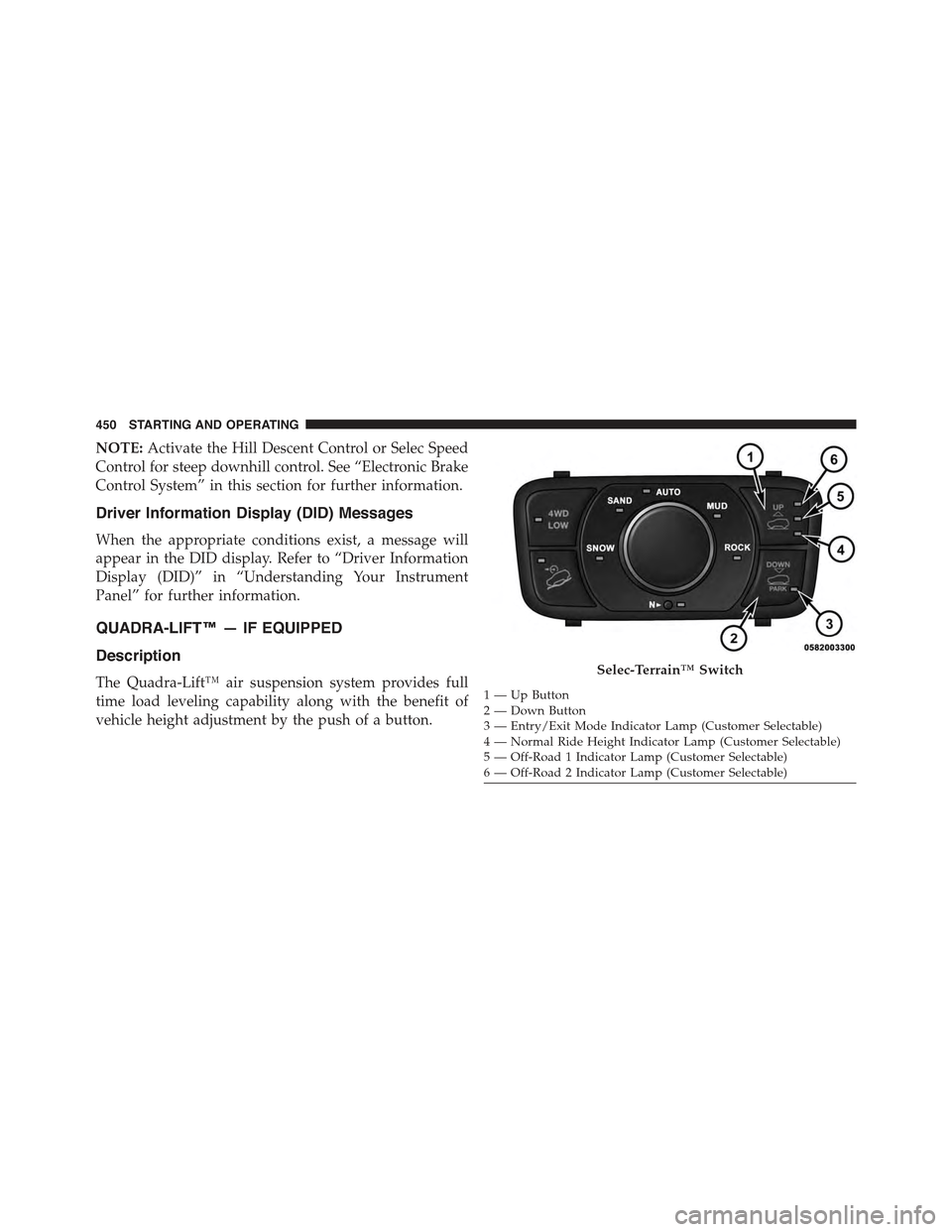
The Quadra-Lift™ air suspension system provides full
time load leveling capability along with the benefit of
vehicle height adjustment by the push of a button.
Selec-Terrain™ Switch
1—UpButton2—DownButton3 — Entry/Exit Mode Indicator Lamp (Customer Selectable)4—NormalRideHeightIndicatorLamp(CustomerSelectable)5 — Off-Road 1 Indicator Lamp (Customer Selectable)6 — Off-Road 2 Indicator Lamp (Customer Selectable)
450 STARTING AND OPERATING
Page 453 of 717
•Normal Ride Height (NRH)– This is the standard
position of the suspension and is meant for normal
driving.
•Off-Road 1 (OR1) (Raises the vehicle approximately
1.1 in (28 mm)– This is the primary position for all
off-road driving until OR2 is needed. A smoother and
more comfortable ride will result. Push the “Up”
button once from the NRH position while the vehicle
speed is below 38 mph (61 km/h). When in the OR1
position, if the vehicle speed remains between 40 mph
(64 km/h) and 50 mph (80 km/h) for greater than 20
seconds or if the vehicle speed exceeds 50 mph
(80 km/h), the vehicle will be automatically lowered to
NRH. Refer to “Off-Road Driving Tips” in “Starting
and Operating” for further information.
•Off-Road 2 (OR2) (Raises the vehicle approximately
2.2 in (55 mm)– This position is intended for off-
roading use only where maximum ground clearance is
required. To enter OR2, push the “Up” button twice
from the NRH position or once from the OR1 position
while vehicle speed is below 20 mph (32 km/h). While
in OR2, if the vehicle speed exceeds 25 mph (40 km/h)
the vehicle height will be automatically lowered to
OR1. Refer to “Off-Road Driving Tips” in “Starting
and Operating” for further information.
•Aero Mode (Lowers the vehicle approximately 0.6 in
(15 mm)– This position provides improved aerody-
namics by lowering the vehicle. The vehicle will
automatically enter Aero Mode when the vehicle
speed remains between 52 mph (83 km/h) and 56 mph
(90 km/h) for greater than 20 seconds or if the vehicle
speed exceeds 56 mph (90 km/h). The vehicle will
return to NRH from Aero Mode if the vehicle speed
remains between 20 mph (32 km/h) and 25 mph
(40 km/h) for greater than 20 seconds or if the vehicle
5
STARTING AND OPERATING 451
Page 454 of 717
speed falls below 20 mph (32 km/h). The vehicle will
enter Aero Mode, regardless of vehicle speed if the
shift lever is in the “SPORT” position.
•Entry/Exit Mode (Lowers the vehicle approximately
1.6 in (40 mm)– This position lowers the vehicle for
easier passenger entry and exit as well as lowering the
rear of the vehicle for easier loading and unloading of
cargo. To enter Entry/Exit Mode, push the “Down”
button once from (NRH) while the vehicle speed is
below 25 mph (40 km/h). Once the vehicle speed goes
below 15 mph (24 km/h) the vehicle height will begin
to lower. If the vehicle speed remains between 15 mph
(24 km/h) and 25 mph (40 km/h) for greater than 60
seconds, or the vehicle speed exceeds 25 mph
(40 km/h) the Entry/Exit Mode change will be can-
celled. To exit Entry/Exit Mode, press the “Up” button
once while in Entry/Exit Mode or drive the vehicle
over 15 mph (24 km/h).
NOTE:Automatic lowering of the vehicle into Entry/
Exit Mode can be enabled through the Uconnect® Touch-
Screen Radio. If this feature is enabled, the vehicle will
only lower if the shift lever is in#PARK#, the terrain
switch is in#AUTO#, the transfer-case is in#AUTO” and
the vehicle level should be either in Normal or Aero
Mode. The Vehicle will not automatically lower if the air
suspension level is in Off Rd 2 or Off Rd 1. If the vehicle
is equipped with Intrusion Theft Module (ITM), the
lowering will be suppressed when the ignition is
switched Off and the Door is Open to prevent setting the
alarm Off.
The Selec-Terrain™ switch will automatically change the
vehicle to the proper height based on the position of the
Selec-Terrain™ switch. The height can be changed from
the default Selec-Terrain™ setting by normal use of the
air suspension buttons. Refer to “Selec-Terrain™” in
“Starting and Operating” for further information.
452 STARTING AND OPERATING
Page 456 of 717
Air Suspension Modes
The Air Suspension system has multiple modes to protect
the system in unique situations:
Tire/Jack Mode
To assist with changing a spare tire, the air suspension
system has a feature which allows the automatic leveling
to be disabled. Refer to “Uconnect® Settings” in “Under-
standing Your Instrument Panel” for further information.
NOTE:This mode is intended to be enabled with engine
running.
Transport Mode
To assist with flat bed towing, the air suspension system
has a feature which will put the vehicle into Entry/Exit
height and disable the automatic load leveling system.
Refer to “Uconnect® Settings” in “Understanding Your
Instrument Panel” for further information.
NOTE:This mode is intended to be enabled with engine
running.
Wheel Alignment Mode
Before performing a wheel alignment this mode must be
enabled. Refer to “Uconnect® Settings” in “Understand-
ing Your Instrument Panel” for further information.
NOTE:This mode is intended to be enabled with engine
running.
If equipped with a touch screen radio all enabling/
disabling of air suspension features must be done
through the radio. Refer to “Uconnect® Settings” in
“Understanding Your Instrument Panel” for further in-
formation.
454 STARTING AND OPERATING
Page 457 of 717
Driver Information Display (DID) Messages
When the appropriate conditions exist, a message will
appear in the DID display. Refer to “Driver Information
Display (DID)” in “Understanding Your Instrument
Panel” for further information.
Operation
The indicator lamps 3 through 6 will illuminate to show
the current position of the vehicle. Flashing indicator
lamps will show a position which the system is working
to achieve. When raising, if multiple indicator lamps are
flashing on the “Up” button, the highest flashing indica-
tor lamp is the position the system is working to achieve.
When lowering, if multiple indicators are flashing on the
#Up#button the lowest solid indicator lamp is the posi-
tion the system is working to achieve.
Pressing the “UP” button once will move the suspension
one position higher from the current position, assuming
all conditions are met (i.e. engine running, speed below
threshold, etc). The “UP” button can be pressed multiple
times, each press will raise the requested level by one
position up to a maximum position of OR2 or the highest
position allowed based on current conditions (i.e. vehicle
speed, etc).
Pressing the “DOWN” button once will move the sus-
pension one position lower from the current level, as-
suming all conditions are met (i.e. engine running, doors
closed, speed below threshold, etc). The “DOWN” button
can be pressed multiple times. Each press will lower the
requested level by one position down to a minimum of
Park Mode or the lowest position allowed based on
current conditions (i.e. vehicle speed, etc.)
Automatic height changes will occur based on vehicle
speed and the current vehicle height. The indicator lamps
and DID messages will operate the same for automatic
changes and user requested changes.
5
STARTING AND OPERATING 455