2015 JEEP GRAND CHEROKEE warning
[x] Cancel search: warningPage 313 of 717
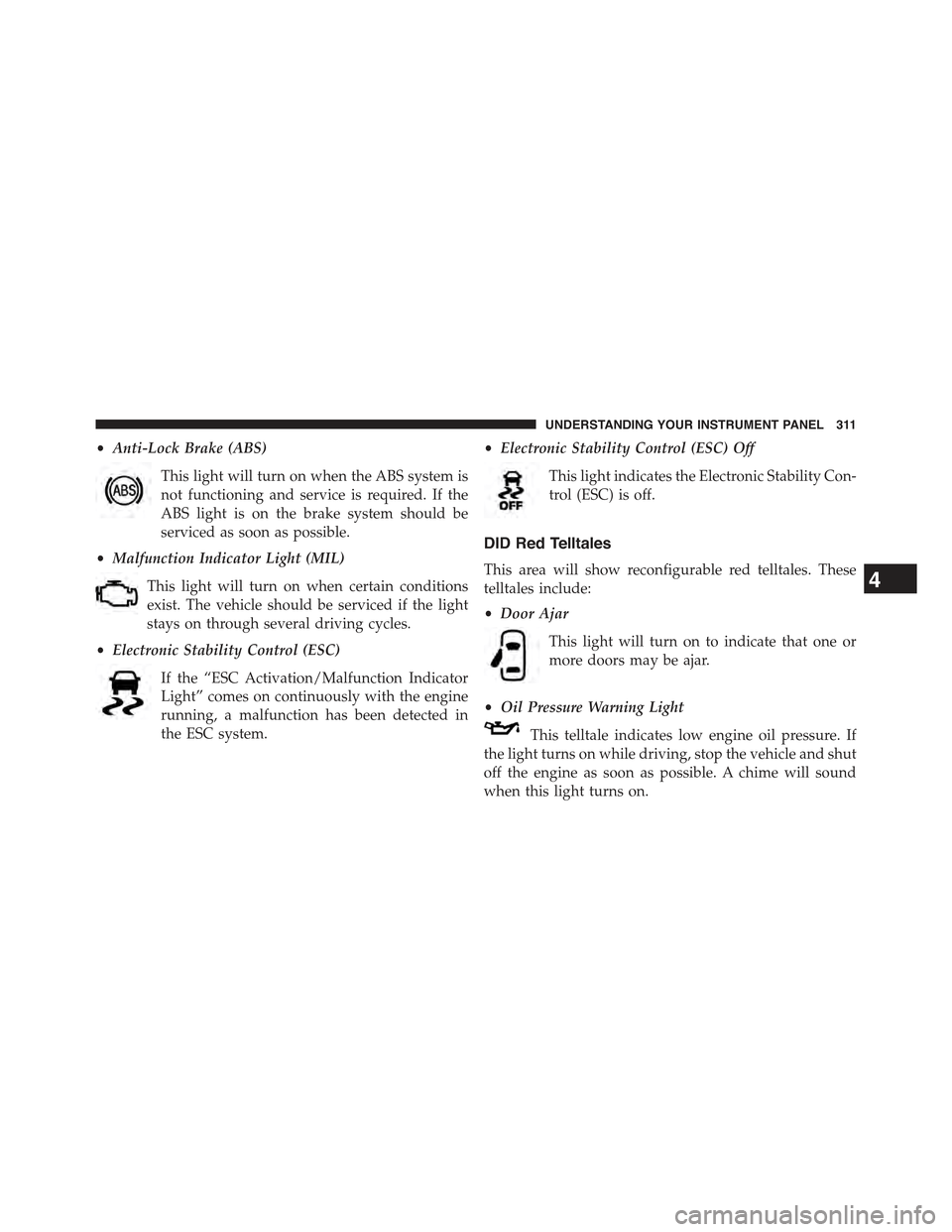
•Anti-Lock Brake (ABS)
This light will turn on when the ABS system is
not functioning and service is required. If the
ABS light is on the brake system should be
serviced as soon as possible.
•Malfunction Indicator Light (MIL)
This light will turn on when certain conditions
exist. The vehicle should be serviced if the light
stays on through several driving cycles.
•Electronic Stability Control (ESC)
If the “ESC Activation/Malfunction Indicator
Light” comes on continuously with the engine
running, a malfunction has been detected in
the ESC system.
•Electronic Stability Control (ESC) Off
This light indicates the Electronic Stability Con-
trol (ESC) is off.
DID Red Telltales
This area will show reconfigurable red telltales. These
telltales include:
•Door Ajar
This light will turn on to indicate that one or
more doors may be ajar.
•Oil Pressure Warning Light
This telltale indicates low engine oil pressure. If
the light turns on while driving, stop the vehicle and shut
off the engine as soon as possible. A chime will sound
when this light turns on.
4
UNDERSTANDING YOUR INSTRUMENT PANEL 311
Page 314 of 717

Do not operate the vehicle until the cause is corrected.
This light does not show how much oil is in the engine.
The engine oil level must be checked under the hood.
•Oil Temperature Warning Light
This telltale indicates engine oil temperature is
high. If the light turns on while driving, stop
the vehicle and shut off the engine as soon as
possible.
•Charging System Light
This light shows the status of the electrical charg-
ing system. If the light stays on or comes on while
driving, turn off some of the vehicle’s non-essential
electrical devices or increase engine speed (if at idle). If
the charging system light remains on, it means that the
vehicle is experiencing a problem with the charging
system. Obtain SERVICE IMMEDIATELY. See an autho-
rized dealer.
If jump starting is required, refer to “Jump Starting
Procedures” in “What To Do In Emergencies”.
•Electronic Throttle Control (ETC) Light
This light informs you of a problem with the
Electronic Throttle Control (ETC) system. The
light will come on when the ignition is first
turned ON and remain on briefly as a bulb
check. If the light does not come on during starting, have
the system checked by an authorized dealer.
If a problem is detected, the light will come on while the
engine is running. Cycle the ignition key when the
vehicle has completely stopped and the shift lever is
placed in the PARK position. The light should turn off.
If the light remains lit with the engine running, your
vehicle will usually be drivable. However, see an autho-
rized dealer for service as soon as possible. If the light is
flashing when the engine is running, immediate service is
312 UNDERSTANDING YOUR INSTRUMENT PANEL
Page 315 of 717
required. You may experience reduced performance, an
elevated/rough idle or engine stall and your vehicle may
require towing.
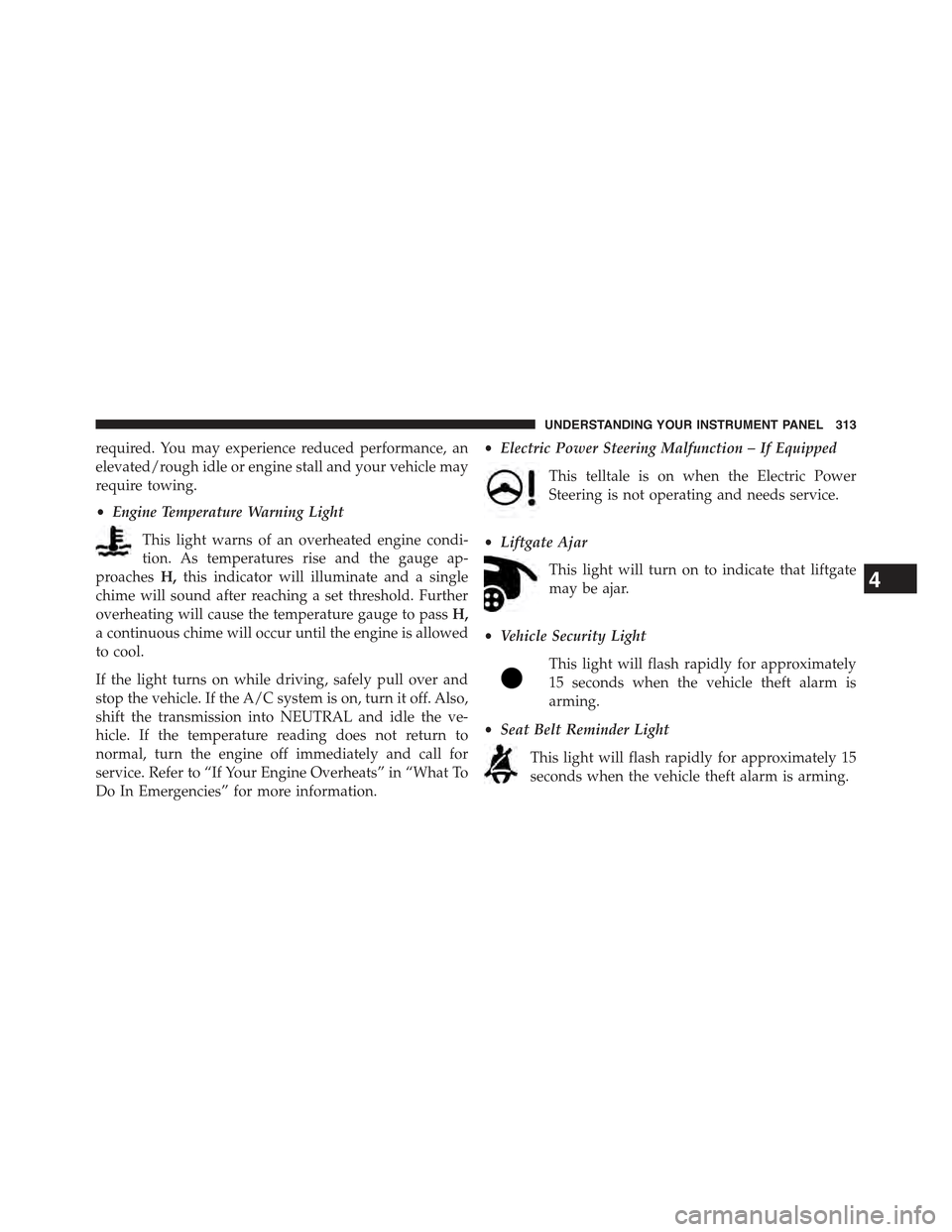
•Engine Temperature Warning Light
This light warns of an overheated engine condi-
tion. As temperatures rise and the gauge ap-
proachesH,this indicator will illuminate and a single
chime will sound after reaching a set threshold. Further
overheating will cause the temperature gauge to passH,
a continuous chime will occur until the engine is allowed
to cool.
If the light turns on while driving, safely pull over and
stop the vehicle. If the A/C system is on, turn it off. Also,
shift the transmission into NEUTRAL and idle the ve-
hicle. If the temperature reading does not return to
normal, turn the engine off immediately and call for
service. Refer to “If Your Engine Overheats” in “What To
Do In Emergencies” for more information.
•Electric Power Steering Malfunction – If Equipped
This telltale is on when the Electric Power
Steering is not operating and needs service.
•Liftgate Ajar
This light will turn on to indicate that liftgate
may be ajar.
•Vehicle Security Light
This light will flash rapidly for approximately
15 seconds when the vehicle theft alarm is
arming.
•Seat Belt Reminder Light
This light will flash rapidly for approximately 15
seconds when the vehicle theft alarm is arming.
4
UNDERSTANDING YOUR INSTRUMENT PANEL 313
Page 316 of 717
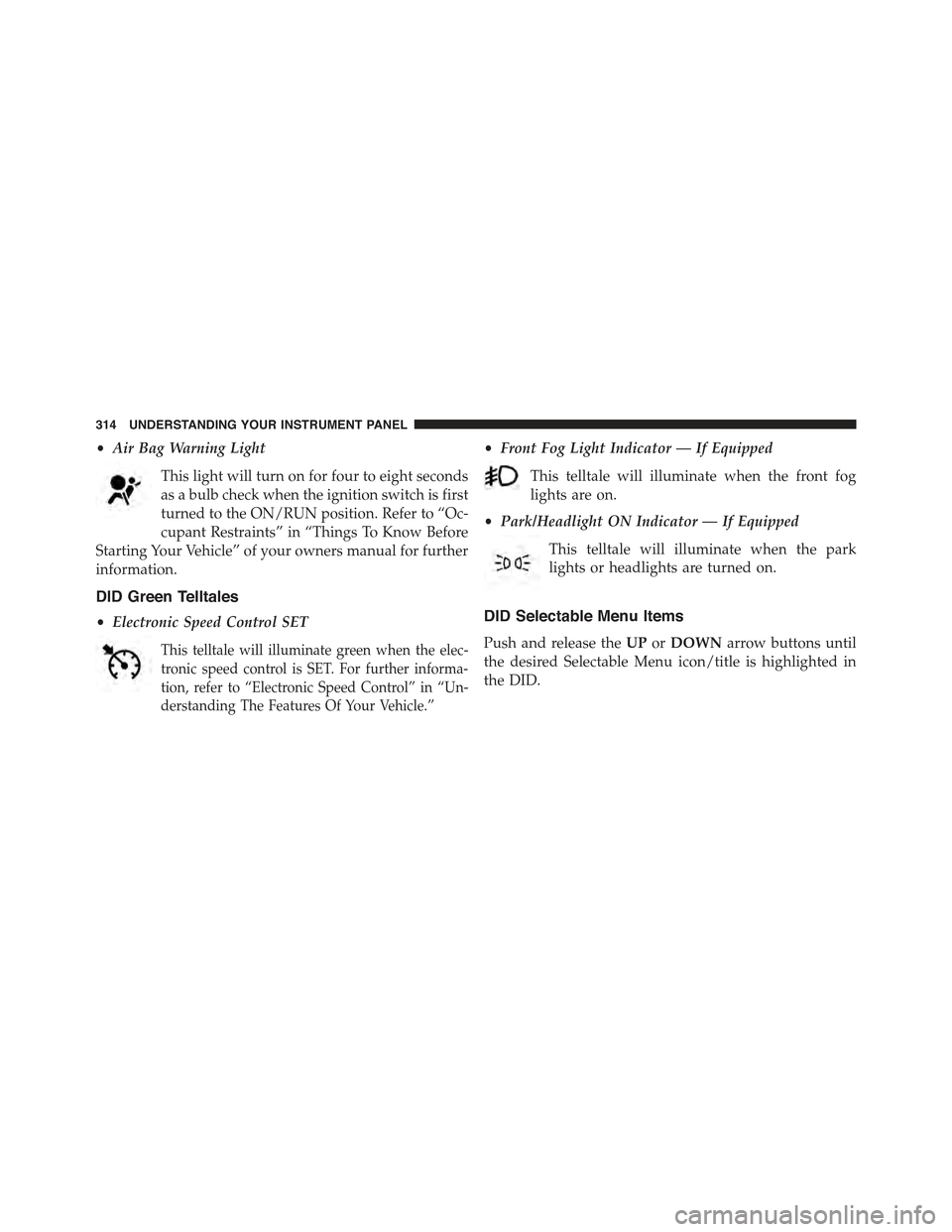
•Air Bag Warning Light
This light will turn on for four to eight seconds
as a bulb check when the ignition switch is first
turned to the ON/RUN position. Refer to “Oc-
cupant Restraints” in “Things To Know Before
Starting Your Vehicle” of your owners manual for further
information.
DID Green Telltales
•Electronic Speed Control SET
This telltale will illuminate green when the elec-
tronic speed control is SET. For further informa-
tion, refer to “Electronic Speed Control” in “Un-
derstanding The Features Of Your Vehicle.”
•Front Fog Light Indicator — If Equipped
This telltale will illuminate when the front fog
lights are on.
•Park/Headlight ON Indicator — If Equipped
This telltale will illuminate when the park
lights or headlights are turned on.
DID Selectable Menu Items
Push and release theUPorDOWNarrow buttons until
the desired Selectable Menu icon/title is highlighted in
the DID.
314 UNDERSTANDING YOUR INSTRUMENT PANEL
Page 320 of 717
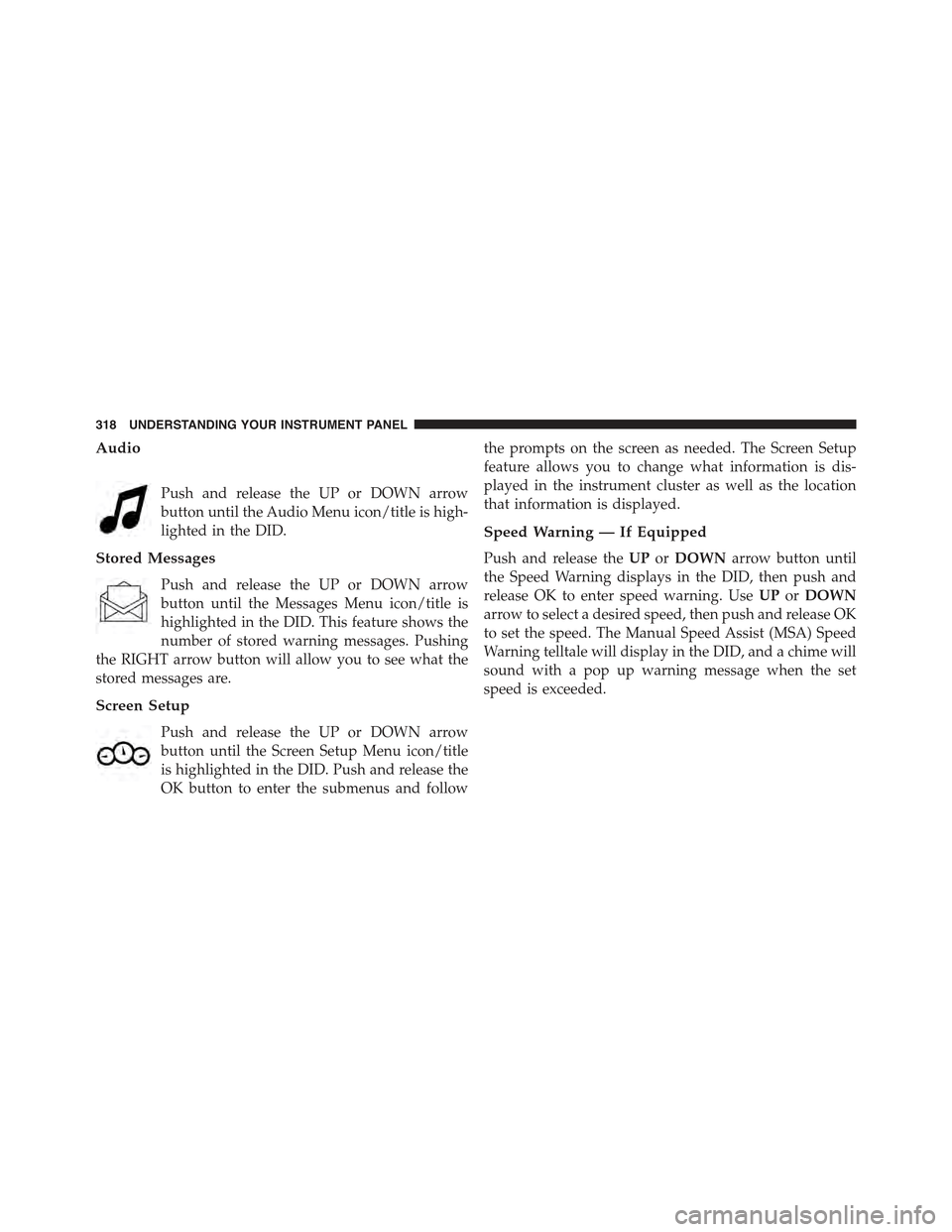
Audio
Push and release the UP or DOWN arrow
button until the Audio Menu icon/title is high-
lighted in the DID.
Stored Messages
Push and release the UP or DOWN arrow
button until the Messages Menu icon/title is
highlighted in the DID. This feature shows the
number of stored warning messages. Pushing
the RIGHT arrow button will allow you to see what the
stored messages are.
Screen Setup
Push and release the UP or DOWN arrow
button until the Screen Setup Menu icon/title
is highlighted in the DID. Push and release the
OK button to enter the submenus and follow
the prompts on the screen as needed. The Screen Setup
feature allows you to change what information is dis-
played in the instrument cluster as well as the location
that information is displayed.
Speed Warning — If Equipped
Push and release theUPorDOWNarrow button until
the Speed Warning displays in the DID, then push and
release OK to enter speed warning. UseUPorDOWN
arrow to select a desired speed, then push and release OK
to set the speed. The Manual Speed Assist (MSA) Speed
Warning telltale will display in the DID, and a chime will
sound with a pop up warning message when the set
speed is exceeded.
318 UNDERSTANDING YOUR INSTRUMENT PANEL
Page 335 of 717
“60,” or “90” seconds to select your desired time interval.
Press the back arrow button on the touchscreen to return
to the previous menu.
•Engine Off Power Delay
When this feature is selected, the power window
switches, radio, Uconnect® phone system (if equipped),
DVD video system (if equipped), power sunroof (if
equipped), and power outlets will remain active for up to
10 minutes after the ignition is cycled to OFF. Opening
either front door will cancel this feature. Press the “En-
gine Off Power Delay” button on the touchscreen and
choose from “0 sec,” “45 sec,” “5 min” or “10 min” to
select your desired time interval. Then press the arrow
back button on the touchscreen.
•Auto Entry/Exit — If Equipped
When this feature is selected, it automatically lowers the
vehicle ride height position when shifted into park. Press
the “Auto Entry/Exit” button on the touchscreen and
choose from “On” or “Off.” Press the back arrow button
on the touchscreen to return to the previous menu.
Suspension — If Equipped
After pressing the “Suspension” button on the touch-
screen the following settings will be available:
•Auto Entry/Exit Suspension
When this feature is selected, the vehicle automatically
lowers from ride height position when vehicle shifted to
park for easy entry/exit. To make your selection, press
the “Auto Entry/Exit” button on the touchscreen, select
“On” or “Off” followed by pressing the back arrow
button on the touchscreen.
•Display Suspension Messages
When “All” is selected, all the Air Suspension Alerts will
be displayed. When “Warning Only” is selected only the
Air Suspension Warnings will be displayed.
4
UNDERSTANDING YOUR INSTRUMENT PANEL 333
Page 346 of 717
Safety & Driving Assistance
After pressing the “Safety & Driving Assistance” button
on the touchscreen the following settings will be avail-
able:
•Forward Collision Warning — If Equipped
The Front Collision Warning (FCW) feature provides an
audible and/or visual warning to potential forward
collisions. The feature can be can be set to Far, or set to
Near. The default status of FCW is the Far setting. This
means the system will warn you of a possible collision
with the vehicle in front of you when you are farther
away. This gives you the most reaction time. To change
the setting for more dynamic driving, select the Near
setting. This warns you of a possible collision when you
are much closer to the vehicle in front of you. To change
the FCW status, press and release the “Near” or “Far”
button. Then press the back arrow button on the touch-
screen.
For further information, refer to “Adaptive Cruise Con-
trol (ACC)” in “Understanding The Features Of Your
Vehicle”.
•Forward Collision Warning (FCW) Active Braking —
If Equipped
The FCW system includes Advanced Brake Assist (ABA).
When this feature is selected, the ABA applies additional
brake pressure when the driver requests insufficient
brake pressure to avoid a potential frontal collision. The
ABA system becomes active at 5 mph (8 km/h). To make
your selection, press the “Forward Collision Warning
(FCW) with Mitigation - Active Braking” button on the
touchscreen, until a check-mark appears next to setting,
indicating that the setting had been selected. Press the
back arrow button on the touchscreen to return to the
previous menu. For further information, refer to “For-
ward Collision Warning (FCW) With Mitigation” in “Un-
derstanding The Features Of Your Vehicle.”
344 UNDERSTANDING YOUR INSTRUMENT PANEL
Page 357 of 717
the touchscreen until a check-mark appears next to
setting, showing that setting has been selected. Press the
back arrow button on the touchscreen to return to the
previous menu.
Suspension — If Equipped
After pressing the Suspension button on the touchscreen
the following settings will be available.
•Auto Entry/Exit Suspension
When this feature is selected, the vehicle lowers the
suspension for easy entry/exit. Press the “Auto Entry/
Exit Suspension” button until a check-mark appears next
to the feature showing the system has been activated or
the check-mark is removed showing the system has been
deactivated. Press the back arrow button on the touch-
screen to return to the previous menu.
•Suspension Display Messages
When “All” is selected, all the Air Suspension Alerts will
be displayed. When “Warnings Only” is selected only the
Air Suspension Warnings will be displayed.
•Tire Jack Mode
When this feature is selected the air suspension system is
disabled to assist with changing a spare tire. Press the
“Tire Jack Mode” button until a check-mark appears next
to the feature showing the system has been activated or
the check-mark is removed showing the system has been
deactivated. Press the back arrow button on the touch-
screen to return to the previous menu.
•Transport Mode
When this feature is selected the air suspension system is
disabled to assist with flat bed towing. Press the “Trans-
port Mode” button until a check-mark appears next to
the feature showing the system has been activated or the
4
UNDERSTANDING YOUR INSTRUMENT PANEL 355