Page 20 of 560

starting your vehicle. The remaining keys must then be
reprogrammed. All vehicle keys must be taken to an
authorized dealer at the time of service to be repro-
grammed.
General Information
The Sentry Key® system complies with FCC rules part 15
and with RSS-210 of Industry Canada. Operation is
subject to the following conditions:
•This device may not cause harmful interference.
•This device must accept any interference that may be
received, including interference that may cause unde-
sired operation.
NOTE:Changes or modifications not expressly approved
by the party responsible for compliance could void the
user’s authority to operate the equipment.
VEHICLE SECURITY ALARM — IF EQUIPPED
This Vehicle Security Alarm monitors the doors, liftgate,
and ignition switch for unauthorized operation.
When the alarm is activated, the interior switches for
door locks are disabled. The Vehicle Security Alarm
provides both audio and visual signals, the horn will
sound, the headlights, park lamps and/or turn signals
will flash repeatedly for three minutes. If the disturbance
is still present (driver’s door, passenger door, other doors,
ignition) after three minutes, the parking lights and tail
lights will flash for an additional 15 minutes.
To Arm The System
1. Remove the key from the ignition switch and get out
of the vehicle.
2. Lock the door using either the power door LOCK
switch or the Remote Keyless Entry (RKE) transmitter
and close all doors.
18 THINGS TO KNOW BEFORE STARTING YOUR VEHICLE
Page 24 of 560
NOTE:Pushing the LOCK button on the RKE transmitter
while you are inside the vehicle will activate the Vehicle
Security Alarm. Opening a door with the Vehicle Security
Alarm activated will cause the alarm to sound. Push the
UNLOCK button to deactivate the Vehicle Security
Alarm.
Illuminated Approach — If Equipped
This feature activates the headlights for up to 90 seconds
when the doors are unlocked with the RKE transmitter.
The time for this feature is programmable on vehicles
equipped with the EVIC. Refer to “Electronic Vehicle
Information Center (EVIC)/Personal Settings (Customer-
Programmable Features)” in “Understanding Your In-
strument Panel” for further information.
NOTE:None of the courtesy lights will operate if the
dimmer control is in the “defeat” position (extreme
downward position), unless the overhead map/reading
lights are turned on manually.
To Lock The Doors And Liftgate
Push and release the LOCK button on the RKE transmit-
ter to lock all doors and liftgate. The turn signal lights
will flash and the horn will chirp to acknowledge the
signal.
Sound Horn With Remote Key Lock
This feature will cause the horn to chirp when the doors
are locked with the RKE transmitter. This feature can be
turned on or turned off. To change the current setting,
proceed as follows:
•For vehicles equipped with the EVIC, refer to “Elec-
tronic Vehicle Information Center (EVIC)/Personal
Settings (Customer-Programmable Features)” in “Un-
derstanding Your Instrument Panel” for further infor-
mation.
22 THINGS TO KNOW BEFORE STARTING YOUR VEHICLE
Page 26 of 560

•For vehicles not equipped with the EVIC, perform the
following steps:
1. Push and hold the UNLOCK button on a programmed
RKE transmitter for at least 4 seconds, but no longer
than 10 seconds. Then, push and hold the LOCK
button while still holding the UNLOCK button.
2. Release both buttons at the same time.
3. Test the feature while outside of the vehicle by push-
ing the LOCK/UNLOCK buttons on the RKE trans-
mitter with the ignition switch in the LOCK position
and the key removed.
4. Repeat these steps if you want to return this feature to
its previous setting.
NOTE:Pushing the LOCK button on the RKE transmitter
while you are in the vehicle will activate the Vehicle
Security Alarm. Opening a door with the Vehicle Security
Alarm activated will cause the alarm to sound. Push the
UNLOCK button to deactivate the Vehicle Security
Alarm.
Using The Panic Alarm
To turn the Panic Alarm feature ON or OFF, push and
hold the PANIC button on the RKE transmitter for at
least one second and release. When the Panic Alarm is on,
the headlights and park lights will flash, the horn will
pulse on and off and the interior lights will turn on.
The Panic Alarm will stay on for three minutes unless
you turn it off by pushing the PANIC button a second
time or if the vehicle speed is 5 mph (8 km/h) or greater.
NOTE:When you turn off the Panic Alarm by pushing
the PANIC button a second time, you may have to move
closer to the vehicle due to the radio frequency noises of
the system.
24 THINGS TO KNOW BEFORE STARTING YOUR VEHICLE
Page 106 of 560

▫Commands.........................144
▫Voice Training.......................148
!SEATS . . . . . . . . . . . . . . . . . . . . . . . . . . . . ..148
▫Power Seats — If Equipped..............149
▫Heated Seats — If Equipped.............151
▫Manual Front Seat Adjustment............152
▫Manual Seat Height Adjustment —
If Equipped..........................153
▫Manual Lumbar — If Equipped...........154
▫Driver’s Seatback Recline................154
▫Head Restraints......................155
▫Folding Rear Seat.....................159
▫Reclining Rear Seat — If Equipped.........160
!TO OPEN AND CLOSE THE HOOD.........160
!LIGHTS.............................163
▫Multifunction Lever...................163
▫Headlights And Parking Lights...........163
▫Daytime Running Lights — If Equipped.....164
▫Lights-On Reminder...................164
▫Fog Lights — If Equipped...............164
▫Turn Signals.........................165
▫High/Low Beam Switch................165
▫Flash-To-Pass........................166
▫Instrument Panel Dimming...............166
▫Map/Reading Lights...................167
!WINDSHIELD WIPERS AND WASHERS......168
104 UNDERSTANDING THE FEATURES OF YOUR VEHICLE
Page 165 of 560
LIGHTS
Multifunction Lever
The multifunction lever controls the operation of the
headlights, parking lights, turn signals, headlight beam
selection, instrument panel light dimming, interior lights,
the passing lights, and the fog lights. The multifunction
lever is located on the left side of the steering column.
Headlights And Parking Lights
Turn the end of the multifunction lever to the first detent
to turn on the parking lights. Turn the end of the lever to
the second detent to turn on the headlights.
Multifunction Lever
Headlight Control
3
UNDERSTANDING THE FEATURES OF YOUR VEHICLE 163
Page 166 of 560
Daytime Running Lights — If Equipped
The high beam lights will come on as Daytime Running
Lights (lower intensity), whenever the ignition is ON, the
engine is running, the headlight switch is off, the parking
brake is off, the turn signal is off, and the shift lever is in
any position except PARK.
Lights-On Reminder
If the headlights or parking lights are left on after the
ignition is turned OFF, a chime will sound to alert the
driver when the driver’s door is opened.
Fog Lights — If Equipped
The front fog light switch is on the multifunc-
tion lever. To activate the front fog lights, turn
on the parking lights or the low beam head-
lights and pull out the end of the multifunction lever.
NOTE:The fog lights will only operate with the head-
lights on low beam. Selecting high beam headlights will
turn off the fog lights.
Front Fog Light Operation
164 UNDERSTANDING THE FEATURES OF YOUR VEHICLE
Page 167 of 560
Turn Signals
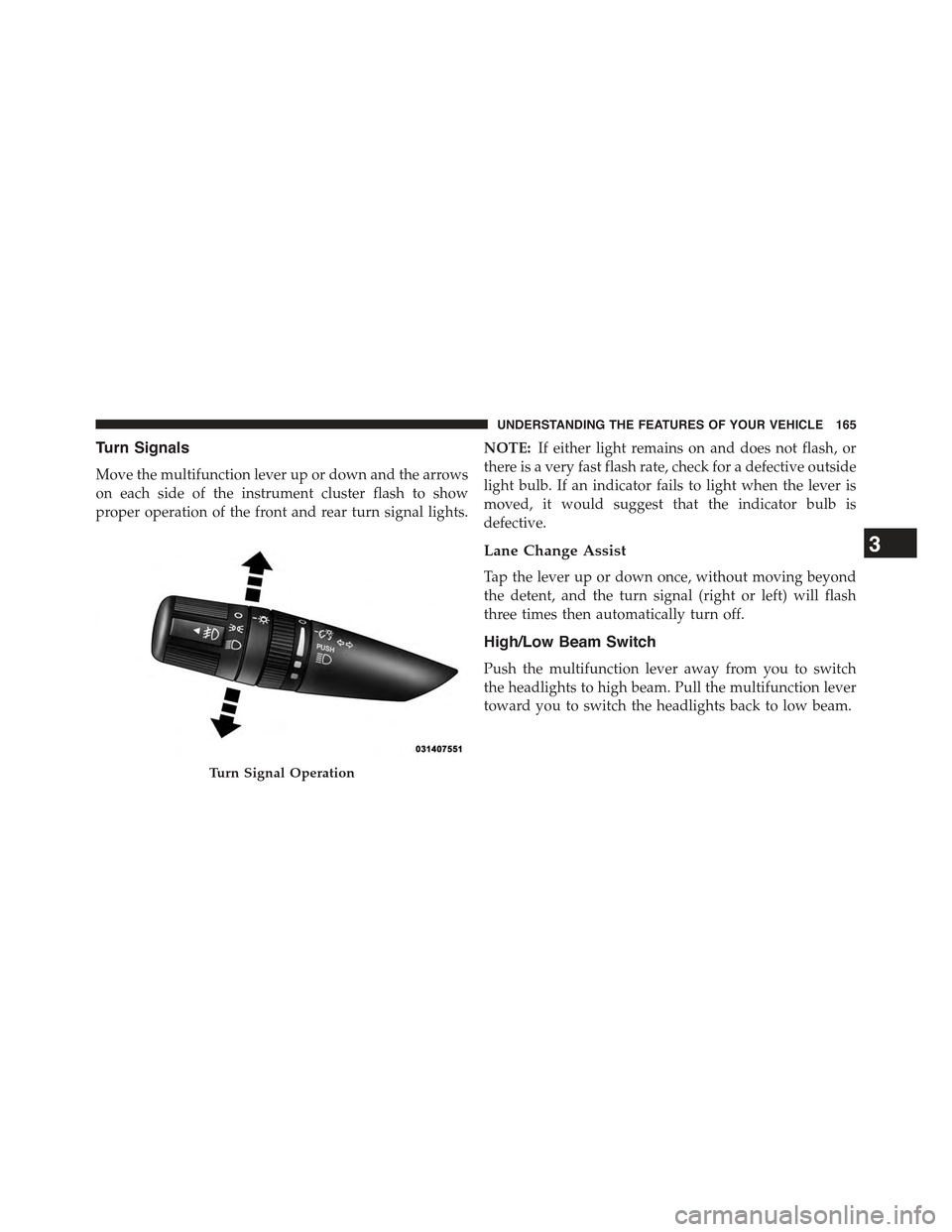
Move the multifunction lever up or down and the arrows
on each side of the instrument cluster flash to show
proper operation of the front and rear turn signal lights.
NOTE:If either light remains on and does not flash, or
there is a very fast flash rate, check for a defective outside
light bulb. If an indicator fails to light when the lever is
moved, it would suggest that the indicator bulb is
defective.
Lane Change Assist
Tap the lever up or down once, without moving beyond
the detent, and the turn signal (right or left) will flash
three times then automatically turn off.
High/Low Beam Switch
Push the multifunction lever away from you to switch
the headlights to high beam. Pull the multifunction lever
toward you to switch the headlights back to low beam.
Turn Signal Operation
3
UNDERSTANDING THE FEATURES OF YOUR VEHICLE 165
Page 168 of 560

Flash-To-Pass
You can signal another vehicle with your headlights by
lightly pulling the multifunction lever toward you. This
will turn on the high beam headlights until the lever is
released.
NOTE:If the multifunction lever is held in the flash-to-
pass position for more than 20 seconds, the high beams
will shut off. If this occurs, wait 30 seconds for the next
flash-to-pass operation.
Instrument Panel Dimming
Rotate the center portion of the lever to the extreme
bottom position to fully dim the instrument panel lights
and prevent the interior lights from illuminating when a
door is opened.
Rotate the center portion of the lever up to increase the
brightness of the instrument panel lights when the park-
ing lights or headlights are on.
Rotate the center portion of the lever upward to the next
detent position to brighten the odometer and radio when
the parking lights or headlights are on.
Rotate the center portion of the lever upward to the last
detent to turn on the interior lighting.
Dimmer Control
166 UNDERSTANDING THE FEATURES OF YOUR VEHICLE