2015 JEEP CHEROKEE tire
[x] Cancel search: tirePage 578 of 772

update, the pressure values in the graphic display in the
EVIC/DID will return to their original color, and the
“Tire Pressure Monitoring Telltale Light” will turn off.
NOTE:When filling warm tires, the tire pressure may
need to be increased up to an additional 4 psi (30 kPa)
above the recommended cold placard pressure in order
to turn the Tire Pressure Monitoring Telltale Light off.
The vehicle may need to be driven for up to 20 minutes
above 15.5 mph (25 km/h) in order for the TPMS to
receive this information.
SERVICE TPMS Warning
When a system fault is detected, the “Tire Pressure
Monitoring Telltale Light” will flash on and off for 75
seconds and then remain on solid. The system fault will
also sound a chime. In addition, the EVIC/DID will
display a#SERVICE TPM SYSTEM#message for a mini-
mum of five seconds and then display dashes (- -) in
place of the pressure value to indicate which sensor is not
being received.
If the ignition key is cycled, this sequence will repeat,
providing the system fault still exists. If the system fault
no longer exists, the “Tire Pressure Monitoring Telltale
Light” will no longer flash, and the “SERVICE TPM
Tire Pressure Monitoring Service Warning
576 STARTING AND OPERATING
Page 579 of 772

SYSTEM” message will no longer display, and a pressure
value will display in place of the dashes. A system fault
can occur due to any of the following:
1. Jamming due to electronic devices or driving next to
facilities emitting the same radio frequencies as the
TPMS sensors.
2. Installing some form of aftermarket window tinting
that affects radio wave signals.
3. Lots of snow or ice around the wheels or wheel
housings.
4. Using tire chains on the vehicle.
5. Using wheels/tires not equipped with TPMS sensors.
Vehicles With Matching Full-Size Spare
1. The matching full size spare wheel and tire assembly
has a tire pressure monitoring sensor that can be
monitored by the TPMS.
2. If you install the full size spare in place of a road tire
that has a pressure below the low-pressure warning
limit, a chime will sound and the “TPMS Telltale
Light” will turn on upon the next ignition key cycle. In
addition, the EVIC/DID will display a Tire Low
message, an#Inflate to XX#message and a graphic
showing the low tire pressure value in a different
color.
3. After driving the vehicle for up to 20 minutes above
15.5 mph (25 km/h) the “TPMS Telltale Light” will
turn OFF, as long as no tire pressure is below the
low-pressure warning limit in any of the four active
road tires.
4. The EVIC/DID will display a graphic showing the tire
pressure value in the same color as the other pressure
values in place of the different color low tire pressure
5
STARTING AND OPERATING 577
Page 580 of 772

value. The EVIC/DID will also display a “SPARE
LOW PRESSURE” message to remind you to service
the flat tire.
Vehicles With Compact Spare or Non-Matching Full
Size Spare
1. The compact spare tire or non-matching full size does
not have a tire pressure monitoring sensor. Therefore,
the TPMS will not monitor the pressure in the compact
spare tire.
2. If you install the compact or non-matching full size
spare tire in place of a road tire that has a pressure
below the low-pressure warning limit, upon the next
ignition key cycle, the “TPMS Telltale Light” will
remain on and a chime will sound. In addition, the
graphic in the EVIC/DID will still display a different
color pressure value and an#Inflate to XX#message.
3. After driving the vehicle for up to 20 minutes above
15.5 mph (25 km/h), the “TPMS Telltale Light” will
flash on and off for 75 seconds and then remain on
solid. In addition, the EVIC/DID will display a “SER-
VICE TPM SYSTEM” message for five seconds and
then display dashes (- -) in place of the pressure value.
4. For each subsequent ignition key cycle, a chime will
sound, the “TPMS Telltale Light” will flash on and off
for 75 seconds and then remain on solid, and the
EVIC/DID will display a “SERVICE TPM SYSTEM”
message for five seconds and then display dashes (- -)
in place of the pressure value.
5. Once you repair or replace the original road tire and
reinstall it on the vehicle in place of the compact spare
or non-matching full size, the TPMS will update
automatically. In addition, the “TPMS Telltale Light”
will turn off and the graphic in the EVIC will display
a new pressure value instead of dashes (- -), as long as
578 STARTING AND OPERATING
Page 581 of 772

no tire pressure is below the low-pressure warning
limit in any of the four active road tires. The vehicle
may need to be driven for up to 20 minutes above
15.5 mph (25 km/h) in order for the TPMS to receive
this information.
General Information
This device complies with Part 15 of the FCC rules and
RSS 210 of Industry Canada. Operation is subject to the
following conditions:
•This device may not cause harmful interference.
•This device must accept any interference received, includ-
ing interference that may cause undesired operation.
The TPM sensors are regulated under one of the follow-
ing licenses:
United StatesGQ4-61T
Canada1470A-42T
FUEL REQUIREMENTS
2.4L Engine
These engines are designed to meet all
emissions regulations and provide excel-
lent fuel economy and performance when
using high quality unleaded “regular”
gasoline having an octane rating of 87. The
use of premium gasoline is not recommended, as it will
not provide any benefit over regular gasoline in these
engines.
Light spark knock at low engine speeds is not harmful to
your engine. However, continued heavy spark knock at
high speeds can cause damage and immediate service is
required. Poor quality gasoline can cause problems such
as hard starting, stalling, and hesitations. If you experi-
ence these symptoms, try another brand of gasoline
before considering service for the vehicle. Over 40 auto
manufacturers worldwide have issued and endorsed
5
STARTING AND OPERATING 579
Page 593 of 772

“clicking” sound is heard. This is an indication that the
fuel filler cap is properly tightened. Refer to “Onboard
Diagnostic System” in “Maintaining Your Vehicle” for
further information.
VEHICLE LOADING
Certification Label
As required by National Highway Traffic Safety Admin-
istration regulations, your vehicle has a certification label
affixed to the driver’s side door or pillar.
This label contains the month and year of manufacture,
Gross Vehicle Weight Rating (GVWR), Gross Axle Weight
Rating (GAWR) front and rear, and Vehicle Identification
Number (VIN). A Month-Day-Hour (MDH) number is
included on this label and indicates the Month, Day and
Hour of manufacture. The bar code that appears on the
bottom of the label is your VIN.
Gross Vehicle Weight Rating (GVWR)
The GVWR is the total permissible weight of your vehicle
including driver, passengers, vehicle, options and cargo.
The label also specifies maximum capacities of front and
rear axle systems (GAWR). Total load must be limited so
GVWR and front and rear GAWR are not exceeded.
Payload
The payload of a vehicle is defined as the allowable load
weight a truck can carry, including the weight of the
driver, all passengers, options and cargo.
Gross Axle Weight Rating (GAWR)
The GAWR is the maximum permissible load on the front
and rear axles. The load must be distributed in the cargo
area so that the GAWR of each axle is not exceeded.
Each axle GAWR is determined by the components in the
system with the lowest load carrying capacity (axle,
springs, tires or wheels). Heavier axles or suspension
5
STARTING AND OPERATING 591
Page 594 of 772

components sometimes specified by purchasers for in-
creased durability does not necessarily increase the vehi-
cle’s GVWR.
Tire Size
The tire size on the Vehicle Certification Label represents
the actual tire size on your vehicle. Replacement tires
must be equal to the load capacity of this tire size.
Rim Size
This is the rim size that is appropriate for the tire size
listed.
Inflation Pressure
This is the cold tire inflation pressure for your vehicle for
all loading conditions up to full GAWR.
Curb Weight
The curb weight of a vehicle is defined as the total weight
of the vehicle with all fluids, including vehicle fuel, at full
capacity conditions, and with no occupants or cargo
loaded into the vehicle. The front and rear curb weight
values are determined by weighing your vehicle on a
commercial scale before any occupants or cargo are
added.
Loading
The actual total weight and the weight of the front and
rear of your vehicle at the ground can best be determined
by weighing it when it is loaded and ready for operation.
The entire vehicle should first be weighed on a commer-
cial scale to insure that the GVWR has not been exceeded.
The weight on the front and rear of the vehicle should
then be determined separately to be sure that the load is
properly distributed over the front and rear axle. Weigh-
ing the vehicle may show that the GAWR of either the
front or rear axles has been exceeded but the total load is
within the specified GVWR. If so, weight must be shifted
from front to rear or rear to front as appropriate until the
592 STARTING AND OPERATING
Page 596 of 772

exceed the GVWR. Refer to “Vehicle Loading/Vehicle
Certification Label” in “Starting and Operating” for
further information.
Gross Trailer Weight (GTW)
The GTW is the weight of the trailer plus the weight of all
cargo, consumables, and equipment (permanent or tem-
porary) loaded in or on the trailer in its#loaded and
ready for operation#condition.
The recommended way to measure GTW is to put your
fully loaded trailer on a vehicle scale. The entire weight
of the trailer must be supported by the scale.
WARNING!
If the Gross Trailer Weight (GTW) is 3,500 lbs (1
587 kg) or more, it is mandatory to use a weight-
distributing hitch to ensure stable handling of your
(Continued)
WARNING!(Continued)
vehicle. If you use a standard weight-carrying hitch,
you could lose control of your vehicle and cause a
collision.
Gross Combination Weight Rating (GCWR)
The GCWR is the total permissible weight of your vehicle
and trailer when weighed in combination.
Gross Axle Weight Rating (GAWR)
The GAWR is the maximum capacity of the front and rear
axles. Distribute the load over the front and rear axles
evenly. Make sure that you do not exceed either front or
rear GAWR. Refer to “Vehicle Loading/Vehicle Certifica-
tion Label” in “Starting and Operating” for further
information.
594 STARTING AND OPERATING
Page 601 of 772
NOTE:The trailer tongue weight must be considered as
part of the combined weight of occupants and cargo (ie.
the GVWR), and the GVWR should never exceed the
weight referenced on the Tire and Loading Information
placard. Refer to “Tire Safety Information” in “Starting
and Operating” for further information.
Trailer And Tongue Weight
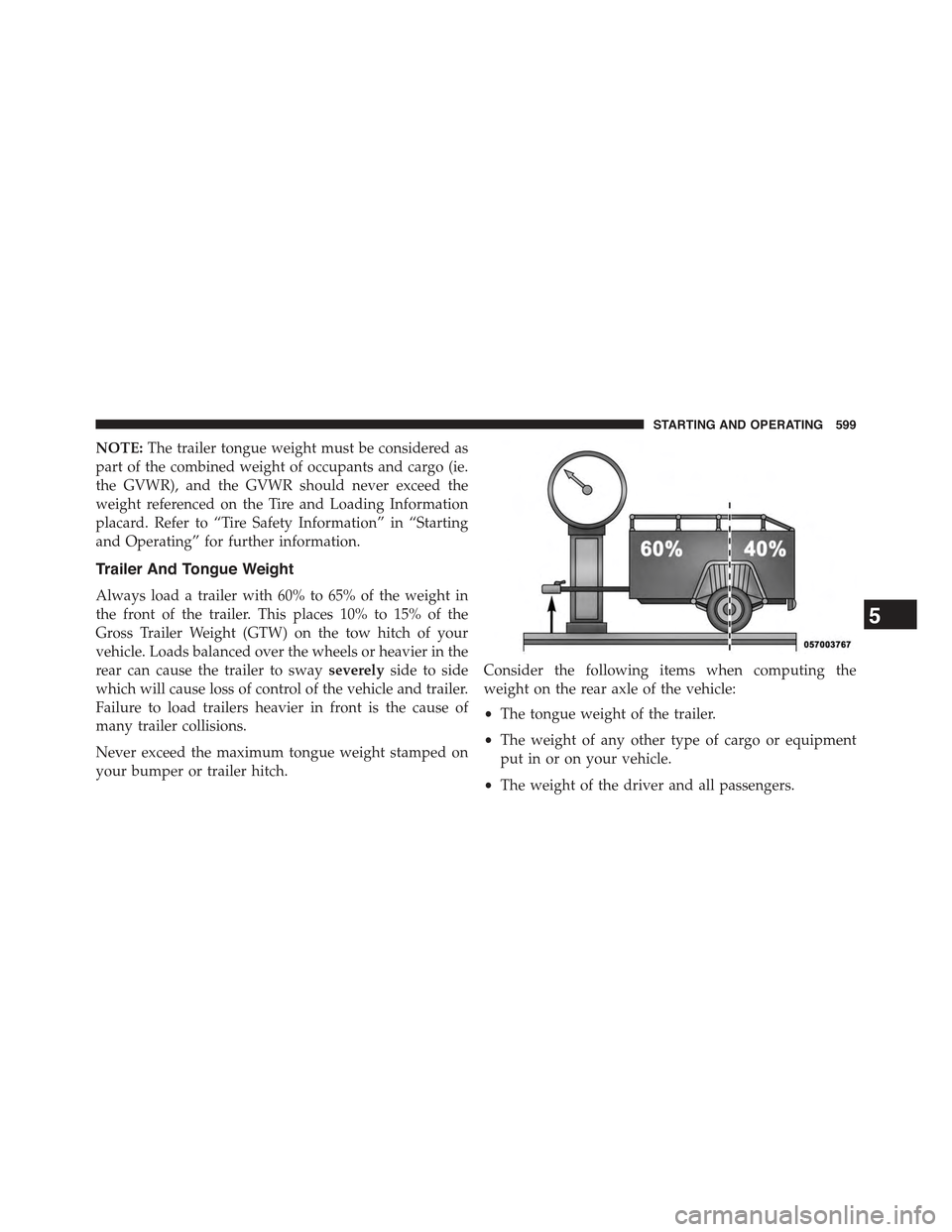
Always load a trailer with 60% to 65% of the weight in
the front of the trailer. This places 10% to 15% of the
Gross Trailer Weight (GTW) on the tow hitch of your
vehicle. Loads balanced over the wheels or heavier in the
rear can cause the trailer to swayseverelyside to side
which will cause loss of control of the vehicle and trailer.
Failure to load trailers heavier in front is the cause of
many trailer collisions.
Never exceed the maximum tongue weight stamped on
your bumper or trailer hitch.
Consider the following items when computing the
weight on the rear axle of the vehicle:
•The tongue weight of the trailer.
•The weight of any other type of cargo or equipment
put in or on your vehicle.
•The weight of the driver and all passengers.
5
STARTING AND OPERATING 599