Page 260 of 772

#PARKSENSE UNAVAILABLE WIPE FRONT SEN-
SORS#,or#PARKSENSE UNAVAILABLE SERVICE RE-
QUIRED#messages if an object is detected within the five
second pop-up duration. The car graphic will remain
displayed for as long as the vehicle is in REVERSE. Refer
to “Electronic Vehicle Information Center (EVIC) or#
Driver Information Display (DID)” for further informa-
tion.
If#PARKSENSE UNAVAILABLE WIPE REAR SENSORS#
or#PARKSENSE UNAVAILABLE WIPE FRONT SEN-
SORS#appears in the Electronic Vehicle Information
Center (EVIC) or Driver Information Display (DID) make
sure the outer surface and the underside of the rear
fascia/bumper and/or front fascia/bumper is clean and
clear of snow, ice, mud, dirt or other obstruction and then
cycle the ignition. If the message continues to appear see
an authorized dealer.
If the#PARKSENSE UNAVAILABLE SERVICE RE-
QUIRED#message appears in the EVIC/DID, see an
authorized dealer.
Cleaning The ParkSense® System
Clean the ParkSense® sensors with water, car wash soap
and a soft cloth. Do not use rough or hard cloths. Do not
scratch or poke the sensors. Otherwise, you could dam-
age the sensors.
ParkSense® System Usage Precautions
NOTE:
•Ensure that the front and rear bumper are free of snow,
ice, mud, dirt and debris to keep the ParkSense®
system operating properly.
•Jackhammers, large trucks, and other vibrations could
affect the performance of ParkSense®.
258 UNDERSTANDING THE FEATURES OF YOUR VEHICLE
Page 261 of 772

•When you turn ParkSense® off, the instrument cluster
will display “PARKSENSE OFF.” Furthermore, once
you turn ParkSense® off, it remains off until you turn
it on again, even if you cycle the ignition key.
•When you move the shift lever to the REVERSE
position and ParkSense® is turned off, the instrument
cluster will display “PARKSENSE OFF” for as long as
the vehicle is in REVERSE.
•ParkSense®, when on, will reduce the volume of the
radio when it is sounding a tone.
•Clean the ParkSense® sensors regularly, taking care
not to scratch or damage them. The sensors must not
be covered with ice, snow, slush, mud, dirt or debris.
Failure to do so can result in the system not working
properly. The ParkSense® system might not detect an
obstacle behind or in front of the fascia/bumper, or it
could provide a false indication that an obstacle is
behind or in front of the fascia/bumper.
•Use the ParkSense® switch to turn the ParkSense®
system off if objects such as bicycle carriers, trailer
hitches, etc. are placed within 12 in (30 cm) from the
rear fascia/bumper. Failure to do so can result in the
system misinterpreting a close object as a sensor
problem, causing the “PARKSENSE UNAVAILABLE
SERVICE REQUIRED” message to be displayed in the
instrument cluster.
•ParkSense® should be disabled when the liftgate is in
the open position. An opened liftgate could provide a
false indication that an obstacle is behind the vehicle.
•There may be a delay in the object detection rate if the
object is moving. This will cause the automatic braking
application to be delayed.
3
UNDERSTANDING THE FEATURES OF YOUR VEHICLE 259
Page 266 of 772

The ParkSense® Active Park Assist system will only
operate and search for a parking space when the follow-
ing conditions are present:
•Gear position is in DRIVE (automatic transmission) or
in a forward gear (manual transmission).
•Ignition is in the RUN position.
•ParkSense® Active Park Assist switch is activated.
•Driver’s door is closed.
•Rear liftgate is closed.
•Vehicle speed is less than 15 mph (25 km/h).
NOTE:If the vehicle is driven above approximately
15 mph (25 km/h), the EVIC/DID will instruct the driver
to slow down. If the vehicle is driven above approxi-
mately 18 mph (30 km/h), the system will cancel. The
driver must then reactivate the system by pressing the
ParkSense® Active Park Assist switch.
•The outer surface and the underside of the front and
rear fascias/bumpers are clean and clear of snow, ice,
mud, dirt or other obstruction.
When pressed, the LED on the ParkSense® Active Park
Assist switch will blink momentarily, and then the LED
will turn OFF if any of the above conditions are not
present.
Parallel Parking Space Assistance Operation/
Display
When the ParkSense® Active Park Assist system is
enabled the “Active ParkSense Searching - Press OK to
Switch to Perpendicular” message will appear in the
EVIC/DID display. You may switch to perpendicular
parking if you desire. Push the OK button on the left side
steering wheel switch to change your parking space
setting.
264 UNDERSTANDING THE FEATURES OF YOUR VEHICLE
Page 601 of 772
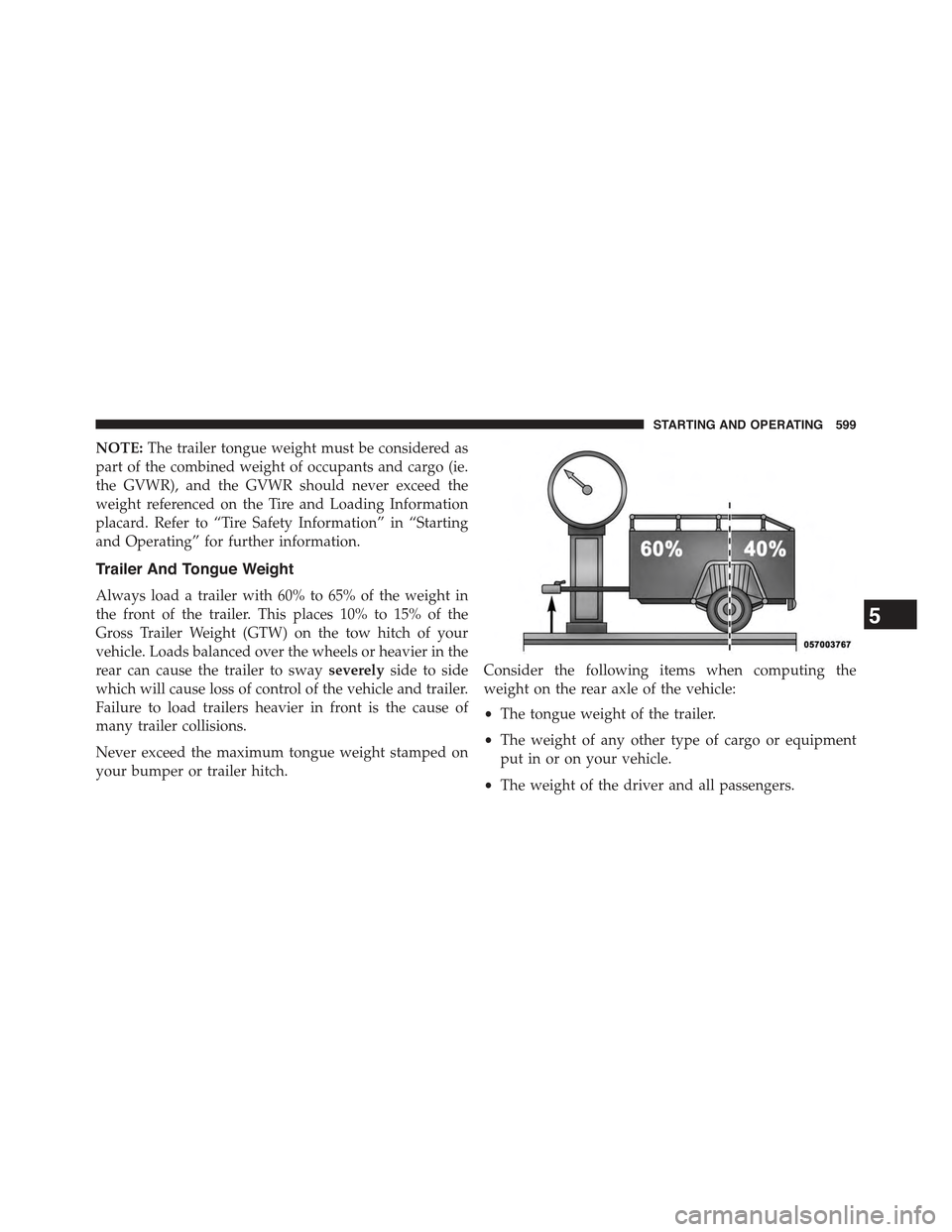
NOTE:The trailer tongue weight must be considered as
part of the combined weight of occupants and cargo (ie.
the GVWR), and the GVWR should never exceed the
weight referenced on the Tire and Loading Information
placard. Refer to “Tire Safety Information” in “Starting
and Operating” for further information.
Trailer And Tongue Weight
Always load a trailer with 60% to 65% of the weight in
the front of the trailer. This places 10% to 15% of the
Gross Trailer Weight (GTW) on the tow hitch of your
vehicle. Loads balanced over the wheels or heavier in the
rear can cause the trailer to swayseverelyside to side
which will cause loss of control of the vehicle and trailer.
Failure to load trailers heavier in front is the cause of
many trailer collisions.
Never exceed the maximum tongue weight stamped on
your bumper or trailer hitch.
Consider the following items when computing the
weight on the rear axle of the vehicle:
•The tongue weight of the trailer.
•The weight of any other type of cargo or equipment
put in or on your vehicle.
•The weight of the driver and all passengers.
5
STARTING AND OPERATING 599
Page 610 of 772

CAUTION!(Continued)
•Tow only in a forward direction. Towing this ve-
hicle backwards can cause severe damage to the
power transfer unit.
•The transmission must be in PARK for recreational
towing.
•Before recreational towing, perform the procedure
outlined under “Shifting into NEUTRAL (N)” to be
certain that the power transfer unit is fully in
NEUTRAL (N). Otherwise, internal damage will
result.
•Towing this vehicle in violation of the above re-
quirements can cause severe transmission and/or
power transfer unit damage. Damage from im-
proper towing is not covered under the New Ve-
hicle Limited Warranty.
(Continued)
CAUTION!(Continued)
•Do not use a bumper-mounted clamp-on tow bar
on your vehicle. The bumper face bar will be
damaged.
Shifting Into NEUTRAL (N)
WARNING!
You or others could be injured or killed if you leave
the vehicle unattended with the power transfer unit
in the NEUTRAL (N) position without first fully
engaging the parking brake. The NEUTRAL (N)
position disengages both the front and rear drive-
shafts from the powertrain and will allow the vehicle
to roll, even if the transmission is in PARK. The
parking brake should always be applied when the
driver is not in the vehicle.
608 STARTING AND OPERATING
Page 651 of 772

4X4 MODELS
Towing Condition Wheels OFF
the Ground
FWD MOD-
ELS
1–SPEED
POWER TRANSFER
UNIT
2–SPEED
POWER TRANSFER
UNIT
Wheel Lift or Dolly
To w
RearNOT AL-
LOWED
NOT ALLOWEDNOT ALLOWED
FrontOKNOT ALLOWEDNOT ALLOWED
FlatbedALLBEST
METHOD
OKBEST METHOD
Proper towing or lifting equipment is required to prevent
damage to your vehicle. Use only tow bars and other
equipment designed for this purpose, following equip-
ment manufacturer ’s instructions. Use of safety chains is
mandatory. Attach a tow bar or other towing device to
main structural members of the vehicle, not to bumpers
or associated brackets. State and local laws regarding
vehicles under tow must be observed.
If you must use the accessories (wipers, defrosters, etc.)
while being towed, the ignition must be in the ON/RUN
position, not the ACC position.
If the key fob is unavailable, or the vehicle’s battery is
discharged, refer to “Shift Lever Override” in this section
for instructions on shifting the transmission out of PARK
so that the vehicle can be moved.
6
WHAT TO DO IN EMERGENCIES 649