2015 HYUNDAI TUCSON Engine
[x] Cancel search: EnginePage 185 of 653
3-99
Convenient features of your vehicle
3
System operation
Ventilation
1. Set the mode to the position.
2. Set the air intake control to theoutside (fresh) air position.
3. Set the temperature control to the desired position.
4. Set the fan speed control to the desired speed.
Heating
1. Set the mode to the position.
2. Set the air intake control to theoutside (fresh) air position.
3. Set the temperature control to the desired position.
4. Set the fan speed control to the desired speed.
5. If dehumidified heating is desired, turn the air conditioning system on.
If the windshield fogs up, set the mode to the or position.
Operation Tips
To keep dust or unpleasant odorfrom entering the car through the
ventilation system, temporarily set
the air intake control to the recircu-
lated air position. Be sure to returnthe control to the fresh air positionwhen the unpleasant odor has
passed to keep fresh air in the
vehicle. This will help keep the driv-
er alert and comfortable.
Air for the heating/cooling system is drawn in through the grilles just
ahead of the windshield. Care
should be taken that the grille open-
ings are not blocked by leaves,
snow, ice or other obstructions.
To prevent the inside of the wind- shied from fogging, set the air intakecontrol to the fresh air position and
fan speed to the desired position,
turn on the air conditioning system,
and adjust the temperature control
to desired temperature.
Air conditioning
HYUNDAI Air Conditioning Systems
are filled with environmentally friendly
R-134a refrigerant.
1. Start the engine. Push the air con- ditioning button.
2. Set the mode to the position.
3. Set the air intake control to the out- side air or recirculated air position.
4. Adjust the fan speed control and temperature control to maintain
the desired comfort.
When maximum cooling is desired, set the temperature con-
trol to the extreme left position, setthe mode control to the MAX A/C
position, then set the fan speedcontrol to the highest speed.
Page 186 of 653
3-100
Convenient features of your vehicle
✽✽NOTICE
When using the air conditioning system, monitor the engine temper-
ature gauge closely while driving
up hills or in heavy traffic when
outside temperatures are high. Air
conditioning system operation may
cause engine overheating.
Continue to use the blower fan but
turn the air conditioning system off
if the engine temperature gauge
indicates engine overheating.
When opening the windows in humid weather, air conditioning
may create water droplets inside
the vehicle. Since excessive water
droplets may cause damage to
electrical equipment, air condi-
tioning should only be operated
with the windows closed. Air conditioning system operation
tips
If the vehicle has been parked in
direct sunlight during hot weather,
open the windows for a short time
to let the hot air inside the vehicle
escape.
To help reduce moisture inside of the windows on rainy or humid
days, decrease the humidity inside
the vehicle by operating the airconditioning system.
During air conditioning system operation, you may occasionallynotice a slight change in enginespeed as the air conditioning com-
pressor cycles. This is a normal
system operation characteristic.
Use the air conditioning system every month for a few minutes to
ensure maximum system perform-
ance. When using the air conditioning
system, you may notice clear water
dripping (or even puddling) on the
ground under the passenger side
of the vehicle. This is a normal sys-
tem operation characteristic.
Operating the air conditioning sys- tem in the recirculated air position
provides maximum cooling, how-
ever, continual operation in this
mode may cause the air inside the
vehicle to become stale.
During cooling operation, you may occasionally notice a misty air flow
because of rapid cooling and
humid air intake. This is a normal
system operation characteristics.
Page 190 of 653
3-104
Convenient features of your vehicle
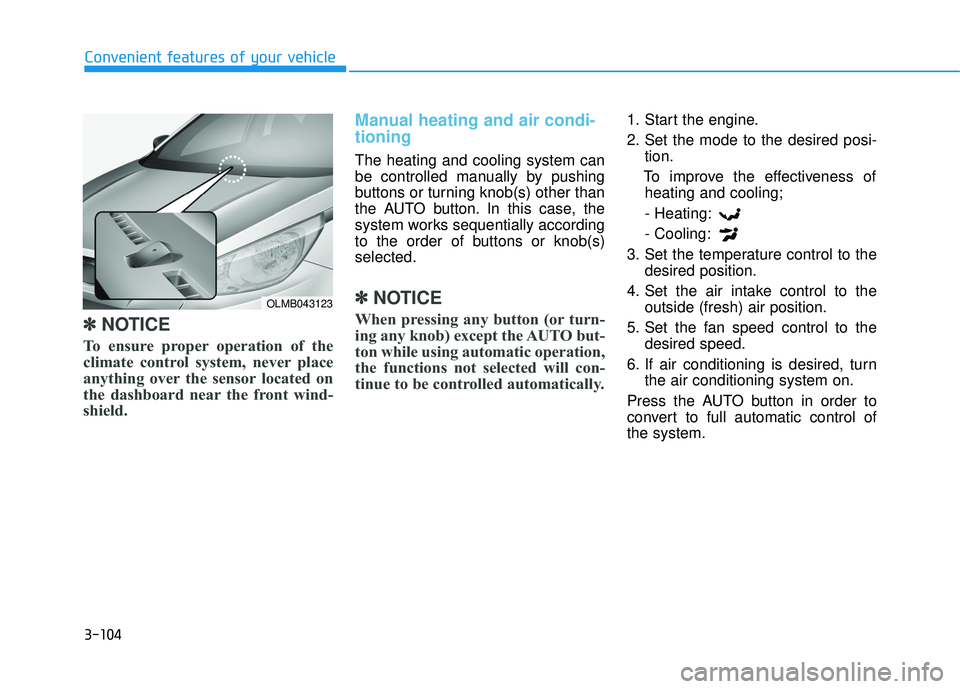
✽✽NOTICE
To ensure proper operation of the
climate control system, never place
anything over the sensor located on
the dashboard near the front wind-
shield.
Manual heating and air condi- tioning
The heating and cooling system can
be controlled manually by pushing
buttons or turning knob(s) other than
the AUTO button. In this case, the
system works sequentially according
to the order of buttons or knob(s)selected.
✽✽ NOTICE
When pressing any button (or turn-
ing any knob) except the AUTO but-
ton while using automatic operation,
the functions not selected will con-
tinue to be controlled automatically.
1. Start the engine.
2. Set the mode to the desired posi- tion.
To improve the effectiveness of heating and cooling;
- Heating:- Cooling:
3. Set the temperature control to the desired position.
4. Set the air intake control to the outside (fresh) air position.
5. Set the fan speed control to the desired speed.
6. If air conditioning is desired, turn the air conditioning system on.
Press the AUTO button in order to
convert to full automatic control ofthe system.
OLMB043123
Page 206 of 653
3-120
Convenient features of your vehicle
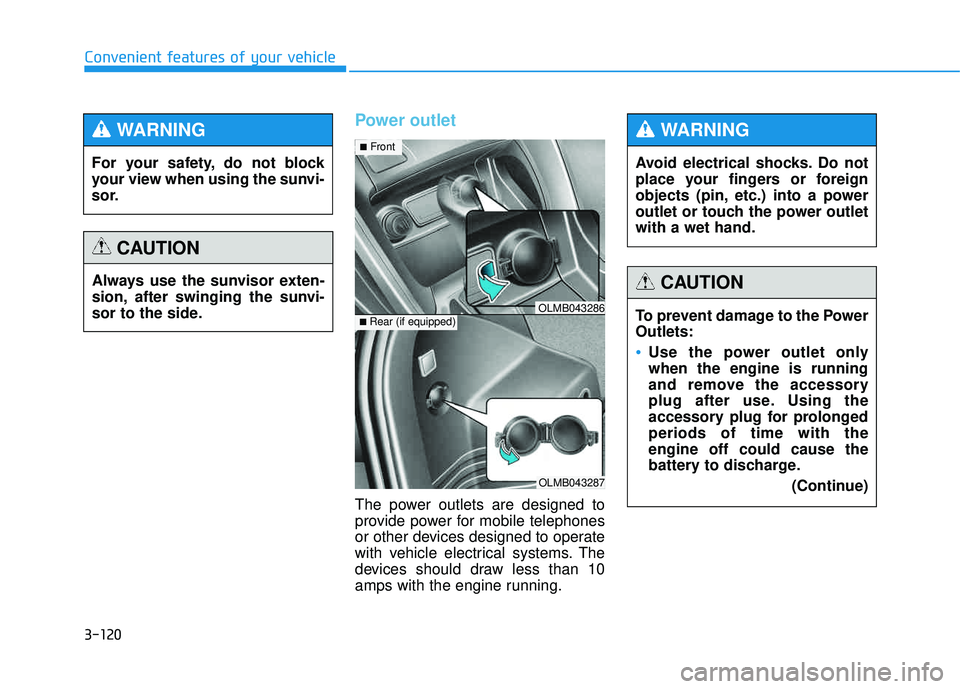
Power outlet
The power outlets are designed to
provide power for mobile telephones
or other devices designed to operate
with vehicle electrical systems. The
devices should draw less than 10
amps with the engine running.
OLMB043287
■Rear (if equipped)OLMB043286
■ Front
For your safety, do not block
your view when using the sunvi-
sor.
WARNING
Always use the sunvisor exten-
sion, after swinging the sunvi-
sor to the side.
CAUTION
Avoid electrical shocks. Do not
place your fingers or foreign
objects (pin, etc.) into a power
outlet or touch the power outletwith a wet hand.
WARNING
To prevent damage to the Power Outlets:
Use the power outlet only when the engine is running
and remove the accessory
plug after use. Using the
accessory plug for prolongedperiods of time with theengine off could cause the
battery to discharge.
(Continue)
CAUTION
Page 215 of 653
4-4
Multimedia System
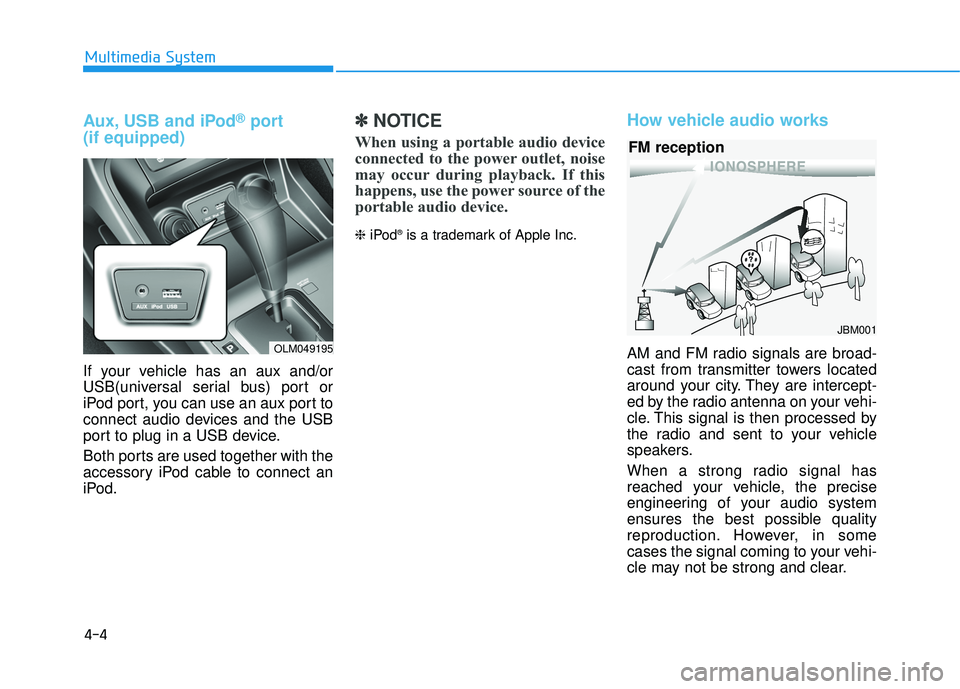
Aux, USB and iPod®port
(if equipped)
If your vehicle has an aux and/or
USB(universal serial bus) port or
iPod port, you can use an aux port to
connect audio devices and the USB
port to plug in a USB device.
Both ports are used together with the
accessory iPod cable to connect an
iPod.
✽✽ NOTICE
When using a portable audio device
connected to the power outlet, noise
may occur during playback. If this
happens, use the power source of the
portable audio device.
❈ iPod ®
is a trademark of Apple Inc.
How vehicle audio works
AM and FM radio signals are broad-
cast from transmitter towers located
around your city. They are intercept-
ed by the radio antenna on your vehi-
cle. This signal is then processed by
the radio and sent to your vehicle
speakers.
When a strong radio signal has
reached your vehicle, the precise
engineering of your audio system
ensures the best possible quality
reproduction. However, in some
cases the signal coming to your vehi-
cle may not be strong and clear.
JBM001
FM reception
OLM049195
Page 220 of 653
4-9
Multimedia System
4
(Continued)
Turn on the car ignition before
using this device. Do not oper-
ate the audio system for longperiods of time with the ignition
turned off as such operations
may lead to battery discharge.
Do not subject the device to
severe shock or impact. Direct
pressure onto the front side of
the monitor may cause dam-
age to the LCD or touchscreen.
When cleaning the device, make sure to turn off the
device and use a dry and
smooth cloth. Never use tough
materials, chemical cloths, or
solvents (alcohol, benzene,
thinners, etc.) as such materi-
als may damage the devicepanel or cause color/quality
deterioration.
(Continued)
(Continued)
Do not place beverages close
to the audio system. Spilling
beverages may lead to systemmalfunction.
In case of product malfunction,
please contact your place of pur-
chase or After Service center.
Placing the audio system with-
in an electromagnetic environ-
ment may result in noise inter-
ference.
Prevent caustic solutions such as perfume and cosmetic oil
from contacting the dashboard
because they may cause dam-
age or discoloration.
✽✽NOTICE - USING THE USB DEVICE
To use an external USB device, make sure the device is not con-
nected when starting up the
vehicle. Connect the device after
starting up.
If you start the engine when the USB device is connected, it may
damage the USB device. (USB
flashdrives are very sensitive to
electric shock.)
If the engine is started up or turned off while the external USB
device is connected, the external
USB device may not work.
The System may not play unau- thenticated MP3 or WMA files.
1) It can only play MP3 files with the compression rate between
8Kbps~320Kbps.
2) It can only play WMA music files with the compression rate
between 8Kbps~320Kbps.
Take precautions for static elec- tricity when connecting or dis-
connecting the external USB
device. (Continued)
Page 289 of 653
4-78
Multimedia System
✽✽NOTICE - USING THE USB DEVICE
Connect the USB device after turning on the engine. The USB
device may become damaged if
it is already connected when the
ignition is turned on.The USB
device may not operate properly
if the car ignition is turned on or
off with the USB device connect-
ed.
Heed caution to static electricity when connecting/disconnecting
USB devices.
Encoded MP3 Players will not be recognized when connected
as an external device.
When connecting an external USB device, the device may not
properly recognize the USB is in
some states.
Only products formatted with byte/sectors under 64Kbyte will
be recognized.
This device recognizes USB devices formatted in FAT
12/16/32 file formats. This
device does not recognize files in
NTFS file format. (Continued)(Continued)
Some USB devices may not be supported due to compatibility
issues.
Avoid contact between the USB connector with bodily parts or
foreign objects.
Repeated connecting/discon- necting of USB devices within
short periods of time may result
in product malfunction.
A strange noise may occur when disconnecting the USB.
Make sure to connect/discon- nect external USB devices with
the audio power turned off.
The amount of time required to recognize the USB device may
differ depending on the type,
size or file formats stored in the
USB. Such differences in time
are not indications of malfunc-
tions.
The device only supports USB devices used to play music files.
USB images and videos are not supported. (Continued)(Continued)
Do not use the USB I/F to charge batteries or USB acces-
sories that generate heat. Such
acts may lead to worsened per-
formance or damage to the
device.
The device may not recognize the USB device if separately
purchased USB hubs and exten-
sion cables are being used.
Connect the USB directly with
the multimedia terminal of the
vehicle.
When using mass storage USB devices with separate logical
drives, only files saved to the
root drive can be played.
Files may not properly operate if application programs are
installed to the USBs.
The device may not operate nor- mally if MP3 Players, cellular
phones, digital cameras, or
other electronic devices (USB
devices not recognized as
portable disk drives) are con-
nected with the device. (Continued)
Page 399 of 653
4-188
Multimedia System
✽✽NOTICE - USING THE USB DEVICE
Connect the USB device after turning on the engine. The USB
device may become damaged if
it is already connected when the
ignition is turned on.The USB
device may not operate properly
if the car ignition is turned on or
off with the USB device connect-
ed.
Heed caution to static electricity when connecting/disconnecting
USB devices.
Encoded MP3 Players will not be recognized when connected
as an external device.
When connecting an external USB device, the device may not
properly recognize the USB is in
some states.
Only products formatted with byte/sectors under 64Kbyte will
be recognized.
This device recognizes USB devices formatted in FAT
12/16/32 file formats. This
device does not recognize files in
NTFS file format. (Continued)(Continued)
Some USB devices may not be supported due to compatibility
issues.
Avoid contact between the USB connector with bodily parts or
foreign objects.
Repeated connecting/discon- necting of USB devices within
short periods of time may result
in product malfunction.
A strange noise may occur when disconnecting the USB.
Make sure to connect/discon- nect external USB devices with
the audio power turned off.
The amount of time required to recognize the USB device may
differ depending on the type,
size or file formats stored in the
USB. Such differences in time
are not indications of malfunc-
tions.
The device only supports USB devices used to play music files.
USB images and videos are not supported. (Continued)(Continued)
Do not use the USB I/F to charge batteries or USB acces-
sories that generate heat. Such
acts may lead to worsened per-
formance or damage to the
device.
The device may not recognize the USB device if separately
purchased USB hubs and exten-
sion cables are being used.
Connect the USB directly with
the multimedia terminal of the
vehicle.
When using mass storage USB devices with separate logical
drives, only files saved to the
root drive can be played.
Files may not properly operate if application programs are
installed to the USBs.
The device may not operate nor- mally if MP3 Players, cellular
phones, digital cameras, or
other electronic devices (USB
devices not recognized as
portable disk drives) are con-
nected with the device. (Continued)